2018 PEUGEOT 5008 key
[x] Cancel search: keyPage 54 of 364
52
Lost keys, remote control, electronic key
Visit a PEUGEOT dealer with the vehicle's
registration certificate, your personal
identification documents and if possible, the
label bearing the key code.
The PEUGEOT dealer will be able to retrieve
the key code and the transponder code
required to order a
new key. Do not throw away the remote control
batteries, they contain metals which are
harmful to the environment.
Take them to an approved collection
point.
Electrical interference
The
K eyless Entry and Starting electronic
key may not operate if close to certain
electronic devices: telephone, laptop
computer, strong magnetic fields, etc.
Remote control
The high frequency remote control is
a
sensitive system; do not operate it while it
is in your pocket as there is a
possibility that
it may unlock the vehicle, without you being
aware of it.
Do not repeatedly press the buttons of your
remote control out of range and out of sight
of your vehicle. The remote control may stop
working and need to be reinitialised.
The remote control does not operate when
the key is in the ignition, even when the
ignition is switched off.
Locking the vehicle
Driving with the doors locked may make
access to the passenger compartment by
the emergency ser vices more difficult in an
emergency.
As a
safety precaution (with children on board),
remove the key from the ignition or take the
electronic key when you leave the vehicle, even
for a
short time. Anti-theft protection
Do not make any modifications to the
electronic engine immobiliser system; this
could cause malfunctions.
For vehicles with an ignition switch, do
not forget to remove the key and turn the
steering to engage the steering lock.
When purchasing a
second-hand vehicle
Have the key codes memorised by
a
PEUGEOT dealer, to ensure that the keys
in your possession are the only ones which
can start the vehicle.
Back-up procedures
Complete unlocking/locking
of the vehicle with the key
These procedures should be used in the
following cases:
-
r
emote control cell battery flat,
-
r
emote control fault,
-
v
ehicle in an area subject to strong
electromagnetic interference.
In the first case, you can also replace the
remote control cell battery.
Refer to the corresponding section.
In the second case, you can also reinitialise the
remote control.
Refer to the corresponding section.
Access
Page 55 of 364
53
Unlocking
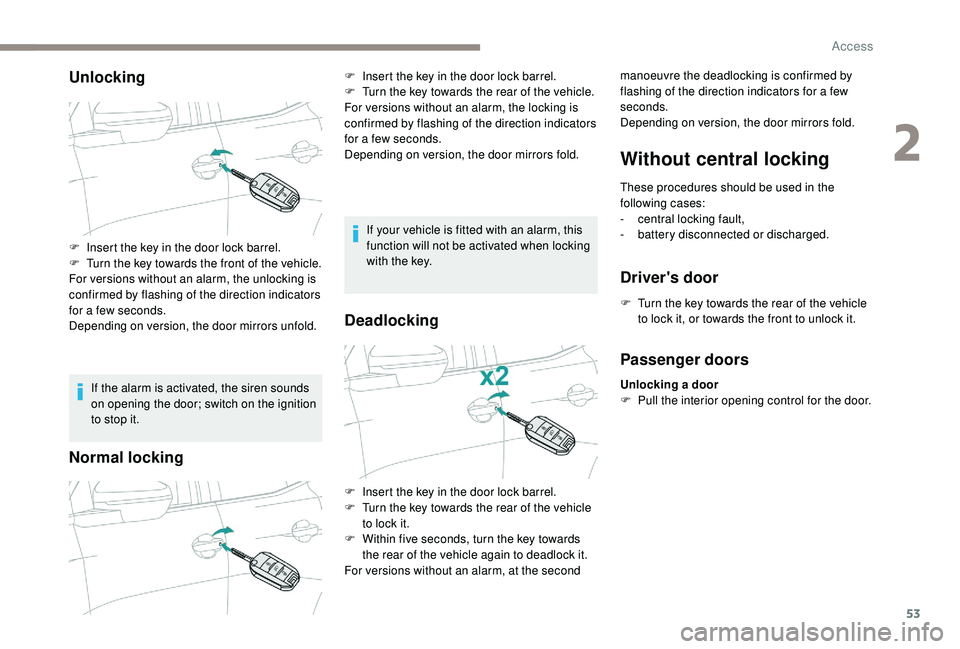
If the alarm is activated, the siren sounds
on opening the door; switch on the ignition
to stop it.
Normal locking
If your vehicle is fitted with an alarm, this
function will not be activated when locking
with the key.
Deadlocking
Without central locking
These procedures should be used in the
following cases:
-
c
entral locking fault,
-
b
attery disconnected or discharged.
Driver's door
F Turn the key towards the rear of the vehicle to lock it, or towards the front to unlock it.
F
I
nsert the key in the door lock barrel.
F
T
urn the key towards the front of the vehicle.
For versions without an alarm, the unlocking is
confirmed by flashing of the direction indicators
for a
few seconds.
Depending on version, the door mirrors unfold. F
I
nsert the key in the door lock barrel.
F
T
urn the key towards the rear of the vehicle.
For versions without an alarm, the locking is
confirmed by flashing of the direction indicators
for a
few seconds.
Depending on version, the door mirrors fold. manoeuvre the deadlocking is confirmed by
flashing of the direction indicators for a few
seconds.
Depending on version, the door mirrors fold.
F
I
nsert the key in the door lock barrel.
F
T
urn the key towards the rear of the vehicle
to lock it.
F
W
ithin five seconds, turn the key towards
the rear of the vehicle again to deadlock it.
For versions without an alarm, at the second
Passenger doors
Unlocking a door
F P ull the interior opening control for the door.
2
Access
Page 56 of 364
54
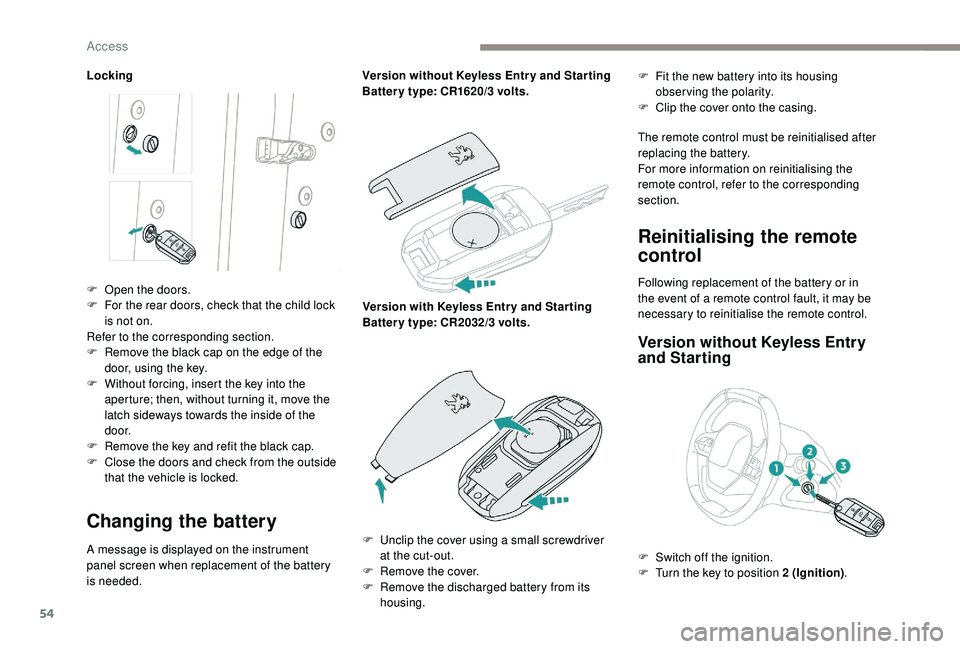
Locking
Changing the battery
A message is displayed on the instrument
panel screen when replacement of the battery
is needed.Version without
K
eyless Entr y and Star ting
Batter y type: CR1620/3 volts.
Version with
K
eyless Entr y and Star ting
Batter y type: CR2032/3 volts.F
F
it the new battery into its housing
observing the polarity.
F
C
lip the cover onto the casing.
The remote control must be reinitialised after
replacing the battery.
For more information on reinitialising the
remote control, refer to the corresponding
section.
Reinitialising the remote
control
F Open the doors.
F F or the rear doors, check that the child lock
is not on.
Refer to the corresponding section.
F
R
emove the black cap on the edge of the
door, using the key.
F
W
ithout forcing, insert the key into the
aperture; then, without turning it, move the
latch sideways towards the inside of the
d o o r.
F
R
emove the key and refit the black cap.
F
C
lose the doors and check from the outside
that the vehicle is locked. Following replacement of the battery or in
the event of a
remote control fault, it may be
necessary to reinitialise the remote control.
Version without K eyless Entry
and Starting
F Unclip the cover using a small screwdriver
at the cut-out.
F
R
emove the cover.
F
R
emove the discharged battery from its
housing. F
S
witch off the ignition.
F
T
urn the key to position 2 (Ignition).
Access
Page 57 of 364
55
Version with Keyless Entry and
Starting
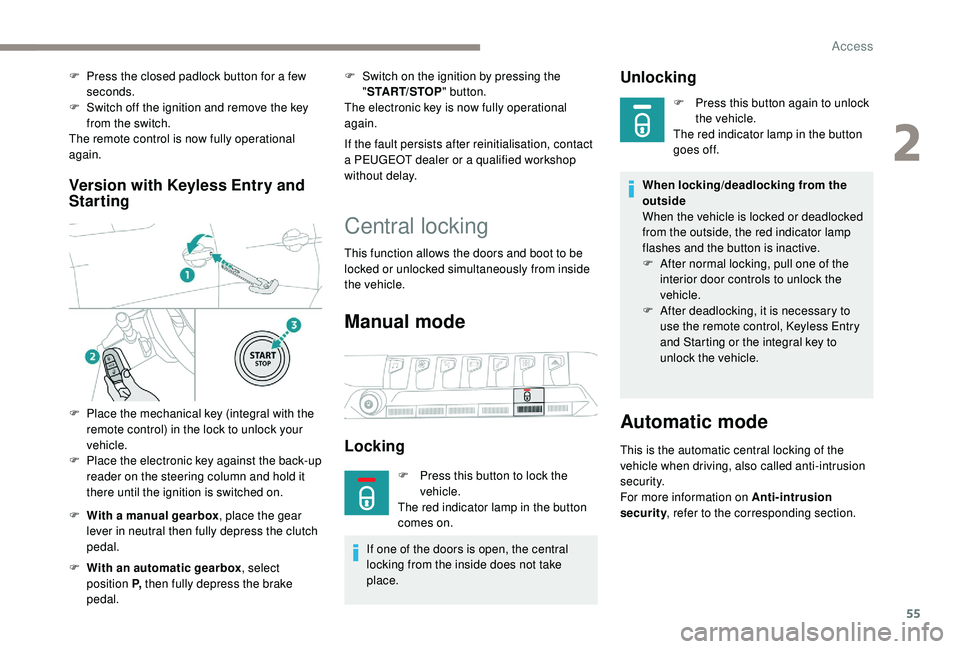
F With a manual gearbox , place the gear
lever in neutral then fully depress the clutch
pedal.
F
W
ith an automatic gearbox , select
position P, then fully depress the brake
pedal. F
S
witch on the ignition by pressing the
" START/STOP " button.
The electronic key is now fully operational
again.
If the fault persists after reinitialisation, contact
a PEUGEOT dealer or a qualified workshop
without delay.
Central locking
This function allows the doors and boot to be
locked or unlocked simultaneously from inside
the vehicle.
Manual mode
Locking
F Press this button to lock the vehicle.
The red indicator lamp in the button
comes on.
If one of the doors is open, the central
locking from the inside does not take
place.
Unlocking
F Press this button again to unlock the vehicle.
The red indicator lamp in the button
goes off.
When locking/deadlocking from the
outside
When the vehicle is locked or deadlocked
from the outside, the red indicator lamp
flashes and the button is inactive.
F
A
fter normal locking, pull one of the
interior door controls to unlock the
vehicle.
F
A
fter deadlocking, it is necessary to
use the remote control,
K
eyless Entry
and Starting or the integral key to
unlock the vehicle.
Automatic mode
This is the automatic central locking of the
vehicle when driving, also called anti-intrusion
s e c u r i t y.
For more information on Anti-intrusion
security , refer to the corresponding section.
F
P
ress the closed padlock button for a
few
seconds.
F
S
witch off the ignition and remove the key
from the switch.
The remote control is now fully operational
again.
F
P
lace the mechanical key (integral with the
remote control) in the lock to unlock your
vehicle.
F
P
lace the electronic key against the back-up
reader on the steering column and hold it
there until the ignition is switched on.
2
Access
Page 59 of 364
57
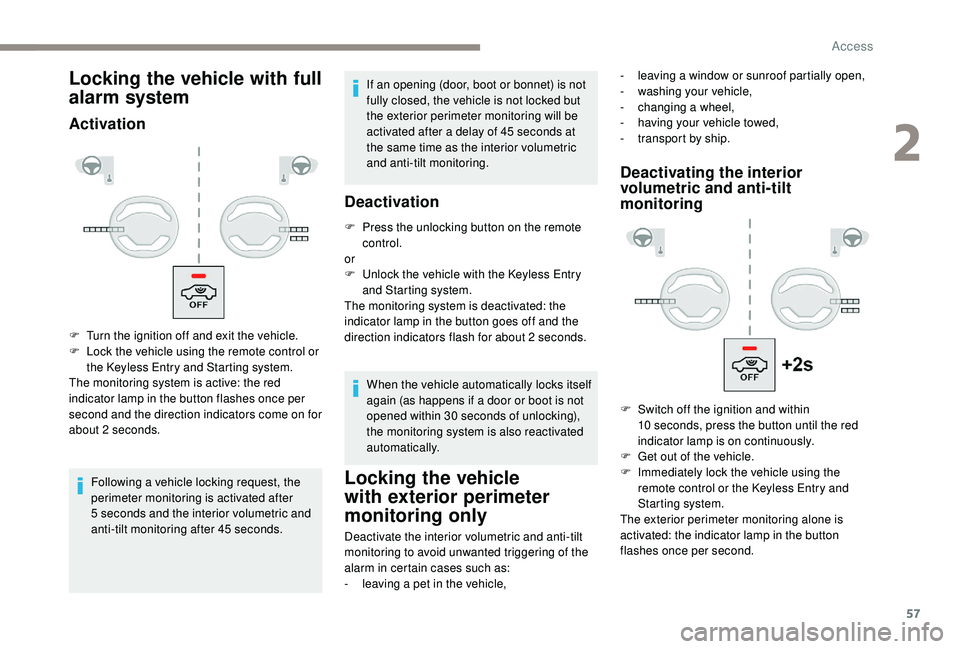
Locking the vehicle with full
alarm system
Activation
Following a vehicle locking request, the
p erimeter monitoring is activated after
5
seconds and the interior volumetric and
anti-tilt monitoring after 45
seconds.If an opening (door, boot or bonnet) is not
fully closed, the vehicle is not locked but
the exterior perimeter monitoring will be
activated after a
delay of 45 seconds at
the same time as the interior volumetric
and anti-tilt monitoring.
Deactivation
F Press the unlocking button on the remote control.
or
F
U
nlock the vehicle with the Keyless Entry
and Starting system.
The monitoring system is deactivated: the
indicator lamp in the button goes off and the
direction indicators flash for about 2
seconds.
When the vehicle automatically locks itself
again (as happens if a
door or boot is not
opened within 30
seconds of unlocking),
the monitoring system is also reactivated
automatically.
Locking the vehicle
with exterior perimeter
monitoring only
Deactivate the interior volumetric and anti-tilt
monitoring to avoid unwanted triggering of the
alarm in certain cases such as:
-
l
eaving a pet in the vehicle,
Deactivating the interior
volumetric and anti-tilt
monitoring
F Turn the ignition off and exit the vehicle.
F L ock the vehicle using the remote control or
the Keyless Entry and Starting system.
The monitoring system is active: the red
indicator lamp in the button flashes once per
second and the direction indicators come on for
about 2
seconds. -
l
eaving a window or sunroof partially open,
-
w
ashing your vehicle,
-
c
hanging a
wheel,
-
h
aving your vehicle towed,
-
t
ransport by ship.
F
S
witch off the ignition and within
10
seconds, press the button until the red
indicator lamp is on continuously.
F
G
et out of the vehicle.
F
I
mmediately lock the vehicle using the
remote control or the Keyless Entry and
Starting system.
The exterior perimeter monitoring alone is
activated: the indicator lamp in the button
flashes once per second.
2
Access
Page 60 of 364
58
To be effective, the deactivation must
be carried out each time the ignition is
switched off.
Reactivating the interior
volumetric and anti-tilt
monitoring
F Deactivate the exterior perimeter monitoring by unlocking the vehicle with the remote
control or the Keyless Entry and Starting
system.
The indicator lamp in the button goes off.
F
R
eactivate all monitoring by locking the
vehicle with the remote control or the
Keyless Entry and Starting system.
The red indicator lamp in the button once again
flashes every second.
Triggering of the alarm Failure of the remote
control
To deactivate the monitoring functions:
F
u nlock the vehicle using the key (integral to
the remote control) in the driver's door lock,
F
o
pen the door; the alarm is triggered,
F
s
witch on the ignition; the alarm stops; the
indicator lamp in the button goes off.
This is indicated by sounding of the siren
and flashing of the direction indicators for
30
seconds.
The monitoring functions remain active until
the alarm has been triggered eleven times in
succession.
When the vehicle is unlocked using the remote
control or the Keyless Entry and Starting
system, rapid flashing of the red indicator
lamp in the button informs you that the alarm
was triggered during your absence. When
the ignition is switched on, this flashing stops
immediately.
Locking the vehicle without
activating the alarm
F Lock or deadlock the vehicle using the key (integral to the remote control) in the driver's
door lock.
Malfunction
When the ignition is switched on, fixed
illumination of the red indicator lamp in the
button indicates a
malfunction of the system.
Have it checked by a
PEUGEOT dealer or
a
qualified workshop.
Doors
Opening
From outside
When the selective unlocking is activated,
the first press of the remote control
unlocking button permits unlocking of the
driver's door only.
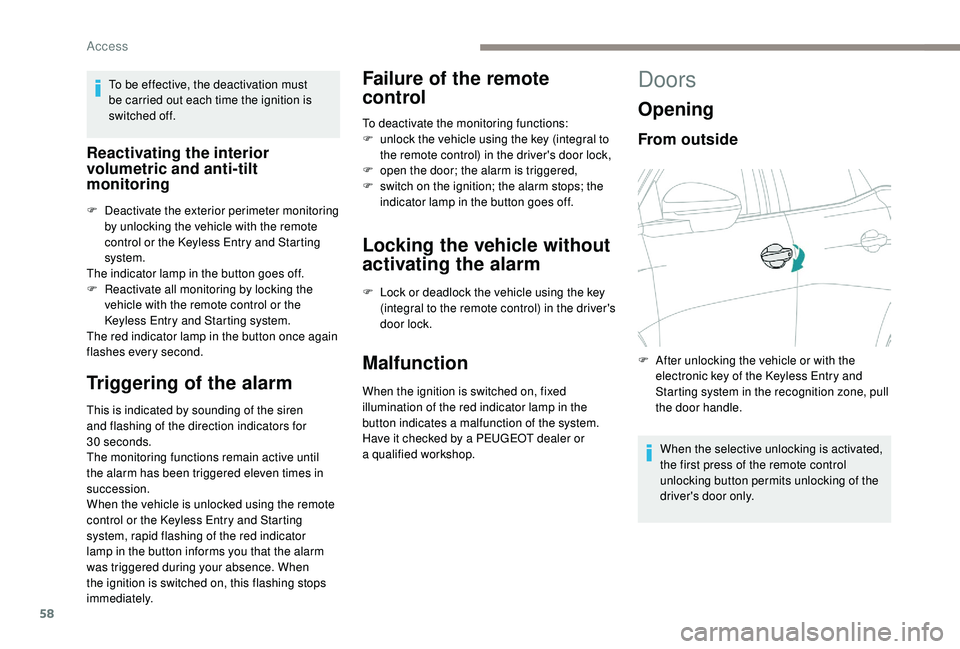
F
A
fter unlocking the vehicle or with the
electronic key of the
K
eyless Entry and
Starting system in the recognition zone, pull
the door handle.
Access
Page 61 of 364
59
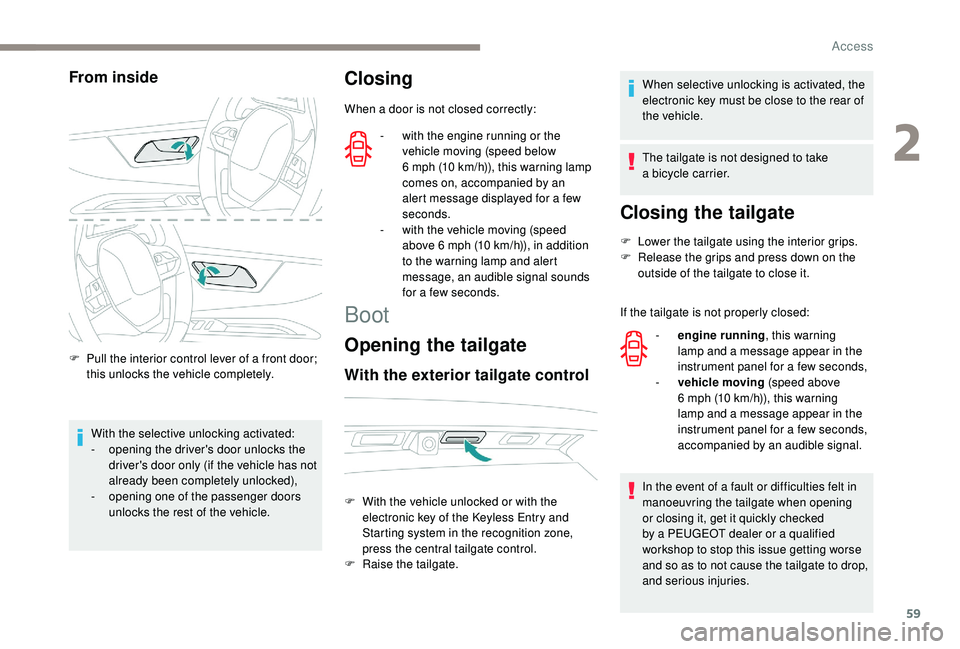
From inside
F Pull the interior control lever of a front door;
this unlocks the vehicle completely.
With the selective unlocking activated:
-
o
pening the driver's door unlocks the
driver's door only (if the vehicle has not
already been completely unlocked),
-
o
pening one of the passenger doors
unlocks the rest of the vehicle.
Closing
When a door is not closed correctly:
Boot
Opening the tailgate
With the exterior tailgate control
When selective unlocking is activated, the
electronic key must be close to the rear of
the vehicle.
The tailgate is not designed to take
a
bicycle carrier.
Closing the tailgate
F Lower the tailgate using the interior grips.
F R elease the grips and press down on the
outside of the tailgate to close it.
If the tailgate is not properly closed:
In the event of a
fault or difficulties felt in
manoeuvring the tailgate when opening
or closing it, get it quickly checked
by a
PEUGEOT dealer or a qualified
workshop to stop this issue getting worse
and so as to not cause the tailgate to drop,
and serious injuries.
-
w
ith the engine running or the
vehicle moving (speed below
6
mph (10
km/h)), this warning lamp
comes on, accompanied by an
alert message displayed for a
few
seconds.
-
w
ith the vehicle moving (speed
above 6
mph (10
km/h)), in addition
to the warning lamp and alert
message, an audible signal sounds
for a
few seconds.
F
W
ith the vehicle unlocked or with the
electronic key of the
K
eyless Entry and
Starting system in the recognition zone,
press the central tailgate control.
F
Ra
ise the tailgate. -
e
ngine running , this warning
lamp and a
message appear in the
instrument panel for a
few seconds,
-
v
ehicle moving (speed above
6
mph (10 km/h)), this warning
lamp and a
message appear in the
instrument panel for a
few seconds,
accompanied by an audible signal.
2
Access
Page 63 of 364
61
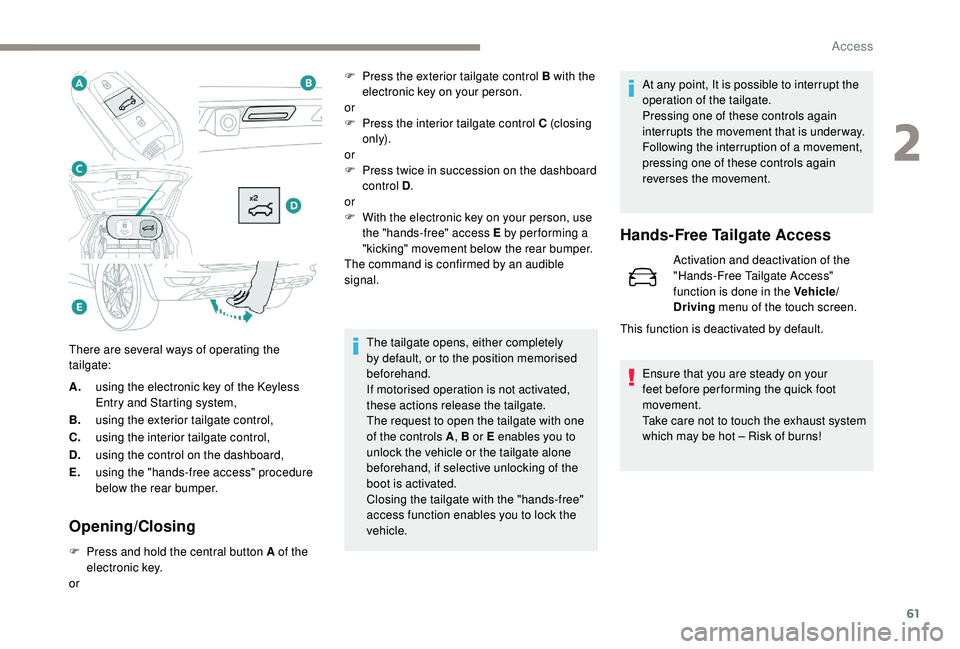
A.using the electronic key of the K eyless
Entry and Starting system,
B. using the exterior tailgate control,
C. using the interior tailgate control,
D. using the control on the dashboard,
E. using the "hands-free access" procedure
below the rear bumper.
Opening/Closing
F Press and hold the central button A of the
electronic key.
or The tailgate opens, either completely
by default, or to the position memorised
beforehand.
If motorised operation is not activated,
these actions release the tailgate.
The request to open the tailgate with one
of the controls A
, B or E enables you to
unlock the vehicle or the tailgate alone
beforehand, if selective unlocking of the
boot is activated.
Closing the tailgate with the "hands-free"
access function enables you to lock the
vehicle. At any point, It is possible to interrupt the
operation of the tailgate.
Pressing one of these controls again
interrupts the movement that is under way.
Following the interruption of a
movement,
pressing one of these controls again
reverses the movement.
Hands-Free Tailgate Access
Activation and deactivation of the
"Hands-Free Tailgate Access"
function is done in the Vehicle/
Driving menu of the touch screen.
Ensure that you are steady on your
feet before per forming the quick foot
movement.
Take care not to touch the exhaust system
which may be hot – Risk of burns!
There are several ways of operating the
tailgate: F
P
ress the exterior tailgate control B with the
electronic key on your person.
or
F
P
ress the interior tailgate control C (closing
only).
or
F
P
ress twice in succession on the dashboard
control D .
or
F
W
ith the electronic key on your person, use
the "hands-free" access E by per forming a
"kicking" movement below the rear bumper.
The command is confirmed by an audible
signal.
This function is deactivated by default.
2
Access