2018 PEUGEOT 5008 warning
[x] Cancel search: warningPage 245 of 364
243
Model with storage box
This kit is installed in the storage box, located
in front of the left-hand seat on the second row.
F
O
pen the storage box cover to access the
kit.
For versions with a spare wheel
F First, access the spare wheel.
For more information on the Spare wheel , refer
to the corresponding section.
Temporary puncture
repair kit
Scan the QR code on page 3 to view
e xplanatory videos.
Comprising a
compressor and a sealant
cartridge, it allows the temporary repair of
a
tyre so that you can drive to the nearest
garage.
It is designed to repair most punctures which
could affect the tyre, located on the tyre tread
or shoulder.
The vehicle's electric system allows the
connection of the compressor for long
enough to inflate a
tyre after a puncture
repair.
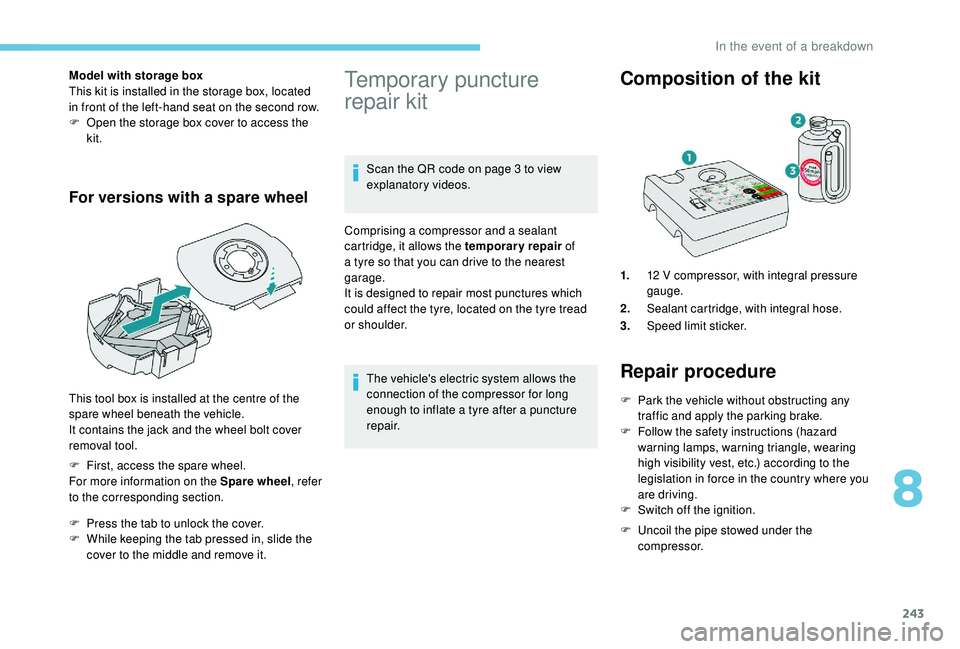
Composition of the kit
1. 12 V compressor, with integral pressure
gauge.
2. Sealant cartridge, with integral hose.
3. Speed limit sticker.
Repair procedure
F Park the vehicle without obstructing any
traffic and apply the parking brake.
F
F
ollow the safety instructions (hazard
warning lamps, warning triangle, wearing
high visibility vest, etc.) according to the
legislation in force in the country where you
are driving.
F
S
witch off the ignition.
F
U
ncoil the pipe stowed under the
compressor.
This tool box is installed at the centre of the
spare wheel beneath the vehicle.
It contains the jack and the wheel bolt cover
removal tool.
F
P
ress the tab to unlock the cover.
F
W
hile keeping the tab pressed in, slide the
cover to the middle and remove it.
8
In the event of a breakdown
Page 251 of 364
249
Removing a wheel
Wheel with wheel trim
When removing the wheel, first remove
the wheel trim by pulling at the valve
aperture using the wheelbrace.
When refitting the wheel , after tightening
the wheel bolts, refit the wheel trim,
starting by placing its aperture in line with
the valve and then pushing it into place all
round its edge with the palm of your hand. Parking the vehicle
Immobilise the vehicle where it does not
block traffic: the ground must be level,
stable and non-slippery.
Apply the parking brake, unless it is
programmed to be in automatic mode;
switch off the ignition and with a
manual
gearbox, engage first gear so as to lock
the wheels.
Apply the parking brake, unless it is
programmed to be in automatic mode;
switch off the ignition and with an
automatic gearbox, select mode P so as to
lock the wheels.
Check that the parking brake warning
lamps in the instrument panel are on fixed
(not flashing).
The occupants must get out of the vehicle
and wait where they are safe.
If necessary, place a
chock under the
wheel diagonally opposite the wheel to be
changed.
Never go underneath a
vehicle raised
using a
jack; use an axle stand.
F
T
ighten it fully. When the cable is
completely reeled in, turning the nut no
longer encounters resistance.
F
C
heck that the wheel is properly flattened
against the floor.
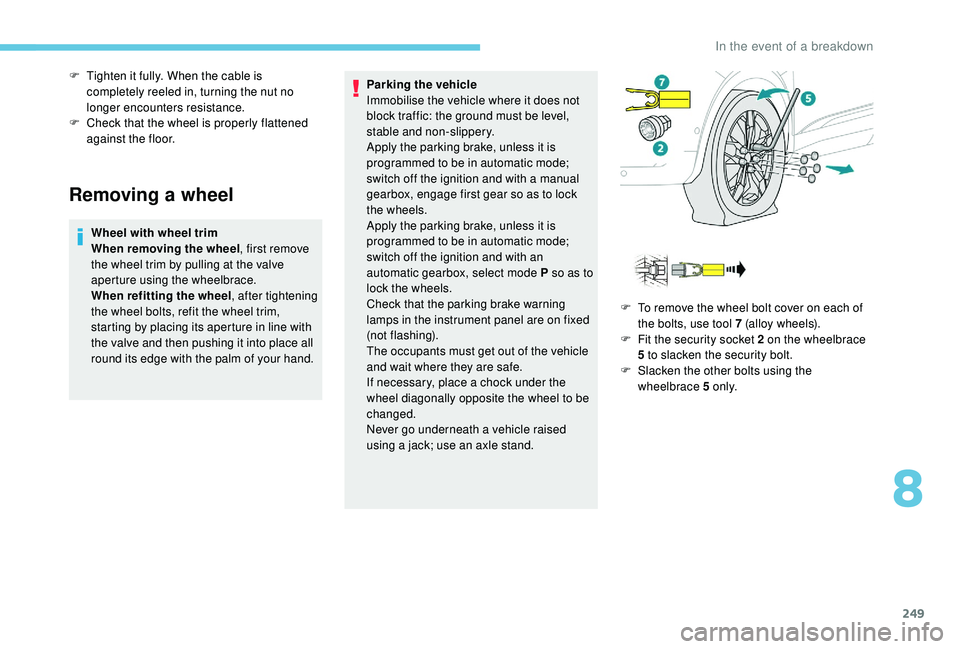
F
T
o remove the wheel bolt cover on each of
the bolts, use tool 7 (alloy wheels).
F
F
it the security socket 2 on the wheelbrace
5
to slacken the security bolt.
F
S
lacken the other bolts using the
wheelbrace 5
o n l y.
8
In the event of a breakdown
Page 261 of 364

259
Fuse N°Rating (A) Functions
F1 3
A
K
eyless Entry and Starting.
F2 5
AMultifunction screen.
F5 5
AReversing camera, parking sensors.
F7 10
AHi-Fi amplifier.
F8 20
ARear wiper.
F10 30
ALocks.
F11 30
ALocks.
F17 10
ABoot 12
V accessory socket.
F18 5
AEmergency and assistance calls.
F22 3
AGlove box lighting.
F26 3
ASeat belts not fastened warning lamps display.
F27 3
ARain/sunshine sensor.
F31 5
AAirbags.
F33 15
AFront 12
V accessory socket
F35 5
AInstrument panel.
F36 20
AAudio system, touch screen, CD player, audio/
navigation system.
Fuse N° Rating (A) Functions
F17 10
AStoring driving positions.
Version 1 (Full)
Box 1
Box 2
8
In the event of a breakdown
Page 268 of 364
266
F Screw in the towing eye until it tightens fully.
F I nstall the towbar.
F
P
lace the gearbox in neutral.
Failure to follow this instruction could
result in damage to some components
(brakes, transmission, etc.) and the
absence of braking assistance when the
engine is restarted.
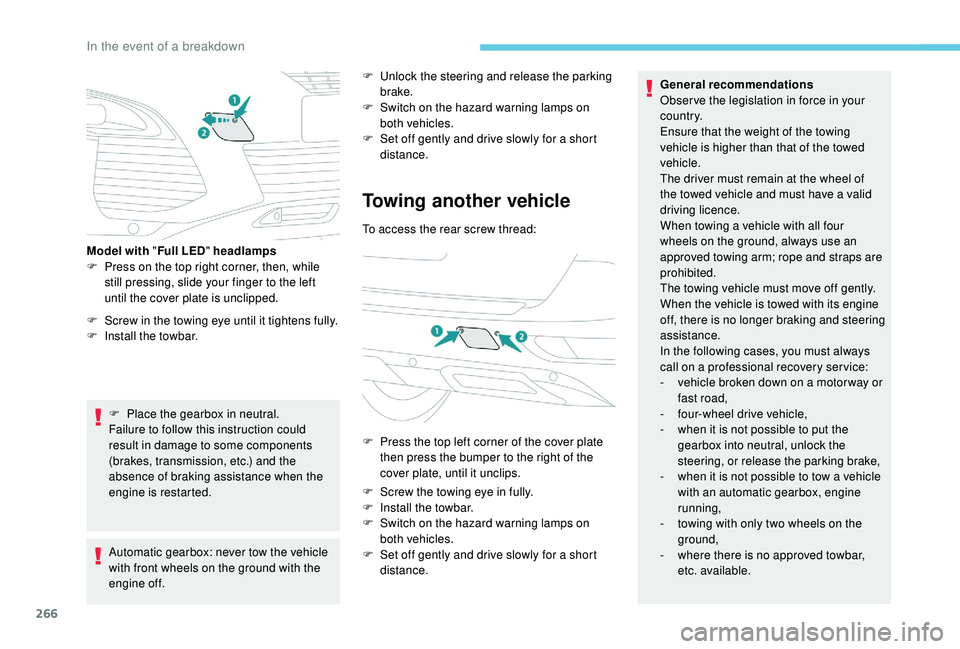
Model with "
Full LED" headlamps
F
P
ress on the top right corner, then, while
still pressing, slide your finger to the left
until the cover plate is unclipped.
Automatic gearbox: never tow the vehicle
with front wheels on the ground with the
engine off. F
U
nlock the steering and release the parking
brake.
F
S
witch on the hazard warning lamps on
both vehicles.
F
S
et off gently and drive slowly for a short
distance.
Towing another vehicle
To access the rear screw thread:
F
P
ress the top left corner of the cover plate
then press the bumper to the right of the
cover plate, until it unclips.
F
S
crew the towing eye in fully.
F
I
nstall the towbar.
F
S
witch on the hazard warning lamps on
both vehicles.
F
S
et off gently and drive slowly for a short
distance. General recommendations
Obser ve the legislation in force in your
c o u nt r y.
Ensure that the weight of the towing
vehicle is higher than that of the towed
vehicle.
The driver must remain at the wheel of
the towed vehicle and must have a
valid
driving licence.
When towing a vehicle with all four
wheels on the ground, always use an
approved towing arm; rope and straps are
prohibited.
The towing vehicle must move off gently.
When the vehicle is towed with its engine
off, there is no longer braking and steering
assistance.
In the following cases, you must always
call on a
professional recovery ser vice:
-
v
ehicle broken down on a motor way or
fast road,
-
f
our-wheel drive vehicle,
-
w
hen it is not possible to put the
gearbox into neutral, unlock the
steering, or release the parking brake,
-
w
hen it is not possible to tow a vehicle
with an automatic gearbox, engine
running,
-
t
owing with only two wheels on the
ground,
-
w
here there is no approved towbar,
etc. available.
In the event of a breakdown
Page 291 of 364
15
Select "Settings ".
Select " Map".
Activate or deactivate:
-
"Allow declaration of danger
zones ".
-
"Guidance to final destination
on foot "
-
"Authorise sending
information "
These settings must be made
according to each profile.
Select " Alerts".
Activate or deactivate " Warn of
danger zones ".
Select this button.
Activate: Give an audible warning
For access to connected navigation, you
have to select the option: " Authorise
sending information ". The display of danger zones depends on
the legislation in force and subscription to
the service.
Declaration of "
Danger
zones "
To distribute information on the
declaration of danger zones, you should
check the option: " Allow declaration of
danger zones ".
or Press Navigation
to display the
primary page.
Press the " Declare a
new danger
zone " button located in the upper
bar of the touch screen
Select the option " Ty p e" to choose
the type of "danger zone".
Select the " Speed" option and enter
it using the virtual keypad.
Press " OK" to save and distribute
the information.
" Danger zones " pack
updates
Press Settings to display the
primary page.
Press the " OPTIONS" button to go to the
secondary page.
Select "System settings ".
Select the " System info " tab.
Select " View" to display the versions
of the different modules installed in
the system.
Select " Update(s) due ".
You can download the system and map
updates from the Brand's website.
The update procedure can also be found
on the website.
.
PEUGEOT Connect Nav
Page 309 of 364
33
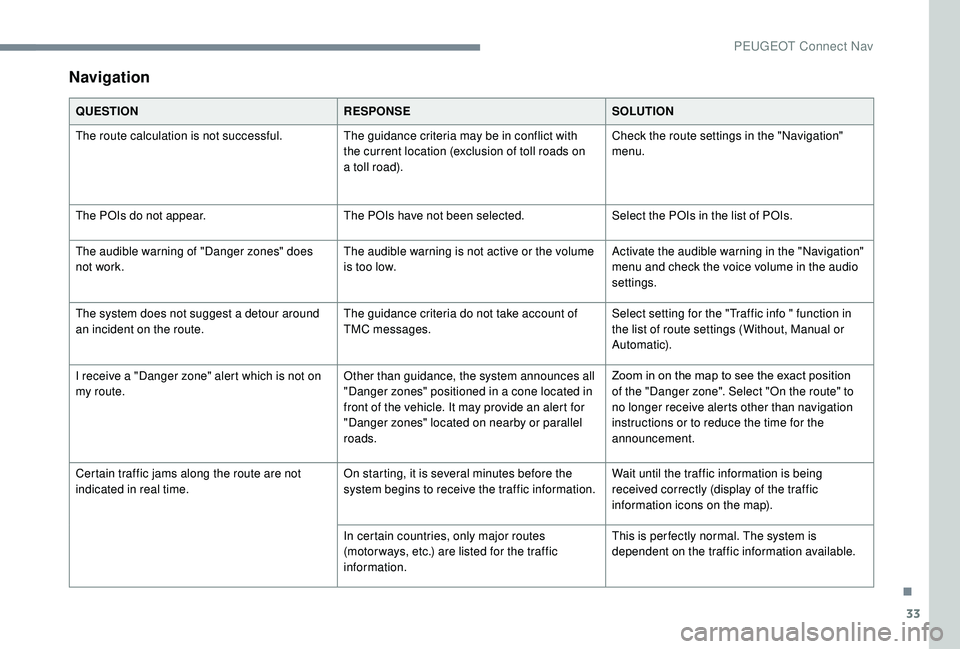
Navigation
QUESTIONRESPONSESOLUTION
The route calculation is not successful. The guidance criteria may be in conflict with
the current location (exclusion of toll roads on
a
toll road).Check the route settings in the "Navigation"
menu.
The POIs do not appear. The POIs have not been selected.Select the POIs in the list of POIs.
The audible warning of "Danger zones" does
not work. The audible warning is not active or the volume
is too low.Activate the audible warning in the "Navigation"
menu and check the voice volume in the audio
settings.
The system does not suggest a
detour around
an incident on the route. The guidance criteria do not take account of
TMC messages.Select setting for the "Traffic info " function in
the list of route settings (Without, Manual or
Automatic).
I receive a "Danger zone" alert which is not on
my route. Other than guidance, the system announces all
"Danger zones" positioned in a
cone located in
front of the vehicle. It may provide an alert for
"Danger zones" located on nearby or parallel
roads. Zoom in on the map to see the exact position
of the "Danger zone". Select "On the route" to
no longer receive alerts other than navigation
instructions or to reduce the time for the
announcement.
Certain traffic jams along the route are not
indicated in real time. On starting, it is several minutes before the
system begins to receive the traffic information.Wait until the traffic information is being
received correctly (display of the traffic
information icons on the map).
In certain countries, only major routes
(motor ways, etc.) are listed for the traffic
information. This is per fectly normal. The system is
dependent on the traffic information available.
.
PEUGEOT Connect Nav
Page 340 of 364
4
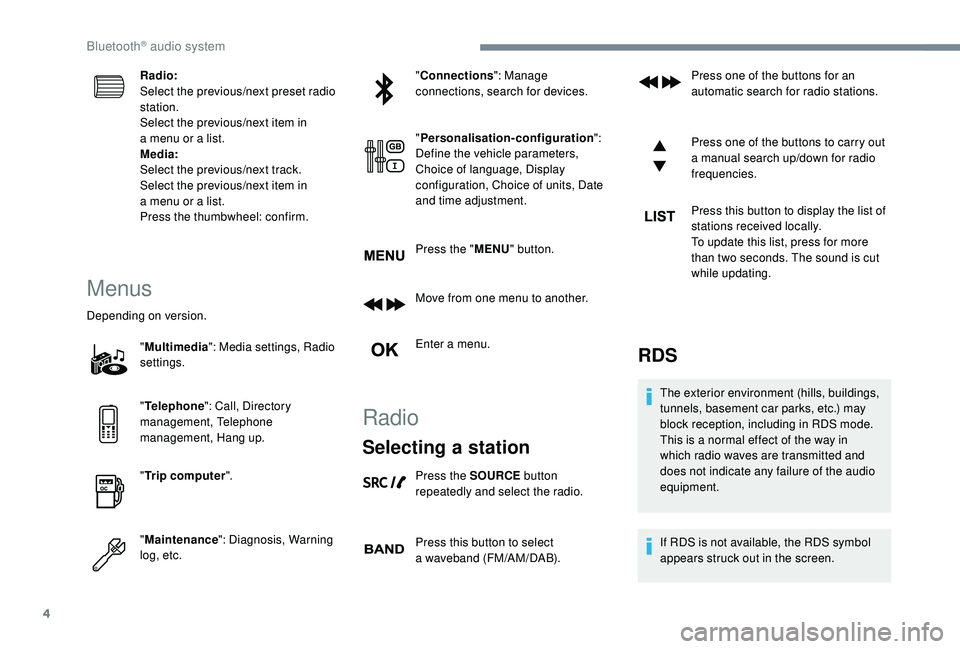
Radio:
Select the previous/next preset radio
station.
Select the previous/next item in
a menu or a list.
Media:
Select the previous/next track.
Select the previous/next item in
a
menu or a list.
Press the thumbwheel: confirm.
Menus
Depending on version.
"Multimedia ": Media settings, Radio
settings.
" Telephone ": Call, Directory
management, Telephone
management, Hang up.
" Trip computer ".
" Maintenance ": Diagnosis, Warning
log, etc. "
Connections ": Manage
connections, search for devices.
" Personalisation-configuration ":
Define the vehicle parameters,
Choice of language, Display
configuration, Choice of units, Date
and time adjustment.
Press the " MENU" button.
Move from one menu to another.
Enter a menu.
Radio
Selecting a station
Press the SOURCE button
repeatedly and select the radio.
Press this button to select
a
waveband (FM/AM/DAB). Press one of the buttons for an
automatic search for radio stations.
Press one of the buttons to carry out
a
manual search up/down for radio
frequencies.
Press this button to display the list of
stations received locally.
To update this list, press for more
than two seconds. The sound is cut
while updating.
RDS
The exterior environment (hills, buildings,
tunnels, basement car parks, etc.) may
block reception, including in RDS mode.
This is a
normal effect of the way in
which radio waves are transmitted and
does not indicate any failure of the audio
equipment.
If RDS is not available, the RDS symbol
appears struck out in the screen.
Bluetooth® audio system
Page 355 of 364
275
Accessories .......................................... 12 2, 16 0
Active Safety Brake..................... 16 -17, 19 2-19 5
AdBlue
® ............................................. 2 0, 32, 237
Additive, Diesel ............................................. 235
Adjusting headlamps
.................................... 114
Adjusting head restraints
................................ 71
Adjusting seats
................................ 69 -71, 77-78
Adjusting the air distribution
.....................89-92
Adjusting the air flow
................................. 8
9-92
Adjusting the date
......................... 38 - 40, 31, 18
Adjusting the height and reach of the steering wheel
.................................... 74
Adjusting the lumbar support
.................... 6
9 -71
Adjusting the seat belt height
................ 13
0 -131
Adjusting the temperature
........................89-92
Adjusting the time
......................... 38 - 40, 31, 17
Advanced Grip Control
.......................... 128 -12 9
Advice on driving
................................... 15 5 -15 6
Airbags
...............................
.............18, 13 4, 13 9
Airbags, curtain
...................................... 13 5 -137
Airbags, front .................................. 13 4 -13 5, 137
Airbags, lateral
...................................... 13 5, 137
Air conditioning
......................................... 86-88
Air conditioning, automatic
.............................85
Air conditioning, dual-zone automatic
......89, 93
Air conditioning, manual
............... 8
5 - 86, 92-93
Air conditioning, mono-zone
...............87- 88, 93
Air intake
................................................... 89-92
Air vents
.......................................................... 84
Alarm
............................................................... 56
Amplifier, audio
...............................
..............101
Anti-lock braking system (ABS)
..............15, 125
Apple CarPlay connection
........................16, 12
Armrest, front
......................................... 102-103
Assistance call
...............................
........123 -124 Assistance, emergency braking
...........
125, 19 4
Audio streaming (Bluetooth)
...................
24, 9, 9
Cable, audio
................................................23, 9
Cable, Jack
.................................................23, 9
Capacity, fuel tank
........................................220
Cartridge, fragrance
............................. 10
3 -104
A
B
C
Backrest, folding ........................................7 0 -71
Battery ..................... 13, 227, 235, 262, 264-265
Battery charge (warning lamp)
.......................13
Battery, charging
................................... 263-264
Battery, remote control
.............................52, 54
Blind
..............................
..................................64
Blind spot monitoring system
..........24, 203-205
Blind spot monitoring system, active
......24, 205
Blind spot sensors
..........................24, 203-204
Blinds, side
.................................................... 107
BlueHDi
..................................... 32, 35, 237, 240
Bluetooth (hands-free)
........ 2
5 -2 6 , 13 -14, 10 -11
Bluetooth (telephone)
...................... 2
5 - 2 7, 1 3 -1 5
Bonnet
................................................... 230-231
Boot
............................................. 59 - 60, 62, 110
Boot (fittings)
................................................. 108
Brake discs
............................................ 236-237
Brake lamps
...............................
...................255
Brakes
........................................ 14-15, 236-237
Braking assistance system
...........................125
Braking, automatic emergency
...16 -17, 19 2-19 5
Braking, emergency
...................................... 16
4
Brightness
....................................................... 16
Bulbs
............................................................. 252
Bulbs (changing)
...........................252, 255-256
180° rear vision
.....................................
209 -210 CD
.....................................................
23 -24, 9, 9
CD, MP3
............................................
23 -24, 9, 9
Central locking
.......................................... 4
9, 55
Changing a
bulb
............................
25
2, 255-256
Changing a
fuse
............................
25
7-258, 261
Changing a
wheel
..................
24
1-243, 246 -248
Changing a wiper blade ........................
12 0, 257
Changing the remote control battery ..............
54
Charger, induction ..................................101-102
Charger, wireless
................................... 10
1-102
Checking the engine oil level
..........................31
Checking the levels
..............................232, 234
Checking tyre pressures (using the kit)
......................................243, 245
Checks
...................................231-232, 235-237
Child lock
................................................15 3 -15 4
Children
.................................14 4, 14 6 -148, 15 0
Children (safety)
.....................................15 3 -15 4
Child seats
............1
33, 138 -139, 142, 144, 152
Child seats, conventional
......................142, 14 4
Child seats, i-Size
.........................................15 0
Child seats, ISOFIX
.......................14 6 -148, 15 0
Cigarette lighter
............................................10 0
Closing the boot
..................................47, 50, 59
Closing the doors
..........................47, 49 -50, 59
Configurations, seats
......................................82
Configuration, vehicle
......................... 3
8 - 42, 44
Connection, Bluetooth
........ 1
9, 25 -27, 13 -15, 11
Connection, MirrorLink
.........................17, 11 -1 2
Connection, Wi-Fi network
.............................20
Connectivity
..................................................101
Container, AdBlue
® ....................................... 23 8
Control, emergency door ................................ 52
C
ontrol, heated seats
...................................... 73
Controls, steering mounted
.................. 165 -169
Control stalk, lighting
................. 2 5 - 2 6 , 111, 113
Control stalk, wipers
.............................. 11
9 -12 1
Courtesy lamps
..................................... 104 -105
Cruise control
... 175 -176, 178, 181-187, 191-192
Cruise control by speed limit recognition
.....178
.
Alphabetical index