Page 119 of 507
∙ Any doors are not closed securely whenlocking the doors.
When the buzzer sounds, be sure to check
both the vehicle and the Intelligent Key. For
additional information, refer to “NISSAN In-
telligent Key®” in the “Pre-driving checks
and adjustments” section of this manual.
Parking brake reminder chime
A chime sounds if the parking brake is set
and the vehicle is driven. The chime will
stop if the parking brake is released or the
vehicle speed returns to zero.
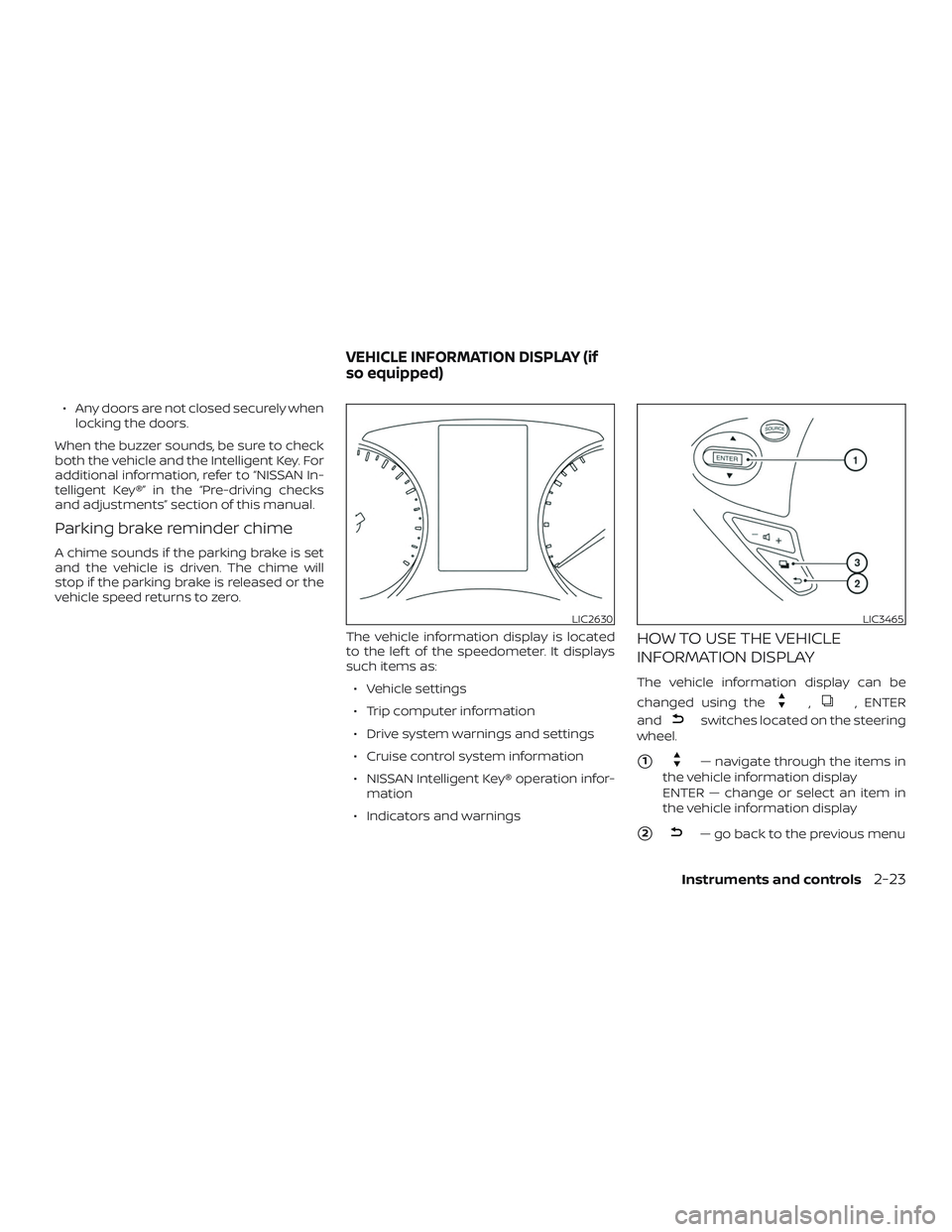
The vehicle information display is located
to the lef t of the speedometer. It displays
such items as:∙ Vehicle settings
∙ Trip computer information
∙ Drive system warnings and settings
∙ Cruise control system information
∙ NISSAN Intelligent Key® operation infor- mation
∙ Indicators and warnings
HOW TO USE THE VEHICLE
INFORMATION DISPLAY
The vehicle information display can be
changed using the
,, ENTER
and
switches located on the steering
wheel.
�1— navigate through the items in
the vehicle information display
ENTER — change or select an item in
the vehicle information display
�2— go back to the previous menu
LIC2630LIC3465
VEHICLE INFORMATION DISPLAY (if
so equipped)
Instruments and controls2-23
Page 120 of 507

�3— select/enter the vehicle infor-
mation display menu items or to
change from one display screen to the
next (i.e. trip, Fuel economy)
The ENTER and
buttons also control
audio and control panel functions. For ad-
ditional information, refer to “Steering
wheel switch for audio control” in the “Moni-
tor, climate, audio, phone and voice recog-
nition systems” section of this manual.
STARTUP DISPLAY
When the vehicle in placed in the ON or ACC
(if so equipped) position the screens that
display in the vehicle information include:
∙ Active system status (if so equipped)
∙ Trip computer
∙ Fuel economy
∙ Warnings
∙ Outside air temperature
∙ Odometer/Twin Trip Odometer
Warnings will only display if there are any
present. For additional information, refer to
“Vehicle information display warnings and
indicators” in this section. To control what items display in the vehicle
information display, refer to “Meter settings”
in this section.
SETTINGS
The setting mode allows you to change the
information displayed in the vehicle infor-
mation display:
∙ Driver Assistance (if so equipped)
∙ Clock
∙ Meter Settings
∙ Vehicle Settings
∙ Maintenance
∙ Alarm
∙ Unit
∙ Language
∙ Factory Reset
2-24Instruments and controls
Page 121 of 507

Driver Assistance (if so equipped)
The driver assistance menu allows the user
to change the settings for the driving aids.
Menu itemResult
Driving Aids Displays available Driving Aids.
Blind Spot/RCTA (if so equipped) Allows user to turn Blind Spot Warning (BSW)/Rear Cross Traffic Alert (RCTA) system on or off. For additional information, refer to “Blind Spot Warning (BSW)” and “Rear Cross Traffic Alert (RCTA) in the “Starting and driving”
section of this manual.
Emergency Brake (if so equipped) Allows user to turn the emergency brake system on or off. For addition information, refer to “Automatic Emer- gency Braking (AEB)” in the “Starting and driving” section of this manual.
Clock
Menu item Result
Clock When selected, the following message appears: “Set Clock in Audio” (models without navigation) or “Set Clock
in NAVI” (models with navigation). For additional information, refer to “Audio system” in the “Monitor, climate,
audio, phone and voice recognition systems” section of this manual (models without navigation) or the
separate NissanConnect® Owner’s Manual (if so equipped) (models with navigation).
Instruments and controls2-25
Page 122 of 507

Meter Settings
The meter settings allow the user to
change the settings for the vehicle infor-
mation display.
Menu itemResult
Main Menu Selection Displays the available options.
Home Allows user to turn the home screen on or off in the vehicle information display.
Average Speed Allows user to turn the average speed screen on or off in the vehicle information display.
Trip A Allows user to turn the trip A on or off in the vehicle information display.
Trip B Allows user to turn the trip B on or off in the vehicle information display.
Fuel Economy Allows user to turn the fuel economy on or off in the vehicle information display.
Navigation (if so equipped) Allows user to turn the navigation on or off in the vehicle information display. For additional information, refer
to the separate “NissanConnect® Owner’s Manual”.
Audio Allows user to turn the audio screen on or off in the vehicle information display. For additional information,
refer to “Audio system” in the “Monitor, climate, audio, phone and voice recognition systems” section of this
manual.
Driving Aids (if so equipped) Allows user to turn the driving aids on or off in the vehicle information display. For additional information, re-
fer to “Driver assistance” in this section.
ECO Mode Settings Displays the available options for ECO mode settings.
ECO Indicator Allows the user to turn the ECO indicator on or off in the vehicle information display.
DISP Mode Allows user to select how the ECO mode in displayed.
Pedal Select to have the ECO mode shown as a pedal display.
Inst.FE Select to have the ECO mode shown as instant fuel economy.
ECO Drive Report Displays the available options for the ECO drive report.
Display Allows user to turn the ECO drive report on or off.
View History Allows user to view and reset ECO drive report history.
Welcome Effect Displays the available options for the welcome effect.
Dial Effect Allows user to turn the dial effect on or off.
Display Effect Allows user to turn the display effect on or off.
2-26Instruments and controls
Page 123 of 507
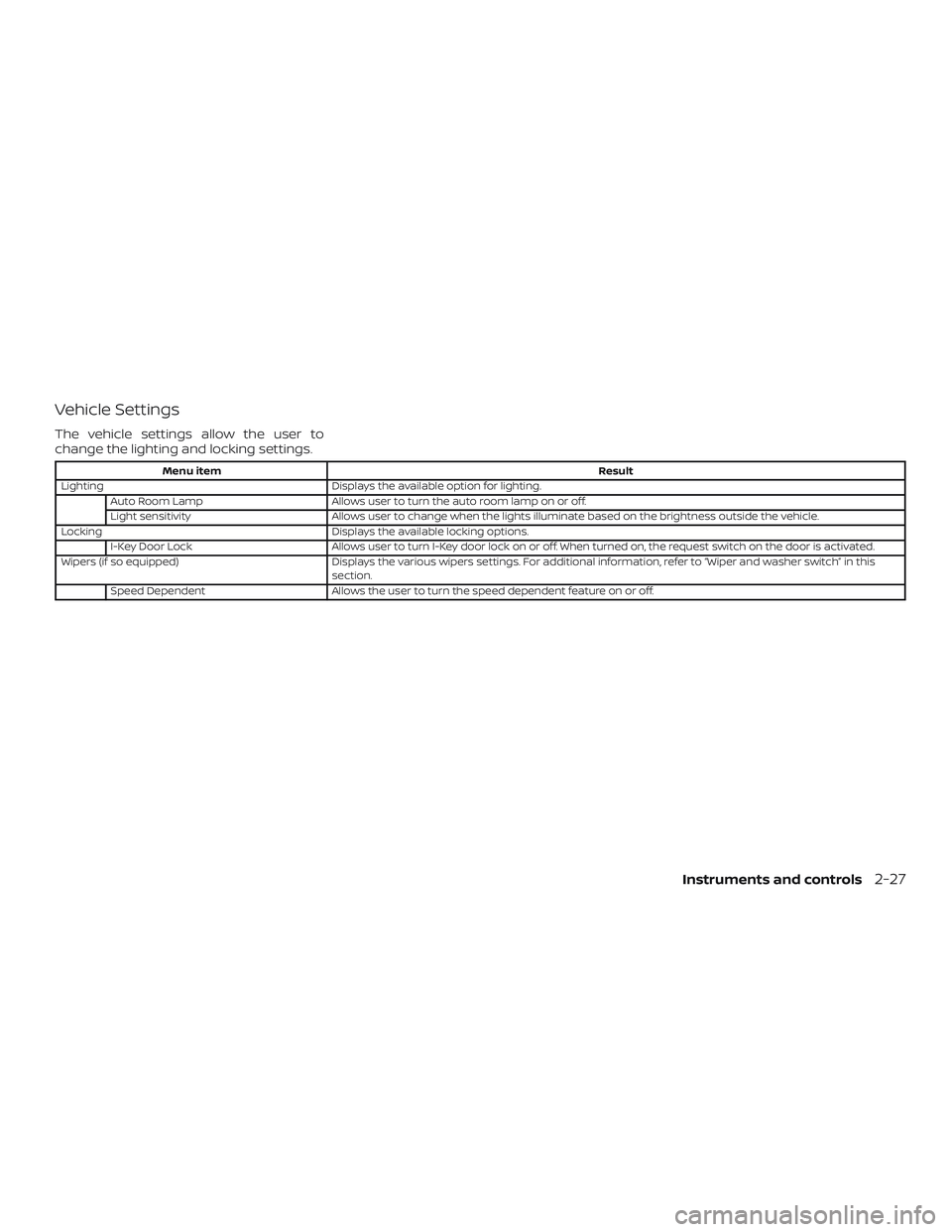
Vehicle Settings
The vehicle settings allow the user to
change the lighting and locking settings.
Menu itemResult
Lighting Displays the available option for lighting.
Auto Room Lamp Allows user to turn the auto room lamp on or off.
Light sensitivity Allows user to change when the lights illuminate based on the brightness outside the vehicle.
Locking Displays the available locking options.
I-Key Door Lock Allows user to turn I-Key door lock on or off. When turned on, the request switch on the door is activated.
Wipers (if so equipped) Displays the various wipers settings. For additional information, refer to “Wiper and washer switch” in this
section.
Speed Dependent Allows the user to turn the speed dependent feature on or off.
Instruments and controls2-27
Page 124 of 507
Maintenance
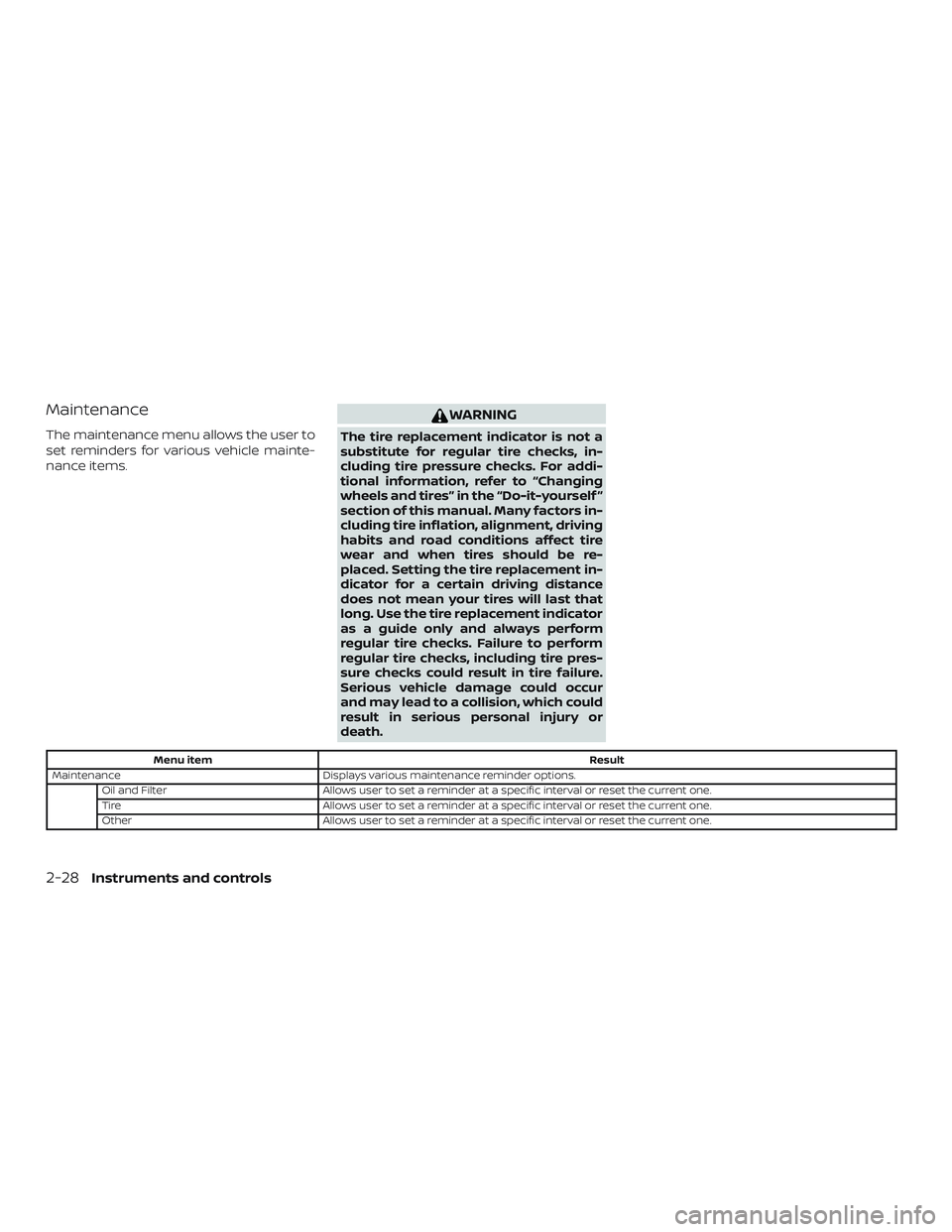
The maintenance menu allows the user to
set reminders for various vehicle mainte-
nance items.
WARNING
The tire replacement indicator is not a
substitute for regular tire checks, in-
cluding tire pressure checks. For addi-
tional information, refer to “Changing
wheels and tires” in the “Do-it-yourself ”
section of this manual. Many factors in-
cluding tire inflation, alignment, driving
habits and road conditions affect tire
wear and when tires should be re-
placed. Setting the tire replacement in-
dicator for a certain driving distance
does not mean your tires will last that
long. Use the tire replacement indicator
as a guide only and always perform
regular tire checks. Failure to perform
regular tire checks, including tire pres-
sure checks could result in tire failure.
Serious vehicle damage could occur
and may lead to a collision, which could
result in serious personal injury or
death.
Menu itemResult
Maintenance Displays various maintenance reminder options.
Oil and Filter Allows user to set a reminder at a specific interval or reset the current one.
Tire Allows user to set a reminder at a specific interval or reset the current one.
Other Allows user to set a reminder at a specific interval or reset the current one.
2-28Instruments and controls
Page 125 of 507
Alarm
The alarm menu allows the user to set spe-
cific alarms for various items on the vehicle.
Menu itemResult
Outside Temp. Allows user to turn the outside temp. alarm on or off.
Timer Alert Allows user to set the timer alert alarm.
Navigation (if so equipped) Allows user to turn the navigation alarm on or off.
Phone Allows user to turn the phone alarm on or off.
Mail Allows user to turn the mail alarm on or off.
Unit
The unit menu allows the user to change
the units shown in the vehicle information
display.
Menu item Result
Mileage Displays the available mileage display units.
Temperature Displays the available temperature display units.
Instruments and controls2-29
Page 126 of 507
Language
The language menu allows the user to
change the languages displayed in the ve-
hicle information display.
Menu itemResult
Language Displays available language options for the vehicle information display.
Factory Reset
The factory reset menu allows the user to
restore the vehicle information display set-
tings to factory status.
Menu item Result
Factory Reset Allows user to reset the vehicle information display settings to the original factory settings. Once selected,
the user can confirm or deny the reset.
2-30Instruments and controls