Page 159 of 428
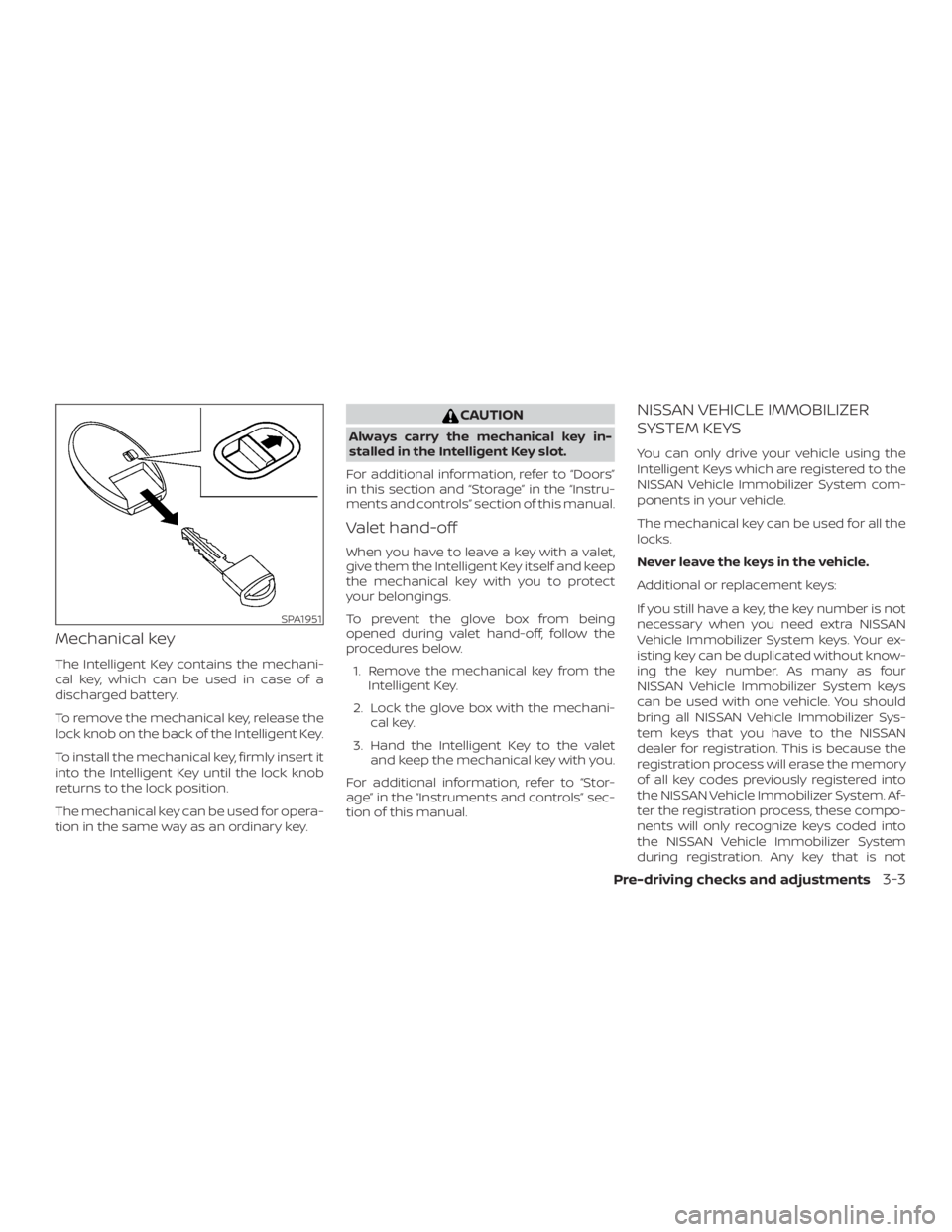
Mechanical key
The Intelligent Key contains the mechani-
cal key, which can be used in case of a
discharged battery.
To remove the mechanical key, release the
lock knob on the back of the Intelligent Key.
To install the mechanical key, firmly insert it
into the Intelligent Key until the lock knob
returns to the lock position.
The mechanical key can be used for opera-
tion in the same way as an ordinary key.
Page 162 of 428

Lockout protection
When the power door lock switch (driver’s
or front passenger’s side) is moved to the
lock position with the Intelligent Key lef t in
the vehicle and any door open, all doors will
unlock automatically and a chime will
sound af ter the door is closed.
AUTOMATIC DOOR LOCKS
∙ All doors lock automatically when thevehicle speed reaches 15 mph
(24 km/h).
∙ All doors unlock automatically when the transmission is placed in the P (Park)
position or when the ignition switch is
placed in the OFF position.
NOTE:
The automatic door unlock function can
be changed using “Vehicle Settings” of
the vehicle information display. For ad-
ditional information, refer to “Vehicle in-
formation display ” in the “Instruments
and controls” section of this manual.
CHILD SAFETY REAR DOOR LOCK
Child safety locks help prevent the rear
doors from being opened accidentally, es-
pecially when small children are in the ve-
hicle.
The child safety lock levers are located on
the edge of the rear doors.
When the lever is in the unlock position
�2,
the door can be opened from the outside
or the inside.
When the lever is in the LOCK position
�1,
the door can be opened only from the
outside.
Page 166 of 428
NOTE:∙ Request switches for all doors and
trunk lid can be deactivated when the
“Ext. Door Switch” setting is switched
to OFF in “Vehicle Settings” of the ve-
hicle information display. For addi-
tional information, refer to “Vehicle
information display ” in the “Instru-
ments and controls” section of this
manual.
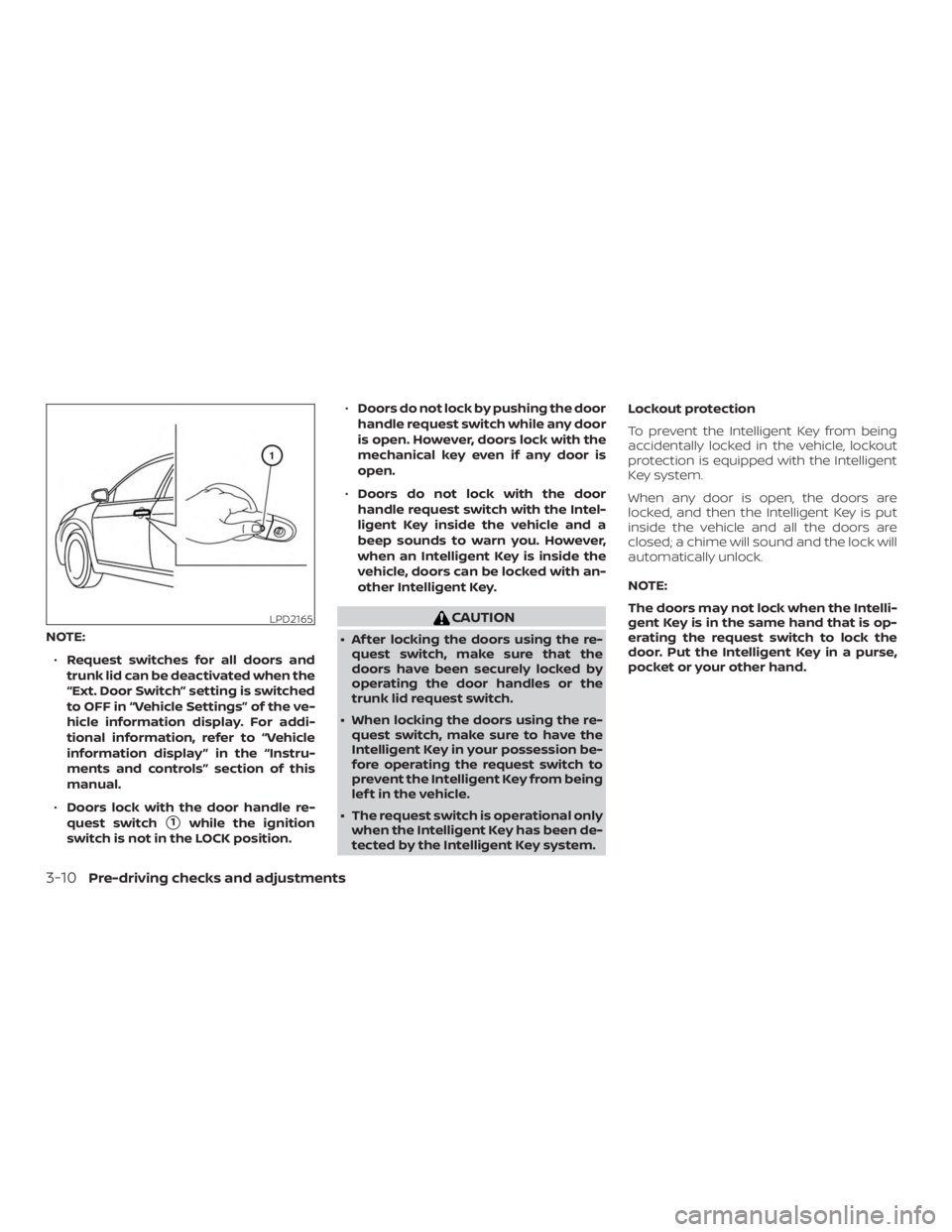
∙ Doors lock with the door handle re-
quest switch
�1while the ignition
switch is not in the LOCK position. ∙
Doors do not lock by pushing the door
handle request switch while any door
is open. However, doors lock with the
mechanical key even if any door is
open.
∙ Doors do not lock with the door
handle request switch with the Intel-
ligent Key inside the vehicle and a
beep sounds to warn you. However,
when an Intelligent Key is inside the
vehicle, doors can be locked with an-
other Intelligent Key.
Page 167 of 428
CAUTION
The lockout protection may not func-
tion under the following conditions:
∙ When the Intelligent Key is placed ontop of the instrument panel.
∙ When the Intelligent Key is placed in- side the glove box or a storage bin.
∙ When the Intelligent Key is placed in- side the door pockets.
∙ When the Intelligent Key is placed in- side or near metallic materials.
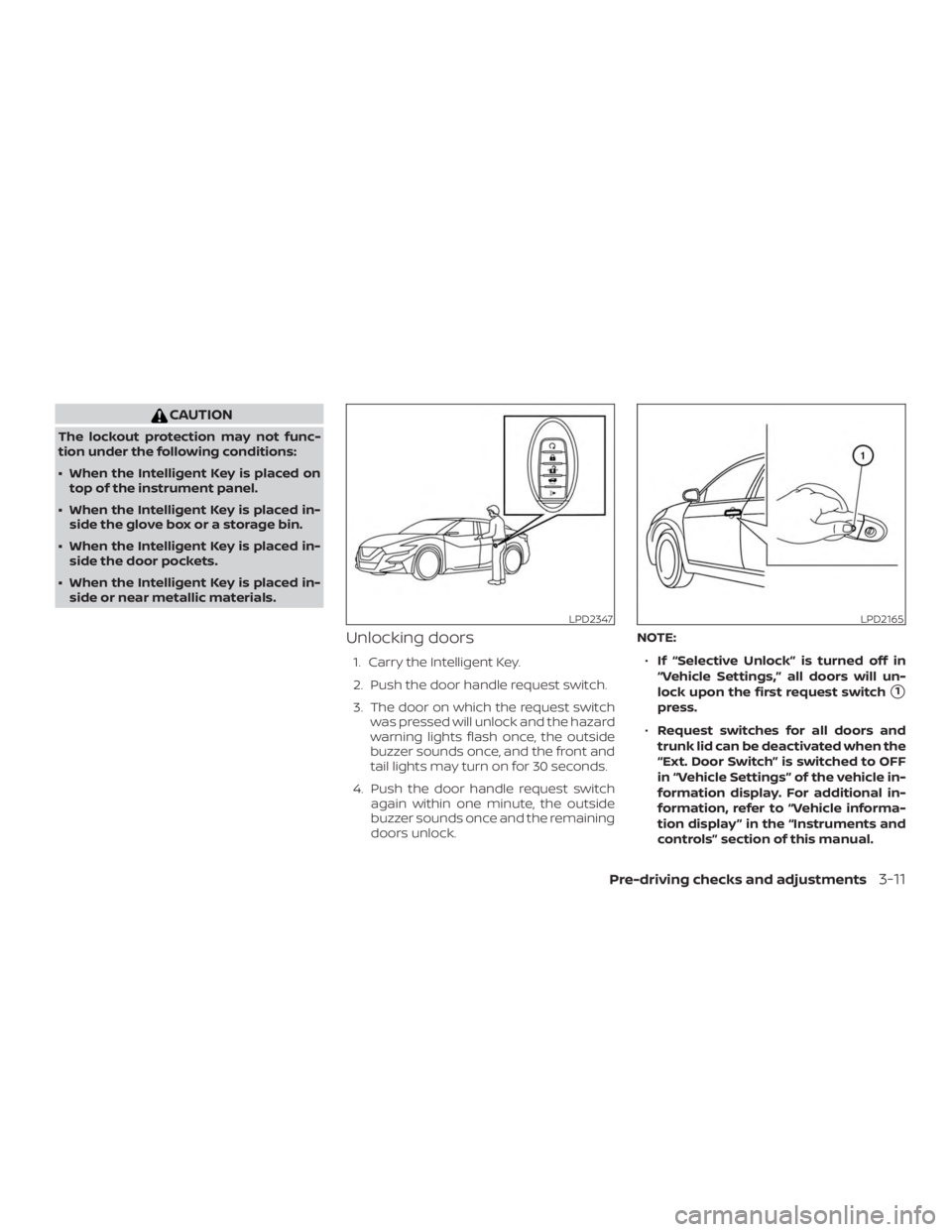
Unlocking doors
1. Carry the Intelligent Key.
2. Push the door handle request switch.
3. The door on which the request switch was pressed will unlock and the hazard
warning lights flash once, the outside
buzzer sounds once, and the front and
tail lights may turn on for 30 seconds.
4. Push the door handle request switch again within one minute, the outside
buzzer sounds once and the remaining
doors unlock. NOTE:
∙ If “Selective Unlock” is turned off in
“Vehicle Settings,” all doors will un-
lock upon the first request switch
�1
press.
∙ Request switches for all doors and
trunk lid can be deactivated when the
“Ext. Door Switch” is switched to OFF
in “Vehicle Settings” of the vehicle in-
formation display. For additional in-
formation, refer to “Vehicle informa-
tion display ” in the “Instruments and
controls” section of this manual.
Page 169 of 428
When all doors are locked and the trunk lid
is closed with the Intelligent Key inside the
trunk, the outside buzzer will sound and the
trunk will open.
HOW TO USE THE REMOTE
KEYLESS ENTRY FUNCTION
The remote keyless entry function can op-
erate all door locks using the remote key-
less function of the Intelligent Key. The re-
mote keyless function can operate at a
distance of 33 f t (10 m) away from the ve-
hicle. The operating distance depends
upon the conditions around the vehicle.
The remote keyless entry function will not
function under the following conditions:∙ When the Intelligent Key is not within the operational range.
∙ When the Intelligent Key battery is dis- charged.
∙ When the doors or the trunk are open or not closed securely.
Page 177 of 428
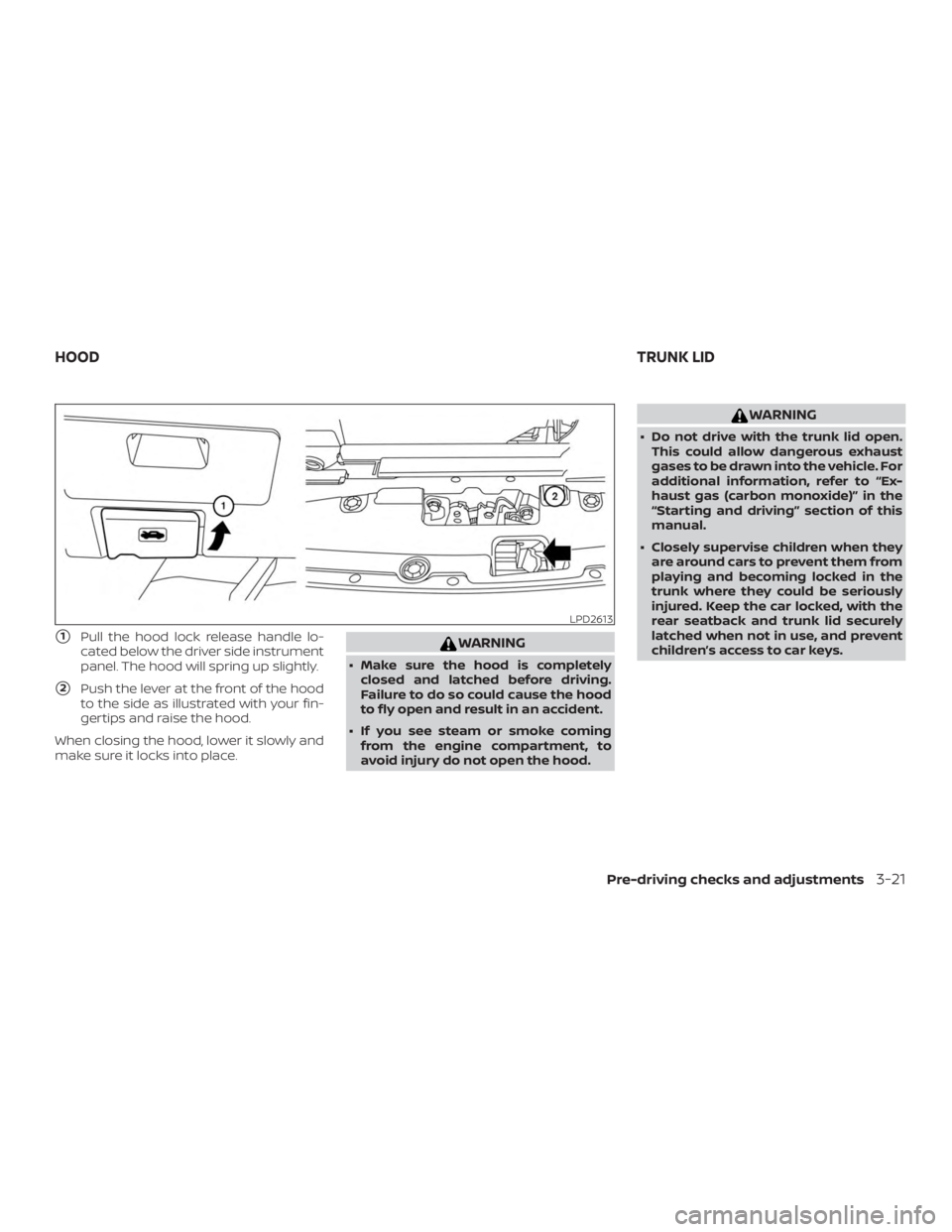
�1Pull the hood lock release handle lo-
cated below the driver side instrument
panel. The hood will spring up slightly.
�2Push the lever at the front of the hood
to the side as illustrated with your fin-
gertips and raise the hood.
When closing the hood, lower it slowly and
make sure it locks into place.
Page 179 of 428

WARNING
∙ Never allow anyone to ride in thecargo area or on the rear seat when it
is in the fold-down position. Use of
these areas by passengers without
proper restraints could result in seri-
ous injury or death in an accident or
sudden stop.
∙ Properly secure all cargo with ropes or straps to help prevent it from sliding
or shif ting. Do not place cargo higher
than the seatbacks. In a sudden stop
or collision, unsecured cargo could
cause personal injury.
∙ When returning the seatbacks to the upright position, be certain they are
completely secured in the latched po-
sition. If they are not completely se-
cured, passengers may be injured in
an accident or sudden stop.
∙ Closely supervise children when they are around cars to prevent them from
playing and becoming locked in the
trunk where they could be seriously
injured. Keep the car locked, with the
rear seatback and trunk lid securely
latched when not in use, and prevent
children’s access to car keys.
OPENING THE FUEL-FILLER DOOR
The fuel-filler door automatically unlocks
when the driver’s door is unlocked.
1. Unlock the fuel-filler door using one of the following operations.
∙ Unlock the driver’s door with the In- telligent Key.
∙ Push the power door lock switch to the unlock position.
∙ Push the door handle request switch. 2. To open the fuel-filler door, push the
right side of the fuel-filler door to re-
lease.
To lock, close the fuel-filler door securely
and lock the doors.
NOTE:
The fuel-filler door will unlock using the
key only when all doors are unlocked.
Unlocking the driver’s door will not un-
lock the fuel-filler door.
FUEL-FILLER CAP
Page 181 of 428
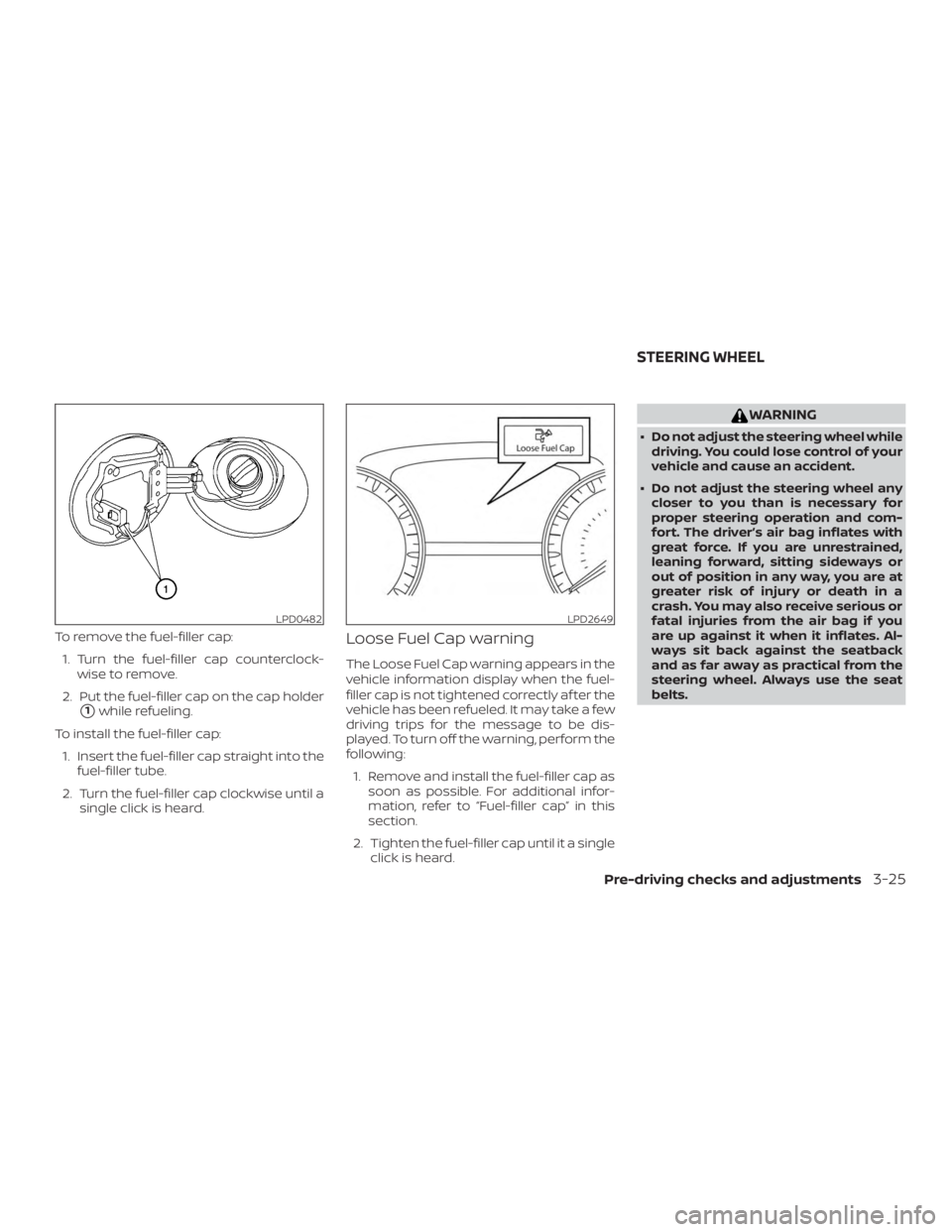
To remove the fuel-filler cap:1. Turn the fuel-filler cap counterclock- wise to remove.
2. Put the fuel-filler cap on the cap holder
�1while refueling.
To install the fuel-filler cap: 1. Insert the fuel-filler cap straight into the fuel-filler tube.
2. Turn the fuel-filler cap clockwise until a single click is heard.
Loose Fuel Cap warning
The Loose Fuel Cap warning appears in the
vehicle information display when the fuel-
filler cap is not tightened correctly af ter the
vehicle has been refueled. It may take a few
driving trips for the message to be dis-
played. To turn off the warning, perform the
following:
1. Remove and install the fuel-filler cap as soon as possible. For additional infor-
mation, refer to “Fuel-filler cap” in this
section.
2. Tighten the fuel-filler cap until it a single click is heard.