Page 153 of 428
WARNING
∙ Do not use the HomeLink® UniversalTransceiver with any garage door
opener that lacks safety stop and re-
verse features as required by federal
safety standards. (These standards
became effective for opener models
manufactured af ter April 1, 1982.) A
garage door opener which cannot de-
tect an object in the path of a closing
garage door and then automatically
stop and reverse does not meet cur-
rent federal safety standards. Using a
garage door opener without these
features increases the risk of serious
injury or death.
∙ During the programming procedure your garage door or security gate will
open and close (if the transmitter is
within range). Make sure that people
or objects are clear of the garage door,
gate, etc., that you are programming. ∙ Your vehicle’s engine should be
turned off while programming the
HomeLink® Universal Transceiver. Do
not breathe exhaust gases; they con-
tain colorless and odorless carbon
monoxide. Carbon monoxide is dan-
gerous. It can cause unconsciousness
or death.
PROGRAMMING HOMELINK®
If you have any questions or are having
difficulty programming your HomeLink®
buttons, refer to the HomeLink® web site at:
www.homelink.com or call 1-800-355-3515.
NOTE:
Place the ignition switch in the ACC posi-
tion when programming HomeLink®. It is
also recommended that a new battery
be placed in the hand-held transmitter
of the device being programmed to
HomeLink® for quicker programming
and accurate transmission of the radio
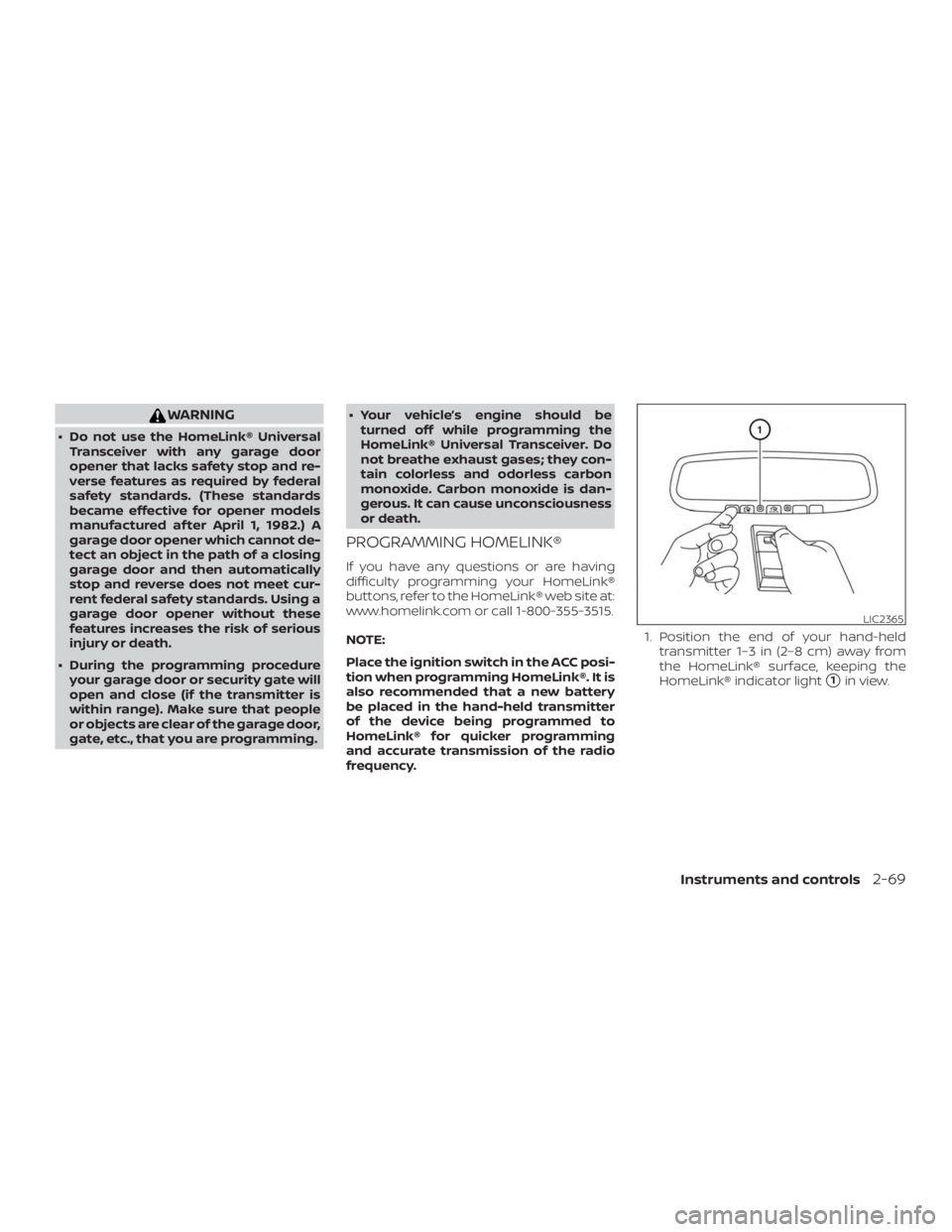
frequency. 1. Position the end of your hand-held
transmitter 1–3 in (2–8 cm) away from
the HomeLink® surface, keeping the
HomeLink® indicator light
�1in view.
Page 169 of 428
When all doors are locked and the trunk lid
is closed with the Intelligent Key inside the
trunk, the outside buzzer will sound and the
trunk will open.
HOW TO USE THE REMOTE
KEYLESS ENTRY FUNCTION
The remote keyless entry function can op-
erate all door locks using the remote key-
less function of the Intelligent Key. The re-
mote keyless function can operate at a
distance of 33 f t (10 m) away from the ve-
hicle. The operating distance depends
upon the conditions around the vehicle.
The remote keyless entry function will not
function under the following conditions:∙ When the Intelligent Key is not within the operational range.
∙ When the Intelligent Key battery is dis- charged.
∙ When the doors or the trunk are open or not closed securely.
Page 178 of 428
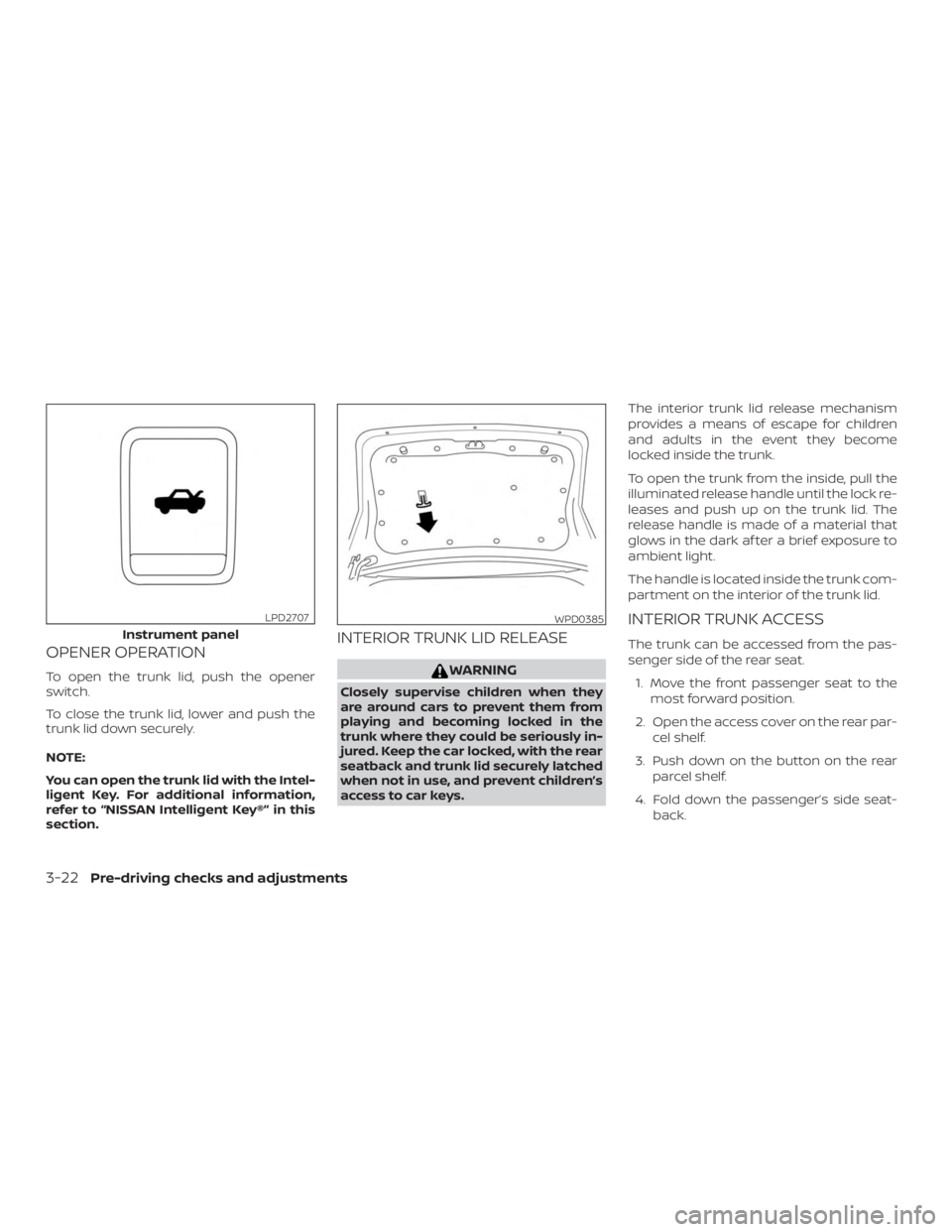
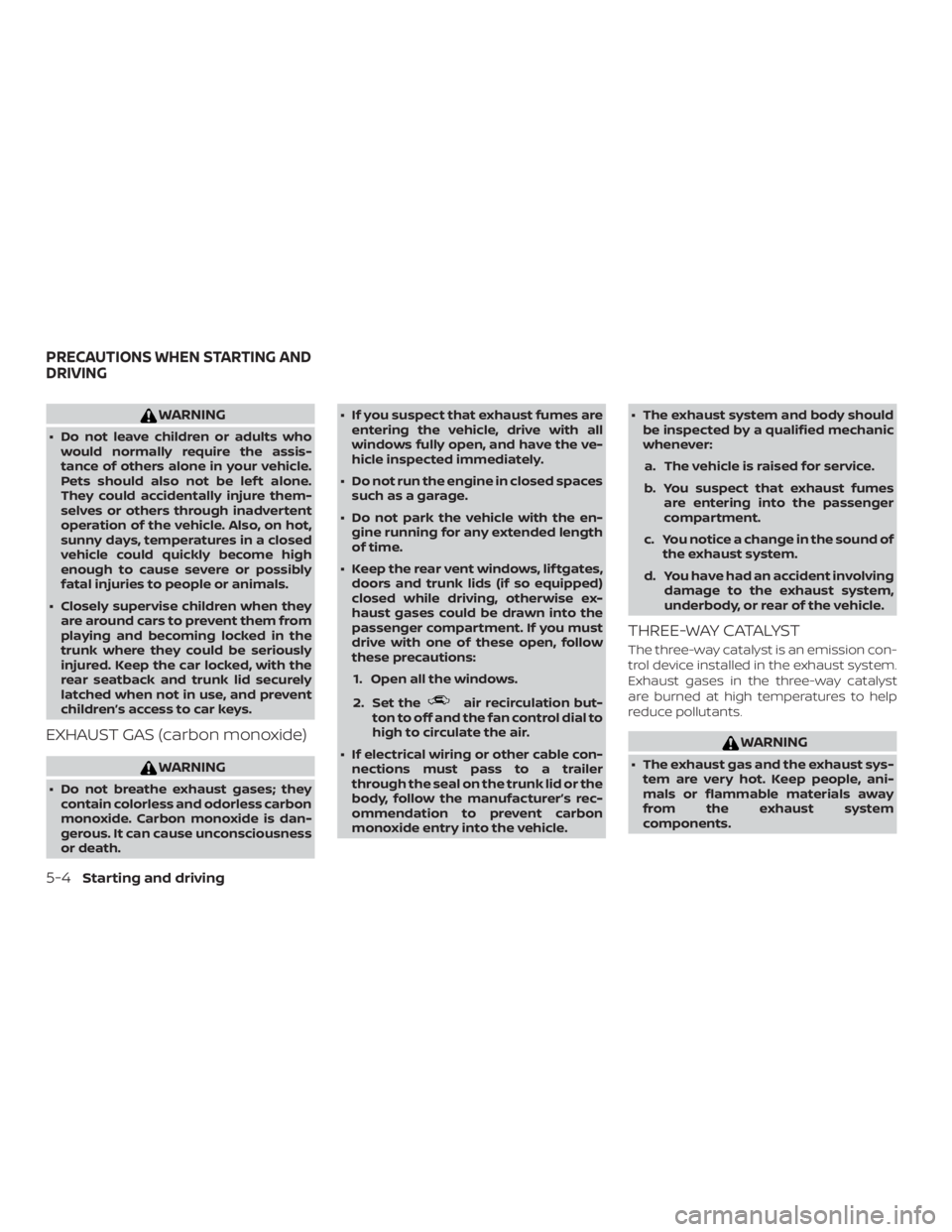
OPENER OPERATION
To open the trunk lid, push the opener
switch.
To close the trunk lid, lower and push the
trunk lid down securely.
NOTE:
You can open the trunk lid with the Intel-
ligent Key. For additional information,
refer to “NISSAN Intelligent Key®” in this
section.
INTERIOR TRUNK LID RELEASE
Page 179 of 428

WARNING
∙ Never allow anyone to ride in thecargo area or on the rear seat when it
is in the fold-down position. Use of
these areas by passengers without
proper restraints could result in seri-
ous injury or death in an accident or
sudden stop.
∙ Properly secure all cargo with ropes or straps to help prevent it from sliding
or shif ting. Do not place cargo higher
than the seatbacks. In a sudden stop
or collision, unsecured cargo could
cause personal injury.
∙ When returning the seatbacks to the upright position, be certain they are
completely secured in the latched po-
sition. If they are not completely se-
cured, passengers may be injured in
an accident or sudden stop.
∙ Closely supervise children when they are around cars to prevent them from
playing and becoming locked in the
trunk where they could be seriously
injured. Keep the car locked, with the
rear seatback and trunk lid securely
latched when not in use, and prevent
children’s access to car keys.
OPENING THE FUEL-FILLER DOOR
The fuel-filler door automatically unlocks
when the driver’s door is unlocked.
1. Unlock the fuel-filler door using one of the following operations.
∙ Unlock the driver’s door with the In- telligent Key.
∙ Push the power door lock switch to the unlock position.
∙ Push the door handle request switch. 2. To open the fuel-filler door, push the
right side of the fuel-filler door to re-
lease.
To lock, close the fuel-filler door securely
and lock the doors.
NOTE:
The fuel-filler door will unlock using the
key only when all doors are unlocked.
Unlocking the driver’s door will not un-
lock the fuel-filler door.
FUEL-FILLER CAP
Page 210 of 428
WARNING
Listed below are the system limitations
for Intelligent Around View Monitor.
Failure to operate the vehicle in accor-
dance with these system limitations
could result in serious injury or death.
∙ Do not use the Intelligent Around ViewMonitor with the outside mirrors in
the stored position, and make sure
that the trunk is securely closed when
operating the vehicle using the Intelli-
gent Around View Monitor.
∙ The apparent distance between ob- jects viewed on the Intelligent Around
View Monitor differs from the actual
distance.
∙ The cameras are installed on the front grille, the outside mirrors and above
the rear license plate. Do not put any-
thing on the vehicle that covers the
cameras.
∙ When washing the vehicle with high pressure water, be sure not to spray it
around the cameras. Otherwise, wa-
ter may enter the camera unit causing
water condensation on the lens, a
malfunction, fire or an electric shock. ∙ Do not strike the cameras. They are
precision instruments. Doing so could
cause a malfunction or cause damage
resulting in a fire or an electric shock.
There are some areas where the system
will not show objects and the system does
not warn of moving objects. When in the
front or rear view display, an object below
the bumper or on the ground may not be
viewed
�1. When in the bird’s-eye view, a tall
object near the seam
�2of the camera
viewing areas will not appear in the moni-
tor.
The following are operating limitations and
do not represent a system malfunction:
∙ There may be a delay when switching between views.
∙ When the temperature is extremely high or low, the screen may not display
objects clearly.
∙ When strong light directly shines on the camera, objects may not be displayed
clearly.
∙ The screen may flicker under fluores- cent light. ∙ The colors of objects on the Intelligent
Around View Monitor may differ some-
what from the actual color of objects.
∙ Objects on the Intelligent Around View Monitor may not be clear and the color
of the object may differ in a dark envi-
ronment.
∙ There may be differences in sharpness between each camera view of the
bird’s-eye view.
∙ Do not use wax on the camera lens. Wipe off any wax with a clean cloth that
has been dampened with a diluted mild
cleaning agent, then wipe with a dry
cloth.
4-20Monitor, climate, audio, phone and voice recognition systems
Page 228 of 428
WARNING
∙ Do not leave children or adults whowould normally require the assis-
tance of others alone in your vehicle.
Pets should also not be lef t alone.
They could accidentally injure them-
selves or others through inadvertent
operation of the vehicle. Also, on hot,
sunny days, temperatures in a closed
vehicle could quickly become high
enough to cause severe or possibly
fatal injuries to people or animals.
∙ Closely supervise children when they are around cars to prevent them from
playing and becoming locked in the
trunk where they could be seriously
injured. Keep the car locked, with the
rear seatback and trunk lid securely
latched when not in use, and prevent
children’s access to car keys.
EXHAUST GAS (carbon monoxide)
Page 326 of 428
∙ Use the correct jack-up points. Neveruse any other part of the vehicle for
jack support.
∙ Never jack up the vehicle more than necessary.
∙ Never use blocks on or under the jack.
∙ Do not start or run the engine while vehicle is on the jack. It may cause the
vehicle to move. This is especially true
for vehicles with limited slip
differentials.
∙ Do not allow passengers to stay in the vehicle while it is on the jack.
∙ Never run the engine with a wheel(s) off the ground. It may cause the ve-
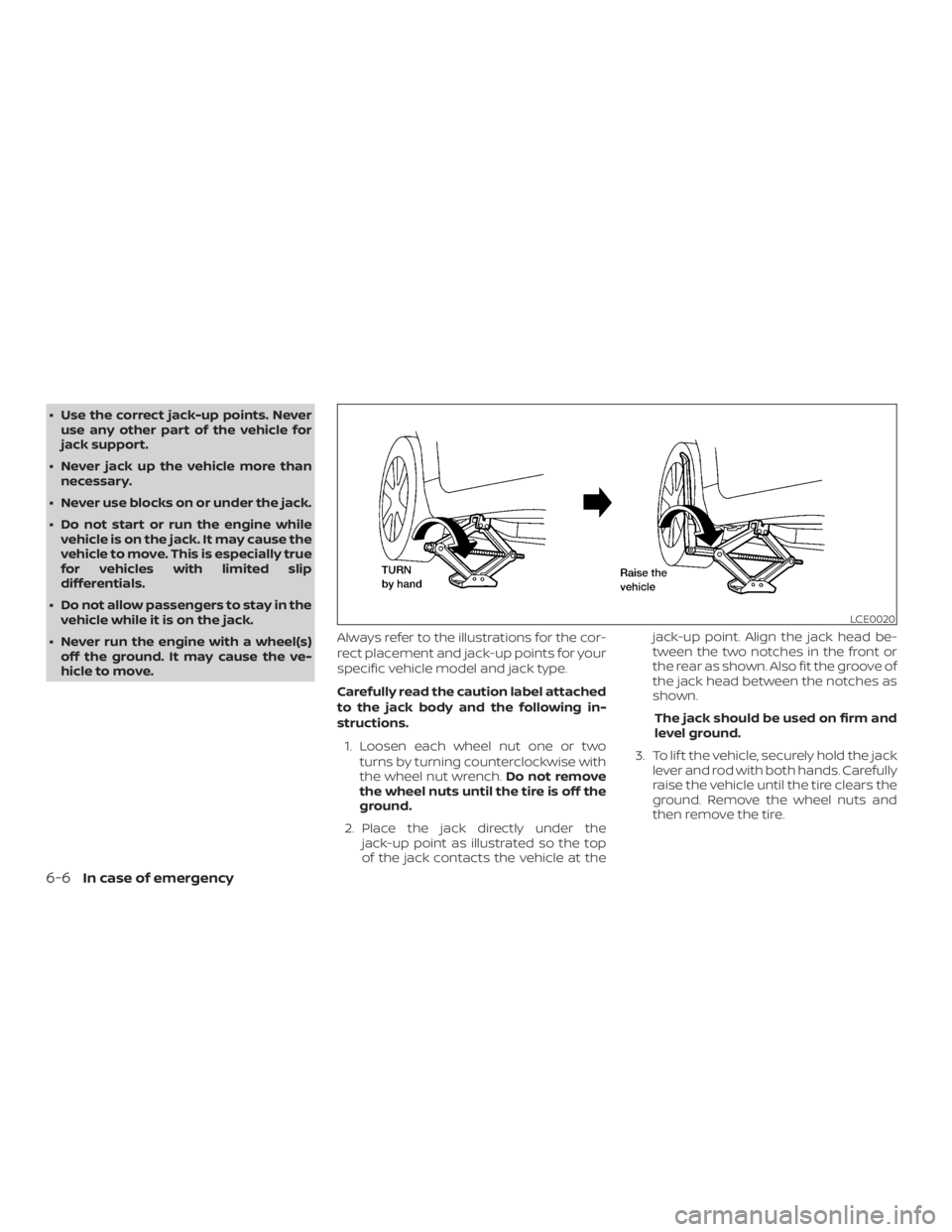
hicle to move. Always refer to the illustrations for the cor-
rect placement and jack-up points for your
specific vehicle model and jack type.
Carefully read the caution label attached
to the jack body and the following in-
structions.
1. Loosen each wheel nut one or two turns by turning counterclockwise with
the wheel nut wrench. Do not remove
the wheel nuts until the tire is off the
ground.
2. Place the jack directly under the jack-up point as illustrated so the top
of the jack contacts the vehicle at the jack-up point. Align the jack head be-
tween the two notches in the front or
the rear as shown. Also fit the groove of
the jack head between the notches as
shown.
The jack should be used on firm and
level ground.
3. To lif t the vehicle, securely hold the jack lever and rod with both hands. Carefully
raise the vehicle until the tire clears the
ground. Remove the wheel nuts and
then remove the tire.
Page 327 of 428
Installing the spare tire
The spare tire is designed for emergency
use. For additional information, refer to
“Wheels and tires” in the “Do-it-yourself ”
section of this manual.1. Clean any mud or dirt from the surface between the wheel and hub.
2. Carefully put the spare tire on and tighten the wheel nuts finger tight.
3. With the wheel nut wrench, tighten wheel nuts alternately and evenly in the
sequence illustrated (
�A,�B,�C,�D,�E)
until they are tight. 4. Lower the vehicle slowly until the tire
touches the ground. Then, with the
wheel nut wrench, tighten the wheel
nuts securely in the sequence illus-
trated (
�A,�B,�C,�D,�E). Lower the ve-
hicle completely.