2018 NISSAN ALTIMA ECO mode
[x] Cancel search: ECO modePage 186 of 467
4 Monitor, climate, audio, phone and
voice recognition systems
NissanConnect® Owner’s Manual................4-2
RearView Monitor ...............................4-3
RearView Monitor system operation ..........4-4
How to read the displayed lines ...............4-4
Difference between predicted and
actual distances ..............................4-5
How to park with predicted course
lines (if so equipped) ..........................4-7
Adjusting the screen .........................4-9
How to turn on and off predictive
course lines (if so equipped) ..................4-9
RearView Monitor system limitations ........4-10
System maintenance ......................... 4-11
Vents ............................................ 4-11
Heater and air conditioner (manual)
(if so equipped) ................................. 4-13
Controls ..................................... 4-14
Heater operation ............................ 4-14
Air conditioner operation ....................4-16
Air flow charts ............................... 4-17
Heater and air conditioner (automatic)
(if so equipped) ................................. 4-20
Automatic operation ........................ 4-21
Manual operation ........................... 4-22Operating tips
............................... 4-23
Servicing air conditioner ........................4-24
Audio system ................................... 4-24
Radio ........................................ 4-24
FM radio reception .......................... 4-25
AM radio reception .......................... 4-25
Satellite radio reception (if so equipped) .....4-25
Audio operation precautions ................4-26
FM/AM radio with compact disc (CD)
player (if so equipped) .......................4-33
FM/AM/SAT radio with compact disc
(CD) player (if so equipped) ..................4-37
USB (Universal Serial Bus) connection
port (models without Navigation
System) (if so equipped) .....................4-42
iPod®* player operation without
Navigation System (if so equipped) ..........4-44
Bluetooth® streaming audio without
Navigation System ..........................4-47
CD care and cleaning ........................ 4-48
Steering wheel switch for audio control ......4-48
Antenna ..................................... 4-50
Siri®
Eyes Free (if so equipped) ..................4-50
Requirements ............................... 4-50
Page 195 of 467
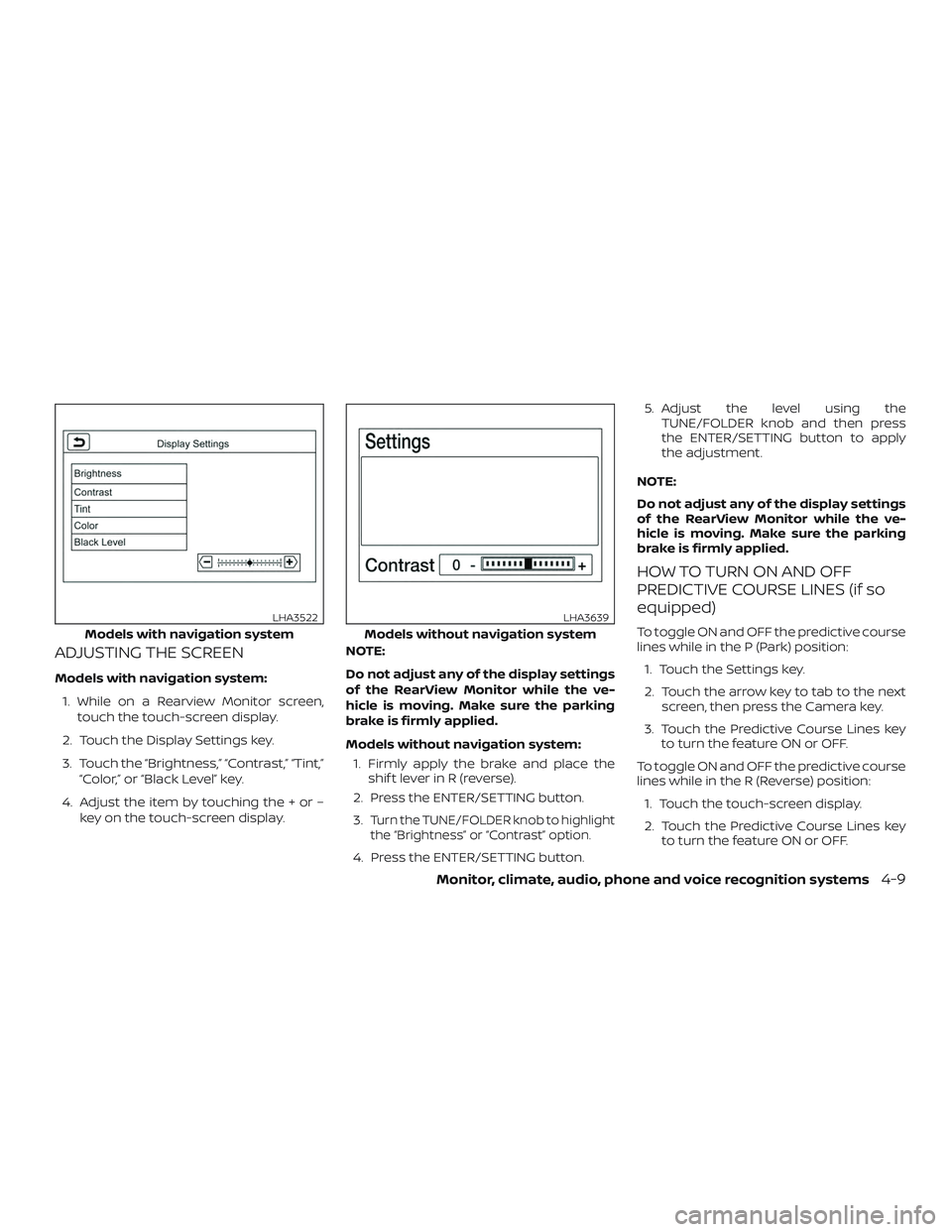
ADJUSTING THE SCREEN
Models with navigation system:1. While on a Rearview Monitor screen, touch the touch-screen display.
2. Touch the Display Settings key.
3. Touch the “Brightness,” “Contrast,” “Tint,” “Color,” or “Black Level” key.
4. Adjust the item by touching the + or – key on the touch-screen display. NOTE:
Do not adjust any of the display settings
of the RearView Monitor while the ve-
hicle is moving. Make sure the parking
brake is firmly applied.
Models without navigation system:
1. Firmly apply the brake and place the shif t lever in R (reverse).
2. Press the ENTER/SETTING button.
3.
Turn the TUNE/FOLDER knob to highlight
the “Brightness” or “Contrast” option.
4. Press the ENTER/SETTING button. 5. Adjust the level using the
TUNE/FOLDER knob and then press
the ENTER/SETTING button to apply
the adjustment.
NOTE:
Do not adjust any of the display settings
of the RearView Monitor while the ve-
hicle is moving. Make sure the parking
brake is firmly applied.
HOW TO TURN ON AND OFF
PREDICTIVE COURSE LINES (if so
equipped)
To toggle ON and OFF the predictive course
lines while in the P (Park) position: 1. Touch the Settings key.
2. Touch the arrow key to tab to the next screen, then press the Camera key.
3. Touch the Predictive Course Lines key to turn the feature ON or OFF.
To toggle ON and OFF the predictive course
lines while in the R (Reverse) position: 1. Touch the touch-screen display.
2. Touch the Predictive Course Lines key to turn the feature ON or OFF.Models with navigation system
LHA3522
Models without navigation system
LHA3639
Monitor, climate, audio, phone and voice recognition systems4-9
Page 199 of 467
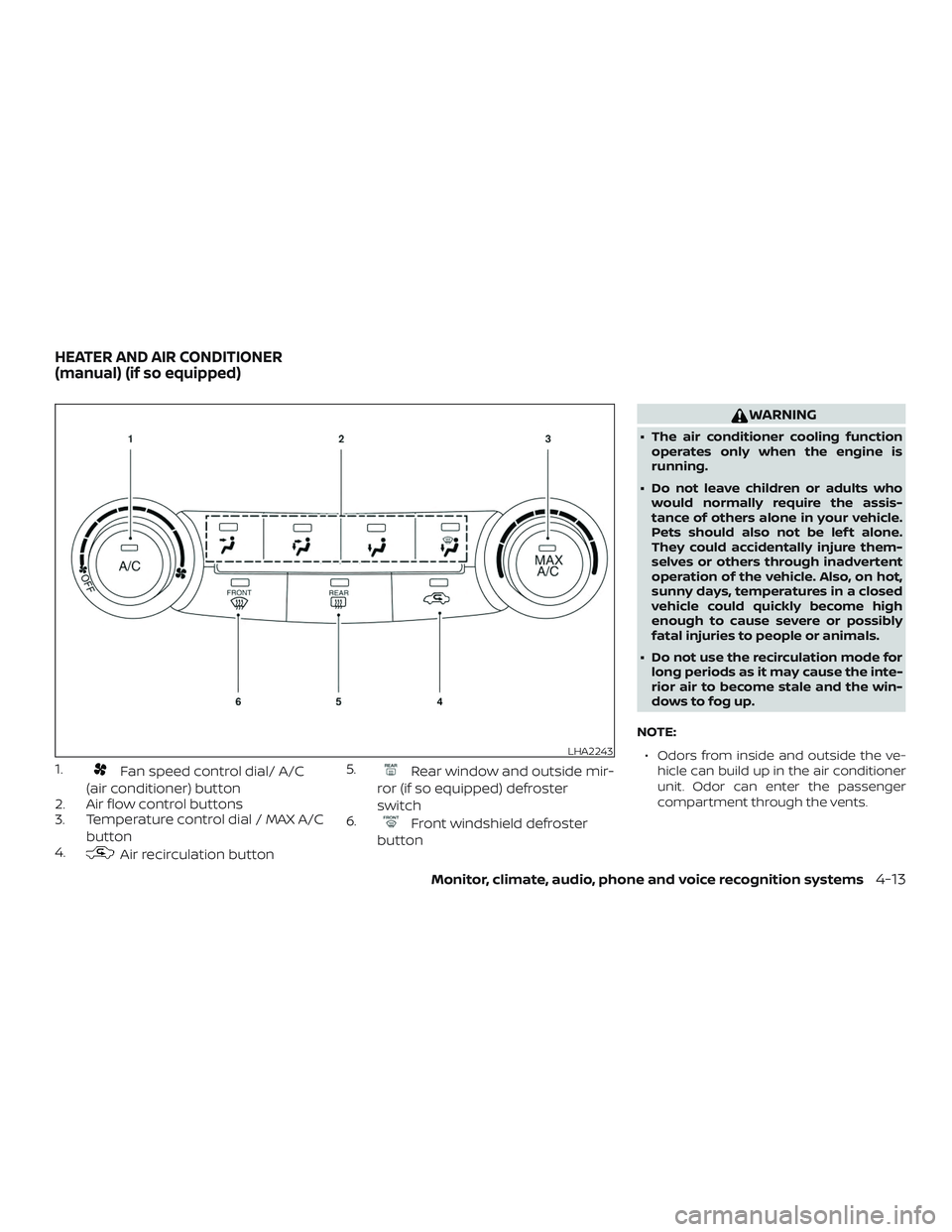
1.Fan speed control dial/ A/C
(air conditioner) button
2. Air flow control buttons
3. Temperature control dial / MAX A/C
button
4.
Air recirculation button 5.
Rear window and outside mir-
ror (if so equipped) defroster
switch
6.
Front windshield defroster
button
WARNING
∙ The air conditioner cooling function operates only when the engine is
running.
∙ Do not leave children or adults who would normally require the assis-
tance of others alone in your vehicle.
Pets should also not be lef t alone.
They could accidentally injure them-
selves or others through inadvertent
operation of the vehicle. Also, on hot,
sunny days, temperatures in a closed
vehicle could quickly become high
enough to cause severe or possibly
fatal injuries to people or animals.
∙ Do not use the recirculation mode for long periods as it may cause the inte-
rior air to become stale and the win-
dows to fog up.
NOTE: ∙ Odors from inside and outside the ve- hicle can build up in the air conditioner
unit. Odor can enter the passenger
compartment through the vents.
LHA2243
HEATER AND AIR CONDITIONER
(manual) (if so equipped)
Monitor, climate, audio, phone and voice recognition systems4-13
Page 200 of 467
∙ When parking, set the heater and airconditioner controls to turn off air recir-
culation to allow fresh air into the pas-
senger compartment. This should help
reduce odors inside the vehicle.
CONTROLS
Fan control dial
Thefan control dial turns the fan on
and off, and controls fan speed.
Air flow control buttons
The air flow control buttons allow you to
select the air flow outlets.
MAX
A/C — Air flows from center and side
vents with maximum cooling.
— Air flows from center and sidevents.
— Air flows from center and sidevents and foot outlets.
— Air flows mainly from footoutlets.
— Air flows from defroster out-lets and foot outlets.
— Air flows mainly from de-froster outlets.
Temperature control dial
The temperature control dial allows you to
adjust the temperature of the outlet air. To
lower the temperature, turn the dial to the
lef t. To increase the temperature, turn the
dial to the right.
Air recirculation button
On position (Indicator light on):
Interior air is recirculated inside the vehicle.
Press the
button to the ON position
when:
∙ driving on a dusty road.
∙ to prevent traffic fumes from entering passenger compartment.
∙ for maximum cooling when using the air conditioner.
Off position (Indicator light off ):
Outside air is drawn into the passenger
compartment and distributed through the
selected outlet.
Use the off position for normal heater or air
conditioner operation.
Air conditioner button
Start the engine, turn thefan control
dial to the desired position and press
the
button to turn on the air condi-
tioner. To turn off the air conditioner, press
the
button again.
The air conditioner cooling function op-
erates only when the engine is running.
Rear window and outside mirror
(if so equipped) defroster switch
For additional information, refer to “Rear
window and outside mirror (if so equipped)
defroster switch” in the “Instruments and
controls” section of this manual.
HEATER OPERATION
Heating
This mode is used to direct heated air to
the foot outlets. Some air also flows from
the defrost outlets and the side vent out-
lets.
1. Press the
button to the OFF posi-
tion for normal heating.
2. Press the
air flow control button.
4-14Monitor, climate, audio, phone and voice recognition systems
Page 201 of 467
3. Turn thefan control dial to the
desired position.
4. Turn the temperature control dial to the desired position between the
middle and the hot position.
Ventilation
This mode directs outside air to the side
and center vents.
1. Press the
button to the OFF posi-
tion.
2. Press the
air flow control button.
3. Turn the
fan control dial to the de-
sired position.
4. Turn the temperature control dial to the desired position.
Defrosting or defogging
This mode directs the air to the defrost
outlets to defrost/defog the windows.
1. Press the defrost/defog button
.
2. Turn the
fan control dial to the
desired position.
3. Turn the temperature control dial to the desired position between the
middle and the hot position. ∙ To quickly remove ice or fog from the
windows, turn the
fan control dial
to the highest setting and the tempera-
ture control to the full HOT position.
∙ When the
position is selected, the
air conditioner automatically turns on if
the outside temperature is more than
36°F (2°C). This dehumidifies the air
which helps defog the windshield.
The
mode automatically turns off,
allowing outside air to be drawn into the
passenger compartment to further im-
prove the defogging performance. The
recirculation mode cannot be activated
in the
position.
Bi-level heating
The bi-level mode directs warmed air to
the side and center vents and to the front
and rear floor outlets.
1. Press the
button to the OFF posi-
tion.
2. Press the
air flow control button.
3. Turn the
fan control dial to the
desired position.
4. Turn the temperature control dial to the desired position.
Heating and defogging
This mode heats the interior and defogs
the windshield.
1. Press the
air flow control button.
2. Turn the
fan control dial to the
desired position.
3. Turn the temperature control dial to the desired position between the
middle and the hot position.
∙ When the
position is selected, the
air conditioner automatically turns on if
the outside temperature is more than
36°F (2°C). This dehumidifies the air
which helps defog the windshield.
The
mode automatically turns off,
allowing outside air to be drawn into the
passenger compartment to further im-
prove the defogging performance.
Operating tips
Clear snow and ice from the wiper blades
and air inlet in front of the windshield.
This improves heater operation.
Monitor, climate, audio, phone and voice recognition systems4-15
Page 202 of 467
AIR CONDITIONER OPERATION
Start the engine, turn thefan control
dial to the desired position, and press
the
button to activate the air condi-
tioner. When the air conditioner is on, cool-
ing and dehumidif ying functions are
added to the heater operation.
The air conditioner cooling function op-
erates only when the engine is running.
Cooling
This mode is used to cool and dehumidif y
the air.
1. Press the
button to the OFF posi-
tion.
2. Press the
air flow control button.
3. Turn the
fan control dial to the
desired position.
4. Press the A/C button. The indicator light comes on.
5. Turn the temperature control dial to the desired position. ∙ For quick cooling when the outside
temperature is high, press the
button to the ON position. Be sure to
return the
to the OFF position for
normal cooling. MAX A/C may be used
for quick cooling.
Dehumidified heating
This mode is used to heat and dehumidif y
the air.
1. Press the
button to the OFF posi-
tion.
2. Press the
air flow control button.
3. Turn the
fan control dial to the
desired position.
4. Press the A/C button. The indicator light comes on.
5. Turn the temperature control dial to the desired position.
Dehumidified defogging
This mode is used to defog the windows
and dehumidif y the air.
1. Press the
air flow control button.
2. Turn the
fan control dial to the
desired position. ∙ When the
orare selected,
the air conditioner automatically turns
on if the outside temperature is more
than 36°F (2°C). This dehumidifies the air
which helps defog the windshield.
The
mode automatically turns off,
allowing outside air to be drawn into the
passenger compartment to further im-
prove the defogging performance.
3. Turn the temperature control dial to the desired position.
Operating tips
∙ Keep the windows closed while the airconditioner is in operation.
∙ Af ter parking in the sun, drive for 2 or 3 minutes with the windows open to
vent hot air from the passenger com-
partment. Then, close the windows.
This allows the air conditioner to cool
the interior more quickly.
∙ The air conditioning system should
be operated for approximately
10 minutes at least once a month.
This helps prevent damage to the
system due to lack of lubrication.
4-16Monitor, climate, audio, phone and voice recognition systems
Page 206 of 467
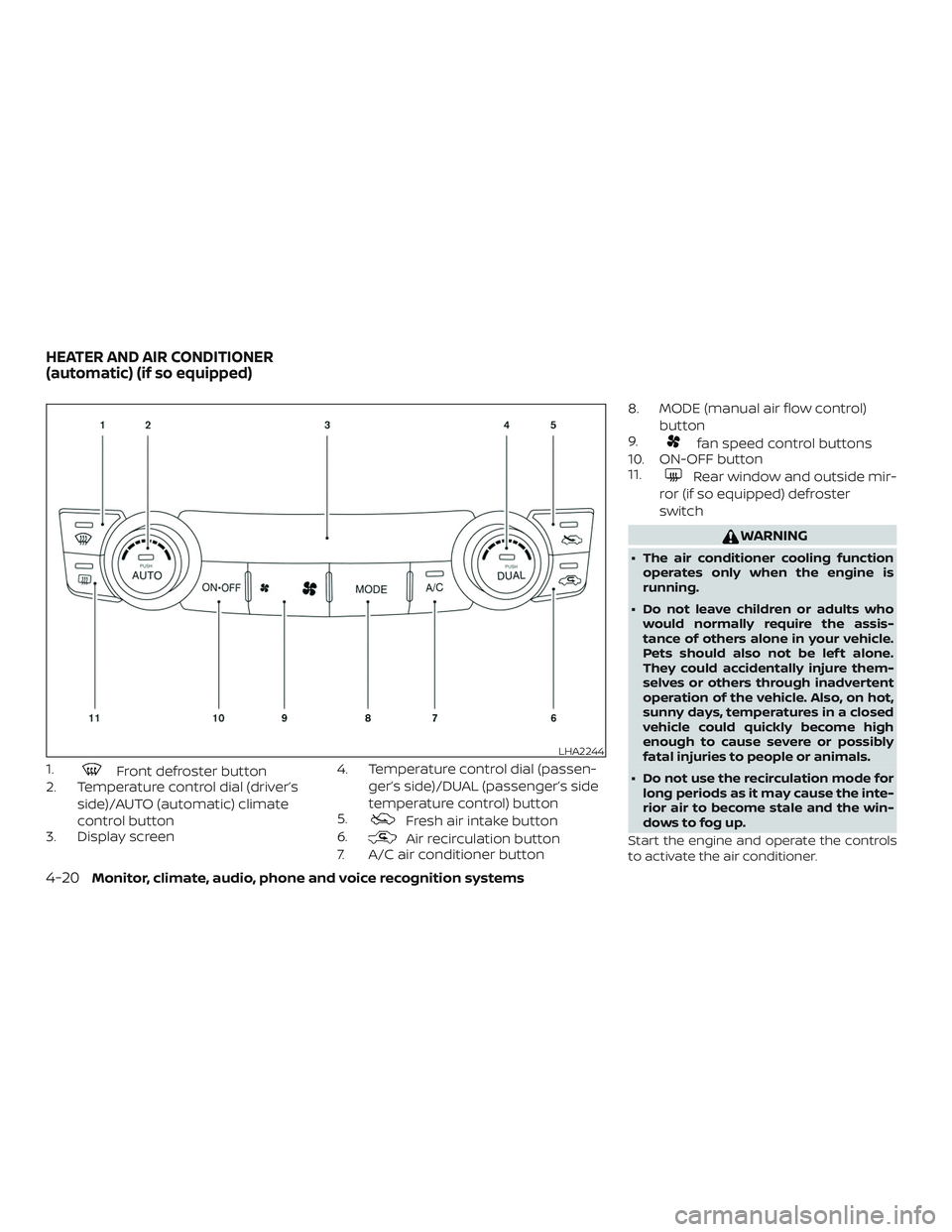
1.Front defroster button
2. Temperature control dial (driver’s
side)/AUTO (automatic) climate
control button
3. Display screen 4. Temperature control dial (passen-
ger’s side)/DUAL (passenger’s side
temperature control) button
5.
Fresh air intake button
6.
Air recirculation button
7. A/C air conditioner button 8. MODE (manual air flow control)
button
9.
fan speed control buttons
10. ON-OFF button
11.
Rear window and outside mir-
ror (if so equipped) defroster
switch
WARNING
∙ The air conditioner cooling function operates only when the engine is
running.
∙ Do not leave children or adults who would normally require the assis-
tance of others alone in your vehicle.
Pets should also not be lef t alone.
They could accidentally injure them-
selves or others through inadvertent
operation of the vehicle. Also, on hot,
sunny days, temperatures in a closed
vehicle could quickly become high
enough to cause severe or possibly
fatal injuries to people or animals.
∙ Do not use the recirculation mode for long periods as it may cause the inte-
rior air to become stale and the win-
dows to fog up.
Start the engine and operate the controls
to activate the air conditioner.
LHA2244
HEATER AND AIR CONDITIONER
(automatic) (if so equipped)
4-20Monitor, climate, audio, phone and voice recognition systems
Page 207 of 467
NOTE:∙ Odors from inside and outside the ve- hicle can build up in the air conditioner
unit. Odor can enter the passenger
compartment through the vents.
∙ When parking, set the heater and air conditioner controls to turn off air recir-
culation to allow fresh air into the pas-
senger compartment. This should help
reduce odors inside the vehicle.
AUTOMATIC OPERATION
Cooling and/or dehumidified
heating (AUTO)
This mode may be used all year round as
the system automatically works to keep a
constant temperature. Air flow distribution,
air intake control, and fan speed are also
controlled automatically.
1. Press the AUTO button on.
2. Turn the temperature control dial to the lef t or right to set the desired tem-
perature.
∙ Adjust the temperature display to about 75°F (24°C) for normal operation. ∙ The temperature of the passenger
compartment will be maintained auto-
matically. Air flow distribution, air intake
control and fan speed are also con-
trolled automatically.
∙ A visible mist may be seen coming from the vents in hot, humid conditions as
the air is cooled rapidly. This does not
indicate a malfunction.
3. You can individually set driver’s and front passenger’s side temperature us-
ing each temperature control dial. To
turn off the passenger’s side tempera-
ture control, press the DUAL button.Heating (A/C OFF)
The air conditioner does not activate. When
you need to heat only, use this mode.
1. Press the AUTO button.
2. Turn the temperature control dial to set the desired temperature.
∙ The temperature of the passenger compartment will be maintained auto-
matically. Air flow distribution and fan
speed are also controlled automatically. ∙ Do not set the temperature lower than
the outside air temperature. Otherwise,
the system may not work properly.
∙ Not recommended if windows fog up.
Dehumidified defrosting or
defogging
1. Press thefront defroster button
on.
2. Turn the temperature control dial to set the desired temperature.
∙ To quickly remove ice from the outside of the windows, use the
fan speed
control buttons to set the fan speed to
maximum.
∙ As soon as possible af ter the wind- shield is clean, press the AUTO button to
return to the automatic mode.
Monitor, climate, audio, phone and voice recognition systems4-21