2018 MITSUBISHI OUTLANDER PHEV phone
[x] Cancel search: phonePage 88 of 538

NOTElIf neither a door nor the tailgate is opened
within 30 seconds of unlocking (except us-ing the tailgate open switch), the doors andtailgate are automatically relocked and the
Dead Lock System is simultaneously set again.
l Even when it is not possible to use the key-
less entry system or keyless operation func- tion to unlock the doors, it is possible to use
the key to unlock the driver’s door. When the key is used to unlock the driver’s door,
the Dead Lock System is cancelled for only the driver’s door. If you wish to subsequent-
ly unlock all other doors, turn the ignition switch to the “ON” or “ACC” position, orput the operation mode in on or ACC.
l It is possible to adjust the time between
pressing the UNLOCK switch (B) on the re-
mote control switch or the driver’s or front passenger’s door lock/unlock switch (C) andautomatic locking. For details, please con-
tact a MITSUBISHI MOTORS Authorized
Service Point.
On vehicles equipped with the Smartphone
Link Display Audio or the MITSUBISHI
Multi-Communication System (MMCS), screen operations can be used to make theadjustment. Refer to the separate owner’s
manual for details.NOTEl It is possible to lock the doors and tailgate
and set the Dead Lock System at the sametime with a single push of the LOCK switch (A) on the remote control switch, the driv-
er’s or front passenger’s door lock/unlock
switch (C), or the tailgate lock switch (D).
For details, please contact a MITSUBISHI
MOTORS Authorized Service Point.Testing the system
E00305400159
Open all of the door windows, then set the
Dead Lock System.
(Refer to “Setting the system” on page 4-17.)
After setting the Dead Lock System, reach into the vehicle through a window and con-
firm that you cannot unlock the doors using
the lock knobs.
NOTEl If you need advice on how to set the Dead
Lock System, please contact a MITSUBISHIMOTORS Authorized Service Point.“Child-protection” rear
doors E00300901042
1- Lock
2- Unlock
Child protection helps prevent the rear doors
from being opened accidentally from the in- side.
If the lever is set to the locked position, the
rear door cannot be opened using the inside handle, but only with the outside handle.
If the lever is set to the “Unlock” position,
the child protection mechanism does not
function.
“Child-protection” rear doors
4-18OGGE18E1Locking and unlocking4
Page 98 of 538

On vehicles equipped with the Smartphone
Link Display Audio or the MITSUBISHI
Multi-Communication System (MMCS),
screen operations can be used to make the ad- justment. Refer to the separate owner’s man-
ual for details.CAUTIONl Do not modify or add parts to the security
alarm system.
Doing so could cause the security alarm to malfunction.NOTEl The alarm system will not be activated if the
doors and the tailgate have been locked us-ing a key, the inside lock knob or the central
door lock switch (instead of the keyless en- try system or the keyless operation func-
tion).NOTEl For vehicles equipped with the interior alarm
sensor, if the turn-signal lamps do not blink after the locking and unlocking operation us-ing the keyless entry system or the keyless
operation function, the security alarm system
may be malfunctioning.
Have the vehicle inspected at a MITSUBISHI MOTORS Authorized Serv-
ice Point.
If the confirmation function (blinking of the turn-signal lamps by locking and unlocking
the doors and the tailgate) is deactivated, the turn-signal lamps do not blink after the lock-
ing and unlocking operation.
For information on the confirmation func- tion, refer to “Keyless entry system” on page
4-03 and “To operate using the keyless oper-
ation function” on page 4-09.
l For vehicles equipped with the interior alarm
sensor, the security alarm system could be activated in the following situations.
• Using a car wash
• Taking the vehicle on a ferry
• Parking in an automated car park
• Leaving someone or a pet in the vehicle
• Leaving a window or the sunroof open
• Leaving an unstable object such as a stuf-
fed toy or accessory in the vehicle
• Suffering a continuous impact or vibra-
tion by hail, thunder, etc.NOTE• Air flows by the Remote Climate Control.
According to the situations, please deacti-
vate the vehicle inclination detection function and the interior intrusion detec-
tion function.
Refer to “To deactivate the vehicle incli-
nation detection function and the interior intrusion detection function” on page 4-32.
l For vehicles equipped with the interior alarm
sensor, the sensitivity of the interior intru- sion detection function can be adjusted. For details, please contact a MITSUBISHI
MOTORS Authorized Service Point.
Security alarm system*
4-28OGGE18E1Locking and unlocking4
Page 103 of 538

lOpening any one of the doors or the tail-
gate, when the system is in the system
preparation mode.
l Holding the keyless operation key and
pressing the driver’s or front passenger’s
door lock/unlock switch, or the tailgate open switch to unlock the doors and the
tailgate.NOTEl If the bonnet is opened during the system
preparation mode, the system preparationmode is suspended.
The system returns to the system preparation mode when the bonnet is closed.
l If the auxiliary battery terminals are discon-
nected while the system is in the system preparation mode, the memory will be erased.
l It is possible to register up to four remote
control switches for keyless operation sys-tem.
As long as they are registered, any of the re-
mote control switches, other than the one used to activate the system, can be used to
cancel the system.
If you want to register additional remote control switches, please contact aMITSUBISHI MOTORS Authorized Serv-
ice Point.NOTEl The activation distance for keyless entry sys-
tem is approximately 4 m.
If it is not possible to lock or unlock the ve- hicle by pressing the switch at the correct
distance or the security alarm system cannot be set or cancelled using the switch, the bat-
tery may need to be replaced.
Replace the battery at a MITSUBISHI
MOTORS Authorized Service Point.
l If the UNLOCK switch on the remote con-
trol switch, or the driver’s or front passen- ger’s door lock/unlock switch is pressed and no door or the tailgate is opened within 30 seconds, the doors and the tailgate will auto-
matically relock. In this case as well, the
system preparation mode will go into effect.
l The time between pressing the UNLOCK
switch on the remote control switch, or thedriver’s or front passenger’s door lock/
unlock switch and automatic locking can be adjusted. Please consult a MITSUBISHI
MOTORS Authorized Service Point.
On vehicles equipped with the Smartphone
Link Display Audio or the MITSUBISHI
Multi-Communication System (MMCS), screen operations can be used to make theadjustment. Refer to the separate owner’s
manual for details.Alarm activation
E00301902408
When the system is in the system armed
mode, the alarm will be activated as follows
if the vehicle is unlocked or if any of the doors, tailgate or bonnet is opened using a
method other than the keyless entry system or the keyless operation function. 1. The inside alarm will be activated for
approximately 10 seconds. (except for vehicles equipped with the interior alarm
sensor)
NOTEl If the bonnet is opened during the system
armed mode, the vehicle outside alarm oper-
ates immediately, without the vehicle inside
alarm operating.
l The time for the vehicle inside alarm can be
adjusted. Please consult a MITSUBISHI
MOTORS Authorized Service Point.
2. The alarm will be activated for approxi-
mately 30 seconds.
The turn-signal lamps will blink, and the horn (the siren for vehicles equipped
Security alarm system*
4-33OGGE18E1Locking and unlocking4
Page 143 of 538
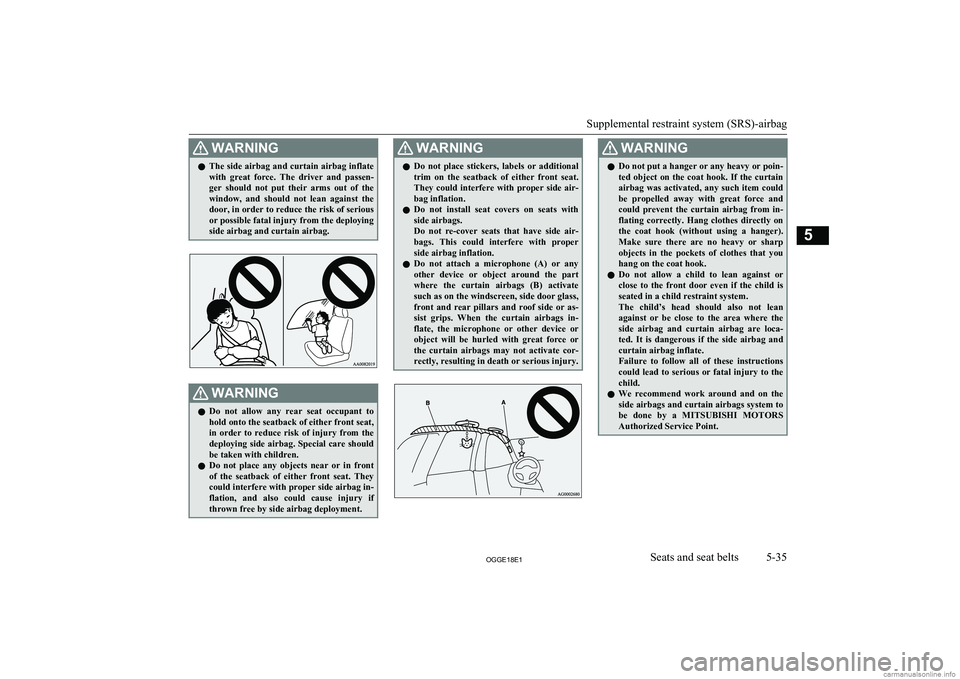
WARNINGlThe side airbag and curtain airbag inflate
with great force. The driver and passen-ger should not put their arms out of the
window, and should not lean against the door, in order to reduce the risk of serious
or possible fatal injury from the deploying
side airbag and curtain airbag.WARNINGl Do not allow any rear seat occupant to
hold onto the seatback of either front seat,
in order to reduce risk of injury from the
deploying side airbag. Special care should
be taken with children.
l Do not place any objects near or in front
of the seatback of either front seat. They could interfere with proper side airbag in-
flation, and also could cause injury if thrown free by side airbag deployment.WARNINGl Do not place stickers, labels or additional
trim on the seatback of either front seat.They could interfere with proper side air-bag inflation.
l Do not install seat covers on seats with
side airbags.
Do not re-cover seats that have side air- bags. This could interfere with properside airbag inflation.
l Do not attach a microphone (A) or any
other device or object around the part where the curtain airbags (B) activate
such as on the windscreen, side door glass, front and rear pillars and roof side or as- sist grips. When the curtain airbags in-
flate, the microphone or other device or
object will be hurled with great force or the curtain airbags may not activate cor-
rectly, resulting in death or serious injury.WARNINGl Do not put a hanger or any heavy or poin-
ted object on the coat hook. If the curtain
airbag was activated, any such item could
be propelled away with great force and could prevent the curtain airbag from in-
flating correctly. Hang clothes directly on the coat hook (without using a hanger).
Make sure there are no heavy or sharp objects in the pockets of clothes that you
hang on the coat hook.
l Do not allow a child to lean against or
close to the front door even if the child is
seated in a child restraint system.
The child’s head should also not lean against or be close to the area where the
side airbag and curtain airbag are loca-
ted. It is dangerous if the side airbag and curtain airbag inflate.
Failure to follow all of these instructions
could lead to serious or fatal injury to the
child.
l We recommend work around and on the
side airbags and curtain airbags system to
be done by a MITSUBISHI MOTORS
Authorized Service Point.
Supplemental restraint system (SRS)-airbag
5-35OGGE18E1Seats and seat belts5
Page 162 of 538

1.Press and hold the multi information dis-
play switch for about 2 seconds or more to switch from the setting mode screen
to the menu screen.
Refer to “Changing the function set-
tings” on page 6-15.
2. Lightly press the multi information dis-
play switch to select “
” (temperature
unit setting).
3. Press and hold the multi information dis-
play switch for about 2 seconds or more
to switch in from °C to °F, or from °F to °C. The setting is changed to the selec-
ted temperature unit.
NOTEl The temperature value on air conditioner
panel is switched in conjunction with outside
temperature display unit of the multi infor-
mation display.
However, “°C” or “°F” are not shown to
temperature display of an air conditioner.
l On vehicles equipped with the Smartphone
Link Display Audio or the MITSUBISHI
Multi- Communication System (MMCS), the temperature value of Smartphone Link
Display Audio or MITSUBISHI Multi-Com-
munication System (MMCS) is switched in conjunction with the outside temperature
display unit of the multi information display.
However, “°C” or “°F” is not shown to the
air conditioner screen of MITSUBISHI Mul-
ti- Communication System (MMCS).Changing the display language
E00523201741
The language of the multi information dis-
play can be switched. 1. Press and hold the multi information dis-
play switch for about 2 seconds or more to switch from the setting mode screen
to the menu screen.
Refer to “Changing the function set-
tings” on page 6-15.
2. Lightly press the multi information dis-
play switch to select “LANGUAGE”
(language setting).
3. Press and hold the multi information dis-
play switch for about 2 seconds or more to display “LANGUAGE”.
4. Lightly press the multi information dis-
play switch to select the desired lan-guage.
5. If you hold down the multi information
display switch for about 2 seconds or
more, the setting is changed to the selec- ted language.NOTEl If “---” is selected in the language setting, a
warning message is not displayed whenthere is a warning display or interrupt dis-
play.Changing the language cooper-
ative control
E00523301696
The language used in MITSUBISHI Multi-
Communication System (MMCS) (if so
equipped), Bluetooth ®
2.0 interface (if so
equipped) or Multi Around Monitor (if so equipped) can be changed automatically to
the same language as that shown in the multi
information display. 1. Press and hold the multi information dis-
play switch for about 2 seconds or more to switch from the setting mode screen to the menu screen.
Refer to “Changing the function set-
tings” on page 6-15.
Multi information display
6-18OGGE18E1Instruments and controls6
Page 196 of 538

If the engine oil pressure drops while thePlug-in Hybrid EV System is operating, thewarning display is displayed on the informa-
tion screen in the multi information display.CAUTIONl If the vehicle is driven while the engine oil
is low, or the oil level is normal but the warning is displayed, the engine may burn
out and be damaged.
l If the warning is displayed while the Plug-in
Hybrid EV System is operating, immediately
park your vehicle in a safe place and check
the engine oil level.
l If the warning is displayed while the engine
oil level is normal, have it inspected.Combination headlamps
and dipper switch E00506004370
Headlamps
NOTElDo not leave the lights on for a long time
while the Plug-in Hybrid EV System is sta-tionary (not operating). A run-down auxili- ary battery could result.NOTEl When it rains, or when the vehicle has been
washed, the inside of the lens sometimes be-
comes foggy, but this does not indicate a functional problem.
When the lamp is switched on, the heat will
remove the fog. However, if water gathers inside the lamp, we recommend you to have
it checked.
Rotate the switch to turn on the lamps.
OFFAll lamps off {except daytime
running lamps}
AUTO
When the operation mode of the
power switch is ON, headlamps,
position-, tail-, licence plate-, in-
strument panel lamps and down-
light are turned on and off auto-
matically in accordance with out-
side light level. {The daytime
running lamps will go on while
the tail lamps are off.} All lamps
go off automatically when the
operation mode is put in OFF.Position, tail, licence plate, in-
strument panel lamps and down-
light onHeadlamps and other lamps go
onNOTEl The sensitivity of the automatic on/off con-
trol can be adjusted. For further information,contact a MITSUBISHI MOTORS Author-
ized Service Point.
On vehicles equipped with the Smartphone
Link Display Audio or the MITSUBISHI
Multi-Communication System (MMCS), screen operations can be used to make theadjustment.
Refer to the separate owner’s manual for de-
tails.
Combination headlamps and dipper switch
6-52OGGE18E1Instruments and controls6
Page 197 of 538

NOTElWhen the headlamps are turned off by the
automatic on/off control with the operation
mode in ON, the front fog lamps and rear fog lamps also go off. When the headlamps
are subsequently turned back on by the auto- matic on/off control, the front fog lamps also
come on but the rear fog lamp stays off. If you wish to turn the rear fog lamp back on,
operate the switch again.
l Do not cover the sensor (A) for the automat-
ic on/off control by affixing a sticker or labelto the windscreen.
l If the lamps do not turn on or off with the
switch in the “AUTO” position, manually
operate the switch and we recommend you
to have your vehicle checked.
Lamps (headlamps, fog lamps,
etc.) auto-cutout function
l If the operation mode of the power
switch is put in OFF or ACC while the
lamp switch is in the “
” position, the
lamps will turn off automatically when the driver’s door is opened.
l If the operation mode of the power
switch is put in OFF or ACC while the
lamp switch is in the “
” position, the
lamps will remain on for about 3 mi-
nutes while the driver’s door is shut and will then automatically turn off.
NOTEl The lamp auto-cutout will not function when
the lamp switch is in the “” position.
l The lamp auto-cutout function can also be
disabled.
For further information, we recommend you
to consult a MITSUBISHI MOTORS Au-
thorized Service Point.
On vehicles equipped with the Smartphone
Link Display Audio or the MITSUBISHI
Multi-Communication System (MMCS), screen operations can be used to make theadjustment. Refer to the separate owner’s
manual for details.When you want to keep the
lamps on:
1. Turn the lamp switch in the “OFF” posi-
tion while the operation mode of the power switch is in OFF or ACC.
2. Turn on the lamps with the switch in the
“”
or “” position again, then the
lamps will remain on.
LED headlamp warning lamp*
E00538101041
This warning lamp will illuminate when there is a fault in the LED headlamps. Also, “LED
HEADLIGHT SERVICE REQUIRED” is displayed on the information screen in the
multi information display for the driver.
Combination headlamps and dipper switch
6-53OGGE18E1Instruments and controls6
Page 202 of 538

Welcome light
E00528902072
This function turns on the position and tail
lamps for about 30 seconds after the UN- LOCK switch on the remote control transmit-
ter is pressed when the combination head-
lamps and dipper switch is in the “OFF” or
“AUTO” position. The welcome light func- tion will operate only when it is dark outside
the vehicle.
NOTEl While the welcome light function is operat-
ing, perform one of the following operations to cancel the function.
• Push the LOCK switch on the remote
control transmitter.
• Turn the combination headlamps and dip-
per switch to the “
” or “” position.
• Put the operation mode of the power
switch in ON.
l It is possible to modify functions as follows:
• The headlamps can be set to come on in
the low beam setting.
• The welcome light function can be deacti-
vated.
For further information, please contact your MITSUBISHI MOTORS Authorized Serv-
ice Point.
On vehicles equipped with the Smartphone
Link Display Audio or the MITSUBISHI
Multi-Communication System (MMCS), screen operations can be used to make the
NOTEadjustment. Refer to the separate owner’s
manual for details.Coming home light
E00529001826
This function turns on the headlamps in the
low beam setting for about 30 seconds after the operation mode is put in OFF. 1. Turn the combination headlamps and
dipper switch to the “OFF” or “AUTO”
position.
2. Put the operation mode of the power
switch in OFF.
3. Within 60 seconds of putting the opera-
tion mode in OFF, pull the turn signal
lever towards you.
4. The headlamps will come on in the low
beam setting for about 30 seconds. After
the headlamps go off, the headlamps can be turned on again in the low beam set-
ting for about 30 seconds by pulling the turn signal lever towards you within 60seconds of putting the operation mode in
OFF.
To turn on the headlamps again after 60
seconds of putting the operation mode in OFF, repeat the process from step 1.NOTEl While the coming home light function is op-
erating, perform one of the following opera-
tions to cancel the function.
• Pull the lever towards you.
• Turn the combination headlamps and dip-
per switch to the “
” or “” position.
• Put the operation mode in ON.
l It is possible to modify functions as follows:
• The time that the headlamps remain on
can be changed.
• The coming home light function can be
deactivated.
For further information, please contact your
MITSUBISHI MOTORS Authorized Serv-
ice Point.
On vehicles equipped with the Smartphone
Link Display Audio or the MITSUBISHI
Multi-Communication System (MMCS), screen operations can be used to make the
Combination headlamps and dipper switch
6-58OGGE18E1Instruments and controls6