2018 MITSUBISHI OUTLANDER PHEV alarm
[x] Cancel search: alarmPage 267 of 538

CAUTION•When driving in curved sections of road
including their entrance/outlet or running beside a closed lane in a traffic work or
similar zone.
• When your vehicle position in a lane is in-
stable, is frequently steered to right and left, or running unstably due to a trafficaccident, trouble with some vehicles, etc.
• When driving on the road that the vehicle
in front runs in offset position from your
vehicle.
l Never use the ACC in any of the following
situations. Failure to follow this instructioncould lead to an accident.
• On roads with heavy traffic or roads in-
cluding many windings or steep curves.
CAUTION• On roads with slippery surfaces, such as
frozen, snow-covered, and dirt roads.
• Under adverse weather conditions (rain,
snow, sand storms, etc.).
• On steep downslopes.
• On roads including steep up and down
slopes or many changes in inclination.
• In traffic requiring frequent acceleration
and deceleration.
• When the proximity alarm sounds fre-
quently.
• When your vehicle is towed or your vehi-
cle tows another vehicle.
• When your vehicle is on a chassis dyna-
mometer or free rollers.
• When the air pressure in the tyres is not
correct.
• When snow traction device (tyre chains)
are attached.
l Be sure to take the following precautions to
keep the system in good operating condi-
tions.
Improper handling of the system compo-
nents may result in degraded sensor per- formance.
• Avoid application of strong shock loads to
the sensor and never tamper with or re- move the sensor mounting screws.
• The cover in front of the sensor and the
sensor should be kept clean.CAUTION• Do not cover the sensor mounted area
(shaded area as shown in the illustration)
with a sticker, licence plate or anything
such as a grill guard, etc.
• The sensor front cover should not be
modified or painted.
• Avoid using different size tyres from
those specified and maintain even tyre
wear.
• Do not modify the suspension of your ve-
hicle.
Adaptive Cruise Control System (ACC)*
7-53OGGE18E1Starting and driving7
Page 269 of 538

WARNINGlYour vehicle may accelerate up to the set
speed in the following situations. Apply the brake, if necessary, to slow down.
• When your vehicle no longer follows
the vehicle in front, e.g. at a freeway ex-it or when your vehicle or the vehicle in
front changes its lane.WARNING• When driving on a curve.
l If the vehicle in front turns off or changes
lane and another stationary vehicle is lo- cated in front of that vehicle, the ACCwill not make deceleration control to the
stationary vehicle.
Proximity alarm
E00634701079
While the ACC is active, if your vehicle ap-
proaches too closely to a vehicle in front be-cause the ACC cannot allow for an adequate
deceleration in such cases as rapid decelera-
tion of the vehicle in front or apparition of a vehicle cutting in front of your vehicle, the
ACC gives a warning by sounding a buzzer and displaying a message.
If this happens, increase the following dis-
tance by depressing the brake pedal or mak- ing other decelerating control.
CAUTIONl When the ACC is not in use, turn off the
system to prevent it from operating by mis-take and an unexpected accident.
l Never operate the ACC from outside the ve-
hicle.
l Neither control nor a warning are performed
in the following situation.
• Something other than a vehicle ap-
proaches, such as a pedestrian.
• When there is an abnormality in the sys-
tem (When the ACC detectes an abnor-mality, “ACC SERVICE REQUIRED” is
indicated.)
l The ACC makes neither acceleration nor de-
celeration control and only issues warning inthe following situation.
• The vehicle in front is parked or moving
at an extremely slow speed.
l The ACC may not be able to maintain the
set speed or the distance to a vehicle in front
and may not alert the driver, if the system
Adaptive Cruise Control System (ACC)*
7-55OGGE18E1Starting and driving7
Page 273 of 538

NOTE•When the select position is in the “P”
(PARK), the “R” (REVERSE) or the “N”
(NEUTRAL) position.
• While the brake pedal is being depressed.
• When the parking brake is applied.
• When the system determines that its per-
formance has been degraded due to con-
taminants adhered to the sensor.
• When there is any abnormality in the sys-
tem.
To increase the set speed
There are two ways to increase the set speed.
By using the “RES +” switch:
The set speed increases by 1 km/h (1 mph) every time you push up the “RES +” switch
while the ACC control is working. If you hold the switch pushed up, the set speed in-creases in 5 km/h (3 mph) increments.
CAUTIONl The setting speed should be set up the suita-
ble speed according to a situation.NOTEl There is some time lag between the setting
to a new speed and actually accelerating tothat speed.
l Speed setting operation is possible even in
presence of a vehicle in front. In this case, however, the set speed alone increases with-
out actual acceleration taking place.
l When the switch is held pushed, a buzzer
sounds every time the set speed changes.
By using the accelerator pedal:
When the accelerator pedal is depressed
while driving with the ACC control working,you can accelerate the vehicle temporarily
beyond the presently set speed.
At the point where the vehicle speed is raised
to your desired speed, push down and release
the “SET -” switch; the new speed is then set in the system.CAUTIONl The ACC braking control and proximity
alarm functions will not work while the ac- celerator pedal is depressed.NOTEl The set speed indication on the display turns
to “---” when the accelerator pedal is de- pressed. This indication remains as long as
the pedal is in a depressed position.
l The ACC control at the original set speed re-
sumes as soon as you release the accelerator
pedal. Under certain conditions, however,
the braking control and alarming functions of ACC may not work for a short while afterreleasing the accelerator pedal.
Adaptive Cruise Control System (ACC)*
7-59OGGE18E1Starting and driving7
Page 274 of 538
NOTElSet speed adjustment is impossible while the
accelerator pedal is in a depressed position.
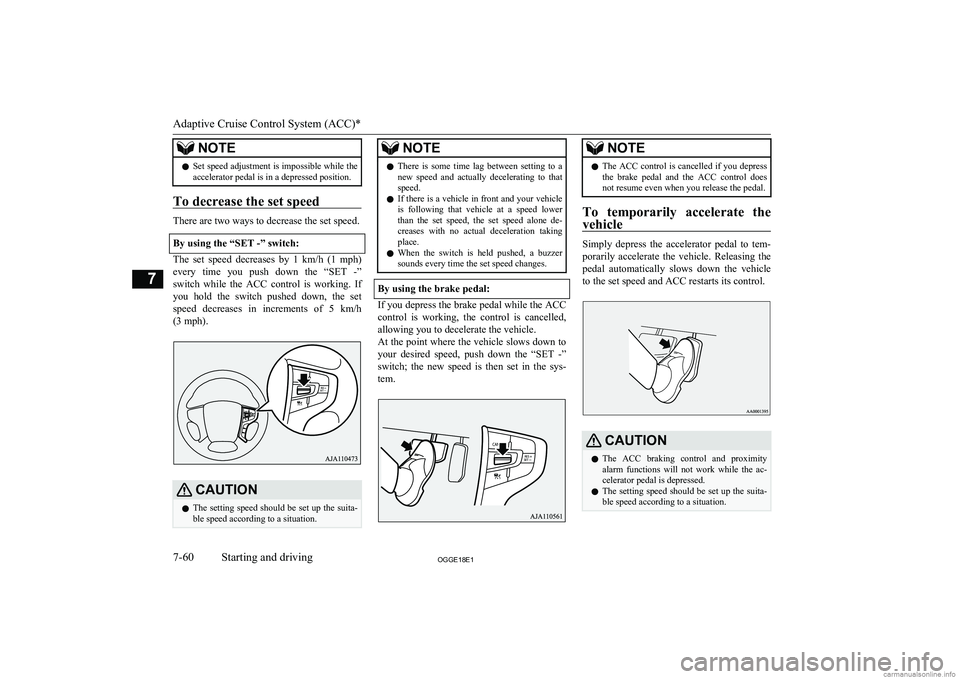
To decrease the set speed
There are two ways to decrease the set speed.
By using the “SET -” switch:
The set speed decreases by 1 km/h (1 mph) every time you push down the “SET -”switch while the ACC control is working. If
you hold the switch pushed down, the set
speed decreases in increments of 5 km/h (3 mph).
CAUTIONl The setting speed should be set up the suita-
ble speed according to a situation.NOTEl There is some time lag between setting to a
new speed and actually decelerating to that
speed.
l If there is a vehicle in front and your vehicle
is following that vehicle at a speed lower
than the set speed, the set speed alone de- creases with no actual deceleration taking
place.
l When the switch is held pushed, a buzzer
sounds every time the set speed changes.
By using the brake pedal:
If you depress the brake pedal while the ACC
control is working, the control is cancelled,allowing you to decelerate the vehicle.
At the point where the vehicle slows down to
your desired speed, push down the “SET -” switch; the new speed is then set in the sys-tem.
NOTEl The ACC control is cancelled if you depress
the brake pedal and the ACC control does
not resume even when you release the pedal.
To temporarily accelerate the
vehicle
Simply depress the accelerator pedal to tem- porarily accelerate the vehicle. Releasing the
pedal automatically slows down the vehicle to the set speed and ACC restarts its control.
CAUTIONl The ACC braking control and proximity
alarm functions will not work while the ac- celerator pedal is depressed.
l The setting speed should be set up the suita-
ble speed according to a situation.
Adaptive Cruise Control System (ACC)*
7-60OGGE18E1Starting and driving7
Page 275 of 538

NOTElThe set speed indication on the display turns
to “---” when the accelerator pedal is de- pressed. This indication remains as long as
the pedal is in a depressed position.
l In certain conditions, the braking control and
alarming functions of ACC may not work
for a short while after releasing the accelera- tor pedal.
l Set speed adjustment is impossible while the
accelerator pedal is in a depressed position.
To terminate ACC control
To cancel of ACC control
You can cancel the ACC control by using ei-
ther of the methods below.
When the control is cancelled, the system is placed in the ‘standby state’. You can makethe system restart the control by using the
“SET -” or “RES +” switch if the conditions for activating the control are met.
l Press the “CANCEL” switch.
l Depress the brake pedal.NOTElYou can also cancel the ACC control by
pressing the “ACC ON/OFF” switch. If thisswitch is pressed, ACC is turned off.
When the system shifts into the ‘standby
state’ as a result of cancellation of the ACC
control, the“ SET” indicator goes out. At the same time, the display of the following dis-
tance setting and running-ahead vehicle sym- bol (only when ACC is detecting a vehicle) is
placed in the standby state of display.
The ACC control is automatically cancelled
and the ACC is placed in the ‘standby’ state
in any of the situations listed below; you are
alerted to this condition by the sound of a
buzzer and a message on the display. You can make the system restart the control by us-ing the “SET -” or “RES +” switch if the con-
ditions for resuming the control are reestab-
lished.
l When your vehicle stops as the vehicle
in front stops.
l When ASC is turned off.
l When ABS, ASC or TCL is in operation.
Adaptive Cruise Control System (ACC)*
7-61OGGE18E1Starting and driving7
Page 278 of 538

CAUTIONlCruise control (automatic vehicle speed con-
trol system) does not alert by proximity
alarm and control distance between vehicles to the vehicle in front.Forward Collision
Mitigation System (FCM)* E00635101243
The Forward Collision Mitigation System(FCM) uses a sensor (A) to determine the distance and relative speed to a vehicle and apedestrian in front.
When your vehicle is approaching a vehicle
or a pedestrian straight-ahead in your path
and the FCM judges that there is the risk of a collision, the system gives audible and visualwarnings (forward collision warning func-
tion), increases the brake fluid pressure (FCM brake prefill function), and also pro-vides braking force assistance when you de-press the brake pedal (FCM brake assist func-
tion) to avoid frontal collision.
When the risk of collision increases more, the system causes the brakes to work moderately
to encourage you to apply brakes. If the sys- tem judges that a potential collision is immi- nent, it initiates emergency braking to miti-
gate collision-caused damages or to avoid possible collision (FCM braking function).
Stop lamps are illuminated during automatic
braking.
If you turn the FCM ON/OFF, the Ultrasonic misacceleration Mitigation System (UMS) al- so turns ON/OFF at the same time. (Vehicles
equipped with the UMS)WARNINGl A driver is responsible for driving safely.
The FCM is the system to mitigate colli- sion-caused damages or to avoid collisionsas much as possible.
The system is not intended to compensate for driver’s loss of attention to the frontduring driving due to distraction or care-
lessness or supplement a drop in visibility
due to the rain and fog.
It is never a substitute for your safe and careful driving. Always be ready to apply
the brakes manually.
l The FCM works to avoid frontal collisions
as much as possible. However, the effect
of its operation varies depending on situa- tions and conditions, such as driving con-ditions, road conditions, and steering, ac-
celeration and braking operations, so that
the performance the function can deliver
is not always the same.
If your vehicle is in danger of collision,
take all necessary collision-evading ac- tions, such as depressing the brake pedal
strongly regardless of whether the system is activated or not.
l Never attempt to test the operation of the
FCM. Doing so could cause an accident,
resulting in serious injury or death.
Forward Collision Mitigation System (FCM)*
7-64OGGE18E1Starting and driving7
Page 279 of 538

Forward collision warningfunction
E00635401129
If the system judges that there is a risk of
your vehicle colliding with a vehicle or a pe-
destrian in front, this function warns you of
the potential hazard with visual and audible
alarms.
When this function is triggered, a buzzer
sounds and, at the same time, a “BRAKE!”
message appears on the information screen of
the multi-information display.
The forward collision warning function oper- ates at the following vehicle speed:
l Against a vehicle: Approximately
15 km/h (9 mph) to 140 km/h (87 mph).
l Against a pedestrian: Approximately
7 km/h (5 mph) to 65 km/h (40 mph).
CAUTIONl Under certain conditions, the audible alarm
may not work at all or may be scarcely audi- ble. Do not overly rely on the system; if your
vehicle is in danger of collision, take all nec- essary collision-evading actions, such as de-
pressing the brake pedal strongly regardless of whether the system is activated or not.FCM brake prefill function
E00635201055
If the system judges that there is a risk of
your vehicle colliding with a vehicle or a pe-
destrian in front, this function prefills the
brake line with additional brake fluid to make
the brakes more responsive to your brake pedal operation.
The FCM brake prefill function operates at
the following vehicle speed:
l Against a vehicle: Approximately
5 km/h (3 mph) to 80 km/h (50 mph).
l Against a pedestrian: Approximately
5 km/h (3 mph) to 65 km/h (40 mph).
FCM brake assist function
E00635301072
If the system judges that there is a risk of
your vehicle colliding with a vehicle or a pe-
destrian in front, this function deploys the
brake assist sooner than the brake assist oper- ation.
The FCM brake assist function operates at
the following vehicle speed:
l Against a vehicle: Approximately
15 km/h (9 mph) to 80 km/h (50 mph).
l Against a pedestrian: Approximately
15 km/h (9 mph) to 65 km/h (40 mph).CAUTIONl The brake assist function may not be trig-
gered when the brake pedal is operated in certain ways.
Do not overly rely on the system; if your ve- hicle is in danger of collision, take all neces-
sary collision-evading actions, such as de-
pressing the brake pedal strongly regardless of whether the system is activated or not.FCM braking function
E00635501380
If the system judges that there is a high risk
of your vehicle colliding with a vehicle or a
pedestrian in front, the system applies the
brakes moderately to encourage you to apply the brakes.
If the system judges that a collision is un-
avoidable, it initiates emergency braking con- trol to mitigate collision-caused damages or, if the situation permits, to avoid a collision.When the emergency braking control is trig-
gered, you are warned of the hazard with vis- ual and audible alarms like with the forwardcollision warning function.
Forward Collision Mitigation System (FCM)*
7-65OGGE18E1Starting and driving7
Page 280 of 538

Once the emergency braking has worked, you
are alerted to this by a message on the infor- mation screen of the multi-information dis- play.
The FCM braking function operates at the
following vehicle speed:
l Against a vehicle: Approximately
5 km/h (3 mph) to 80 km/h (50 mph).
l Against a pedestrian: Approximately
5 km/h (3 mph) to 65 km/h (40 mph).
CAUTIONl Do not use the FCM as a normal braking.
l After your vehicle has stopped following the
activation of the FCM, automatic braking is released. As the vehicle will then start creep-
ing, be sure to depress the brake pedal to
hold the vehicle stationary.CAUTIONl When applying the brake during the auto-
matic braking condition the pedal will feel firm.
This is not abnormal.
You can apply more pressure to the pedal to
assist in braking.
l In the following situations, the system pro-
vides neither control nor alarming.
• When a vehicle or a pedestrian suddenly
cuts in front of your vehicle.
• When the distance from a vehicle or a pe-
destrian in front is extremely short.
• To an oncoming vehicle.
• When the select position is in the “P”
(PARK) or the “R” (REVERSE) position.
• When the FCM has detected a problem in
the system.
l If the ASC is deactivated, the FCM braking
function will not operate. Refer to “Active
Stability Control (ASC)” on page 7-40.
l The FCM may or may not detect a motorcy-
cle, bicycle or wall depending on the situa-
tion. The FCM is not designed to detect these objects.
l The forward collision warning function
and/or the FCM braking function may not
activate in the following situations.
• When a vehicle suddenly appear just in
front of your vehicle.
• When a vehicle cuts in front of your vehi-
cle very closely.
• When the vehicle in front is offset to the
left or right.CAUTION• When the vehicle in front is towing a
trailer.
• A freight trailer that is not carrying a con-
tainer.
• The vehicle has a protruding load from
the carrier.
• The vehicle has a low vehicle height.
• The vehicle has an extremely high ground
clearance.
• When a vehicle in front is extremely dirty.
• When a vehicle in front is covered with
snow.
• When a vehicle in front has a large glass
surface.
• When a vehicle in front does not have re-
flectors (lamp reflector) or the position of the reflector is low.
• When a vehicle in front is a car carrier or
a similar shaped vehicle.
• When there is a different object near the
vehicle.
• When driving on a road with many and
successive curves, including when pass-
ing their entrances and outlets.
• When accelerating and decelerating
quickly.
• When the system recognizes driver’s
steering, accelerating, braking or gear
shifting actions as evasive actions to
avoid collision.
• When you are driving on a road with
steep and alternating up and down slopes.
• When driving on a slippery road covered
by rain water, snow, ice etc.
Forward Collision Mitigation System (FCM)*
7-66OGGE18E1Starting and driving7