2018 MERCEDES-BENZ SPRINTER wheel
[x] Cancel search: wheelPage 22 of 294

Sidewall (definition) ....................... 266
Snow chains .................................. 251
Speed rating (definition) ................ 265
Storing ........................................... 267
Structure and characteristics
(definition) ..................................... 264
Summer tires ................................. 250
TIN (Tire Identification Number)
(definition) ..................................... 266
Tire bead (definition) ...................... 266
Tire pressure (definition) ................ 266
Tire pressures (recommended) ...... 265
Tire size designation, load-bearing
capacity, speed rating .................... 262
Tire tread ....................................... 249
Tire tread (definition) ..................... 266
Total load limit (definition) ............. 266
Traction (definition) ....................... 266
TWR (permissible trailer drawbar
noseweight) (definition) ................. 266
Uniform Tire Quality Grading
Standards (definition) .................... 265
Wear indicator (definition) ............. 266
Wheel rim (definition) .................... 265
Wheel/tire combinations ............... 273
Top Tether ............................................ 52
Touchshift (automatic transmis-
sion) .................................................... 124
Tow-away alarm
Arming/deactivating ........................ 59
Deactivating ..................................... 59
Operation ......................................... 59
Tow-starting
Emergency engine starting ............ 247
Important safety notes .................. 244
Towing
If the vehicle is stuck ..................... 246
Installing/removing the towing
eye ................................................. 245
With a raised front or rear axle ...... 246
Towing a trailer
Axle load, permissible .................... 288
Cleaning the trailer tow hitch ......... 238
Coupling up a trailer ...................... 156
Decoupling a trailer ....................... 157
Driving tips .................................... 154
Important safety notes .................. 154
Notes on retrofitting ...................... 288 Trailer loads ................................... 288
Towing away
Imp ortant sa
fety guidelines ........... 244
In the event of malfunctions .......... 245
With both axles on the ground ....... 246
Trailer
Brake force booster malfunction ... 197
Trailer coupling
see Towing a trailer
Trailer loads and drawbar nose-
weights ............................................... 158
Trailer towing
Blind Spot Assist ............................ 145
PARKTRONIC ................................. 152
Permissible trailer loads and
drawbar noseweights ..................... 158
Transmission
see Automatic transmission
Transmission oil ................................ 284
Transport
Loading guidelines ......................... 213
Vehicle ........................................... 247
Transport by rail ................................ 134
Transportation
Rail ................................................ 134
Transporting
Load distribution ............................ 215
Securing a load .............................. 215
Trim pieces (cleaning instruc-
tions) .................................................. 239
Trip computer (on-board com-
puter) .................................................. 173
Trip odometer
Display (vehicles with steering
wheel buttons) ............................... 166
Display (vehicles without steering
wheel buttons) ............................... 162
Resetting ....................................... 161
see Trip computer (on-board computer)
Turn signals
Replacing bulbs (front) ..................... 91
Replacing bulbs (rear) ...................... 92
Switching on/off .............................. 84
Turn signals (Chassis Cab)
Replacing bulbs (rear) ...................... 93
Twin front-passenger seat
Stowage compartment .................. 207
20Index
Page 23 of 294

Two-way radiosType approval/frequency .............. 276
TWR (Tongue Weight Rating) (defi-
nition) ................................................. 266
Type plate
Vehicle identification number
(VIN) .............................................. 276
U
UnlockingFrom inside the vehicle (central
unlocking button) ............................. 65
USB port ............................................. 212
V
Vehicle
Data acquisition ............................... 30
Display message ............................ 194
Electronics ..................................... 276
Equipment ....................................... 23
Individual settings (vehicles with
steering wheel buttons) ................. 167
Limited Warranty ............................. 23
Loading .......................................... 259
Locking (SmartKey) .......................... 61
Lowering ........................................ 272
Maintenance .................................... 24
Operating safety .............................. 26
Parking for a long period ................ 131
Pulling away ................................... 121
Raising ........................................... 268
Registration ..................................... 28
Reporting problems ......................... 28
Securing from rolling away ............ 129
Towing away .................................. 244
Transporting .................................. 247
Unlocking (SmartKey) ...................... 61
Vehicle battery
see Battery (vehicle)
Vehicle bodies ..................................... 28
Body/equipment mounting direc-
tives for trucks ................................. 28
Vehicle data ....................................... 286
Vehicle identification number .......... 276
Vehicle identification plate .............. 276
Vehicle tool kit .................................. 241 VIN
...................................................... 276
Voltage supply
Fuses ............................................. 247
W
WarningStickers ........................................... 25
Warning and indicator lamp
Power assistance for the steering .. 204
Warning and indicator lamps
Brakes ........................................... 197
Check Engine ................................. 201
Coolant .......................................... 200
Diesel Exhaust Fluid (DEF) ............. 198
Distance warning function ............. 195
Electrical step ................................ 204
ESP
®.............................................. 195
ESP®function ................................ 199
Lane Keeping Assist ...................... 195
Overview .......................................... 35
Seat belt ........................................ 203
Warning lamp .................................... 242
Warning triangle ................................ 242
Warning- and indicator lamps
ABS ................................................ 196
Air filter .......................................... 202
ASR ................................................ 195
BAS ................................................ 196
Battery charge ............................... 199
Brake wear .................................... 199
Bulbs .............................................. 203
Doors ............................................. 203
Engine oil level ............................... 200
Preglow .......................................... 202
Reserve fuel ................................... 201
Tire pressure monitor .................... 202
Water separator ............................. 203
Windshield washer fluid ................. 203
Warranty .............................................. 23
Washer fluid
Adding ........................................... 225
Capacities ...................................... 286
Display message ............................ 194
Indicator lamp ................................ 203
Notes ............................................. 286
Wiping with ...................................... 96
Index21
Page 24 of 294

WheelsChanging a wheel .......................... 267
Checking ........................................ 249
Cleaning ......................................... 236
Important safety notes .................. 248
Installing the adapter (spare
wheel) ............................................ 270
Interchanging/changing ................ 267
Mounting a wheel .......................... 268
Removing a wheel .......................... 270
Removing and mounting the spare
wheel ............................................. 274
Snow chains .................................. 251
Storing ...........................................2 67
Tightening torque ........................... 272
Wheel/tire combinations ...............2 73
Window curtain air bag ....................... 47
Windows
see Side windows
Windshield
Cleaning ......................................... 236
Defrosting ...................................... 104
Windshield heating
Problem (malfunction) ................... 105
Switching on/off ........................... 105
Windshield washer fluid
Adding ...........................................2 25
Indicator lamp ................................ 203
Windshield wipers
Problem (malfunction) ..................... 98
Rain and light sensor ....................... 96
Rear window wiper .......................... 97
Replacing the wiper blades .............. 97
Setting the sensitivity (vehicles
with steering wheel buttons and
rain/light sensor) ........................... 171
Switching on/off .............................. 96
Wiping with windshield washer
fluid ................................................. 96
Winter diesel ..................................... 279
Winter driving
Slippery road surfaces ................... 136
Snow chains .................................. 251
Winter operation
General notes ................................ 250
Radiator cover ................................. 29
Winter tires
M+S tires ....................................... 250 Setting a limit spee
d ......................1
33
Wi
per blades
Cleaning ......................................... 236
Replacing ......................................... 97
Workshop
see Qualified specialist workshop
22Index
Page 28 of 294

Operating conditions:
Ravoid short trips as these increase fuel con-
sumption.
Ralways make sure that the tire pressures
are correct.
Rdo not carry any unnecessary weight.
Rremove roof racks once you no longer need
them.
Ra regularly serviced vehicle will contribute
to environmental protection. You should
therefore adhere to the service intervals.
Ralways have service work carried out at a
qualified specialist workshop.
Personal driving style:
Rdo not depress the accelerator pedal when
starting the engine.
Rdo not warm up the engine when the vehicle
is stationary.
Rdrive carefully and maintain a safe distance
from the vehicle in front.
Ravoid frequent, sudden acceleration and
braking.
Rchange gear in good time and use each gear
only up to Ôof its maximum engine speed.
Rswitch off the engine in stationary traffic.
Rkeep an eye on the vehicle's fuel consump-
tion.
Environmental issues and recommen-
dations
When prompted by this Operator's Manual to
dispose of materials, please try to regenerate
and recycle these materials. Observe all rele-
vant environmental guidelines and regulations
when disposing of materials. This helps to pro-
tect the environment.
Operating safety and vehicle approval
Important safety notes
GWARNING
If you do not have the prescribed service/
maintenance work or any required repairs
carried out, this can result in malfunctions or system failures. There is a risk of an accident.
Always have the prescribed service/mainte-
nance work as well as any required repairs
carried out at a qualified specialist workshop.
Air bags and pyrotechnic Emergency Tensioning
Devices (ETDs) contain perchlorate material,
which may require special handling and regard
for the environment. The guidelines must be
observed during disposal.
In California, you can find more information on
the Internet at www.dtsc.ca.gov.
Notes on operating the vehicle
There is a risk of damage to the vehicle if:
Rthe vehicle makes contact with the ground,
e.g. on a high curb or a loose road surface
Ryou drive too quickly over an obstacle, e.g. a
curb, speed bump or pothole
Ra heavy object hits the underbody or chassis
component
In these or similar situations, the vehicle body/
frame, the underbody, chassis components,
wheels or tires could be damaged even if this is
not visible from the outside. Components that
have been damaged in this way can unexpect-
edly fail or no longer be able to assimilate the
loads occurring in the event of an accident. If the underbody paneling is damaged, flammable
material, such as leaves, grass or twigs, could
collect between the underbody and underbody
paneling. These materials could ignite if they
remain in contact with hot components of the
exhaust system for an extended period.
GWARNING
Flammable material such as leaves, grass or
twigs may ignite if they come into contact with
hot parts of the exhaust system. There is a risk of fire.
26Introduction
Page 32 of 294

The operating safety of the vehicle could be
jeopardized if you use parts, tires and wheels as
well as accessories relevant to safety which
have not been approved by Mercedes-Benz. This
could lead to malfunctions in safety-relevant
systems, e.g. the brake system. Only use genu-
ine Mercedes-Benz parts or parts of equal qual-ity. Only use tires, wheels and accessories that
have been specifically approved for your vehi-
cle.
We test genuine Sprinter parts, as well as con-
version parts and accessories that have been
specifically approved for the type of vehicle, for:
RReliability
RSafety
RSuitability
Despite ongoing market research, Mercedes-
Benz is unable to assess other parts. Therefore,
we accept no responsibility for the use of such
parts in Sprinter vehicles, even if they have been
officially approved or independently approved
by a testing center.
In some countries, certain parts are only offi-
cially approved for installation or modification if
they comply with legal requirements. All genu-
ine Sprinter parts satisfy these requirements.
Make sure that all parts are suitable for your
vehicle.
Always specify the vehicle identification number
(VIN) and engine number when ordering genuine Sprinter parts (
Ypage 276).
QR code for rescue card
The QR Code stickers are affixed to the B-pillar
on the driver's and front-passenger side.
In the event of an accident the rescue services
use the QR Code to quickly find the rescue card
for your vehicle. The current rescue card con-
tains the most important information on your
vehicle, e.g. the electric cable routes, in a com-
pact form.
Further information can be found at http://
www.mercedes-benz.de/qr-code.
Data stored in the vehicle
Information from electronic control
units
There are electronic control units installed in
your vehicle. Some of these are necessary for
your vehicle to operate safely, while some offer
support during driving (driver assistance sys-
tems). In addition, your vehicle offers comfort
and entertainment functions that are also made
possible by electronic control units.
Electronic control units contain data storage
systems that can temporarily or permanently
save technical information concerning the vehi-
cle's condition, component stress and mainte-
nance requirements as well as technical events
and malfunctions.
This information generally documents the con-
dition of a component, a module, a system or the
surroundings, for example:
ROperating conditions of system components
(e.g. levels, battery status, tire pressure)
RStatus messages concerning the vehicle or its
individual components (e.g. wheel revolution
number / speed, deceleration in movement,
lateral acceleration, display showing fastened
belts)
RMalfunctions and defects in key system com-
ponents (e.g. lights, brakes)
RInformation about events leading to vehicle
damage
RSystem responses in special driving situa-
tions (e.g. air bag deployment, intervention of
stability control systems)
RAmbient conditions (e.g. temperature, rain
sensor)
In addition to performing the actual control unit function, these data are used by manufacturers
to detect and rectify malfunctions and to opti-
mize vehicle functions. Most of these data are
volatile and processed only in the vehicle itself.
Only a small part of the data is stored in event or
malfunction memories.
When you use services, the technical data from
the vehicle can be read out by service network
employees or third parties. Service activities
include repairs, maintenance, warranty claims
and quality assurance measures. The data are
read out via the connection for OBD (on-board
diagnostics) in the vehicle, which is required by
law. The relevant offices in the service network
or third parties collect, process and use the
30Introduction
Page 33 of 294

data. These data document the vehicle's tech-
nical states, are used to help in finding malfunc-
tions and improving quality and are sent to the
manufacturer where necessary. In addition, the
manufacturer is subject to product liability. The
manufacturer needs technical data from vehi-
cles for this purpose.
Malfunction memories in the vehicle can be
reset by a service center during repair or service
work.
You can incorporate data into the vehicle's com-
fort and infotainment functions yourself as part
of the selected equipment.
These include:
RMultimedia data such as music, films or pho-
tos for playback in an integrated multimedia
system
RAddress book data for use in conjunction with
an integrated hands-free system or an inte-
grated navigation system
RNavigation destinations that have been
entered
RData about using Internet services
These data can be saved locally in the vehicle or are located on a device that you have connected
to the vehicle. If these data are saved in the
vehicle, you can delete them at any time. These data are sent to third parties only at your
request, particularly when you use online serv-
ices in accordance with the settings that you
have selected.
You can save and change comfort settings/
customizations in the vehicle at any time.
Depending on the equipment, these settings
include:
RSeat and steering wheel position settings
RSuspension and climate control settings
RCustom settings such as interior lighting
If your vehicle is equipped appropriately, you
can connect your smartphone or another mobile terminal to the vehicle. You can control this by
means of the control elements integrated in the
vehicle. The smartphone's picture and sound
can be output via the multimedia system. Spe-
cific items of information are also sent to your
smartphone.
Depending on the type of integration, such infor-
mation includes:
RGeneral vehicle information
RPosition data This allows you to use selected apps on your
smartphon
e, such as navigation or music play-
back. There is no additional interaction between
the smartphone and the vehicle, particularly
active access to vehicle data. The type of addi-
tional data processing is determined by the pro- vider of the app being used. Whether you can
configure settings for it and, if so, which ones,
depends on the app and your smartphone's
operating system.
Service provider
Wireless network connection
If your vehicle has a wireless network connec-
tion, it enables data to be exchanged between
your vehicle and other systems. The wireless
network connection is enabled by either an in-
vehicle transmitter and receiver or your own
mobile end device (e.g. smartphone). Online
functions can be used via this wireless connec-
tion. These include online services and applica-
tions/apps provided by the manufacturer or
other providers.
Manufacturer's own services
In the case of the manufacturer's online serv-
ices, the manufacturer describes the functions
in a suitable place and the associated informa-
tion subject to data protection legislation. Per-
sonal data can be used in the provision of online
services. Data are exchanged via a secure con-
nection (e.g. using the IT system specially pro-
vided for this purpose by the manufacturer).
Collecting, processing and using personal data
beyond the provision of services is permitted
only on the basis of a statutory permit or decla-
ration of consent.
You can usually activate and deactivate the serv-
ices and functions (some of which are subject to
charge). In many cases, this also applies to the
vehicle's entire data connection. However, this
does not apply in particular to legally prescribed
functions and services such as the "eCall" emer-
gency call system.
Services from third parties
If it is possible to use online services from other
providers, these services are the responsibility
of the provider in question and subject to that
provider's data protection conditions and terms
Introduction31
Z
Page 35 of 294
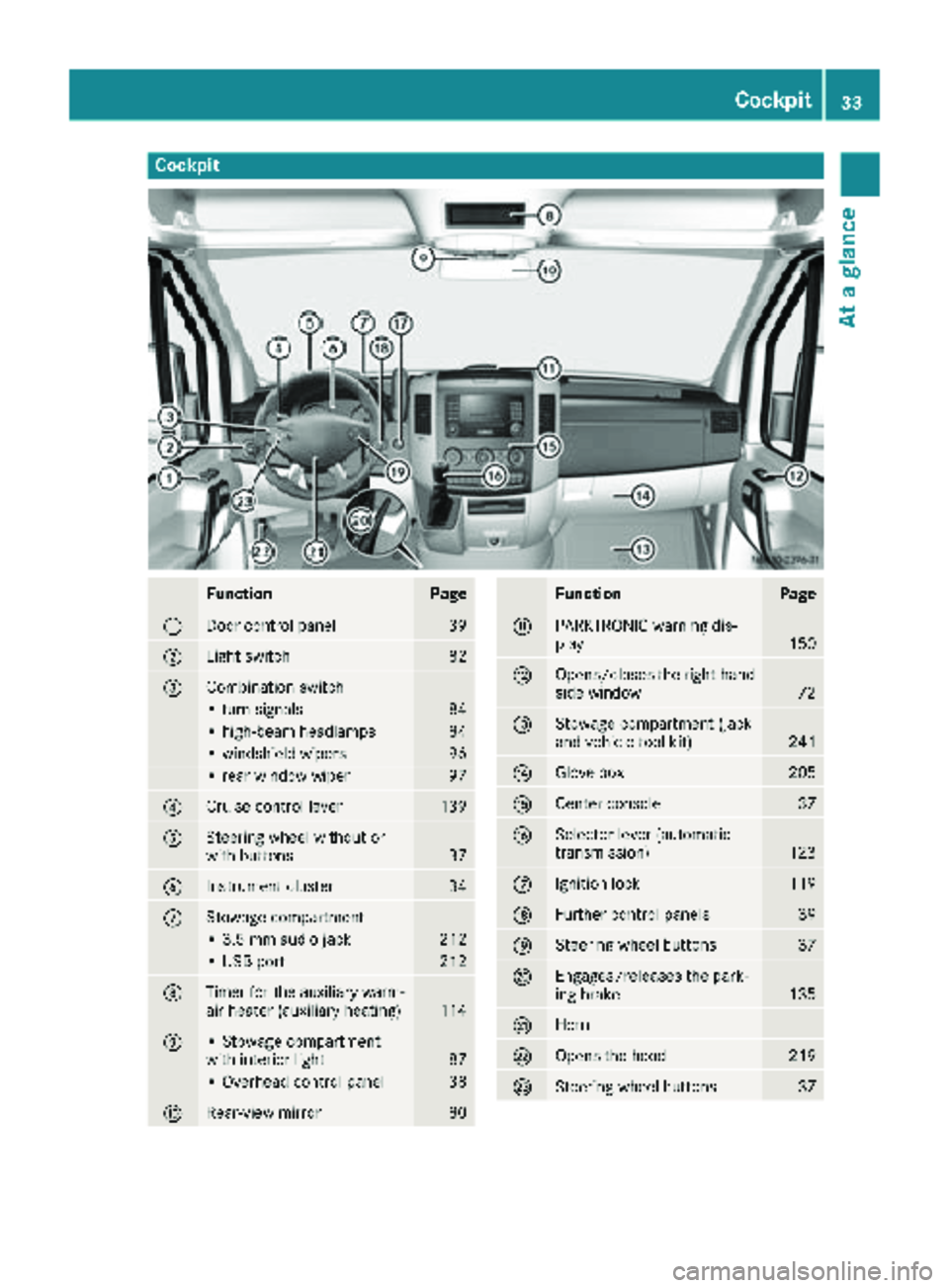
Cockpit
FunctionPage
:Door control panel39
;Light switch82
=Combination switch
• turn signals84
• high-beam headlamps84
• windshield wipers96
• rear window wiper97
?Cruise control lever139
ASteering wheel without or
with buttons37
BInstrument cluster34
CStowage compartment
• 3.5 mm audio jack212
• USB port212
DTimer for the auxiliary warm-
air heater (auxiliary heating)114
E• Stowage compartment
with interior light87
• Overhead control panel38
FRear-view mirror80
FunctionPage
GPARKTRONIC warning dis-
play150
HOpens/closes the right-hand
side window72
IStowage compartment (jack
and vehicle tool kit)241
JGlove box205
KCenter console37
LSelector lever (automatic
transmission)123
MIgnition lock119
NFurther control panels39
OSteering wheel buttons37
PEngages/releases the park-
ing brake135
QHorn
ROpens the hood219
SSteering wheel buttons37
Cockpit33
At a glance
Page 36 of 294

Instrument cluster
Displays and controls
Instrumentcluste ron vehicles without steering whee lbuttons
Instrumen tcluste rin vehicles wit hsteering-wheel buttons
FunctionPag e
:Speedometer161
;Tachometer161
=f, gBrightens/dims th e
instrumen tcluste rlighting16 1
?Fue lgauge wit hfuel filler flap
location indicator16 1
ADisplay
Vehicles without steering
whee lbuttons16 2
Vehicles wit hsteering whee l
buttons16 3
FunctionPag e
BReset butto n934
CMen ubutto n4
• changes standard display16 2
•select smenus16 3
DService butto nË
Checks th eengin eoil level22 1
34Instrument cluster
At a glance