2018 MERCEDES-BENZ S-CLASS SEDAN change time
[x] Cancel search: change timePage 421 of 562
The system checks the tire pressure and the tire
te mp erature of the tires mounted on theve hicle
by means of a tire pressure sensor.
New tire pressure sensor, e.g. in winter tires, are
automatically taught-in thefirs t time they are
driven.
The tire pressure appears in the multifunction
display (
→page 247).
If th ere is a subs tantial pressure loss or if the
tire temp erature is excessive, a warning will be
given:
RVi a display messages (→page 487).
RViath eh warning lamp in the instrument
clus ter (→page 517).
It is the driver's responsibility toset the tire
pressure tothere commended cold tire pressure
suitable forth e operating situation. Set the tire
pressure for cold tires using a tire pressure
ga uge. No tethat the cor rect tire pressure forth e
cur rent operating situation must firs t be taught-
in to the tire pressure monitoring sy stem.
In most cases, the tire pressure monitoring sys‐
te m will auto matically update the new refere nce va
lues af teryo u ha vechanged the tire pressure.
Yo u can, ho wever,also update there fere nce val‐
ues byrestarting the tire pressure monitoring
sy stem manually (
→page 420).
Sy stem limitations
The sy stem may be impaired or may not function
in thefo llowing situations:
RIf th e tire pressure is set incor rectly.
RIfth ere is a sudden pressure loss caused, for
ex ample byafo re ign object penetrating the
tire.
RIf th ere is a malfunction caused byano ther
ra dio signal source.
Make sure toobser vethefo llowing fur ther rela‐
te d subjec t:
RNotes on tire pressure (→page 414)
Checking the tire pressure with the tire pres‐
sure moni toring sy stem
Requ irement:
RThe ignition is switched on. On-board computer:
,6HUYLFH.7LUHV
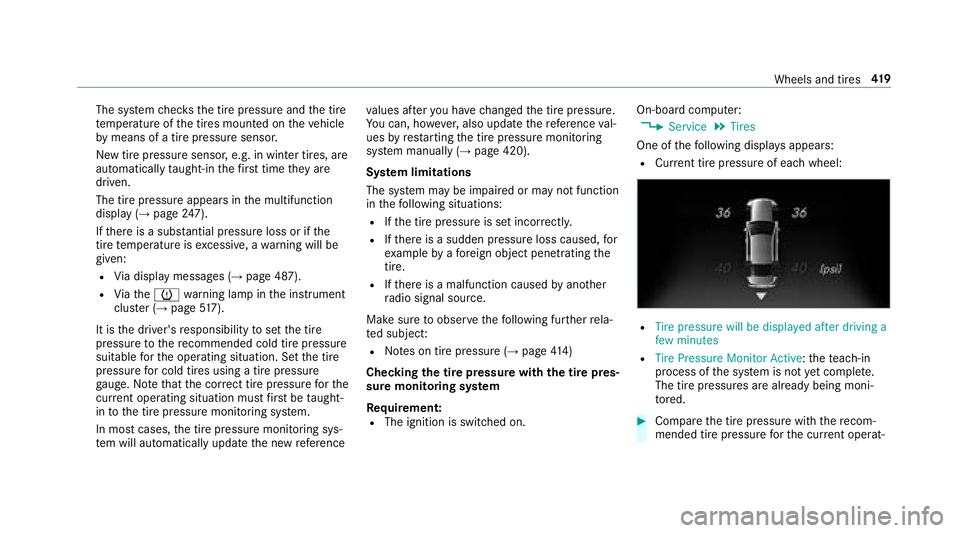
One of thefo llowing displa ysappears:
RCur rent tire pressure of ea chwheel:
R7LUH SUHVVXUH ZLOO EH GLVSOD\HG DIWHU GULYLQJ D
IHZ PLQXWHV
R7LUH 3UHVVXUH 0RQLWRU $FWLYH: thete ach-in
process of the sy stem is not yet comple te.
The tire pressures are already being moni‐
to re d.
#Compare the tire pressure with there com‐
mended tire pressure forth e cur rent operat‐
Wheels and tires 41
9
Page 440 of 562
Aluminum hub cap
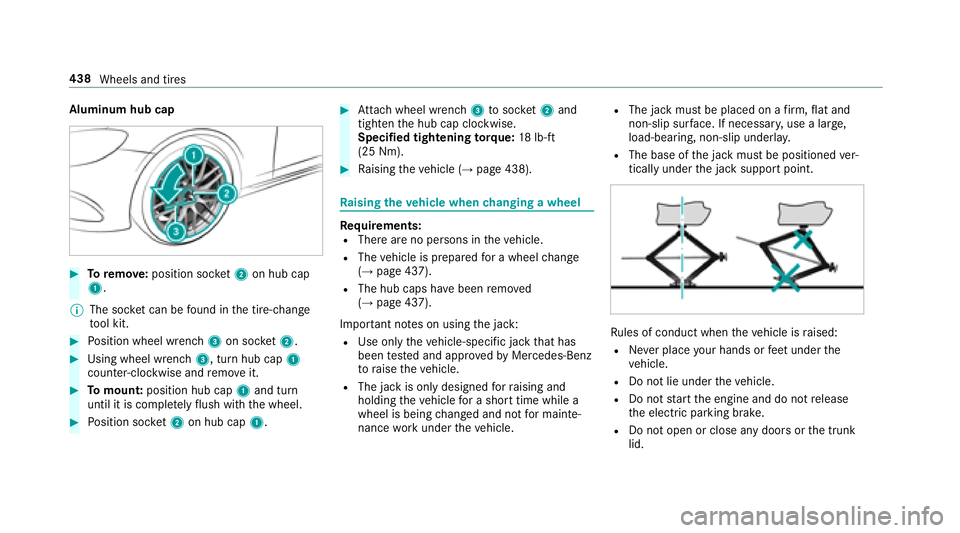
#Toremo ve:position soc ket2 on hub cap
1.
% The soc ket can be found inthe tire-change
to ol kit.
#Po sition wheel wrench 3on soc ket2.
#Using wheel wrench 3, turn hub cap1
counter-clo ckwise and remo veit.
#To mount: position hub cap 1and turn
until it is compl etely flush withth e wheel.
#Po sition soc ket2 on hub cap 1.
#Attach wheel wrench 3tosoc ket2 and
tighten the hub cap clockwise.
Specified tightening torq ue: 18lb-ft
(25 Nm).
#Ra ising theve hicle (→page 438).
Ra ising theve hicle when changing a wheel
Re quirements:RThere are no persons in theve hicle.
RThe vehicle is prepared for a wheel change
(→page 437).
RThe hub caps ha vebeen remo ved
(→page 437).
Impor tant no tes on using the jack:
RUse only theve hicle-specific jack that has
been tested and appr oved byMercedes-Benz
to raise theve hicle.
RThe jack is only designed forra ising and
holding theve hicle for a short time while a
wheel is being changed and not for mainte‐
nance workunder theve hicle.
RThe jack must be placed on a firm ,fl at and
non-slip sur face. If necessar y,use a lar ge,
load-bearing, non-slip underla y.
RThe base ofthe jack must be positioned ver‐
tically under the jack support point.
Ru les of conduct when theve hicle is raised:
RNe ver place your hands or feet under the
ve hicle.
RDo not lie under theve hicle.
RDo not start the engine and do not release
th e electric parking brake.
RDo not open or close any doors or the trunk
lid.
438 Wheels and tires
Page 521 of 562

1,2, 3 ...
12 V sock et
see Soc ket (12 V)
11 5 V soc ket
see Soc ket (1 15 V)
360° camera ............................................ 224
Assigning as a favo rite ........................ 226
Ca re .................................................... 389
Fu nction .............................................. 224
Selecting a view .................................. 226
A
A/C function Activating/deactivating (multimedia
sy stem) ................................................ 158
Switching on/off (control panel) ......... 158
ABS (Anti-lock Braking Sy stem) ............ .189
Ac celeration
see Kickdown
Ac cess data
Editing ................................................ .333
Setting ................................................. 331 Ac
oustic locking verification signal
Ac tivating/deactivating ......................... 59
Ac tive Blind Spot Assi st......................... 238
Ac tivating/deactivating .......................2 40
Brake application ................................. 239
Fu nction .............................................. 238
Sy stem limitations .............................. .238
To wing a trailer .................................... 239
Ac tive Brake Assi st
Fu nction/no tes ................................... 192
Setting ................................................. 196
Ac tive Di stance Assist DI STRONIC........ 199
Ac tive Emergency Stop Assist .............2 07
Ac tive Lane Change Assi st.................. 206
Calling up a speed ............................... 200
Displa ysinthe Instrument Display ...... 208
Fu nction .............................................. 199
Increasing/decreasing speed ..............2 00
Re quirements ...................................... 200
Ro ute-based speed adjustment ...........203
St eering wheel buttons ............... .....
... 200
St oring a speed ................................... 200
Switching off/deactivating .................. 200
Switching on/activating ......................2 00
Sy stem limitations .............................. .199 Ac
tive Eme rgency Stop Assist ...............207
Ac tive hood (pedestrian pr otection) ......378
Me thod of operation ............................3 78
Re setting ............................................. 378
Ac tive Lane Change Assi st
Fu nction .............................................. 206
Switching on/off ................................. 207
Ac tive Lane Keeping Assist .................... 240
Fu nction .............................................. 240
Sensitivity (function/no tes) ................. 243
Setting the sensitivity .......................... 243
Switching on/off ................................. 242
Sy stem limitations .............................. .240
To wing a trailer .................................... 240
Ac tive Parking Assist .............................. 226
Cross Traf fic Alert ................................ 231
Drive AwayAssist ................................ 230
Exiting a pa rking space ...................... .229
Fu nction .............................................. 226
Pa rking ................................................ 228
Sy stem limitations .............................. .226
Ac tive Speed Limit Assi st.............. 202, 235
Di
splay ................................................ 202
Fu nction .............................................. 202
Index 51
9
Page 522 of 562
Setting ................................................. 235
Ac tive Steering Assist ............................ .204
Ac tivating/deactivating .......................2 06
Ac tive Emergency Stop Assist .............2 07
Ac tive Lane Change Assi st.................. 206
Displa ysinthe Instrument Display ...... 208
Fu nction .............................................. 204
Sy stem limitations .............................. .204
Ad aptive cruise control
see Active Dis tance Assist DISTRONIC
Ad aptive Highbeam Assist
Fu nction .............................................. 146
Switching on/off ................................. 147
Ad ditive s.................................................. 449
Engine oil ............................................ 449
Fu el ..................................................... 449
Ad ditive s (engine oil)
see Additives
Ad ditive s (fuel)
see Fuel
Ad dress book
see Contacts Ad
justing the balance/ fader
Burmes ter®high-end 3D sur round
sound sy stem ...................................... 360
Burmes ter
®sur round sound sy stem ... 359
Ad justing the bass, mid- range and
treble
Burmes ter
®high-end 3D sur round
sound sy stem ...................................... 359
Ad justing the mid- range, treble and
bass
Burmes ter
®high-end 3D sur round
sound sy stem ...................................... 359
Ad justing the sound focus
Burmes ter
®sur round sound sy stem ... 359
Ad justing the s
ound optimization
Burmes ter®high-end 3D sur round
sound sy stem ...................................... 360
Ad justing treble, mid- range and bass
settings
Burmes ter
®high-end 3D sur round
sound sy stem ...................................... 359
ADS PLUS damping sy stem
see AIR BODY CONTROL Af
ter-sales service center
see ASS YST PLUS
Air bag ........................................................ 38
Ac tivation .............................................. 32
Belt air bag ............................................ 36
Cushionbag ........................................... 38
Fr ont air bag (driver, front passenger) ... 38
Ins tallation locations ............................ .38
Knee air bag .......................................... 38
Overview ............................................... 38
Pr otection ............................................. .39
Re duced pr otection .............................. .40
Side air bag ........................................... 38
Wi ndow air bag ...................................... 38
AIR BODY CONT ROL................................ .211
Setting ................................................. 213
Suspension .......................................... 211
Air dis tribution
Setting (multimedia sy stem) ............... .159
Air freshener sy stem
see Frag rance sy stem
Air pressure see Tire pressure
520
Index