2018 MERCEDES-BENZ S-CLASS SEDAN ESP
[x] Cancel search: ESPPage 148 of 562
Cornering light
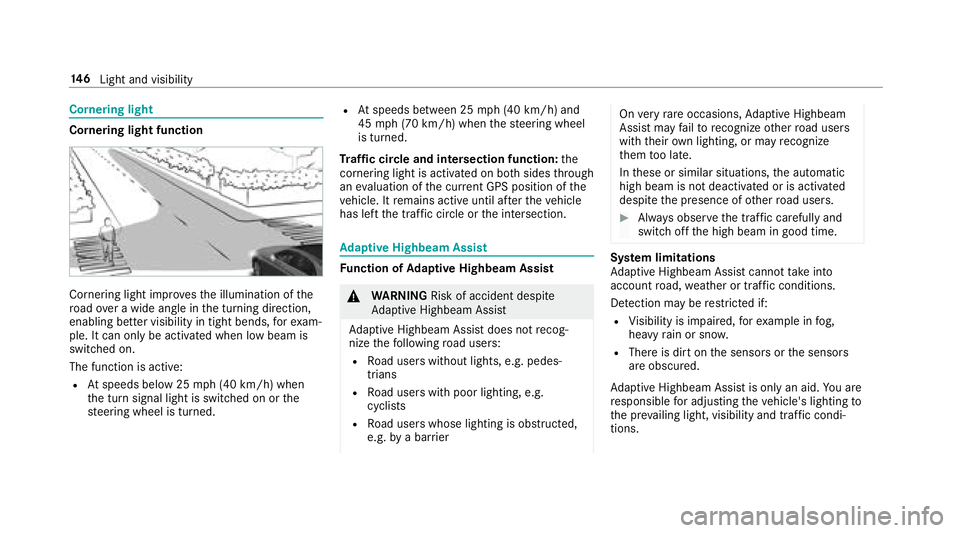
Cornering light function
Cornering light improvesth e illumination of the
ro ad ove r a wide angle in the turning direction,
enabling better visibility in tight bends, forex am‐
ple. It can only be activated when low beam is
switch ed on.
The function is active:
RAt speeds below 25 mph (40 km/h) when
th e turn signal light is switched on or the
st eering wheel is turned.
RAt speeds between 25 mph (40 km/h) and
45 mph (70 km/h) when thesteering wheel
is turned.
Tr af fic circle and intersection function: the
cornering light is acti vated on bo thsides thro ugh
an evaluation of the cur rent GPS position of the
ve hicle. It remains active until af terth eve hicle
has left the traf fic circle or the intersection.
Ad aptive Highbeam Assist
Function of Adaptive Highbeam Assist
&
WARNING Risk of accident despite
Ad aptive Highbeam Assist
Ad aptive Highbeam Assist does not recog‐
nize thefo llowing road users:
RRo ad users without lights, e.g. pedes‐
trians
RRo ad users with poor lighting, e.g.
cyclists
RRo ad users whose lighting is obstructed,
e.g. bya bar rier
On very rare occasions, Adaptive Highbeam
Assist may failto recognize other road users
with their own lighting, or may recognize
th em too late.
In these or similar situations, the automatic
high beam is not deactivated or is activated
despite the presence of other road users.
#Alw ays obser vethe tra ffic carefully and
switch off the high beam in good time.
Sy stem limitations
Ad aptive Highbeam Assist cannot take into
account road, weather or traf fic conditions.
De tection may be restricted if:
RVi sibility is impaired, forex ample in fog,
heavy rain or sno w.
RThere is dirt on the sensors or the sensors
are obscured.
Ad aptive Highbeam Assist is only an aid.You are
re sponsible for adju sting theve hicle's lighting to
th e pr evailing light, visibility and traf fic condi‐
tions.
14 6
Light and visibility
Page 155 of 562

Folding the outside mir rors in/out
#Brief lypress switch 1.
% Ifth e battery has been disconnected or com‐
ple tely discharged ,th e outside mir rors must
be reset. Only then will the automatic mir ror
fo lding function workproperly. Ad
justing the outside mir rors
#Select there qu ired mir ror using button 3or
4.
#Use button 2toset the position of the mir‐
ro ryo u ha veselected.
Engaging the outside mir rors
#Press and hold button 1.
Yo uwill hear a click and the mir ror audibly
engage in position. The mir ror is set in the
cor rect position.
In fo rm ation on automatic anti-glare mir rors
&
WARNING Risk of burn s and poisoning
due tothe anti- glare mir ror electrolyte
Electrolyte may escape if theglass in an
automatic anti-glare mir ror breaks.
The electrolyte is harmful and causes ir rita ‐
tion. It must not come into contact wi thyour
skin, eyes,respiratory organs or clo thing or
be swallo wed.
#Ifyo u come into contact with electro‐
ly te , obser vethefo llowing:
RRinse the electrolyte from your skin
and seek medical attention immedi‐
atel y.
RIf electrolyte comes into contact
with your eyes, rinse them thor‐
oughly with clean water and seek
medical attention immediately.
RIf th e electrolyte is swallo wed,
immediately rinse your mouth out
th oroughly. Do not induce vomiting.
Seek medical attention immediately.
RImmediate lych ange out of clo thing
which has come into con tact wi th
electrolyte.
RIf an allergic reaction occurs, seek
medical attention immediatel y.
The outside mirrors and inside rearview mir rors
on the driver's side automatically go into anti-
gl are mode if light from a headlamp hits the
inside rearview mir ror.
Light and visibility 15
3
Page 175 of 562

-Engine and transmission management
-Active Dis tance Assist DISTRONIC
RESP®
RSuspension
RSteering
Selecting the drive prog ram
#Press DYNA MIC SELECT switch 1forw ards
or backwards.
The drive prog ram selected appears in the
multifunction displa y.
Configuring drive prog ram I
Multimedia sy stem:
,9HKLFOH.e '<1$0,&
6(/(&7.,QGLYLGXDO
#Select the individual setting.
Displaying vehicle data
Multimedia sy stem:
,9HKLFOH.e '<1$0,& 6(/(&7
#Select 9HKLFOH 'DWD.
Displaying engine data
Multimedia sy stem:
,9HKLFOH.e '<1$0,& 6(/(&7
#Select (QJLQH 'DWD. %
The values for engine output and engine tor‐
qu e may deviate from the nominal values.
Items that can influence this are, forex am‐
ple:
Rengine speed
Rsea le vel
Rfuel grade
Routside temp erature
Automatic transmission
DIRECT SELECT le ver
Fu nction of the DIRECT SELECT le ver
&
WARNING Risk of accident and injury
due tochildren left unatte nded inthe
ve hicle
If ch ildren are left unatte nded intheve hicle,
th ey could:
ROpen doo rs,th ereby endangering other
persons or road users
Driving and parking 17
3
Page 185 of 562

#Holdremo tecontrol 5atthe same angles
at various dis tances in front of the inside rear
view mir ror.Yo u should test eve ryposition
fo r at least 25 seconds before trying ano ther
position.
#No tethat some remo tecontrols transmit
only for a limite d period, press button 6on
re mo tecontrol 5again before transmission
ends.
#Align the antenna line of thega rage door
opener unit with there mo tecontrol.
% Support and additional information on pro‐
gramming:
ROntheto ll free HomeLink®Hotline on
1-800-355-35 15.
ROn the Internet at http://
www.homelink. com/mercedes.
Opening/closing thega rage door
Requ irements:
RThe cor responding button is programmed to
operate thega rage door.
#Press and hold buttons 1,2or3 until
th ega rage door opens or closes.
#If indicator lamp 4flashes yellow af ter
appr oximately 20 seconds: press and hold
th e pr eviously pressed button again until the
ga rage door opens or closes. Clearing
thega rage door opener memory#Press and hold buttons 1and 3.
Indicator lamp 4lights up yello w.
#If indicator lamp 4flashes green: release
buttons 1and 3.
Driving and parking 18
3
Page 190 of 562

#Select
Driving and driving saf ety sy stems
Driving sy stems and your responsibility
Yo ur vehicle is equipped with driving sy stems
which assist youin drivin g, parking and maneu‐
ve ring theve hicle. The driving sy stems are aids
and do not relie ve you of your responsibility. Pay
attention tothe tra ffic conditions at all times
and inter vene when necessary . Beaware of the
limitations rega rding the safe use of these sys‐
te ms.
Fu nction of thera dar senso rs
Some driving and driving safe ty systems use
ra dar sensors tomonitor the area in front of,
behind or next totheve hicle (depending on the
ve hicle's equipment).
Depending on theve hicle's equipment, thera dar
sensors are integrated behind the bumpers
and/or behind thera diator grill. Keep these
parts free of dirt, ice and slush (
→page 389). The sensors must not be co
vered, forex ample
by bicycle rack s, overhanging loads or radar-
re flecting sticke rs.Fo llowing an impact and in
th eeve nt of associated damage , which may not
be visible, tothe bumpers or radiator grille, ha ve
th e function of thera dar sensors checked at a
qu alified specialist workshop. The driver assis‐
ta nce sy stem may no longer workproperly.
Overview of driving sy stems and driving
saf ety sy stems
In this section, you will find information about
th efo llowing driving sy stems and driving saf ety
sy stems:
R360° Camera (→page 224)
RABS (Anti-lock BrakingSystem)
(→page 189)
RAc tive Dis tance Assist DISTRONIC
(→pa ge 199)
RAIR BODY CONTROL(→page 211)
RAc tive Brake Assi st(→page 192)
RAc tive Lane Keeping Assist (→page 240)
RATTENTION ASSIST (→page 232)
RBA S (Bra ke Assist System) (→page 189)
REBD ( Electronic Brakeforc eDistribution)
(→page 192)
RESP®(E lectronic Sta bility Program)
(→page 189)
RHOLD function (→page 210)
RST EER CONTROL (→page 192)
RAc tive Steering Assist (→page 204)
RMAGIC BODY CONTROL (→page 214)
RAc tive Parking Assist (→page 226)
RPa rking Assist PARKTRONI C (→page21 8)
RRe ar view camera (→page 222)
RCruise control (→page 196)
RBlind Spot Assist and Active Blind Spot Assi st
(→page 238)
RTr af fic Sign Assist (→page 233)
188
Driving and pa rking
Page 191 of 562

Functions of ABS (anti-lock braking sy stem)
ABS regulates the brake pressure in critical driv‐
ing situations:
RDuring braking, e.g. at maximum full-s top
braking or insuf ficient traction of the tires,
th e wheels are pr evented from blocking.
RVe hicle steerability while braking is ensured.
If ABS inter venes when braking, youwill feel a
pulsing in the brake pedal. The pulsating brake
pedal can be an indication of hazardous road
conditions and can ser veas a reminder totake
ex tra care while driving.
Sy stem limitations
RABS is active from speeds of appr ox. 5 mph
(8 km/h).
RABS may be impaired or may not function if a
malfunction has occur red and theye l‐
low ! ABSwarning lamp lights up contin‐
uously in the instrument clus ter af terth e
engine is star ted.
Fu nction of BAS (Brake Assist Sy stem)
&
WARNING Risk of an accident caused by
a malfunction in BAS (Brake Assist Sys‐
te m)
If BA S is malfunctioning, the braking dis tance
in an emergency braking situation is
increased.
#Depre ssthe brake pedal with full forc e
in emer gency braking situations. ABS
pr eve nts the wheels from locking.
BA S suppo rts yo ur eme rgency braking situation
with additional brake forc e.
If yo u depress the brake pedal quickl y,BA S is
acti vated:
RBA S au tomatical lyboosts the brake pres‐
sure.
RBA S can short enthe braking dis tance.
RABS pr events the wheels from locking.
The brakes will function as usual once you
re lease the brake pedal. BAS is deactivated.
Functions of ESP®(Electronic Stability Pro‐
gr am)
&
WARNING Risk of skidding if ESP®is
malfunctioning
If ESP
®is malfunctioning, ESP®cannot car ry
out vehicle stabilization. In addition, other
driving saf etysy stems are switched off.
#Drive on carefull y.
#Have ESP®checked at a qualified spe‐
cialist workshop.
&
WARNING Risk of skidding if ESP®is
deactivated
If yo u deactivate ESP
®, ESP®cannot car ry
out vehicle stabilization.
#ESP®should only be deactivated in the
fo llowing situations.
Mercedes‑AMG vehicles: observeth e no tes in
th e Supplement. Otherwise, you may not recog‐
nize dangers.
Driving and park ing18
9
Page 192 of 562

ESP®can monitor and impr ovedriving stability
and traction in thefo llowing situations, within
ph ysical limits:
RWhen pulling away on a wet or slippe ryroad.
RWhen braking.
RIn stro ng sidewinds when you are driving
fast erthan 50 mph (80 km/h).
If th eve hicle deviates from the direction desired
by the driver, ESP
®can stabilize theve hicle by
inter vening in thefo llowing ways:
ROne or more wheels are braked.
RThe engine output is adap ted according to
th e situation.
ESP
®is deactivated if the ESP®OFF å warn‐
ing lamp lights up continuously in the instrument
clus ter:
RDriving stability will no longe r be improved.
RCrosswind Assist is no longer active.
RThe drive wheels could spin.
RETS/4ETS traction control is still active.
% When ESP
®is deactivated, you are still assis‐
te dby ESP®when braking.
ESP
®is inter vening if the ESP®÷ warning
lamp flashes in the instrument clus ter:
RDo not deacti vate ESP®.
ROnly depress the accelera tor pedal as far as
is necessar y.
RAdapt your drivin gst yle to suit the cur rent
ro ad and weather conditions.
Deactivate ESP
®in thefo llowing situations to
impr ovetraction:
RWhen using snow chains
RIn deep snow
ROn sand or gr avel.
% Spinning the wheels results in a cutting
action which pr ovides better grip.
If th e ESP
®÷ warning lamp lights up continu‐
ousl y,ESP®is not available due toa malfunction. Observ
eth efo llowing information:
RWa rning and indicator lamps (→page 501)
RDisplay messages (→page 457)
ETS/4ETS (Electronic Traction Sy stem)
ETS/4ETS traction control is pa rtof ESP
®and
makes it possible topull away or accelerate on a
slippery sur face.
ETS/4ETS can impr oveth eve hicle's traction by
inter vening in thefo llowing ways:
RThe drive wheels are braked individually if
they spin.
RMore drive torque is transferred tothe wheel
or wheels with traction.
Influence of drive prog rams on ESP
®
The drive programs enable ESP®to adapt todif‐
fe re nt we ather and road conditions as well as
th e driver's prefer red driving style. You can
select the drive programs using theDY NA MIC
SELECT switch (
→page 173).
19 0
Driving and pa rking
Page 193 of 562
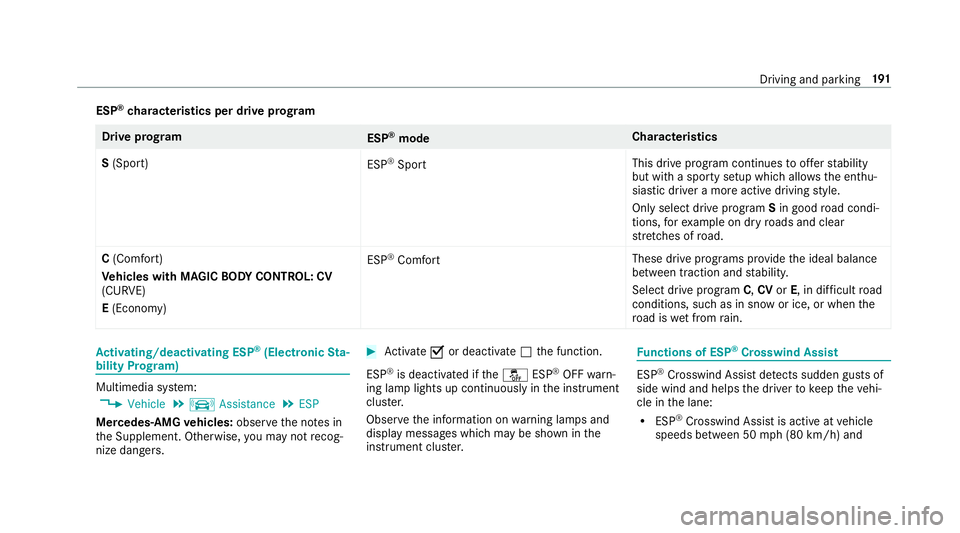
ESP®characteristics per drive prog ram
Driv eprog ram
ESP®mode Cha
racteristics
S (Sport)
ESP
®Sport This drive program continues
toofferst ability
but with a sporty setup which allo wsthe enthu‐
siastic driver a more active driving style.
Only select drive program Sin good road condi‐
tions, forex ample on dry roads and clear
st re tches of road.
C (Comfort)
Ve hicles with MAGIC BODY CONT ROL: CV
(CURVE)
E (Econo my) ESP
®Comfort
These drive prog
rams pr ovide the ideal balance
between traction and stability.
Select drive program C,CV orE, in di fficult road
conditions, such as in snow or ice, or whenthe
ro ad is wet from rain.
Ac tivating/deactivating ESP®(Electronic Sta‐
bility Prog ram)
Multimedia sy stem:
,9HKLFOH.k $VVLVWDQFH.(63
Mercedes‑AMG vehicles: observeth e no tes in
th e Supplement. Otherwise, you may not recog‐
nize dangers.
#Ac tivate Oor deacti vate ª the function.
ESP
®is deactivated if theå ESP®OFFwarn‐
ing lamp lights up continuously in the instrument
clus ter.
Obser vethe information on warning lamps and
display messages which may be shown in the
instrument clus ter.
Fu nctions of ESP®Crosswind Assist
ESP®Crosswind Assist de tects sudden gust s of
side wind and helps the driver tokeep theve hi‐
cle in the lane:
RESP®Crosswind Assist is active at vehicle
speeds between 50 mph(8 0 km/h) and
Driving and parking 19
1