2018 MERCEDES-BENZ GLS change wheel
[x] Cancel search: change wheelPage 227 of 398
R
is affected more by strong crosswinds R
demands more sensitive steering R
has a larger turning circle
This could impair the handling characteristics.
When towing a trailer, always adjust your speed
to the current road and weather conditions. Do
not exceed the maximum permissible speed for
your vehicle/trailer combination.
Notes on towing a trailer
General notes
! If you have a trailer tow hitch retrofitted,
changes to the cooling system and drive train
may be necessary, depending on the vehicle
type.
If you have a trailer tow hitch retrofitted,
observe the anchorage points on the chassis
frame. R
Do not exceed the legally prescribed maxi-
mum speed for vehicle/trailer combinations
in the relevant country.
This lowers the risk of an accident. R
Only install an approved trailer coupling on
your vehicle.
More information on availability and installa-
tion can be obtained at any qualified special-
ist workshop. R
The bumpers of your vehicle are not suitable
for installing detachable trailer couplings. R
Do not install hired trailer couplings or other
detachable trailer couplings on the bumpers
of your vehicle. R
If you no longer need the ball coupling,
remove it from the ball coupling recess. This
will reduce the risk of damage to the ball cou-
pling.
When towing a trailer, set the tire pressure on
the rear axle of the towing vehicle for the max-
imum load. You will find the values in the tire
pressure table in the fuel filler flap of the vehicle
( Y
page 372).
Please note that when towing a trailer, the fol-
lowing driving systems have limited availability
or are not available at all: R
Parking Assist PARKTRONIC ( Y
page 192)R
Blind Spot Assist ( Y
page 209)R
Active Lane Keeping Assist ( Y
page 215) On vehicles without level control, the height of
the ball coupling will alter according to the load
placed on the vehicle. If necessary, use a trailer
with a height-adjustable drawbar.
You will find installing dimensions and loads
under "Technical data" ( Y
page 395).
Driving tips Also observe the notes on pulling away with a
trailer ( Y
page 143).
The maximum permissible speed for vehicle/
trailer combinations depends on the type of
trailer. Before beginning the journey, check the
trailer's documents to see what the maximum
permissible speed is for your trailer. Observe the
legally permissible maximum speed in the rele-
vant country.
For certain Mercedes-Benz vehicles, the maxi-
mum permissible rear axle load is increased
when towing a trailer. See "Technical data" to
find out whether this applies to your vehicle
( Y
page 395). If you utilize any of the added
maximum rear axle load when towing a trailer,
the vehicle/trailer combination may not exceed
a maximum speed of 60 mph (100 km/h) for
reasons concerning the operating permit. This
also applies in countries in which the maximum
permissible speed for car/trailer combinations
is greater than 60 mph (100 km/h).
When towing a trailer, your vehicle's handling
characteristics will be different in comparison
with when driving without a trailer.
Use the left-hand steering wheel paddle shifter
to shift into a lower gear in good time on long
and steep downhill gradients.
This also applies if you have activated cruise
control or Distance Pilot DISTRONIC.
This will use the braking effect of the engine, so
that less braking will be required to maintain the
speed. This relieves the load on the brake sys-
tem and prevents the brakes from overheating
and wearing too quickly. If you need additional
braking, depress the brake pedal repeatedly
rather than continuously.
Driving tips
If the trailer swings from side to side: X
Do not accelerate. X
Do not counter-steer. X
Brake if necessary.Towing a trailer 225
Driving and parking Z
Page 230 of 398
Most U.S. states and all Canadian provinces
require by law: R
Safety chains between the towing vehicle and
the trailer. The chains should be cross-wound
under the trailer drawbar. They must be fas-
tened to the vehicle's trailer coupling, not to
the bumper or the axle.
Leave enough play in the chains to make tight
cornering possible. R
A separate brake system for certain types of
trailer. R
Safety switch for braked trailers. Check the
specific legal requirements applicable to your
state.
If the trailer becomes detached from the tow-
ing vehicle, the safety feature triggers the
trailer brakes.
Towing a trailer There are numerous legal requirements con-
cerning the towing of a trailer, e.g. speed restric-
tions. Make sure that your car/trailer combina-
tion complies with the local regulations: R
in your place of residence R
in the location to which you are driving
The police and local authorities can provide reli-
able information.
Observe the following when towing a trailer: R
To gain driving experience and to become
accustomed to the new handling characteris-
tics, you should practice the following in a
traffic-free location: -
cornering -
stopping -
backing up R
Before driving, check: -
trailer tow hitch -
safety switch for braked trailers -
safety chains -
electrical connections -
lights -
wheels R
Adjust the exterior mirrors to provide an
unobstructed view of the rear section of the
trailer. R
If the trailer has electronically controlled
brakes, pull away carefully. Brake manually using the brake controller and check whether
the brakes function correctly. R
Secure any objects on the trailer to prevent
the cargo from slipping when the vehicle is in
motion. R
When you couple up a trailer, check at regular
intervals that the load is firmly secured. If the
trailer is equipped with trailer lights and
brakes, check the trailer to ensure that these
are working. R
Bear in mind that the handling will be less
stable when towing a trailer than when driving
without one. Avoid sudden steering move-
ments. R
The vehicle/trailer combination is heavier,
accelerates more slowly, has a decreased
gradient climbing capability and a longer
braking distance.
It is more susceptible to side winds and
requires more careful steering. R
If possible, do not brake suddenly, but instead
depress the brake pedal moderately at first so
that the trailer can activate its brakes. Then
increase the pressure on the brake pedal. R
If the automatic transmission repeatedly
shifts between gears on uphill or downhill gra-
dients, shift to a lower gear using the left-hand
steering wheel paddle shifter.
A lower gear and lower speed reduce the risk
of engine failure. R
When driving downhill, shift to a lower gear to
utilize the engine's braking effect.
Avoid continuous brake application as this
may overheat the vehicle brakes and, if instal-
led, the trailer brakes. R
If the coolant temperature increases dramat-
ically while the air-condition ing system is
switched on, switch off the air-conditioning
system.
Coolant heat can also be dissipated by open-
ing the windows and switching the ventilation
blower and the interior temperature to the
highest level. R
When overtaking, pay particular attention to
the extended length of your vehicle/trailer
combination.
Due to the length of the vehicle/trailer com-
bination, you require additional road space in
relation to the vehicle you are overtaking
before you can change back to the original
lane.228
Towing a trailer
Driving and parking
Page 245 of 398
Settings menu
Introduction Depending on the equipment installed in the
vehicle, In the Sett. menu you have the follow-
ing options: R
Changing the instrument cluster settings
( Y
page 243) R
Changing the light settings ( Y
page 243)R
Changing the vehicle settings ( Y
page 244)R
Changing the convenience settings
( Y
page 244) R
Restoring the factory settings ( Y
page 245)
Instrument cluster submenu Selecting the distance unit The Display Unit Speedometer / Odome‐
ter: function allows you to choose whether
certain displays appear in kilometers or miles in
the multifunction display. X
Press the Y or e button on the steering
wheel to select the Sett. menu.X
Press the d or c button to select the
Instrument Cluster submenu.X
Press v to confirm.X
Press the d or c button to select the
Display Unit Speedometer / Odometer
function.
You will see the selected setting: km or miles .X
Press the v button to save the setting.
The selected unit of measurement for distance
applies to: R
Digital speedometer in the Trip menuR
Odometer and the trip odometer R
Trip computer R
Current consumption and the range R
Navigation instructions in the Navi menuR
Cruise control R
Distance Pilot DISTRONIC R
ASSYST PLUS service interval display
Selecting permanent display
The Permanent Display: function allows you
to choose whether the multifunction display
always shows the outside temperature or the
speed. The speed display is inverse to the speedome-
ter. X
Press the Y or e button on the steering
wheel to select the Sett. menu.X
Press the d or c button to select the
Instrument Cluster submenu.X
Confirm by pressing v on the steering
wheel. X
Press the d or c button to select the
Permanent Display: function.
The current setting, Outside Temperature ,
Speedometer [km/h] or Speedometer
[mph] appears. X
To change the setting: press v again.
Light submenu Setting the daytime running lamps This function is not available in Canada. X
Press the Y or e button on the steering
wheel to select the Sett. menu.X
Press the d or c button to select the
Light submenu. X
Press v to confirm. X
Press d or c to select the Daytime
Running Lights function.
If the Daytime Running Lights function has
been switched on, the cone of light and the
Page 275 of 398

Tires Display messages
Possible causes/consequences and P Solutions
Check Tire Pressure
Soon The tire pressure loss warning system has detected a significant loss
in pressure.
A warning tone also sounds.
Possible causes: R
you have changed the positions of the wheels and tires or installed
new wheels and tires. R
the tire pressure in one or more tires has dropped significantly
G WARNING
Tire pressures that are too low pose the following hazards: R
they may burst, especially as the load and vehicle speed increase. R
they may wear excessively and/or unevenly, which may greatly
impair tire traction. R
the driving characteristics, as well as steering and braking, may be
greatly impaired.
There is a risk of an accident. X
Stop the vehicle without making any sudden steering or braking
maneuvers. Pay attention to the traffic conditions as you do so. X
Secure the vehicle against rolling away ( Y
page 161).X
Check the tires and, if necessary, follow the instructions for a flat
tire ( Y
page 339). X
Check the tire pressures and, if necessary, correct the tire pressure. X
Restart the tire pressure loss warning system when the tire pres-
sure is correct ( Y
page 361).
Check Tire Pressure
Then Restart Run
Flat Indicator The tire pressure loss warning system generated a display message
and has not been restarted since. X
Set the correct tire pressure in all four tires. X
Restart the tire pressure loss warning system ( Y
page 361).
Run Flat Indicator
Inoperative The tire pressure loss warning system is faulty. X
Visit a qualified specialist workshop.
Please Correct Tire
Pressure The tire pressure is too low in at least one of the tires, or the tire
pressure difference between the wheels is too great. X
Check the tire pressures at the next opportunity ( Y
page 361).X
If necessary, correct the tire pressure. X
Restart the tire pressure monitor ( Y
page 364).Displa y messages 27 3
On-board computer and displays Z
Page 302 of 398
Stowage areas
Loading guidelines
G WARNING
If objects, luggage or loads are not secured or
not secured sufficiently, they could slip, tip
over or be flung around and thereby hit vehicle
occupants. There is a risk of injury, particu-
larly in the event of sudden braking or a sud-
den change in direction.
Always store objects so that they cannot be
flung around. Secure objects, luggage or
loads against slipping or tipping before the
journey.
G WARNING
Combustion engines emit poisonous exhaust
gases such as carbon monoxide. If the tailgate
is open when the engine is running, particu-
larly if the vehicle is moving, exhaust fumes
could enter the passenger compartment.
There is a risk of poisoning.
Turn off the engine before opening the tail-
gate. Never drive with the tailgate open.
G WARNING
The exhaust tail pipe and tail pipe trim can
become very hot. If you come into contact
with these parts of the vehicle, you could burn
yourself. There is a risk of injury.
Always be particularly careful around the
exhaust tail pipe and the tail pipe trim. Allow
these components to cool down before touch-
ing them.
The gross vehicle weight (GVW) is the vehicle
weight including fuel, vehicle tool kit, spare
wheel, installed accessories, vehicle occupants
and luggage/cargo.
Do not exceed the load limit or permitted gross
vehicle weight rating (GVWR) for your vehicle.
The gross load limit and the GVWR are specified
on the vehicle identification plate on the B-pillar
of the driver's door ( Y
page 364).
The load must also be distributed so that the
weight on each axle never exceeds the gross
axle weight rating (GAWR) for the front and rear
axles. The specifications for GVWR and GAWR are on the vehicle identification plate on the B-
pillar of the driver's door ( Y
page 364).
Observe the notes on loading the vehicle
( Y
page 364).
The handling characteristics of a laden vehicle
are dependent on the distribution of the load
within the vehicle. For this reason, you should
observe the following notes when transporting a
load: R
Never exceed the maximum permissible
gross vehicle mass or the gross axle weight
rating for the vehicle (including occupants). R
The cargo compartment is the preferred place
to carry objects. R
Position heavy loads as far forward as possi-
ble and as low down in the cargo compart-
ment as possible. R
The load must not protrude above the upper
edge of the seat backrests. R
Always place the load against the rear or front
seat backrests. Make sure that the seat
backrests are securely locked into place. R
Always place the load behind unoccupied
seats if possible. R
Use the cargo tie-down rings and the parcel
nets to transport loads and luggage. R
Use cargo tie-down rings and fastening mate-
rials appropriate for the weight and size of the
load. R
Secure the load with sufficiently strong and
wear-resistant tie-downs. Pad sharp edges for
protection.
Stowage spaces
Important safety notes
G WARNING
If you transport objects in the vehicle interior
and these are not adequately secured, they
could slip or be flung around and thereby
strike vehicle occupants. In addition, cup
holders, open stowage spaces and mobile
phone brackets may not always be able to
hold the objects placed in them in the event of
an accident. There is a risk of injury, particu-
larly in the event of sharp braking or sudden
changes of direction.300
Stowage areas
Stowage and features
Page 319 of 398
You can find more information in the separate
mbrace manual.
The system has not been able to initiate a Road-
side Assistance call, if: R
the R indicator lamp for the Roadside
Assistance call button is flashing continu-
ously. R
no voice connection to the Mercedes-Benz
Customer Assistance Center was estab-
lished.
This can occur if the relevant mobile phone net-
work is not available, for example.
The Call Failed message appears in the mul-
tifunction display. X
To end a call: press the v button on the
multifunction steering wheel.
or X
Press the corresponding multimedia system
button for ending a phone call.
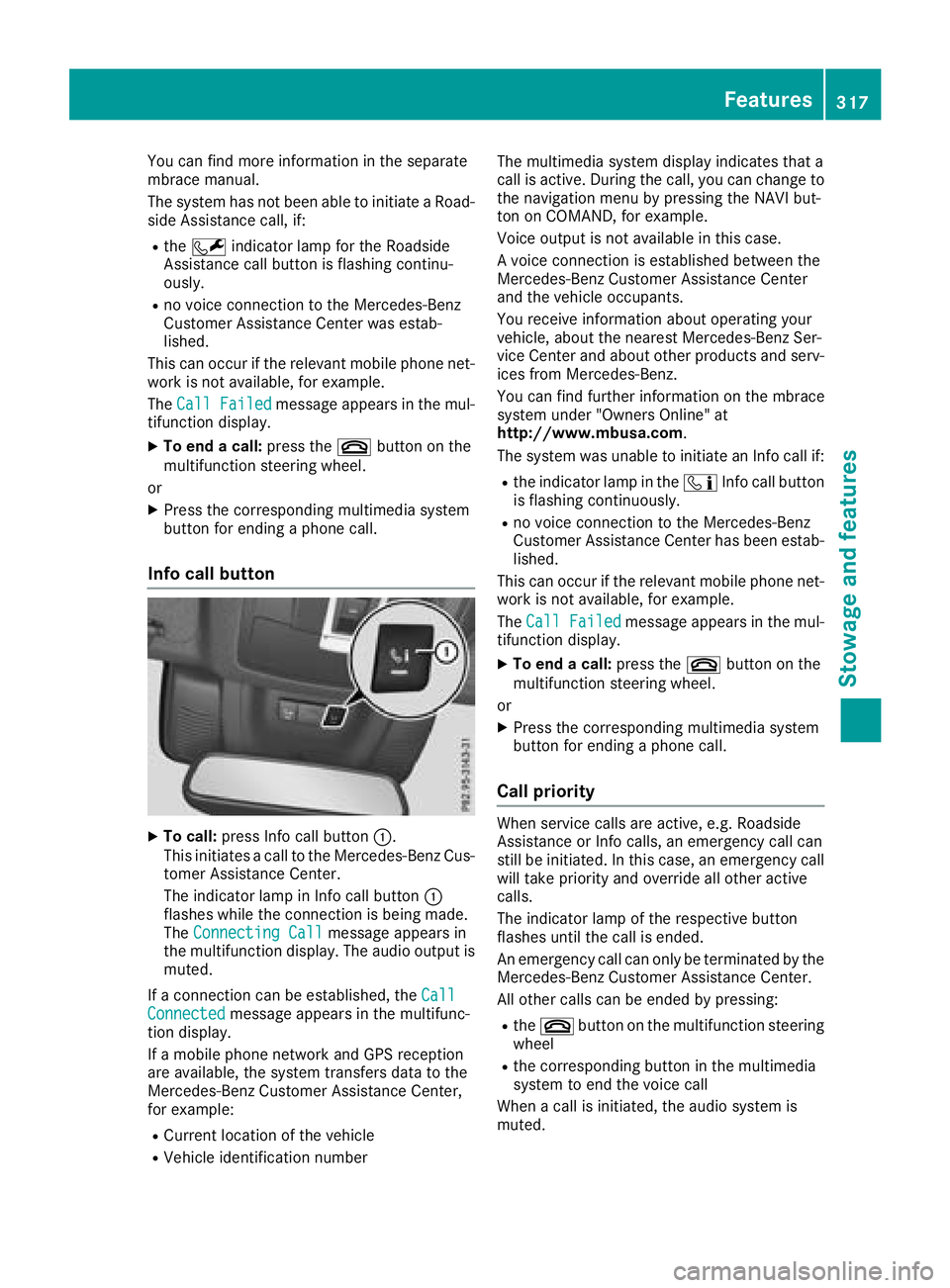
Info call button
X
To call: press Info call button C .
This initiates a call to the Mercedes-Benz Cus-
tomer Assistance Center.
The indicator lamp in Info call button C
flashes while the connection is being made.
The Connecting Call message appears in
the multifunction display. The audio output is
muted.
If a connection can be established, the Call
Connected message appears in the multifunc-
tion display.
If a mobile phone network and GPS reception
are available, the system transfers data to the
Mercedes-Benz Customer Assistance Center,
for example: R
Current location of the vehicle R
Vehicle identification number The multimedia system display indicates that a
call is active. During the call, you can change to
the navigation menu by pressing the NAVI but-
ton on COMAND, for example.
Voice output is not available in this case.
A voice connection is established between the
Mercedes-Benz Customer Assistance Center
and the vehicle occupants.
You receive information about operating your
vehicle, about the nearest Mercedes-Benz Ser-
vice Center and about other products and serv-
ices from Mercedes-Benz.
You can find further information on the mbrace
system under "Owners Online" at
http://www.mbusa.com .
The system was unable to initiate an Info call if: R
the indicator lamp in the
Page 332 of 398
A qualified specialist workshop will reset the
ASSYST service interval display after the service
work has been carried out. You can also obtain
further information on maintenance work, for
example.
Special service requirements The specified maintenance interval takes only
the normal operation of the vehicle into
account. Under increased load on the vehicle,
maintenance work must be carried out more
frequently, for example: R
Regular city driving with frequent intermedi-
ate stops R
If the vehicle is primarily used to travel short
distances R
Use in mountainous terrain or on poor road
surfaces R
If the engine is often left idling for long periods
Under these or similar conditions, have, for
example, the air filter, engine oil and oil filter
replaced or changed more frequently. Under
arduous operating conditions, the tires must be
checked more often. Further information can be
obtained at a qualified specialist workshop.
Driving abroad An extensive Mercedes-Benz Service network is
also available in other countries. You can obtain
further information from any authorized
Mercedes-Benz Center.
Care
General notes
H Environmental note
Dispose of empty packaging and cleaning
cloths in an environmentally responsible man-
ner.
! When cleaning your car, do not use: R
dry, coarse or hard cloths R
abrasive cleaning agents R
solvents R
cleaning agents containing solvents
Do not scrub.
Do not touch the surfaces and films with hard
objects, e.g. rings or ice scrapers. Otherwise, you may scratch or damage the surfaces and
films.
! Do not park your vehicle for a long period of
time directly after cleaning, particularly after
cleaning the wheel rim with wheel cleaner.
Wheel cleaner can lead to the increased cor-
rosion of the brake discs and pads. Therefore,
drive for a few minutes after cleaning. By
heating up the brakes, the brake discs and
pads dry. The vehicle can then be parked for a
long period of time.
Regular care of your vehicle is a condition for
retaining the quality in the long term.
Use care products and cleaning agents recom-
mended and approved by Mercedes-Benz.
Washing the vehicle and cleaning the
paintwork
Automatic car wash
G WARNING
Braking efficiency is reduced after washing
the vehicle. There is a risk of an accident.
After the vehicle has been washed, brake
carefully while paying attention to the traffic
conditions until full braking power is restored.
! Before driving into an automatic car wash,
make sure that it is suitable for the dimen-
sions of the vehicle. In particular, make sure
that: R
there is enough ground clearance between
the vehicle underbody and the guide rails of
the automatic car wash. R
the clearance width of the automatic car
wash is sufficient, particularly the width of
the guide rails. R
you enter the automatic car wash straight
and in the center of the guide rails in order
to avoid damaging the tires or wheel rims.
Fold in the exterior mirrors before the vehicle
is washed. The exterior mirrors could other-
wise be damaged.
! When Distance Pilot DISTRONIC or the
HOLD function is activated, the vehicle
brakes automatically in certain situations.330
Care
Maintenance and care
Page 341 of 398
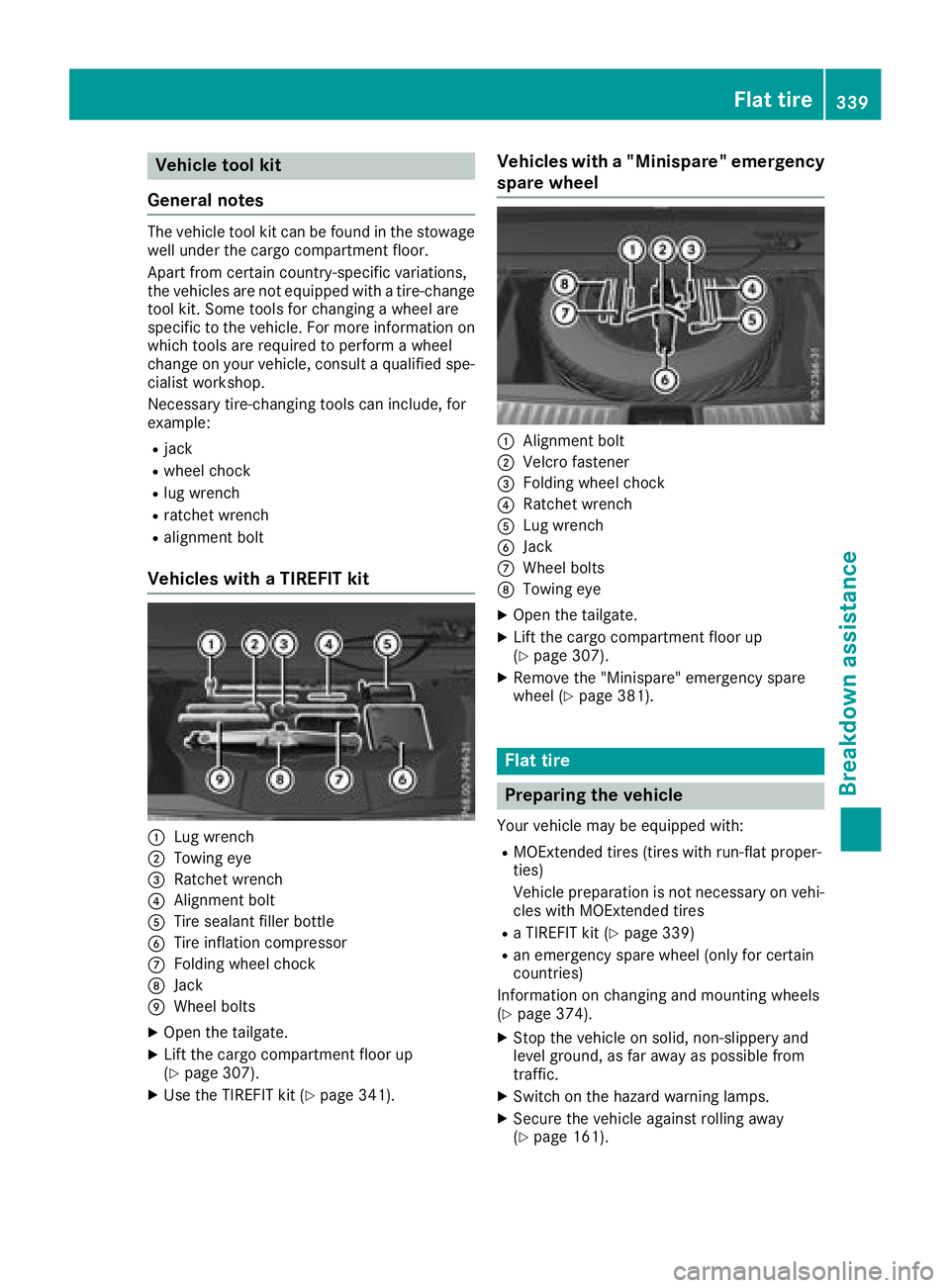
Vehicle tool kit
General notes The vehicle tool kit can be found in the stowage
well under the cargo compartment floor.
Apart from certain country-specific variations,
the vehicles are not equipped with a tire-change
tool kit. Some tools for changing a wheel are
specific to the vehicle. For more information on
which tools are required to perform a wheel
change on your vehicle, consult a qualified spe-
cialist workshop.
Necessary tire-changing tools can include, for
example: R
jack R
wheel chock R
lug wrench R
ratchet wrench R
alignment bolt
Vehicles with a TIREFIT kit
C
Lug wrenchD
Towing eye