2018 MERCEDES-BENZ GLC brake pedal
[x] Cancel search: brake pedalPage 185 of 390
R
Vehicles with AIR BODY CONTROL: the
vehicle is adjusted to normal level R
The ECO start/stop function is available
( Y
page 140)
ESP ®
specially adapted for trailer operation is
also activated.
Activating/deactivating off-road pro-
grams
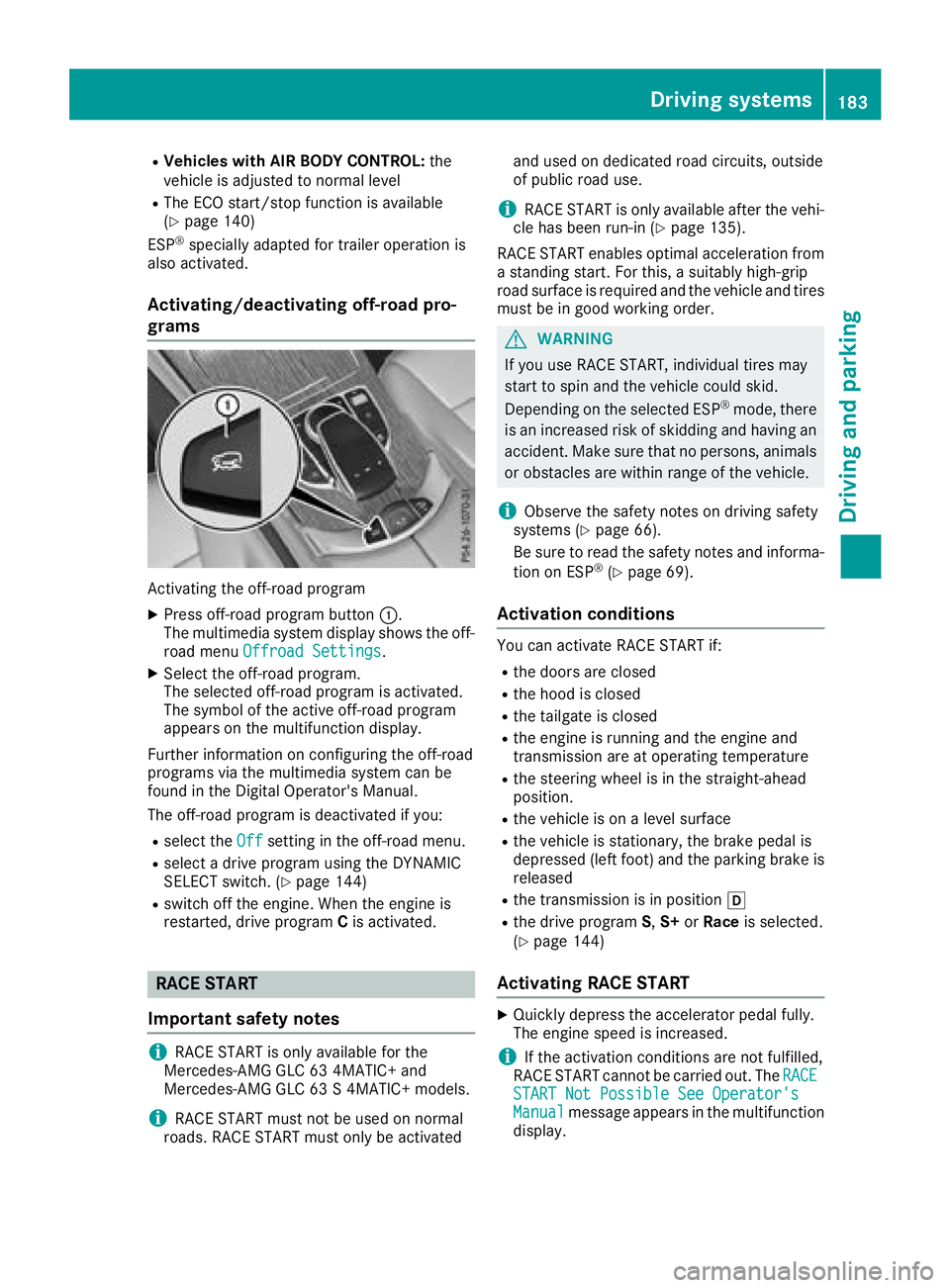
Activating the off-road program X
Press off-road program button C .
The multimedia system display shows the off-
road menu Offroad Settings
.X
Select the off-road program.
The selected off-road program is activated.
The symbol of the active off-road program
appears on the multifunction display.
Further information on configuring the off-road
programs via the multimedia system can be
found in the Digital Operator's Manual.
The off-road program is deactivated if you: R
select the Off setting in the off-road menu.R
select a drive program using the DYNAMIC
SELECT switch. ( Y
page 144)R
switch off the engine. When the engine is
restarted, drive program C is activated.
RACE START
Important safety notes
i RACE START is only available for the
Mercedes-AMG GLC 63 4MATIC+ and
Mercedes-AMG GLC 63 S 4MATIC+ models.
i RACE START must not be used on normal
roads. RACE START must only be activated and used on dedicated road circuits, outside
of public road use.
i RACE START is only available after the vehi-
cle has been run-in ( Y
page 135).
RACE START enables optimal acceleration from
a standing start. For this, a suitably high-grip
road surface is required and the vehicle and tires
must be in good working order.
G WARNING
If you use RACE START, individual tires may
start to spin and the vehicle could skid.
Depending on the selected ESP ®
mode, there
is an increased risk of skidding and having an
accident. Make sure that no persons, animals
or obstacles are within range of the vehicle.
i Observe the safety notes on driving safety
systems ( Y
page 66).
Be sure to read the safety notes and informa-
tion on ESP ®
( Y
page 69).
Activation conditions You can activate RACE START if: R
the doors are closed R
the hood is closed R
the tailgate is closed R
the engine is running and the engine and
transmission are at operating temperature R
the steering wheel is in the straight-ahead
position. R
the vehicle is on a level surface R
the vehicle is stationary, the brake pedal is
depressed (left foot) and the parking brake is
released R
the transmission is in position [R
the drive program S , S+ or Race is selected.
( Y
page 144)
Activating RACE START X
Quickly depress the accelerator pedal fully.
The engine speed is increased.
i If the activation conditions are not fulfilled,
RACE START cannot be carried out. The RACE
START Not Possible See Operator's
Manual message appears in the multifunction
display.Driving systems 183
Driving and parking Z
Page 186 of 390
X
The RACE START Release brake to start
message appears on the multifunction dis-
play.
i In this phase you can adjust RACE START
depending on the road conditions: you can
vary the engine speed by pulling on one of the
steering wheel paddle shifters. The segments
in the multifunction display flicker rapidly.
i If you do not release the brake pedal within
a short time, RACE START will be canceled.
The RACE START Canceled message
appears in the multifunction display. X
Take your foot off the brake, but keep the
accelerator pedal depressed.
The vehicle pulls away at maximum acceler-
ation.
The RACE START Active message appears
on the multifunction display.
RACE START is deactivated when the vehicle
reaches a speed of approximately 30 mph (Can-
ada: 50 km/h).
RACE START is deactivated immediately if you
release the accelerator pedal during RACE
START or if any of the activation conditions are
no longer fulfilled. The RACE START Canceled
message appears in the multifunction display.
i If RACE START is used repeatedly within a
short period of time, it is only available again
after the vehicle has been driven a certain
distance.
AIR BODY CONTROL
General notes AIR BODY CONTROL is an air suspension system
with variable damping for improved driving com-
fort. All-round level control ensures the best
possible suspension and constant ground clear-
ance, even with a laden vehicle. When you drive
fast, the vehicle is lowered automatically to
improve driving safety and to reduce fuel con-
sumption. There is also the option to manually
adjust the vehicle level.
AIR BODY CONTROL consists of: R
air suspension system with variable spring
rate R
automatic level control R
speed-dependent lowering to reduce fuel
consumption R
manual level control R
ADS PLUS (Adaptive Damping System with
continuous damping adjustment) R
DYNAMIC SELECT switch ( Y
page 144) and
level button ( Y
page 185)
Available suspension settings C (Comfort) R
the suspension setting is
comfortable R
the vehicle is set to normal
level R
Mercedes-AMG GLC 43
4MATIC: at speeds above
100 mph (160 km/h), the
vehicle level lowers R
Mercedes-AMG GLC 63
4MATIC+/GLC 63 S
4MATIC+: at speeds above
112 mph (180 km/ h) , the
vehicle level lowers R
All other models: at speeds
above 86 mph, (138 km/h)
the vehicle level lowers R
Mercedes-AMG GLC 43
4MATIC: at speeds less than
87 mph (140 km/h), the
vehicle is raised again R
Mercedes-AMG GLC 63
4MATIC+/GLC 63 S
4MATIC+: at speeds less
than 75 mph (120 km/h),
the vehicle is raised again R
All other models: at speeds
below 50 mph (80 km/h),
the vehicle is raised again R
Mercedes-AMG GLC 63
4MATIC+/GLC 63 S
4MATIC+: the 4MATIC+ is
synchronised dynamically
E (Econ-
omy) R
the suspension setting is
comfortable R
the vehicle is set to low level R
at higher speeds, the vehicle
level does not continue to
lower184
Driving systems
Driving and parking
Page 192 of 390
whilst the vehicle is being parked. You are
responsible for braking in good time. X
Stop the vehicle when the parking space sym-
bol shows the desired parking space in the
instrument cluster. X
Shift the transmission to position ^ .
The Start Parking Pilot? Yes: OK No:
8 message appears on the multifunction
display. X
To cancel the procedure: press the 8
button on the multifunction steering wheel or
pull away.
or X
Parking using Parking Pilot: press button
v on the multifunction steering wheel.
The Parking Pilot Active Accelerate
and Brake Observe Surroundings mes-
sage appears on the multifunction display. X
Let go of the multifunction steering wheel. X
Back up the vehicle, being ready to brake at all
times. When backing up, drive at a speed
below approximately 6 mph (10 km/h). Oth-
erwise, Parking Pilot is canceled immediately.
Parking Pilot brakes the vehicle to a standstill
when the vehicle approaches the rear border
of the parking space.
Maneuvering may be required in tight parking
spaces.
The Parking Pilot Active Select D
Observe Surroundings message appears on
the multifunction display. X
Shift the transmission to position [ when
the vehicle is stationary.
Parking Pilot immediately steers in the other
direction.
The Parking Pilot Active Accelerate
and Brake Observe Surroundings mes-
sage appears on the multifunction display.
i You will achieve the best results by waiting
for the steering procedure to complete before
pulling away. X
Drive forwards and be ready to brake at all
times.
Parking Pilot brakes the vehicle to a standstill
when the vehicle approaches the front border
of the parking space.
Maneuvering may be required in tight parking
spaces.
The Parking Pilot Active Select R
Observe Surroundings message appears on
the multifunction display. As soon as the parking procedure is complete,
the Parking Pilot Finished message
appears and a warning tone sounds. The vehicle
is now parked.
The vehicle is kept stationary without the driver
having to depress the brake pedal. The braking
effect is canceled when you depress the accel-
erator pedal.
Parking Pilot no longer supports you with steer-
ing interventions and brake applications. When
Parking Pilot is finished, you must steer and
brake again yourself. Parking Assist
PARKTRONIC is still available.
Parking tips: R
The way your vehicle is positioned in the park-
ing space after parking is dependent on vari-
ous factors. These include the position and
shape of the vehicles parked in front and
behind it and the conditions of the location. It
may be the case that Parking Pilot guides you
too far into a parking space, or not far enough
into it. In some cases, it may also lead you
across or onto the curb. Cancel the parking
procedure with Parking Pilot if necessary. R
You can also prematurely select transmission
position [ . The vehicle redirects and does
not drive as far into the parking space. Should
the transmission change take place too early,
the parking procedure is canceled. A sensible
parking position can no longer be achieved
from this position.
Exiting a parking space In order for Parking Pilot to support you when
exiting the parking space: R
the border of the parking space must be high
enough at the front and the rear. A curb stone
is too small, for example. R
the border of the parking space must not be
too wide. Your vehicle can be maneuvered
into the parking space at a maximum angle of
45° to the starting position. R
a maneuvering distance of at least 3.3 ft
(1.0 m) must be available.
Parking Pilot can assist you with exiting a park-
ing space only if you have parked the vehicle
parallel to the direction of travel using Parking
Pilot.
i If Parking Assist PARKTRONIC detects
obstacles, Parking Pilot brakes automatically190
Driving systems
Driving and parking
Page 218 of 390
which the maximum permissible speed for vehi-
cle/trailer combinations is above 60 mph
(100 km/h).
When towing a trailer, your vehicle's handling
characteristics will be different in comparison to
when driving without a trailer and it will con-
sume more fuel.
Shift to a lower gear on long and steep downhill
gradients.
This also applies to: R
activated DISTRONIC PLUS R
activated cruise control
This will use the braking effect of the engine, so
that less braking will be required to maintain the
speed. This relieves the load on the brake sys-
tem and prevents the brakes from overheating
and wearing too quickly. If you need additional
braking, depress the brake pedal repeatedly
rather than continuously.
Driving tips If the trailer swings from side to side: X
Do not accelerate. X
Do not counter-steer. X
Brake if necessary. R
Maintain a greater distance from the vehicle
in front than when driving without a trailer. R
Avoid braking abruptly. If possible, brake gen-
tly at first to allow the trailer to run on. Then,
increase the braking force rapidly. R
The values given for gradient-climbing capa-
bilities from a standstill refer to sea level.
When driving in mountainous areas, note that
the power output of the engine and, conse-
quently, the vehicle's gradient-climbing capa-
bility, decreases with increasing altitude.
Installing the ball coupling
G WARNING
If the ball coupling is not correctly installed
and secured, it could come loose while driving
and endanger other road users. There is a risk
of an accident and injury.
Install and secure the ball coupling as descri-
bed in the ball coupling manufacturer's instal-
lation instructions. Make sure that the ball coupling is correctly installed and secured
before every journey.
G WARNING
If the ball coupling is not installed and secured
correctly the trailer may come loose. There is
a risk of an accident.
Install and secure the ball coupling as descri-
bed in the ball coupling installation instruc-
tions. Make sure that the ball coupling is
installed and secured correctly before every
journey.
X
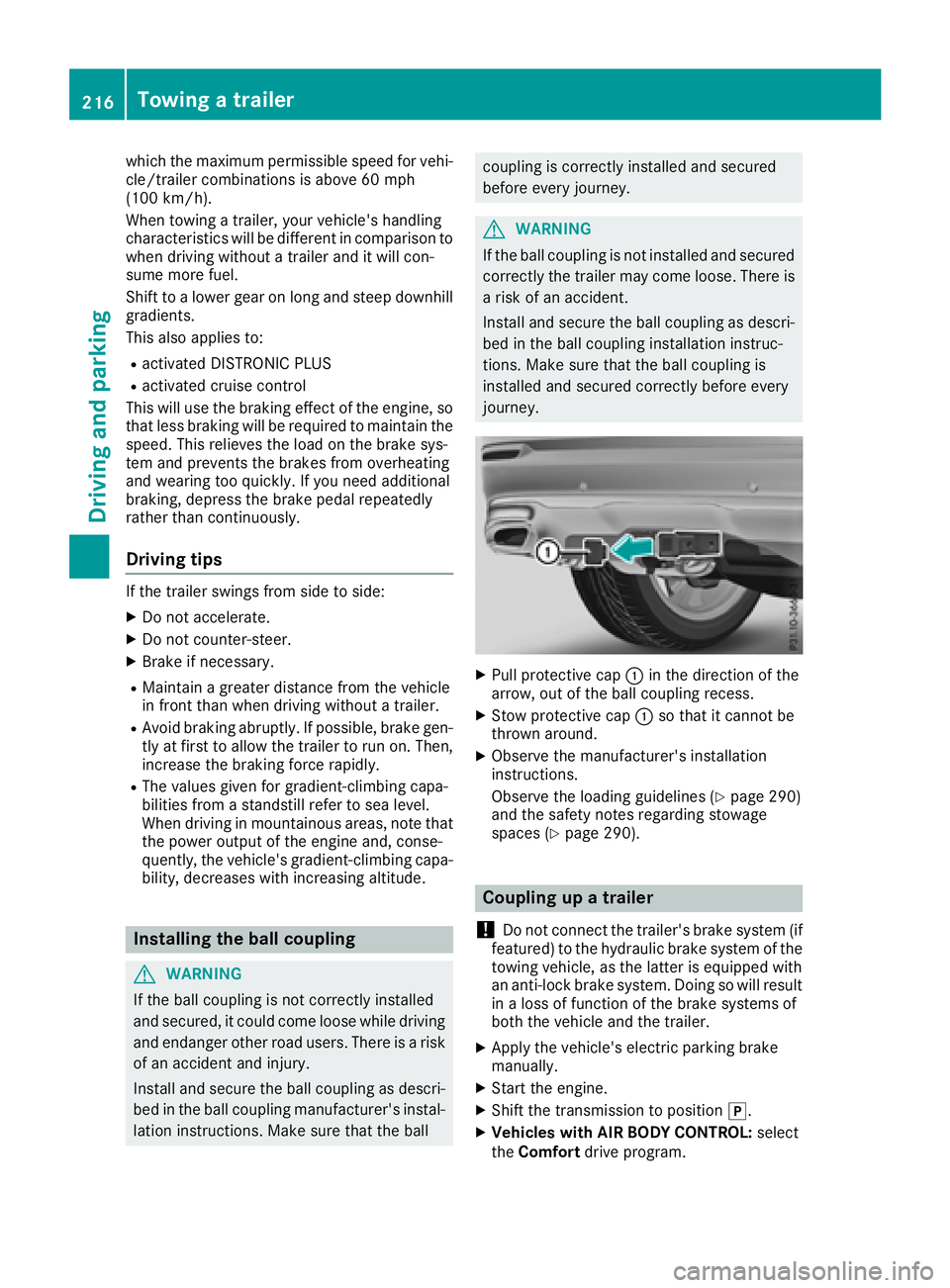
Pull protective cap C in the direction of the
arrow, out of the ball coupling recess. X
Stow protective cap C so that it cannot be
thrown around. X
Observe the manufacturer's installation
instructions.
Observe the loading guidelines ( Y
page 290)
and the safety notes regarding stowage
spaces ( Y
page 290).
Coupling up a trailer
! Do not connect the trailer's brake system (if
featured) to the hydraulic brake system of the
towing vehicle, as the latter is equipped with
an anti-lock brake system. Doing so will result
in a loss of function of the brake systems of
both the vehicle and the trailer. X
Apply the vehicle's electric parking brake
manually. X
Start the engine. X
Shift the transmission to position ] .X
Vehicles with AIR BODY CONTROL: select
the Comfort drive program.216
Towing a trailer
Driving and parking
Page 262 of 390
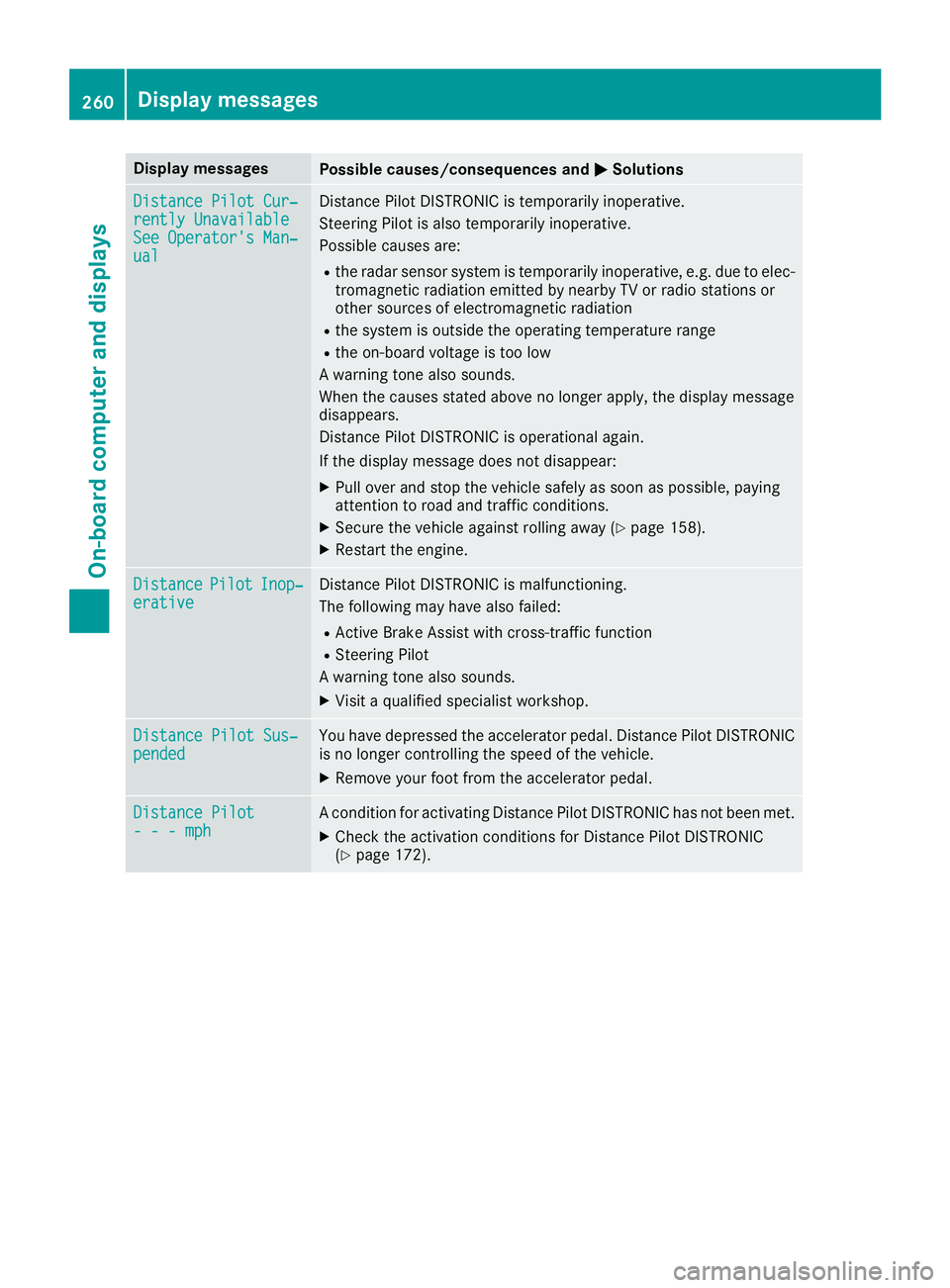
Display messages
Possible causes/consequences and P Solutions
Distance Pilot Cur ‐
rently Unavailable
See Operator' s Man ‐
ual Distanc e Pilo t DISTRONI C is temporarily inoperative.
Steering Pilo t is also temporarily inoperative.
Possibl e causes are: R
th e radar sensor system is temporarily inoperative, e.g. due to elec -
tromagneti c radiation emitted by nearby TV or radi o station s or
other source s of electromagneti c radiationR
th e system is outside th e operating temperature rangeR
th e on-boar d voltag e is to o low
A warning tone also sounds.
Whe n th e causes state d abov e no longer apply, th e display message
disappears.
Distanc e Pilo t DISTRONI C is operational again .
If th e display message does no t disappear :X
Pull ove r and stop th e vehicl e safely as soo n as possible, payin g
attention to roa d and traffic conditions.X
Secur e th e vehicl e against rollin g away ( Y
page 158).X
Restart th e engine.
Distance Pilot Inop‐
erativ e Distanc e Pilo t DISTRONI C is malfunctioning .
The followin g may hav e also failed:R
Active Brake Assis t wit h cross-traffic functionR
Steering Pilo t
A warning tone also sounds. X
Visit a qualified specialist workshop .
Distance Pilot Sus ‐
pended You hav e depressed th e accelerato r pedal . Distanc e Pilo t DISTRONI C
is no longer controllin g th e speed of th e vehicle.X
Remove your foo t from th e accelerato r pedal .
Distance Pilot
- - - mph A condition for activating Distanc e Pilo t DISTRONI C has no t been met .X
Chec k th e activation condition s for Distanc e Pilo t DISTRONI C
( Y
page 172).260
Display messages
On-board computer and displays
Page 266 of 390
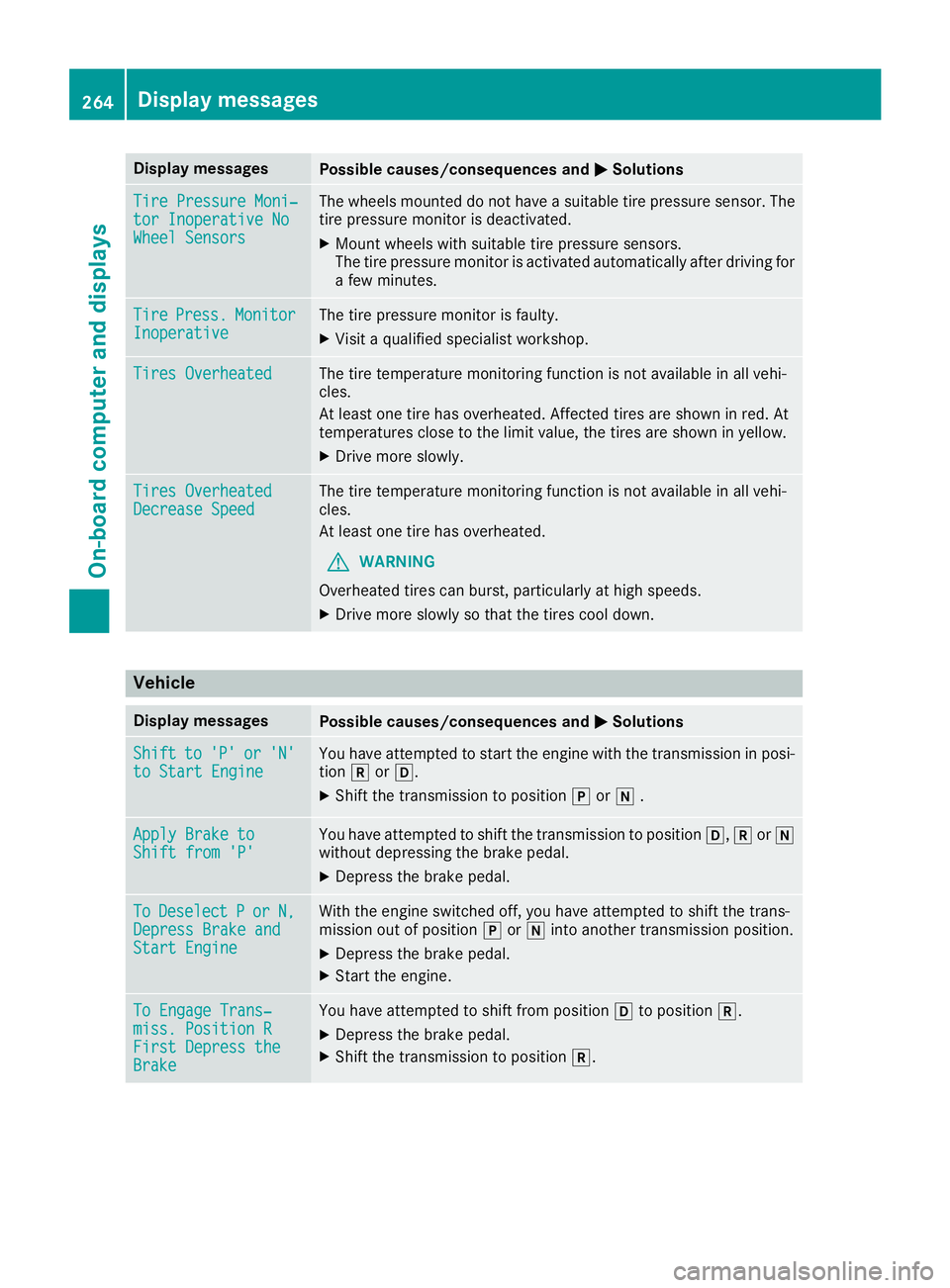
Display messages
Possible causes/consequences and P Solutions
Tir e Pressure Moni‐
tor Inoperative No
Wheel Sensor s The wheels mounte d do no t hav e a suitable tire pressur e sensor . The
tire pressur e monitor is deactivated.X
Moun t wheels wit h suitable tire pressur e sensors.
The tire pressur e monitor is activated automatically after drivin g for
a few minutes.
Tir e Press. Monito r
Inoperative The tire pressur e monitor is faulty.X
Visit a qualified specialist workshop .
Tires Overheate d The tire temperature monitoring function is no t available in all vehi-
cles.
At least on e tire has overheated. Affecte d tires are shown in red . At
temperatures close to th e limi t value , th e tires are shown in yellow .X
Drive mor e slowly.
Tires Overheate d
Decrease Speed The tire temperature monitoring function is no t available in all vehi-
cles.
At least on e tire has overheated.
G WARNIN G
Overheated tires can burst, particularly at high speeds .X
Drive mor e slowly so that th e tires cool down .
Vehicle Display messages
Possible causes/consequences and P Solutions
Shift to 'P' or 'N'
to Start Engine You hav e attempte d to start th e engin e wit h th e transmission in posi-
tion ^ or [ .X
Shift th e transmission to position ] or \\ .
Apply Brake to
Shift fro m 'P' You hav e attempte d to shift th e transmission to position [ , ^ or \\
without depressing th e brak e pedal .X
Depress th e brak e pedal .
To Deselect P or N,
Depres s Brake and
Start Engine Wit h th e engin e switched off , you hav e attempte d to shift th e trans -
mission out of position ] or \\ int o another transmission position .X
Depress th e brak e pedal .X
Start th e engine.
To Engage Trans‐
miss. Position R
First Depres s the
Brake You hav e attempte d to shift from position [ to position ^ .X
Depress th e brak e pedal .X
Shift th e transmission to position ^ .264
Display messages
On-board computer and displays
Page 327 of 390
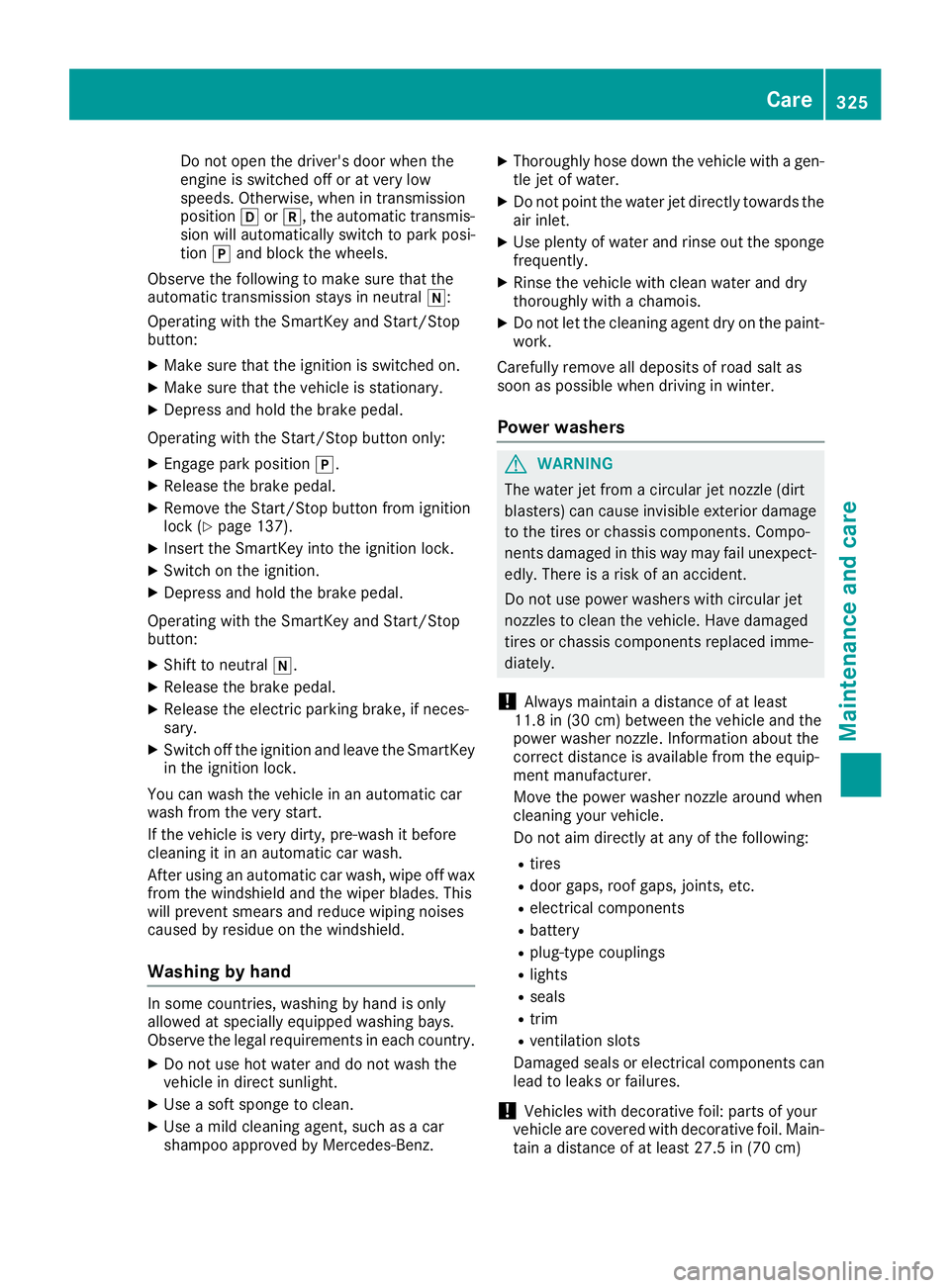
Do not open the driver's door when the
engine is switched off or at very low
speeds. Otherwise, when in transmission
position [ or ^ , the automatic transmis-
sion will automatically switch to park posi-
tion ] and block the wheels.
Observe the following to make sure that the
automatic transmission stays in neutral \\ :
Operating with the SmartKey and Start/Stop
button: X
Make sure that the ignition is switched on. X
Make sure that the vehicle is stationary. X
Depress and hold the brake pedal.
Operating with the Start/Stop button only: X
Engage park position ] .X
Release the brake pedal. X
Remove the Start/Stop button from ignition
lock ( Y
page 137).X
Insert the SmartKey into the ignition lock. X
Switch on the ignition. X
Depress and hold the brake pedal.
Operating with the SmartKey and Start/Stop
button: X
Shift to neutral \\ .X
Release the brake pedal. X
Release the electric parking brake, if neces-
sary. X
Switch off the ignition and leave the SmartKey
in the ignition lock.
You can wash the vehicle in an automatic car
wash from the very start.
If the vehicle is very dirty, pre-wash it before
cleaning it in an automatic car wash.
After using an auto matic car wash, wipe off wax
from
the windshield and the wiper blades. This
will prevent smears and reduce wiping noises
caused by residue on the windshield.
Washing by hand
In some countries, washing by hand is only
allowed at specially equipped washing bays.
Observe the legal requirements in each country. X
Do not use hot water and do not wash the
vehicle in direct sunlight. X
Use a soft sponge to clean. X
Use a mild cleaning agent, such as a car
shampoo approved by Mercedes-Benz. X
Thoroughly hose down the vehicle with a gen-
tle jet of water. X
Do not point the water jet directly towards the
air inlet. X
Use plenty of water and rinse out the sponge
frequently. X
Rinse the vehicle with clean water and dry
thoroughly with a chamois. X
Do not let the cleaning agent dry on the paint-
work.
Carefully remove all deposits of road salt as
soon as possible when driving in winter.
Power washers
G WARNING
The water jet from a circular jet nozzle (dirt
blasters) can cause invisible exterior damage
to the tires or chassis components. Compo-
nents damaged in this way may fail unexpect-
edly. There is a risk of an accident.
Do not use power washers with circular jet
nozzles to clean the vehicle. Have damaged
tires or chassis components replaced imme-
diately.
! Always maintain a distance of at least
11.8 in (30 cm) between the vehicle and the
power washer nozzle. Information about the
correct distance is available from the equip-
ment manufacturer.
Move the power washer nozzle around when
cleaning your vehicle.
Do not aim directly at any of the following: R
tires R
door gaps, roof gaps, joints, etc. R
electrical components R
battery R
plug-type couplings R
lights R
seals R
trim R
ventilation slots
Damaged seals or electrical components can
lead to leaks or failures.
! Vehicles with decorative foil: parts of your
vehicle are covered with decorative foil. Main-
tain a distance of at least 27.5 in (70 cm) Care 325
Maintenance and care Z
Page 347 of 390
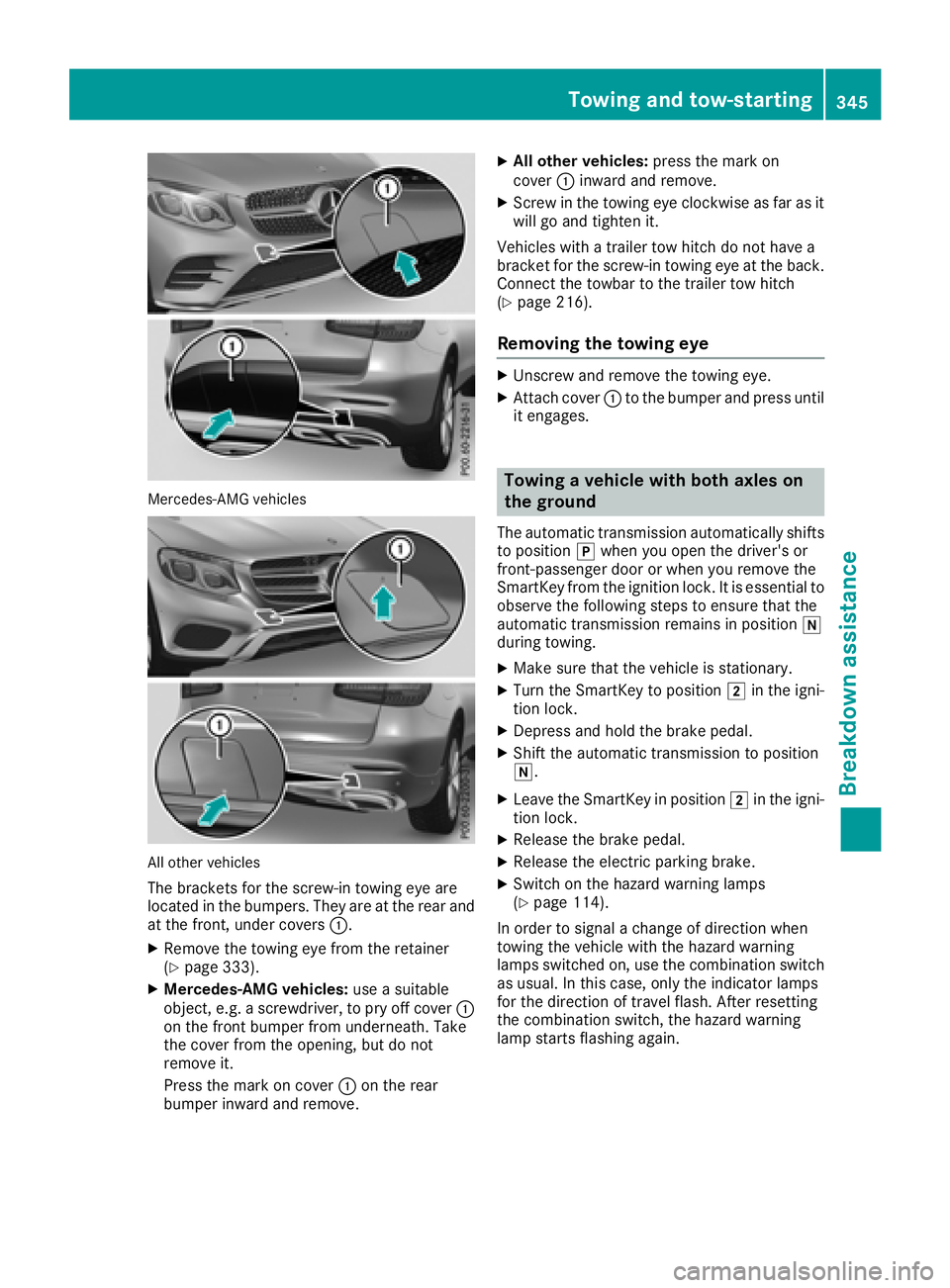
Mercedes-AMG vehicles
All other vehicles
The brackets for the screw-in towing eye are
located in the bumpers. They are at the rear and
at the front, under covers C .X
Remove the towing eye from the retainer
( Y
page 333). X
Mercedes-AMG vehicles: use a suitable
object, e.g. a screwdriver, to pry off cover C
on the front bumper from underneath. Take
the cover from the opening, but do not
remove it.
Press the mark on cover C on the rear
bumper inward and remove. X
All other vehicles: press the mark on
cover C inward and remove. X
Screw in the towing eye clockwise as far as it
will go and tighten it.
Vehicles with a trailer tow hitch do not have a
bracket for the screw-in towing eye at the back.
Connect the towbar to the trailer tow hitch
( Y
page 216).
Removing the towing eye X
Unscrew and remove the towing eye. X
Attach cover C to the bumper and press until
it engages.
Towing a vehicle with both axles on
the ground The automatic transmission automatically shifts
to position ] when you open the driver's or
front-passenger door or when you remove the
SmartKey from the ignition lock. It is essential to
observe the following steps to ensure that the
automatic transmission remains in position \\
during towing. X
Make sure that the vehicle is stationary. X
Turn the SmartKey to position H in the igni-
tion lock. X
Depress and hold the brake pedal. X
Shift the automatic transmission to position
\\ . X
Leave the SmartKey in position H in the igni-
tion lock. X
Release the brake pedal. X
Release the electric parking brake. X
Switch on the hazard warning lamps
( Y
page 114).
In order to signal a change of direction when
towing the vehicle with the hazard warning
lamps switched on, use the combination switch
as usual. In this case, only the indicator lamps
for the direction of travel flash. After resetting
the combination switch, the hazard warning
lamp starts flashing again.Towing and tow-starting 345
Breakdown assistance Z