2018 MERCEDES-BENZ G-CLASS engine
[x] Cancel search: enginePage 116 of 294
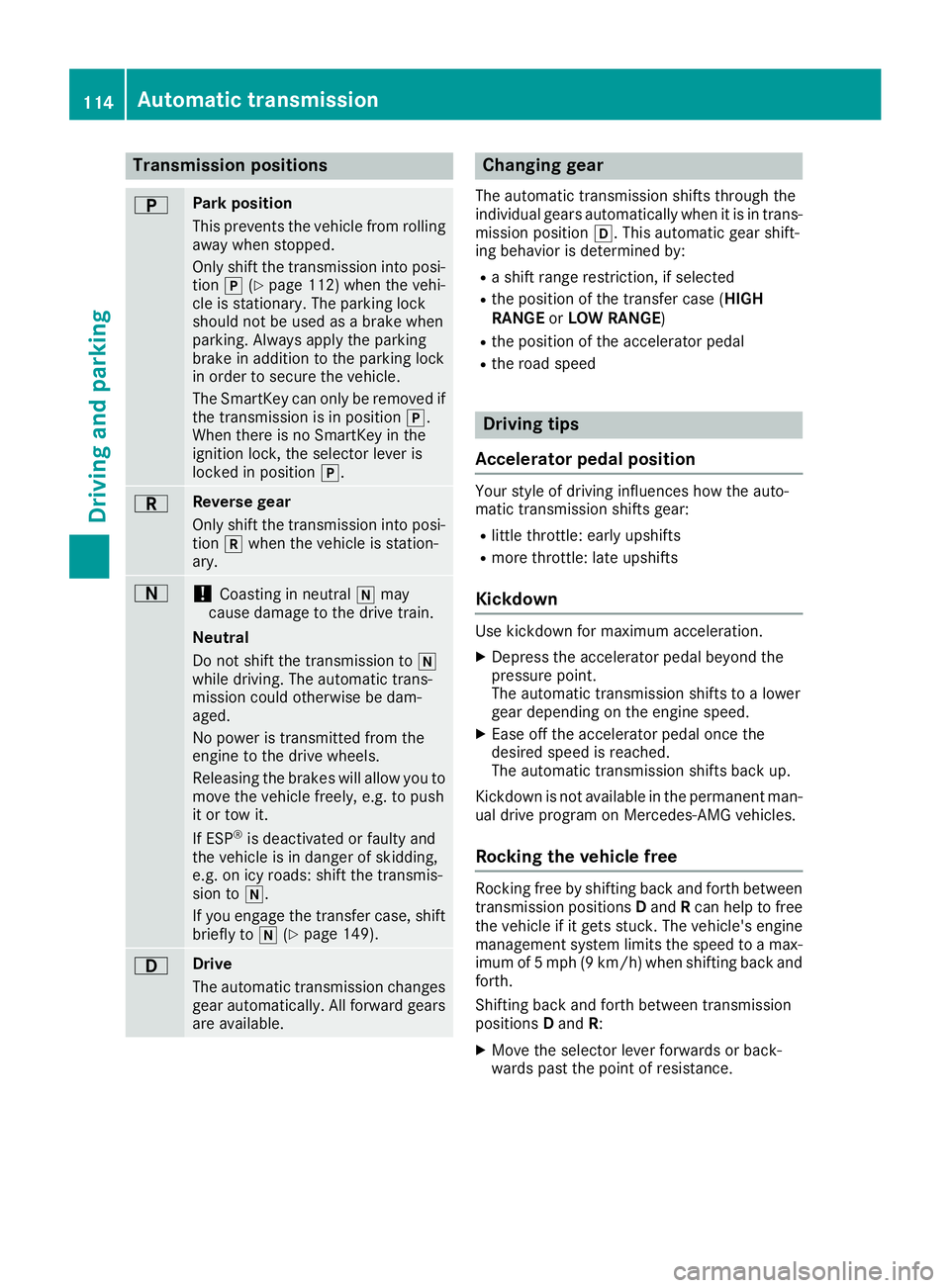
Transmission positions
BPark position
This prevents the vehicle from rolling
away when stopped.
Only shift the transmission into posi-
tion j(
Ypage 112) when the vehi-
cle is stationary. The parking lock
should not be used as a brake when
parking. Always apply the parking
brake in addition to the parking lock
in order to secure the vehicle.
The SmartKey can only be removed if
the transmission is in position j.
When there is no SmartKey in the
ignition lock, the selector lever is
locked in position j.
CReverse gear
Only shift the transmission into posi-
tionkwhen the vehicle is station-
ary.
A!Coasting in neutral imay
cause damage to the drive train.
Neutral
Do not shift the transmission to i
while driving. The automatic trans-
mission could otherwise be dam-
aged.
No power is transmitted from the
engine to the drive wheels.
Releasing the brakes will allow you to
move the vehicle freely, e.g. to push
it or tow it.
If ESP
®is deactivated or faulty and
the vehicle is in danger of skidding,
e.g. on icy roads: shift the transmis-
sion to i.
If you engage the transfer case, shift briefly to i(
Ypage 149).
7Drive
The automatic transmission changes
gear automatically. All forward gears
are available.
Changing gear
The automatic transmission shifts through the
individual gears automatically when it is in trans-
mission position h. This automatic gear shift-
ing behavior is determined by:
Ra shift range restriction, if selected
Rthe position of the transfer case ( HIGH
RANGE orLOW RANGE )
Rthe position of the accelerator pedal
Rthe road speed
Driving tips
Accelerator pedal position
Your style of driving influences how the auto-
matic transmission shifts gear:
Rlittle throttle: early upshifts
Rmore throttle: late upshifts
Kickdown
Use kickdown for maximum acceleration.
XDepress the accelerator pedal beyond the
pressure point.
The automatic transmission shifts to a lower
gear depending on the engine speed.
XEase off the accelerator pedal once the
desired speed is reached.
The automatic transmission shifts back up.
Kickdown is not available in the permanent man-
ual drive program on Mercedes-AMG vehicles.
Rocking the vehicle free
Rocking free by shifting back and forth between
transmission positions Dand Rcan help to free
the vehicle if it gets stuck. The vehicle's engine
management system limits the speed to a max-
imum of 5 mph (9 km/h) when shifting back and
forth.
Shifting back and forth between transmission
positions Dand R:
XMove the selector lever forwards or back-
wards past the point of resistance.
114Automatic transmission
Driving an d parking
Page 117 of 294
Towing a trailer
XDrive in the middle of the engine speed range
on uphill gradients.
XVehicles except Mercedes‑AMG vehicles:
limit the shift range to 3or 2depending on the
uphill or downhill gradient (
Ypage 116). This
also applies if cruise control, the speed limiter
or DISTRONIC PLUS is activated.
Mercedes ‑AMG vehicles: shift down to shift
range 3or 2depending on the uphill or down-
hill gradient (
Ypage 116). This also applies if
cruise control, the speed limiter or
DISTRONIC PLUS is activated.
XShift the transfer case into low-range driving
position LOW RANGE on extreme uphill gra-
dients or steep downhill gradients
(
Ypage 149).
Program selector button
General notes
The program selector button allows you to
choose between drive programs with different
driving characteristics.
On Mercedes-AMG vehicles, drive program Eis
called drive program C.
The automatic transmission switches to auto-
matic drive program E(drive program Cin
Mercedes-AMG vehicles) each time the engine
is started.
Only change from automatic drive program Cor
S to manual drive program Mwhen the vehicle is
stationary.
Drive programs available for vehicles
except Mercedes-AMG vehicles
E EconomyComfortable, economical
driving
S SportSporty driving style
M ManualManual gear shifting
Drive programs available for
Mercedes ‑AMG vehicles
C Controlled
EfficiencyComfortable, economical
driving
S SportSporty driving style
M ManualManual gear shifting
For further information on the automatic drive
program, see (Ypage 116).
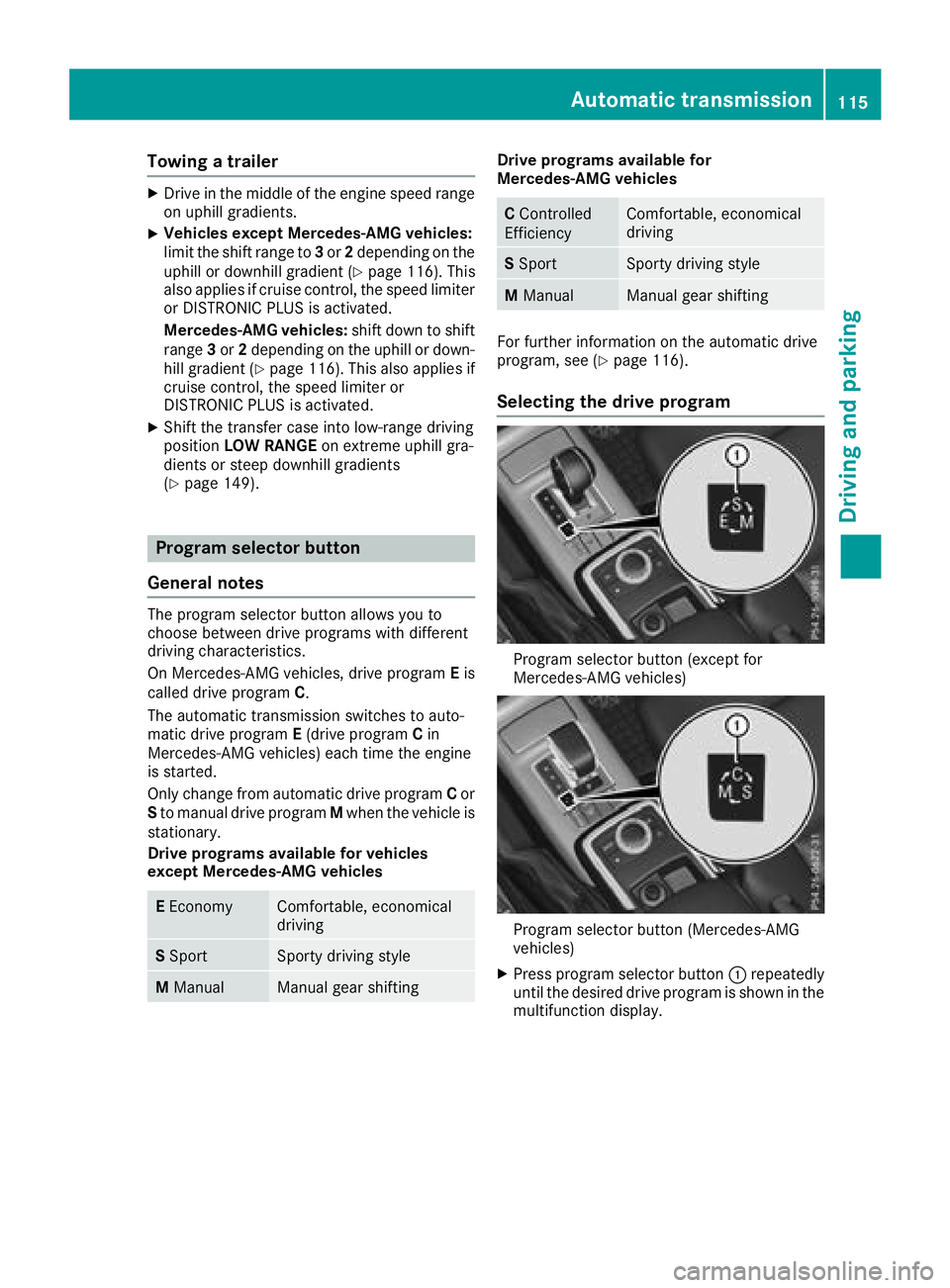
Selecting the drive program
Program selector button (except for
Mercedes-AMG vehicles)
Program selector button (Mercedes-AMG
vehicles)
XPress program selector button :repeatedly
until the desired drive program is shown in the
multifunction display.
Automatic transmission115
Driving an d parking
Z
Page 118 of 294
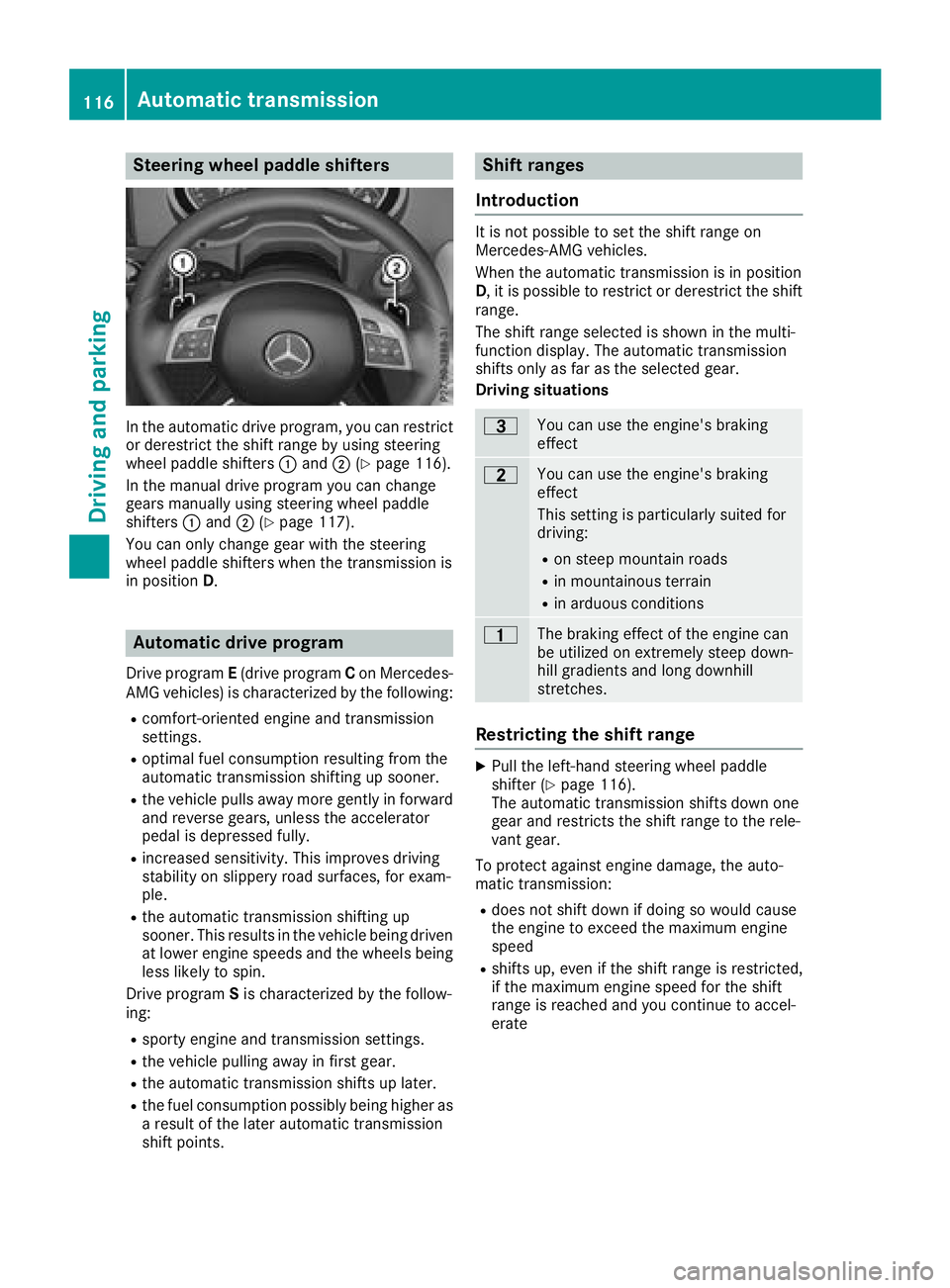
Steering wheel paddle shifters
In the automatic drive program, you can restrict
or derestrict the shift range by using steering
wheel paddle shifters:and ;(
Ypage 116).
In the manual drive program you can change
gears manually using steering wheel paddle
shifters :and ;(
Ypage 117).
You can only change gear with the steering
wheel paddle shifters when the transmission is
in position D.
Automatic drive program
Drive program E(drive program Con Mercedes-
AMG vehicles) is characterized by the following:
Rcomfort-oriented engine and transmission
settings.
Roptimal fuel consumption resulting from the
automatic transmission shifting up sooner.
Rthe vehicle pulls away more gently in forward
and reverse gears, unless the accelerator
pedal is depressed fully.
Rincreased sensitivity. This improves driving
stability on slippery road surfaces, for exam-
ple.
Rthe automatic transmission shifting up
sooner. This results in the vehicle being driven
at lower engine speeds and the wheels being
less likely to spin.
Drive program Sis characterized by the follow-
ing:
Rsporty engine and transmission settings.
Rthe vehicle pulling away in first gear.
Rthe automatic transmission shifts up later.
Rthe fuel consumption possibly being higher as
a result of the later automatic transmission
shift points.
Shift ranges
Introduction
It is not possible to set the shift range on
Mercedes-AMG vehicles.
When the automatic transmission is in position
D, it is possible to restrict or derestrict the shift
range.
The shift range selected is shown in the multi-
function display. The automatic transmission
shifts only as far as the selected gear.
Driving situations
=You can use the engine's braking
effect
5You can use the engine's braking
effect
This setting is particularly suited for
driving:
Ron steep mountain roads
Rin mountainous terrain
Rin arduous conditions
4The braking effect of the engine can
be utilized on extremely steep down-
hill gradients and long downhill
stretches.
Restricting the shift range
XPull the left-hand steering wheel paddle
shifter (Ypage 116).
The automatic transmission shifts down one
gear and restricts the shift range to the rele-
vant gear.
To protect against engine damage, the auto-
matic transmission:
Rdoes not shift down if doing so would cause
the engine to exceed the maximum engine
speed
Rshifts up, even if the shift range is restricted,
if the maximum engine speed for the shift
range is reached and you continue to accel-
erate
116Automatic transmission
Driving and parking
Page 120 of 294
Shift recommendation
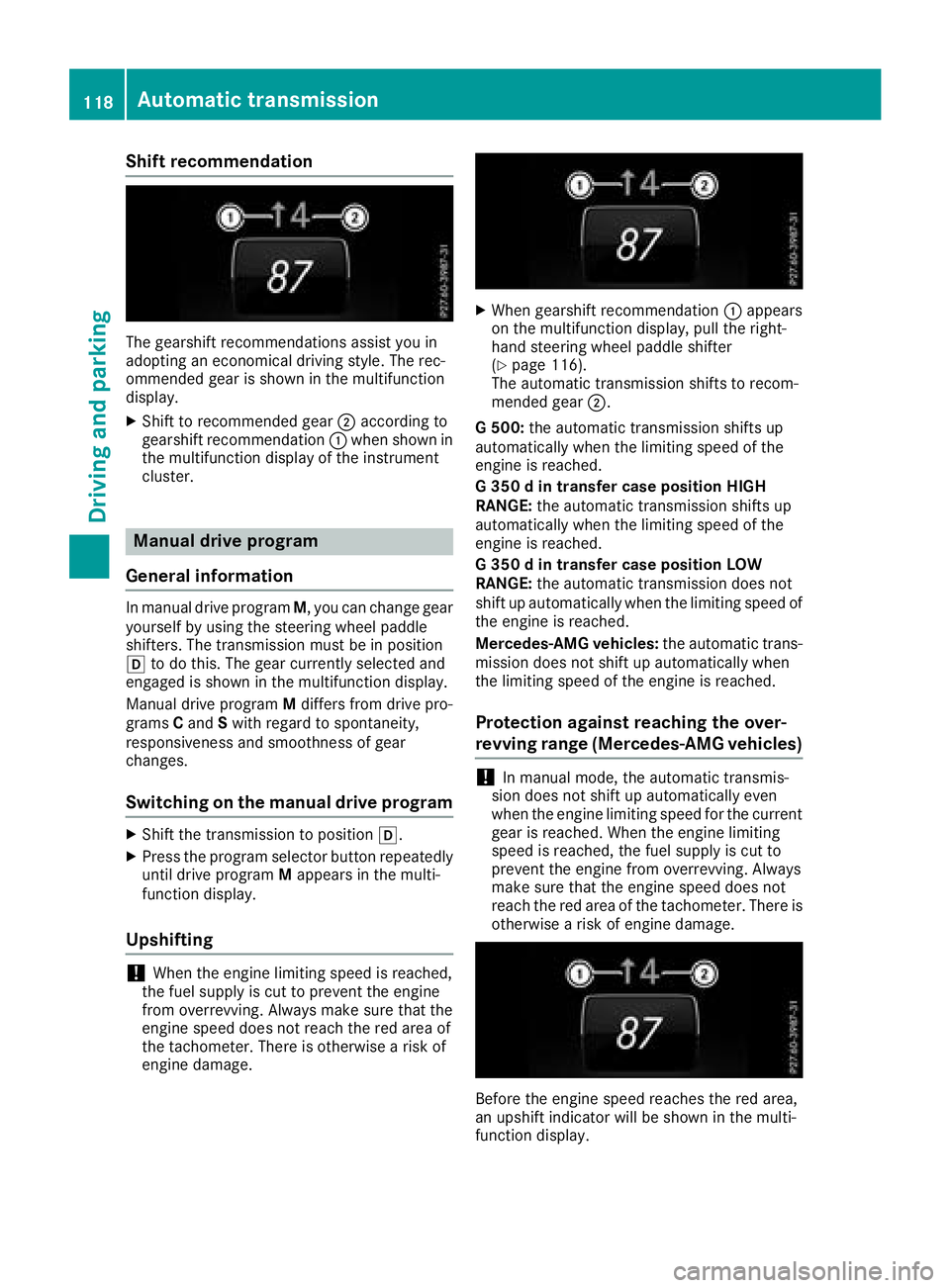
The gearshift recommendations assist you in
adopting an economical driving style. The rec-
ommended gear is shown in the multifunction
display.
XShift to recommended gear;according to
gearshift recommendation :when shown in
the multifunction display of the instrument
cluster.
Manual drive program
General information
In manual drive program M, you can change gear
yourself by using the steering wheel paddle
shifters. The transmission must be in position
h to do this. The gear currently selected and
engaged is shown in the multifunction display.
Manual drive program Mdiffers from drive pro-
grams Cand Swith regard to spontaneity,
responsiveness and smoothness of gear
changes.
Switching on the manual drive program
XShift the transmission to position h.
XPress the program selector button repeatedly
until drive programMappears in the multi-
function display.
Upshifting
!When the engine limiting speed is reached,
the fuel supply is cut to prevent the engine
from overrevving. Always make sure that the
engine speed does not reach the red area of
the tachometer. There is otherwise a risk of
engine damage.
XWhen gearshift recommendation :appears
on the multifunction display, pull the right-
hand steering wheel paddle shifter
(
Ypage 116).
The automatic transmission shifts to recom-
mended gear ;.
G 500: the automatic transmission shifts up
automatically when the limiting speed of the
engine is reached.
G 350 d in transfer case position HIGH
RANGE: the automatic transmission shifts up
automatically when the limiting speed of the
engine is reached.
G 350 d in transfer case position LOW
RANGE: the automatic transmission does not
shift up automatically when the limiting speed of
the engine is reached.
Mercedes-AMG vehicles: the automatic trans-
mission does not shift up automatically when
the limiting speed of the engine is reached.
Protection against reaching the over-
revving range (Mercedes-AMG vehicles)
!In manual mode, the automatic transmis-
sion does not shift up automatically even
when the engine limiting speed for the current
gear is reached. When the engine limiting
speed is reached, the fuel supply is cut to
prevent the engine from overrevving. Always
make sure that the engine speed does not
reach the red area of the tachometer. There is
otherwise a risk of engine damage.
Before the engine speed reaches the red area,
an upshift indicator will be shown in the multi-
function display.
118Automatic transmission
Driving and parking
Page 121 of 294

XWhen gearshift recommendation:appears
on the multifunction display, pull the right-
hand steering wheel paddle shifter
(
Ypage 116).
The automatic transmission shifts to recom-
mended gear ;.
Downshifting
XPull the left-hand steering wheel paddle
shifter (Ypage 116).
The automatic transmission shifts down to
the next gear.
If you slow down or stop without shifting down, the automatic transmission automatically shifts
down.
Selecting the optimal gear for maxi-
mum acceleration
XPull the left-hand steering wheel paddle
shifter until the transmission selects the opti-
mum gear according to the speed.
Switching off the manual drive program
XAll vehicles (except Mercedes ‑AMG vehi-
cles): press the program selector button
repeatedly until Eor Sis shown in the multi-
function display.
XMercedes‑AMG vehicles: press the program
selector button repeatedly until Cor Sis
shown in the multifunction display.
Problems with the automatic transmission
ProblemPossible causes/consequences and MSolutions
The transmission has
problems shifting gear.The transmission is losing oil.
XHave the transmission checked at a qualified specialist workshop
immediately.
The acceleration ability
is deteriorating.
The transmission no lon-
ger changes gear.The transmission is in emergency mode.
It is only possible to shift intosecondgear and reverse gear.
XStop the vehicle.
XShift the transmission to position j.
XTurn the SmartKey to positiongin the ignition lock.
XWait at least ten seconds before restarting the engine.
XShift the transmission to position hork.
If h is selected, the transmission shifts to secondgear; ifkis
selected, the transmission shifts to reverse gear.
XHave the transmission checked at a qualified specialist workshop
immediately.
You hear a warning tone.You have:
Rswitched off the engine
Ropened the driver's door
Rnot shifted the selector lever to position j
XShift the selector lever to positionj.
Automatic transmission119
Driving and parking
Z
Page 122 of 294
Refueling
Important safety notes
GWARNING
Fuel is highly flammable. If you handle fuel
incorrectly, there is a risk of fire and explo-
sion.
You must avoid fire, open flames, creating
sparks and smoking. Switch off the engine
and, if applicable, the auxiliary heating before refueling.
GWARNING
Fuel is poisonous and hazardous to health.
There is a risk of injury.
You must make sure that fuel does not come into contact with your skin, eyes or clothing
and that it is not swallowed. Do not inhale fuel
vapors. Keep fuel away from children.
If you or others come into contact with fuel,
observe the following:
RWash away fuel from skin immediately
using soap and water.
RIf fuel comes into contact with your eyes,
immediately rinse them thoroughly with
clean water. Seek medical assistance with-
out delay.
RIf fuel is swallowed, seek medical assis-
tance without delay. Do not induce vomit-
ing.
RImmediately change out of clothing which
has come into contact with fuel.
GWARNING
Electrostatic buildup can create sparks and
ignite fuel vapors. There is a risk of fire and
explosion.
Always touch the vehicle body before opening
the fuel filler flap or touching the fuel pump
nozzle. Any existing electrostatic buildup is
thereby discharged.
Do not get into the vehicle again during the refu-
eling process. otherwise electrostatic charge
could build up again.
!Do not use diesel to refuel vehicles with a
gasoline engine. Do not switch on the ignition
if you accidentally refuel with the wrong fuel.
Otherwise, the fuel will enter the fuel system. Even small amounts of the wrong fuel could
result in damage to the fuel system and the
engine. Notify a qualified specialist workshop
and have the fuel tank and fuel lines drained
completely.
!Overfilling the fuel tank could damage the
fuel system.
!Take care not to spill any fuel on painted
surfaces. You could otherwise damage the
paintwork.
!Use a filter when adding fuel from a fuel can.
The fuel lines and/or the fuel injection system
could otherwise be blocked by particles from
the fuel can.
If you overfill the fuel tank, fuel could spray out
when the fuel pump nozzle is removed.
For further information on fuel and fuel quality
(
Ypage 283).
Refueling
General information
Pay attention to the important safety notes
(Ypage 120).
If you unlock/lock the vehicle from the outside,
the fuel filler flap also unlocks/locks.
The position of the fuel filler cap is displayed in
the instrument cluster 8. The arrow next to
the filling pump indicates the side of the vehicle.
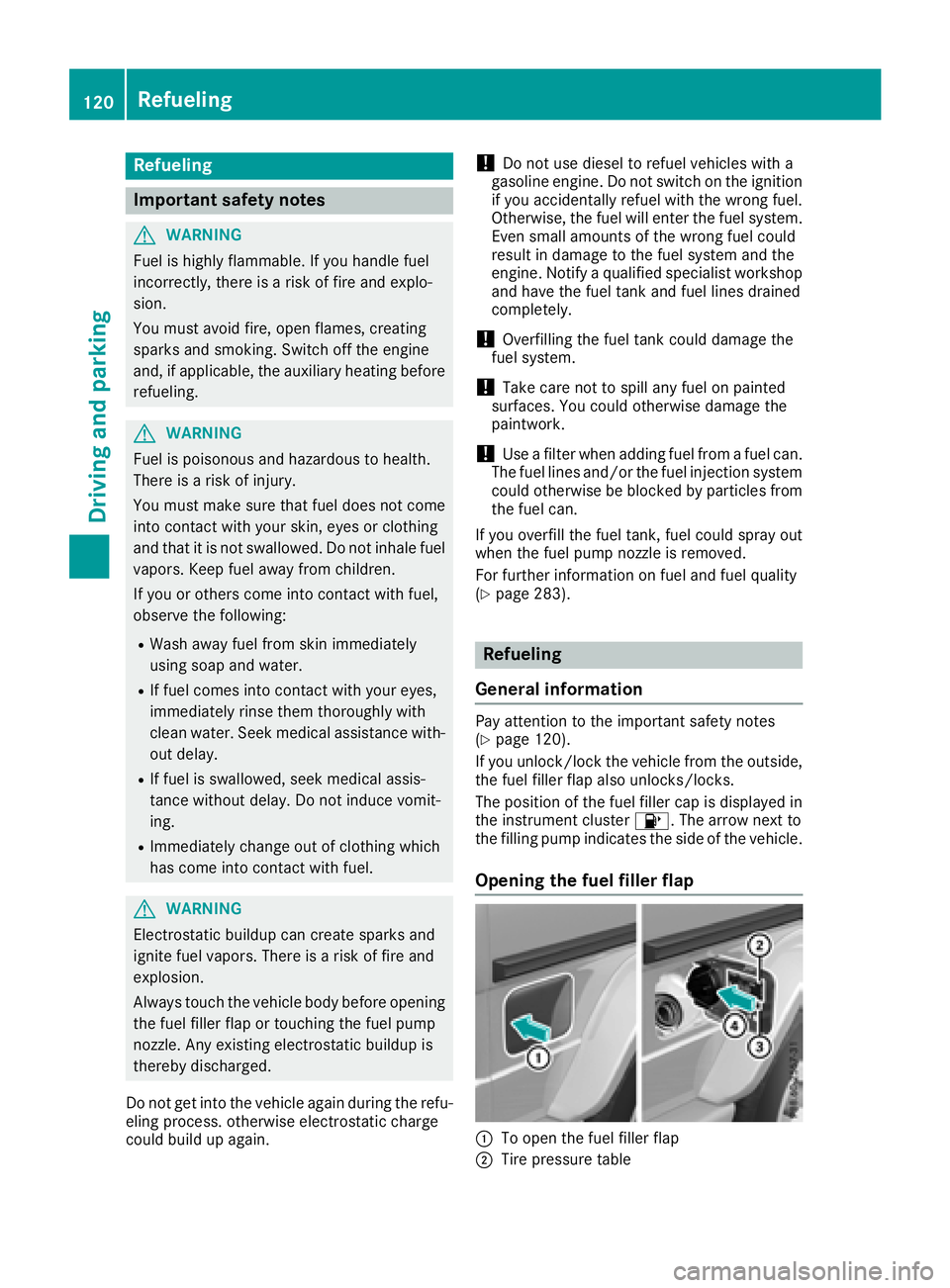
Opening the fuel filler flap
:To open the fuel filler flap
;Tire pressure table
120Refueling
Driving and parking
Page 123 of 294
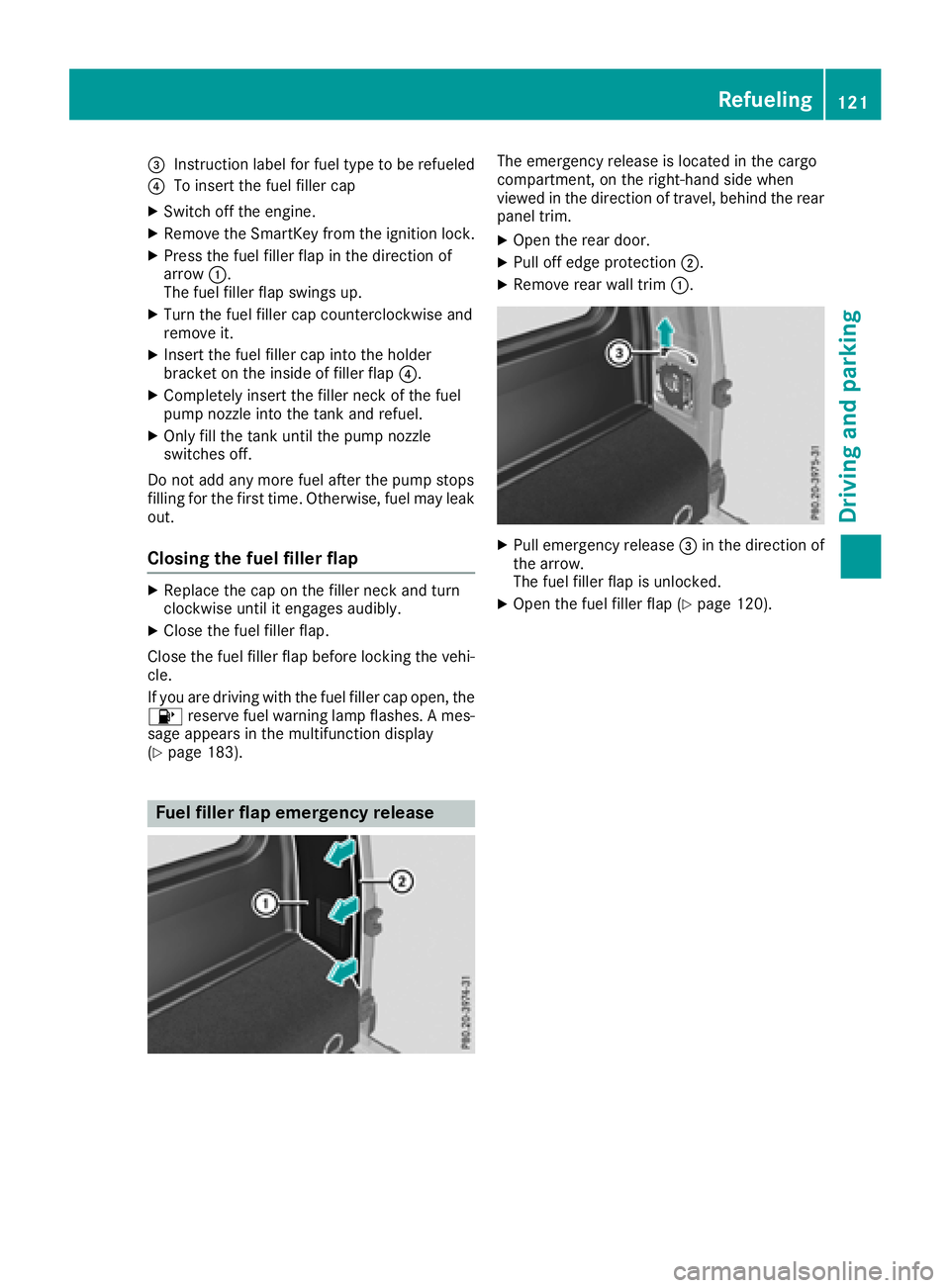
=Instruction label for fuel type to be refueled
?To insert the fuel filler cap
XSwitch off the engine.
XRemove the SmartKey from the ignition lock.
XPress the fuel filler flap in the direction of
arrow:.
The fuel filler flap swings up.
XTurn the fuel filler cap counterclockwise and
remove it.
XInsert the fuel filler cap into the holder
bracket on the inside of filler flap ?.
XCompletely insert the filler neck of the fuel
pump nozzle into the tank and refuel.
XOnly fill the tank until the pump nozzle
switches off.
Do not add any more fuel after the pump stops
filling for the first time. Otherwise, fuel may leak
out.
Closing the fuel filler flap
XReplace the cap on the filler neck and turn
clockwise until it engages audibly.
XClose the fuel filler flap.
Close the fuel filler flap before locking the vehi-
cle.
If you are driving with the fuel filler cap open, the
8 reserve fuel warning lamp flashes. A mes-
sage appears in the multifunction display
(
Ypage 183).
Fuel filler flap emergency release
The emergency release is located in the cargo
compartment, on the right-hand side when
viewed in the direction of travel, behind the rear
panel trim.
XOpen the rear door.
XPull off edge protection ;.
XRemove rear wall trim:.
XPull emergency release =in the direction of
the arrow.
The fuel filler flap is unlocked.
XOpen the fuel filler flap (Ypage 120).
Refueling121
Driving and parking
Z
Page 124 of 294
Problems with the fuel and fuel tank
ProblemPossible causes/consequences andMSolutions
Fuel is leaking from the
vehicle.GWARNING
The fuel line or the fuel tank is defective.
There is a risk of fire or explosion.
XApply the parking brake.
XSwitch off the engine.
XRemove the SmartKey from the ignition lock.
XDo not restart the engine under any circumstances.
XConsult a qualified specialist workshop.
The fuel filler flap cannot
be opened.The fuel filler flap is not unlocked.
XUnlock the vehicle (Ypage 63).
XOpen the rear door.
XManually unlock the fuel filler flap using the emergency release
(Ypage 121).
The SmartKey battery is discharged or nearly discharged.
XUnlock the vehicle using the mechanical key (Ypage 64).
The fuel filler flap is unlocked, but the opening mechanism is jammed.
XManually unlock the fuel filler flap using the emergency release
(Ypage 121).
XConsult a qualified specialist workshop.
Parking
Important safety notes
GWARNING
Flammable material such as leaves, grass or
twigs may ignite if they come into contact with
hot parts of the exhaust system or exhaust
gas flow. There is a risk of fire.
Park the vehicle so that no flammable mate-
rials come into contact with parts of the vehi-
cle which are hot. Take particular care not to
park on dry grassland or harvested grain
fields.
GWARNING
If you leave children unsupervised in the vehi-
cle, they could set it in motion by, for example:
Rrelease the parking brake.
Rshift the automatic transmission out of the
parking position P.
Rstart the engine.
In addition, they may operate vehicle equip-
ment and become trapped. There is a risk of
an accident and injury.
When leaving the vehicle, always take the
SmartKey with you and lock the vehicle. Never
leave children unsupervised in the vehicle.
122Parking
Driving and parking