2018 MERCEDES-BENZ E-CLASS WAGON fuel
[x] Cancel search: fuelPage 159 of 506
*NO
TEDama getothe fuel sy stem caused
by ove rfilled fuel tanks.
#Only fill th e fuel tank until the pump
nozzle switches off.
* NO
TEFuel may spr ayout when you
re mo vethe fuel pump nozzle.
#Only fill th e fuel tank until the pump
nozzle switches off.
Re quirement:RThe vehicle must be unloc ked.
% Do not get into theve hicle again during the
re fueling process. Otherwise, electros tatic
ch arge could build up again.
Obser vethe no tes on operating fluids
(
→page 394).
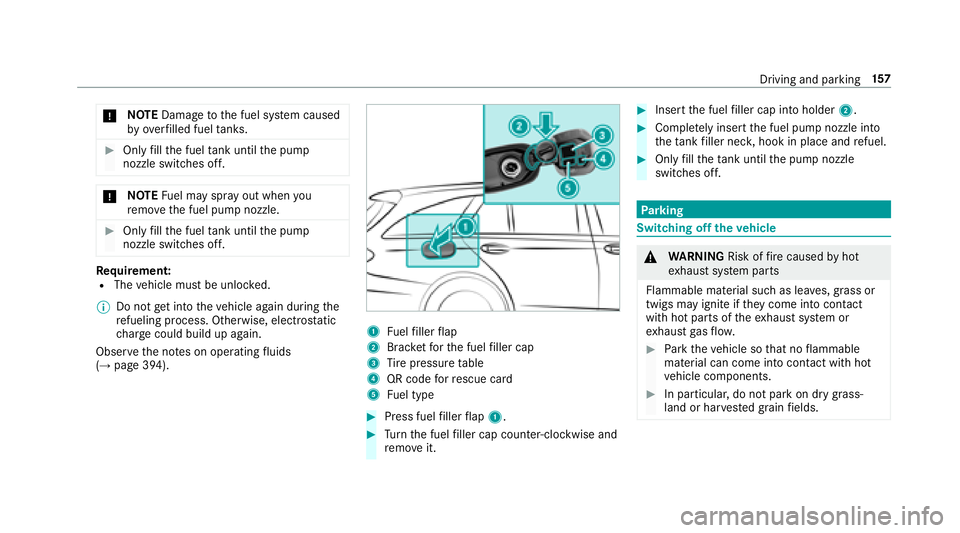
1Fu elfiller flap
2Brac ketfo rth e fuel filler cap
3Ti re pressure table
4QR code forre scue card
5Fu el type
#Press fuel filler flap 1.
#Turn the fuel filler cap coun ter-clockwise and
re mo veit.
#Insert the fuel filler cap into holder 2.
#Completely inse rtthe fuel pump nozzle into
th eta nk filler nec k,hook in place and refuel.
#Only fill th eta nk until the pump nozzle
switches off.
Pa rking
Switching off theve hicle
&
WARNING Risk offire caused byhot
ex haust sy stem parts
Flammable material such as lea ves, grass or
twigs may ignite if they come into contact
wi th hot parts of theex haust sy stem or
ex haust gasflow .
#Park theve hicle so that no flammable
material can come into con tact wi thhot
ve hicle components.
#In particular, do not park on dry grass‐
land or har vested grain fields.
Driving and parking 15
7
Page 180 of 506

taking on the left in left-hand tra ffic on free ways
and high-speed major roads.
If yo u act ivate the turn signal indicator tochange
lanes, theve hicle will accelerate more briskly to
th e set speed under thefo llowing conditions:
RAc tive Dis tance Assist DISTRONIC is acti va‐
te d.
RIfth e driving speed is higher than 45 mph
(70 km/h).
RIf th e driven speed drops below thestored
speed.
RThe sy stem cannot detect a vehicle in there l‐
ev ant area of theov ertak ing lane.
Ve hicles with Driving Assistance Package
and Traf fic Sign Assis t:Ac tive Dis tance Assist
DISTRONIC also has theAc tive Speed Limit
Assi stfunction. This function can be configure d
in the multimedia sy stem. If a change in the
speed limit is de tected and Active Dis tance
Assist DISTRONIC is acti vated, Ac tive Dis tance
Assist DISTRONIC assumes this new speed.
The driven speed is adap ted when theve hicle is
le ve l with the tra ffic signs. The speed limit dis‐ play in
the Instrument Display is alw ays update d
when theve hicle is le vel with the tra ffic sign.
If Ac tive Dis tance Assist DISTRONIC has been
put into passive modebypressing the accelera‐
to r pedal, only speed limits which are higher
th an the set speed ar e adop
ted.
Pullin
g th e cruise control le ver will set the dis‐
pla yed speed limit as the speed, pr ovided that:
RAc tive Speed Limit Assi sthas been activated
in the multimedia sy stem and
RAc tive Dis tance Assist DISTRONIC has been
acti vated
If no speed limit is display ed whenthe le ver is
operated, the speed set bythe driver is adop ted.
Drive prog ram
The DYNA MIC SELECT switch allo wsyouto
ch ange the driving style of Active Dis tance
Assist DISTRONIC. Depending on which drive
prog ram is selected, the driving characteristics
can be geared towa rds fuel econom y,comfort or
dynamic per form ance (
→page 150). Sy
stem limitations
Ve hicles with the Driving Assistance Pack‐
age: Active Dis tance Assist DISTRONIC is acti ve
in the 0 mph(0 km/h) to130mp h(210 km/h)
speed range.
The sy stem may be impaired or may not function
in thefo llowing ins tances, forex ample:
RIn snow ,ra in, fog, heavy spr ay, if there is
gl are, in direct sunlight or in greatlyvarying
ambient light.
RThe windshield in the area of the camera is
dirty, fogged up, damaged or co vered.
RIfth era dar sensors are dirty or co vered.
ROn slippery roads, braking or accelerating
can cause the drive wheels tolose traction
and theve hicle could then skid.
RIn parking garage s,tollst ations or on roads
with steep uphill or downhill gradients.
Do not use Active Dis tance Assist DISTRONIC in
th ese situations.
17 8
Driving and pa rking
Page 189 of 506
The HOLD function is deactivated inthefo llow‐
ing situations:
RWhen Active Dis tance Assist DISTRONIC is
acti vated.
RThe transmission is switched toposition j.
RWhentheve hicle is secured with the electric
parking brake.
In thefo llowing situations, theve hicle is held by
th e transmission position jorby the electric
parking brake:
RWhen the seat belt is unfas tened and the
driver's door is opened.
RWhen the engine is switched off.
RWhen there is a malfunction in the sy stem or
if th e po wer supply is insufficient.
DY NA MIC BODY CONT ROL
DYNA MIC BODY CONTROL has thefo llowing
ch aracteristics:
RVa riable damping characteristics
RContinual adjustment of the damping forc es
The damping characteristics adapt tothe cur rent
operating and driving situation.
The da mping is tuned individually for each wheel
and is af fected bythefo llowing factors:
RThe road sur face conditions
RVe hicle load
RThe drive program selected
The drive program can be adjus ted using the
DY NA MIC SELECT switch.
AIR BODY CONT ROL
AIR BODY CONT ROL function
AIR BODY CONTROL is an air suspension sy stem
with variable damping for impr oved driving com‐
fo rt. The all-round le vel control sy stem ensures
th e best possible suspension and const ant
ground clearance, even with a laden vehicle.
When driving at speed, theve hicle is lo wered
automatically toimpr ovedriving saf etyand to re
duce fuel consum ption. The option of manually
adjusting theve hicle le vel is also available.
AIR BODY CONTROL comprises:
RAir suspension with variable spring rate
RAu tomatic le vel control sy stem
RSpeed-dependent lo wering toreduce fuel
consum ption
RManual le vel adjustment
RADS PLUS (Adaptive Damping Sy stem with
const ant damping forc e adjustment)
RDY NA MIC SELECT switch and le vel button
Driving and parking 18
7
Page 217 of 506
Instrument displayoverview
Mercedes-AMG vehicles: be sure toobser ve
th e no tes in the Supplement. Otherwise, you
may not recognize dangers.
&
WARNING Risk of accident due toan
instrument display malfunction
If th e instrument display has failed or mal‐
functioned, you cannot recognize function
re strictions applying tosaf etyre leva nt sys‐
te ms.
The operating saf etyof your vehicle may be
impaired.
#Drive on carefull y.
#Have theve hicle checked immediately
at a qualified specialist workshop.
Ifth e operating saf etyof your vehicle is
impaired, park theve hicle safely as soon as pos‐
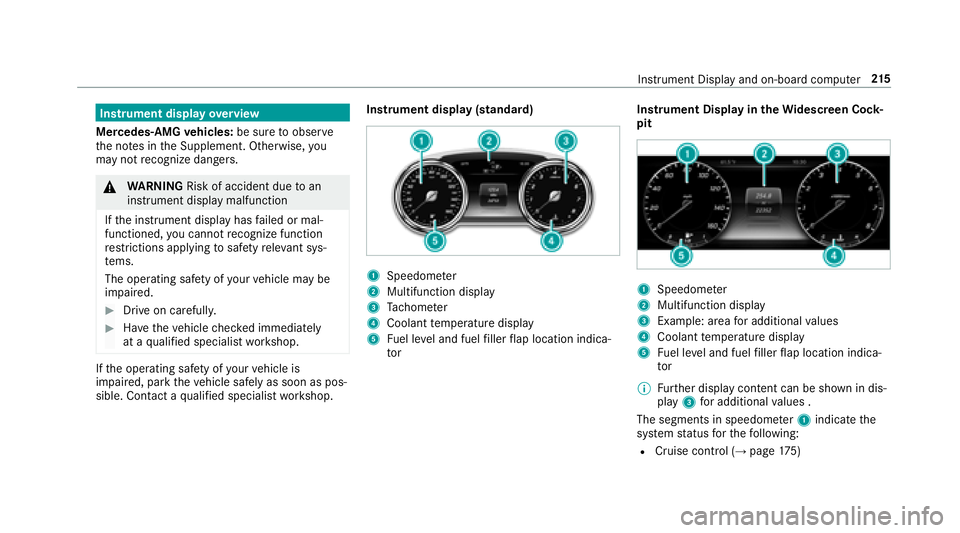
sible. Contact a qualified specialist workshop. Instrument display (standard)
1Speedome
ter
2Multifunction display
3Ta ch ome ter
4Coolant temp erature display
5Fuel le vel and fuel filler flap location indica‐
to r Instrument Display in
theWi descreen Co ck‐
pit
1Speedom eter
2Multifunction display
3Example: area for additional values
4Coolant temp erature display
5Fuel le vel and fuel filler flap location indica‐
to r
% Further display content can be shown in dis‐
play 3for additional values .
The segments in speedomet er1 indicate the
sy stem status forth efo llowing:
RCruise control (→page 175)
Instru ment Display and on-board computer 21
5
Page 218 of 506

RActive Dis tance Assist DISTRONIC
(→pa ge 177)
* NO
TEEngine damage duetoexc essively
high engine speeds
The engine will be damaged if youdriv ewit h
th e engine in theov errevving range.
#Do not drive wi th the engine in theove r‐
re vving range.
The fuel supply is inter rupted toprotect the
engine when there d band in tach ome ter3
(o ve rrev ving range) is reached.
During no rmal operating conditions, coolant
te mp erature display 4may rise tothere d
mar k.
&
WARNING Danger of burn s when open‐
ing the hood
If yo u open the hood when the engine has
ove rheated or during a fire inthe engine
compartment, you could come into contact
wit h hot gases or other escaping operating
fl uids.
#Before opening the hood, allow the
engine tocool down.
#Intheeve nt of a fire inthe engine com‐
partment, keep the hood closed and
call thefire service.
Overview of the butto ns onthest eering
wheel
1But ton group:
% Main menu and ba ckbutton (on-board
computer)
8 Switches sound off/on W
Increases thevo lume
X Decreases thevo lume
2Touch Control (on-board co mputer)
3Touch Control (multimedia sy stem)
4Button group:
% Main menu and back button (multime‐
dia sy stem)
ó Voice Cont rol Sy stem
6 Makes/accepts a call
~ Rejects/ends a call
Ope rating the on-board co mputer
&
WARNING Risk of dist raction from infor‐
mation sy stems and communications
equipment
If yo u operate information and communica‐
tions equipment integ rated in theve hicle
when driving, youwill be distracted from the
traf fic situation. This could also cause youto
lose control of theve hicle.
21 6
Instrument Display and on-board computer
Page 222 of 506
RGray radar waves next tovehicle: Blind Spot
Assist activated
RGreen radar waves next tovehicle: Blind Spot
Assist active
RDisplay of Active Dis tance Assist DISTRONIC
(→pa ge 177)
Calling up displays in theTr ip menu
On-board computer:
,7ULS
% Ve
hicles with an instrument display in
th eWi descreen Co ckpit: When you ha ve
th e design set to3URJUHVVLYH ,yo u can view
information on the journey in the left-hand
area of the instrument displa y.
#Toselect a displa y:swipe upwards or down‐
wa rds on the left-hand side of Touch Control.
Dis playsinthe7ULS menu:
RStandard display
RRa nge and cur rent fuel consump tion When
gliding mode is active (
→page 154),
*OLGLQ J0RGH is displa yed ins tead of the cur‐
re nt fuel consump tion.
A recuperation displ ayis also available for
cer tain engines. If there is only a small
amount of fuel left in the fuel tank, the dis‐
play sho wsave hicle being refueled ins tead
of the appr oximate range.
RECO displ ay(→page 150)
RTrip computer )URP 6WDUWand)URP 5HVHW
RDigital speedomet er
% Ve
hicles with an Instrument Display in
th eWi descreen Co ckpit: The digital speed‐
ome ter only appears in the&ODVVLF and6SRUW
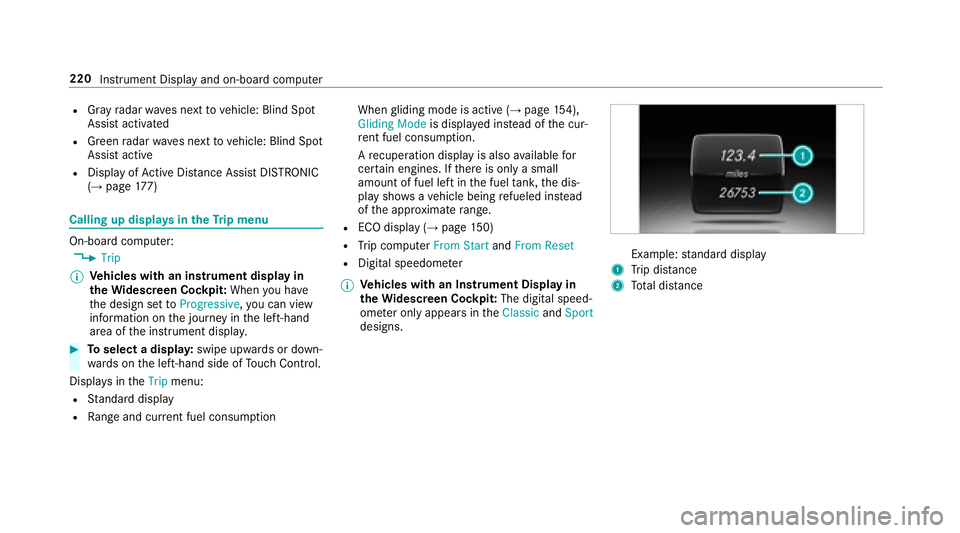
designs.Example: standard display
1Trip dis tance
2To tal dis tance
220
Instrument Display and on-board computer
Page 223 of 506

Example: trip computer
1Total dis tance
2Driving time
3Av erage speed
4Average fuel consum ption
Re setting values in theTr ip menu of the on-
board compu ter
On-board computer:
,7ULS
% The spelling may dif fer in the main menu dis‐
pla yed. Therefore, obser vethe menu over‐ view
forth e instrument display
(
→page 216).
Yo u can reset theva lues of thefo llowing func‐
tions:
RTr ip dis tance
RTrip computer "F rom start" and "F rom reset"
RECO display
#To select the function tobe rese t:swipe
upwards or down wards on the left-hand side
of Touch Control.
#Press the left-hand side of Touch Control.
#Select
If yo upr ess and hold the left-hand side of Touch
Control, the function will be reset immediately.
Calling up navigation instructions in the on-
board compu ter
On-board computer:
,1DYLJDWLRQ
Example: no change of direction announced
1Dis tance tothe next destination
2Estimated ar riva l time
3Dis tance tothe next change of direction
4Cur rent road
Inst rument Display and on-board computer 221
Page 266 of 506
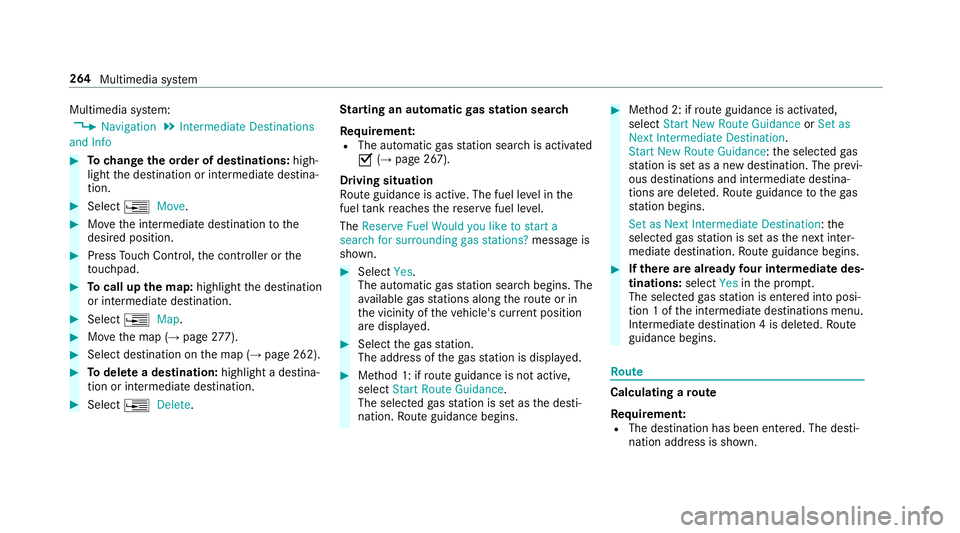
Multimedia system:
,1DYLJDWLRQ.,QWHUPHGLDWH 'HVWLQDWLRQV
DQG ,QIR
#To change the order of destinations: high‐
light the destination or intermediate destina‐
tion.
#Select ¥0RYH.
#Movethe intermediate destination tothe
desired position.
#Press Touch Control, the controller or the
to uchpad.
#To call up the map: highlight the destination
or intermediate destination.
#Select ¥0DS.
#Movethe map (→page 277).
#Select destination on the map (→page 262).
#To del ete a destination: highlight a destina‐
tion or intermediate destination.
#Select ¥'HOHWH. St
arting an automatic gasst ation sear ch
Re quirement:
RThe automatic gasst ation sear chis activated
O (→page 267).
Driving situation
Ro ute guidance isactive. The fuel le vel in the
fuel tank reaches there ser vefuel le vel.
The 5HVHUYH )XHO :RXOG \RX OLNH WR VWDUW D
VHDUFK IRU VXUURXQGLQJ JDV VWDWLRQV" message is
shown.
#Select
av ailable gasst ations along thero ute or in
th e vicinity of theve hicle's cur rent position
are displ ayed.
#Select thega sst ation.
The address of thega sst ation is displa yed.
#Me thod 1: if route guidance isnot active,
select 6WDUW 5RXWH *XLGDQFH .
The selected gasst ation is set as the desti‐
nation. Route guidance begins.
#Me thod 2: if route guidance is activated,
select 6WDUW 1HZ 5RXWH *XLGDQFH or6HW DV
1H[W ,QWHUPHGLDWH 'HVWLQDWLRQ .
6WDUW 1HZ 5RXWH *XLGDQFH :th e selected gas
st ation is set as a new destination. The pr evi‐
ous destinations and intermediate destina‐
tions are dele ted. Ro ute guidance tothega s
st ation begins.
6HW DV 1H[W ,QWHUPHGLDWH 'HVWLQDWLRQ :th e
selected gasst ation is set as the next inter‐
mediate destination. Route guidance begins.
#Ifth ere are already four intermediate des‐
tinations: select
tion 1 of the intermediate destinations menu.
Intermediate destination 4 is dele ted. Ro ute
guidance begins.
Ro ute
Calculating a route
Re quirement:
RThe destination has been entered. The desti‐
nation address is shown.
264
Multimedia sy stem