Page 267 of 593
The
following display con tent can be selected in
th eClassic andSport designs:
R Rev counter
R Navigation
R ECO display
R Consu mption
R G-m eter
The following con tent can be selected in thePro-
gressive design:
R Date
R Navigation
R ECO display
R Consu mption
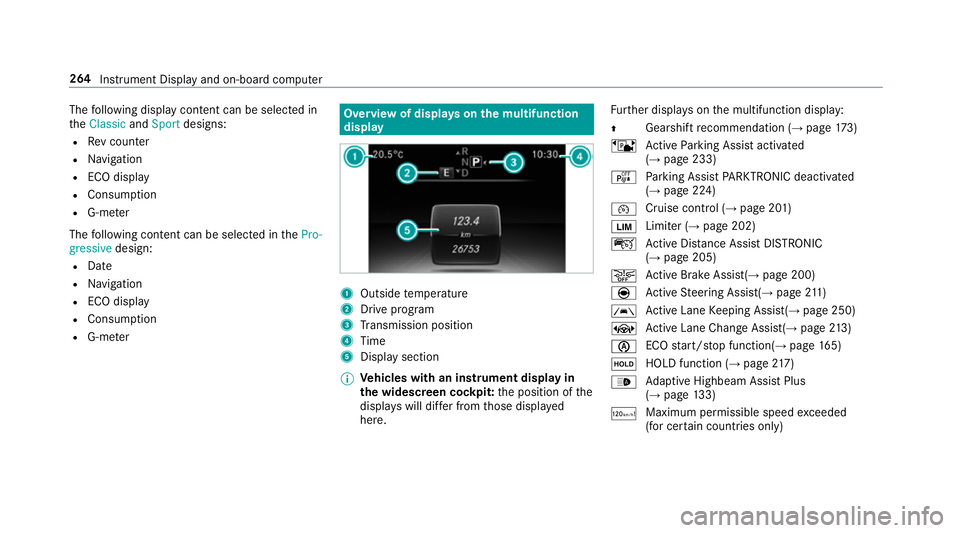
R G-m eter Overview of displa
yson the multifunction
display 1
Outside temp erature
2 Drive prog ram
3 Transmission position
4 Time
5 Display section
% Ve
hicles with an instrument display in
th e widescreen cockpit: the position of the
displa yswill dif fer from those displa yed
here. Fu
rther displa yson the multifunction display:
Z Gearshift
recommendation (→ page 173)
ë Active Parking Assist activated
(→ page 233)
é Parking Assist PARKTRONIC deacti vated
( → page 224)
¯ Cruise control (→
page 201)
È Limiter (→
page 202)
ç Active Dis tance Assi stDISTRONIC
(→ page 205)
æ Ac
tive Brake Assi st(→ page 200)
è Active Steering Assis t(→ page 211)
à Ac
tive Lane Keeping Assist(→ page 250)
± Active Lane Change Assi st(→ page 213)
è ECO
start/ stop function(→ page165)
ë HOLD fu
nction (→ page 217)
_ Ad
aptive Highbeam Assist Plus
(→ page 133)
ð Maximum permissible speed
exceeded
(for cer tain countries only) 264
Instrument Display and on-board computer
Page 271 of 593
Re
setting values on the trip menu of the on-
board compu terOn-board computer:
Trip
% The spelling on the main menu displa yed
may dif fer. Therefore, obser vethe menu
ove rview forth e instrument display
(→ page 262).
Yo u can reset theva lues of thefo llowing func‐
tions:
R Trip dis tance
R Trip computer From startandFrom reset
R ECO displa y(→ page 167) #
Toselect the function tobe rese t:swipe
upwards or down wards on the left-hand
To uch Control. #
Press the left-hand Touch Control. #
Select Yes. #
Press the left-hand Touch Control. If
yo u press and hold the left-hand Touch Con‐
trol, theva lues of the function will be reset
immediatel y. Calling up navigation instructions on
the on-
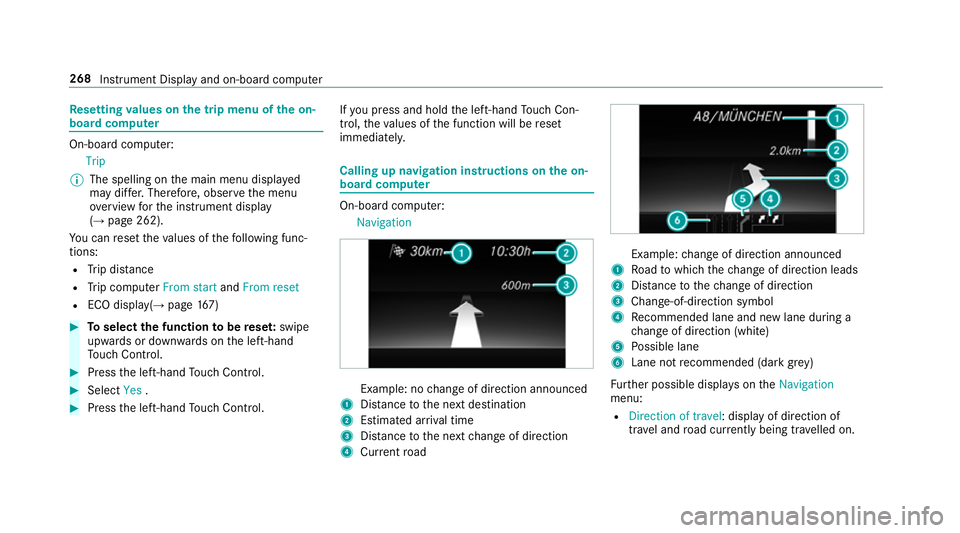
board compu ter On-board computer:
Navigation Example: no
change of direction announced
1 Distance tothe next destination
2 Estimated ar riva l time
3 Distance tothe next change of direction
4 Current road Example:
change of direction announced
1 Road towhich thech ange of direction leads
2 Distance tothech ange of direction
3 Chan ge-of-direction symbol
4 Recommended lane and new lane du ring a
ch ange of direction (white)
5 Possible lane
6 Lane not recommended (da rkgrey)
Fu rther possible displa yson theNavigation
menu:
R Direction of travel: display of direction of
tra vel and road cur rently being tr avelled on. 268
Instrument Display and on-board computer
Page 272 of 593
R
New route... orCalculating route…: a new
ro ute is being calculated.
R Road not mapped :th ero ad is unknown, e.g.
fo r newly built roads.
R No route: no route could be calculated tothe
selected destination.
R Off map: the map forth e cur rent location is
not available.
R Area of destination reached: you ha ve
re ached the area of destination.
R O: you ha vereached the destination or an
intermediate destination. #
Toexitth e menu: pressthe back button on
th e left.
Ve hicles with the COMAND Online multime‐
dia sy stem: you can also start navigation toone
of there cent destinations on theNavigation
menu: #
Press the left-hand Touch Control. #
Toselect a destination: swipe upwards or
down wards on the left-hand Touch Control. #
Press the left-hand Touch Control.
Ro ute guidance is star ted.
If ro ute guidance has already been activated,
a re qu est will appear asking whe ther you
wish toend the cur rent route guidance. #
Select Yes. #
Press the left-hand Touch Control.
Ro ute guidance is star ted. Selecting
radio stations using the on-boa rd
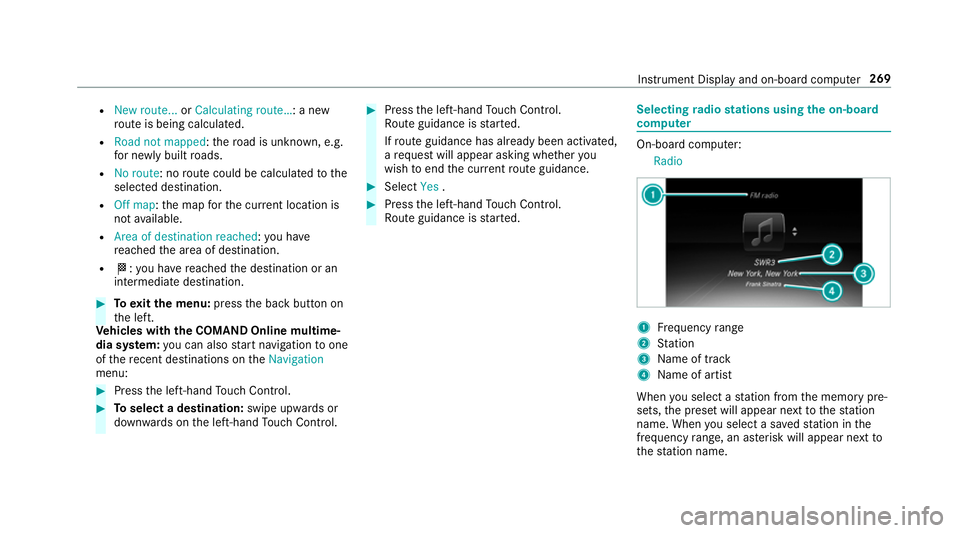
compu ter On-board computer:
Radio 1
Frequency range
2 Station
3 Name of track
4 Name of artist
When you select a station from the memory pre‐
sets, the preset will appear next tothest ation
name. When you select a sa vedstation in the
frequency range, an as terisk will appear next to
th est ation name. In
stru ment Display and on-board computer 269
Page 275 of 593
#
Press the left-hand Touch Control. 1
Setting cur rently selected
2 Digital speedome ter
3 Traf fic Sign Assi st
4 Navigation displa ys Head-up Display
Fu
nction of the head-up display Mercedes-AMG
vehicles: be sure toobser ve
th e information in the Supplement. Otherwise,
yo u may failto recognise dangers.
The head-up displ ayprojects into the driver's
fi eld of vision:
R Information from the navigation sy stem
R Information from the driver assis tance sys‐
te ms
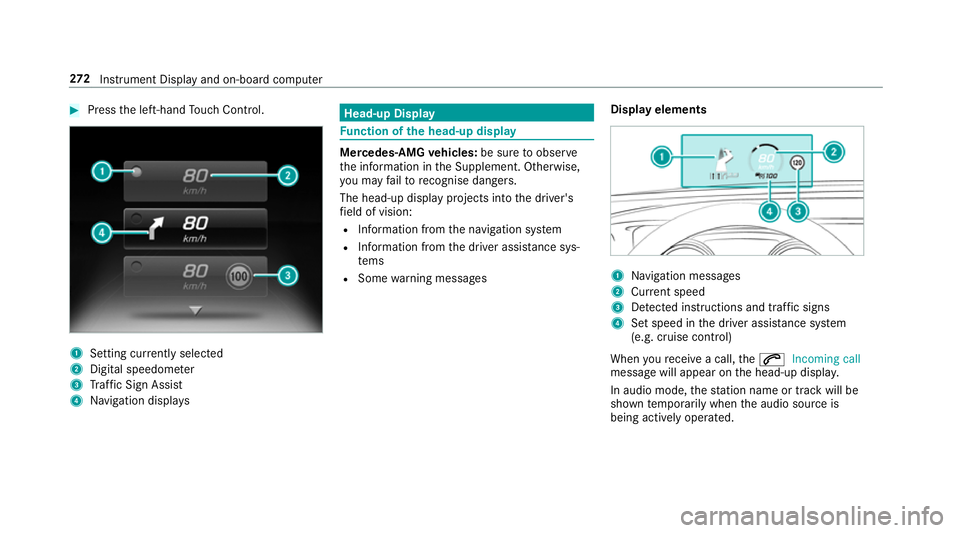
R Some warning messages Display elements 1
Navigation messa ges
2 Current speed
3 Detected instructions and traf fic signs
4 Set speed in the driver assis tance sy stem
(e.g. cruise control)
When youre cei vea call, the6 Incoming call
message will appear on the head-up displa y.
In audio mode, thest ation name or track will be
shown temp orarily when the audio source is
being actively operated. 272
Instrument Display and on-board computer
Page 278 of 593

1
Press therock er switch up: £starts LIN‐
GU ATRO NIC
2 Press the control knob: 8switches the
sound off or on (ends LINGU ATRO NIC)
Tu rn the control knob up/down: increases/
decreases thevo lume 3
Press therock er switch up: 6makes/
accepts a call
Press therock er switch down: ~rejects/
ends a call (ends LINGU ATRO NIC) Conducting a dialogue with LINGU
ATRO NIC #
Tostart or continue a dialogue: onthe
multifunction steering wheel, press the£
rock er switch up.
Yo u can say a voice command af ter an
acou stic signal. #
Tocor rect an ent ry:say theCorrection
vo ice command. #
Toselect an entry from the selection lis t:
say the line number or the conte nts. #
Tobrows eth e selection lis t:say theNext
or Back voice command. #
Tointer rupt the dialogue: saythePause
vo ice command. #
Tocancel the dialogue: saytheCancel
vo ice command. Operable functions
Yo
u can use the LINGU ATRO NIC voice control
sy stem tooperate thefo llowing equipment
depending on thefe atures:
R Telephone
R Text messa ges
R Navigation
R Address book
R Radio
R Audio (memory card, Media Inter face, USB
and Blu etoo th®
audio)
R TV
R Vehicle Overview of types of
voice command A distinction is made between
thefo llowing
vo ice commands:
R Global voice commands can be said at any
time and rega rdless of the cur rent applica‐
tion, e.g. thevo ice commands Navigate to,
Call orText message to. LINGU
ATRO NIC 275
Page 280 of 593
Essential
voice commands Overview of switch
voice commands Swit
chvoice commands can be used toopen
cer tain applications. The voice command selec‐ tion can be used
rega rdless of the application
th at is cur rently acti ve.
Switch voice commands Vo
ice command Function
Navigation To
switch tonavigation mode
Map To
switch tomap display
Address book To
switch toaddress book
Telephone To
switch totelephone mode
Text message To
switch totext messa ges
Radio To
switch toradio mode
TV To
switch toTV mode
Media To
switch tomedia mode
USB To
switch toUSB LINGU
ATRO NIC 277
Page 281 of 593
Vo
ice command Function
Memory card To
switch tomemory card
Internet application To
start a Mercedes-Benz online application. The application must be called up bytouch once prior
to use.
Mercedes-Benz Apps To
switch toMercedes-Benz Apps
Connect To
switch toInternet mode
Vehicle menu To
switch tovehicle settings
System settings menu To
switch tosystem settings Overview of navigation
voice commands Using navigation
voice commands, you can en ter
POIs or con ventional addresses as well as
directly change impor tant navigation settings. 278
LINGU ATRO NIC
Page 282 of 593
Na
vigation voice commands Vo
ice command Function
Navigate to
Uni
versal sear chfor all types of destinations. A search is conducted in the address book contac ts,
th e navigation database and on the Internet (POIs). The order of the de tails, e.g. cit y,stre et or
house number, can be changed.
Address in De
stination ent ryin a desired countr y,e.g. address in France
Home St
arts navigation tohome address
Work St
arts navigation to yourwo rkspace
POI Destination entry
for a POI, e.g. the POI Brandenburg Gate. A sear chis per form ed in the navigation
database and on the Internet.
POI online search Conducts a POI sear
chon the Internet only
Navigate to contact Destination entry
toa con tact in the address book LINGU
ATRO NIC 279