2018 MERCEDES-BENZ E-CLASS COUPE towing
[x] Cancel search: towingPage 103 of 486
#Securethero of rack tothe anchorage points
under co vers 1.
#Alw ays comply with thero of rack manufac‐
turer's ins tallation instructions.
#Secure the load on thero of rack .
Cup holder
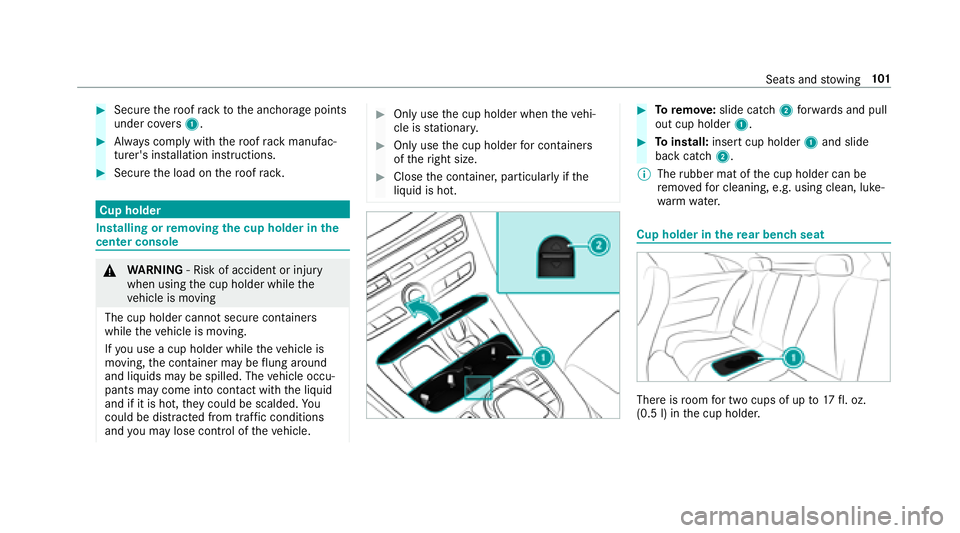
Installing or removing the cup holder in the
center console
& WARNING ‑ Risk of accident or injury
when using the cup holder while the
ve hicle is moving
The cup holder cannot secure containers
while theve hicle is moving.
If yo u use a cup holder whiletheve hicle is
moving, the conta iner may be flung around
and liquids maybe spill ed. The vehicle occu‐
pants may come into contact with the liquid
and if it is hot, they could be scalded. You
could be dist racted from traf fic conditions
and you may lose cont rol of theve hicle.
#Only use the cup holder when theve hi‐
cle is stationar y.
#Only use the cup holder for containers
of theright size.
#Close the conta iner, particular lyifth e
liquid is hot.
#To remo ve:slide catch 2forw ards and pull
out cup holder 1.
#Toinstall: insert cup holder 1and slide
back catch 2.
% The rubber mat of the cup holder can be
re mo vedfo r cleaning, e.g. using clean, luke‐
wa rm wate r.
Cup holder in there ar ben chseat
There is room for two cups of up to17 fl. oz.
(0.5 l) in the cup holder.
Seats and stowing 10
1
Page 104 of 486
Ashtray and cigar ette lighter
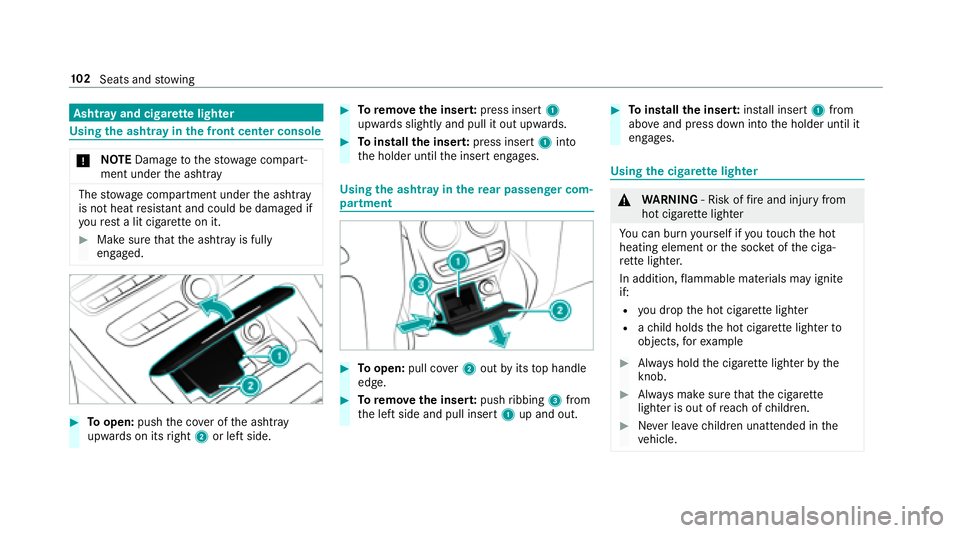
Using the ashtr ayinthe front center console
* NO
TEDama getothestow age compart‐
ment under the ashtr ay
Thestow age compartment under the ashtray
is not heat resis tant and could be damaged if
yo ure st a lit cigar ette on it.
#Make sure that the ashtr ayis fully
engaged.
#To open: pushthe co ver of the ashtr ay
upwar dson its right 2or left side.
#Toremo vethe inser t:press insert 1
upwards slightly and pull it out upwards.
#To install the inser t:press insert 1into
th e holder until the insert engages.
Using the ashtr ayinthere ar passenger com‐
partment
#To open: pull co ver2 out byits top handle
edge.
#To remo vethe inser t:push ribbing 3from
th e left side and pull insert 1up and out.
#Toinstall the inser t:ins tall inse rt1 from
abo veand press down into the holder until it
engages.
Using the cigar ette lighter
&
WARNING ‑ Risk of fire and injury from
hot cigar ette lighter
Yo u can burn yourself ifyo uto uch the hot
heating element or the soc ket of the ciga‐
re tte lighter.
In addition, flammable materials may ignite
if:
Ryo udr op the hot cigar ette lighter
Rach ild holds the hot cigar ette lighter to
objects, forex ample
#Alw ays hold the cigar ette lighter bythe
knob.
#Alw ays make sure that the cigar ette
lighter is out of reach of children.
#Ne ver lea vechildren unatte nded inthe
ve hicle.
10 2
Seats and stowing
Page 105 of 486
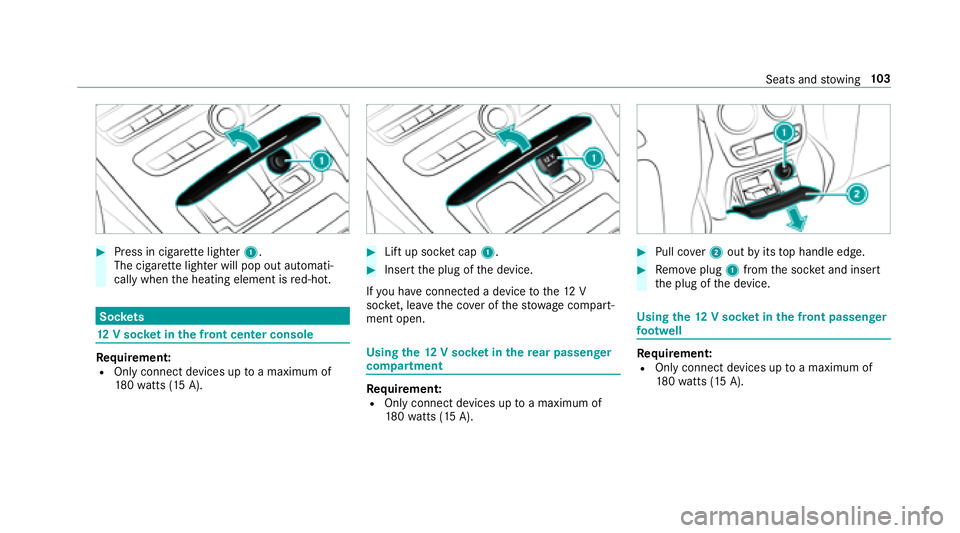
#Press in cigarette lighter 1.
The cigar ette lighter will pop out automati‐
cally when the heating element is red-hot.
Soc kets
12 V sock etinthe front center console
Re quirement:ROnly connect devices up toa maximum of
18 0wa tts (15 A).
#Lift up soc ket cap 1.
#Insert the plug of the device.
If yo u ha veconnected a device tothe12 V
soc ket, le ave the co ver of thestow age compart‐
ment open.
Using the12 V sock etinthere ar passenger
co mp artment
Requirement:ROnly connect devices up toa maximum of
18 0wa tts (15 A).
#Pull co ver2 out byits top handle edge.
#Re mo veplug 1from the soc ket and insert
th e plug of the device.
Using the12 V sock etinthe front passenger
fo ot we ll
Requirement:ROnly connect devices up toa maximum of
18 0wa tts (15 A).
Seats and stowing 10
3
Page 106 of 486
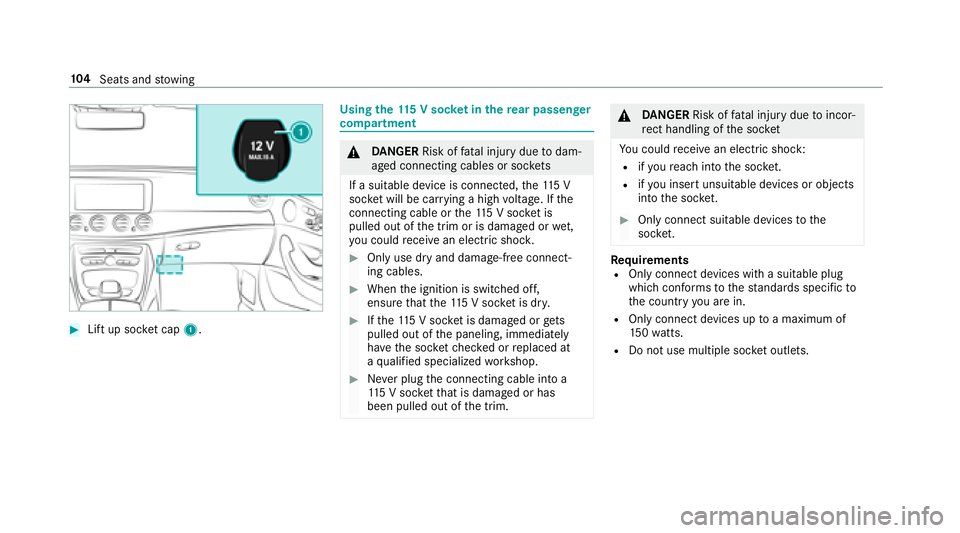
#Lift up socket cap 1.
Using the 115 V soc ket in the rear passenger
co mp artment
&
DANG ER Risk of fata l injury due todam‐
aged connecting cables or soc kets
If a suitable device is connected, the11 5 V
soc ket will be car rying a high voltage. If the
connecting cable or the11 5 V soc ket is
pulled out of the trim or is damaged or wet,
yo u could receive an electric shoc k.
#Only use dry and damage-free connect‐
ing cables.
#Whenthe ignition is switched off,
ensure that the11 5 V soc ket is dr y.
#Ifth e11 5 V soc ket is damage d orgets
pulled out of the paneling, immediately
ha ve the soc ketch ecked or replaced at
a qu alified specialized workshop.
#Ne ver plug the connecting cable into a
11 5 V soc ketth at is damaged or has
been pulled out of the trim.
&
DANG ER Risk of fata l injury due toincor‐
re ct handling of the soc ket
Yo u could receive an electric shock:
Rifyo ure ach into the soc ket.
Rifyo u insert unsuitable devices or objects
into the soc ket.
#Only connect suitable devices tothe
soc ket.
Re quirementsROnly connect devices with a suitable plug
which con form sto thest andards specific to
th e count ryyou are in.
ROnly connect device s uptoa maximum of
15 0wa tts.
RDo not use multiple soc ket outlets.
10 4
Seats and stowing
Page 107 of 486
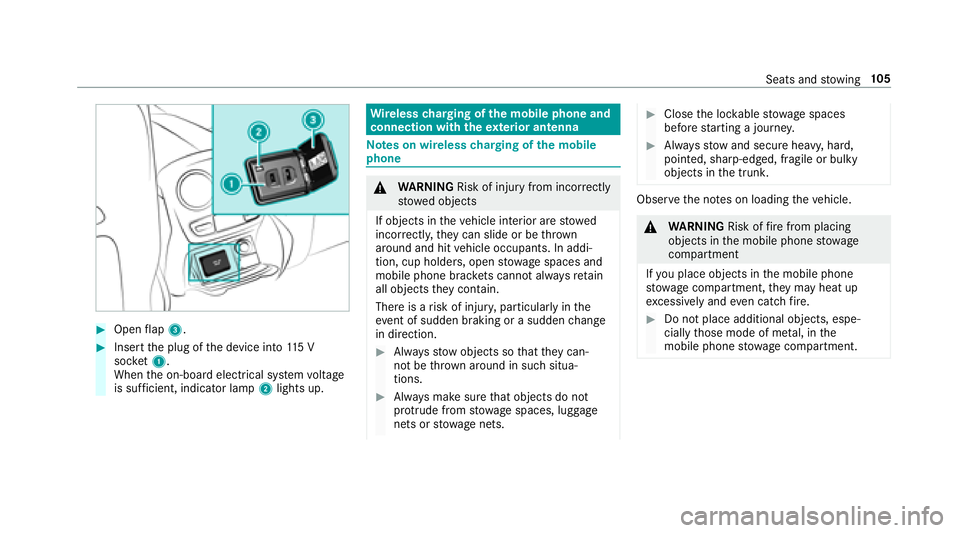
#Openflap 3.
#Insert the plug of the device into 115 V
soc ket1.
When the on-board electrical sy stem voltage
is suf ficient, indicator la mp2lights up.
Wire lesscharging of the mobile phone and
connection with theex terior antenna
Note s on wireless charging of the mobile
phone
& WARNING Risk of injury from incorrectly
stowe d objects
If objects in theve hicle interior are stowed
incor rectly, they can slide or be throw n
around and hit vehicle occupants. In addi‐
tion, cup holders, open stowage spaces and
mobile phone brac kets cann otalw aysre tain
all objects they contain.
There is arisk of injur y,particularly in the
ev ent of sudden braking or a sudden change
in direction.
#Alw aysstow objects so that they can‐
not be throw n around in such situa‐
tions.
#Alw ays make sure that objects do not
pr otru de from stowage spaces, luggage
nets or stowage nets.
#Close the loc kable stow age spaces
before starting a journe y.
#Alwaysstow and secure heavy, hard,
pointe d, sharp-edged, fragile or bulky
objects in the trunk.
Obser vethe no tes on loading theve hicle.
&
WARNING Risk offire from placing
objects in the mobile phone stowage
compartment
If yo u place objects in the mobile phone
stow age compartment, they may heat up
exc essively and even catch fire .
#Do not place additional objects, espe‐
cially those mode of me tal, in the
mobile phone stowage compartment.
Seats and stowing 10
5
Page 108 of 486
*NO
TEDama getoobjects caused by
placing them in the mobile phone stow‐
age compartment
If yo uplac e objects inthe mobile phone
stow age compartment, these may be dam‐
aged byelectromagnetic fields.
#Do not place credit cards, storage
media or other objects sensitive to
electromagnetic fields in the mobile
phone stowage compartment.
* NO
TEDama getothe mobile phone
stow age compartment caused byliquids
If liquids enter the mobile phone stowage
compartment, the compartment may be
damaged.
#Ensure that no liquids enter the mobile
phone stowage compartment.
RDepending on theve hicle equipment, the
mobile phone is connected totheve hicle's
ex terior aerial via thech arging module.
RThe charging function and wireless connec‐
tion of the mobile phone totheve hicle's
ex terior aerial are only available if the ignition
is switched on.
RSmall mobile phones may not be able tobe
ch arge d in everyposition of the mobile
phone stowage compartment.
RLargemobile phones which do not rest flat in
th e mobile phone stowage compartment may
not be able tobe charge d or connec ted with
th eve hicle's exterior aerial.
RThe mobile phone may heat up during the
ch arging process. The mobile phone can be
cooled in the mobile phone stowage com‐
partment when the air conditioning sy stem is
switched on. The cooling output in the
mobile phone stowage compartment is high‐
est when the controller in theglove box is
closed.
RTo ensure more ef ficient charging and con‐
nection with theve hicle's exterior aerial,
re mo vethe pr otective co ver from the mobile
phone.
RWhen charging, the mat should be used if
possible.
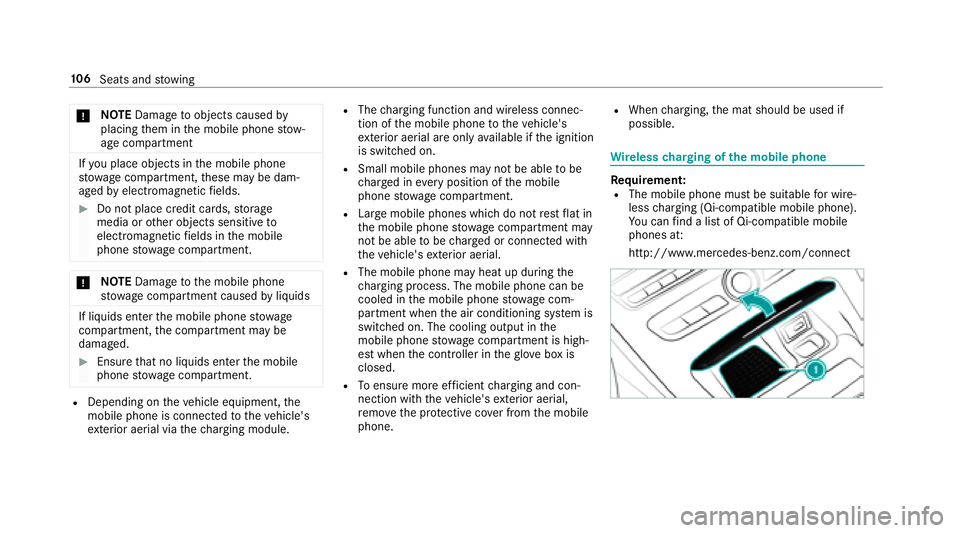
Wire lesscharging of the mobile phone
Re quirement:RThe mobile phone must be suitable for wire‐
less charging (Qi-compatible mobile phone).
Yo u can find a li stof Qi-compatible mobile
phones at:
http://www.mercedes-benz.com/connect
10 6
Seats and stowing
Page 109 of 486
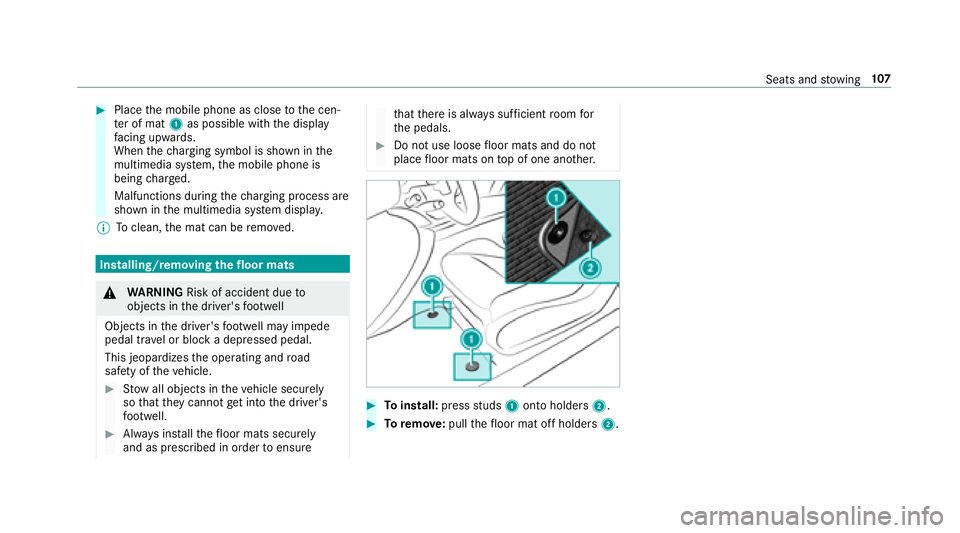
#Placethe mobile phone as close tothe cen‐
te r of mat 1as possible with the display
fa cing up wards.
When thech arging symbol is shown in the
multimedia sy stem, the mobile phone is
being charge d.
Malfunctions during thech arging process are
shown in the multimedia sy stem displa y.
% Toclean, the mat can be remo ved.
Installing/removing thefloor mats
&
WARNING Risk of accident due to
objects in the driver's foot we ll
Objects in the driver's foot we ll may impede
pedal tr avel or block a depressed pedal.
This jeopardizes the operating and road
saf etyof theve hicle.
#Stow all objects in theve hicle securely
so that they cannot getinto the driver's
fo ot we ll.
#Alw ays ins tallth efloor mats securely
and as prescribed in order toensure
that there is alw ays suf ficient room for
th e pedals.
#Do not use loose floor mats and do not
place floor mats on top of one ano ther.
#To install: pressstuds 1onto holders 2.
#Toremo ve:pull thefloor mat off holders 2.
Seats andstowing 10
7
Page 168 of 486

RIf Distance Pilot DISTRONIC is deacti va‐
te d with the cruise control le ver,fo r
ex ample byave hicle occupant or from
outside theve hicle.
RIfth e electrics in the engine compart‐
ment, the battery or the fuses are tam‐
pered with.
RIf th e battery is disconnected.
RIfth eve hicle is accelerated, forex ample
by ave hicle occupant.
#Alw ays deactivate Dis tance Pilot
DISTRONIC and secu retheve hicle to
pr eve nt it from rolling away before you
lea vethe driver's seat.
&
WARNING Risk of accident due to
unkno wnstored speed
If yo u call up thestored speed and this is
lo we rth an your cur rent speed, theve hicle
decelerates.
If yo udo not kn owthestored speed, the
ve hicle could decelerate unexpectedl y.
#Take into account the tra ffic situation
before calling up thestored speed.
#If th estored speed is not known, store
th e desired speed again.
&
WARNING Risk of accident due tounex‐
pecte d acceleration byDis tance Pilot
DISTRONIC
If Dis tance Pilot DISTRONIC no longer
de tects a vehicle in front, it may unexpect‐
edly accelerate tothe speed stored.
RThis speed may be too high for a turning
lane or an exit lane.
RIf driving in theright lane, this speed may
be so high that you pass vehicles driving
on the left (in count ries where tra ffic
drives on theright).
RIf driving in the left lane, this speed may
be so high that you pass vehicles driving
on theright (in countri es where traffic
drives on the left).
Alw ays carefully obser vethe tra ffic condi‐
tions and be ready tobrake at all times.
&
WARNING Risk of accident due toDis‐
ta nce Pilot DISTRONIC pulling away auto‐
matically
If Dis tance Pilot DISTRONIC pe rforms an
automatic driving-off procedure, theve hicle
may accelerate unexpectedl y.
Where necessar y,brake theve hicle yourself
and take evasive action.
&
WARNING Risk of accident due toSpeed
Limit Pilot adapting theve hicle's speed
The speed adop tedby the Speed Limit Pilot
may be too high or incor rect in some individ‐
ual cases, such as:
RInthewe t or in fog
RWhen towing a trailer
Ensure that the driven speed complies with
traf fic re gulations.
16 6
Driving and pa rking