2018 MERCEDES-BENZ E-CLASS COUPE reset
[x] Cancel search: resetPage 311 of 486
Battery disconnection periods
The ASSYST PLUS service inter val display
can only calculate the service due da tewhen
th e batte ryis connected.
#Notedown the service due date displa yed in
th e instrument display before disconnecting
th e battery (
→page 308).
Engine compartment
Ac tive hood (pedestrian pr otection)
Operation of the active hood (pedestrian pro‐
te ction)
In cer tain accident situations, therisk of injury
to pedestrians can be reduced bythe actuation
of the active hood. The rear area of the engine
hood is raised byappr oximately 85 mm.
Fo rth e drive tothewo rkshop, reset the trig‐
ge red active hood yourself. Ifth e active hood
has been triggered, pedestrian pr otection may
be limited.
A qu alified specialist workshop must re-ins tate
th e full functionality of the active hood. The active hood is not
available in all countries.
Re setting the active hood
&
WARNING Risk of burn s from hot com‐
ponent parts in the engine compartment
Cer tain component parts in the engine com‐
partment can be very hot, e.g. the engine,
th e cooler and parts of theex haust sy stem.
#Let the engine cool down and only
to uch the component parts described
as follo ws .
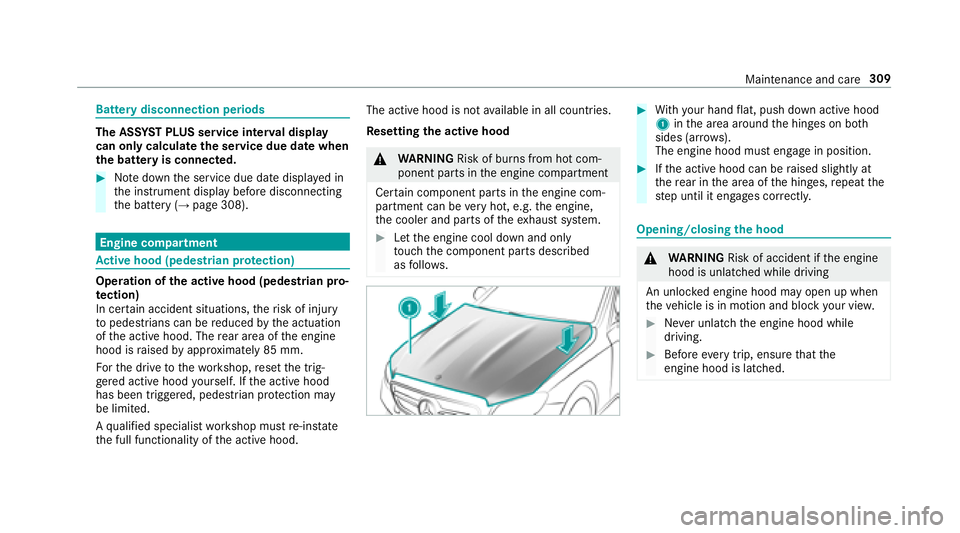
#With your hand flat, push down active hood
1 inthe area around the hinges on bo th
sides (ar rows).
The engine hood must engage in position.
#If th e active hood can be raised slightly at
th ere ar in the area of the hinges, repeat the
st ep until it engages cor rectl y.
Opening/closing the hood
&
WARNING Risk of accident if the engine
hood is unlatched while driving
An unloc ked engine hood may open up when
th eve hicle is in motion and block your vie w.
#Never unlatch the engine hood while
driving.
#Before every trip, ensure that the
engine hood is latched.
Maintenance and care 309
Page 468 of 486
Avoiding an area (deleting) .................. 262
Av oiding an area (o verview) ................ .261
Displ aying auto zoom when turning .... .263
Display ingthe compass ....................... 263
Displaying the map version .................. 261
Displaying the next intersecting
st re et ................................................... 261
Displaying the satellite map ............... .263
Display ingthe tra ffic map .................. .257
Displ aying traf fic signs ........................ 261
Displaying weather information .......... .264
Map data ............................................. 263
Moving ................................................ 260
Overview ............................................. 259
Selecting POI symbols .........................2 60
Selecting text information ................... 260
Selecting the map orientation ............ .260
Setting the map scale .......................... 259
Up dating .............................................2 62
Map and co mpass
Overview ............................................. 259
Massage prog ram
Selecting the front seats ....................... 87
Massage prog rams
Overview ............................................... 87Massage settings
Resetting ............................................... 87
Matte finish (cleaning instructions) .......317
Maximum load
rati
ng .............................. 356
Maximum permissible load Calculation example ............................ 351
De term ining ........................................ 350
Maximum tire pressures ........................ 356
Media Menu (on-board computer) .................. 213
Searc hing ............................................ 293
Media display Notes .................................................. 228
Media Inter face
Ac tivating ............................................ 294
Information .......................................... 293
Overview .............................................2 95
Media mode Activating ............................................ 287
Media playba ck
Operating (on-board computer) ........... 213
Media sear ch
St arting .............................................. .293 Media source
Dial (on-board computer) .....................2 13
Memory function Head-up Display — Calling up sa ved
settings .................................................9 2
Head-up Display — Saving settings ........ 92
Opera ting .............................................. 92
Outside mirr or — Calling up sa ved
settings .................................................9 2
Outside mir ror — Saving settings ...........9 2
Seat — Calling up sa ved settings ...........9 2
Seat — Saving settings ........................... 92
St eering wheel — Callin
g up sa
ved
settings .................................................9 2
St eering wheel — Saving settings ........... 92
Menu (on-board computer) .....................215
Assist ancegraphic .............................. 209
Designs ................................................ 215
Media ................................................... 213
Na vigation ............................................ 211
Overview ............................................. 206
Ra dio .................................................. .213
Service ................................................ 209
Te lephone ............................................ 214
Tr ip ...................................................... 210
466
Index
Page 472 of 486
Pets in the vehicle .....................................5 4
Phone book see Contacts
Picture form ats
see Video mode
Picture settings see Video mode
PIN pr otection for data export ............... 242
Plastic trim (Care) .................................... 319
Playback options Selecting ............................................. 290
POI symbols Custom ................................................ 260
Po we r supp ly
Switching on (s tart/s top button) ........ .128
PRE-SAFE
®(anticipatory occupant
pr otection)
Fu nction ................................................ 44
PRE-SAFE
®Sound ................................. 44
Re versing measures .............................. 44PRE-SAFE
®(anticipatory occupant
pr otection)
see Anticipatory occupant pr otection
see Occupant saf ety
see Pr eventati veoccupant pr otection sy stem
PRE-SAFE
®PLUS (anticipa tory occu‐
pant pr otection plus)
Fu nction ................................................ 45
Re versing measures .............................. 44
PRE-SAFE
®PLUS (anticipatory occu‐
pant pr otection plus)
see Anticipatory occupant pr otection
see Occupant saf ety
Pr ev entative occupant pr otection sys‐
te m ............................................................. 44
Prog rams
see DYNA MIC SELECT
Pr otection against theft ............................ 78
AT A (anti-theft alarm sy stem) ............... .78
Pr otection of the environment
No tes ......... ............................................
19
Q
QR code Rescue card .......................................... 26
Qualified specialist workshop ................. 25
R
Ra dar senso rs.......................................... 150
Ra dio
Ac tivating ............................................ 298
Ac tivating/deactivating radio text ....... 301
Calling up thest ation list .................... .300
Dele testation ...................................... 300
Direct frequency ent ry........................ 300
Displaying information ......................... 301
Editing station presets ........................ .300
Menu (on-board computer) .................. 213
Moving stations .................................. .300
Overview ............................................. 299
Sear ching forst ations ........................ .300
Setting a station .................................. 300
Setting the frequency band ................. 300
St oring stations .................................. .300
Switching HD radio on/off .................. 300
Ta gging music trac ks........................... 301
470
Index
Page 473 of 486
Todisplay radio text ............................. 301
Vo ice commands (Voice Cont rol Sys‐
te m) ..................................................... 224
Ra dio station list
Calling up ............................................ 300
Ra dio stations
Dial (on-boa rdcompute r) ..................... 213
Ra in closing function
Sliding sunroof ...................................... .76
Ra nge
Displaying ............................................ 210
Re ading lamp
see Interior lighting
Re ar fog light .......................................... .109
Re ar seat
see Seat
Re ar view camera ....................................1 79
Assigning as a favo rite ......................... 184
Care .................................................... .318
Fu nction .............................................. 179
Re ar window
Ro ller sun blind ...................................... 69
Re ar window heater ................................ 121 Re
ar-view mir ror
see Outside mir rors
Re frigerant (air conditioning sy stem)
No tes ................................................... 381
Re fueling
Re fueling theve hicle ........................... 140
Re mo teParking Pilot .............................. 189
Au thorizing a mobile phone ................. 193
Fu nction/no tes ................................... 189
Operating ............................................
190
Sy stem limitat
ions .............................. .189
Re porting malfunctions releva nt to
saf ety .......................................................... 25
Re scue card ............................................... 26
Re ser ve
Fu el ..................................................... 378
Re set function (multimedia sy stem) .....2 43
Re sidual heat ...........................................1 24
Re storing (factory settings)
see Reset function (multimedia sy stem)
Re stra int sy stem
Children ................................................ .45 Fu
nction in an accident .........................3 1
Fu nctionality .......................................... 31
Malfunction ...........................................3 1
Pr otection ..............................................3 0
Re duced pr otection .............................. .30
Sy stem self-test .................................... .31
Wa rning lamp ........................................ .31
Re stra int sy stem
see Occupant saf ety
Re versege ar
Selecting ............................................. 137
Re versing camera
Opening the camera co ver .................. 184
RF transmitters see Two-w ayradios
Rims (Care) .............................. .....
...........
.318
Ro adside Assistance ................................. 21
Ro llaw ay protection
see HOLD function
Ro ller sun blind
Re ar wind ow.......................................... 69
Ro of lining (care) .................................... .319
Index 47
1
Page 477 of 486
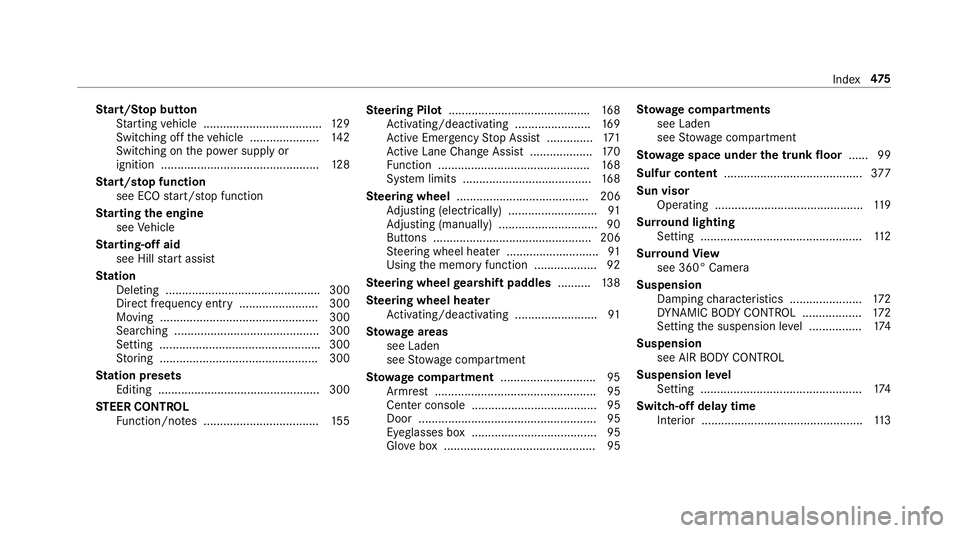
Start/S top button
St arting vehicle .................................... 129
Switching off theve hicle ..................... 142
Switching on the po wer supply or
ignition ................................................1 28
St art/s top function
see ECO start/ stop function
St arting the engine
see Vehicle
St arting-o ffaid
see Hill start assist
St ation
Deleting ............................................... 300
Direct frequency entry ........................ 300
Moving ................................................ 300
Sear ching ............................................ 300
Setting ................................................ .300
St oring ................................................ 300
St ation presets
Editing ................................................. 300
ST EER CONT ROL
Fu nction/no tes ................................... 155 Ste
ering Pilot .......................................... .168
Ac tivating/deactivating .......................1 69
Ac tive Emergency Stop Assist .............. 171
Ac tive Lane Change Assi st................... 170
Fu nction .............................................. 168
Sy stem limits ....................................... 168
Ste ering wheel ........................................ 206
Ad justing (electrically) ...........................9 1
Ad justing (manually) .............................. 90
Butto
ns ................................................ 206
St eering wheel heater ........................... .91
Using the memory function .................. .92
Ste ering wheel gearshift paddles ..........138
Ste ering wheel heater
Ac tivating/deactivating ......................... 91
St ow age areas
see Laden
see Stow age compartment
St ow age co mpartment .............................9 5
Armrest ................................................. 95
Center console ...................................... 95
Door ...................................................... 95
Eyeglasses box ...................................... 95
Gl ove box .............................................. 95 St
ow age co mpartments
see Laden
see Stow age compartment
St ow age space under the trunk floor ...... 99
Sulfur content .......................................... 377
Sun visor Operating ............................................. 119
Sur round lighting
Setting .................................................1 12
Sur round View
see 360° Camera
Suspension Damping characteristics ...................... 172
DY NA MIC BODY CONTROL .................. 172
Setting the suspension le vel ................ 174
Suspension see AIR BODY CONTROL
Suspension le vel
Setting ................................................. 174
Switch-off delay time Interior .................................................1 13
Index47
5