2018 MERCEDES-BENZ E-CLASS COUPE charging
[x] Cancel search: chargingPage 333 of 486

#Make surethat the positive term inal of
th e connected battery does not come
into conta ct withvehicle parts.
#Ne ver place me tal objects or tools on a
batter y.
#When connecting and disconnecting the
batter y,yo u must observ eth e descri‐
bed order forth e battery clamps.
#When giving starting assis tance, al ways
make sure that you only connect bat‐
te ry term inals with identical polarity.
#During starting assis tance, you must
observ eth e described order for con‐
necting and disconnecting the jumper
cables.
#Do not connect or disconnect the bat‐
te ry cla mp s while the engine is running.
&
WARNING Risk ofexplosion during
ch arging process and starting assis tance
During thech arging process and starting
assis tance, the battery may release an explo‐
sive gas mixture.
#Av oid fire , open flames, creating spar ks
and smoking.
#Make sure that there is suf ficient venti‐
lation du ring thech arging process and
during starting assis tance.
#Do not lean over a batter y.
Ifth e indicator/warning lamps in the instrument
clus ter do not light up at low temp eratures, it is
ve ry likely that the dischar ged battery has fro‐
zen.
& WARNING Risk ofexplosion from a fro‐
zen battery
A dischar ged battery may freeze at temp era‐
tures slightly abo veor below freezing point.
During starting assis tance or battery charg‐
ing, batte rygas may be released.
#Alw aysth aw a frozen batte ryout firs t
before charging it or per form ing start‐
ing assis tance.
The service li feof a battery that has been
th awe d may be dramatically shor tened. It is
recommended that you ha veathaw ed bat‐
te ry checked at a qualified specialist workshop.
All vehicles
* NO
TEDama gecaused bynumerous or
ex tended attem ptsto start the engine
Nume rous or extended attem ptsto start the
engine may damage the catalytic con verter
due tonon-combu sted fuel.
#Av oid numerous and extended attem pts
to start the engine.
Obser vethefo llowing points during starting
assis tance and when charging the battery:
ROnly use undamaged jumper cables/charg‐
ing cables with a suf ficient cross-section and
insula tedte rm inal clamps.
RNon- insulated parts of thete rm inal clamps
must not come into con tact wi thother me tal
parts while the jumper cable/charging cable
is connected tothe battery/jump-s tart con‐
nection point.
Breakdown assis tance 331
Page 334 of 486
RThe jumper cable/charging cable must not
come into contact with any parts which may
movewhen the engine is running.
RAlw ays make sure that nei ther you nor the
battery is elect rostatically charge d.
RKe ep away from fire and open flames.
RDo not lean overth e batter y.
RWhencharging: only use battery charge rs
te sted and appr oved byMercedes-Benz and
re ad the battery charge r's operating instruc‐
tions before charging the batter y.
Obser vethe additional following points during
st arting assis tance:
RSt arting assis tance may only be pr ovided
using batteries with a nominal voltage of
12 V.
RThe vehicles must not touch.
RGa soline engine: Onlyaccept starting assis‐
ta nce if the engine and exhaust sy stem are
cold.
#Secure theve hicle byapplying the electric
parking brake.
#Au tomatic transmission: Shiftthe trans‐
mission toposition j.
#Make sure that the ignition and all electrical
consumers are switched off.
#Open the hood.
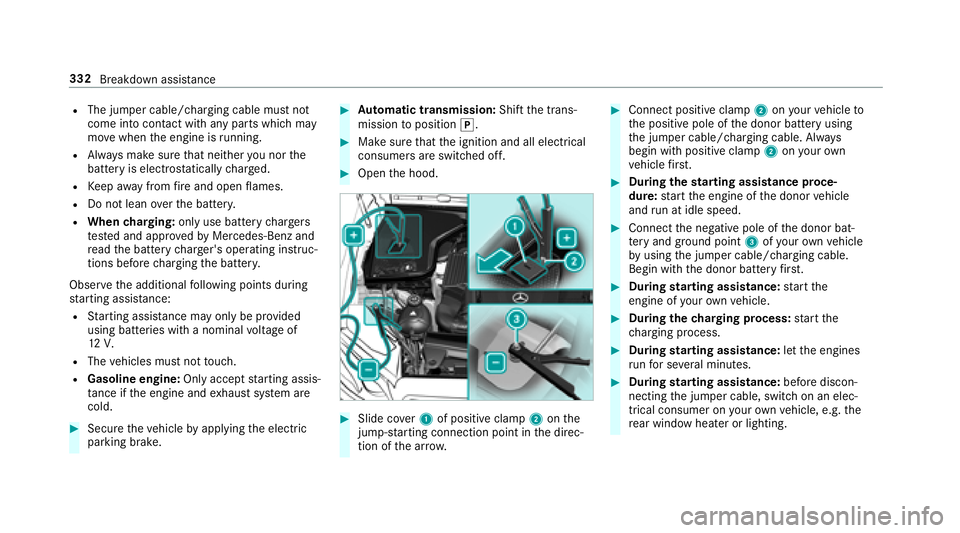
#Slide co ver1 of positive clamp 2onthe
jump-s tarting connection point in the direc‐
tion of the ar row.
#Connect positive clamp 2onyour vehicle to
th e positive pole of the donor battery using
th e jumper cable/charging cable. Alw ays
begin with positive clamp 2onyour ow n
ve hicle firs t.
#Du ring thest arting assist ance proce‐
dure: start the engine of the donor vehicle
and run at idle speed.
#Connect the negative pole of the donor bat‐
te ry and ground po int3 ofyour ow nve hicle
by using the jumper cable/charging cable.
Begin with the donor battery firs t.
#Du ring starting assist ance:start the
engine of your ow nve hicle.
#During thech arging process: start the
ch arging process.
#During starting assist ance:letthe engines
ru nfo r se veral minutes.
#During starting assist ance:before discon‐
necting the jumper cable, switch on an elec‐
trical consumer on your ow nve hicle, e.g. the
re ar wind owheater or lighting.
332
Breakdown assis tance
Page 335 of 486
Whenthest arting assis tance/charging process
is compl ete:
#Fir st,re mo vethe jumper cable/charging
cable from ground point 3and the negative
pole of the donor batter y,then from positive
clamp 2and the positive pole of the donor
batter y.Begin each time with the conta cts
on your ow nve hicle firs t.
#Af terre moving the jumper cable/charging
cable, close co ver1 of positive clamp 2.Yo
u can obtain fur ther information on starting
assis tance at any qualified specialist workshop.
To w starting or towing away
Perm itted towing me thods
Mercedes-Benz recommends transporting your
ve hicle in the case of a breakdown, rath er than
to wing it away. *
NO
TEDama getotheve hicle due to tow‐
ing away incor rectly
#Obser vethe instructions and no tes on
to wing away.
Breakdown assis tance 333
Page 453 of 486
Battery (vehicle)Charging .............................................. 330
Jump -star ting ...................................... 330
No tes .................................................. 328
Battery (vehicle) see Vehicle battery
Belt .............................................................3 2
Blind Spot Assist ..................................... 198
Ac tivating/deactivating .......................2 00
Fu nction/no tes ................................... 198
Sy stem limits ....................................... 198
Blind Spot Assist see Active Blind Spot Assi st
Blo wer
see Climate control
Blue tooth
®
Ac tivating/deactivating .......................2 37
Setting up an Internet connection ....... 279
Settings ............................................... 237
Switching profile (DUN/PAN) .............. 281
Blue tooth
®Au dio
Ac tivating ............................................ 298 De-authorizing (de-regis
tering) the
device .................................................. 298
Information .......................................... 295
Overview .............................................2 96
Sear ching for and au thorizing the
device .................................................. 297
Switching device via NFC .................... 298
Brake Assist Sy stem
see BAS (Brake Assist System)
Brak e
fluid
No tes ................................................... 379
Brake forc e d
istribution
EBD (Elect ronic Brake forc e Distribu‐
tion) ..................................................... 155
Brakes ABS (Anti-lock Braking Sy stem) ........... 151
BA S (Brake Assist System) .................. .151
Driving tips .......................................... 131
EBD (Electronic Brake forc e Distribu‐
tion) ..................................................... 155
HOLD function .....................................1 71
Limited braking ef fect (salt-treate d
ro ads) .................................................. 131 New/replaced brake linings/brake
discs ....................................................
131
No tes on breaking-in a new vehicle ..... 131
Brakes see Active Brake Assi st
Braking assistance see BAS (Brake Assist System)
Breakdown ............................................... 322
Changing a wheel ................................ 366
Overview of the help functions .............. 16
Ro adside Assis tance .............................. 21
To w starting ........................................ 338
To wing away ........................................ 334
Tr ansporting theve hicle ......................3 36
Burmes ter
®high-end 3D sur round
so
und sy stem
Ad justing the balance/fader ............... 307
Ad justing the sound optimization ........ 307
Ad justing treble, mid and bass ............ 307
Calls up the sound menu ..................... 306
Information .......................................... 306
Setting the sound profile ..................... 307
Burmes ter
®sur round sound sy stem .....3 05
Ad justing the balance/fader ............... 306
Index 451
Page 454 of 486

Adjusting the sound focus ................... 306
Calls up the sound menu ..................... 306
Information .......................................... 305
Setting treble, mid-range and bass ...... 306
Switching the sur round sound on/off
............................................................ .306
Buttons Steering wheel .................................... 206
C
California Impor tant information for private
cus tomers and lessees ..........................2 2
Call list Making a call ...................................... .271
Options in the call list .......................... 272
Overview ..............................................2 71
Calls .......................................................... 268
Ac cepting ............................................ 268
Ac tivating functions du ring a call ........ 268
Calls wi thseveral participants ............ .269
Declining ............................................. 268
Ending a call ........................................ 268
Incoming call during an existing call .... 269 Making ................................................ 268
Calls up the sound menu
Burmes ter
®high-end 3D sur round
sound sy stem ...................................... 306
Burmes ter
®sur round sound sy stem ... 306
Camera see 360° Camera
see Rear view camera
Car wash
see Care
Care ........................................................... 319
Car wash ..............................................3 15
Carpet ............................................ ...... 319
Displ ay................................................. 319
Exterior lighting .................................... 318
Genuine wood/trim element
s ..............319
Matte finish .......................................... 317
Pa int wo rk ............................................. 317
Plastic trim ...........................................3 19
Po we rwa sher ...................................... 316
Re ar view camera/360° Camera ........ .318
Ro of lining ............................................ 319
Seat belts ............................................ 319
Seat co ver ............................................ 319 Sensors
............................................... 318
Ta ilpipes .............................................. .318
Wa shing byhand ..................................3 16
Wheels/rims ........................................3 18
Wi ndo ws .............................................. 318
Wi per blades ........................................ 318
Carpet (Care) ............................................ 319
Change of address .................................... .21
Change of ownership ................................ 21
Changing a wheel Lowe ring theve hicle ............................3 70
Mounting a new wheel ........................ 369
Prepara tion ......................................... 366
Ra ising theve hicle ...............................3 67
Re moving a wheel ...............................3 69
Re moving/mounting hub caps ............ 366
Changing hub caps ................................. 366
Character entry Functi
on/no tes ................................... 234
Using the controller ............................. 235
Charging Battery (vehicle) ................................. .330
Mobile phone (wi reless) ...................... 105
452
Index
Page 469 of 486
Mercedes-Benz AppsCalling up ............................................ 282
Using voice control .............................. 282
Mercedes-Benz mbrace
®(USA only)
Emer gency call sy stem ........................ 277
Making a call via theove rhead con‐
trol panel ............................................. 276
MB Info call ......................................... 278
Ro adside Assis tance call ..................... 278
Tr ans ferred data ................................. .278
Mercedes-Benz service cen ter
see Qualifi ed specialist workshop
Message (multifunction display) see Display message
Message memory .................................... 384
Messages see Text message s
Mir rors
see Outside mir ror
see Outside mir rors
Mobile phone ...........................................2 14
Au thorizing (Remo teParking Pilot) ...... 193 Canc
eling permission for Internet
connection ........................................... 281
Wi reless charging ................................ 106
Mobile phone see Telephone
Mobile phone voice recognition
St arting .............................................. .268
St opping ..............................................2 68
Model type ............................................... 374
MOExtended tires ................................... 323
Multifunction display (on-board com‐
puter) ................................................ ........ 208
Multifunctio
n st eering wheel
Overview of buttons ............................ 206
Multifunction steering wheel
see Steering wheel
Multimedia sy stem ........................ .228, 236
Ac tivating/deactivating standby
mode .................................................. .150
Ad justing thevo lume .......................... .234
Calling up lists and menus ................... 231
Central control elements ..................... 228
Configuri ng displaysettings ................2 36Main functions ..................................... 231
Overview ............................................. 228
Re
storing thefa ctory settings .............. 243
Switching the sound on/off ............... .233
N
Na vigation
Ac tivating ............................................ 243
Callin g upthe Digital Operator's
Manual ................................................ 264
Menu (on-board computer) .................. 211
Showing/hiding the menu .................. .244
Up dating the map data ........................ 262
Vo ice commands (Voice Cont rol Sys‐
te m) ..................................................... 221
Na vigation
see Destination
see Destination entry
see Map
see Route
see Route guidance
see Traf fic information
Na vigation announcements ...................254
Ad justs thevo lume .............................. 254
Re peating ............................................ 254
Index 467
Page 478 of 486
Switchingthe sur round sound on/off
Burmes ter®sur round sound sy stem ... 306
Synchronization function Activating/deactivating (control
panel) .................................................. 123
Ac tivating/deactivating (multimedia
sy stem) ................................................ 123
Sy stem settings
Language ............................................ .240
No tes on language selection ............... 240
Re set function (multimedia sy stem) ... .243
Setting the dis tance unit ...................... 241
Software upda te.................................. 243
Sy stem settings
see Multimedia sy stem
T
Ta ilgate
see Trunk lid
Ta ilpipes (Care) ........................................ 318
Ta nk capacity
Fu el ..................................................... 378
Re ser ve(fuel) ...................................... 378 Te
ch nical data
Information .......................................... 372
Ti re pressure monitoring sy stem ......... 349
Ve hicle identification plate ...................3 74
Te lephone ................................................ .264
Ac tivating functions du ring a call ........ 268
Auth orizing a mobile phone (Remo te
Pa rking Pilot) ...................................... .193
Call and ringtone volume .................... .268
Calls with se veral participants ............ .269
Connecting a mobile phone (Near
Field Communication (NFC)) ................ 267
Connecting a mobile phone (Pass‐
ke y) .................................................... .266
Connecting a mobile phone (Secure
Simple Pairing) .................................... 266
Disconnecting the mobile phone ......... 266
Incoming call during an existing call .... 269
Menu (on-board computer) .................. 214
Mobile phone voice recognition .......... 268
No te
s .................................................. 265
R
e ception and transmission volume .... 267
Swit ching mobile phones .................... 266
Swit ching mobile phones (Near Field
Communication (NFC)) ........................ 267 Te
lephone menu overview .................. .264
Te lephone operation ............................ 268
Using Near Field Communication
(NFC) .................................................. .267
Vo ice commands (Voice Cont rol Sys‐
te m) ..................................................... 223
Wi reless charging (mobile phone) ........ 106
Te lephone
see Mobile phone
Te lephone number
Dialing (on-board computer) ................ 214
Te mp erature ............................................ .121
Te mp erature grade .................................. 354
Te xt messages ......................................... 272
Calling a sender .................................. .273
Composing .......................................... 272
Confi guring thete xt message s dis‐
pla yed .................................................. 272
Del eting ................................ ..............
.273
No tes ................................................... 272
Re ad-aloud function ............................ 272
Re ading .............................................. .272
Re plying .............................................. .273
Sending ............................................... 272
476
Index
Page 485 of 486
Windo ws(Care) ........................................ 318
Wi ndshield ................................................ 116
Defrosting ............................................ 121
Infrared reflective ................................ 120
Re placing the wiper blades ........... 114, 116
Wi ndshield
see Windshield
Wi ndshield washer fluid .........................3 80
No tes .................................................. 380
Wi ndshield washer sy stem
Re filling ................................................ 314
Wi ndshield wipers
Ac tivating/deactivating .......................1 14
Re placing the wiper blades ........... 114, 116
Wi nter operation
Snow chains ........................................ 343
Wi nter tires
Setting the permanent speed limit ...... 162
Wi per blades
Ca re ..................................................... 318
Changing ...................................... 114, 116
Wire lesscharging
Fu nction/no tes ................................... 105 Mobile phone ......................................
106
Wire lessvehicle co mponents
Declaration of Conformity .................... .23
Wo rkshop
see Qualified specialist workshop
Index 483