2018 MERCEDES-BENZ CLA tow
[x] Cancel search: towPage 252 of 326
Mercedes-Ben zC ustomer Assistanc eC enter
at 1-800-FOR-MERCedes (1-800-367-6372)
or 1-866-990-9007
You will be asked for your password. X
Return to your vehicle at the time agreed upon
with the Mercedes-Ben zC ustomer Assis-
tance Center.
Alternatively, the vehicle can be opened via: R
the Internet, under the "Owners Online" sec-
tion R
telephone applications (e.g. for iPhone ®
,
Android™)
To do this, you will need your identification num-
ber and password.
Vehicle remote closing The vehicle remote-closing feature can be used
when you have forgotten to lock the vehicle and
you are no longer nearby.
The vehicle can then be locked by the Mercedes-
Benz Customer Assistanc eC enter.
The vehicle can be immediately remotely locked
within four days of the ignition being turned off.
After this time, remote closing may be delayed
by 15 to 60 minutes. After 30 days the vehicle
can no longer be valet locked remotely.
The vehicle remote closing feature is available if
the relevant mobile phone network is available
and ad ata connection is possible.X
Contact the following service hotlines:
Mercedes-Ben zC ustomer Assistanc eC enter
at 1-800-FOR-MERCedes (1-800-367-6372)
or 1-866-990-9007
You will be asked for your password.
The next time you are inside the vehicle and you
switch on the ignition, the Doors Locked
Remotely message appears in the multifunction
display.
Alternatively, the vehicle can be locked via: R
the Internet, under the "Owners Online" sec-
tion R
telephone applications (e.g. for iPhone ®
,
Android™)
To do this, you will need your identification num-
ber and password. Stolen vehicle recovery service If your vehicle has been stolen: X
Notify the police.
The police will issue an umbered incident
report. X
This number will be forwarded to the
Mercedes-Ben zC ustomer Assistanc eC enter
together with your PIN.
The Mercedes-Ben zC ustomer Assistance
Center then tries to locate the system. The
Mercedes-Ben zC ustomer Assistanc eC enter
contacts you and the local law enforcement
agency if the vehicle is located.
However, only the law enforcement agency is
informed of the location of the vehicle.
If the anti-theft alarm system is activated for
longer than 30 seconds, the Mercedes-Benz
Customer Assistanc eC enter is automatically
notified.
Vehicle Health Check With the Vehicle Health Check, the Customer
Assistanc eC enter can provide improved sup-
port for problems with your vehicle. During an
existing call, vehicle data is transferred to the
Customer Assistanc eC enter.
The customer service representative can use
the received data to decide what kind of assis-
tance is required. You are then, for example,
guided to the nearest Mercedes-Ben zS ervice
Center or ar ecovery vehicle is called.
If vehicle data needs to be transferred during an
MB Info call or aR oadside Assistanc ec all, this is
initiated by the Customer Assistanc eC enter.
The Roadside Assistance Connected mes-
sage appears in the display .Ift he Vehicle Health
Check can be started, the Request for Vehi‐
cle Diagnostics Received Start vehi‐
cle diagnostics? message appears in the
display. X
Press the Yes button to confirm the message. X
When the Vehicle Diagnostics Please
Start Ignition message appears: turn the
SmartKey to position 2 in the ignition lock
( Y
page 122). X
If the Please follow the instructions
received by phone and move your vehi‐
cle to as afe position. message
appears: please follow the instructions250
Features
Stowage and features
Page 253 of 326
receive dbyp hone and move you rv ehicl etoa
safe position.
The message in the display disappears.
The vehicl eo perating state check begins.
During this procedure, you wil ls ee the Vehi‐
cle Diagnostics Active message.
If you select Cancel
,t he Vehicl eH ealth
Check is canceled completely.
When the check is complete, the Sending
vehicle diagnostics data. (Voice con‐
nection may be interrupted during
data transfer) message appears. The vehicle
data can now be sent. X
Press the OK button to confirm the message.
The voice connection with the Customer
Assistance Center is terminated.
The Vehicle Diagnostics: Transfer‐
ring Data... message appears.
The vehicl ed ata is sent to the Customer
Assistance Center.
Depending on wha tt he customer service rep-
resentative agree dw ith you ,t he voice connec-
tion is re-establishe da fter the transfer is com-
plete. If necessary ,y ou wil lbec ontacted at a
later time by another means, e.g. by e-mail or
phone.
Another function of the Vehicl eH ealth Check is
the transfer of service data to the Customer
Assistance Center. If as ervice is due ,t he display
shows am essage to this effect together with
informatio na bout any specia lo ffers at your
workshop.
This informatio nc an als obec alled up under
"Owners Online" at http://www.mbusa.com.
Information on the data stored in the vehicle
( Y
pag e2 9).
Information on Roadsid eA ssistance
( Y
pag e2 6).
Downloading routes Downloading routes allows you to transfer and
save predefined routes in the navigation sys-
tem.
Ar oute can be prepared and sent by either a
customer service representative or under "Own-
ers Online" at http://www.mbusa.com.
Each route can includ euptof our way points.
Once ar oute has been receive dbyt he naviga-
tion system, you wil ls ee the Do you want to
start route guidance ?D estination
Received destination has been saved in "Previou sd estinations". message on
the multimedia system display.
The route is saved. X
To start route guidance: select Yes .
An overvie woft he route is shown in the dis-
play.
If you select No ,t he saved route can be called
up later in the navigation menu. X
Select Start .
Route guidance starts.
Downloaded and saved routes can be called up
again.
Speed alert You can define the upper spee dl imit, which
must not be exceede dbyt he vehicle.
If this selected spee dise xceede dbyt he vehicle,
am essage wil lbes ent to the Customer Assis-
tance Center. The Customer Assistance Center
then forwards this informatio ntoy ou.
You can select the way in which you receive this
informatio nb eforehand. Possible options
includ et ext message, e-mail or an automated
call.
The data you receive contains the following
information: R
the location where the spee dl imi tw as excee-
ded R
the time at which the spee dl imi tw as excee-
ded R
the selected spee dl imi tw hich was exceeded
Geo fencing Geo fencing allows you to select area sw hich the
vehicl es hould not enter or leave. You wil lb e
informed if the vehicl ec rosses the boundaries
of the selected areas. You can select the way in
which you receive this informatio nb eforehand.
Possible options includ et ext message, e-mail or
an automated call.
The area can be determine dase ither ac ircle or
ap olygon with am aximu moft en corners. You
can specify up to ten area ss imultaneously .D if-
ferent settings are possible for each area.
These settings can be called up under "Owners
Online" at http://www.mbusa.com.
Alternatively, you can trigger an MB Info call and
inform the customer service representative that
you wis htoa ctivate geo fencing.Features 251
Stowage and features Z
Page 258 of 326
South America
Floormats
G WARNING
Object sint he driver's footwell can restrict the
pedal travel or obstruct ad epressed pedal.
The operating and road safety of the vehicle is
jeopardized. There is ar isk of an accident.
Make sure that all object sint he vehicle are
stowed correctly, and that they cannot enter
the driver's footwell. Install the floormats
securely and as specified in order to ensure
sufficient clearance for the pedals. Do not use
loose floormats and do not place floormats on
top of one another.
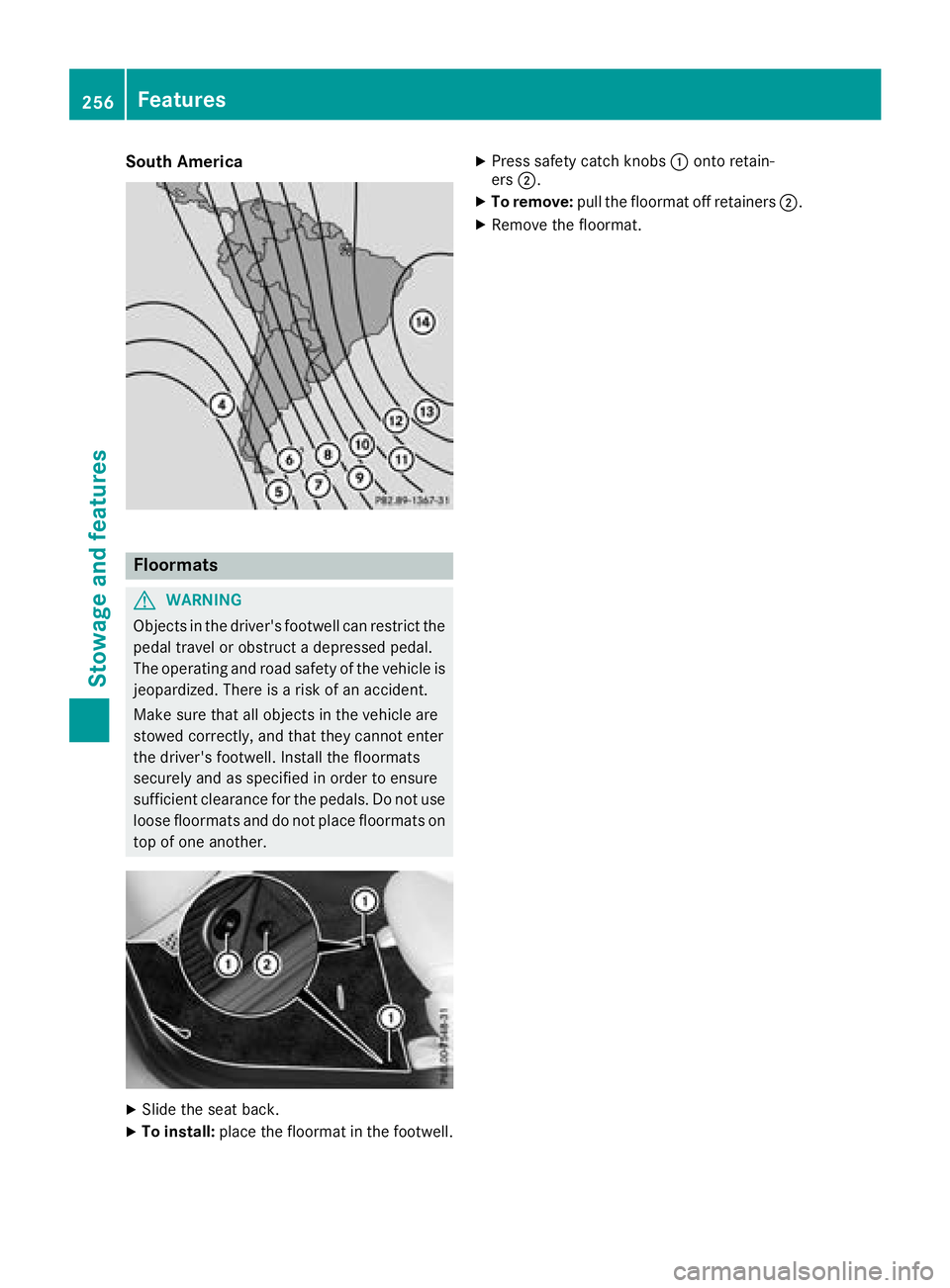
X
Slide the seat back. X
To install: place the floormat in the footwell. X
Press safety catch knobs C onto retain-
ers D . X
To remove: pull the floormat off retainers D .X
Remove the floormat.256
Features
Stowage and features
Page 264 of 326
quently. Under arduous operatin gc onditions,
the tires must be checked more often. Further
information can be obtained at aq ualified spe-
cialist workshop, e.g. an authorized Mercedes-
Ben zC enter.
Driving abroad An extensive Mercedes-Benz Service network is
also available in other countries. You can obtain
further information from any authorized
Mercedes-Benz Center.
Care
General notes
H Environmental note
Dispose of empty packagin ga nd cleaning
cloths in an environmentally responsible man-
ner.
! For cleanin gy our vehicle, do not use any of
the following: R
dry, rough or hard cloths R
abrasive cleanin ga gentsR
solvents R
cleanin ga gent sc ontainin gs olvents
Do not scrub.
Do not touch the surfaces or protective films
with hard objects, e.g. ar ing or ice scraper.
You could otherwise scratch or damage the
surfaces and protective film.
! Do not park your vehicle for al ong period of
time directly after cleaning, particularly after
cleanin gt he wheel rim with wheel cleaner.
Wheel cleaner can lead to the increased cor-
rosion of the brake discs and pads. Therefore,
drive for af ew minutes after cleaning. By
heating up the brakes, the brake discs and
pads dry. The vehicle can then be parked for a
long period of time.
Regular care of your vehicle is ac ondition for
retaining the quality in the long term.
Use care product sa nd cleanin ga gent sr ecom-
mended and approved by Mercedes-Benz. Washing the vehicle and cleaning the
paintwork
Automatic car wash
G WARNING
Braking efficiency is reduced after washing
the vehicle. There is ar isk of an accident.
After the vehicle has been washed, brake
carefully while paying attention to the traffic
condition su ntil full brakin gp ower is restored.
! When Distance Pilot DISTRONIC or the
HOLD function is activated, the vehicle
brakes automatically in certain situations.
To avoid damage to the vehicle, deactivate
Distance Pilot DISTRONIC and the HOLD
function in the following or similar situations: R
when towing the vehicle R
in the car wash
! Never clean your vehicle in aT ouchless
Automatic Car Wash as these use special
cleanin ga gents. These cleanin ga gent sc an
damage the paintwor korp lastic parts.
! Make sure that the automatic transmission
is in position N when washing your vehicle in
at ow-through car wash. The vehicle could be
damaged if the transmission is in another
position.
! Make sure that: R
the side windows and the sliding sunroof
are fully closed. R
the blower is switched off. R
the windshield wiper switch is at position 0 .
The vehicle may otherwise be damaged.
You can wash the vehicle in an automatic car
wash from the very start.
If the vehicle is very dirty, pre-wash it before
cleanin gitinana utomatic car wash.
After using an automatic car wash, wipe off wax
from the windshield and the wiper blades. This
will preven ts mears and reduce wiping noises
caused by residue on the windshield.
Washing by hand
In some countries, washing by hand is only
allowed at specially equipped washing bays.
Observe the legal requirements in each country.262
Care
Maintenance and care
Page 271 of 326
Where will If ind...?
Reflective safety jacket
Removing/replacing the reflective
safety jacket
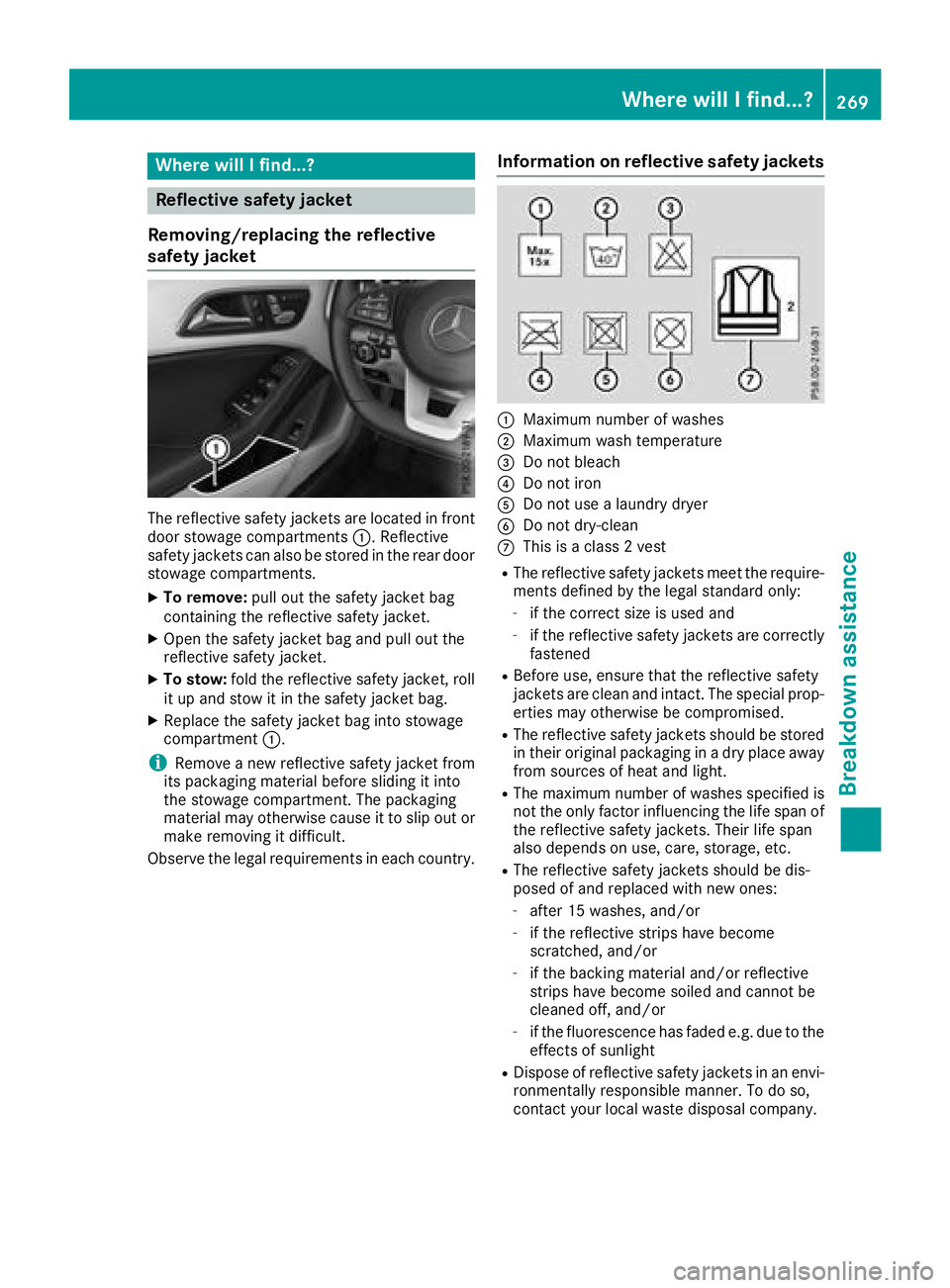
The reflective safety jackets are located in front
door stowage compartments C .R eflective
safety jackets can als obes tored in the rear door
stowage compartments. X
To remove: pul lo ut the safety jacket bag
containing the reflective safety jacket. X
Open the safety jacket bag and pul lo ut the
reflective safety jacket. X
To stow: fold the reflective safety jacket, roll
it up and stow it in the safety jacket bag. X
Replace the safety jacket bag into stowage
compartment C .
i Remove an ew reflective safety jacket from
its packaging material before sliding it into
the stowage compartment. The packaging
material may otherwise caus eittos li po ut or
make removing it difficult.
Observe the lega lr equirements in each country. Information on reflective safety jackets
C
Maximum numbe rofw as hesD
Maximum wash temperature
Page 275 of 326
inhale TIREFIT fumes .K eep tir es ealant away
fro mc hildren. There is ar isk of injury.
If you com ei nt oc ontac tw ith the tir es ealant,
observe the following: R
Rinse off the tir es ealant fro my our skin
immediately with water. R
If the tir es ealant comes int oc ontac tw ith
your eyes, immediately rinse the mt hor-
oughly with clean water. R
If tir es ealant is swallowed, immediately
rinse your mout ho ut thoroughly and drink
plent yofw ater .Don ot induc ev omiting,
and seek medical attention immediately. R
Immediately change out of clothing which
has com ei nt oc ontac tw ith tir es ealant.R
If an allergic reaction occurs, seek medical
attention immediately.
! Residue fro mt he tir es ealant may com eo ut
of the filler hose after use. This could cause
stains.
Therefore, place the filler hose in the plastic
bag which contained the TIREFIT kit.
H Environmental note
Have the used tir es ealant bottle dispose do f
professionally, e.g. at aq ualified specialist
workshop.
! Do not operat et he tir ei nflation compressor
for longer than ten minutes at at im ew ithout
ab reak .Itm ay otherwise overheat.
The tir ei nflation compressor can be operated
again onc eith as coole dd own.
Comply with the manufacturer’s safet yi nstruc-
tion sont he sticker on the tir ei nflation com-
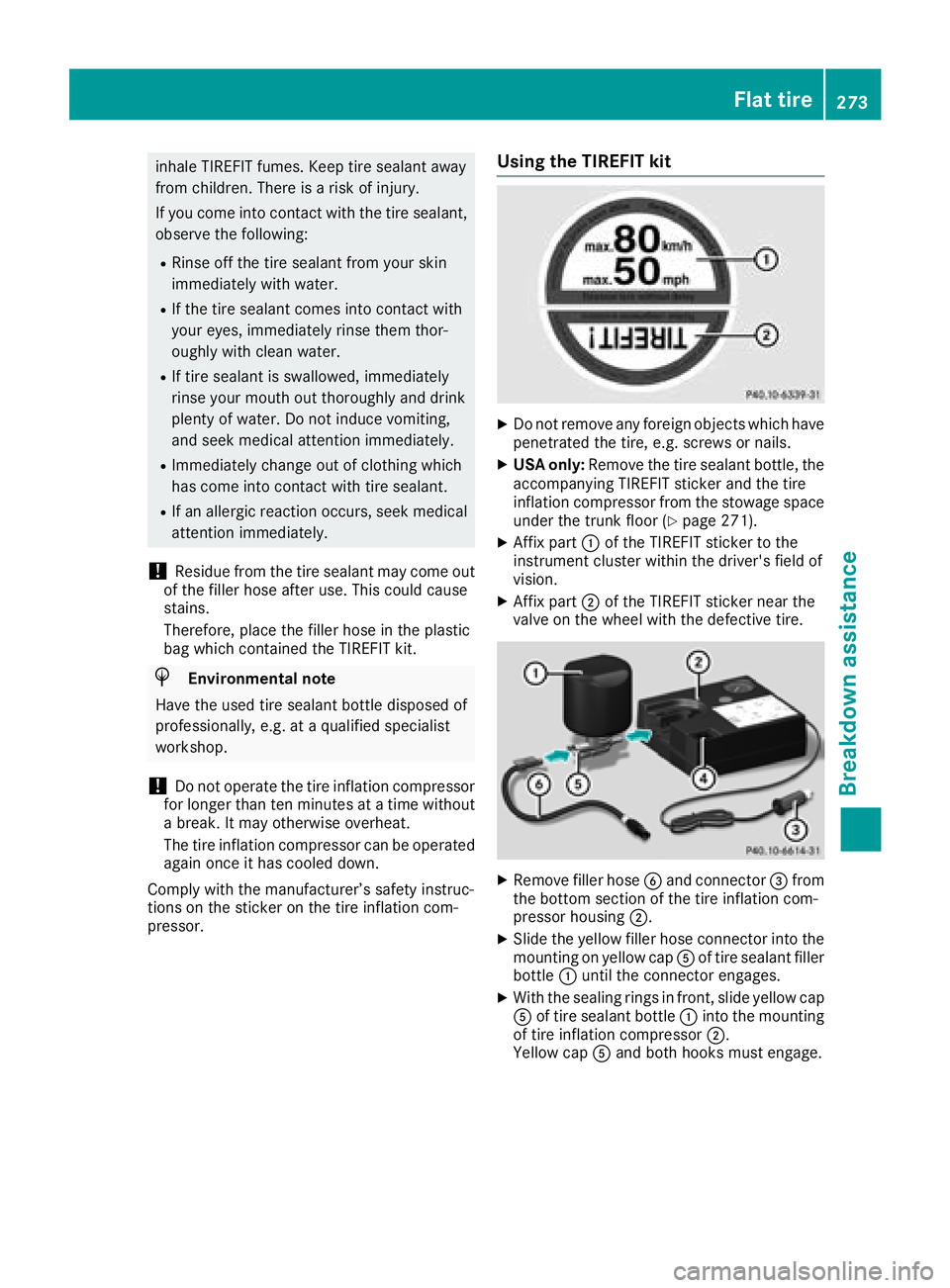
pressor. Using th eT IREFIT kit X
Do not remove any foreign object sw hich have
penetrate dt he tire, e.g. screws or nails. X
USA only: Remove the tir es ealant bottle, the
accompanying TIREFIT sticker and the tire
inflation compressor fro mt he stowage space
under the trunk floor ( Y
page 271).X
Affix part C of the TIREFIT sticker to the
instrumen tc luster within the driver's field of
vision. X
Affix part D of the TIREFIT sticker near the
valve on the wheel with the defectiv et ire.
X
Remove filler hose
Page 277 of 326
If at ire pressure of 200 kPa (2.0 bar/29 psi) has
been attained after ten minutes: X
Switch off the tire inflation compressor. X
Unscrew the fille rh ose from the valve of the
faulty tire.
Note that tire sealant may escape when you
unscrew the fille rh ose.X
USA only: Stow the tire sealant bottle and the
tire inflation compressor. X
Pull away immediately .X
Stop after driving for approximately ten
minutes and check the tire pressure with the
tire inflation compressor.
The tire pressure must now be at least
130 kPa (1.3 bar/19 psi).
G WARNING
If the required tire pressure is not reached
after driving for as hort period ,t he tire is too
badl yd amaged. The tire sealant cannot repair
the tire in this instance. Damaged tires and a
tire pressure that is too low can significantly
impair the vehicle's braking and driving char-
acteristics. There is ar isk of accident.
Do not continue driving. Contact aq ualified
specialist workshop.
i USA only: In cases such as the one men-
tioned above ,c ontact an authorized
Mercedes-Benz Center. Or call
1-800-FOR-MERCedes (in the USA) or
1-800-387-0100 (in Canada). X
USA only: Correct the tire pressure if it is still
at least 130 kPa (1.3 bar/19 psi). See the Tire
and Loading Information placard on the driv-
er's side B-pilla rort he tire pressure table in
the fuel fille rf lap for values.X
To increase the tire pressure: switch on the
tire inflation compressor. X
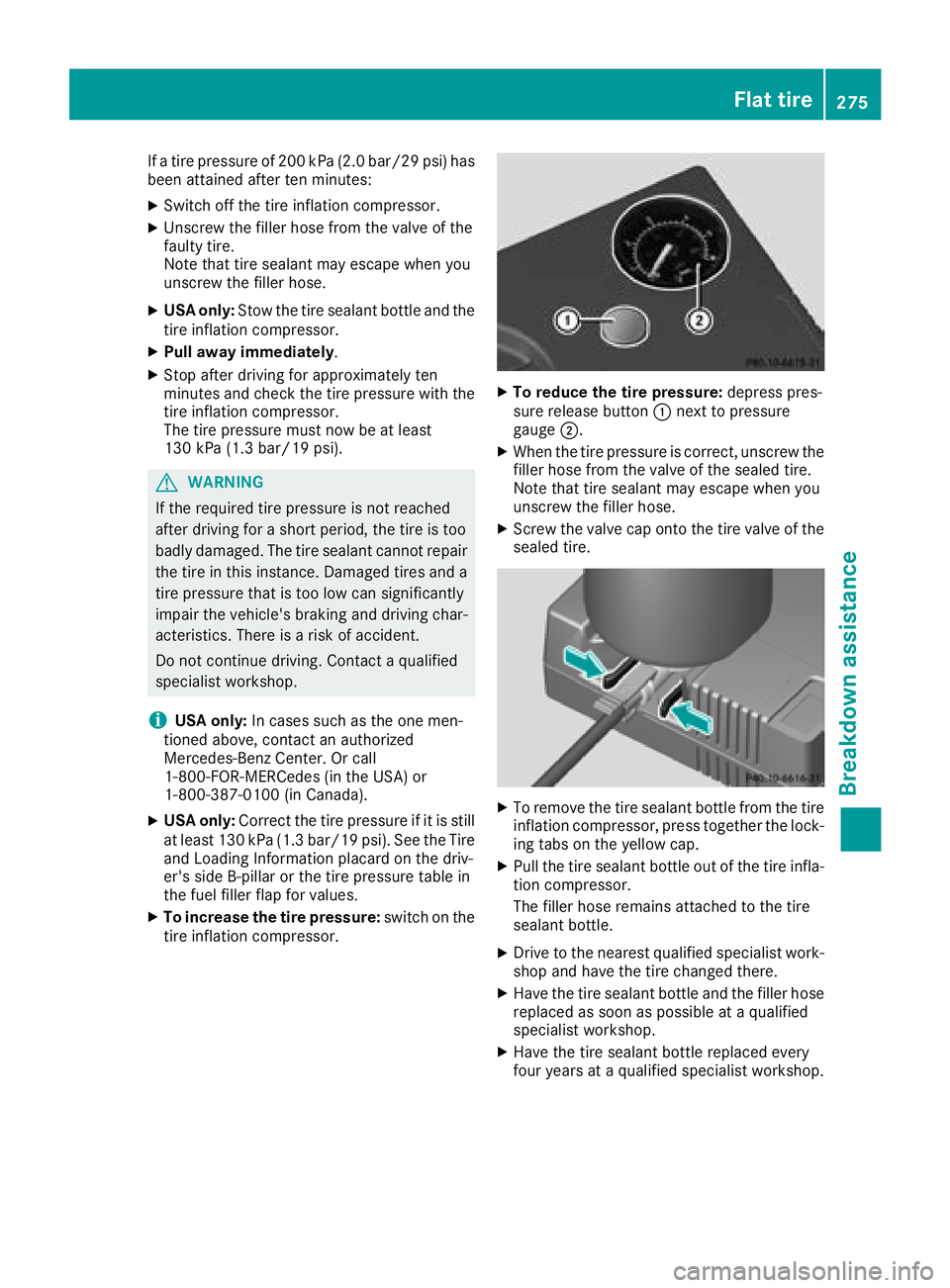
To reduce the tire pressure: depres sp res-
sure release button C next to pressure
gauge D . X
When the tire pressure is correct, unscrew the
fille rh ose from the valve of the sealed tire.
Note that tire sealant may escape when you
unscrew the fille rh ose.X
Screw the valve cap onto the tire valve of the
sealed tire.
X
To remove the tire sealant bottle from the tire
inflation compressor, press together the lock-
ing tabs on the yellow cap. X
Pul lt he tire sealant bottle out of the tire infla-
tion compressor.
The fille rh ose remains attached to the tire
sealant bottle. X
Drive to the nearest qualifie ds pecialist work-
shop and have the tire changed there. X
Have the tire sealant bottle and the fille rh ose
replaced as soon as possible at aq ualified
specialist workshop. X
Have the tire sealant bottle replaced every
four years at aq ualifie ds pecialist workshop.Flat tire 275
Breakdow na ssistance Z
Page 283 of 326
i Jumper cable sa nd further informatio nr egardin gj ump-startin gc an be obtaine data ny qualified
specialist workshop.
Towing and tow-starting
Important safety notes
G WARNING
Function sr elevan ttos afety are restricted or
no longer available if: R
th ee ngine is no tr unning.R
th eb rak es ystem or th ep ower steering is
malfunctioning. R
there is am alfunctio nint he voltage supply
or th ev ehicle's electrical system.
If your vehicle is bein gt ow ed, muc hm ore
force may be necessar yt os te er or brake.
Ther eisar isk of an accident.
In such cases, use at ow bar. Before towing,
mak es ure that th es te ering moves freely.
G WARNING
You can no longer steer th ev ehicle if the
steering wheel loc kh as been engaged. There
is ar isk of an accident.
Always switch off th ei gnitio nw hen towing the
vehicle with at ow cable or at ow bar.
G WARNING
When towing or tow-startin ga nother vehicle
and its weight is greater than th ep ermissible
gross weight of your vehicle ,t he :R
th et ow ing eye could detach itselfR
th ev ehicle/trailer combinatio nc ould roll-
over.
Ther eisar isk of an accident.
When towing or tow-startin ga nother vehicle,
its weight shoul dn ot be greater than th ep er-
missible gross weight of your vehicle.
Details on th ep ermissible gross vehicle weight
of your vehicle can be foun dont he vehicle iden-
tification plat e( Y
page 314).
! When Activ eB ra ke Assist ,D istance Pilot
DISTRONIC or th eH OL Df unction is activated, th ev ehicle brakes automatically in certain
situations.
To avoid damage to th ev ehicle ,d eactivate
these systems in th ef ollowing or similar sit-
uations: R
when towing th ev ehicle R
in th ec ar wash
! Mak es ure that th ee lectric parking brak ei s
released. If th ee lectric parking brak eisf aulty,
visi taq ualifie ds pecialist workshop.
! Only secure th et ow rope or to wb ar at the
towing eyes. Otherwise, th ev ehicle coul db e
damaged.
! Do no tu se th et ow ing eyes for recover yp ur-
pose sast hi sc oul dd amage th ev ehicle .Ifi n
doubt ,r ecover th ev ehicle with ac ra ne.
! When towing ,p ull away slowly and
smoothly. If th et ra ctive power is to oh igh ,t he
vehicle sc oul dbed amaged.
! The vehicle can be towed am aximum of
30 miles (50km). The t owing speed of 30 mph
(5 0km/h) must no tbee xceeded.
If th ev ehicle has to be towed mor et ha n
30 miles (50km), th ef ront axle must be raised
or th ee ntire vehicle raise da nd transported.
! Do no tt ow with sling-type equipment .T his
coul dd amage th ev ehicle.
! When towing vehicle sw ith KEYLESS-GO,
use th ek ey instead of th eS ta rt/Sto pb utton.
Otherwise, th ea utomatic transmission may
shif ttop osition P when th ed river' sorf ront -
passenger door are opened, whic hc oul dl ead
to damage to th et ra nsmission.
! Vehicles with automatic transmission must
no tbes ta rted by tow-starting. This coul do th -
erwis ed amage th et ra nsmission.
It is bette rtoh ave th ev ehicle transported than
to have it towed away.
If th ev ehicle can no longer be driven because of
an acciden torb reakdown ,y ou have th ef ollow-
ing options: R
Transportin gt he vehicle.Towing and tow-starting 281
Breakdown assistance Z