2018 MERCEDES-BENZ C-CLASS SALOON clock
[x] Cancel search: clockPage 268 of 609

Coupling up a trailer
000E NO
TEDama getotheve hicle battery due
to full discharge Charging
the trailer battery using the po wer
supply of the trailer can damage theve hicle
batter y. 0007
Do not use theve hicle's po wer supply
to charge the trailer batter y. 0007
Remo vethe co ver from the ball head and
st ore it in a safe place (0013 page114). 0007
Position the trailer on a le vel sur face behind
th eve hicle and couple it up totheve hicle. 0007
Open the soc ket cap. 0007
Inse rtthe plug with lug 1in groo ve3 on
th e soc ket. 0007
Turn the ba yonet coupling 2clockwise as
fa r as it will go. 0007
Let the cap engage. 0007
Secure the cable tothe trailer with cable ties
(only if you are using an adap ter cable). 0007
Make sure that the cable is alw ays slack for
ease of mo vement during cornering.
A display messa gemay appear on the multifunc‐
tion display even if the trailer has been connec‐
te d cor rectly:
R LEDs ha vebeen ins talled in the trailer light‐
ing sy stem
R The cur rent has fallen below the trailer light‐
ing sy stem's minimum cur rent (50 mA).
0009 Accessories can be connected tothe perma‐
nent po wer supp lyup to180W, and tothe
po we r supp lythat is swit ched on via the igni‐
tion loc k. Un
coupling a trailer 000A
WARNING Risk of being crushed and
becoming trapped when uncoupling a
trailer
When uncoupling a trailer wi than engaged
ine rtia-activated brake, your hand may
become trapped between theve hicle and the
trailer dr awbar. 0007
Do not uncouple trailers with an
engaged overrun brake. 000A
WARNING Risk of becoming trapped
when disconnecting the trailer cable
Ve hicles with le vel control sy stem: The
ve hicle lo werswhen the trailer cable is dis‐
connected.
This could result in you or other people
becoming trapped if your or their limbs are
between theve hicle body and the tyres or
underneath theve hicle. 0007
Make sure that nobody is unde rneath
th eve hicle or in the immediate vicinity Driving and parking
265
Page 302 of 609

0007
Toselect a menu item: swipe up, down, left
or right on Touch Control 2. 0007
Press Touch Control 2. 0007
Tomo vethe digital map: swipe in any
direction.
Setting the sensitivity for the Touch Control
Multimedia sy stem:
0018 System 0019
w Input
0019 Touch Control sensitivity 0007
Select Fast,Medium orSlow . Operating
the controller 1
0038 button
Press brief ly:re turns tothe pr evious display
Press and hold: calls up main functions
2 00E2 button
Calls up the main functions To
call up favo urites: when the main func‐
tions are displa yed, slide controller 3
down.
3 Controller
Controller operating options: 0007
Turn 0018 anti-clockwise or clo ckwise. 0007
Slide 0016 left orright. 0007
Slide 0019 up or down. 0007
Slide 0017 diagonally. 0007
Press 001Cbrief lyor press and hold. To
uchpad Ac
tivating/deactivating the touchpad
Multimedia sy stem:
0018 System 0019
w Input 0007
Activate 0073or deacti vate 0053 theTouchpad .
Operating theto uchpad
Re quirements:
R The touchpad is swit ched on
(0013 page 299). Multimedia sy
stem 299
Page 344 of 609

0009
Requirements:
R Mercedes me connect is available.
R You ha vea user account forthe
Mercedes me por tal.
R The service has been activated at a
Mercedes-Benz service centre.
Fu rther information can be found at: http://
www.mercedes.me
0009 The online information is not available in all
countries.
If Display in COMAND is activated inTraf fic Sign
Assi st (0013 page 255), speed limits and over‐
ta king restrictions are displ ayed on the map.
0009 Company logos displa yed on the map are
trademar ksofthere spective companies and
used solely forth e purpose of indicating the
locations of these companies. The use of
such logos on the map does not indicate
appr oval of, suppo rtof or advertising by
th ese companies forth e navigation sy stem
itself. Setting
the map scale
Re quirements:
R The map is shown.
Multimedia sy stem:
0018 Navigation 0007
Tozoom in: swipe down on theTo uch Con‐
trol.
or 0007
Turn the controller anti-clockwise.
or 0007
Movetwo fingers apart on theto uchpad. 0007
Tozoom out: swipe up on theTo uch Control.
or 0007
Turn the controller clockwise.
or 0007
Movetwo fingers toge ther on theto uchpad.
0009 You can set the unit of measurement of the
map scale (0013 page312). Moving
the map
Multimedia sy stem:
0018 Navigation 0019
Z Options
0019 Map menu 0007
Alternatively, if the map is displa yed in full
screen mode, press the cent ral control ele‐
ment.
The map menu appears. 0007
Select "Mo vemap" in map menu 2
(0013 page 340). 0007
Swipe in any direction on theTo uch Control
or touchpad.
or 0007
Slide the controller in any direction.
The map mo ves in the cor responding direc‐
tion under the crosshair. The fur ther you
mo veyour finger away from thest arting posi‐
tion on theto uchpad, thefast erthe map
mo ves. Multimedia sy
stem 341
Page 415 of 609
0007
Allow the engine tocool down and only
to uch co mponent parts described in the
fo llowing. 000A
WARNING Risk offire and injury from
engine oil
If engine oil comes into con tact wi thhot
component parts in the engine compart‐
ment, it may ignite. 0007
Make sure that no engine oil is spilled
next tothefiller opening. 0007
Allow the engine tocool off and thor‐
oughly clean the engine oil from compo‐
nent parts before starting theve hicle. 000E
NO
TEEngine dama gecaused byan
incor rect oil filter, incor rect oil or addi‐
tives 0007
Do not use engine oils or oil filters
which do not cor respond tothe specifi‐
cations explicitly prescribed forthe
service inter vals. 0007
Do not alter the engine oil or oil filter in
order toachie velonger change inter vals
th an presc ribed. 0007
Do not use additives. 0007
Follow the instructions in the service
inter val display rega rding the oil
ch ange. 000E
NO
TEDama gecaused bytopping up too
much engine oil To
o much engine oil can damage the engine
or the catalytic con verter. 0007
Have excess engine oil remo ved at a
qu alified specialist workshop. 0007
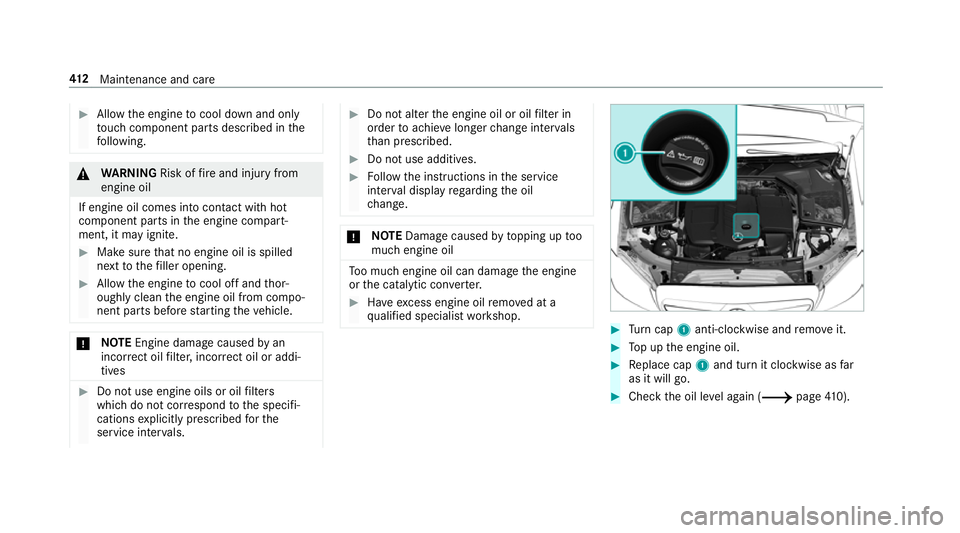
Turn cap 1anti-clockwise and remo veit. 0007
Top up the engine oil. 0007
Replace cap 1and turn it clockwise as far
as it will go. 0007
Check the oil le vel again (0013 page410). 412
Maintenance and care
Page 416 of 609

Checking
the coolant le vel 000A
WARNING Risk of bu rns from hot com‐
ponent parts in the engine compartment
Cer tain components in the engine compart‐
ment can be very hot, e.g. the engine, the
ra diator and parts of theex haust sy stem. 0007
Allow the engine tocool down and only
to uch co mponent parts described in the
fo llowing. 000A
WARNING Danger of bu rns when open‐
ing the bonn et
If yo u open the engine bonn etwhen the
engine has overheated or during a fire inthe
engine compartment, you could come into
contact with hot gases or other escaping
operating fluids. 0007
Before opening the bonn et, allow the
engine tocool down. 0007
Intheeve nt of a fire inthe engine com‐
partment, keep the engine bonn et
closed and call thefire service. 000A
WARNING Risk of scalding from hot
coolant
The engine cooling sy stem is pressurised,
particularly when the engine is warm. If you
open the cap, you could be scalded byhot
coolant spr aying out. 0007
Let the engine cool down before open‐
ing the cap. 0007
When opening the cap, wear pr otective
gl ove s and saf etygl asses. 0007
Open the cap slowly torelease pres‐
sure. 0007
Park theve hicle on a le vel sur face. 0007
Check the coolant temp erature display in the
instrument clus ter.
The coolant temp erature must be below
70 °C. 0007
Slowly turn cap 1anti-clockwise torelie ve
ov erpressure. Maintenance and care
413
Page 417 of 609

0007
Continue turning cap 1anti-clockwise and
re mo veit.
The coolant le vel is cor rect:
R ifth e engine is cold, up tomar ker bar 2
R ifth e engine is warm, up to1.5 cm over
mar ker bar 2 0007
If necessar y,top up with coolant that has
been appr ovedby Mercedes-Benz.
R Further information on coolant
(0013 page 483). To
pping up the windsc reen washer sy stem 000A
WARNING Risk of bu rns from hot com‐
ponent parts in the engine compartment
Cer tain components in the engine compart‐
ment can be very hot, e.g. the engine, the
ra diator and parts of theex haust sy stem. 0007
Allow the engine tocool down and only
to uch co mponent parts described in the
fo llowing. 000A
WARNING Danger of bu rns when open‐
ing the bonn et
If yo u open the engine bonn etwhen the
engine has overheated or during a fire inthe
engine compartment, you could come into
contact with hot gases or other escaping
operating fluids. 0007
Before opening the bonn et, allow the
engine tocool down. 0007
Intheeve nt of a fire inthe engine com‐
partment, keep the engine bonn et
closed and call thefire service. 000A
WARNING ‑ Risk of fire and injury due to
windscreen washer concentrate
Wi ndsc reen washer concentrate is highly
fl ammable. It could ignite if it comes into
con tact wi thhot engine component parts or
th eex haust sy stem. 0007
Make sure that no windsc reen washer
concentrate spills out next tothefiller
opening. 0007
Remo vethe cap 1bytheta b. 0007
Top up thewa sher fluid. Ke
eping the air-water duct free 0007
Keep the area between the bonn etand the
windscreen free of deposits, e.g. ice, sn ow
and lea ves. 414
Maintenance and care
Page 447 of 609

Installing
theto wing eye 0007
Press the mark on co ver1 inwa rds and
re mo ve. 0007
Screw intheto wing eyeclockwise as far as it
will go and tighten.
Ve hicles with a trailer hitch: vehicles with a
trailer hitch do not ha veare ar brac ketfo rthe to
wing eye. Fasten theto w bar tothe trailer
hitch.
0009 Make sure that co ver1 engages in the
bumper when youre mo vetheto wing eye.
000E NO
TEDama gedue toincor rect use of
th eto wing eye When a
towing eye is used toreco ver a vehi‐
cle, theve hicle may be damaged in the proc‐
ess. 0007
Only use theto wing eyeto to waw ay or
to w start theve hicle. To
w starting theve hicle (eme rgency engine
st art) Ve
hicles with automatic transmission
000E NO
TEDama getothe automatic trans‐
mission due to tow-starting The automatic transmission may be damaged
in the process of tow- starting vehicles with
automatic transmission. 0007
Vehicles with automatic transmission
must not be tow- star ted. 0007
Vehicles with automatic transmission must
not be tow- star ted.
Ve hicles with manual transmission 0007
Obser vethe no tes on towing away
( 0013 page440). 0007
If necessa ry, allow the engine and exhaust
sy stem tocool down. 0007
Switch the ignition on. 0007
Enga gesecond gear. 0007
Release the electric parking brake. 0007
Tow- start theve hicle while the clutch pedal
is fully depressed. 0007
Slowly release the clutch pedal. 0007
Immediately shift toneutral if the engine
st arts. 0007
Pull over and stop theve hicle, paying atten‐
tion toroad and traf fic conditions. 0007
Remo vetheto w bar. 444
Breakdown assis tance
Page 466 of 609

R
The vehicle is not on a slope.
R The vehicle is on solid, non-slippery and le vel
ground. 0007
Apply the electric parking brake manually. 0007
Movethe front wheels tothest ra ight-ahead
position. 0007
Vehicles with manual transmission:
engage firs t or reve rsege ar. 0007
Vehicles with automatic transmission:
shift into position 005D. 0007
Vehicles with le vel control sy stem: setthe
normal vehicle le vel (0013 page 234). 0007
Swit choff the engine. 0007
Make sure that the engine cann otbe star ted. 0007
Place choc ks orother suitable items under
th e front and rear of the wheel that is diago‐
nally opposite the wheel you wish tochange. 0007
Remo vethe hub caps if necessary
(0013 page 463). 0007
Raise theve hicle (0013 page 464). Re
moving and fitting hub caps Re
quirements:
R The vehicle is prepared for a wheel change
(0013 page 462).
Ve hicles with steel wheels
The wheel trim co vers the wheel bolts. Before
yo u can unscr ewthe wheel bolts, you must
re mo vethe wheel trim. 0007
Toremo ve:using bo thhands, carefully reach
into two wheel trim openings and remo vethe
wheel trim. Plastic hub cap 0007
Toremo ve:turn the cent recover of the hub
cap anti-clockwise and remo vethe hub cap. 0007
Tofit: make sure that the cent recover of the
hub cap is turned anti-clockwise. 0007
Position the hub cap and turn the cent re
co ver clockwise until the hub cap engages
ph ysically and audibly.
Aluminium hub cap 0007
Toremo ve:position soc ket2 on hub cap
1. Wheels and tyres
463