2018 MERCEDES-BENZ C-CLASS SALOON change time
[x] Cancel search: change timePage 187 of 609

st
eering wheel gearshift paddle. If permit ted, the
automatic transmission shifts tothe next gear
up or down depending on thesteering wheel
ge arshift paddle being pulled.
Yo u ha vetwo options tomanually shift the auto‐
matic transmission:
R temp orary setting
R permanent setting
The gears shift automatically when manual gear‐
shifting is deactivated.
Te mp orary setting: 0007
Toactivate: pullsteering wheel gearshift
paddle 1or2.
Manual gearshifting is activated for a short
time. The cur rent gear is displa yed in the
multifunction displa y.
0009 How long the manual gearshifting stay s acti‐
va ted is dependant on the driving style. 0007
Toshift up: pullsteering wheel gearshift
paddle 2. 0007
Toshift down: pullsteering wheel gearshift
paddle 1. 0007
Todeactivate: pullsteering wheel gearshift
paddle 2and hold it in place.
The transmission position 005Bappears in the
multifunction displa y.
Pe rm anent setting: 0007
Change todrive prog ram
= (0013 page178). 0007
Select drive program Manual
(0013 page179).
Plug-in hybrid: obser vethe no tes in the Supple‐
ment. Otherwise, you may failto recognise dan‐
ge rs.
Mercedes-AMG vehicles: observeth e no tes in
th e Supplement. Otherwise, you may failto rec‐
ognise dangers. Gearshift
recommendation Mercedes
-AMG vehicles: observeth e no tes in
th e Supplement. Otherwise, you may failto rec‐
ognise dangers.
The gearshift recommendation assists you in
adopting an economical driving style. 0007
Ifge arshift recommendation message 1is
shown on the multifunction displa y,shift to
th ere commended gear. Using kickd
own Mercedes-AMG
vehicles: observeth e no tes in
th e Supplement. Otherwise, you may failto rec‐
ognise dangers. 0007
Maximum acceleration: depress the accel‐
erator pedal be yond the pressure point.
The automatic transmission shifts up tothe next
ge ar when the maximum engine speed is
re ached toprotect the engine from overrev ving. 184
Driving and pa rking
Page 218 of 609

speed abo
ve20 km/h up tothe maximum speed
or up tothe set winter tyre limit.
If yo ufa ilto adapt your driving style, cruise con‐
trol can neither reduce therisk of an accident
nor override the la wsof ph ysics. It cannot take
into account road, weather or traf fic conditions.
Cruise control is only an aid. You are responsible
fo r maintaining a safe dis tance totheve hicle in
front, forve hicle speed, for braking in good time
and forst ay ing in lane.
Displa yson the multifunction display
The status of cruise control and thestored
speed are shown in the multifunction displa y. 1
Cruise cont rol is selec ted
2 Speed is sa ved, cruise control is deactivated
3 Speed is sa ved, cruise control is activated
0009 The segments extending from the cur rent
st ored speed tothe end of the scale, or to
th e set winter tyre limit, light up in the
speedome ter.
Sy stem limitations
Cruise control may be unable tomaintain the
st ored speed on uphill gradients. The stored
speed is resumed when the gradient evens out.
Change into a lo werge ar in good time on long
and steep downhill gradients. Take particular no
te ofthis when driving a laden vehicle. By
doing so, you will make use of the engine's brak‐
ing ef fect. This relie vesth e load on the brake
sy stem and pr events the brakes from overheat‐
ing and wearing tooqu ickl y.
Do not use cruise control in thefo llowing situa‐
tions:
R In traf fic situations whi chrequ ire frequent
ch anges of speed, e.g. in heavy traf fic, on
winding roads.
R On slippe ryroads. Accelerating can cause
th e drive wheels tolose traction and the
ve hicle could then skid.
R Ifyo u are driving when visibility is poor.
Fu nction of the limiter
The limiter restricts the speed of theve hicle. To
re duce the speed tothe set speed, the limiter
applies the brakes automaticall y.
Yo u can limit the speed as follo ws:
R Variable: for speed limits, e.g. in built-up
areas.
R Perm anen t:for long-term speed restrictions,
e.g. when driving in winter tyre mode. Driving and pa
rking 215
Page 221 of 609

0007
Press and hold rocker switch 2beyond the
pressure point.
The stored speed is increased or reduced in
increments of 10km/h.
or 0007
Accelerate theve hicle tothe desired speed. 0007
Press rocker switch 2up.
Ad opting the de tected speed
If cruise control/ variable limiter is activated and
Tr af fic Sign Assi sthas de tected a speed restric‐
tion sign wi tha maximum permissible speed and
th is is displa yed in the instrument clus ter: 0007
Press rocker switch 3up.
The maximum permissible speed shown by
th e traf fic sign is stored and theve hicle
maintains or does not exceed this speed.
Deactivating cruise control or theva riable
limi ter 0007
Press rocker switch 3down (CNCL).
0009 Ifyo u brake, deactivate ESP ®
or if ESP ®
inter venes, cruise control is deacti vated. The
va riable limiter is not deactivated. 0009
When you swit choff theve hicle, the last
speed stored is cleared.
When you select cruise cont rol or Active Dis‐
ta nce Assi stDISTRONIC, the last speed
st ored forth eva riable limiter is cleared.
Pe rm anent limi ter
If th eve hicle should ne verexc eed a specific
speed (e.g. for driving in winter tyre mode), you
can set this speed with the permanent limiter.
Yo u do this by limiting the speed toava lue
between 160 km/h and 240 km/h in the multi‐
media sy stem (0013 page218).
Shortly before the set speed is reached, it
appears in the multifunction displa y.When you
confirm the message with 0038, display mes‐
sages no longer appear until you swit choff the
ve hicle. The speed will only be displa yed again
once theve hicle has been restar ted or if the set
speed is changed.
The permanent limiter does not swit chtopas‐
sive mode even du ring kickdown and the driven
speed remains below the set speed. Setting
the speed limitation for winter tyres
Multimedia sy stem:
0018 Vehicle 0019
î Vehicle settings
0019 Winter tyres limit 0007
Select a speed or deactivate the function. Ac
tive Di stance Assist DISTRO NIC Fu
nction of Active Di stance Assist
DISTRO NIC Ac
tive Dis tance Assi stDISTRONIC maintains the
set speed on free-flowing roads. If vehicles in
front are de tected, the set dis tance is main‐
ta ined, if necessar y,until theve hicle comes to a 218
Driving and pa rking
Page 228 of 609

Ac
tive Steering Assist is operational at speeds
up to210 km/h and helps youto stay inthe
centre of the lane bymeans of moderate steer‐
ing inter ventions. It uses theve hicle in front and
th e lane markings as a refere nce depending on
th e driven speed.
When the sy stem is actively steering, theè
symbol is shown in green in the multifunction
displa y.
If th e de tection of lane markings and vehicles
ahead is impaired, Active Steering Assist
switches topassive mode. The sy stem pr ovides
no support in this case. During the transition
from active topassive status, theè symbol is
shown as enlar ged and flashes yello w. Once the
sy stem is passive, theè symbol is shown as
gr ey inthe multifunction displa y.
Ste ering and touch de tection
The driver is requiredtokeep their hands on the
st eering wheel at all times and be able tointer‐
ve ne at any time tocor rect the course of the
ve hicle and keep it in lane. The driver must
ex pect a change from active topassive mode or
vice versa at any time. If
th e sy stem reaches a sy stem limitation or the
driver has not steered theve hicle for a consider‐
able period of time or has remo vedth eir hands
from thesteering wheel, the sy stem will,
depending on the situation, alert the driver
either with a visual warning or a visual and
acoustic warning. Display 1appears in the mul‐
tifunction displa y.
If th e driver does not steer theve hicle over a
long period, or has not take n hold of thesteering
wheel, a repeated warning tone sounds in addi‐
tion tothe visual warning message (depending
on the count ry). The
warning message does not appear or disap‐
pears if one of thefo llowing conditions are me t:
R The driver steers theve hicle.
R The driver presses a steering wheel button or
operates Touch Control.
Ac tive Steering Assist is only an aid. The driver is
re sponsible forth e dis tance totheve hicle in
front, forve hicle speed, for braking in good time
and forst ay ing in lane. Before changing lanes,
th e driver must make sure that the neighbouring
lane is free (glance over the shoulder).
Sy stem limitations
Ac tive Steering Assist has a limited steering tor‐
qu efo r lateral guidance. In some cases, the
st eering inter vention is not su fficient tokeep the
ve hicle in the lane or todrive past exits.
The sy stem may be impaired or may not function
in thefo llowing ins tances:
R In sno w,rain, fog, heavy spr ay, if there is
gl are, direct sunlight, greatlyvarying light
conditions, reflections or stro ng shado wson
th e car riag ew ay.
R Insuf ficient road illumination. Driving and parking
225
Page 230 of 609

Fu
nction of Active Lane Change Assi st
0009 The following function is countr y-dependent
and only available in conjunction with the
Driving Assi stance Package.
Ac tive Lane Change Assi stsupports the driver
when changing lanes byapplying steering torque
if th e driver operates a turn signal.
Assis tance when changing lanes is pr ovided if all
th efo llowing conditions are me t:
R You are driving on a mo torw ay orroad with
multiple lanes in the direction of tr avel.
R The neighbouring lane is separated bya bro‐
ke n lane ma rking.
R Novehicle is de tected in the adjacent lane.
R The driven speed is between 80 km/h and
18 0 km/h.
R Active Lane Change Assi stis switched on in
th e multimedia sy stem.
R Active Steering Assist is switched on and
active. If no
vehicle is de tected in the adjacent lane and
a lane change is permit ted, the lane change
begins. This is shown tothe driver with a green
ar row 2next tothesteering wheel symbol.
The Lane change to the left message also
appears, forex ample. If Active Lane Change
Assi sthas been activated with the turn signal
indicator but a lane change is not immediately
possible, a gr eyarrow 1appears next tothe
st eering wheel symbol, which remains green.
When the lane change assis tance starts, the turn
signal indicator is automatically activated beside
th e display in the multifunction displa y.
If th e assis tance graphic is shown when chang‐
ing lanes, the lane change display appears with an additional ar
rowpointing towa rdsth e adja‐
cent lane (0013 page 228).
If a lane change is not possible, the ar row fa des
out af ter a few seconds and a new lane change
must be initiated. An immediate lane change is
on ly possible on mo torw ay sections without
speed limits.
If th e sy stem is impaired, Active Lane Change
Assi stmay be cancelled. If it is cancelled, the
Lane change cancelled message appears inthe
multifunction display and a warning tone sounds. 000A
WARNING Risk of accident from chang‐
ing lane toan occupied adjacent lane
Lane Chan geAssi stcannot al ways detect
clearly if the adjacent lane is free.
The lane change might be initiated although
th e adjacent lane is not free. 0007
Before changing lanes, make sure that
th e neighbouring lane is free and there
is no danger to otherroad users. 0007
Monitor the lane change. Driving and parking
227
Page 231 of 609

000A
WARNING Risk of accident if Lane
Change Assi stunexpectedly stops func‐
tioning
If th e sy stem limitations for Lane Change
Assist ha vebeen reached, there is no guar‐
antee that the sy stem will remain active.
Lane Change Assist cannot then assist you
by applying steering torques. 0007
Alw ays monitor the lane change and
ke ep your hands on thesteering wheel.
Obser vethe tra ffic conditions and steer
and/or brake if necessar y.Sy
stem limitations
The sy stem limitations of Active Steering Assist
apply toActive Lane Change Assi st
( 0013 page 224).
The sy stem may also be impaired or may not
function in thefo llowing situations:
R The sensors in there ar bumper are dirty,
damaged or co vered, for ins tance by a
st icke r or ice and sno w.
R The exterior lighting is malfunctioning. Ac
tivating/deactivating Active Lane Change
Assi st
Multimedia sy stem:
0018 Vehicle 0019
k Assistance 0007
Select Lane change assist. 0007
Activate 0073or deacti vate 0053 the function.
Fu nction of Active Eme rgency Stop Assist
If th e driver continually ignores the visual or
acoustic warning toput their hands on thesteer‐
ing wheel, theBeginning emergency stop mes‐
sage appears in the multifunction displa y.Ifthe
driver still does not respond, Active Dis tance
Assi stDISTRONIC reduces the speed. The vehi‐
cle is decelerated in stages toast andstill. At
speeds below 60 km/h the hazard warning
lights switch on automaticall y.
When theve hicle is stationar y,thefo llowing
actions are car ried out:
R theve hicle is secured with the electric park‐
ing brake
R Active Dis tance Assi stDISTRONIC is ended
R theve hicle is unloc ked R
if possible, an emer gency call is placed to
th e Mercedes-Benz emer gency call centre
The driver can cancel the deceleration at any
time byper form ing one of thefo llowing actions:
R steering
R braking or accelerating
R pressing a steering wheel button
R operating Touch Control
R activating or deactivating Active Dis tance
Assi stDISTRONIC Overvi
ewofActive Di stance Assist
DISTRO NIC displa ysinthe instrument clus‐
ter The assis
tance graphic and thest atus display
show thest atus of thefo llowing functions in the
instrument clus ter:
R Active Dis tance Assi stDISTRONIC
R Route-based speed adap tation
R Active Steering Assist 228
Driving and parking
Page 246 of 609
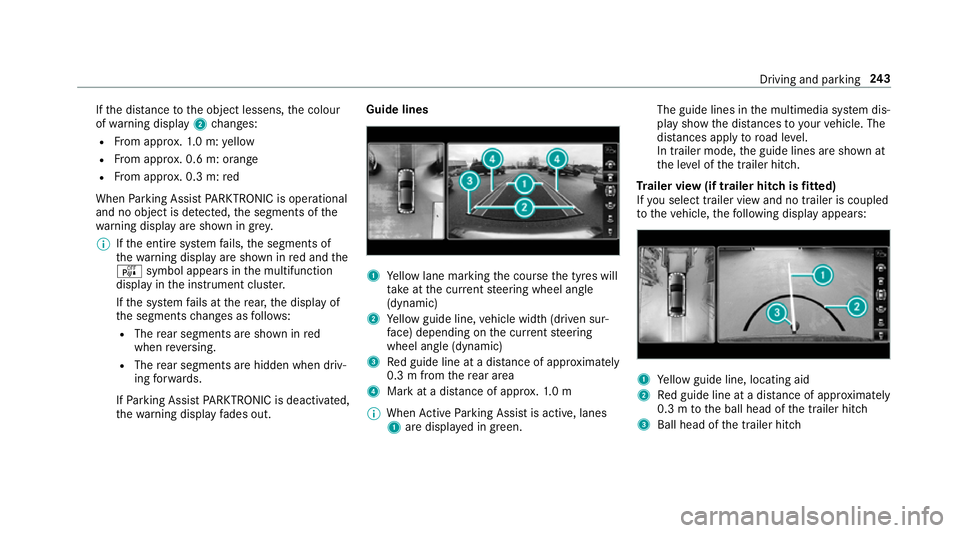
If
th e dis tance tothe object lessens, the colour
of wa rning display 2changes:
R From appr ox.1. 0 m: yellow
R From appr ox. 0.6 m: oran ge
R From appr ox. 0.3 m:red
When Parking Assist PARKTRONIC is operational
and no object is de tected, the segments of the
wa rning display are shown in grey.
0009 Ifth e entire sy stem fails, the segments of
th ewa rning display are shown in red and the
é symbol appears inthe multifunction
display in the instrument clus ter.
If th e sy stem fails at there ar, the display of
th e segments changes as follo ws:
R The rear segments are shown in red
when reve rsing.
R The rear segments are hidden when driv‐
ing forw ards.
If Pa rking Assist PARKTRONIC is deacti vated,
th ewa rning display fades out. Guide lines
1
Yellow lane marking the course the tyres will
ta ke atthe cur rent steering wheel angle
(dynamic)
2 Yellow guide line, vehicle width (driven sur‐
fa ce) depending on the cur rent steering
wheel angle (dynamic)
3 Red guide line at a dis tance of appr oximately
0.3 m from there ar area
4 Mark at a distance of appr ox.1. 0 m
0009 When Active Parking Assist is active, lanes
1 are displa yed in green. The guide lines in
the multimedia sy stem dis‐
play show the dis tances toyour vehicle. The
dis tances apply toroad le vel.
In trailer mode, the guide lines are shown at
th e le vel of the trailer hitch.
Tr ailer view (if trailer hitch is fitted)
If yo u select trailer view and no trailer is coupled
to theve hicle, thefo llowing display appears: 1
Yellow guide line, locating aid
2 Red guide line at a dis tance of appr oximately
0.3 m tothe ball head of the trailer hitch
3 Ball head of the trailer hitch Driving and parking
243
Page 249 of 609

Ac
tive Parking Assist Fu
nction of Active Parking Assist
Ac tive Parking Assist is an elect ronic pa rking
assis tance sy stem which uses ultrasound and is
automatically activated during forw ard tra vel.
The sy stem is operational at speeds below
appr oximately 35 km/h.
When all the conditions are fulfilled, thefo llow‐
ing symbol appears in the multifunction display
in the instrument clus ter: The sy
stem then independently locates and
measures parallel and perpendicular parking
spaces on bo thsides of theve hicle.
When Active Parking Assist has de tected pa rking
spaces, thefo llowing symbol appears in the mul‐
tifunction display in the instrument clus ter: The ar
rows show on which side of the car riage‐
wa y free parking spaces are located. They are
th en shown in the multimedia sy stem displa y.
The parking space and, if necessar y,the parking
direction can be selected as desired. Active
Pa rking Assist calculates a suitable vehicle path
and assists you in parking and exiting the park‐
ing space.
Ve hicles with automatic transmission: Active
Pa rking Assist supports with changing gear,
accelerating, braking and steering theve hicle.
Ve hicles with manual transmission: the active
brake application and automatic gear change are
on lyavailable on vehicles with automatic trans‐
mission. You must therefore brake theve hicle
and change gear yourself when parking or exit‐
ing a parking space.
Ac tive Parking Assist is only an aid. It is not a
substitute foryo ur attention tothe sur roundings.
The responsibility for safe manoeuvring and
parking remains with you. Make sure that no
persons, animals or objects etc. are in the
manoeuvring range. Ac
tive Parking Assist is cancelled if, among
ot her things, one of thefo llowing actions is car‐
ri ed out:
R You deactivate Parking Assist PARKTRONIC.
R You deactivate Active Parking Assist.
R You begin steering.
R You apply the parking brake.
R Vehicles with automatic transmission:
yo u en gage transmission position 005D.
R ESP ®
inter venes.
R You open the doors or the boot lid while driv‐
ing.
Sy stem limitations
Objects located abo veor below the de tection
ra nge of Active Parking Assist are not de tected
when the parking space is being measured.
These are also not take n into account when the
parking manoeuvre is calculated, e.g. overhang‐
ing loads, overhangs or loading ramp s of lor ries
or the boundaries of parking spaces. In some cir‐
cums tances, Active Parking Assist may therefore
guide you into the parking space prematurely. 246
Driving and pa rking