2018 MERCEDES-BENZ C-CLASS ESTATE display
[x] Cancel search: displayPage 22 of 609
Pr
otection of the environment
Plug-in hybrid: obser vethe no tes in the Supple‐
ment. Otherwise, you may failto recognise dan‐
ge rs.
000F ENVIRONMENTAL
NOTEEnvironmental
dama gedue tooperating conditions and
personal driving style The pollutant emission of
your vehicle is
directly related tothewa yyo u operate your
ve hicle.
Help toprotect the environment byoperating
yo ur vehicle in an environmentally responsi‐
ble manner. Please obser vethefo llowing rec‐
ommendations on ope rating conditions and
pe rsonal driving style.
Operating conditions: 0007
Make sure that the tyre pressure is cor‐
re ct. 0007
Do not car ryany unnecessary weight
(e.g. roof luggage rack s once you no
lon ger need them). 0007
Adhere tothe service inter vals.
A regularly serviced vehicle will contri b‐
ute toenvironmen tal pr otection. 0007
Alw ays ha vemaintenance workcar ried
out at a qualified specialist workshop.
Pe rsonal driving style: 0007
Do not depress the accelera tor pedal
when starting the engine. 0007
Do not warm upthe engine while the
ve hicle is stationar y. 0007
Drive carefully and maintain a suitable
di st ance from theve hicle in front. 0007
Avoid frequent, sudden acceleration
and braking. 0007
Change gear in good time and use each
ge ar on lyup to00C3 of its maximum
engine speed. 0007
Switch off the engine in stationary traf‐
fi c, e.g. byusing the ECO start/ stop
function. 0007
Drive fuel-ef ficiently. Obser vethe ECO
display for a fuel-ef ficient driving style. 000F
ENVIRONMEN
TALNO TEEnvironmental
pollution caused byirre sponsible dis‐
posal of the high-voltage battery A high-voltage battery conta
ins materials
which are harmful tothe environment. 0007
Dispose of faulty high-voltage bat teries
at a qualified specialist workshop. Ta
ke -back of end-of-life vehicles
EU countries onl y:
Mercedes-Benz will take back your end-of-life
ve hicle for environment-friendly disposal in
accordance with the European Union(EU) End-
of-Life Vehicles Directive.
A network of vehicle take -ba ckpoints and dis‐
mantlers has been es tablished foryo uto return
yo ur vehicle. You can lea veit at any of these
points free of charge . This makes an impor tant
contribution toclosing there cycling circle and
conse rving resources.
Fo r fur ther information about there cycling and
disposal of end-of-li fevehicles, and theta ke- Gene
ral no tes 19
Page 30 of 609
of an accident,
rescue services can use the QR
code toquickly find the appropriate rescue card
fo ryo ur vehicle. The cur rent rescue card con‐
ta ins the most impor tant information about your
ve hicle in a compact form , e.g. thero uting of the
electric lines.
Fu rther information can be obtained at http://
www.mercedes-benz.de/qr-code. Data
storage Electronic control units
Elect
ronic control units are fitted in your vehicle.
Some of these are necessary forth e safe opera‐
tion of your vehicle, while some assist you when
driving (driver assis tance sy stems). In addition,
yo ur vehicle pr ovides com fort and enter tainment
functions, which are also made possible byelec‐
tronic control units.
Elect ronic control units contain da tamemories
which can temp orarily or permanently store
te ch nical information about theve hicle's operat‐
ing state, component loads, main tenance
re qu irements and tech nical events or faults. In
general, this information documents thest ate
of a component part, a module, a sy stem or the
sur roundings such as:
R operating status of sy stem components (e.g.
fi ll le vels, battery status, tyre pressure)
R status messages concerning theve hicle or
its individual components (e.g. number of
wheel revo lutions/speed, longitudinal accel‐
eration, lateral acceleration, display of fas‐
te ned seat belts)
R malfunctions or faults in impor tant sy stem
components (e.g. lights, brakes)
R information on events leading tovehicle
damage
R system reactions in special driving situations
(e.g. airbag deployment, inter vention of sta‐
bility control sy stems)
R ambient conditions (e.g. temp erature, rain
sensor)
In addition toprov iding the actual control unit
function, this data assists the manufacturer in
de tecting and rectifying faults and optimising
ve hicle functions. The majority of this data is te
mp orary and is only processed in theve hicle
itself. Only a small portion of the data is stored
in theeve nt or fault memor y.
When your vehicle is serviced, tech nical da ta
from theve hicle can be read out byservice net‐
wo rkemplo yees (e.g. workshops, manufactur‐
ers) or third parties (e.g. breakdown services).
Services include repair services, maintenance
processes, warranty claims and quality assur‐
ance measures, forex ample. The read out is per‐
fo rm ed via the legally prescribed port forthe
diagnostics connection in theve hicle. The
re spective service network locations or third
parties collect, process and use the data. They
document tech nical statuses of theve hicle,
assist in finding faults and impr oving quality and
are transmitted tothe manufacturer, if neces‐
sar y.Fu rthermore, the manufacturer is subject
to product liability. Forth is, the manufacturer
requ irestech nical da tafrom vehicles.
Fa ult memories in theve hicle can be reset by a
service outlet as part of repair or maintenance
wo rk. Gene
ral no tes 27
Page 39 of 609
000E
NO
TEDeployment of the seat belt ten‐
sioner when the front passenger seat is
unoccupied If
th e seat belt tongue is engaged in the seat
belt buckle of the unoccupied front
passenger seat, the seat belt tensioner may
also depl oyintheev ent of an accident along
with other sy stems. 0007
Only one person should use each seat
belt at any one time. Seat belt adjustment function
Ve
hicles with PRE-SAFE ®
:if th e front seat belt
is not pulled tight across your body, the seat belt
adjustment may automatically apply a cer tain
tigh tening forc e. Do not hold the seat belt tightly
while it is adjusting.
Yo u can activate and deactivate the seat belt
adjustment function using the multimedia sys‐
te m (0013 page 36). Re
leasing a seat belt 0007
Press there lease button in the seat belt
buckle and guide the seat belt back with the
seat belt tongue. Ac
tivating/deactivating seat belt adjustment
via the multimedia sy stem Multimedia sy
stem:
0018 Vehicle 0019
î Vehicle settings
0019 Belt adjustment 0007
Activate 0073or deacti vate 0053 the function. Seat belt
warning function for the driver and
front passen ger The
00E9 seat belt warning lamp in the instru‐
ment display is a reminder that all vehicle occu‐
pants must weartheir seat belts cor rectly.
In addition, a warning tone may sound.
As soon as the driver and front passenger fasten
th eir seat belts, the seat belt warning goes out. Fu
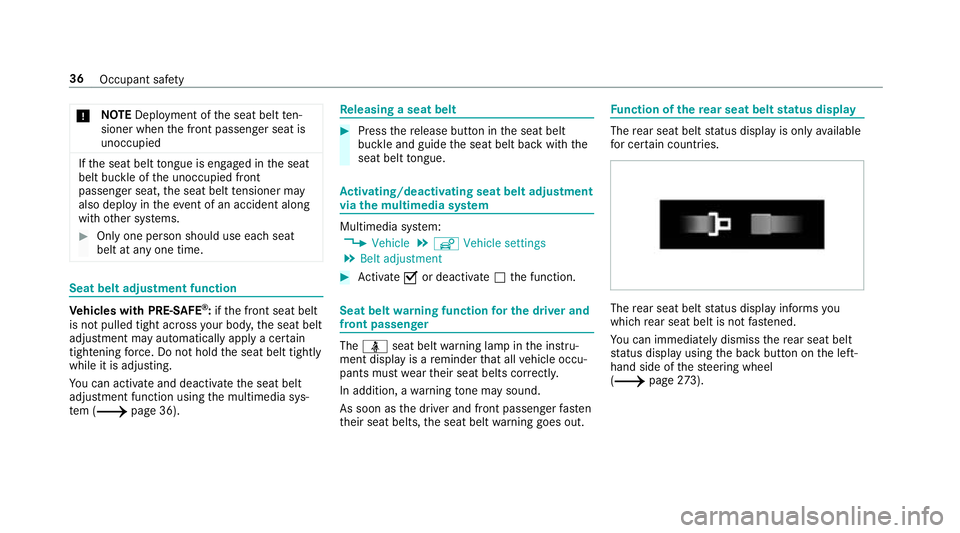
nction of there ar seat belt status display The
rear seat belt status display is on lyavailable
fo r cer tain countries. The
rear seat belt status display informs you
which rear seat belt is not fastened.
Yo u can immediately dismiss there ar seat belt
st atus display using the back button on the left-
hand side of thesteering wheel
(0013 page273). 36
Occupant saf ety
Page 45 of 609
front airbag. The
PASSENGER AIR BAG OFF indi‐
cator lamp may be lit continuously or be off.
If th ePA SSENGER AIR BAG OFF indicator lamp
and the0075 restra int sy stem warning lamp
light up simultaneousl y,the front passenger seat
may not be used. Also in this case, do not fit a
ch ild restra int sy stem tothe front passenger
seat. Ha veautomatic front passenger front air‐
bag shutoff checked and repaired immediately at
a qu alified specialist workshop.
St atus display
If th e front passenger seat is occupied, ensure,
bo th before and during the journe y,that thest a‐
tus of the front passenger front airbag is cor rect
fo rth e cur rent situation.
Af terfitting a rear wa rd-facing child restra int
sy stem tothe front passenger seat:
PA SSENGER AIR BAG OFF must be lit continu‐
ousl y. 000A
WARNING Risk of inju ryor death from
using a rear wa rd-facing child restra int
sy stem when the front passenger front
airbag is enabled
If yo u secure a child in a rear wa rd-facing
ch ild restra int sy stem on the front passenger
seat and thePA SSENGER AIR BAG OFF indi‐
cator lamp is off, the front passenger airbag
can deploy in theev ent of an accident.
The child could be stru ck bythe airbag.
Alw ays ensure that the front passenger air‐
bag is disabled. The PASSENGER AIR BAG
OFF indicator lamp must be lit.
NEVER use a rear wa rd-facing child restra int
sy stem on a seat pr otected byan ENABLED
FRONT AIRB AGin front of it, DE ATH or SERI‐
OUS INJU RYtotheCH ILD can occur. When
fitting a child restra int sy stem tothe front
passenger seat, obser vetheve hicle-specific
information (0013 page 66).
Depending on thech ild restra int sy stem and the
st ature of thech ild, thePA SSENGER AIR BAG
OFF indicator lamp may be off. In this case, do not
fit th ere ar wa rd-facing child restra int sy stem
to the front passenger seat.
Ins tead, fit th ere ar wa rd-facing child restra int
sy stem toa suitable rear seat.
Af terfitting a forw ard-facing child restra int
sy stem tothe front passenger seat: depend‐
ing on thech ild restra int sy stem and thest ature
of thech ild, PASSENGER AIR BAG OFF may be lit
continuously or be off. Alw ays obser vethefo l‐
lowing information. 000A
WARNING Risk of inju ryor death due to
incor rect positioning of thefo rw ard-
fa cing child restra int sy stem
If yo u secure a child in a forw ard-facing child
re stra int sy stem on the front passenger seat
and you position the front passenger seat too
close tothe cockpit, in theev ent of an acci‐
dent, thech ild could:
R Come into con tact wi th theve hicle inte‐
ri or if thePA SSENGER AIR BAG OFF indi‐
cator lamp is lit, forex ample.
R Bestru ck bythe airbag if thePA SSENGER
AIR BAG OFF indicator lamp is off. 42
Occupant saf ety
Page 113 of 609
0007
When leaving theve hicle, alw aysta ke
th eke y with you and lock theve hicle.
This also applies tothe digital vehicle
ke y if the "Digital Vehicle Key" function
is activated via Mercedes me connect. The memory function can be used when
the igni‐
tion is switched off.
St oring
Seat adjustments for up tothre e people can be
st ored and called up using the memory function.
The following sy stems can be selected:
R Seat, backrest and head restra int
R Steering wheel
R Outside mir rors
R Head-up display 0007
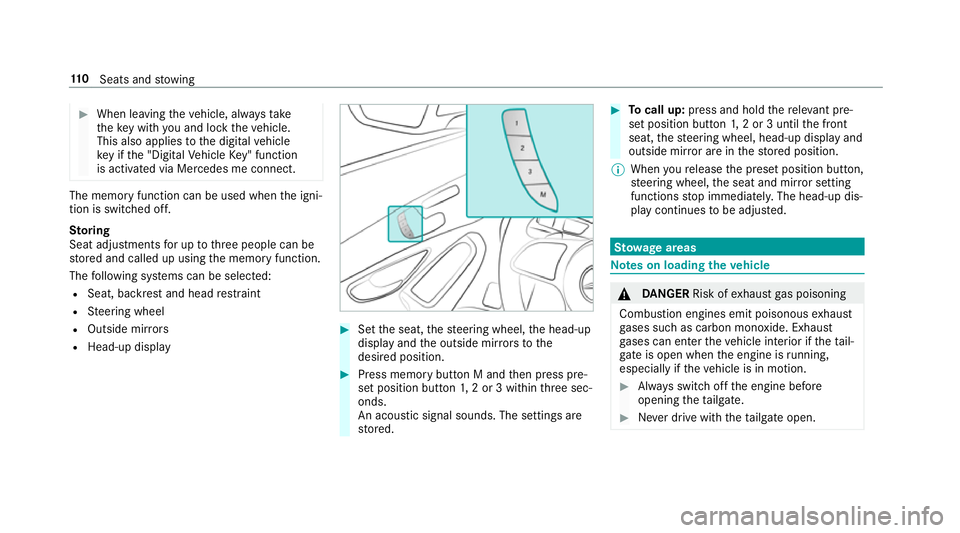
Set the seat, thesteering wheel, the head-up
display and the outside mir rors to the
desired position. 0007
Press memory button M and then press pre‐
set position button 1,2 or 3 within thre e sec‐
onds.
An acoustic signal sounds. The settings are
st ored. 0007
Tocall up: press and hold there leva nt pre‐
set position button 1,2 or 3 until the front
seat, thesteering wheel, head-up display and
outside mir ror are in thestored position.
0009 When youre lease the preset position button,
st eering wheel, the seat and mir ror setting
functions stop immediatel y.The head-up dis‐
play continues tobe adjus ted. St
ow age areas Note
s on loading theve hicle 000A
DANG ER Risk of exhaust gas poisoning
Combustion engines emit poisonous exhaust
ga ses such as carbon monoxide. Exhaust
ga ses can enter theve hicle interior if theta il‐
gate is open when the engine is running,
especially if theve hicle is in motion. 0007
Alw ays switch off the engine before
opening theta ilgate. 0007
Never drive with theta ilgate open. 11 0
Seats and stowing
Page 116 of 609
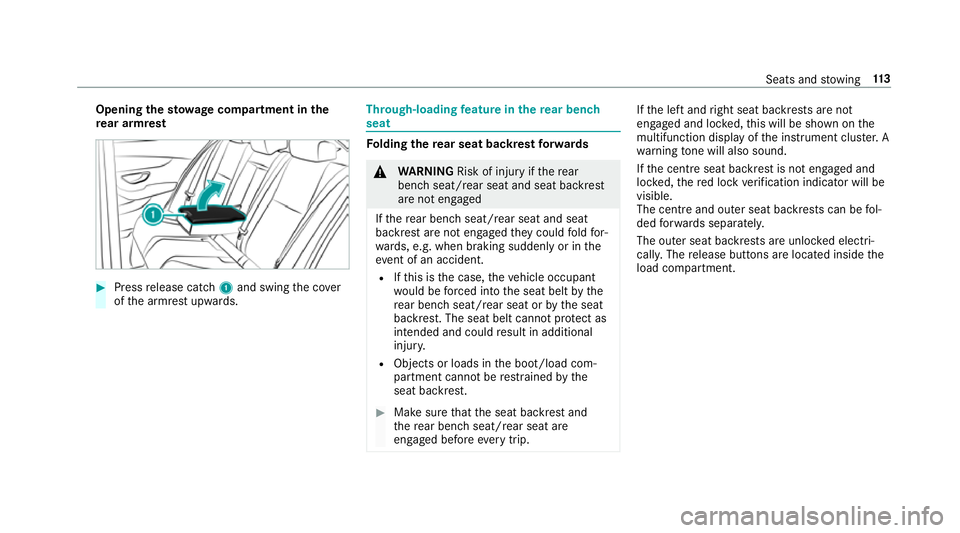
Opening
thesto wage compa rtment in the
re ar armrest 0007
Press release cat ch1 and swing the co ver
of the armrest upwards. Through-loading
feature in there ar ben ch
seat Fo
lding there ar seat backrest forw ards 000A
WARNING Risk of inju ryifth ere ar
ben chseat/rear seat and seat backrest
are not engaged
If th ere ar ben chseat/rear seat and seat
backrest are not engaged they could fold for‐
wa rds, e.g. when braking suddenly or in the
ev ent of an accident.
R Ifth is is the case, theve hicle occupant
wo uld be forc ed into the seat belt bythe
re ar ben chseat/rear seat or bythe seat
backrest. The seat belt cann otprotect as
intended and could result in additional
injur y.
R Objects or loads in the boot/load com‐
partment cann otbe restra ined bythe
seat backrest. 0007
Make sure that the seat backrest and
th ere ar ben chseat/rear seat are
engaged before everytrip. If
th e left and right seat backrests are not
engaged and loc ked, this will be shown on the
multifunction display of the instrument clus ter. A
wa rning tone will also sound.
If th e cent reseat backrest is not engaged and
loc ked, there d lock verification indicator will be
visible.
The centre and ou ter seat backrests can be fol‐
ded forw ards separatel y.
The outer seat backrests are unloc ked elect ri‐
cally. The release buttons are located inside the
load compartment. Seats and
stowing 11 3
Page 118 of 609
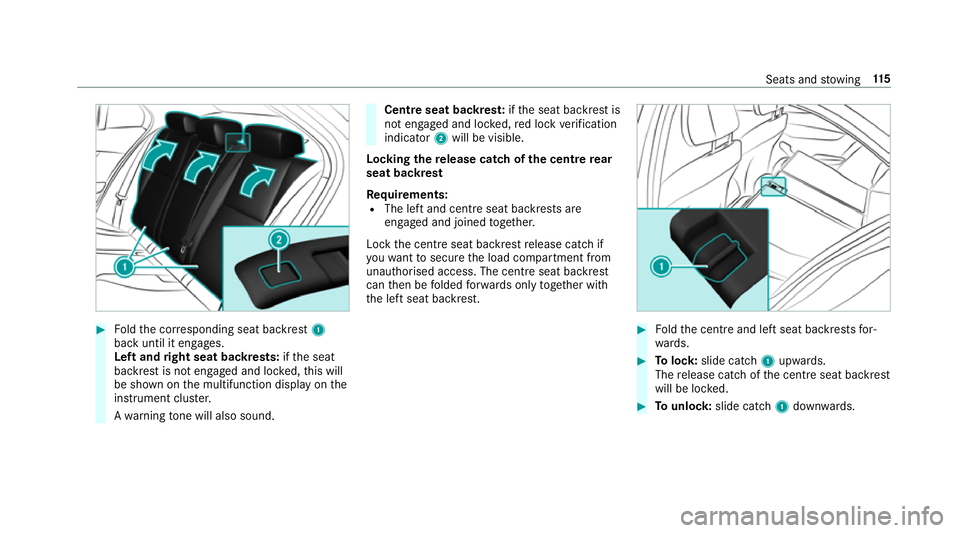
0007
Foldthe cor responding seat backrest 1
back until it engages.
Left and right seat backrests: ifth e seat
backrest is not engaged and loc ked, this will
be shown on the multifunction display on the
instrument clus ter.
A wa rning tone will also sound. Centre seat backres
t:ifth e seat backrest is
not engaged and loc ked, red lock verification
indicator 2will be visible.
Lo cking there lease catch of the centre rear
seat backrest
Re quirements:
R The left and centre seat backrests are
engaged and joined toge ther.
Lock the cent reseat backrest release cat chif
yo uwa nttosecure the load compartment from
unauthorised access. The cent reseat backrest
can then be folded forw ards on lytoge ther with
th e left seat backrest. 0007
Foldthe cent reand left seat backrests for‐
wa rds. 0007
Tolock: slide cat ch1 upwards.
The release cat chofthe cent reseat backrest
will be loc ked. 0007
Tounlo ck:slide catch 1down wards. Seats and
stowing 11 5
Page 135 of 609
R
The charging function and wireless connec‐
tion of the mobile phone totheve hicle's
ex terior aerial are only available if the ignition
is switched on.
R Small mobile phones may not be able tobe
ch arge d in everyposition of the mobile
phone stowage compartment.
R Largemobile phones which do not rest flat in
th e mobile phone stowage compartment may
not be able tobe charge d or connec ted with
th eve hicle's exterior aerial.
R The mobile phone may heat up during the
ch arging process. This may also depend on
th e applications (apps) cur rently open.
R Toensure more ef ficient charging and con‐
nection with theve hicle's exterior aerial,
re mo vethe pr otective co ver from the mobile
phone. Pr otective co vers which are neces‐
sary for wireless charging are excluded. Wire
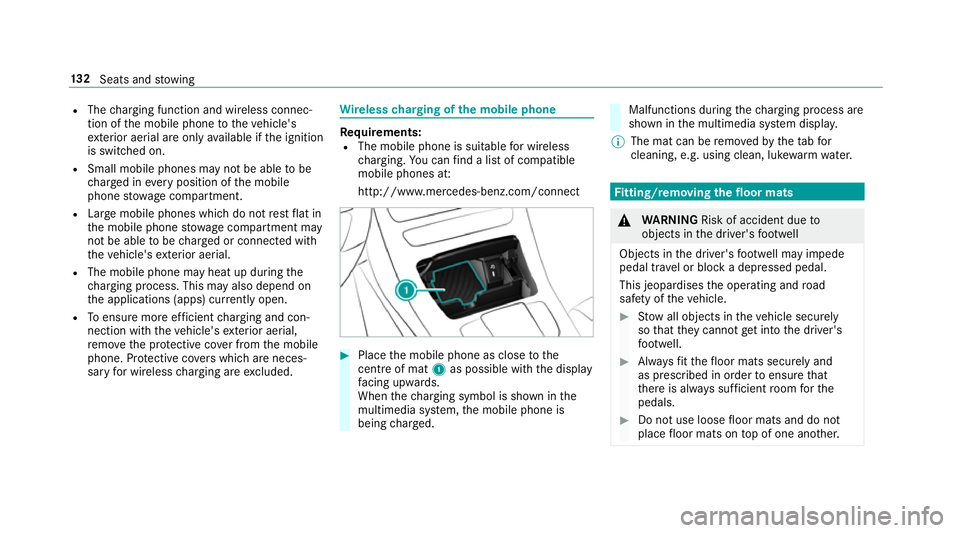
lesscharging of the mobile phone Re
quirements:
R The mobile phone is suitable for wireless
ch arging. You can find a li stof compatible
mobile phones at:
http://www.mercedes-benz.com/connect 0007
Place the mobile phone as close tothe
centre of mat 1as possible wi th the display
fa cing up wards.
When thech arging symbol is shown in the
multimedia sy stem, the mobile phone is
being charge d. Malfunctions during
thech arging process are
shown in the multimedia sy stem displa y.
0009 The mat can be remo vedby theta bfor
cleaning, e.g. using clean, lu kewa rm wate r. Fi
tting/ removing the floormats 000A
WARNING Risk of accident due to
objects in the driver's foot we ll
Objects in the driver's foot we ll may impede
pedal tr avel or block a depressed pedal.
This jeopardises the operating and road
saf ety of theve hicle. 0007
Stow all objects in theve hicle securely
so that they cannot getinto the driver's
fo ot we ll. 0007
Alw aysfit th efloor mats securely and
as prescribed in order toensure that
th ere is alw ays suf ficient room forthe
pedals. 0007
Do not use loose floor mats and do not
place floor mats on top of one ano ther. 13 2
Seats and stowing