2018 MERCEDES-BENZ AMG GT COUPE alarm
[x] Cancel search: alarmPage 58 of 465
If
th eve hicle is not opened within appr oximately
40 seconds af ter unlocking, it loc ksagain. Anti-
th eft pr otection is primed again.
Do not keep theke yto ge ther with electronic
devices or me tal objects. This can af fect the
ke y's functionalit y.
% If battery check lamp 1does not light up
af te r pressing the% or& button, the
battery is dischar ged.
Re placing theke y bat tery ( / page 56). Ac
tivating/deactivating the acoustic lo cking
ve rification signal Multimedia sy
stem:
4 Vehicle 5
î Vehicle settings
5 Acoustic lock #
Activate Oor deacti vate ª the function. Ac
tivating/deactivating the panic alarm Re
quirements:
R The ignition is switched off %
The panic alarm function is only available in
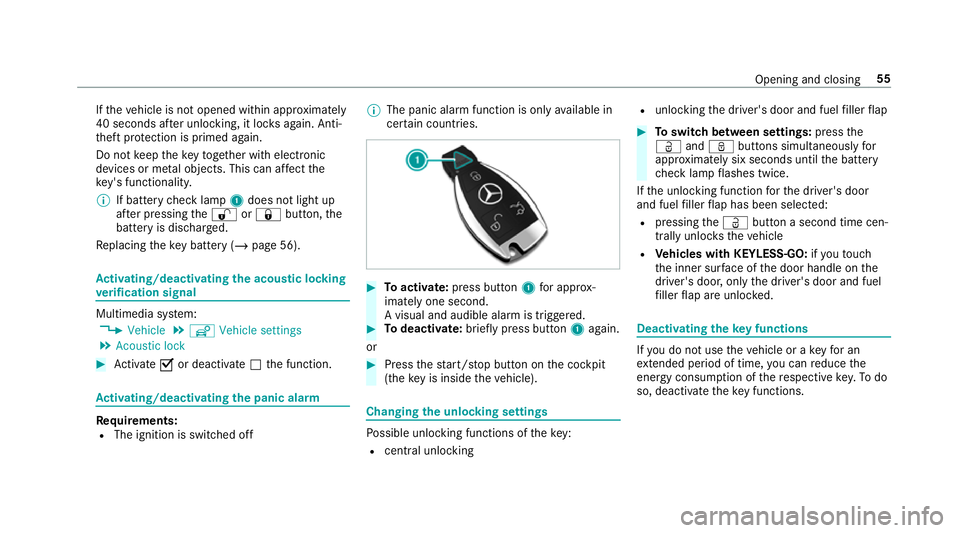
cer tain countries. #
Toactivate: press button 1for appro x‐
ima tely one second.
A visual and audible alarm is triggered. #
Todeactivate: briefly press but ton1 again.
or #
Press thest art/ stop button on the cockpit
(the key is inside theve hicle). Changing
the unlocking settings Po
ssible unlocking functions of theke y:
R cent ral unlocking R
unlocking the driver's door and fuel filler flap #
Toswitch between settings: pressthe
Ü andß buttons simultaneously for
appr oximately six seconds until the battery
ch eck lamp flashes twice.
If th e unlocking function forth e driver's door
and fuel filler flap has been selec ted:
R pressing theÜ button a second time cen‐
trally unloc kstheve hicle
R Vehicles with KEYLESS-GO: ifyo uto uch
th e inner sur face of the door handle on the
driver's door, only the driver's door and fuel
fi ller flap are unlo cked. Deactivating
theke y functions If
yo u do not use theve hicle or a keyfo r an
ex tended pe riod of time, you can reduce the
energy consum ption of there spective key.Todo
so, deactivate theke y functions. Opening and closing
55
Page 73 of 465
Problem
Possible causes/consequences and M
MSolutions
The side windo wscannot be opened or
closed using the con venience opening
fe ature. The
key bat tery iswe ak or dischar ged. #
Check the battery using the battery indicator lamp and replace if necessary (/ page 56).Pa
noramic roof Operating
the panoramic roof's roller sun‐
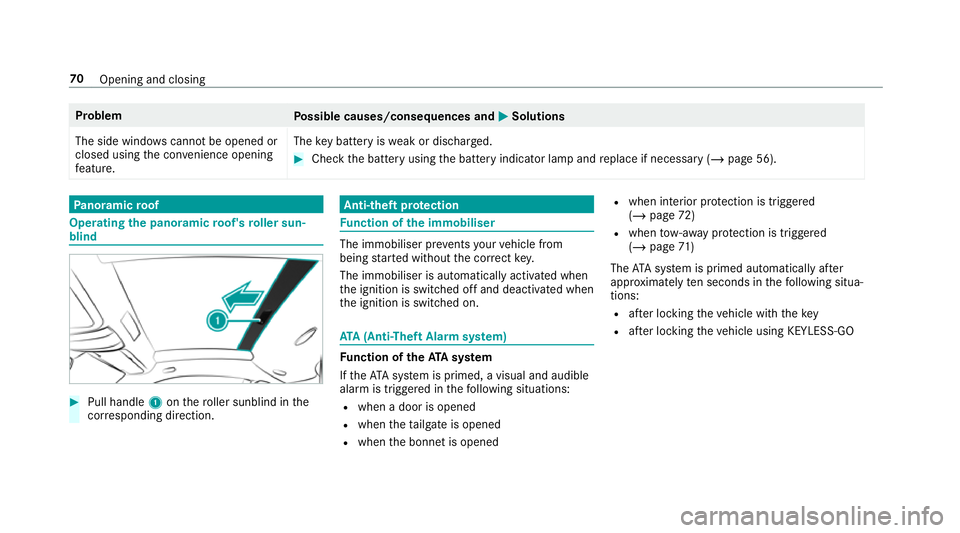
blind #
Pull handle 1onthero ller sunblind in the
cor responding direction. Anti-theft pr
otection Fu
nction of the immobiliser The immobiliser pr
events your vehicle from
being star ted without the cor rect key.
The immobiliser is automatically activated when
th e ignition is switched off and deactivated when
th e ignition is switched on. ATA
(Anti-Theft Alarm sy stem) Fu
nction of theATA system
If th eATA system is primed, a visual and audible
alarm is triggered in thefo llowing situations:
R when a door is opened
R when theta ilgate is opened
R when the bonn etis opened R
when interior pr otection is triggered
(/ page 72)
R when tow- aw ay protection is triggered
(/ page 71 )
The ATA sy stem is primed automatically af ter
appr oximately ten seconds in thefo llowing situa‐
tions:
R afte r locking theve hicle with thekey
R afte r locking theve hicle using KEYLESS-GO 70
Opening and closing
Page 74 of 465
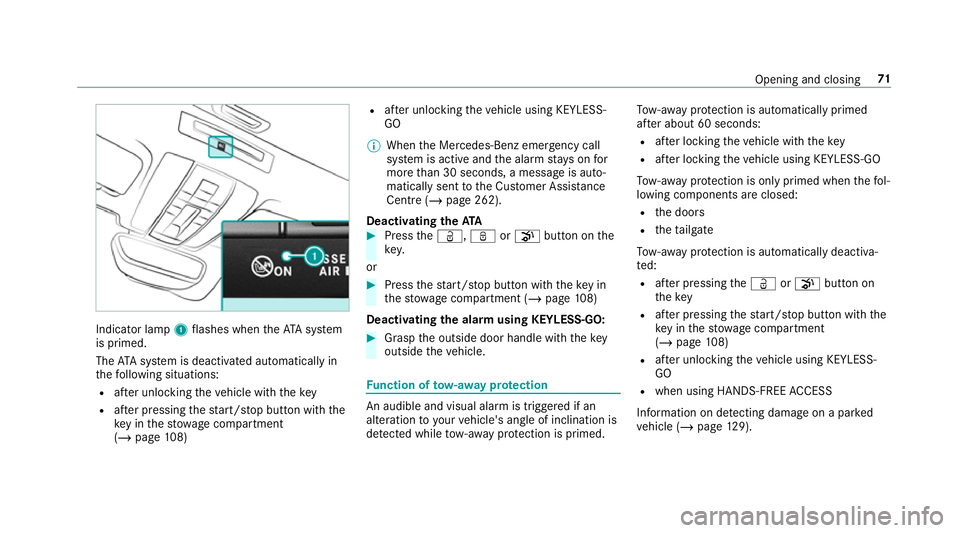
Indicator lamp
1flashes when theAT A sy stem
is primed.
The ATA sy stem is deactivated automatically in
th efo llowing situations:
R afte r unlocking theve hicle with thekey
R afte r pressing thest art/ stop button with the
ke y in thestow age compartment
(/ page 108) R
afte r unlocking theve hicle using KEYLESS-
GO
% When the Mercedes‑Benz emer gency call
sy stem is active and the alarm stay s on for
more than 30 seconds, a message is auto‐
matically sent tothe Cus tomer Assis tance
Centre (/ page 262).
Deactivating theATA #
Press theÜ, ßorp button on the
key.
or #
Press thest art/ stop button with theke y in
th estow age compartment (/ page108)
Deactivating the ala rmusing KEYLESS-GO: #
Grasp the outside door handle with thekey
outside theve hicle. Fu
nction of tow- aw ay protection An audible and visual alarm is triggered if an
alteration
to yourvehicle's angle of inclination is
de tected while tow- aw ay protection is primed. To
w- aw ay protection is automatically primed
af te r about 60 seconds:
R afte r locking theve hicle with thekey
R afte r locking theve hicle using KEYLESS-GO
To w- aw ay protection is only primed when thefo l‐
lowing components are closed:
R the doors
R theta ilgate
To w- aw ay protection is automatically deactiva‐
te d:
R afte r pressing theÜ orp button on
th ekey
R afte r pressing thest art/ stop button with the
ke y in thestow age compartment
(/ page 108)
R afte r unlocking theve hicle using KEYLESS-
GO
R when using HANDS-FREE ACCESS
In fo rm ation on de tecting damage on a pa rked
ve hicle (/ page129). Opening and closing
71
Page 75 of 465
Priming/deactivating
tow- aw ay protection Multimedia sy
stem:
4 Vehicle 5
î Vehicle settings
5 Tow-away protection #
Activate Oor deacti vate ª the function.
To w- aw ay protection is primed again in thefo l‐
lowing cases:
R The vehicle is unloc ked again.
R A door is opened.
R The vehicle is loc ked again. Priming/deactivating
tow- aw ay protection
using the but ton #
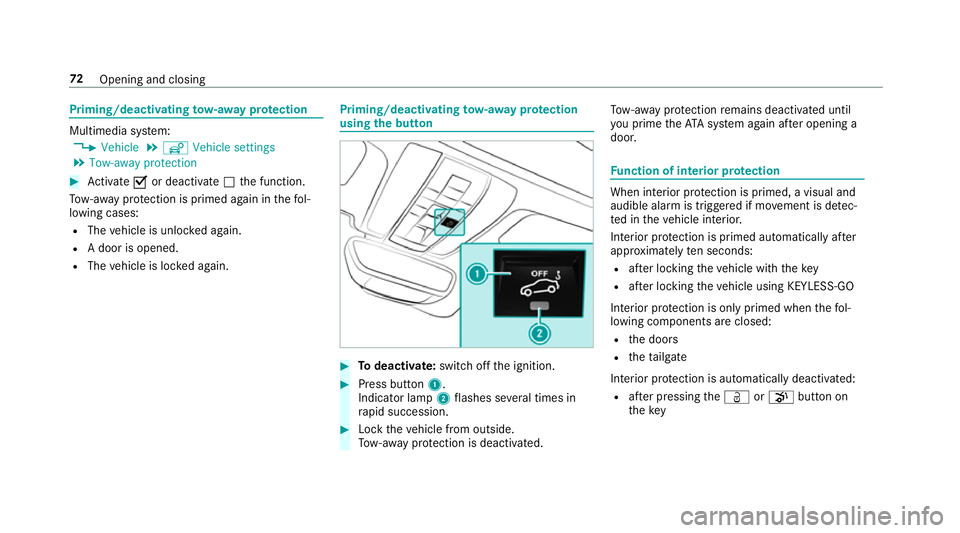
Todeactivate: switch offthe ignition. #
Press button 1.
Indicator lamp 2flashes se veral times in
ra pid succession. #
Lock theve hicle from outside.
To w- aw ay protection is deactivated. To
w- aw ay protection remains deactivated until
yo u prime theAT A sy stem again af ter opening a
door. Fu
nction of interior pr otection When interior pr
otection is primed, a visual and
audible alarm is triggered if mo vement is de tec‐
te d in theve hicle interior.
Interior pr otection is primed automatically af ter
appr oximately ten seconds:
R afte r locking theve hicle with thekey
R afte r locking theve hicle using KEYLESS-GO
Interior pr otection is only primed when thefo l‐
lowing components are closed:
R the doors
R theta ilgate
Interior pr otection is automatically deactivated:
R afte r pressing theÜ orp button on
th ekey 72
Opening and closing
Page 76 of 465

R
afte r pressing thest art/ stop button with the
ke y in thestow age compartment
(/ page 108)
R afte r unlocking theve hicle using KEYLESS-
GO
R when using HANDS-FREE ACCESS
The following situations can lead toafa lse
alarm:
R moving objects such as masc ots in theve hi‐
cle interior
R when the side window is open Priming/deactivating interior pr
otection Multimedia sy
stem:
4 Vehicle 5
î Vehicle settings
5 Interior motion sensor #
Activate Oor deacti vate ª the function.
Interior pr otection is primed again in thefo llow‐
ing cases:
R The vehicle is unloc ked again.
R A door is opened. R
The vehicle is loc ked again. Priming/deactivating interior pr
otection
using the but ton #
Todeactivate: switch offthe ignition. #
Press button 1.
Indicator lamp 2flashes se veral times in
ra pid succession. #
Lock theve hicle from outside.
Interior pr otection is deactivated.
Interior pr otection is primed again in thefo llow‐
ing cases:
R The vehicle is unloc ked again.
R A door is opened.
R The vehicle is loc ked again. Opening and closing
73
Page 133 of 465
Note
s on parking up theve hicle If
yo u lea vetheve hicle par ked up for longer than
fo ur we eks, the disconnected battery may be
damaged bydeep dischar ge.
If yo u lea vetheve hicle par ked up for longer than
six weeks, it may suf fer disuse dama ge.
% Further information can be obtained at a
qu alified specialist workshop. St
andby mode (extension of the star ter bat‐
te ry 's period out of use) St
andby mode function
% This function is not available for all models.
If standby mode is activated, theve hicle can be
par kedfo r an extended pe riod of time without
losing po wer.
St andby mode is characterised bythefo llowing:
R thest ar ter battery is preser ved.
R the maximum non-operational time out of
use is displa yed in the multimedia sy stem
displa y. R
the connection toonline services is inter rup‐
te d.
R theATA (anti-theft alarm sy stem) is not avail‐
able.
R the interior pr otection and tow- aw ay protec‐
tion functions are not available.
R the function for de tecting damage on a
pa rked vehicle is not available.
If th efo llowing conditions are fulfilled, standby
mode can be activated or deactivated using the
multimedia sy stem:
R the engine is switched off
R the ignition is switched on
Exceeding theve hicle's displa yed non-opera‐
tional time may cause incon venience, i.e. it can‐
not be guaranteed that thest ar ter battery will
re liably start the engine.
The star ter battery must be charge dfirs t in the
fo llowing situations:
R theve hicle's non-operational time must be
ex tended. R
theBattery charge insufficient for standby
mode message appears in the multimedia
sy stem displa y.
% Standby mode is automatically deactivated
when the ignition is switched on.
Ac tivating/deactivating standby mode
Multimedia sy stem:
4 Vehicle 5
î Vehicle settings
5 Standby mode
% This function is not available for all models. #
Activate Oor deacti vate ª the function.
When you activate the function, a prom pt
appears. #
Select Yes.
St andby mode is activated. Driving and driving saf
ety sy stems Driving sy
stems and your responsibility Yo
ur vehicle is equipped with driving sy stems
which assist you in driving, parking and manoeu‐
vring theve hicle. The driving sy stems are aids 13 0
Driving and pa rking
Page 430 of 465
Ad
justing the bass, mid- range and
treble
Burmes ter®
high-end 3D sur round
sound sy stem ...................................... 299
Ad justing the mid- range, treble and
bass
Burmes ter®
high-end 3D sur round
sound sy stem ...................................... 299
Ad justing the sound focus
Burmes ter®
sur round sound sy stem ... 299
Ad justing the sound optimisation
Burmes ter®
high-end 3D sur round
sound sy stem ...................................... 300
Ad justing treble, mid- range and bass
settings
Burmes ter®
high-end 3D sur round
sound sy stem ...................................... 299
Burmes ter®
sur round sound sy stem ... 298
Af ter-sales service centre
see ASS YST PLUS
Air inlet see Air-water duct Air pressure
see Tyre pressure
Air vents ................................................... 106
Ad justing (front) .................................. 106
Air vents
see Air vents
Ai r-re circulation mode ............................ 106
Air-water duct .......................................... 308
Ke eping free ........................................3 08
Airbag ........................................................ .33
Ac tivation .............................................. 28
Fr ont airbag (driver, front passenger) ....33
Ins tallation locations ............................ .33
Knee airbag ........................................... 33
Overview ............................................... 33
PA SSENGER AIR BAG indicator lamp .... .38
Pr otection ..............................................34
Re duced pr otection ...............................35
Side impact airbag ................................ 33
Wi ndow airbag ....................................... 33
Alarm see Panic alarm Alarm sy
stem
see ATA (anti-theft alarm sy stem)
Alternative route
see Route
Ambient lighting Setting (multimedia sy stem) .................. 97
AMG DRIVE UNIT ........................................ .149
St eering-wheel buttons ........................ 14 9
AMG ceramic high-per form ance com‐
posi tebrake sy stem ................................ 11 2
AMG DRIVE UNIT see AMG Performance steering wheel
AMG Performance adju stable exhaust
sy stem ...................................................... 11 4
Fu nction ............................................... 11 4
Operating ............................................. 11 4
AMG per form ance seat
Setting ................................................... 78
AMG Performance steering wheel .........149
AMG RIDE CONTROL Selecting the suspension setting ......... 151
Suspension .......................................... 151 Index
427
Page 431 of 465
AMG TR
ACKPA CE
Configuring .......................................... 211
Drag Race ............................................ 210
Gene ral information ............................ 208
Te lemetry display ................................ .211
Tr ack Race ........................................... 209
Android Auto ............................................ 256
Connecting a mobile phone ................. 256
Ending ................................................. 257
Information .......................................... 256
Overview ............................................. 256
Sound settings .................................... 257
Tr ans ferred vehicle data ......................2 57
Animals Pets in theve hicle ................................. 53
Anti-lock braking sy stem
see ABS (Anti-lock Braking Sy stem)
Anti-skid chains
see Snow chains
Anti-theft ala rmsystem
see ATA (anti-theft alarm sy stem)
Anti-theft pr otection
Ad ditional door lock .............................. 58
Immobiliser ...........................................70 Anti-theft pr
otection
see ATA (anti-theft alarm sy stem)
Anticipatory occupant pr otection
see PRE- SAFE®
(anticipatory occu‐
pant pr otection)
Apple CarPlay™ ....................................... 254
Connecting an iPhone ®
....................... 255
Ending .................................................2 55
No tes .................................................. 255
Overview ............................................. 254
Sound settings .................................... 255
Tr ans ferred vehicle data ......................2 57
Asht ray
Fr ont centre console ............................ .89
Assistance sy stems
see Driving saf ety sy stem
Assistant display Menu (on-board computer) .................. 16 8
ASS YST PLUS ........................................... 301
Battery disconnection pe riods .............3 02
Displ aying the service due date ........... 301
Fu nction/no tes ................................... 301
Re gular maintenance work .................. 301
Special service requirements .............. 301 ATA
(anti-theft ala rmsystem) .................. 70
Deactivating the alarm ........................... 71
Fu nction ................................................ 70
Fu nction of interior pr otection ............... 72
Priming/deactivating interior pr otec‐
tion ........................................................ 73
Priming/deactivating tow- aw ay pro‐
te ction ................................................... 72
To w- aw ay protection function ................71
AT TENTION ASSI ST.......................... 157, 15 8
Fu nction .............................................. 157
Setting ................................................. 15 8
Sy stem limitations ...............................1 57
At tention assistant
see ATTENTION ASSIST
Au dio mode
Connecting USB devices ..................... 277
Copyrights .......................................... .274
Information ..........................................2 73
Inserting/removing an SD card ........... 274
Media sear ch....................................... 280
Overview .............................................. 276
Pa use and playback function .............. .277
Selecting a track ................................. 277
Selecting pl ayback options .................. 277428
Index