2018 MERCEDES-BENZ AMG GT COUPE service
[x] Cancel search: servicePage 168 of 465
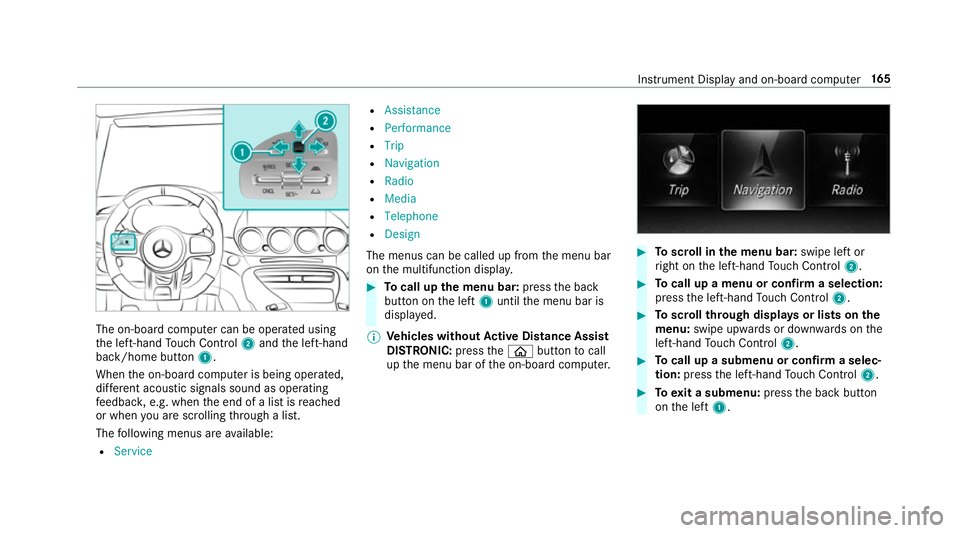
The on-board computer can be operated using
th e left-hand Touch Control 2and the left-hand
back/home button 1.
When the on-board computer is being operated,
dif fere nt acoustic signals sound as operating
fe edbac k,e.g. when the end of a list is reached
or when you are sc rolling thro ugh a list.
The following menus are available:
R Service R
Assistance
R Performance
R Trip
R Navigation
R Radio
R Media
R Telephone
R Design
The menus can be called up from the menu bar
on the multifunction displa y. #
Tocall up the menu bar: pressthe back
button on the left 1until the menu bar is
displa yed.
% Ve
hicles without Active Di stance Assist
DISTRO NIC:press theò button tocall
up the menu bar of the on-board computer. #
Toscroll in the menu bar: swipe left or
ri ght on the left-hand Touch Control 2. #
Tocall up a menu or confirm a selection:
press the left-hand Touch Control 2. #
Toscroll through displa ysor lists on the
menu: swipe upwards or down wards on the
left-hand Touch Control 2. #
Tocall up a submenu or confirm a selec‐
tion: press the left-hand Touch Control 2. #
Toexit a submenu: pressthe back button
on the left 1. Instrument Display and on-board computer
16 5
Page 170 of 465
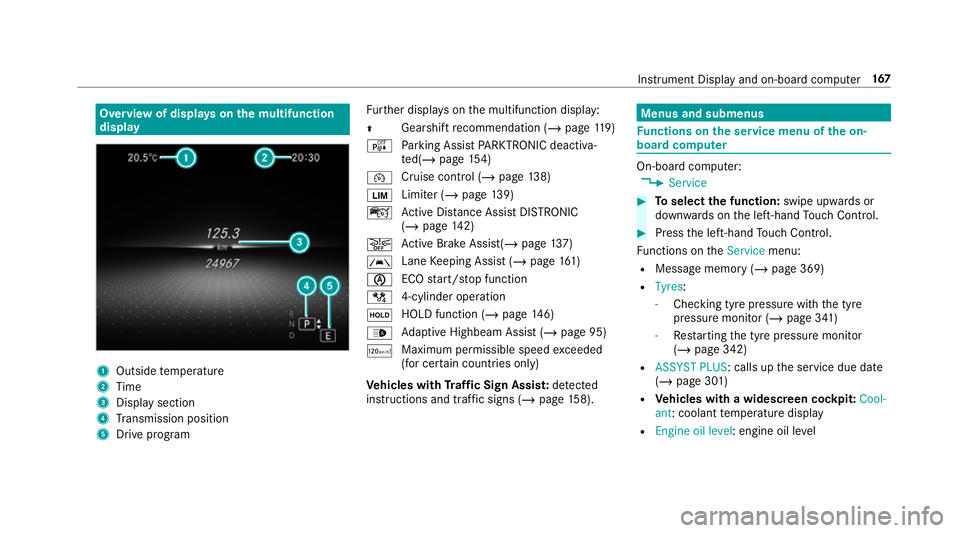
Overview of displa
yson the multifunction
display 1
Outside temp erature
2 Time
3 Display section
4 Transmission position
5 Drive prog ram Fu
rther displa yson the multifunction display:
Z Gearshift
recommendation (/ page 119)
é Parking Assist PARKTRONIC deacti va‐
te d(/ page 154)
¯ Cruise
control (/ page 138)
È Limi
ter (/ page139)
ç Active Dis tance Assi stDISTRONIC
(/ page 142)
æ Ac
tive Brake Assi st(/ page 137)
à La
ne Keeping Assist (/ page161)
è ECO
start/ stop function
/ 4-cylinder operation
ë HOLD function (/
page146)
_ Ad
aptive Highbeam Assist (/ page 95)
ð Maximum permissible speed
exceeded
(for cer tain countries only)
Ve hicles with Traf fic Sign Assis t:de tected
instructions and traf fic signs (/ page 158). Menus an
d submenus Fu
nctions on the service menu of the on-
board compu ter On-board computer:
4 Service #
Toselect the function: swipe upwards or
down wards on the left-hand Touch Control. #
Press the left-hand Touch Control.
Fu nctions on theService menu:
R Message memory (/ page 369)
R Tyres :
- Checking tyre pressure with the tyre
pressure monitor (/ page 341)
- Restarting the tyre pressure monitor
(/ page 342)
R ASSYST PLUS: calls up the service due date
(/ page 301)
R Vehicles with a widescreen cock pit:Cool-
ant: coolant temp erature display
R Engine oil level: engine oil le vel Instrument Display and on-board computer
167
Page 187 of 465
Ra
dio and TVvoice commands Vo
ice command Function
Station
call up recei vable or sa vedstations
enter a frequency directly
Next station To
switch tothe next available station
Previous station To
switch tothe pr evious station
Save station To
save ast ation in thest ation list
Show station list To
display the names of all recei vable stations
Read out station list To
listento the names of all recei vable stations
Traffic information on
Traffic information off To
switch the traf fic information service on/off
Radio info on
Radio info off To
switch the cur rent station information on/off Overview of media pla
yervo ice commands Media pla
yervo ice commands can also be used
when the media pla yerru ns in the bac kground. 184
LINGU ATRO NIC
Page 208 of 465
Ac
tivating PIN pr otection for data export #
Select Change settings .
Confirm wi th the PIN. #
Select Protect data export.
Ac tivate Oor deacti vate ª the function.
Un blocking the PIN
Re quirements:
R There is an Internet connection.
R A Mercedes me account exists at http://
www.me rcedes.me.
R The Personalisation service is active
(/ page 205).
If th e PIN has been entered incor rectly three
times, the PIN will be bloc ked. You can ha ve a
single-use password sent to you via the
Mercedes me connect online por talto reset the
PIN pr otection. #
Select Unblock PIN. #
Ente rth e single-use password.
PIN pr otection is reset, and you can set a
new PIN. %
Alternativel y,yo u can ha vePIN pr otection
re set at a Mercedes-Benz service centre. User profile
Setting a user profile
Multimedia sy
stem:
4 System 5
g Personalisation
Displaying a user profile when starting
If th is function is active, a prom ptappears when
st arting the sy stem asking which user profile to
use. #
Select Display profile list after start . #
Activate Oor deacti vate ª the function.
Selecting a user profile #
Select Guestor individual profile #.
% Some settings from the user profile are only
loaded when theve hicle is stationary or
when the ignition is switched on.
Au tomatic syn chronisation
Each time the ignition is switched off or on, the
individual user profiles are synchronised on themultimedia sy
stem and on the ser ver.This
ensures that the latest user profiles are alw ays
av ailable. #
Select Automatic synchronisation. #
Activate Oor deacti vate ª the function.
% For more information about importing/
ex porting user profiles (/ page 206).
Creating a user profile
Multimedia sy stem:
4 System 5
g Personalisation
5 Create profile #
Ente r a name. #
Select a.
The following information is sa ved in the user
profile, forex ample:
R System settings
R Settings in theTV tuner's channel list
R Navigation and traf fic information
The settings di ffer depending on theve hicle
equipment. Multimedia sy
stem 205
Page 209 of 465
Importing/exporting user profiles
Re
quirements:
R There is an Internet connection
(/ page 265).
R A Mercedes me account exists at http://
www.me rcedes.me.
R The Personalisation service is active.
Multimedia sy stem:
4 System 5
g Personalisation
5 Manual export/import
This function is not available in all countries.
On ly individu al profiles can be impor ted or
ex por ted.
The individual profiles are alw ays collectively
impor ted or expor ted. #
Impor t:select Import profiles from the
server.
The The profile import overwrites the exist-
ing profiles. Do you want to continue? mes‐
sage appears. #
Select Yes.
User profiles are impor ted. #
Expor t:select Export profiles to the server.
User profiles are expor ted.
% Certain settings, such as address book
ent ries or pr evious destinations from the
navigation sy stem, are not expor ted.
Setting user profile options
Multimedia sy stem:
4 System 5
g Personalisation #
Highlight a profile. #
Select ¥options.
The following options are available:
R Rename
R Delete
R Reset
% The guest profile cannot be dele ted or
re named. So
ftwa reupdate Information on software updates
The multimedia sy
stem pr ovides a message
when an update is available. Depending on
the source, you can per form vari‐
ous updates:
Software update Source of
the
update Up
date type
Up dates via mobile
phone Na
vigation map, sys‐
te m updates, Digital
Owner's Manual
Up dates via an exter‐
nal storage medium,
e.g. a USB flash drive Na
vigation maps %
Updates via mobile phone requ ire an active
Internet connection forth eve hicle. This is
not available in all countries. For fur ther
information on connecting tothe Internet,
see (/ page 264).
Ad vantages of updating software
Thanks tothe software update, your vehicle sta‐
tus is up-to-date.
In order tocons tantly impr ovethequ ality of our
services you will recei vefuture updates foryo ur 206
Multimedia sy stem
Page 210 of 465
multimedia sy
stem, the Mercedes me connect
services and your vehicle's communication mod‐
ule. These will con veniently be sent to you via
th e mobile phone connection in your vehicle
and, as an option, ins talled automaticall y.Yo u
can moni torth est atus of your updates on the
Mercedes me por tal and find information about
po tential inno vations.
Yo ur advantages at a glance:
R con veniently recei vesoftware update s via
th e mobile phone network
R impr ovesth equ ality and availability of
Mercedes me connect services
R keeps your multimedia sy stem and communi‐
cation module up-to-date
Fu rther information about software updates can
be found at http://me.mercedes-benz.com
Pe rforming a software upda te
Requ irements:
R There is an Internet connection
(/ page 264). R
For automatic updates: your vehicle has a
permanently installed communication mod‐
ule.
Multimedia sy stem:
4 System 5
Software update
Au tomatic update #
Activate OAutomatic online updates.
Up dates are per form ed.
The cur rent status of the updates is dis‐
pla yed.
Manual update #
Deactivate ªAutomatic online updates. #
Select an update from the list and start the
update.
Ac tivating the so ftwa reupdate #
Restart the sy stem.
Fu nction of important sy stem upda tes
Impor tant sy stem updates may be necessary for
th e security of your multimedia sy stem's data.
Please ins tallth ese updates, or else the security
of your multimedia sy stem cann otbe ensured. %
If automatic software updates are activated,
th e sy stem updates will be downloaded auto‐
matically (/ page 207).
As soon as an update is available for download,
a cor responding message appears onthe media
displa y.
Yo u ha vethefo llowing selection options:
R Download
The update will be downloaded in the back‐
ground.
R Details
Information about the pending sy stem
update is displa yed.
R Later
The update can be downloaded manually at a
later time (/ page 207).
If th e download is comple ted and the update is
re ady for ins tallation, you will be informed of this
af te rth e next ignition cycle, forex ample.
% Park theve hicle safely in a suitable location
before starting the ins tallation. Multimedia sy
stem 207
Page 211 of 465

Re
quirements forth e ins tallation:
R The ignition is switched on.
R The engine is not running.
R Notes and warnings ha vebeen read and
accep ted.
R The parking brake is applied.
If all requirements are met, the update will be
ins talled. The multimedia sy stem cann otbe
operated while the update is being ins talled and
ve hicle functions are restricted.
If er rors should occur during the ins tallation, the
multimedia sy stem automatically attem ptsto
re store the pr evious version. If restoration of the
pr ev ious version is not possible, a symbol
appears on the cent reconsole displ ay. Please
consult a qualified specialist workshop to
re solve the problem. Re
set function Multimedia sy
stem:
4 System 5
Reset
Pe rsonal data is dele ted, forex ample:
R Station presets
R Connec ted mobile phones #
Select Yes.
If PIN pr otection is activated, a prom ptappears
asking if you also wish torestore this to thefa c‐
to ry settings during a reset. #
Select Yes. #
Enter the cur rent PIN.
The PIN is reset.
or #
Select No.
The cur rent PIN stay sth e same af terre set‐
ting.
% Ifyo u ha veforg ottenyo ur PIN, a Mercedes-
Benz service centre can deactivate the PIN
pr otection foryo u. A prom
ptappears again asking whe ther you
re ally wish toreset. #
Select Yes.
The multimedia sy stem is reset tothefa ctory
settings. AMG TRA
CKPACE General information
Wi
th AMG TR ACKPA CE, the driving characteris‐
tics on race trac kscan be ana lysed and opti‐
mised. You can drive pr eviously stored race
trac ks(e.g. Hoc kenheimring) or new trac kscan
be recorded and stored. The driven lap times are
st ored forev ery tra ck. These can be ana lysed
and compared to other lap times toachie vethe
best possible race results. Additionall y,accelera‐
tion and braking procedures can be measured
and stored. 208
Multimedia sy stem
Page 217 of 465
or
#
Slide the controller totheright.
% Toshow or hide lo wer menu le vels, swipe or
slide tothe left or right as many times as
necessar y. Destination ent
ryEntering a POI or address
&
WARNING Risk of di stra ction from infor‐
mation sy stems and communications
equipment
If yo u operate information and communica‐
tion equipment integ rated in theve hicle
when driving, you will be distracted from the
traf fic situation. This could also cause youto
lose control of theve hicle. #
Only operate this equipment when the
traf fic situation permits. #
Ifyo u cannot be sure of this, stop the
ve hicle whilst paying attention toroad and traf
fic conditions and ope rate the
equipment with theve hicle stationar y. Yo
u must obse rveth e legal requirements forthe
country in whi chyou are cur rently driving when
operating the multimedia sy stem.
Re quirements:
R For the online sear ch:Mercedes me con‐
nect is available.
R You ha vea user account forth e Mercedes
me por tal.
R The service has been activated at a
Mercedes-Benz service centre.
Fu rther information can be found at: http://
www.mercedes.me
Multimedia sy stem:
4 Navigation #
Show the navigation menu. #
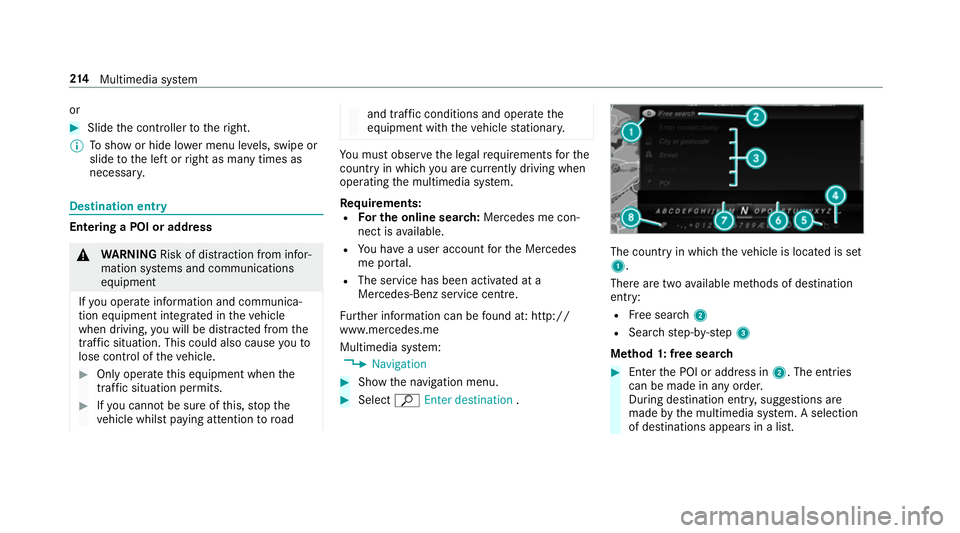
Select ªEnter destination . The count
ryin which theve hicle is located is set
1.
There are two available me thods of destination
entry:
R Free sear ch2
R Sea rchstep-b y-step 3
Me thod 1: free sear ch #
Enter the POI or address in 2. The entries
can be made in any order.
During destination entry , suggestions are
made bythe multimedia sy stem. A selection
of destinations appears in a list. 214
Multimedia sy stem