2018 MERCEDES-BENZ AMG GT COUPE sensor
[x] Cancel search: sensorPage 8 of 294

Notes/function .............................. 150
Blower
see Climate control
Bluetooth
®
Searching for a mobile phone ........ 211
see also Digital Operator's Man-
ual .................................................. 204
Brake Assist System
see BAS (Brake Assist System)
Brake assistance
see BAS (Brake Assist System)
Brake fluid
Display message ............................ 175
Notes .............................................2 86
Brake force distribution
see EBD (electronic brake force
distribution)
Brakes
ABS ..................................................5 7
AMG high-performance and
ceramic brakes .............................. 128
BAS .................................................. 58
Brake fluid (notes) ......................... 286
Braking assistance appropriate to
the situation .....................................6 0
Display message ............................ 170
EBD .................................................. 63
Hill start assist ............................... 107
Important safety notes .................. 127
Maintenance .................................. 128
Parking brake ................................ 124
Riding tips ...................................... 127
Warning lamp ................................. 195
Braking assistance appropriate to
the situation
Function/notes ................................ 60
Breakdown
see Flat tire
see Towing away
Breakdown assistance
Where will I find...? ........................ 245
Buttons on the steering wheel ......... 155
C
California
Important notice for retail cus-
tomers and lessees .......................... 25 Calling up a malfunction
see Display messages
Calling up the climate control bar
Multimedia system ........................ 208
Calling up the climate control
menu
Multimedia system ........................ 208
Car
see Vehicle
Care
Car wash ........................................ 239
Carpets .......................................... 244
Display ........................................... 243
Exhaust pipe .................................. 242
Exterior lights ................................ 242
Gear or selector lever .................... 243
General notes ................................ 238
Interior ........................................... 243
Matte finish ................................... 241
Paint .............................................. 240
Plastic trim .................................... 243
Power washer ................................ 240
Rear view camera .......................... 242
Roof lining ...................................... 244
Seat belt ........................................ 244
Seat cover ..................................... 244
Sensors ......................................... 242
Steering wheel ............................... 243
Trim pieces .................................... 243
Washing by hand ........................... 239
Wheels ........................................... 241
Windows ........................................ 241
Wiper blades .................................. 241
Cargo compartment cover
Important safety notes .................. 215
Cargo net ........................................... 215
CD
see also Digital Operator's Man-
ual .................................................. 204
CD player (on-board computer) ........ 160
Center console
Overview .......................................... 36
Central locking
Locking/unlocking (SmartKey) ........ 65
Changing the media source ............. 160
Charge retention
Socket ........................................... 125
6Index
Page 14 of 294

I
Ignition keysee SmartKey
Ignition lock
see Key positions
Immobilizer .......................................... 63
Indicator lamps
see Warning and indicator lamps
Indicators
see Turn signals
Inspection
see ASSYST PLUS
Instrument cluster
Overview .......................................... 34
Warning and indicator lamps .......... .34
Instrument cluster lighting .............. 164
Interior lighting
Automatic control ............................ 95
Overview .......................................... 94
Reading lamp .................................. .94
Setting the brightness of the dis-
play/switch (on-board computer) .. 164
iPod
®
see also Digital Operator's Man-
ual .................................................. 204
J
Jack Using ............................................. 277
Jump starting (engine) ...................... 251
K
Key positions
SmartKey ....................................... 106
Start/Stop button .......................... 105
KEYLESS-GO
Convenience closing feature ............ 77
Deactivation ..................................... 66
Locking ............................................ 66
Start function ................................... 66
Unlocking ......................................... 66
KEYLESS-GO start function
Start/Stop button .......................... 105
Kickdown
Driving tips .................................... 115
Knee bag .............................................. 45
L
Lamps
see Warning and indicator lamps
Lane detection (automatic)
see Lane Keeping Assist
Lane Keeping Assist
Activating/deactivating (on-
board computer) ............................ 164
Display message ............................ 184
Function/information .................... 152
Lane Tracking package ..................... 150
Lap time (RACETIMER) ...................... 167
License plate lamp (display mes-
sage) ................................................... 180
Light sensor (display message) ....... 180
Lights
Automatic headlamp mode .............. 91
Fogged up headlamps ...................... 94
Hazard warning lamps ..................... 93
High beam flasher ............................ 92
High-beam headlamps ..................... 92
Light switch ..................................... 91
Low-beam headlamps ...................... 92
Parking lamps .................................. 92
Rear fog lamp .................................. 92
Setting exterior lighting ................... 91
Setting the brightness of the dis-
play/switch (on-board computer) .. 164
Standing lamps ................................ 92
Switching the daytime running
lamps on/off (on-board com-
puter) ............................................. 164
Turn signals ..................................... 92
see Interior lighting
Loading guidelines ............................ 213
Locking (doors)
Automatic ........................................ 72
Emergency locking ........................... 72
From inside (central locking but-
ton) .................................................. 71
see KEYLESS-GO
Locking centrally
see Central locking
Low-beam headlamps
Display message ............................ 180
Switching on/off .............................. 92
12Index
Page 17 of 294
P
Paddle shifterssee Steering wheel paddle shifters
Paint code number ............................282
Paintwork (cleaning instructions) ... 240
Panic alarm .......................................... 39
Panorama roof ..................................... 79
Parking
Engaging park position .................. 113
Important safety notes .................. 122
Parking brake ................................ 124
Position of exterior mirror, front-
passenger side ................................. 88
Rear view camera .......................... 145
Switching off the engine ................ 123
see Parking Assist PARKTRONIC
Parking aid
see Exterior mirrors
see Parking Assist PARKTRONIC
Parking Assist PARKTRONIC
Deactivating/activating ................. 144
Driving system ............................... 142
Important safety notes .................. 142
Problems (malfunctions) ................ 145
Sensor range ................................. 143
Warning display ............................. 144
Parking assistance
see Parking Assist PARKTRONIC
Parking brake
Applying automatically ................... 124
Applying or releasing manually ...... 124
Display message ............................ 172
Electric parking brake .................... 124
Emergency braking ........................ 125
General notes ................................ 124
Releasing automatically ................. 125
Warning lamp ................................. 198
Parking lamps
Switching on/off .............................. 92
PASSENGER AIR BAG
Display message ............................ 178
Indicator lamps ................................ 40
Problems (malfunction) .................. 178
Pets in the vehicle ............................... 57
Phone book
see also Digital Operator's Man-
ual .................................................. 204 Plastic trim (cleaning instruc-
tions)
.................................................. 243
Power washers .................................. 240
Power windows
see Side windows
Pre-emptive safety
see PRE-SAFE
®(anticipatory
occupant protection)
PRE-SAFE
®(anticipatory occupant
protection)
Display message ............................ 176
Operation ......................................... 53
Protection against theft
ATA (Anti-Theft Alarm system) ......... 63
Immobilizer ...................................... 63
Protection of the environment
General notes .................................. 24
Pulling away
Automatic transmission ................. 107
General notes ................................ 107
Hill start assist ............................... 107
Q
QR codeMercedes-Benz Guide App ................. 1
Rescue card ..................................... 29
Qualified specialist workshop ........... 28
Quick access for audio and tele-
phone
Changing the station/music
track .............................................. 207
R
RACE STARTActivating ....................................... 141
Activation conditions ..................... 140
Important safety notes .................. 140
RACE TIMER (on-board computer,
Mercedes-AMG vehicles) .................. 167
Radio
Selecting a station ......................... 159
Radio mode
see also Digital Operator's Man-
ual .................................................. 204
Index15
Page 19 of 294

Introduction .....................................40
Releasin g ......................................... 43
Warning lamp ................................. 193
Warning lamp (function) ................... 43
Seat function
see Seat
Seats
Adjusting (electrically) ..................... 82
Adjusting (manually) ........................ 81
Adjusting (Performance Seat) .......... 83
Adjusting lumbar support ................ 82
Adjusting the head restraint ............ 82
Calling up a stored setting (mem-
ory function) .................................... 90
Cleaning the cover ......................... 244
Important safety notes .................... 80
Seat heating problem ...................... 84
Seat ventilation problem .................. 84
Storing settings (memory func-
tion) ................................................. 89
Switching seat heating on/off ......... 83
Switching seat ventilation on/off .... 84
Selecting a gear
see Automatic transmission
Selector lever
Cleaning ......................................... 243
Positions ........................................ 112
Sensors (cleaning instructions) ....... 242
Service menu (on-board com-
puter) .................................................. 163
Service message
see ASSYST PLUS
Service products
Brake fluid ..................................... 286
Coolant (engine) ............................ 287
Engine oil ....................................... 286
Fuel ................................................ 283
Important safety notes .................. 283
Refrigerant (air-conditioning sys-
tem) ............................................... 288
Washer fluid ................................... 287
Setting the date/time format
see also Digital Operator's Man-
ual .................................................. 204
Setting the language
see also Digital Operator's Man-
ual .................................................. 204 Setting the time
see also Digital Operator's Man-
ual .................................................. 204
Settings
Factory (on-board computer) ......... 165
On-board computer ....................... 163
SETUP (on-board computer,
Mercedes-AMG vehicles) .................. 166
Side impact air bag ............................. 46
Si de marke
r lamp (display mes-
sage) ................................................... 180
Side windows
Cleaning ......................................... 241
Convenience closing feature ............ 77
Convenience opening feature .......... 76
Important safety information ........... 75
Opening/closing .............................. 76
Problem (malfunction) ..................... 78
Resetting ......................................... 77
Reversing feature ............................. 75
SIRIUS services
see also Digital Operator's Man-
ual .................................................. 204
SmartKey
Changing the battery ....................... 68
Changing the programming ............. 67
Checking the battery ....................... 68
Convenience closing feature ............ 77
Convenience opening feature .......... 76
Display message ............................ 192
Door central locking/unlocking ....... 65
Important safety notes .................... 65
KEYLESS-GO start function .............. 66
Loss ................................................. 69
Mechanical key ................................ 67
Overview .......................................... 65
Positions (ignition lock) ................. 106
Problem (malfunction) ..................... 69
Starting the engine ........................ 107
SMS
see also Digital Operator's Man-
ual .................................................. 204
Snow chains ...................................... 260
Sockets
General notes ................................ 218
Luggage compartment ................... 219
Sound
Switching on/off ........................... 205
Index17
Page 26 of 294
Protecting the environment
General notes
HEnvironmental note
Daimler's declared policy is one of compre-
hensive environmental protection.
The objectives are for the natural resources
that form the basis of our existence on this
planet to be used sparingly and in a manner
that takes the requirements of both nature
and humanity into account.
You too can help to protect the environment
by operating your vehicle in an environmen-
tally responsible manner.
Fuel consumption and the rate of engine,
transmission, brake and tire wear are affected by these factors:
Roperating conditions of your vehicle
Ryour personal driving style
You can influence both factors. You should
bear the following in mind:
Operating conditions:
Ravoid short trips as these increase fuel con-
sumption.
Ralways make sure that the tire pressures
are correct.
Rdo not carry any unnecessary weight.
Rremove roof racks once you no longer need
them.
Ra regularly serviced vehicle will contribute
to environmental protection. You should
therefore adhere to the service intervals.
Ralways have service work carried out at a
qualified specialist workshop.
Personal driving style:
Rdo not depress the accelerator pedal when
starting the engine.
Rdo not warm up the engine when the vehicle
is stationary.
Rdrive carefully and maintain a safe distance
from the vehicle in front.
Ravoid frequent, sudden acceleration and
braking.
Rchange gear in good time and use each gear
only up to Ôof its maximum engine speed.
Rswitch off the engine in stationary traffic.
Rkeep an eye on the vehicle's fuel consump-
tion.
Environmental concerns and recom-
mendations
Wherever the Operator's Manual requires you to
dispose of materials, first try to regenerate or re-
use them. Observe the relevant environmental
rules and regulations when disposing of materi-
als. In this way you will help to protect the envi-
ronment.
Genuine Mercedes-Benz parts
HEnvironmental note
Daimler AG also supplies reconditioned major
assemblies and parts which are of the same
quality as new parts. They are covered by the
same Limited Warranty entitlements as new
parts.
!Air bags and Emergency Tensioning Devi-
ces, as well as control units and sensors for
these restraint systems, may be installed in
the following areas of your vehicle:
Rdoors
Rdoor pillars
Rdoor sills
Rseats
Rcockpit
Rinstrument cluster
Rcenter console
Do not install accessories such as audio sys-
tems in these areas. Do not carry out repairs or welding. You could impair the operating
efficiency of the restraint systems.
Have aftermarket accessories installed at a
qualified specialist workshop.
You could jeopardize the operating safety of
your vehicle if you use parts, tires and wheels as
well as accessories relevant to safety which
have not been approved by Mercedes-Benz. This
could lead to malfunctions in safety-relevant
24Genuine Mercedes-Benz parts
Introduction
Page 31 of 294
The following text is published as required of
manufacturers under Title 49, Code of U.S. Fed-
eral Regulations, Part 575 pursuant to the
"National Traffic and Motor Vehicle Safety Act of
1966".
If you believe that your vehicle has a defect
which could cause a crash or could cause injury
or death, you should immediately inform the
National Highway Traffic Safety Administration
(NHTSA) in addition to notifying Mercedes-Benz USA, LLC.
If NHTSA receives similar complaints, it may
open an investigation, and if it finds that a safety
defect exists in a group of vehicles, it may order
a recall and remedy campaign. However, NHTSA
cannot become involved in individual problems
between you, your dealer, or Mercedes-Benz
USA, LLC.
To contact NHTSA, you may call the Vehicle
Safety Hotline toll-free at 1-888-327-4236
(TTY: 1-800-424-9153); go tohttp://
www.safercar.gov; or write to: Administrator,
NHTSA, 400 Seventh Street, SW., Washington,
DC 20590.
You can also obtain other information about
motor vehicle safety at:
http://www.safercar.gov
Limited Warranty
!
Observe the notes in this Operator's Manual
regarding the correct operation of your vehi-
cle and possible damage to the vehicle. Dam-
age to the vehicle which is caused by violation
of these notes is not covered by the
Mercedes-Benz implied warranty or the new
or used-vehicle warranty.
QR code for rescue card
The QR codes are secured in the fuel filler flap
and on the opposite side on the B-pillar. In the
event of an accident, rescue services can use
the QR code to quickly find the appropriate res- cue card for your vehicle. The current rescue
card contains the most important information
about your vehicle in a compact form, e.g. the
routing of the electric cables.
You can find more information under
www.mercedes-benz.de/qr-code.
Data stored in the vehicle
Information from electronic control
units
There are electronic control units installed in
your vehicle. Some of these are necessary for
your vehicle to operate safely, while some offer
support during driving (driver assistance sys-
tems). In addition, your vehicle offers comfort
and entertainment functions that are also made
possible by electronic control units.
Electronic control units contain data storage
systems that can temporarily or permanently
save technical information concerning the vehi-
cle's condition, component stress and mainte-
nance requirements as well as technical events
and malfunctions.
This information generally documents the con-
dition of a component, a module, a system or the
surroundings, for example:
Roperating states of system components (e.g.
fill levels, battery status, tire pressure)
Rstatus messages concerning the vehicle or its
individual components (e.g. wheel rpm/
speed, deceleration, lateral acceleration, indi-
cation of whether seat belts are fastened)
Rmalfunctions and defects in important system
components (e.g. lights, brakes)
Rinformation about events leading to vehicle
damage
Rsystem responses in special driving situations
(e.g. air bag deployment, intervention of sta-
bility control systems)
Rambient conditions (e.g. temperature, rain
sensor)
In addition to performing the actual control unit function, these data are used by manufacturers
to detect and rectify malfunctions and to opti-
mize vehicle functions. Most of these data are
volatile and processed only in the vehicle itself.
Only a small part of the data is stored in event or malfunction memories.
When you use services, the technical data from
the vehicle can be read out by service network
employees or third parties. Services can include
repair services, maintenance processes, war-
ranty cases and quality assurance measures.
The data is read out via the legally prescribed
diagnostics connection in the vehicle. The rele-
vant offices in the service network or third par-
ties collect, process and use the data. These
data document the vehicle's technical states,
Data stored in the vehicle29
Introduction
Z
Page 47 of 294
vehicle" (Ypage 54) in addition to the child
restraint system manufacturer's installation
and operating instructions.
Objects in the vehicle interior may prevent
an air bag from functioning correctly. Before
starting your journey and to avoid risks resulting
from the speed of the air bag as it deploys, make sure that:
Rthere are no people, animals or objects
between the vehicle occupants and an air bag
Rthere are no objects between the seat, door
and B-pillar
Rno accessories, such as cup holders, are
attached to the vehicle within the deployment
area of an air bag, e.g. to doors or side win-
dows
Rno heavy, sharp-edged or fragile objects are in
the pockets of your clothing. Store such
objects in a suitable place
GWARNING
If you modify the air bag cover or affix objects
such as stickers to it, the air bag can no longer
function correctly. There is an increased risk
of injury.
Never modify an air bag cover or affix objects
to it.
GWARNING
Sensors to control the air bags are located in
the doors. Modifications or work not per-
formed correctly to the doors or door panel-
ing, as well as damaged doors, can lead to the
function of the sensors being impaired. The air
bags might therefore not function properly
anymore. Consequently, the air bags cannot
protect vehicle occupants as they are
designed to do. There is an increased risk of
injury.
Never modify the doors or parts of the doors.
Always have work on the doors or door pan-
eling carried out at a qualified specialist work-
shop.
Front air bags
!Do not place heavy objects on the front-
passenger seat. This could cause the system
to identify the seat as being occupied. In the
event of an accident, the restraint systems on the front-passenger side may be triggered
and have to be replaced.
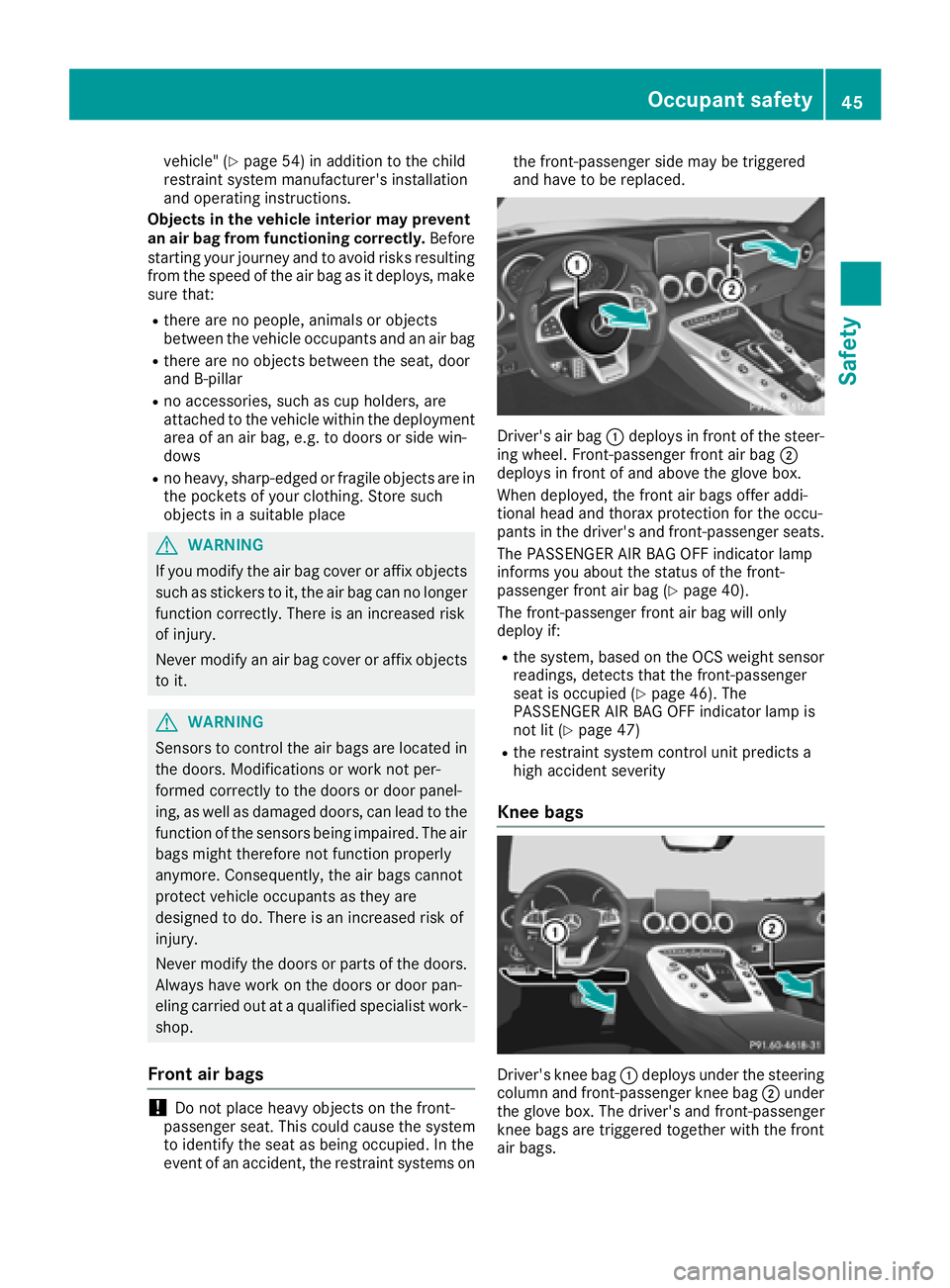
Driver's air bag
:deploys in front of the steer-
ing wheel. Front-passenger front air bag ;
deploys in front of and above the glove box.
When deployed, the front air bags offer addi-
tional head and thorax protection for the occu-
pants in the driver's and front-passenger seats.
The PASSENGER AIR BAG OFF indicator lamp
informs you about the status of the front-
passenger front air bag (
Ypage 40).
The front-passenger front air bag will only
deploy if:
Rthe system, based on the OCS weight sensor
readings, detects that the front-passenger
seat is occupied (
Ypage 46). The
PASSENGER AIR BAG OFF indicator lamp is
not lit (
Ypage 47)
Rthe restraint system control unit predicts a
high accident severity
Knee bags
Driver's knee bag :deploys under the steering
column and front-passenger knee bag ;under
the glove box. The driver's and front-passenger
knee bags are triggered together with the front
air bags.
Occupant safety45
Safety
Z
Page 60 of 294

play messages which may be shown in the
instrument cluster (Ypage 170).
Brakes
XIf ABS intervenes:continue to depress the
brake pedal vigorously until the braking sit-
uation is over.
XTo make a full brake application: depress
the brake pedal with full force.
If ABS intervenes when braking, you will feel a
pulsing in the brake pedal.
The pulsating brake pedal can be an indication
of hazardous road conditions, and functions as a reminder to take extra care while driving.
BAS (Brake Assist System)
General information
BAS operates in emergency braking situations.
If you depress the brake pedal quickly, BAS
automatically boosts the braking force, thus
shortening the stopping distance.
Important safety notes
iObserve the "Important safety notes" sec-
tion (Ypage 57).
GWARNING
If BAS is malfunctioning, the braking distance
in an emergency braking situation is
increased. There is a risk of an accident.
In an emergency braking situation, depress
the brake pedal with full force. ABS prevents
the wheels from locking.
Braking
XKeep the brake pedal firmly depressed until
the emergency braking situation is over.
ABS prevents the wheels from locking.
The brakes will function as usual once you
release the brake pedal. BAS is deactivated.
Active Brake Assist
General information
iObserve the "Important safety notes" sec-
tion (Ypage 57).
Active Brake Assist consists of a distance warn-
ing function with an autonomous braking func-
tion and situation-dependent braking assis-
tance.
Active Brake Assist can help you to minimize the
risk of a collision with the vehicle traveling in
front or reduce the effects of such a collision.
If Active Brake Assist detects that there is a risk
of collision, you will be warned visually and
acoustically. If you do not react to the visual and audible collision warning, autonomous braking
can be initiated in critical situations. If you apply
the brake yourself in a critical situation, Active
Brake Assist supports you with situation-
dependent braking assistance.
Important safety notes
In particular, the detection of obstacles can be
impaired if:
Rthere is dirt on the sensors or anything else
covering the sensors
Rthere is snow or heavy rain
Rthere is interference by other radar sources
Rthere are strong radar reflections, for exam-
ple in parking garages
Ra narrow vehicle is traveling in front, e.g. a
motorbike
Ra vehicle is traveling in front on a different line
Ryou are driving a new vehicle or servicing on
the Active Brake Assist system has just been
carried out
Observe the important safety notes in the
"Breaking-in notes" section (
Ypage 104).
Following damage to the front end of the vehicle,
have the configuration and operation of the
radar sensor checked at a qualified specialist
workshop. This also applies to collisions at slow
speeds where there is no visible damage to the
front of the vehicle.
Activating/deactivating
Active Brake Assist is automatically active after
switching on the ignition.
58Driving safety systems
Safety