2018 MERCEDES-BENZ AMG GT COUPE light
[x] Cancel search: lightPage 18 of 294
Radio-wave reception/transmis-
sion in the vehicleDeclaration of conformity ................ 27
Reading lamp ....................................... 94
Rear axle steering
Function/notes .............................1 08
Rear fog lamp
Display message ............................ 180
Switching on/off .............................. 92
Rear lamps
see Lights
Rear spoiler
Display message ............................ 190
Extending/retracting ..................... 226
Problem ......................................... 227
Rear view camera
Cleaning instructions ..................... 242
Function/notes .............................1 45
Switching on/off ........................... 146
Rear window defroster
Problem (malfunction) ................... 102
Switching on/off ........................... 102
Rear-view mirror
Anti-glare (manual) .......................... 86
Dipping (automatic) ......................... 88
Recycling
see Protection of the environment
Reflective safety jacket .................... 245
Refrigerant (air-conditioning sys-
tem)
Important safety notes .................. 288
Refueling
Fuel gauge ....................................... 34
Important safety notes .................. 120
Refueling process .......................... 121
see Fuel
Remote control
Garage door opener ....................... 228
Replacing bulbs
General notes .................................. 95
Reporting safety defects .................... 28
Rescue card ......................................... 29
Reserve (fuel tank)
see Fuel
Reserve fuel
Display message ............................ 183
Warning lamp ................................. 199 Restraint system
Display message ............................ 176
Introduction ..................................... 39
Warning lamp ................................. 198
Warning lamp (function) ................... 40
Reversing feature
Side windows ................................... 75
Reversing lamps (display mes-
sage) ................................................... 180
Roadside Assistance (breakdown) .... 26
Roll away protection
see HOLD function
Roller sunblind for the panorama
roof
Opening and closing ........................ 79
Ope rating ......................................... 79
Ro
of lining and carpets (cleaning
guidelines) ......................................... 244
Route guidance
see also Digital Operator's Man-
ual .................................................. 204
S
SafetyChildren in the vehicle ..................... 54
see Occupant safety
see Operating safety
Safety system
see Driving safety systems
SD card
Inserting/removing ........................ 212
SD memory card
see also Digital Operator's Man-
ual .................................................. 204
Selecting ........................................ 160
Search & Send
see also Digital Operator's Man-
ual .................................................. 204
Seat
Correct driver's seat position ........... 80
Seat belts
Adjusting the driver's and front-
passenger seat belt ......................... 43
Cleaning ......................................... 244
Correct usage .................................. 42
Fastening ......................................... 43
Important safety guidelines ............. 41
16Index
Page 20 of 294

Special seat belt retractor.................. 55
Specialist workshop ............................28
Speed, controlling
see Cruise control
Speedometer
Activating/deactivating the addi-
tional speedometer ........................ 165
Digital ............................................ 157
Segments ...................................... 154
Selecting the display unit ............... 164
SPORT handling mode
Activating/deactivating ...................6 1
Warning lamp ................................. 198
Sports exhaust system
see AMG sports exhaust system
Standing lamps
Display message ............................1 80
Switching on/off .............................. 92
Start/Stop button
General notes ................................ 105
Key positions ................................. 105
Starting the engine ........................ 107
Start/stop function
see ECO start/stop function
Starting (engine) ................................ 106
Starting the engine
see Starting (engine)
Steering
Display message ............................ 191
Warning lamps ............................... 203
Steering wheel
Adjusting (electrically) ..................... 85
Button overview ............................... 35
Buttons (on-board computer) ......... 155
Calling up a stored setting (mem-
ory function) ....................................9 0
Cleaning ........................................ .243
EASY ENTRY/EXIT feature ...............8 5
Important safety notes .................... 85
Paddle shifters ............................... 116
Storing settings (memory func-
tion) .................................................8 9
Steering wheel paddle shifters ........ 116
Stopwatch (RACETIMER) ...................167
Stowage areas ................................... 213
Stowage compartments
Armrest (front) ............................... 214 Armrest (under) .............................2
14
Cup hol
ders ................................... 216
Glove box ....................................... 214
Important safety information ......... 213
Stowage net ................................... 215
see Stowage areas
Stowage net ....................................... 215
Summer opening
see Side windows
Summer tires
In winter ........................................ 260
Sun visor ............................................ 217
Suspension setting
AMG adaptive sport suspension
system ...........................................1 42
Suspension tuning
SETUP (on-board computer,
Mercedes-AMG vehicles) ...............1 66
Switching air-recirculation mode
on/off ................................................. 102
Switching on media mode
Via the device list .......................... 211
T
Tachometer ........................................ 154
Tail lamps
Display message ............................ 180
see Lights
Tailgate
Display message ............................ 190
Emergency unlocking ....................... 75
Important safety notes .................... 73
Opening (automatically from
inside) .............................................. 74
Opening dimensions ...................... 288
Opening with an extended rear
spoiler .............................................. 73
Opening/closing (from outside) ....... 73
Unlocking with KEYLESS-GO ............ 73
Tank
see Fuel tank
Tank content
Fuel gauge ....................................... 34
Technical data
Capacities ...................................... 283
Information .................................... 282
Tires/wheels ................................. 280
18Index
Page 31 of 294
The following text is published as required of
manufacturers under Title 49, Code of U.S. Fed-
eral Regulations, Part 575 pursuant to the
"National Traffic and Motor Vehicle Safety Act of
1966".
If you believe that your vehicle has a defect
which could cause a crash or could cause injury
or death, you should immediately inform the
National Highway Traffic Safety Administration
(NHTSA) in addition to notifying Mercedes-Benz USA, LLC.
If NHTSA receives similar complaints, it may
open an investigation, and if it finds that a safety
defect exists in a group of vehicles, it may order
a recall and remedy campaign. However, NHTSA
cannot become involved in individual problems
between you, your dealer, or Mercedes-Benz
USA, LLC.
To contact NHTSA, you may call the Vehicle
Safety Hotline toll-free at 1-888-327-4236
(TTY: 1-800-424-9153); go tohttp://
www.safercar.gov; or write to: Administrator,
NHTSA, 400 Seventh Street, SW., Washington,
DC 20590.
You can also obtain other information about
motor vehicle safety at:
http://www.safercar.gov
Limited Warranty
!
Observe the notes in this Operator's Manual
regarding the correct operation of your vehi-
cle and possible damage to the vehicle. Dam-
age to the vehicle which is caused by violation
of these notes is not covered by the
Mercedes-Benz implied warranty or the new
or used-vehicle warranty.
QR code for rescue card
The QR codes are secured in the fuel filler flap
and on the opposite side on the B-pillar. In the
event of an accident, rescue services can use
the QR code to quickly find the appropriate res- cue card for your vehicle. The current rescue
card contains the most important information
about your vehicle in a compact form, e.g. the
routing of the electric cables.
You can find more information under
www.mercedes-benz.de/qr-code.
Data stored in the vehicle
Information from electronic control
units
There are electronic control units installed in
your vehicle. Some of these are necessary for
your vehicle to operate safely, while some offer
support during driving (driver assistance sys-
tems). In addition, your vehicle offers comfort
and entertainment functions that are also made
possible by electronic control units.
Electronic control units contain data storage
systems that can temporarily or permanently
save technical information concerning the vehi-
cle's condition, component stress and mainte-
nance requirements as well as technical events
and malfunctions.
This information generally documents the con-
dition of a component, a module, a system or the
surroundings, for example:
Roperating states of system components (e.g.
fill levels, battery status, tire pressure)
Rstatus messages concerning the vehicle or its
individual components (e.g. wheel rpm/
speed, deceleration, lateral acceleration, indi-
cation of whether seat belts are fastened)
Rmalfunctions and defects in important system
components (e.g. lights, brakes)
Rinformation about events leading to vehicle
damage
Rsystem responses in special driving situations
(e.g. air bag deployment, intervention of sta-
bility control systems)
Rambient conditions (e.g. temperature, rain
sensor)
In addition to performing the actual control unit function, these data are used by manufacturers
to detect and rectify malfunctions and to opti-
mize vehicle functions. Most of these data are
volatile and processed only in the vehicle itself.
Only a small part of the data is stored in event or malfunction memories.
When you use services, the technical data from
the vehicle can be read out by service network
employees or third parties. Services can include
repair services, maintenance processes, war-
ranty cases and quality assurance measures.
The data is read out via the legally prescribed
diagnostics connection in the vehicle. The rele-
vant offices in the service network or third par-
ties collect, process and use the data. These
data document the vehicle's technical states,
Data stored in the vehicle29
Introduction
Z
Page 32 of 294

are used to help in finding malfunctions and
improving quality and are sent to the manufac-
turer where necessary. In addition, the manu-
facturer is subject to product liability. The man-
ufacturer needs technical data from vehicles for
this purpose.
Malfunction memories in the vehicle can be
reset by a service center during repair or service
work.
You can incorporate data into the vehicle's com-
fort and infotainment functions yourself as part
of the selected equipment.
These include, for example:
Rmultimedia data such as music, films or pho-
tos for playback in an integrated multimedia
system
Raddress book data for use in conjunction with
an integrated hands-free system or an inte-
grated navigation system
Rnavigation destinations that have been
entered
Rdata about using Internet services
These data can be saved locally in the vehicle or
are located on a device that you have connected
to the vehicle. If this data is saved in the vehicle,
you can delete it at any time. These data are sent
to third parties only at your request, particularly
when you use online services in accordance with
the settings that you have selected.
You can save and change comfort settings/
customizations in the vehicle at any time.
Depending on the piece of equipment in ques-
t
ion, these can include, for example:
Rseat and steering wheel position settings
Rsuspension and climate control settings
Rcustom settings such as interior lighting
If your vehicle is equipped appropriately, you
can connect your smartphone or another mobile
end device to the vehicle. You can control this by
means of the control elements integrated in the vehicle. The smartphone's picture and sound
can be output via the multimedia system. Spe-
cific items of information are also sent to your
smartphone.
Depending on the type of integration, this can
include:
Rgeneral vehicle information
Rposition data
This allows the use of selected smartphone
Apps, such as navigation or music player Apps.
There is no additional interaction between the smartphone and the vehicle, particularly active
access to vehicle data. The type of additional
data processing is determined by the provider of
the App being used. Whether you can configure
settings for it and, if so, which ones, depends on
the App and your smartphone's operating sys-
tem.
Service provider
Wireless network connection
If your vehicle has a wireless network connec-
tion, data can be exchanged between your vehi-
cle and other systems. The wireless network
connection is enabled by either an in-vehicle
transmitter and receiver or your own mobile end
device (e.g. smartphone). Online functions can
be used via this wireless network connection.
These include online services and applications/ Apps provided by the manufacturer or other
providers.
Services provided by the manufacturer
In the case of the manufacturer's online serv-
ices, the manufacturer describes the functions
in a suitable place and the associated informa-
tion subject to data protection legislation. Per-
sonal data can be used in order to provide online
services. Data are exchanged via a secure con-
nection (e.g. using the IT system specially pro-
vided for this purpose by the manufacturer).
Collecting, processing and using personal data
beyond the provision of services is permitted
only on the basis of a statutory permit or decla-
ration of consent.
You can usually activate and deactivate the serv-
ices and functions (some of which are subject to
charge). In many cases, this also applies to the
vehicle's entire data connection. However, this
does not apply in particular to legally prescribed
functions and services such as the "eCall" emer-
gency call system.
Services from third parties
If it is possible to use online services from other
providers, these services are the responsibility
of the provider in question and subject to that
provider's data protection conditions and terms
of use. The manufacturer has no influence over
the content exchanged here.
30Data stored in the vehicle
Introduction
Page 35 of 294
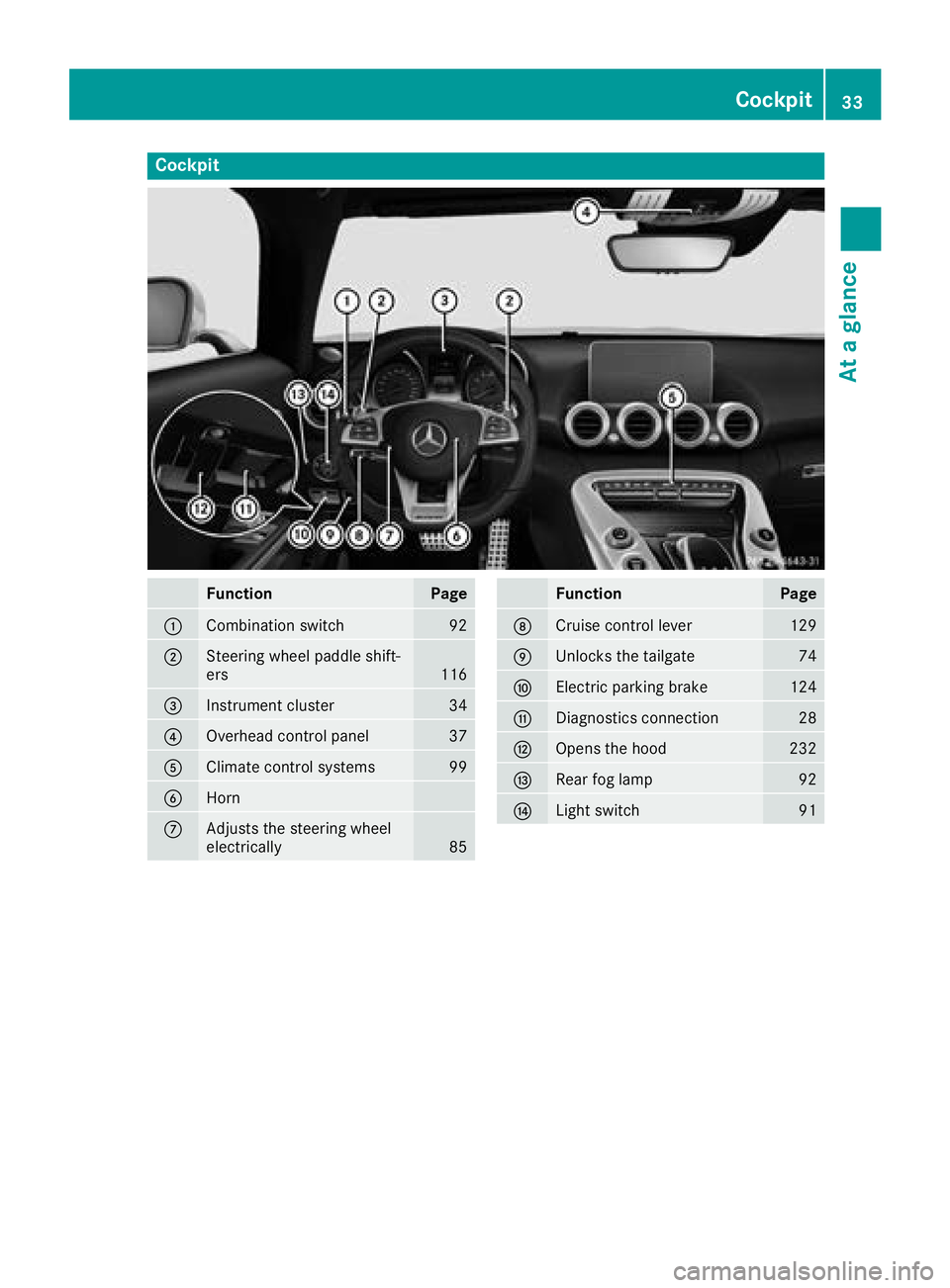
Cockpit
FunctionPage
:Combination switch92
;Steering wheel paddle shift-
ers116
=Instrument cluster34
?Overhead control panel37
AClimate control systems99
BHorn
CAdjusts the steering wheel
electrically85
FunctionPage
DCruise control lever129
EUnlocks the tailgate74
FElectric parking brake124
GDiagnostics connection28
HOpens the hood232
IRear fog lamp92
JLight switch91
Cockpit33
At a glance
Page 36 of 294

Instrument cluster
FunctionPage
:Speedometer
Speedometer segments154
Warning and indicator lamps:
h Tirepressur emonitor20 2
å ESP®OF F196
÷ ESP®19 6
· Distanc ewarning20 1
Ð Powersteering20 3
6 Restrain tsystem40
ü Seat belt s193
K High-beam headlamps92
LLow-beam headlamps92
TParking lamp s92
NThis indicator lamp has
no function
R Rear fog lamp92
;#! Turn signals92
=Multifunction display156
?Tachometer154
FunctionPag e
Warning and indicator lamps:
! Electric parking brak e
(yellow)19 8
! ABS196
; CheckEngin e199
Electric parking brak e(red)19 8
F USAonly
! Canad aonly
Brake s(red)19 5
$ USAonly
J Canad aonly
M SPORT handlin gmod e198
ACoolan ttemperature gauge15 4
Warning and indicator lamps:
? Coolan t199
BFue llevel indicator
Warning and indicator lamps:
8 Reserve fuel level wit h
fuel filler flap location indica-
to r(right )
199
iInformation on th edisplay of th eoutside
temperature in th emultifunction display can
be foun dunder "Outside temperature dis-
play" (
Ypage 154). Adjusting th
einstrumen tcluste rlighting
usin gth eon-board computer (
Ypage 164).
34Instrument cluster
At a glance
Page 38 of 294
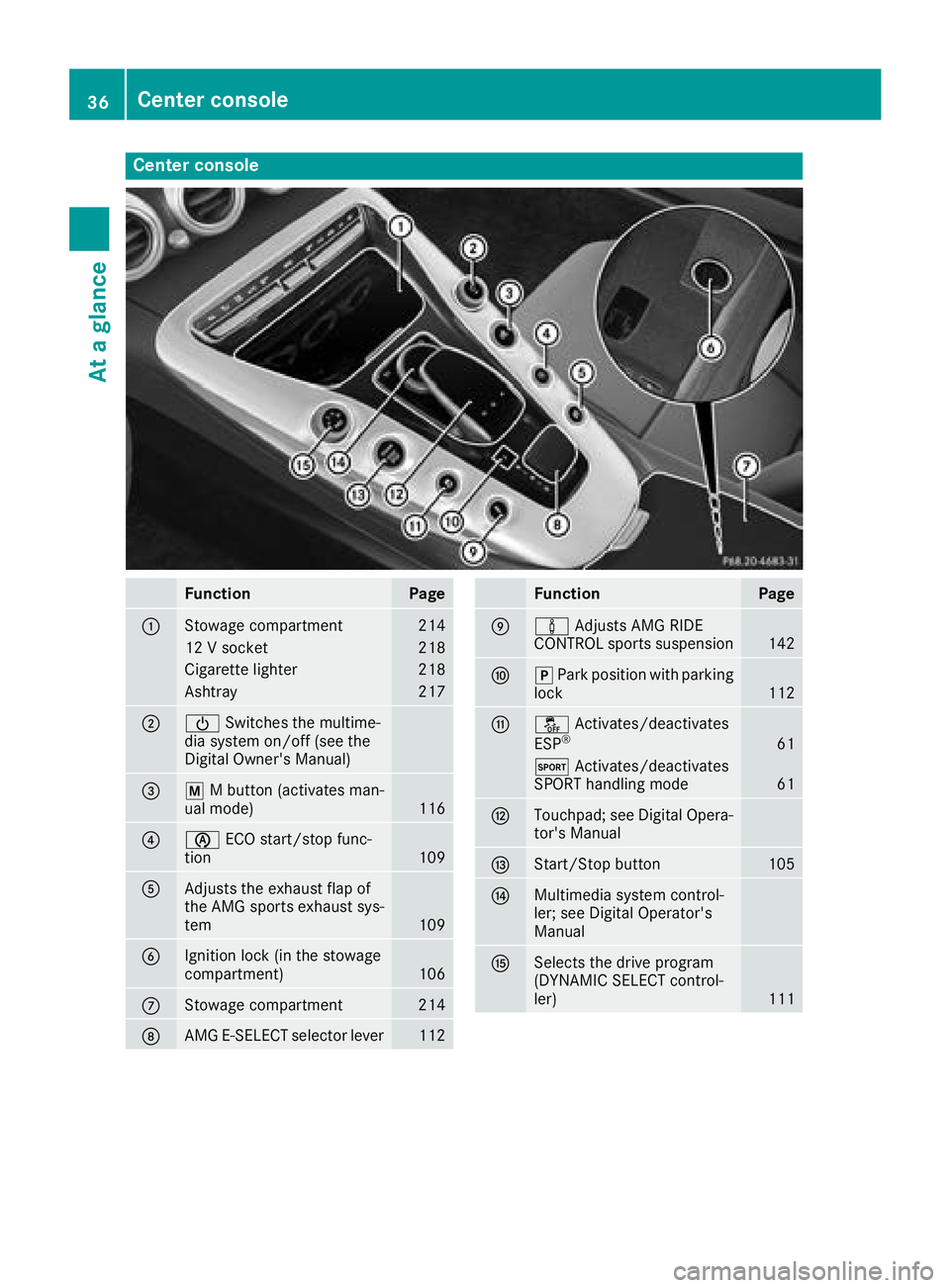
Center console
FunctionPage
:Stowage compartment214
12 V socket218
Cigarette lighter218
Ashtray217
;ÜSwitches the multime-
dia system on/off (see the
Digital Owner's Manual)
=p M button (activates man-
ual mode)116
?è ECO start/stop func-
tion109
AAdjusts the exhaust flap of
the AMG sports exhaust sys-
tem
109
BIgnition lock (in the stowage
compartment)106
CStowage compartment214
DAMG E-SELECT selector lever112
FunctionPage
Eà Adjusts AMG RIDE
CONTROL sports suspension142
Fj Park position with parking
lock112
Gå Activates/deactivates
ESP®61
M Activates/deactivates
SPORT handling mode61
HTouchpad; see Digital Opera-
tor's Manual
IStart/Stop button105
JMultimedia system control-
ler; see Digital Operator's
Manual
KSelects the drive program
(DYNAMIC SELECT control-
ler)
111
36Center console
At a glance
Page 39 of 294
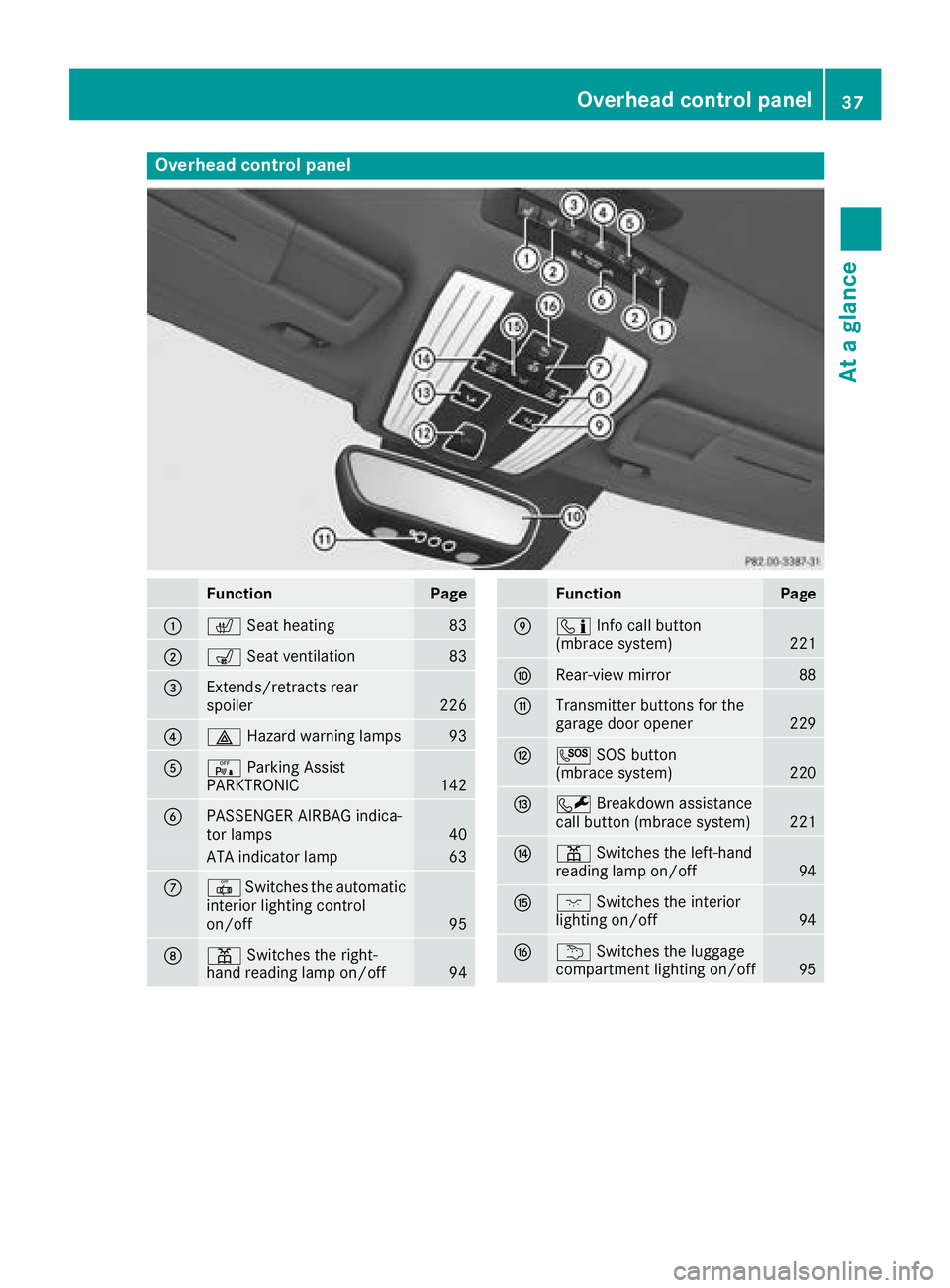
Overhead control panel
FunctionPage
:cSeat heating83
;sSeat ventilation83
=Extends/retracts rear
spoiler226
?£Hazard warning lamps93
AcParking Assist
PARKTRONIC142
BPASSENGER AIRBAG indica-
tor lamps40
ATA indicator lamp63
C| Switches the automatic
interior lighting control
on/off
95
Dp Switches the right-
hand reading lamp on/off94
FunctionPage
Eï Info call button
(mbrace system)221
FRear-view mirror88
GTransmitter buttons for the
garage door opener229
HG SOS button
(mbrace system)220
IF Breakdown assistance
call button (mbrace system)221
Jp Switches the left-hand
reading lamp on/off94
Kc Switches the interior
lighting on/off94
Lu Switches the luggage
compartment lighting on/off95
Overhead control panel37
At a glance