2018 MERCEDES-BENZ A-CLASS HATCHBACK light
[x] Cancel search: lightPage 62 of 609

We
ight categories Size categoryEquipment Rear seat
Left ,ri ght
Category I: 9to 18 kgand between appr ox. 9 months and 4 yearsD
C
B
B1
A ISO/R2, ISO/R2X
ISO/R3
ISO/F2
ISO/F2X
ISO/F3IL
IL
1
IUF
IUF
IUF
1 When using a child restra int sy stem of size category C (ISO/R3), mo vethe front seat tothe highest position. Make sure that the seat backrest of the
front seat does not rest against thech ild restra int sy stem. Note
s onthe suitability of seats for attach‐
ing i‑Size child restra int sy stems
Obser vethefo llowing information:
R When using a rear wa rd-facing child
re stra int sy stem: adjust the front seat so
th at it does not touch thech ild restra int sys‐
te m.
R When using a forw ard-facing child
re stra int sy stem: remo vethe head restra int
from there spective seat, if possible (→
page 93). In addition, the seat backrest
of thech ild restra int sy stem must, as far as
possible, lie flat against the backrest of the
ve hicle seat.
R When youre mo vethech ild restra int sy stem,
fi t th e head restra int immediately
(→ page 93) and adjust all the head
re stra ints again cor rectly.
R Makesure that thech ild's feet do not touch
th e front seat. If necessar y,mo vethe front
seat forw ard slightl y. R
Obser vethe manufacturer's ins tallation
instructions forth ech ild restra int sy stem.
Legend forth eta ble:
XN otsuitable for an i-Size child restra int sys‐
te m in the "Universal" categor y.
i‑U Suitable forfo rw ard-facing and rear wa rd-
fa cing i-Size child restra int sy stems in the
"Universal" categor y. Occupant saf
ety59
Page 69 of 609

The indicator lamp in
the door trim on the driv‐
er's side flashes when theve hicle is loc ked from
outside. The indicator lamp goes out if theve hi‐
cle is loc ked from inside or while theve hicle is in
motion.
If th eve hicle is not opened within appr oximately
40 seconds af ter unlocking, it loc ksagain. Anti-
th eft pr otection is primed again.
Do not keep theke yto ge ther with electronic
devices or me tal objects. This can af fect the
ke y's functionalit y.
% If battery check lamp 2does not light up
af te r pressing the% or& button, the
battery is dischar ged.
Re placing theke y bat tery ( →page 67). Ac
tivating/deactivating the acoustic lo cking
ve rification signal Multimedia sy
stem:
, © .
Settings .
Vehicle #
Activate or deacti vate Acoustic lock . Ac
tivating/deactivating the panic alarm Re
quirements:
% The panic alarm function is only available in
cer tain countries.
R The ignition is switched off. #
Toactivate: press button 1for appro x‐
ima tely one second.
A visual and audible alarm is triggered. #
Todeactivate: briefly press but ton1 again.
or #
Press thest art/ stop button on the cockpit
(the key is inside theve hicle). Changing
the unlocking settings Po
ssible unlocking functions of theke y:
R cent ral unlocking
R unlocking the driver's door and fuel filler flap #
Toswitch between settings: pressthe
% and& buttons simultaneously for
appr oximately six seconds until the battery
ch eck lamp flashes twice.
If th e unlocking function forth e driver's door
and fuel filler flap has been selec ted:
R pressing the% button a second time cen‐
trally unloc kstheve hicle
R Vehicles with KEYLESS-GO: ifyo uto uch
th e inner sur face of the door handle on the
driver's door, only the driver's door and fuel
fi ller flap are unlo cked. Deactivating
theke y functions If
yo u do not use theve hicle or a keyfo r an
ex tended pe riod of time, you can reduce the
energy consum ption of there spective key.Todo
so, deactivate theke y functions. 66
Opening and closing
Page 70 of 609
#
Todeactivate: pressthe& button on the
ke y twice in quick succession.
The battery check lamp of theke yflashes
twice brief lyand lights up once. #
Toactivate: press any button on thekey.
% When theve hicle is star ted with theke y in
th estow age compartment of the cent recon‐
sole, theke y functions are automatical ly
activated (→ page154). Re
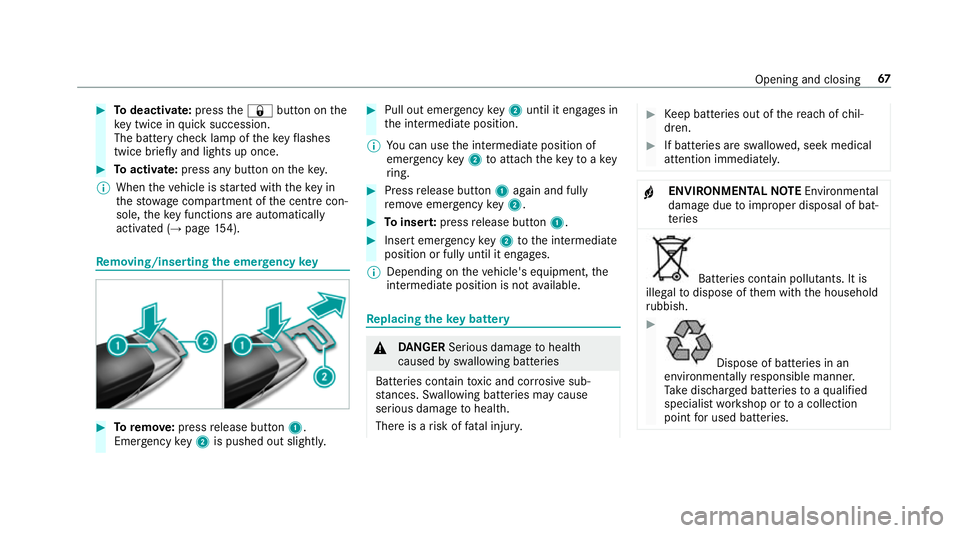
moving/inserting the eme rgency key #
Toremo ve:press release button 1.
Emer gency key2 is pushed out slight ly. #
Pull out emer gency key2 until it en gage s in
th e intermediate position.
% You can use the intermediate position of
emer gency key2 toattach theke yto akey
ri ng. #
Press release button 1again and fully
re mo veemer gency key2. #
Toinser t:press release button 1. #
Insert emer gency key2 tothe intermediate
position or fully until it engages.
% Depending on theve hicle's equipment, the
intermediate position is not available. Re
placing the key battery &
DANG ER Serious damage tohealth
caused byswallowing batteries
Batteries contain toxic and cor rosive sub‐
st ances. Swallowing bat teries may cause
serious damage tohealth.
There is a risk of fata l injur y. #
Keep batteries out of there ach of chil‐
dren. #
If batteries are swallo wed, seek medical
attention immediately. +
ENVIRONMEN
TALNO TEEnvironmental
dama gedue toimproper disposal of bat‐
te ries Batteries conta
in pollutants. It is
illegal todispose of them with the household
ru bbish. #
Dispose of batteries in an
environmen tally responsible manner.
Ta ke dischar ged batteries toaqu alified
specialist workshop or toa collection
point for used batteries. Opening and closing
67
Page 73 of 609

Un
locking/opening the doors from the inside #
United Kingdom onl y:obser vethe no tes on
th e additional door lock (→ page 69).#
Pull door handle 1. Centrally locking and unlocking
theve hicle
from the inside #
Tounlo ck:press button 1. #
Tolock: press button 2.
The indicator lamp lights up.
This does not lock or unlock the fuel filler flap. The
vehicle is not unloc ked:
R Ifyo u ha veloc kedth eve hicle using thekey.
R Ifyo u ha veloc kedth eve hicle using KEY‐
LESS-GO. Locking/unlocking
theve hicle with a Digital
Ve hicle Key Re
quirements:
R one of thefo llowing versions of the Digital
Ve hicle Key is available:
- suitable mobile phone
- Digital Vehicle Keyst icker
R theve hicle is equipped with the "Digital Vehi‐
cle Key" function.
R the "Digital Vehicle Key" function is activated
via Mercedes me connec t:http://
www.mercedes.me.
R The mobile phone must be suf ficiently
ch arge d.
% You can check the suitability of your mobile
phone byentering the phone number at
http://www.mercedes.me. 70
Opening and closing
Page 76 of 609

Ac
tivating/deactivating the automatic lo ck‐
ing feature The
vehicle is loc ked automatically when the
ignition is switched on and the wheels are turn‐
ing fast erthan walking pace. #
Toactivate: press and hold button 2for
appr oximately five seconds until an acoustic
signal sounds. #
Todeactivate: press and hold button 1for
appr oximately five seconds until an acoustic
signal sounds.
When theve hicle is loc ked automatically, the
indicator lamp in button 2lights up.
In thefo llowing situations, there is a danger of
being loc ked out when the function is activated:
R While theve hicle is being tow star ted/
pushed.
R The vehicle is being tested on the dynamom‐
et er. Locking/unlocking
theve hicle with the
emer gency key Locking/unlocking
the driver's door with the
emer gency key
% Ifyo u wish tolock theve hicle entirely using
th e emer gency key,firs t press the button for
locking from the inside while the driver's
door is open. Then proceed tolock the driv‐
er's door using the emer gency key. #
Insert the emer gency key as far as it will go
into opening 1inthe co ver. #
Pull and hold the door handle. #
Pull the co ver on the emer gency key as
st ra ight as possible away from theve hicle
until it releases. #
Release the door handle. Opening and closing
73
Page 80 of 609

#
Tointer rupt automatic operation: press or
pull theW button again.
When theve hicle is switched off, the side win‐
do ws can continue being ope rated.
The function is available for around five minutes
or until a front door is opened.
Au tomatic reve rsing function of the side win‐
do ws
If an object bloc ksa side wind owduring the
closing process, the side window opens again
automaticall y.The automatic reve rsing function
is only an aid and is not a substitute foryo ur
attentiveness. #
When closing, make sure that no body parts
are in the closing area. &
WARNING Risk of becoming trapped
despi tethere being reve rsing pr otection
on the side window
The reve rse function does not react:
R tosoft, light and thin objects, e.g. fingers
R during resetting This means
that there ve rse function cann ot
pr eve nt someone from becoming trapped in
th ese situations. #
When closing, make sure that no body
parts are in the closing area. #
If someone becomes trapped, press the
W button toopen the side window
again. Au
tomatic function of the side windo ws The side windo
wsare closed automatically when
th eve hicle is switched off:
R if it starts torain (de tection bythera in sen‐
sor on the windscreen)
R intheeve nt of extreme outside temp eratures
R afte r six hours
R ifth ere is a malfunction in the po wer supp ly
The side windo wsare closed as far as theve nti‐
lation position. Ve
hicles with a sliding sunroof: the side win‐
do ws are closed comple tely if the sliding sunroof
is open.
If th e side windo wsare bloc ked during auto‐
matic closing, the side window concerned will
open again slightl y.The automatic function for
th e sliding sunroof and the side windo wsisthen
deactivated. Con
venience opening (ventilating theve hicle
before starting a journey) &
WARNING Risk of entrapment when
opening a side window
When opening a side windo w,parts of the
body could be dr awn in or become trapped
between the side window and window frame. #
When opening, make sure that nobody
is touching the side windo w. #
Release the button immediately if
somebody becomes trapped. Opening and closing
77
Page 82 of 609

Problem
Possible causes/consequences and M
MSolutions
& WARNING Risk of becoming trapped or fata lly injured if reve rsing pr otection is not activated
If yo u close a side wind owagain immediately af ter it has been bloc ked or reset, the side window closes
with increased or maximum forc e. The reve rsing feature is then not active.
Pa rts of the body could become trapped in the closing area in the process. #
Make sure that no parts of the body are in the closing area. #
Tostop the closing process, release the button or press the button again toreopen the side win‐
do w. If a side window is obstructed during closing and
reopens again slightly: #
Immediately af terth e window is bloc ked, pull the cor responding switch again until the side window has
closed, and hold the switch for an additional second.
The side window will be closed with increased forc e.
If a side window is obstructed again during closing and reopens again slightly: #
Repeat the pr evious step.
The side window is closed without the automatic reve rsing function.
The side windo wscannot be opened or
closed using the con venience opening
fe ature. The
key bat tery iswe ak or dischar ged. #
Check the battery using the battery indicator lamp and replace if necessary (→ page67). Opening and closing
79
Page 85 of 609

&
WARNING Risk of entrapment even wi th
th ere ve rsing feature active
The reve rse function does not react in partic‐
ular:
R tosoft, light and thin objects, e.g. fingers
R overth e last 4 mm of the closing path
R during resetting
This means that there ve rse function cann ot
pr eve nt someone from becoming trapped in
th ese situations. #
When closing, make sure that no body
parts are in the closing area. #
Release the button immediately if
somebody becomes trapped.
or #
Brief lypress the button in any direction
during automatic operation.
The closing process is stopped. Au
tomatic reve rsing function of thero ller
sunblind
If th ere is an object obstructing thero ller sun‐
blind during the closing process, thero ller sun‐
blind will open again automaticall y.The auto‐
matic reve rsing function is only an aid and is not
a substitute foryo ur attentiveness. #
When closing thero ller sunblind, make sure
th at no body parts are in thera nge of mo ve‐
ment. &
WARNING Risk of becoming trapped
despi tereve rsing function
In particular, there ve rsing function does not
re act tosoft, light and thin objects, e.g. fin‐
ge rs.
This means that there ve rsing function can‐
not pr event entrapment in these situations. #
When closing thero ller sunblind, make
sure that no body parts are in thera nge
of mo vement. #
Release the button immediately if
somebody becomes trapped. or
#
Press the button in any direction during
th e automatic closing process.
The closing process is stopped. Au
tomatic functions of the sliding sun roof %
The term "sliding sun roof" also refers to the
panoramic sliding sunroof.
By pushing or pulling the3 button, you can
inter rupt the automatic functions: "Rain closing
function when driving" and "Automatic lo wer‐
ing".
The sliding sunroof is auto maticallyclosed when
th eve hicle has been switched off:
R if it starts torain (de tection bythera in sen‐
sor on the windscreen)
R intheeve nt of extreme outside temp eratures
R afte r six hours
R ifth ere is a malfunction in the po wer supp ly
The sliding sunroof then rises at there ar in order
to continue ventilating theve hicle interior. 82
Opening and closing