2018 MERCEDES-BENZ A-CLASS HATCHBACK light
[x] Cancel search: lightPage 359 of 609

Multimedia sy
stem:
, © .
Naviga-
tion .
Z .
Advanced .
Augmented
Reality #
Activate Street names andHouse numbers.
The display buttons are acti vated. During
ro ute guidance, stre et names and house
numbe rsare shown as additional information
in the video image.
Switching on display of traf fic lights
Re quirements:
R Augmented reality is activated (→ page 355).
R The Traffic light zoom option is switched on.
R When theve hicle is standing in firs t position
at a junction, the camera image will show an
enlar ged tra ffic lights displa y.
% When theve hicle pulls away the navigation
map is shown again. Multimedia sy
stem:
, © .
Naviga-
tion .
Z .
Advanced .
Augmented
Reality #
Activate Traffic light zoom.
The display button is acti vated. #
Under TRAFFIC LIGHT VIEW select one ofthe
Off, After asking orAutomatic options.
If After asking is set,theTraffic light indica-
tor available message is shown. The camera
image is shown af ter confirmation of the
messa ge.
If Automatic is set,the traf fic lights displ ayis
shown automatically in the camera image
when available. #
Toreturn tothe navigation map: pressthe
G button. Map and compass
Setting
the map scale
Multimedia sy stem:
, © .
Navigation
Zooming in #
When the map is shown, tap twice quickly
with one finger on the media display or the
to uchpad.
or #
Movetwo fingers apart on the media display
or on theto uchpad.
Zooming out #
Tap with two fingers on the media display or
th eto uchpad.
or #
Movetwo fingers toge ther on the media dis‐
play or on theto uchpad.
% You can set the unit of measurement of the
map scale (→ page316). 356
MBUX multimedia sy stem
Page 401 of 609
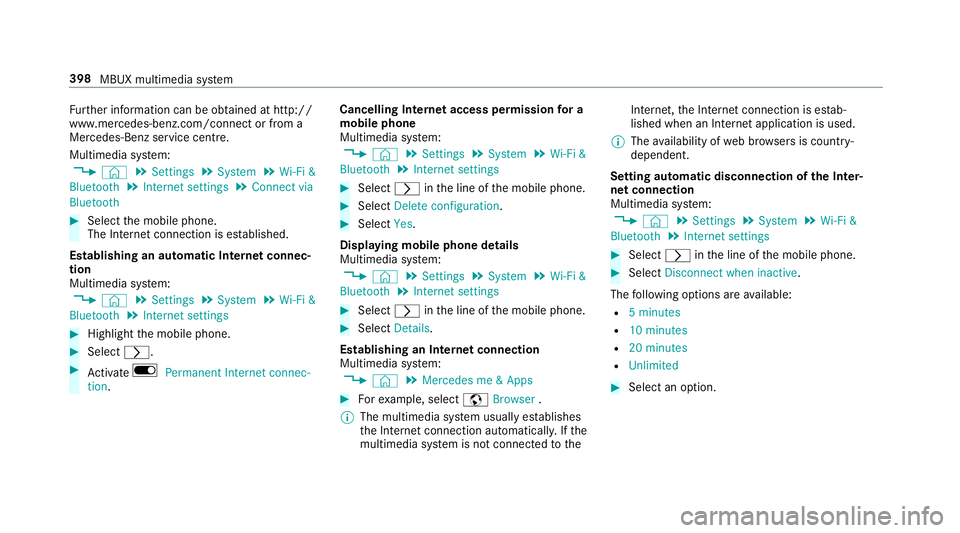
Fu
rther information can be obtained at http://
www.mercedes-benz.com/connect or from a
Mercedes-Benz service centre.
Multimedia sy stem:
, © .
Settings .
System .
Wi-Fi &
Bluetooth .
Internet settings .
Connect via
Bluetooth #
Select the mobile phone.
The Internet connection is es tablished.
Establishing an automatic Internet connec‐
tion
Multimedia sy stem:
, © .
Settings .
System .
Wi-Fi &
Bluetooth .
Internet settings #
Highlight the mobile phone. #
Select r. #
Activate D Permanent Internet connec-
tion. Cancelling In
ternetaccess permission for a
mobile phone
Multimedia sy stem:
, © .
Settings .
System .
Wi-Fi &
Bluetooth .
Internet settings #
Select rinthe line of the mobile phone. #
Select Delete configuration. #
Select Yes.
Displaying mobile phone details
Multimedia sy stem:
, © .
Settings .
System .
Wi-Fi &
Bluetooth .
Internet settings #
Select rinthe line of the mobile phone. #
Select Details.
Establishing an Internet connection
Multimedia sy stem:
, © .
Mercedes me & Apps #
Forex ample, select zBrowser .
% The multimedia sy stem usually es tablishes
th e Internet connection automaticall y.Ifthe
multimedia sy stem is not connected tothe Internet,
the Internet connection is es tab‐
lished when an Internet application is used.
% The availability of web br ows ers is count ry-
dependent.
Setting automatic disconnection of the Inter‐
net connection
Multimedia sy stem:
, © .
Settings .
System .
Wi-Fi &
Bluetooth .
Internet settings #
Select rinthe line of the mobile phone. #
Select Disconnect when inactive .
The following options are available:
R 5 minutes
R 10 minutes
R 20 minutes
R Unlimited #
Select an option. 398
MBUX multimedia sy stem
Page 424 of 609

#
With your hand flat, push down active bonnet
1 inthe area around the hinges on bo th
sides (ar rows).
In doing so, the actuator is depressurised
and you may hear a hissing sound.
The engine bonnet must en gage in position. #
Ifth e active bonn etcan be raised slight lyat
th ere ar in the area of the hinges, repeat the
st ep until it engages cor rectl y. Opening/closing
the bonnet &
WARNING Risk of accident due todriv‐
ing with the engine bonn etunlo cked
An unloc ked engine bonn etmay open up
when theve hicle is in motion and block your
vie w. #
Never unlock the engine bonn etwhen
driving. #
Before every trip, ensure that the
engine bonn etis loc ked. &
WARNING Risk of accident and inju ry
when opening and closing the engine
bonn et
When opening or closing the engine bonn et,
it may suddenly drop into the end position.
There is a risk of injury for an yone in the
engine bonn et's range of mo vement. #
Only open or close the engine bonn et
when there are no persons in the
engine bonn et's range of mo vement. &
WARNING Danger of bu rns when open‐
ing the bonn et
If yo u open the engine bonn etwhen the
engine has overheated or during a fire inthe
engine compartment, you could come into
contact with hot gases or other escaping
operating fluids. #
Before opening the bonn et, allow the
engine tocool down. #
Intheeve nt of a fire inthe engine com‐
partment, keep the engine bonn et
closed and call thefire service. &
WARNING Risk of inju rydue tomoving
parts
Cer tain components in the engine compart‐
ment may continue tomo veor suddenly
mo veagain even af terth e ignition has been
switched off, e.g. the cooler fan.
Ma kesure of thefo llowing before per form ing
ta sks in the engine compartmen t: #
Switch the ignition off. Maintenance and care
421
Page 426 of 609

#
Push yellow handle 1onthe bonn etcatch
to the left as far as it will go (palm down‐
wa rds). Lift the bonn etuntil it is automati‐
cally raised bythe pneumatic stru t. #
Toclose: lowe rth e bonn etand let it fall from
a height of appr oximately 20 cm. #
Ifth e bonn etcan still be lif ted slightl y,open
th e bonn etagain and close it with a little
fo rc e until it engages cor rectl y. Engine oil
Checking
the engine oil le vel using the on-
board compu ter
Re quirements:
The engine oil le vel is de term ined during driving.
De term ining the engine oil le vel can take up to
30 minutes with a normal driving style and even
longer with an active driving style.
In order torecei veare sult as quickly as possi‐
ble:
R warm upthe engine
R park theve hicle on a le vel sur face
R leave the engine running at idling speed
On-board compu ter:
, Assistance .
Engine oil level
Yo u will see one of thefo llowing messages on
th e multifunction display:
R Engine oil level Measuring now : measure‐
ment of the oil le vel is not yet possible. #
Repeat there qu est af ter a maximum of
30 minutes driving. R
Engine oil level OK andthe bar display for
indicating the oil le vel on the multifunction
display is green and is between "min" and
"max": the oil le vel is cor rect.
R Engine oil level Add 1,0 l andthe bar display
fo r indicating the oil le vel on the multifunc‐
tion display is orange and is below "min": #
Top up with 1 l engine oil.
R Reduce engine oil level andthe bar display
fo r indicating the oil le vel on the multifunc‐
tion display is orange and is abo ve"max": #
Drain off excess engine oil that has been
added. Consult a qualified specialist work‐
shop.
R For engine oil level turn on ignition: #
switch on the ignition tocheck the engine oil
le ve l.
R Engine oil level System inoperative : sensor
fa ulty or not inser ted. #
Consult a qualified specialist workshop.
R Engine oil level System currently unavail. : Maintenance and care
423
Page 431 of 609

R
vehicles with deco rative foil: parts of your
ve hicle are co vered with a decorative foil.
Maintain a dis tance of at least 70 cm
between thefo il-c ove red parts of theve hicle
and the nozzle of the high-pressure cleaner.
Mo vethe high-pressure cleaner nozzle
around whilst cleaning. The waterte mp era‐
ture of the high-pressure cleaner must not
exc eed 60 °C.
R obser vethe information on the cor rect dis‐
ta nce in the equipment manufacturer's oper‐
ating instructions. R
do not point the nozzle of the high-pressure
cleaner directly at sensitive parts such as
tyres, slits, electrical components, bat teries,
light bulbs and ventilation sl ots. Wa
shing the vehicle byhand Obser
vethe legal requirements, e.g. in a number
of countries, washing byhand is only permitted
in specially designated wash ba ys. #
Use a mild cleaning agent, e.g. car shampoo. #
Washtheve hicle with luk ewarmwate r using
a soft car sponge. When doing so, do not
ex pose theve hicle todirect sunlight. #
Carefully hose theve hicle off with water and
dry using a chamois. Take care not topoint
th ewate r jet directly towa rdsth e air inlet
grille. 428
Maintenance and care
Page 432 of 609

Note
s on paint work/matt finish paint workcare Obser
vethefo llowing information: Cleaning and car
eA voiding paintwork damage
Pa intwork R
Insect remains: soak with insect remo ver and rinse off the
trea ted areas af terw ards.
R Bird droppings: soak with water and rinse off af terw ards.
R Tree resin, oils, fuels and greases: remo veby rubbing gen‐
tly wi tha clo thsoaked in petroleum ether or lighter fluid.
R Coolant and brake fluid: remo vewith a damp clo thand
clean water.
R Tarst ains: use tarre mo ver.
R Wax: use silicone remo ver. R
Do not attach sticke rs,fi lms or similar.
R Remo vedirt immediatel y,where possible. Maintenance and care
429
Page 433 of 609

Cleaning and car
eA voiding paintwork damage
Matt finish R
Only use care products appr ovedfo r Mercedes-Benz. R
Do not polish theve hicle and light-alloy wheels.
R Only use car washes that cor respond tothe latest engi‐
neering standards.
R Do not use car wash programmes with a final hot wax
treatment.
R Do not use paint cleane rs, buf fing or polishing products,
gl oss preser vers, e.g. wax.
R Alw ays ha vepaintwork repairs car ried out at a qualified
specialist workshop. Note
s on cleaning decorative foils Obser
vethe no tes on matt finish care in the
ch ap ter "No tes on paintwork/matt finish paint‐ wo
rkcare" (→ page 429). They also apply to
matt decorative foils. 430
Maintenance and care
Page 434 of 609

Obser
vethefo llowing information: Cleaning
Avoiding dama getothe decorative foil
R For cleaning, use plenty of water and a mild cleaning agent without
additives or abrasive substances, e.g. a car sha mpoo appr ovedfor
Mercedes-Benz.
R Remo vedirt immediately, where possible, whilst avoiding rubbing
to o hard. There is otherwise a risk of damaging the decorative foil
ir re parably.
R Ifth ere is dirt on thefinish or if the decorative foil is dull: use the
Pa int Cleaner recommended and appr ovedfo r Mercedes-Benz.
R Insect remains: soak with insect remo ver and rinse off the treated
areas af terw ards.
R Bird droppings: soak with water and rinse off af terw ards.
R Toprev ent waterst ains, dry a foil-wrapped vehicle with a soft,
absorbent clo thafte reve rycar wash. R
The service life and colouring of decorative foils are impaired by:
- sunlight
- temp erature, e.g. hot air blo wer
- weather conditions
- stone chippings and dirt
- chemical cleaning agents
- oily products
R Do not use polish on matt decorative foil. Po lishing will ha vethe ef fect of
shining thefo il-wrapped sur face.
R Do not treat matt or stru ctured deco rative foils with wax.Pe rm anent
st ains may occur. Sc
ratches, cor rosive deposits, areas af fected by
cor rosion and damage caused byincor rect care
cannot al ways be comple tely repaired. In such
cases, visit a qualified specialist workshop.
Yo u can obtain more information on care and
cleaning products from the manufacturer. In
the case of foil-wrapped sur faces, optical dif‐
fe re nces may occur between the sur faces that
we renot pr otected bya decorative foil af ter
re moving a decorative foil. %
Have wo rkor repairs todecorative foils car‐
ri ed out at a qualified specialist workshop,
e.g. in a Mercedes-Benz service centre. Maintenance and care
431