Page 164 of 649
The head restraints consist of:
An energy absorbing foam andstructure.A
Two steel stems.B
Guide sleeve unlock and removebutton.C
A fold button.D
Removing the Head Restraint
1. Press and hold both C buttons.
2. Pull the head restraint up.
Installing the Head Restraint
Align the steel stems into the guide sleevesand push the head restraint down until itlocks.
Note:Make sure the head restraint foldbutton is facing the outboard side of theseat.
Folding the Head Restraint
1.Press button D to fold the head restraint.
2.Pull the head restraint up to place it backto the upright position.
Second Row Center Seat Head Restraint
The head restraints consist of:
An energy absorbing foam andstructure.A
Two steel stems.B
Guide sleeve adjust and releasebutton.C
Guide sleeve unlock and removebutton.D
Raising the Head Restraint
Pull the head restraint up.
161
Navigator (TB9) Canada/United States of America, enUSA, Edition date: 201708, Third-Printing-
SeatsE257663 E138645
Page 165 of 649
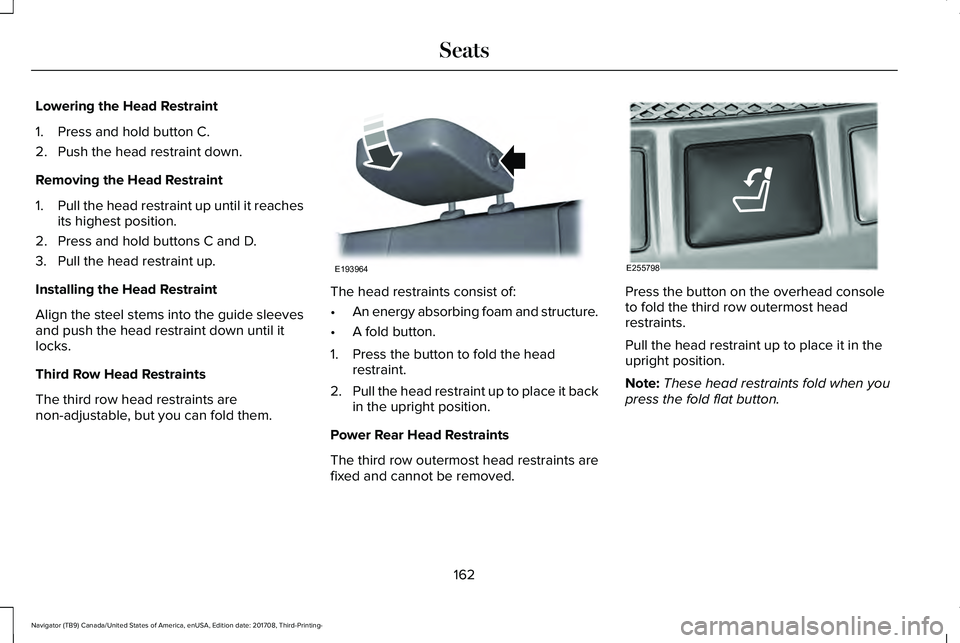
Lowering the Head Restraint
1. Press and hold button C.
2. Push the head restraint down.
Removing the Head Restraint
1.Pull the head restraint up until it reachesits highest position.
2. Press and hold buttons C and D.
3. Pull the head restraint up.
Installing the Head Restraint
Align the steel stems into the guide sleevesand push the head restraint down until itlocks.
Third Row Head Restraints
The third row head restraints arenon-adjustable, but you can fold them.
The head restraints consist of:
•An energy absorbing foam and structure.
•A fold button.
1. Press the button to fold the headrestraint.
2.Pull the head restraint up to place it backin the upright position.
Power Rear Head Restraints
The third row outermost head restraints arefixed and cannot be removed.
Press the button on the overhead consoleto fold the third row outermost headrestraints.
Pull the head restraint up to place it in theupright position.
Note:These head restraints fold when youpress the fold flat button.
162
Navigator (TB9) Canada/United States of America, enUSA, Edition date: 201708, Third-Printing-
SeatsE193964 E255798
Page 389 of 649

Note: Do not use razor blades or othersharp objects to clean or remove decals fromthe inside of the heated rear window. Thevehicle warranty does not cover damagecaused to the heated rear window grid lines.
CLEANING THE INTERIOR
WARNING: Do not use cleaningsolvents, bleach or dye on the vehicle'sseatbelts, as these actions may weakenthe belt webbing.
WARNING: On vehicles equippedwith seat-mounted airbags, do not usechemical solvents or strong detergents.Such products could contaminate the sideairbag system and affect performance ofthe side airbag in a crash.
Note:Follow the same procedure forcleaning leather seats when cleaning leatherinterior. See Cleaning Leather Seats (page388).
Note:Do not use household cleaningproducts or glass cleaners, which can stainand discolor the fabric and affect the flameretardant abilities of the seat materials.
For fabric, carpets, cloth seats, safety beltsand seats equipped with side airbags:
•Remove dust and loose dirt with avacuum cleaner.
•Remove light stains and soil withMotorcraft® Professional Strength Carpet& Upholstery Cleaner.
For grease or tar stains:
•Spot clean the area with Motorcraft® Spotand Stain Remover. In Canada, useMotorcraft® Multi-Purpose Cleaner.
•If a ring forms on the fabric after spotcleaning, clean the entire areaimmediately, but do not oversaturate orthe ring will set.
Cleaning Black Label or PresidentialInterior (If Equipped)
Note:Alcantara microfiber cloth fabric ismade of polyester microfiber withmicro-porous polyurethane. Usingcommercially available fabric cleaners cancause permanent damage.
Note:Do not use commercially availableleather and vinyl cleaning products onAlcantara microfiber cloth fabric.
Note:Lincoln Black Label or Presidentialvehicles may have Alcantara microfiber clothfabric on the seats, headliner, floor mats anddoor panels.
Depending on the type of stain, use water,lemon juice or pure ethyl alcohol whencleaning. For cleaning Alcantara microfibercloth, refer to the following chart:
386
Navigator (TB9) Canada/United States of America, enUSA, Edition date: 201708, Third-Printing-
Vehicle Care
Page 391 of 649

CLEANING THE INSTRUMENT
PANEL AND INSTRUMENT
CLUSTER LENS
WARNING: Do not use chemicalsolvents or strong detergents whencleaning the steering wheel or instrumentpanel to avoid contamination of the airbagsystem.
Note:Follow the same procedure ascleaning leather seats for cleaning leatherinstrument panels and leather interior trimsurfaces. See Cleaning Leather Seats (page388).
Clean the instrument panel and cluster lenswith a clean, damp and soft cloth, then usea clean, dry and soft cloth to dry these areas.
•Avoid cleaners or polishes that increasethe gloss of the upper portion of theinstrument panel. The dull finish in thisarea helps protect you from undesirablewindshield reflection.
•Do not use any household cleaningproducts or glass cleaners as these maydamage the finish of the instrumentpanel, interior trim and cluster lens.
•Wash or wipe your hands clean if youhave been in contact with certainproducts such as insect repellent andsuntan lotion to avoid possible damageto the interior painted surfaces.
•Do not allow air fresheners and handsanitizers to spill onto interior surfaces.If a spill occurs, wipe off immediately.Your warranty may not cover thesedamages.
If a staining liquid like coffee or juice hasbeen spilled on the instrument panel or oninterior trim surfaces:
1.Wipe up spilled liquid using a clean, softcloth as quickly as possible.
2. Use Motorcraft Premium Leather andVinyl Cleaner or a commercially availableleather cleaning product for automotiveinteriors. Test any cleaner or stainremover on an inconspicuous area.
3. Alternatively, wipe the surface with aclean, soft cloth and a mild soap andwater solution. Dry the area with a clean,soft cloth.
4.If necessary, apply more soap and watersolution or cleaning product to a clean,soft cloth and press it onto the soiledarea. Allow this to set at roomtemperature for 30 minutes.
5. Remove the soaked cloth, then with aclean, damp cloth, use a rubbing motionfor 60 seconds on the soiled area.
6. Dry the area with a clean, soft cloth.
CLEANING LEATHER SEATS
Note:Follow the same procedure ascleaning leather seats for cleaning leatherinstrument panels and leather interior trimsurfaces.
388
Navigator (TB9) Canada/United States of America, enUSA, Edition date: 201708, Third-Printing-
Vehicle Care
Page 532 of 649

Menu Item
Enable this option to remove additional voice prompts and confirmations.Advanced Mode
Enable this option to have the system confirm a contacts name with you beforemaking a call.Phone Confirmation
Enable this option to have the system display a list of available voice commandswhen the voice button is pressed.Voice Command List
Personal Profiles
You can personalize positional settings suchas seats and mirrors, as well asnon-positional settings such as radio,navigation, driver assist and system settings.You can use this menu to edit, link, unlink,and rename a keyfob. You can also deleteany personal profiles.
Note:Deleting a profile will permanentlydelete all of your personalized settings andyour linked keyfob.
Note:Deleting a profile will not delete yoursaved preset positions. You can still use thememory button to recall your pre-set positionsettings.
Master Reset
Upon a Master Reset, all Personal Profiles,linked keyfobs, and personalized settingsare deleted permanently and the PersonalProfiles feature is turned off automatically.Once this is done, you must opt into PersonalProfiles to create the first Drive Profile.
Valet Mode
Valet mode allows you to lock the system.No information is accessible until the systemis unlocked with the correct PIN.
When you select valet mode a pop upappears informing you that a four digit codemust be entered to enable and disable valetmode. You can use any PIN you chose butyou must use the same PIN to disable valetmode. The system asks you to input thecode.
Note:Personal Profiles are temporarilydisabled when Valet Mode is enabled.
Note:If the system is locked and you cannotremember the PIN, please contact theCustomer Relationship Center.
United States: 1-800-521-4140Canada: 1-800-387-9333
529
Navigator (TB9) Canada/United States of America, enUSA, Edition date: 201708, Third-Printing-
SYNC™ 3
