2018 LINCOLN MKZ mirror
[x] Cancel search: mirrorPage 145 of 595

In cold weather, the system sets to 72°F(22°C). The heated seats and heated steeringwheel set to high (if available, and if youselect AUTO in the information display). Therear defroster and heated mirrors turn on.
142
MKZ (CC9) Canada/United States of America, enUSA, Edition date: 201706, First Printing
Climate Control
Page 152 of 595

MEMORY FUNCTION
WARNINGS
Before activating the memory seat,make sure that the area immediatelysurrounding the seat is clear of obstructionsand that all occupants are clear of movingparts.
Do not use the memory function whenyour vehicle is moving.
This feature automatically recalls the positionof the following features:
•Driver seat.
•Power mirrors.
•Power steering column.
The memory control is on the driver door.
Saving a PreSet Position
1. Adjust the memory features to yourdesired position.
2. Press the SET button until you hear asingle tone.
3.Press the desired preset button until youhear a single tone.
You can save up to two preset memorypositions. You can save a memory preset atany time.
Recalling a PreSet Position
Press and release the preset buttonassociated with your desired driving position.The memory features move to the positionstored for that preset.
Note:You can only recall a preset memoryposition when you switch the ignition off, orwhen the transmission is in park (P) orneutral (N) if the ignition is on and the vehicleis not moving.
You can also recall a preset memory positionby:
•Pressing the unlock button on yourintelligent access key fob if it is linked toa preset position.
•Unlocking the intelligent driver doorhandle if a linked key fob is present.
Note:Using a linked key fob to recall yourmemory position when the ignition is offmoves the seat to the Easy Entry position.
Note:Pressing any active memory featurecontrol - power seat, mirror, or steeringcolumn (or any memory button) during amemory recall cancels the operation.
149
MKZ (CC9) Canada/United States of America, enUSA, Edition date: 201706, First Printing
SeatsE223340
Page 222 of 595

REAR VIEW CAMERA
WARNINGS
The rear view camera system is areverse aid supplement device that stillrequires the driver to use it in conjunctionwith the interior and exterior mirrors formaximum coverage.
Objects that are close to either cornerof the bumper or under the bumper,might not be seen on the screen due to thelimited coverage of the camera system.
Back up as slow as possible sincehigher speeds might limit your reactiontime to stop your vehicle.
Use caution when using the rear videocamera and the trunk is ajar. If the trunkis ajar, the camera will be out of position andthe video image may be incorrect. Allguidelines (if enabled) have been removedwhen the trunk is ajar.
Use caution when turning camerafeatures on or off while in reverse (R).Make sure your vehicle is not moving.
The rear view camera system provides avideo image of the area behind your vehicle.The image will display in either the rear viewmirror or the display in the center of theinstrument panel.
During operation, lines will appear in thedisplay that represent your vehicle’s pathand proximity to objects behind your vehicle.
The camera is located on the trunk near thehigh-mount brake lamp.
Using the Rear View Camera System
The rear view camera system displays whatis behind your vehicle when you place thetransmission in reverse (R).
The system uses three types of guides tohelp you see what is behind your vehicle:
•Active guidelines: Show the intendedpath of your vehicle when reversing.
•Fixed guidelines: Show the actual pathyour vehicle is moving in while reversingin a straight line. This can be helpfulwhen backing into a parking space oraligning your vehicle with another objectbehind you.
•Centerline (if applicable): Helps align thecenter of your vehicle with an object(trailer).
Note:If the transmission is in reverse (R) andthe luggage compartment is ajar, no rearview camera features will display.
Note:If the image comes on while thetransmission is not in reverse (R), have thesystem inspected by an authorized dealer.
219
MKZ (CC9) Canada/United States of America, enUSA, Edition date: 201706, First Printing
Parking AidsE152548
Page 224 of 595

Fixed guideline: Yellow zoneD
Fixed guideline: Red zoneE
Rear bumperF
Active guidelines are only shown with fixedguidelines. To use active guidelines, turn thesteering wheel to point the guidelines towardan intended path. If you change the steeringwheel position while reversing, your vehiclemight deviate from the original intendedpath.
The fixed and active guidelines fade in andout depending on your steering wheelposition. When your steering wheel positionis straight, the active guidelines are notvisible.
Always use caution while reversing. Objectsin the red zone are closest to your vehicleand objects in the green zone are fartheraway. Objects are getting closer to yourvehicle as they move from the green zoneto the yellow or red zones. Use the side viewmirrors and rear view mirror to get bettercoverage on both sides and rear of yourvehicle.
Enhanced Park Aids
Note:The reverse sensing system is noteffective at speeds above 3 mph (5 km/h)and may not detect certain angular ormoving objects.
The system uses red, yellow and greenhighlights that appear on top of the videoimage when the reverse sensing systemdetects an object. The alert highlights theclosest object detected. You can disable thereverse sensing alert if you have enhancedpark aids enabled, you will still see thedisplayed highlighted areas.
Selectable settings for this feature are ONand OFF.
Manual Zoom
WARNING
When manual zoom is on, the full areabehind your vehicle is not shown. Beaware of your surroundings when using themanual zoom feature.
Note:Manual zoom is only available whenthe transmission is in reverse (R).
Note:Only the centerline shows when youenable manual zoom.
This allows you to get a closer view of anobject behind your vehicle. The zoomedimage keeps the bumper in the image toprovide a reference. The zoom is only activewhile the transmission is in reverse (R). Whenyou shift the transmission out of reverse (R),the feature automatically turns off and youmust enable it to use it again.
Selectable settings for this feature are ONand OFF.
Rear Camera Delay
When shifting the transmission out of reverse(R) and into any gear other than park (P), thecamera image remains in the display untilyour vehicle speed reaches 5 mph (8 km/h)or until you select a radio button.
Selectable settings for this feature are ONand OFF. The default setting for the rearcamera delay is OFF.
221
MKZ (CC9) Canada/United States of America, enUSA, Edition date: 201706, First Printing
Parking Aids
Page 236 of 595

LANE KEEPING SYSTEM (If Equipped)
WARNINGS
The system is designed to aid thedriver. It is not intended to replace yourattention and judgment. You are stillresponsible to drive with due care andattention.
Always drive with due care andattention when using and operating thecontrols and features on your vehicle.
At all times, you are responsible forcontrolling your vehicle, supervisingthe system and intervening, if required.Failure to take care may result in the loss ofcontrol of your vehicle, serious personalinjury or death.
In cold and severe weather conditionsthe system may not function. Rain,snow and spray can all limit sensorperformance.
The system will not operate if thesensor cannot track the road lanemarkings.
WARNINGS
The sensor may incorrectly track lanemarkings as other structures or objects.This can result in a false or missed warning.
Large contrasts in outside lighting canlimit sensor performance.
The system may not operate properlyif the sensor is blocked. Keep thewindshield free from obstruction.
If damage occurs in the immediate areasurrounding the sensor, have yourvehicle checked as soon as possible.
Note:The system works above 40 mph(64 km/h).
Note:The system works as long as thecamera can detect one lane marking.
Note:The system may not function if thecamera is blocked or there is damage to thewindshield.
Note:When Aid mode is on and the systemdetects no steering activity for a short period,the system will alert you to put your handson the steering wheel. The system maydetect a light grip or touch on the steeringwheel as hands off driving.
The system notifies you to stay in your lanethrough the steering system and theinstrument cluster display when the frontcamera detects an unintentional drift out ofyour lane is likely to occur. The systemautomatically detects and tracks the roadlane markings using a camera mountedbehind the interior rear view mirror.
233
MKZ (CC9) Canada/United States of America, enUSA, Edition date: 201706, First Printing
Driving AidsE249505
Page 241 of 595
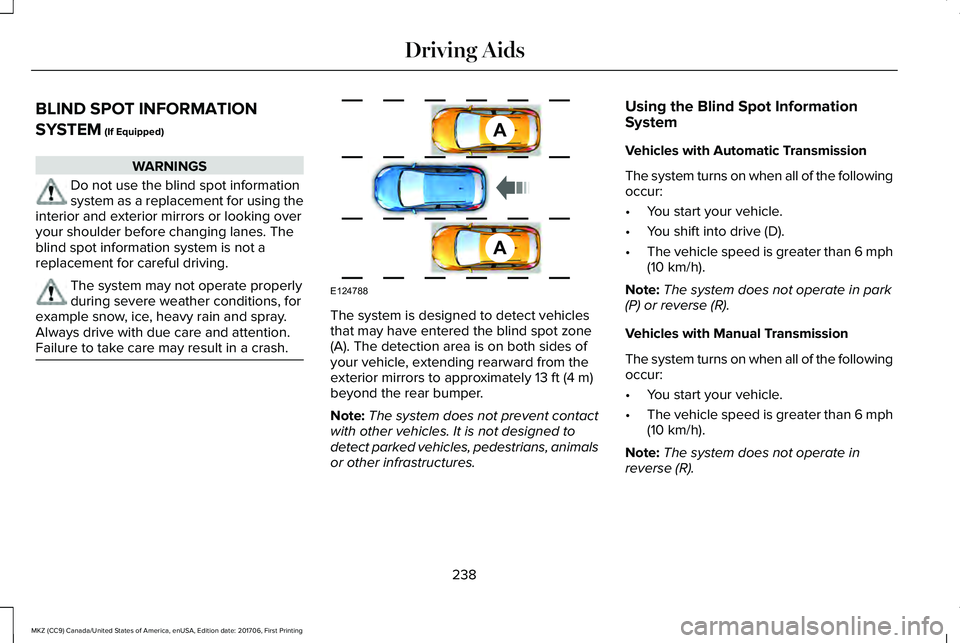
BLIND SPOT INFORMATION
SYSTEM (If Equipped)
WARNINGS
Do not use the blind spot informationsystem as a replacement for using theinterior and exterior mirrors or looking overyour shoulder before changing lanes. Theblind spot information system is not areplacement for careful driving.
The system may not operate properlyduring severe weather conditions, forexample snow, ice, heavy rain and spray.Always drive with due care and attention.Failure to take care may result in a crash.
The system is designed to detect vehiclesthat may have entered the blind spot zone(A). The detection area is on both sides ofyour vehicle, extending rearward from theexterior mirrors to approximately 13 ft (4 m)beyond the rear bumper.
Note:The system does not prevent contactwith other vehicles. It is not designed todetect parked vehicles, pedestrians, animalsor other infrastructures.
Using the Blind Spot InformationSystem
Vehicles with Automatic Transmission
The system turns on when all of the followingoccur:
•You start your vehicle.
•You shift into drive (D).
•The vehicle speed is greater than 6 mph(10 km/h).
Note:The system does not operate in park(P) or reverse (R).
Vehicles with Manual Transmission
The system turns on when all of the followingoccur:
•You start your vehicle.
•The vehicle speed is greater than 6 mph(10 km/h).
Note:The system does not operate inreverse (R).
238
MKZ (CC9) Canada/United States of America, enUSA, Edition date: 201706, First Printing
Driving AidsA
A
E124788
Page 242 of 595

System Lights and Messages
When the system detects a vehicle, an alertindicator illuminates in the exterior mirror onthe side the approaching vehicle is comingfrom. If you turn the direction indicator on forthat side of your vehicle, the alert indicatorflashes.
Note:The system may not alert you if avehicle quickly passes through the detectionzone.
Blocked Sensors
The sensors are behind the rear bumper onboth sides of your vehicle.
Note:Keep the sensors free from snow, iceand large accumulations of dirt.
Note:Do not cover the sensors with bumperstickers, repair compound or other objects.
Note:Blocked sensors could affect systemperformance.
If the sensors are blocked, a message mayappear in the information display. SeeInformation Messages (page 117). The alertindicators remain illuminated but the systemdoes not alert you.
System Errors
If the system detects a fault, a warning lampilluminates and a message displays. SeeInformation Messages (page 117).
Switching the System Off and On
You can switch the system off using theinformation display. See GeneralInformation (page 111). When you switch thesystem off, a warning lamp illuminates anda message displays. When you switch thesystem on or off, the alert indicators flashtwice.
Note:The system remembers the last settingwhen you start your vehicle.
Note:The system may not correctly operatewhen towing a trailer. For vehicles with atrailer tow module and tow bar approved byus, the system turns off when you attach atrailer. For vehicles with an aftermarkettrailer tow module or tow bar, werecommend that you switch the system offwhen you attach a trailer.
To permanently switch the system off,contact an authorized dealer.
239
MKZ (CC9) Canada/United States of America, enUSA, Edition date: 201706, First Printing
Driving AidsE142442 E205199
Page 243 of 595

CROSS TRAFFIC ALERT (If Equipped)
WARNINGS
Do not use the cross traffic alert systemas a replacement for using the interiorand exterior mirrors or looking over yourshoulder before reversing out of a parkingspace. The cross traffic alert system is not areplacement for careful driving.
WARNINGS
The system may not operate properlyduring severe weather conditions, forexample snow, ice, heavy rain and spray.Always drive with due care and attention.Failure to take care may result in a crash.
The system is designed to alert you ofvehicles approaching from the sides whenyou shift into reverse (R).
Using the Cross Traffic Alert System
The system is designed to detect vehiclesthat approach with a speed up to 37 mph(60 km/h). Coverage decreases when thesensors are partially, mostly or fullyobstructed. Slowly reversing helps increasethe coverage area and effectiveness.
The system turns on when you start theengine and you shift into reverse (R). Thesystem turns off when you shift out of reverse(R).
240
MKZ (CC9) Canada/United States of America, enUSA, Edition date: 201706, First Printing
Driving Aids