2018 LINCOLN MKZ automatic transmission
[x] Cancel search: automatic transmissionPage 186 of 595

Upshifts when accelerating (recommended for best fuel economy)
mph (km/h)Gear Upshift
ToFrom
15 mph (24 km/h)21
25 mph (40 km/h)32
40 mph (64 km/h)43
45 mph (72 km/h)54
50 mph (80 km/h)65
The instrument cluster will display yourcurrently selected gear.
The transmission will automatically upshift ifyour engine speed is too high or downshiftif your engine speed is too low.
Note:The system will stay in manual controluntil you make another shift button selection.For example, drive (D).
Brake-Shift Interlock Override
WARNINGS
Do not drive your vehicle until youverify that the stoplamps are working.
When doing this procedure, you needto take the transmission out of park (P)which means your vehicle can roll freely. Toavoid unwanted vehicle movement, alwaysfully apply the parking brake prior to doingthis procedure. Use wheels chocks ifappropriate.
WARNINGS
If the parking brake is fully released,but the brake warning lamp remainsilluminated, the brakes may not be workingproperly. Have your vehicle checked as soonas possible.
Note:See your authorized dealer as soonas possible if this procedure is used.
Note:For some markets this feature isdisabled.
183
MKZ (CC9) Canada/United States of America, enUSA, Edition date: 201706, First Printing
Transmission
Page 187 of 595
Note:This feature will only function if your12-volt battery has power. If vehicle batteryvoltage is not sufficient, an external 12-voltpower source (for example, jumper cables,battery charger or jump pack) may berequired to function the interlock overrideswitch.
Use the brake-shift interlock override tomove your transmission from the parkposition in the event of an electricalmalfunction. If your vehicle has a deadbattery, an external power source will berequired.
1. Apply the parking brake and turn yourignition off before performing thisprocedure.
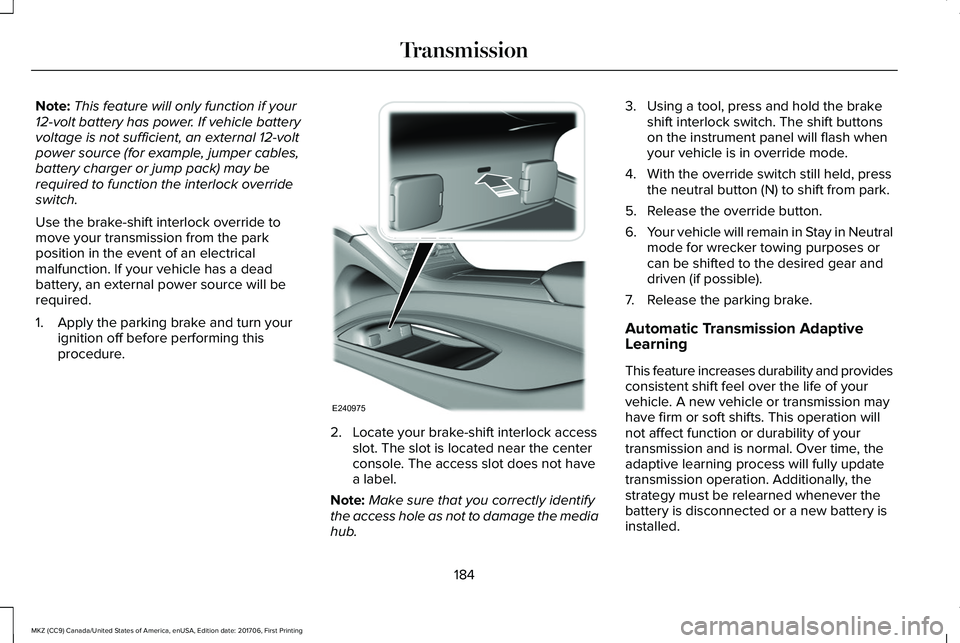
2. Locate your brake-shift interlock accessslot. The slot is located near the centerconsole. The access slot does not havea label.
Note:Make sure that you correctly identifythe access hole as not to damage the mediahub.
3. Using a tool, press and hold the brakeshift interlock switch. The shift buttonson the instrument panel will flash whenyour vehicle is in override mode.
4. With the override switch still held, pressthe neutral button (N) to shift from park.
5. Release the override button.
6.Your vehicle will remain in Stay in Neutralmode for wrecker towing purposes orcan be shifted to the desired gear anddriven (if possible).
7. Release the parking brake.
Automatic Transmission AdaptiveLearning
This feature increases durability and providesconsistent shift feel over the life of yourvehicle. A new vehicle or transmission mayhave firm or soft shifts. This operation willnot affect function or durability of yourtransmission and is normal. Over time, theadaptive learning process will fully updatetransmission operation. Additionally, thestrategy must be relearned whenever thebattery is disconnected or a new battery isinstalled.
184
MKZ (CC9) Canada/United States of America, enUSA, Edition date: 201706, First Printing
TransmissionE240975
Page 191 of 595
Operating AWD Vehicles With Spareor Mismatched Tires
WARNING
Only use replacement tires and wheelsthat are the same size, load index,speed rating and type (such as P-metricversus LT-metric or all-season versusall-terrain) as those originally provided byFord. The recommended tire and wheel sizemay be found on either the SafetyCompliance Certification Label (affixed toeither the door hinge pillar, door-latch post,or the door edge that meets the door-latchpost, next to the driver’s seating position), orthe Tire Label which is located on the B-Pillaror edge of the driver’s door. If thisinformation is not found on these labels, thenyou should contact your authorized dealeras soon as possible. Use of any tire or wheelnot recommended by Ford can affect thesafety and performance of your vehicle,which could result in an increased risk of lossof vehicle control, vehicle rollover, personalinjury and death.
A spare tire of a different size other than thetire provided should never be used. TheAWD system may disable automatically andenter front-wheel drive only mode to protectdriveline components if a non-full sized tireis installed. This condition may display anAWD OFF message in the informationdisplay. If there is an AWD OFF message inthe information display from using a non-fullsized spare tire, this indicator should turn offafter reinstalling the repaired or replacednormal road tire and cycling the ignition offand on. It is recommended to reinstall therepaired or replaced road tire as soon aspossible.
Major dissimilar tire sizes between the frontand rear axles (for example, 17 inch lowprofile tires on the front axle and 22 inch highprofile tires on the rear axle) could cause theAWD system to stop functioning and defaultto front-wheel drive or damage the AWDsystem. However, the AWD system iscapable of tolerating any combination of newand worn tires of the same original tire size.For example, using 3 worn tread tires and 1new tread tire all of the same original tiresize, can be tolerated by the AWD system.
Driving In Special Conditions With All-Wheel Drive (AWD)
AWD vehicles are equipped for driving onsand, snow, mud and rough roads and haveoperating characteristics that are somewhatdifferent from conventional vehicles, both onand off the highway.
When driving at slow speeds in deep sandunder high outside temperatures, use a lowgear when possible. Lower gear operationwill maximize the engine and transmissioncooling capability.
Under severe operating conditions, the A/Cmay cycle on and off to protect overheatingof the engine.
Basic operating principles in specialconditions
•Drive slower in strong crosswinds whichcan affect the normal steeringcharacteristics of your vehicle.
•Be extremely careful when driving onpavement made slippery by loose sand,water, gravel, snow or ice.
188
MKZ (CC9) Canada/United States of America, enUSA, Edition date: 201706, First Printing
All-Wheel Drive (If Equipped)
Page 199 of 595
HINTS ON DRIVING WITH ANTI-
LOCK BRAKES
The anti-lock braking system does noteliminate the risks when:
•You drive too closely to the vehicle infront of you.
•Your vehicle is hydroplaning.
•You take corners too fast.
•The road surface is poor.
Note: If the system activates, the brakepedal may pulse and may travel further. Maintain pressure on the brake pedal. Youmay also hear a noise from the system. Thisis normal.
ELECTRIC PARKING BRAKE
WARNING
Always set the parking brake and leaveyour vehicle with the transmission inpark (P).
Note:When you apply the electric parkingbrake in certain conditions, for example ona steep hill, the electric parking brake mayreapply the brakes within three to tenminutes. As a result, you may notice variousnoises when you apply and release theelectric parking brake. This is normal and nocause for concern.
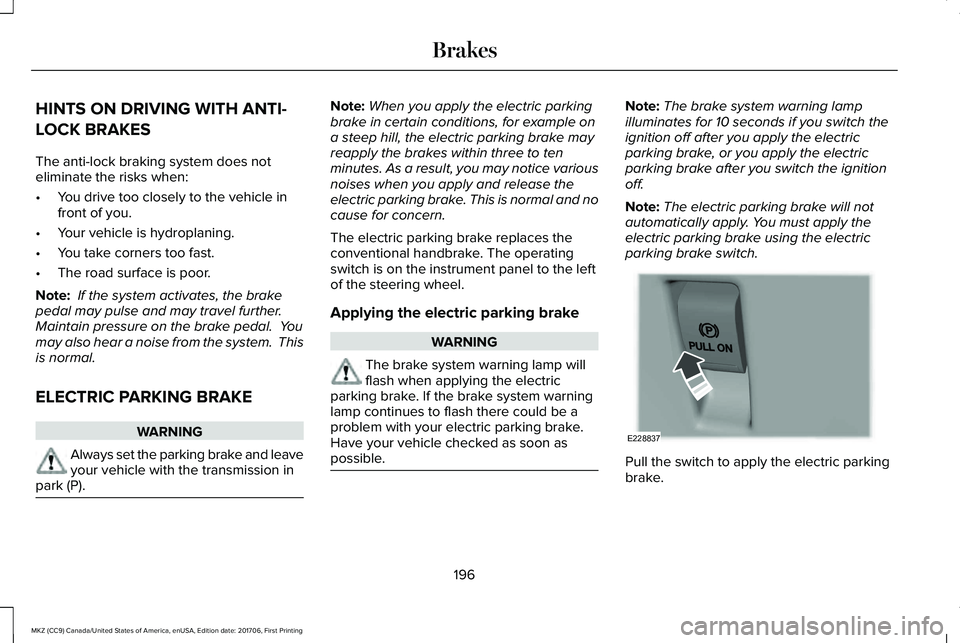
The electric parking brake replaces theconventional handbrake. The operatingswitch is on the instrument panel to the leftof the steering wheel.
Applying the electric parking brake
WARNING
The brake system warning lamp willflash when applying the electricparking brake. If the brake system warninglamp continues to flash there could be aproblem with your electric parking brake.Have your vehicle checked as soon aspossible.
Note:The brake system warning lampilluminates for 10 seconds if you switch theignition off after you apply the electricparking brake, or you apply the electricparking brake after you switch the ignitionoff.
Note:The electric parking brake will notautomatically apply. You must apply theelectric parking brake using the electricparking brake switch.
Pull the switch to apply the electric parkingbrake.
196
MKZ (CC9) Canada/United States of America, enUSA, Edition date: 201706, First Printing
BrakesE228837
Page 203 of 595

Note:Auto Hold turns off every time youpower down your vehicle.
When Auto Hold is off, your vehicle behavesthe same as a vehicle without Auto Hold.
There is an Auto Hold indicator lamp in theinstrument cluster that has two modes, activeand unavailable:
The Auto Hold (ACTIVE) indicatorlight illuminates in the informationdisplay when the system holdsyour vehicle stationary. When in active mode,press the brake pedal and the Auto Holdbutton to switch Auto Hold off.
The Auto Hold (UNAVAILABLE)indicator light illuminates in theinformation display when thesystem is on but unavailable to hold yourvehicle (for example, during Active ParkAssist, Stay in Neutral Mode, or when youdo not fasten your seatbelt or close thedoor).
Note:Make sure you switch off Auto Holdor use the Stay in Neutral mode before youenter a car wash. See AutomaticTransmission (page 180).
Using Auto Hold
1. Bring your vehicle to a stop by pressingthe brake pedal. After coming to a stop,the green Auto Hold (ACTIVE) indicatorlamp illuminates in the informationdisplay.
2.Release the brake pedal. The Auto Hold(ACTIVE) indicator light remainsilluminated in the information display andAuto Hold will hold your vehicle at a stop.
3. When you press the accelerator pedal,Auto Hold releases the brakes and youwill be able to drive off. Once you driveoff, the green Auto Hold (ACTIVE)indicator no longer illuminates in theinformation display.
Note:The Stop/Start system (if equipped)may stop the engine when you press thebrake pedal. If this occurs, it will restart onceyou press the accelerator pedal. Auto Holdstill holds your vehicle at a standstill with theengine off.
200
MKZ (CC9) Canada/United States of America, enUSA, Edition date: 201706, First Printing
BrakesE197933 E197934
Page 207 of 595

Electronic Stability Control
The system enhances your vehicle’s abilityto prevent skids or lateral slides by applyingbrakes to one or more of the wheelsindividually and, if necessary, reducingengine power.
Traction Control
The system enhances your vehicle’s abilityto maintain traction of the wheels bydetecting and controlling wheel spin. SeeUsing Traction Control (page 201).
Vehicle without stability controlskidding off its intended route.A
Vehicle with stability controlmaintaining control on a slipperysurface.
B
USING STABILITY CONTROL
The system automatically turns on each timeyou switch the ignition on.
The electronic stability control portion of thesystem disables when the transmission is inreverse (R) or, on some models, if you pressand hold the stability control button for morethan five seconds when you apply the brakesand the vehicle is at a stop.
You can switch the traction control systemoff or on independently.
204
MKZ (CC9) Canada/United States of America, enUSA, Edition date: 201706, First Printing
Stability ControlE72903A
AA
B
BB
B
Page 209 of 595

PRINCIPLE OF OPERATION
WARNINGS
To help avoid personal injury, alwaysuse caution when in reverse (R) andwhen using the sensing system.
The system may not detect objectswith surfaces that absorb reflection.Always drive with due care and attention.Failure to take care may result in a crash.
Traffic control systems, inclementweather, air brakes, external motorsand fans may affect the correct operation ofthe sensing system.This may cause reducedperformance or false alerts.
The system may not detect small ormoving objects, particularly those closeto the ground.
Note:If your vehicle is equipped withMyKey™, the sensing system cannot beturned off when a MyKey™ is present. SeePrinciple of Operation (page 62).
Note:Keep the sensors, located on thebumper or fascia, free from snow, ice andlarge accumulations of dirt. If the sensorsare covered, the system’s accuracy can beaffected. Do not clean the sensors with sharpobjects.
Note:If your vehicle sustains damage to thebumper or fascia, leaving it misaligned orbent, the sensing zone may be alteredcausing inaccurate measurement ofobstacles or false alerts.
Note:Certain add-on devices installedaround the bumper or fascia may createfalse alerts. For example, large trailerhitches, bike or surfboard racks, license platebrackets, bumper covers or any other devicethat may block the normal detection zoneof the system. Remove the add-on device toprevent false alerts.
Note:When a trailer is connected to yourvehicle, the rear parking aid may detect thetrailer and therefore provide an alert. Disablethe rear parking aid when a trailer isconnected to prevent the alert.
The sensing system warns the driver ofobstacles within a certain range of yourvehicle. The system turns on automaticallywhenever you switch the ignition on.
The system can be switched off through theinformation display menu or from the pop-upmessage that appears once you shift thetransmission into reverse (R). See GeneralInformation (page 111).
If a fault is present in the system, a warningmessage appears in the information display.See Information Messages (page 117).
REAR PARKING AID
The rear sensors are only active when thetransmission is in reverse (R). As your vehiclemoves closer to the obstacle, the rate of theaudible warning increases. When theobstacle is less than 12 in (30 cm) away, thewarning sounds continuously. If the systemdetects a stationary or receding objectfarther than 12 in (30 cm) from the corners ofthe bumper, the tone sounds for only threeseconds. Once the system detects an objectapproaching, the warning sounds again.
206
MKZ (CC9) Canada/United States of America, enUSA, Edition date: 201706, First Printing
Parking Aids
Page 213 of 595

If the transmission is in neutral (N), the sidesensing system provides visual distanceindication only when your vehicle is movingbelow a speed of 5 mph (8 km/h) and thereis a front or rear parking aid obstacledetected, and the side obstacle is within24 in (60 cm) from the side of your vehicle.When you stop your vehicle the visualdistance indication stops after four seconds.
If the side sensing system is not available,the side distance indicator blocks do notappear.
The side sensing system is not availableunder the following condition:
•If you switch the traction control systemoff.
The side sensing system may not beavailable until you have driven approximatelythe length of your vehicle in order for thesystem to reinitialize if:
•You switch the ignition on, off and backon.
•Your vehicle remains stationary for overtwo minutes.
•The anti-lock brake system is activated.
•The traction control system is activated.
•When the steering wheel angleinformation is not available, the sidesensing system is not available. Thevehicle must be driven at least 492 ft(150 m) above 19 mph (30 km/h) torecover the steering wheel angleinformation.
ACTIVE PARK ASSIST (If Equipped)
Parallel Parking, PerpendicularParking, Parallel Park Out Assist
WARNINGS
You must remain in your vehicle whenthe system turns on. At all times, youare responsible for controlling your vehicle,supervising the system and intervening, ifrequired. Failure to take care may result inthe loss of control of your vehicle, seriouspersonal injury or death.
The sensors may not detect objects inheavy rain or other conditions thatcause interference.
WARNINGS
Active park assist does not apply thebrakes under any circumstances.
The system is designed to aid thedriver. It is not intended to replace yourattention and judgment. You are stillresponsible to drive with due care andattention.
Note:Active Park Assist is a multi-stepprocess and may require you to shift yourtransmission multiple times. Follow theon-screen instructions until you complete theparking process.
Note:The Blind Spot Information Systemdoes not detect traffic alongside or behindyour vehicle during an Active Park Assistmaneuver.
The system detects an available parallel orperpendicular parking space andautomatically steers your vehicle into thespace (hands-free) while you control theaccelerator, gearshift and brakes. The systemvisually and audibly guides you to park yourvehicle.
210
MKZ (CC9) Canada/United States of America, enUSA, Edition date: 201706, First Printing
Parking Aids