2018 LINCOLN MKZ ECU
[x] Cancel search: ECUPage 79 of 595

To Unlock All Doors
Enter the factory-set code or your personalcode, then press 3·4 within five seconds.
To Lock All Doors
Press and hold 7·8 and 9·0 at the same timewith the driver door closed. You do not needto enter the keypad code first.
To Release the Trunk
Enter the factory-set code or your personalcode, then press 5·6 within five seconds.
Note:The keypad does not operate a powerdecklid.
Displaying the Factory Set Code
Note:You need to have two programmedintelligent access keys for this procedure.
To display the factory-set code in theinformation display:
1.Remove the rubber covering (A) from thecupholder. With the buttons facingupwards and the unlock button facingthe front of the vehicle, place the firstintelligent access in the backup slot (B).
2.Press the START/STOP button once andwait a few seconds.
3.Press the START/STOP button again andremove the key.
4. Insert the second programmed key intothe backup slot, and then press theSTART/STOP button.
The factory-set code appears in theinformation display for a few seconds.
Note:The code may not display until afterany other warning messages first display.
INTERIOR LUGGAGE
COMPARTMENT RELEASE
WARNINGS
Keep vehicle doors and luggagecompartment locked and keep keysand remote transmitters out of a child’sreach. Unsupervised children could lockthemselves in the trunk and risk injury.Children should be taught not to play invehicles.
Do not leave children or animalsunattended in the vehicle. On hot days,the temperature in the trunk or vehicleinterior can rise very quickly. Exposure ofpeople or animals to these hightemperatures for even a short time can causedeath or serious heat-related injuries,including brain damage. Small children areparticularly at risk.
76
MKZ (CC9) Canada/United States of America, enUSA, Edition date: 201706, First Printing
Doors and LocksE155835
Page 81 of 595

PASSIVE ANTI-THEFT SYSTEM
Note: The system is not compatible withnon-Ford aftermarket remote start systems. Use of these systems may result in vehiclestarting problems and a loss of securityprotection.
Note: Metallic objects, electronic devicesor a second coded key on the same keychain may cause vehicle starting problemsif they are too close to the key when startingyour vehicle. Prevent these objects fromtouching the coded key while starting yourvehicle. Switch the ignition off, move allobjects on the key chain away from thecoded key and restart your vehicle if aproblem occurs.
Note: Do not leave a duplicate coded keyin your vehicle. Always take your keys andlock all doors when leaving your vehicle.
SecuriLock
The system helps prevent your vehicle fromstarting unless you use a coded keyprogrammed to your vehicle. Using thewrong key may prevent your vehicle fromstarting. A message may appear in theinformation display.
If you are unable to start your vehicle with acorrectly coded key, it is not operatingproperly. A message may appear in theinformation display.
Automatic Arming
Your vehicle arms immediately afterswitching the ignition off.
Automatic Disarming
Switching the ignition on with a coded keydisarms your vehicle.
Replacement Keys
Note:Your vehicle comes equipped with twointelligent access keys.
The intelligent access key functions as aprogrammed key that operates the driverdoor lock and activates the intelligent accesswith push button start system, as well as aremote control.
If your programmed transmitters are lost orstolen and you do not have an extra codedkey, have your vehicle towed to anauthorized dealer. You need to erase thekey codes from your vehicle and programnew coded keys.
Store an extra programmed key away fromyour vehicle in a safe place to help preventany inconveniences. See your authorizeddealer to purchase additional spare orreplacement keys.
Programming a Spare Intelligent AccessKey
Note: You can program a maximum of fourintelligent access keys to your vehicle.
78
MKZ (CC9) Canada/United States of America, enUSA, Edition date: 201706, First Printing
Security
Page 82 of 595

You must have two previously programmedintelligent access keys inside your vehicleand the new unprogrammed intelligentaccess keys readily accessible. See anauthorized dealer to have the spare keyprogrammed if two previously programmedkeys are not available.
Make sure that your vehicle is off beforebeginning this procedure. Make sure thatyou close all the doors before beginning andthat they remain closed throughout theprocedure. Perform all steps within 30seconds of starting the sequence. Stop andwait for at least one minute before startingagain if you perform any steps out ofsequence.
Read and understand the entire procedurebefore you begin.
1.Remove the rubber covering (A) from thecupholder. With the buttons facingupwards and the unlock button facingthe front of the vehicle, place the firstintelligent access in the backup slot (B).
2. Press the push button ignition switch.
3. Wait five seconds and then press thepush button ignition switch again.
4. Remove the intelligent access key.
5. Within 10 seconds, place a secondprogrammed intelligent access key in thebackup slot. Press the push buttonignition switch.
6. Wait five seconds and then press thepush button ignition switch again.
7. Remove the intelligent access key.
8. Place the unprogrammed intelligentaccess key in the backup slot and pressthe push button ignition switch.
Programming is now complete. Verify theremote control functions operate and yourvehicle starts with the new intelligent accesskey.
If programming was not successful, wait 10seconds and repeat Steps 1 through 7. If youare still unsuccessful, take your vehicle toyour authorized dealer.
ANTI-THEFT ALARM
The system will warn you of an unauthorizedentry to your vehicle. It will be triggered ifany door, the luggage compartment or thehood is opened without using the key,remote control or keyless entry keypad.
The direction indicators will flash and thehorn will sound if unauthorized entry isattempted while the alarm is armed.
79
MKZ (CC9) Canada/United States of America, enUSA, Edition date: 201706, First Printing
SecurityE155835
Page 83 of 595

Take all remote controls to an authorizeddealer if there is any potential alarm problemwith your vehicle.
Arming the Alarm
The alarm is ready to arm when there is nota key in your vehicle. Electronically lock yourvehicle to arm the alarm.
Disarming the Alarm
Disarm the alarm by any of the followingactions:
•Unlock the doors or luggagecompartment with the remote control orkeyless entry keypad.
•Switch your vehicle on or start yourvehicle.
•Use a key in the driver door to unlockyour vehicle, then switch your vehicle onwithin 12 seconds.
Note:Pressing the panic button on theremote control will stop the horn and signalindicators, but will not disarm the system.
80
MKZ (CC9) Canada/United States of America, enUSA, Edition date: 201706, First Printing
Security
Page 127 of 595

ActionMessage
Displays when the door switches have been disabled.Switches Inhibited Security Mode
Displayed when there is a system malfunction with the child locks. Contact your authorized dealeras soon as possible.Child Lock Malfunction Service Required
Displays the factory keypad code after the keypad has been reset. See Keyless Entry (page74).Factory Keypad Code {X X X X X}
Driver Alert
ActionMessage
Stop and rest as soon as it is safe to do so.Driver Alert Warning Rest Now
Take a rest soon.Driver Alert Warning Rest Suggested
Fuel
ActionMessage
Displayed as an early reminder of a low fuel condition.Fuel Level Low
Displayed when the fuel fill inlet may not be properly closed.Check Fuel Fill Inlet
124
MKZ (CC9) Canada/United States of America, enUSA, Edition date: 201706, First Printing
Information Displays
Page 138 of 595

ActionMessage
Displays when an invalid gear has been selected.Invalid Gear Selection
Displays when the brake pedal needs to be depressed.Press Brake Pedal
Displays when the brake pedal needs to be depressed to enable the transmission to shift frompark.Depress Brake to Shift from Park
Displays when the neutral button N needs to be pressed again to enter neutral hold. See Auto-matic Transmission (page 180).Press N again to Enter Stay in NeutralMode
Displays when neutral hold is active. See Automatic Transmission (page 180).Stay in Neutral Mode Engaged
Displays when neutral hold is active. See General Information (page 111).Stay in Neutral Tow Engaged See Manualto Disable
Displays when there is a system fault and the park brake needs to be depressed before exitingthe vehicle. See your authorized dealer.SHIFT SYS FAULT Confirm Park BrakeApply Before Exiting the Vehicle
Displays when there is a system fault and the park brake needs to be depressed before exitingthe vehicle. See your authorized dealer.SHIFT SYS FAULT Cannot Shift Trans UsePark Brake to Secure Vehicle
See your authorized dealer.SHIFT SYS FAULT Service Required
Displays when there is a system fault while the vehicle is shifting to park. See your authorizeddealer.SHIFT SYS FAULT Vehicle is Shifting toPark
Displays when there is a system fault while the vehicle is shifting to reverse. See your authorizeddealer.SHIFT SYS FAULT Reverse UnavailableService Required
135
MKZ (CC9) Canada/United States of America, enUSA, Edition date: 201706, First Printing
Information Displays
Page 157 of 595
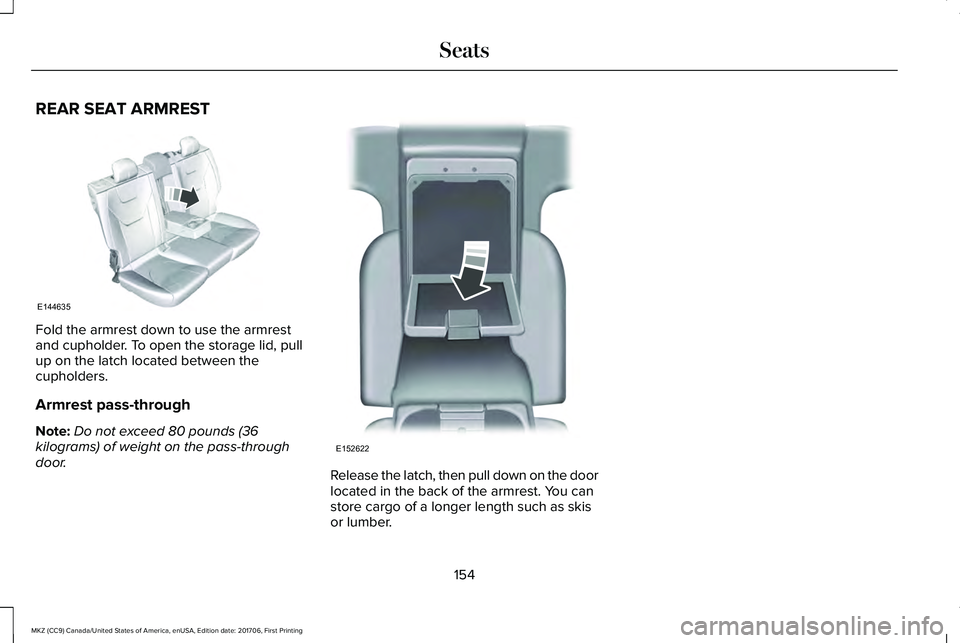
REAR SEAT ARMREST
Fold the armrest down to use the armrestand cupholder. To open the storage lid, pullup on the latch located between thecupholders.
Armrest pass-through
Note:Do not exceed 80 pounds (36kilograms) of weight on the pass-throughdoor.Release the latch, then pull down on the doorlocated in the back of the armrest. You canstore cargo of a longer length such as skisor lumber.
154
MKZ (CC9) Canada/United States of America, enUSA, Edition date: 201706, First Printing
SeatsE144635 E152622
Page 158 of 595

HomeLink Wireless Control System
WARNINGS
Make sure that the garage door andsecurity device are free fromobstruction when you are programming. Donot program the system with the vehicle inthe garage.
Do not use the system with any garagedoor opener that does not have thesafety stop and reverse feature as requiredby U.S. Federal Safety Standards (thisincludes any garage door openermanufactured before April 1, 1982). A garagedoor opener which cannot detect an object,signaling the door to stop and reverse, doesnot meet current federal safety standards.Using a garage door opener without thesefeatures increases the risk of serious injuryor death.
Note:Make sure you keep the originalremote control transmitter for use in othervehicles as well as for future systemprogramming.
Note:We recommend that upon the sale orlease termination of your vehicle, you erasethe programmed function buttons for securityreasons. See Erasing the Function ButtonCodes.
Note:You can program a maximum of threedevices. To change or replace any of thethree devices after it has been initiallyprogrammed, you must first erase the currentsettings. See Erasing the Function ButtonCodes.
The universal garage door opener replacesthe common hand-held garage door openerwith a three-button transmitter that isintegrated into the driver’s sun visor.
The system includes two primary features, agarage door opener and a platform forremote activation of devices within the home.As well as being programmed for garagedoors, the system transmitter can beprogrammed to operate entry gate operators,security systems, entry door locks and homeor office lighting.
Additional system information can be foundonline at www.homelink.com,www.youtube.com/HomeLinkGentex or bycalling the toll-free help line on1-800-355-3515.
In-Vehicle Programming
This process is to program your hand-heldtransmitter and your in-vehicle HomeLinkbutton.
Note:The programming steps below assumeyou will be programming HomeLink that wasnot previously programmed.
Note:Put a new battery in the hand-heldtransmitter. This will ensure quicker trainingand accurate transmission of theradio-frequency signal.
155
MKZ (CC9) Canada/United States of America, enUSA, Edition date: 201706, First Printing
Universal Garage Door OpenerE142657