2018 LINCOLN MKZ ECU
[x] Cancel search: ECUPage 30 of 595

9. Attach the tether strap (if the childrestraint is equipped).
10. Before placing the child in the seat,forcibly move the seat forward and backto make sure the seat is securely heldin place. To check this, grab the seat atthe belt path and attempt to move itside to side and forward and back.There should be no more than 1 in(2.5 cm) of movement for properinstallation.
We recommend checking with a NHTSACertified Child Passenger Safety Technicianto make certain the child restraint is properlyinstalled. In Canada, check with TransportCanada for referral to a Child Car Seat Clinic.
Using Lower Anchors and Tethers for
CHildren (LATCH)
WARNINGS
Do not attach two child safety restraintsto the same anchor. In a crash, oneanchor may not be strong enough to holdtwo child safety restraint attachments andmay break, causing serious injury or death.
Depending on where you secure achild restraint, and depending on thechild restraint design, you may block accessto certain seatbelt buckle assemblies andLATCH lower anchors, rendering thosefeatures potentially unusable. To avoid riskof injury, make sure occupants only useseating positions where they are able to beproperly restrained.
The LATCH system is composed of threevehicle anchor points: two lower anchorswhere the seatback and seat cushion meet(called the seat bight) and one top tetheranchor behind that seating position.
LATCH compatible child safety seats havetwo rigid or webbing mounted attachmentsthat connect to the two lower anchors at theLATCH equipped seating positions in yourvehicle. This type of attachment methodeliminates the need to use seatbelts to attachthe child restraint. However, you can still usethe seatbelt to attach the child restraint. Forforward-facing child restraints, the top tetherstrap must also be attached to the propertop tether anchor if a top tether strap hasbeen provided with your child restraint.
27
MKZ (CC9) Canada/United States of America, enUSA, Edition date: 201706, First Printing
Child SafetyE142534
Page 31 of 595

Your vehicle has LATCH lower anchors forchild restraint installation at the seatingpositions marked with the child restraintsymbol.
The LATCH anchors are at the rear sectionof the rear seat between the cushion andseatback below the symbols as shown.Follow the child restraint manufacturer'sinstructions to properly install a child restraintwith LATCH attachments. Follow theinstructions on attaching child safety seatswith tether straps.
Attach LATCH lower attachments of the childrestraint only to the anchors shown.
Use of Inboard Lower Anchors from theOutboard Seating Positions (Center SeatingUse)
WARNING
The standardized spacing for LATCHlower anchors is 11 in (280 mm) centerto center. Do not use LATCH lower anchorsfor the center seating position unless thechild restraint manufacturer's instructionspermit and specify using anchors spaced atleast as far apart as those in this vehicle.
The lower anchors at the center of thesecond row rear seat are spaced 18 in(46 cm) apart. You cannot install a childrestraint with rigid LATCH attachments at thecenter seating position. You can only useLATCH compatible child restraints (withattachments on belt webbing) at this seatingposition provided that the child restraintmanufacturer's instructions permit use withthe anchor spacing stated. Do not attach achild restraint to any lower anchor if anadjacent child restraint is attached to thatanchor.
Each time you use the safety seat, check thatthe seat is properly attached to the loweranchors and tether anchor, if applicable. Tugthe child restraint from side to side andforward and back where it is secured to yourvehicle. The seat should move less than 1 in(2.5 cm) when you do this for a properinstallation.
If the safety seat is not anchored properly,the risk of a child being injured in a crashgreatly increases.
28
MKZ (CC9) Canada/United States of America, enUSA, Edition date: 201706, First Printing
Child SafetyE142535 E144054
Page 40 of 595

•Seatbelt warning light and chime.
•Crash sensors and monitoring systemwith readiness indicator.
The seatbelt pretensioners at the frontseating positions are designed to tighten theseatbelts when activated. In frontal andnear-frontal crashes, the seatbeltpretensioners may be activated alone or, ifthe crash is of sufficient severity, togetherwith the front airbags. The pretensioners mayalso activate when the Safety Canopydeploys.
FASTENING THE SEATBELTS
Standard belts shown, inflatable belts similar
The front outboard and rear safety restraintsin the vehicle are combination lap andshoulder belts.
1. Insert the belt tongue into the properbuckle (the buckle closest to the directionthe tongue is coming from) until you heara snap and feel it latch. Make sure yousecurely fasten the tongue in the buckle.
2. To unfasten, press the release buttonand remove the tongue from the buckle.
Using Seatbelts During Pregnancy
WARNING
Always ride and drive with yourseatback upright and properly fastenyour seatbelt. Fit the lap portion of theseatbelt snugly and low across the hips.Position the shoulder portion of the seatbeltacross your chest. Pregnant women mustfollow this practice. See the following figure.
37
MKZ (CC9) Canada/United States of America, enUSA, Edition date: 201706, First Printing
SeatbeltsE71880 E67017 E142587 E142588
Page 56 of 595
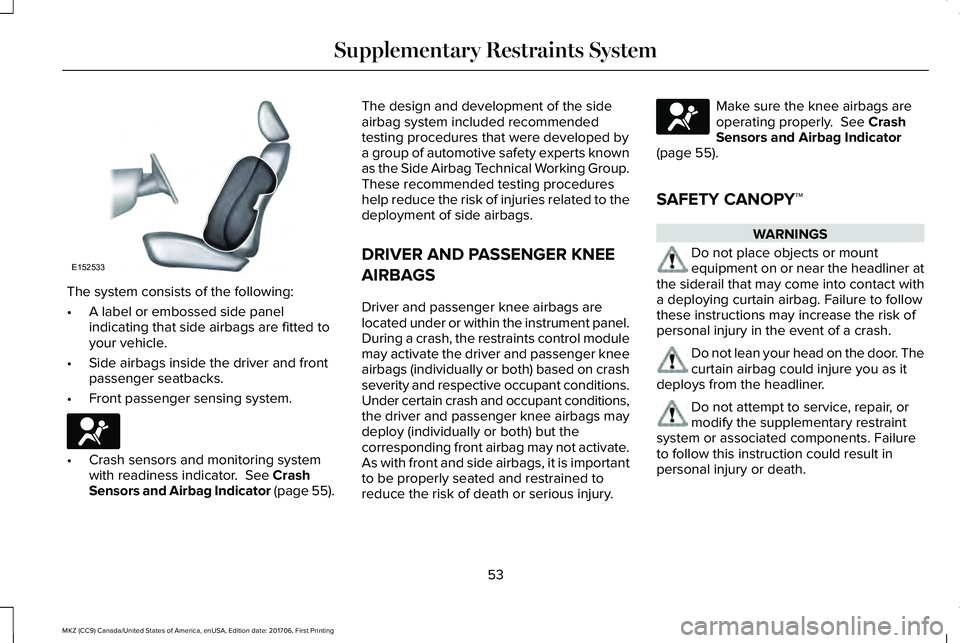
The system consists of the following:
•A label or embossed side panelindicating that side airbags are fitted toyour vehicle.
•Side airbags inside the driver and frontpassenger seatbacks.
•Front passenger sensing system.
•Crash sensors and monitoring systemwith readiness indicator. See CrashSensors and Airbag Indicator (page 55).
The design and development of the sideairbag system included recommendedtesting procedures that were developed bya group of automotive safety experts knownas the Side Airbag Technical Working Group.These recommended testing procedureshelp reduce the risk of injuries related to thedeployment of side airbags.
DRIVER AND PASSENGER KNEE
AIRBAGS
Driver and passenger knee airbags arelocated under or within the instrument panel.During a crash, the restraints control modulemay activate the driver and passenger kneeairbags (individually or both) based on crashseverity and respective occupant conditions.Under certain crash and occupant conditions,the driver and passenger knee airbags maydeploy (individually or both) but thecorresponding front airbag may not activate.As with front and side airbags, it is importantto be properly seated and restrained toreduce the risk of death or serious injury.
Make sure the knee airbags areoperating properly. See CrashSensors and Airbag Indicator(page 55).
SAFETY CANOPY™
WARNINGS
Do not place objects or mountequipment on or near the headliner atthe siderail that may come into contact witha deploying curtain airbag. Failure to followthese instructions may increase the risk ofpersonal injury in the event of a crash.
Do not lean your head on the door. Thecurtain airbag could injure you as itdeploys from the headliner.
Do not attempt to service, repair, ormodify the supplementary restraintsystem or associated components. Failureto follow this instruction could result inpersonal injury or death.
53
MKZ (CC9) Canada/United States of America, enUSA, Edition date: 201706, First Printing
Supplementary Restraints SystemE152533 E67017 E67017
Page 61 of 595

REMOTE CONTROL
Intelligent Access Key
Note:You may not be able to shift out ofpark (P) unless the intelligent access key isinside your vehicle.
The intelligent access keys operate thepower locks and the remote start system. The key must be in your vehicle to use thepush button start.
Note: Your vehicle keys came with asecurity label that provides important keycut information. Keep the label in a safeplace for future reference.
Removable Key Blade
The intelligent access key also contains aremovable key blade that you can use tounlock your vehicle.
Push the release button and pull the keyblade out.
Replacing the Battery
Note:Refer to local regulations whendisposing of transmitter batteries.
Note:Do not wipe off any grease on thebattery terminals or on the back surface ofthe circuit board.
58
MKZ (CC9) Canada/United States of America, enUSA, Edition date: 201706, First Printing
Keys and Remote ControlsE218688 E151795 E218689
Page 70 of 595

Potential causesCondition
· The key or transmitter used to start the vehicle is the only admin key.There always has to be at least one admin key.· SecuriLock passive anti-theft system is disabled or in unlimited mode.
· The key or transmitter used to start the vehicle does not have adminprivileges.I cannot program the configurable settings.
· There are no MyKeys programmed to the vehicle. See Creating aMyKey (page 63).
· An admin transmitter is present when you started your vehicle.For vehicles with keyless start: No MyKey restrictions are availablewhen starting the vehicle.· There are no MyKeys programmed to the vehicle. See Creating aMyKey (page 63).
· The key or transmitter used to start the vehicle does not have adminprivileges.I cannot clear the MyKeys.
· No MyKeys are created. See Creating a MyKey (page 63).
· Purchase a new key or transmitter from your authorized dealer.I lost the only admin key.
· Program a spare key or transmitter. You may need to see yourauthorized dealer. See Passive Anti-Theft System (page 78).I lost a key.
· The MyKey user is not using the MyKey.MyKey distances do not accumulate.· An admin key holder cleared the MyKeys and created new MyKeys.· The key system has been reset.
67
MKZ (CC9) Canada/United States of America, enUSA, Edition date: 201706, First Printing
MyKey™
Page 77 of 595

Note:Let the power system operate thedecklid after pressing the control. Pushingor pulling the decklid may activate theobstacle detection feature and stop thepower operation.
With the Decklid Close Button
Press the button inside the decklidon the left-hand side.
Obstacle Detection
The decklid will reverse to full open if itdetects an obstacle while closing. Threechimes will sound as the decklid begins toreopen. Remove the obstacle to close thedecklid.
Note:Before driving your vehicle, check theinstrument cluster for a trunk ajar or doorajar message or warning indicator. Failureto do this could result in unintentionallyleaving the decklid open while driving.
The decklid will stop and three chimes willsound if it detects an obstacle while opening.Remove the obstacle to operate the decklid.
Resetting the Power Decklid
The decklid may not operate correctly andyou may need to reset it if:
•The vehicle battery charge is low.
•You disconnect the battery.
•You manually close the decklid and leaveit unlatched.
To reset the power decklid:
1. Disconnect the battery for 20 secondsthen reconnect the battery.
2. Manually close the decklid making sureit is fully closed.
3.Power open the decklid using the remotecontrol or instrument panel button.
KEYLESS ENTRY
SECURICODE™ KEYLESS ENTRYKEYPAD
The keypad is located near the driverwindow. It is invisible until you touch it, thenit lights up so you can see and touch theappropriate buttons.
Note:If you enter your entry code too faston the keypad, the unlock function may notwork. Re-enter your entry code more slowly.
You can use the keypad to:
•Lock or unlock the doors.
•Program and erase personal entry codes.
•Arm and disarm the anti-theft alarm.
•Release the trunk.
Note:The keypad does not operate a powerdecklid.
74
MKZ (CC9) Canada/United States of America, enUSA, Edition date: 201706, First Printing
Doors and LocksE194407 E138637
Page 78 of 595

You can operate the keypad with thefactory-set 5-digit entry code. The code islocated on the owner’s wallet card in theglove box and is available from an authorizeddealer. You can also create up to five of yourown 5-digit personal entry codes.
Programming a Personal Entry Code
To create your own personal entry code:
1. Enter the factory-set code.
2. Press 1·2 on the keypad within fiveseconds.
3. Enter your personal 5-digit code. Youmust enter each number within fiveseconds of each other.
4.Press 1·2 on the keypad to save personalcode 1.
The doors lock then unlock to confirm thatprogramming was successful.
To program additional personal entry codes,repeat Steps 1-3, then for Step 4:
•Press 3·4 to save personal code 2
•Press 5·6 to save personal code 3
•Press 7·8 to save personal code 4
•Press 9·0 to save personal code 5.
You may also program a personal entry codeusing the touchscreen. See Settings (page466).
Tips:
•Do not set a code that uses five of thesame number.
•Do not use five numbers in sequentialorder.
•The factory-set code works even if youhave set your own personal code.
Erasing a Personal Code
1. Enter the factory-set 5-digit code.
2. Press and release 1·2 on the keypadwithin five seconds.
3. Press and hold 1·2 for two seconds. Youmust do this within five seconds ofcompleting Step 2.
If you complete this successfully, you haveerased all personal codes and only thefactory-set 5-digit code works.
Anti-Scan Feature
The keypad goes into an anti-scan mode ifyou enter the wrong code seven times (35consecutive button presses). This modedisables the keypad for one minute and thekeypad lamp flashes.
The anti-scan feature turns off after:
•One minute of keypad inactivity.
•Pressing the unlock button on the remotecontrol.
•Switching the ignition on.
•Unlocking your vehicle using intelligentaccess.
Unlocking and Locking the Doors
To Unlock the Driver Door
Enter the factory-set 5-digit code or yourpersonal code. You must press each numberwithin five seconds of each other. Theinterior lamps illuminate.
Note:All doors unlock if you enable the alldoor unlocking mode. See Locking andUnlocking (page 68).
75
MKZ (CC9) Canada/United States of America, enUSA, Edition date: 201706, First Printing
Doors and Locks