2018 LINCOLN MKX light
[x] Cancel search: lightPage 236 of 603

When you override the system, thegreen indicator light illuminatesand the vehicle graphic does notappear in the information display.
The system resumes operation when yourelease the accelerator pedal. The vehiclespeed decreases to the set speed, or a lowerspeed if following a slower vehicle.
Changing the Set Speed
•Press SET+ or SET- to change the setspeed in small increments.
•Press the accelerator or brake pedal untilyou reach the desired speed. Press SET+or SET-.
•Press and hold SET+ or SET- to changethe set speed in large increments.Release the control when you reach thedesired speed.
The system may apply the brakes to slowthe vehicle to the new set speed. The setspeed displays continuously in theinformation display when the system isactive.
Canceling the Set Speed
Press CNCL or tap the brake pedal. The setspeed does not erase.
Resuming the Set Speed
Note:Only use resume if you are aware ofthe set speed and intend to return to it.
Press RES. Your vehicle speed returns tothe previously set speed and gap setting. The set speed displays continuously in theinformation display when the system isactive.
Automatic Cancellation
Note:If the engine speed drops too low, anaudible warning sounds and a messageappears in the information display.Automatic braking releases.
The system does not operate below 12 mph(20 km/h).
Automatic cancellation can also occur if:
•The tires lose traction.
•The engine speed is too low.
•You apply the parking brake.
Hilly Condition Usage
Note:An audible alarm sounds and thesystem shuts down if it applies brakes for anextended period of time. This allows thebrakes to cool. The system functionsnormally again after the brakes cool.
Select a lower gear when the system isactive in situations such as prolongeddownhill driving on steep grades, forexample in mountainous areas. The systemneeds additional engine braking in thesesituations to reduce the load on the vehicle’sregular brake system to prevent it fromoverheating.
Switching Adaptive Cruise Control Off
Note:You erase the set speed and gapsetting when you switch the system off.
Press OFF when the system is in standbymode, or switch the ignition off.
233
MKX (CD9) Canada/United States of America, enUSA, Edition date: 201707, First Printing
Cruise ControlE144529
Page 239 of 603

ActionCause
Do not use the system in these conditions because it may not detectany vehicles ahead.Water, snow or ice on the surface of the road may interfere with theradar signals.
Wait a short time or switch to normal cruise control.You are in a desert or remote area with no other vehicles and noroadside objects.
Due to the nature of radar technology, it is possible to get a blockage warning with no actual block. This happens, for example, when drivingin sparse rural or desert environments. A false blocked condition either self clears, or clears after you restart your vehicle.
Switching to Normal Cruise Control
WARNING
Normal cruise control will not brakewhen your vehicle is approachingslower vehicles. Always be aware of whichmode you have selected and apply thebrakes when necessary.
You can change from adaptive cruise controlto normal cruise control through theinformation display.
The cruise control indicator lightreplaces the adaptive cruisecontrol indicator light if you selectnormal cruise control. The gap setting doesnot display, and the system does not respondto lead vehicles. Automatic braking remainsactive to maintain set speed.
236
MKX (CD9) Canada/United States of America, enUSA, Edition date: 201707, First Printing
Cruise ControlE71340
Page 242 of 603

LANE KEEPING SYSTEM (If Equipped)
WARNINGS
The system is designed to aid thedriver. It is not intended to replace yourattention and judgment. You are stillresponsible to drive with due care andattention.
Always drive with due care andattention when using and operating thecontrols and features on your vehicle.
At all times, you are responsible forcontrolling your vehicle, supervisingthe system and intervening, if required.Failure to take care may result in the loss ofcontrol of your vehicle, serious personalinjury or death.
In cold and severe weather conditionsthe system may not function. Rain,snow and spray can all limit sensorperformance.
The system will not operate if thesensor cannot track the road lanemarkings.
WARNINGS
The sensor may incorrectly track lanemarkings as other structures or objects.This can result in a false or missed warning.
The system may not operate properlyif the sensor is blocked. Keep thewindshield free from obstruction.
If damage occurs in the immediate areasurrounding the sensor, have yourvehicle checked as soon as possible.
Note:The system works above 40 mph(64 km/h).
Note:The system works as long as thecamera can detect one lane marking.
Note:When Aid or both modes are selectedand the system detects no steering activityfor a short period, the system alerts you toput your hands on the steering wheel. Thesystem may detect a light grip or touch onthe steering wheel as hands off driving.
The system notifies you to stay in your lanethrough the steering system and theinstrument cluster display when the frontcamera detects an unintentional drift out ofyour lane is likely to occur. The systemautomatically detects and tracks the roadlane markings using a camera mountedbehind the interior rear view mirror.
Switching the System On and Off
Note:The system on or off setting is storeduntil it is manually changed, unless a MyKeyis detected. If the system detects a MyKeyit defaults to on and the mode is set to Alert.
239
MKX (CD9) Canada/United States of America, enUSA, Edition date: 201707, First Printing
Driving AidsE249505
Page 245 of 603

•Using the turn signal indicator.•Evasive steering maneuver.
Troubleshooting
Why is the feature not available (line markings are gray) when I can see the lane markings on the road?
Vehicle speed is outside the operational range of the feature
Sun is shining directly into the camera lens
Quick intentional lane change
Staying too close to the lane marking
Driving at high speeds in curves
The last Alert warning or Aid intervention occurred a short time ago
Ambiguous lane markings (mainly in construction zones)
Rapid transition from light to dark or vice versa
Sudden offset in lane markings
ABS or AdvanceTrac activation
Camera blockage due to dirt, grime, fog, frost or water on the windshield
Driving too close to the vehicle in front of you
Transitioning between no lane markings to lane markings or vice versa
Standing water on the road
242
MKX (CD9) Canada/United States of America, enUSA, Edition date: 201707, First Printing
Driving Aids
Page 248 of 603

System Lights and Messages
When the system detects a vehicle, an alertindicator illuminates in the exterior mirror onthe side the approaching vehicle is comingfrom. If you turn the direction indicator on forthat side of your vehicle, the alert indicatorflashes.
Note:The system may not alert you if avehicle quickly passes through the detectionzone.
Blocked Sensors
The sensors are behind the rear bumper onboth sides of your vehicle.
Note:Keep the sensors free from snow, iceand large accumulations of dirt.
Note:Do not cover the sensors with bumperstickers, repair compound or other objects.
Note:Blocked sensors could affect systemperformance.
If the sensors are blocked, a message mayappear in the information display. SeeInformation Messages (page 125). The alertindicators remain illuminated but the systemdoes not alert you.
System Errors
If the system detects a fault, a warning lampilluminates and a message displays. SeeInformation Messages (page 125).
Switching the System Off and On
You can switch the system off using theinformation display. See GeneralInformation (page 118). When you switch thesystem off, a warning lamp illuminates anda message displays. When you switch thesystem on or off, the alert indicators flashtwice.
Note:The system remembers the last settingwhen you start your vehicle.
Note:The system may not correctly operatewhen towing a trailer. For vehicles with atrailer tow module and tow bar approved byus, the system turns off when you attach atrailer. For vehicles with an aftermarkettrailer tow module or tow bar, werecommend that you switch the system offwhen you attach a trailer.
To permanently switch the system off,contact an authorized dealer.
245
MKX (CD9) Canada/United States of America, enUSA, Edition date: 201707, First Printing
Driving AidsE142442 E205199
Page 252 of 603

System Lights, Messages and AudibleAlerts
When the system detects a vehicle, anindicator illuminates in the exterior mirror onthe side the approaching vehicle is comingfrom. A tone sounds and a message appearsin the information display.
Note:In exceptional conditions, the systemcould alert you even when there is nothingin the detection zone, for example a vehiclepassing in the distance.
Blocked Sensors
The sensors are behind the rear bumper onboth sides of your vehicle.
Note:Keep the sensors free from snow, iceand large accumulations of dirt.
Note:Do not cover the sensors with bumperstickers, repair compound or other objects.
Note:Blocked sensors could affect systemperformance.
If the sensors are blocked, a message mayappear in the information display when youshift into reverse (R). See InformationMessages (page 125).
System Limitations
The system may not correctly operate whenany of the following occur:
•The sensors are blocked.
•Adjacently parked vehicles or objects areobstructing the sensors.
•Vehicles approach at speeds greaterthan 37 mph (60 km/h).
•The vehicle speed is greater than 7 mph(12 km/h).
•You reverse out of an angled parkingspace.
System Errors
If the system detects a fault a messagedisplays. See Information Messages (page125).
Switching the System Off and On
You can temporarily switch the system offusing the information display. SeeInformation Messages (page 125). When youswitch system off, a message displays. SeeInformation Messages (page 125).
249
MKX (CD9) Canada/United States of America, enUSA, Edition date: 201707, First Printing
Driving AidsE142442 E205199
Page 255 of 603
WARNINGS
The system may fail or operate withreduced function during cold andsevere weather conditions. Snow, ice, rain,spray and fog can adversely affect thesystem. Keep the front camera and radar freeof snow and ice. Failure to take care mayresult in the loss of control of your vehicle,serious personal injury or death.
In situations where the vehicle camerahas limited detection capability, thismay reduce system performance. Thesesituations include but are not limited to director low sunlight, vehicles at night without taillights, unconventional vehicle types,pedestrians with complex backgrounds,running pedestrians, partly obscuredpedestrians, or pedestrians that the systemcannot distinguish from a group. Failure totake care may result in the loss of control ofyour vehicle, serious personal injury or death.
The system cannot help prevent allcrashes. Do not rely on this system toreplace driver judgment and the need tomaintain a safe distance and speed.
Using the Pre-Collision Assist System
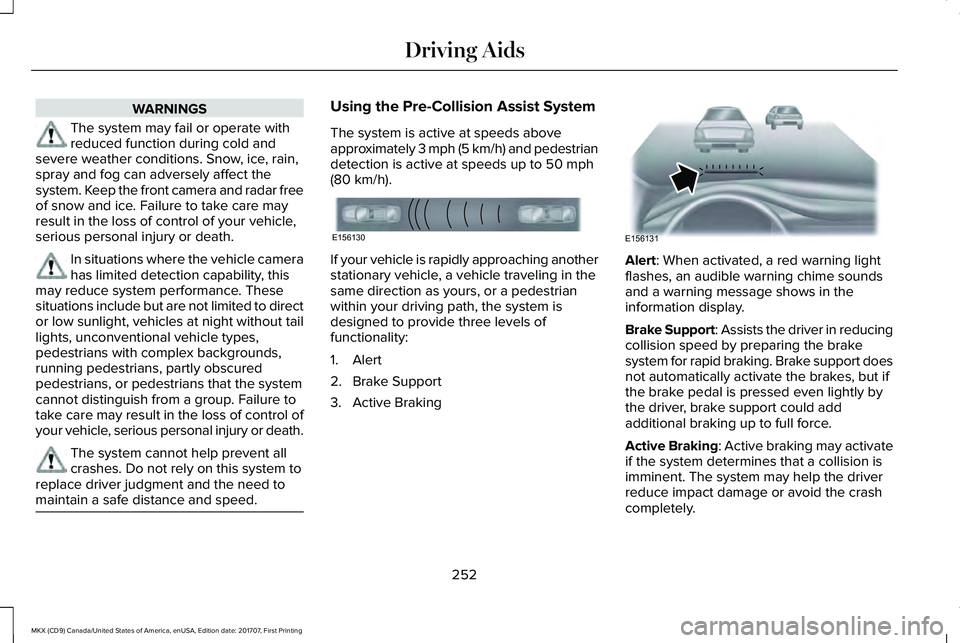
The system is active at speeds aboveapproximately 3 mph (5 km/h) and pedestriandetection is active at speeds up to 50 mph(80 km/h).
If your vehicle is rapidly approaching anotherstationary vehicle, a vehicle traveling in thesame direction as yours, or a pedestrianwithin your driving path, the system isdesigned to provide three levels offunctionality:
1. Alert
2. Brake Support
3. Active Braking
Alert: When activated, a red warning lightflashes, an audible warning chime soundsand a warning message shows in theinformation display.
Brake Support: Assists the driver in reducingcollision speed by preparing the brakesystem for rapid braking. Brake support doesnot automatically activate the brakes, but ifthe brake pedal is pressed even lightly bythe driver, brake support could addadditional braking up to full force.
Active Braking: Active braking may activateif the system determines that a collision isimminent. The system may help the driverreduce impact damage or avoid the crashcompletely.
252
MKX (CD9) Canada/United States of America, enUSA, Edition date: 201707, First Printing
Driving AidsE156130 E156131
Page 261 of 603

The cargo net secures lightweight objectsin the cargo area. Attach the net to theanchors provided. Repeat the attachment onboth sides of the vehicle.
LUGGAGE COVERS (If Equipped)
WARNING
Do not place objects on the luggagecover. Failure to follow this instructioncould result in personal injury or death in theevent of a sudden stop or crash.
Use the luggage cover to cover items in theluggage area of your vehicle.
Insert the ends of the luggage cover into themounting features located behind the rearseat on the rear trim panels to install thecover.
To operate the cover:
1. Pull out the cover and secure it in theretaining points.
2. Release it from the retaining points andlet it roll back into the case.
ROOF RACKS AND LOAD
CARRIERS
WARNINGS
Read and follow the manufacturer'sinstructions when you are fitting a roofrack.
258
MKX (CD9) Canada/United States of America, enUSA, Edition date: 201707, First Printing
Load CarryingE199571 E159183