Page 271 of 603

Trailer lamps are required on most towedvehicles. Make sure all running lights, brakelights, turn signals and hazard lights areworking.
Before Towing a Trailer
Practice turning, stopping and backing up toget the feel of your vehicle-trailercombination before starting on a trip. Whenturning, make wider turns so the trailerwheels clear curbs and other obstacles.
When Towing a Trailer
•Do not drive faster than 70 mph(113 km/h) during the first 500 mi(800 km).
•Do not make full-throttle starts.
•Check your hitch, electrical connectionsand trailer wheel lug nuts thoroughly afteryou have traveled 50 miles (80kilometers).
•When stopped in congested or heavytraffic during hot weather, place thegearshift in position P to aid engine andtransmission cooling and to help A/Cperformance.
•Turn off the speed control with heavyloads or in hilly terrain. The speed controlmay turn off automatically when you aretowing on long, steep grades.
•Shift to a lower gear when driving downa long or steep hill. Do not apply thebrakes continuously, as they mayoverheat and become less effective.
•If your transmission is equipped with aGrade Assist or Tow/Haul feature, usethis feature when towing. This providesengine braking and helps eliminateexcessive transmission shifting foroptimum fuel economy and transmissioncooling.
•Allow more distance for stopping with atrailer attached. Anticipate stops andbrake gradually.
•Avoid parking on a grade. However, ifyou must park on a grade:
1. Turn the steering wheel to point yourvehicle tires away from traffic flow.
2. Set your vehicle parking brake.
3. Place the automatic transmission inposition P.
4. Place wheel chocks in front and back ofthe trailer wheels. (Chocks not includedwith vehicle.)
Launching or Retrieving a Boat orPersonal Watercraft (PWC)
Note:Disconnect the wiring to the trailerbefore backing the trailer into the water.
Note:Reconnect the wiring to the trailerafter removing the trailer from the water.
When backing down a ramp during boatlaunching or retrieval:
•Do not allow the static water level to riseabove the bottom edge of the rearbumper.
•Do not allow waves to break higher than6 in (15 cm) above the bottom edge ofthe rear bumper.
Exceeding these limits may allow water toenter vehicle components:
•Causing internal damage to thecomponents.
•Affecting driveability, emissions, andreliability.
268
MKX (CD9) Canada/United States of America, enUSA, Edition date: 201707, First Printing
Towing
Page 275 of 603

There are also some things you may want toavoid doing because they reduce your fueleconomy:
•Avoid sudden or hard accelerations.
•Avoid revving the engine before turningoff the car.
•Avoid long idle periods.
•Do not warm up your vehicle on coldmornings.
•Reduce the use of air conditioning andheat.
•Avoid using speed control in hilly terrain.
•Do not rest your foot on the brake pedalwhile driving.
•Avoid carrying unnecessary weight.
•Avoid adding particular accessories toyour vehicle (e.g. bug deflectors,rollbars/light bars, running boards, skiracks).
•Avoid driving with the wheels out ofalignment.
DRIVING THROUGH WATER
WARNING
Do not drive through flowing or deepwater as you may lose control of yourvehicle.
Note:Driving through standing water cancause vehicle damage.
Note:Engine damage can occur if waterenters the air filter.
Before driving through standing water, checkthe depth. Never drive through water that ishigher than the bottom of the front rockerarea of your vehicle.
When driving through standing water, drivevery slowly and do not stop your vehicle. Your brake performance and traction maybe limited. After driving through water andas soon as it is safe to do so:
•Lightly press the brake pedal to dry thebrakes and to check that they work.
•Check that the horn works.
•Check that the exterior lights work.
•Turn the steering wheel to check that thesteering power assist works.
272
MKX (CD9) Canada/United States of America, enUSA, Edition date: 201707, First Printing
Driving HintsE259345
Page 294 of 603
Protected ComponentsFuse RatingFuse or Relay Number
Not used.—14
Run-start relay.—15
Power point 2 - console bin.20A 216
Power point 4 - luggage compartment.20A 217
RH HID headlamp.20A 118
Run-start electronic power assist steering.10A 119
Run/start lighting.10A 120
Transmission oil pump logic power (start/stop).15A 121
Air conditioner clutch solenoid.10A 122
Front split view camera.15A 123Rear view camera.Front split view camera module.Gear shift actuator.
Not used (spare).10A 124
291
MKX (CD9) Canada/United States of America, enUSA, Edition date: 201707, First Printing
Fuses
Page 301 of 603
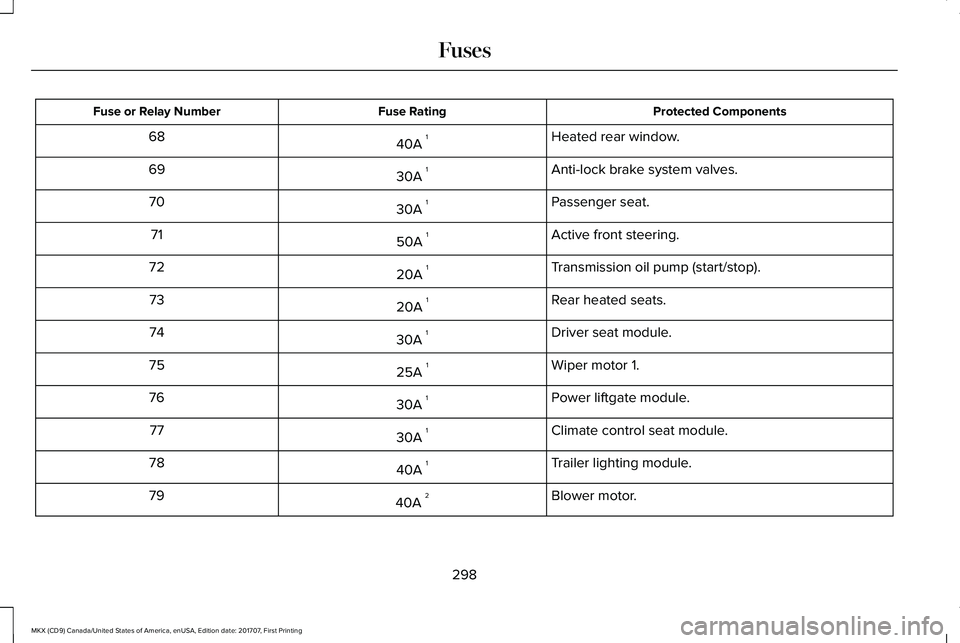
Protected ComponentsFuse RatingFuse or Relay Number
Heated rear window.40A 168
Anti-lock brake system valves.30A 169
Passenger seat.30A 170
Active front steering.50A 171
Transmission oil pump (start/stop).20A 172
Rear heated seats.20A 173
Driver seat module.30A 174
Wiper motor 1.25A 175
Power liftgate module.30A 176
Climate control seat module.30A 177
Trailer lighting module.40A 178
Blower motor.40A 279
298
MKX (CD9) Canada/United States of America, enUSA, Edition date: 201707, First Printing
Fuses
Page 302 of 603
Protected ComponentsFuse RatingFuse or Relay Number
Wiper motor 2.25A 180
110 volt inverter.40A 181
Not used.–82
TRCM (iShifter).20A 183
Starter solenoid.30A 184
Not used (spare).30A 185
Anti-lock brake system pump.60A 287
1 M case fuse.2 J case fuse.
Passenger Compartment Fuse Panel
The fuse panel is located under theinstrument panel to the left of the steeringcolumn.
Note:It may be easier to access the fusepanel if you remove the finish trim piece.
299
MKX (CD9) Canada/United States of America, enUSA, Edition date: 201707, First Printing
Fuses
Page 304 of 603
Protected ComponentsFuse RatingFuse or Relay Number
Not used (spare).5A 14
Subwoofer amplifier.20A 15
USB charger.10A 26
Not used (spare).10A 27
Security horn relay.–8
Rear seat entertainment system module.10A 29360 camera badge.
Keypad.5A 210Power liftgate module logic power.Hands free liftgate module.SYNC 3 module.Embedded Modem.
Combined sensing module.5A 211
Climate control module.7.5A 212Gear shift module.
Cluster.7.5A 213Steering column control module.Smart datalink connector (gateway) module.
301
MKX (CD9) Canada/United States of America, enUSA, Edition date: 201707, First Printing
Fuses
Page 305 of 603
Protected ComponentsFuse RatingFuse or Relay Number
Extended power module - power.10A 214
Datalink power.10A 215
Not used (spare).15A 116
Not used (spare).5A 217
Not used (spare).5A 218
Extended power module - Run/Start.7.5A 219
Active front steering logic power.7.5A 220
Humidity and in-car temperature sensor.5A 221
Occupant classification sensor.5A 222
Delayed accessory (power inverter logic, moonroof logic,driver window switch power).10A 123
Central lock unlock.20A 124
Driver door (window, mirror).30A 125Driver door module.
302
MKX (CD9) Canada/United States of America, enUSA, Edition date: 201707, First Printing
Fuses
Page 318 of 603
Note:Do not remove the dipstick when theengine is running.
Note: If the oil level is between themaximum and minimum marks, the oil levelis acceptable. Do not add oil.
Note:The oil consumption of new enginesreaches its normal level after approximately3,000 mi (5,000 km).
Adding Engine Oil
WARNING
Do not remove the filler cap when theengine is running.
Do not use supplemental engine oil additivesbecause they are unnecessary and couldlead to engine damage that may not becovered by the vehicle Warranty.
Only use oils certified for gasoline enginesby the American Petroleum Institute (API). An oil with this trademark symbol conformsto the current engine and emission systemprotection standards and fuel economyrequirements of the International LubricantsSpecification Advisory Committee (ILSAC).
To top up the engine oil level do thefollowing:
1. Clean the area surrounding the engineoil filler cap before you remove it.
2. Remove the engine oil filler cap. SeeUnder Hood Overview (page 310). Turnit counterclockwise and remove it.
3. Add engine oil that meets Fordspecifications. See Capacities andSpecifications (page 387). You may haveto use a funnel to pour the engine oil intothe opening.
4.Recheck the oil level.
5. If the oil level is correct, replace thedipstick and make sure it is fully seated.
6. Replace the engine oil filler cap. Turn itclockwise until you feel a strongresistance.
Note: Do not add oil further than themaximum mark. Oil levels above themaximum mark may cause engine damage.
Note:Make sure you install the oil filler capcorrectly.
Note:Soak up any spillage with anabsorbent cloth immediately.
OIL CHANGE INDICATOR RESET
Use the information display controls on thesteering wheel to reset the oil changeindicator.
315
MKX (CD9) Canada/United States of America, enUSA, Edition date: 201707, First Printing
MaintenanceE142732