2018 LINCOLN MKX power steering
[x] Cancel search: power steeringPage 294 of 603

Protected ComponentsFuse RatingFuse or Relay Number
Not used.—14
Run-start relay.—15
Power point 2 - console bin.20A 216
Power point 4 - luggage compartment.20A 217
RH HID headlamp.20A 118
Run-start electronic power assist steering.10A 119
Run/start lighting.10A 120
Transmission oil pump logic power (start/stop).15A 121
Air conditioner clutch solenoid.10A 122
Front split view camera.15A 123Rear view camera.Front split view camera module.Gear shift actuator.
Not used (spare).10A 124
291
MKX (CD9) Canada/United States of America, enUSA, Edition date: 201707, First Printing
Fuses
Page 301 of 603
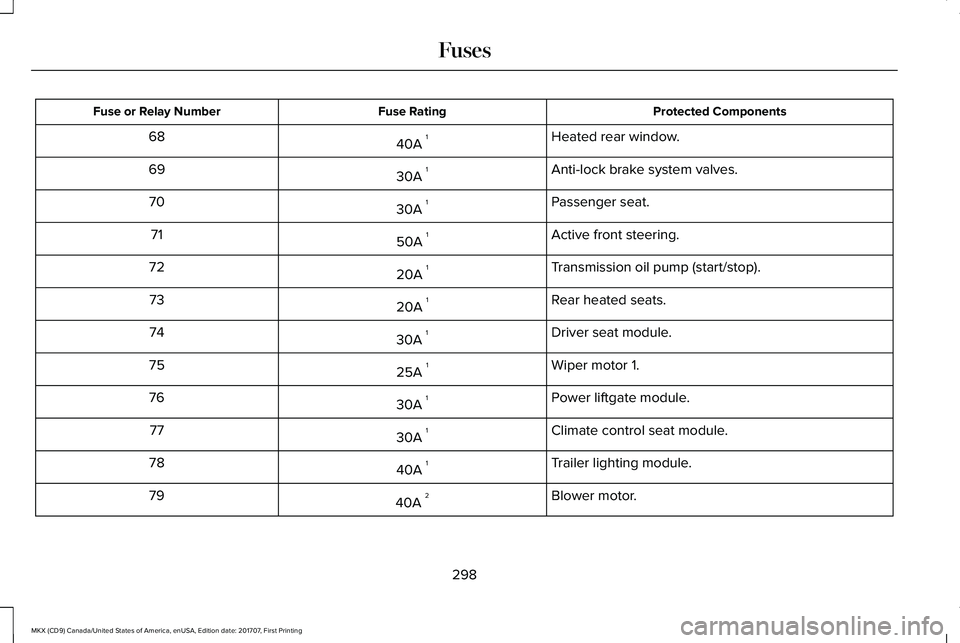
Protected ComponentsFuse RatingFuse or Relay Number
Heated rear window.40A 168
Anti-lock brake system valves.30A 169
Passenger seat.30A 170
Active front steering.50A 171
Transmission oil pump (start/stop).20A 172
Rear heated seats.20A 173
Driver seat module.30A 174
Wiper motor 1.25A 175
Power liftgate module.30A 176
Climate control seat module.30A 177
Trailer lighting module.40A 178
Blower motor.40A 279
298
MKX (CD9) Canada/United States of America, enUSA, Edition date: 201707, First Printing
Fuses
Page 304 of 603

Protected ComponentsFuse RatingFuse or Relay Number
Not used (spare).5A 14
Subwoofer amplifier.20A 15
USB charger.10A 26
Not used (spare).10A 27
Security horn relay.–8
Rear seat entertainment system module.10A 29360 camera badge.
Keypad.5A 210Power liftgate module logic power.Hands free liftgate module.SYNC 3 module.Embedded Modem.
Combined sensing module.5A 211
Climate control module.7.5A 212Gear shift module.
Cluster.7.5A 213Steering column control module.Smart datalink connector (gateway) module.
301
MKX (CD9) Canada/United States of America, enUSA, Edition date: 201707, First Printing
Fuses
Page 305 of 603

Protected ComponentsFuse RatingFuse or Relay Number
Extended power module - power.10A 214
Datalink power.10A 215
Not used (spare).15A 116
Not used (spare).5A 217
Not used (spare).5A 218
Extended power module - Run/Start.7.5A 219
Active front steering logic power.7.5A 220
Humidity and in-car temperature sensor.5A 221
Occupant classification sensor.5A 222
Delayed accessory (power inverter logic, moonroof logic,driver window switch power).10A 123
Central lock unlock.20A 124
Driver door (window, mirror).30A 125Driver door module.
302
MKX (CD9) Canada/United States of America, enUSA, Edition date: 201707, First Printing
Fuses
Page 322 of 603

Coolant Change
At specific mileage intervals, as listed in thescheduled maintenance information, thecoolant should be changed. Add predilutedcoolant approved to the correct specification.See Capacities and Specifications (page381).
Fail-Safe Cooling
Fail-safe cooling allows you to temporarilydrive your vehicle before any incrementalcomponent damage occurs. The fail-safedistance depends on ambient temperature,vehicle load and terrain.
How Fail-Safe Cooling Works
If the engine begins to overheat,the coolant temperature gaugemoves toward the red zone:
A warning lamp illuminates and amessage may appear in theinformation display.
If the engine reaches a presetover-temperature condition, the engineautomatically switches to alternating cylinderoperation. Each disabled cylinder acts as anair pump and cools the engine.
When this occurs, your vehicle still operates,however:
•Engine power is limited.
•The air conditioning system turns off.
Continued operation increases the enginetemperature, causing the engine tocompletely shut down. Your steering andbraking effort increases in this situation.
When the engine temperature cools, you canre-start the engine. Have your vehiclechecked as soon as possible to minimizeengine damage.
When Fail-Safe Mode Is Activated
WARNINGS
Fail-safe mode is for use duringemergencies only. Operate yourvehicle in fail-safe mode only as long asnecessary to bring your vehicle to rest in asafe location and seek immediate repairs.When in fail-safe mode, your vehicle will havelimited power, will not be able to maintainhigh-speed operation, and may completelyshut down without warning, potentially losingengine power, power steering assist, andpower brake assist, which may increase thepossibility of a crash resulting in seriousinjury.
Never remove the coolant reservoircap when the engine is running or hot.
Your vehicle has limited engine power whenin the fail-safe mode, drive your vehicle withcaution. Your vehicle does not maintainhigh-speed operation and the engine mayoperate poorly.
Remember that the engine is capable ofautomatically shutting down to preventengine damage. In this situation:
319
MKX (CD9) Canada/United States of America, enUSA, Edition date: 201707, First Printing
Maintenance
Page 349 of 603

Air compressor (inside).A
Selector switch.B
On and off button.C
Air pressure gauge.D
Sealant bottle and canister.E
Dual purpose hose: air and repair.F
Tire valve connector.G
Accessory power plug.H
Casing/housing.I
Bike/raft/sports ball adapters.J
General Information
WARNING
Failure to follow these guidelines couldresult in an increased risk of loss ofvehicle control, injury or death.
Note:Do not use the kit if you have severelydamaged a tire. Only seal punctures locatedwithin the tire tread with the kit.
Do not attempt to repair punctures largerthan ¼ inch (6 millimeters) or damage to thetire's sidewall. The tire may not completelyseal.
Loss of air pressure may adversely affect tireperformance. For this reason:
Note:Do not drive the vehicle above 50 mph(80 km/h).
Note:Do not drive further than 120 mi(200 km). Drive only to the closest authorizedFord dealer or tire repair shop to have yourtire inspected.
•Drive carefully and avoid abrupt steeringmaneuvers.
•Periodically monitor tire inflation pressurein the affected tire; if the tire is losingpressure, have the vehicle towed.
•Read the information in the Tips for Useof the Kit section to make sure safeoperation of the kit and your vehicle.
Tips for Use of the Kit
To ensure safe operation of the kit:
•Read all instructions and cautions fully.
•Before operating the kit, make sure yourvehicle is safely off the road and awayfrom moving traffic. Switch on the hazardlights.
346
MKX (CD9) Canada/United States of America, enUSA, Edition date: 201707, First Printing
Wheels and TiresE175977
Page 371 of 603

USING SNOW CHAINS
WARNING
Snow tires must be the same size, loadindex, and speed rating as thoseoriginally provided by Ford. Use of any tireor wheel not recommended by Ford canaffect the safety and performance of yourvehicle, which could result in an increasedrisk of loss of vehicle control, vehicle rollover,personal injury, and death. Additionally, theuse of non-recommended tires and wheelscould cause steering, suspension, axle,transfer case, or power transfer unit failure.It is also strongly advised to follow the Fordrecommended tire inflation pressure foundon the Safety Compliance Certification Label(affixed to either the door hinge pillar,door-latch post, or the door edge that meetsthe door-latch post, next to the driver’sseating position), or Tire Label which islocated on the B-Pillar or the edge of thedriver door. Failure to follow the tire pressurerecommendations can cause uneventreadwear patterns and adversely affect theway your vehicle handles.
The tires on your vehicle may haveall-weather treads to provide traction in rainand snow. However, in some climates youmay need to use snow chains.
Your vehicle may not be compatible withsnow chain or cable usage with thefactory-fitted wheels and tires. Only certainchains or snow cables have been approvedby Ford as safe for use on your vehicle withthe following wheel and tire combination(s):18x8.0 wheels with 235/60R18 tires. Youshould only install chains or cables sized at10 mm or less in dimension as measured onthe sidewall of your tire. Not all S-class snowchains meet these restrictions. Chains of thissize restriction will include a tensioningdevice. The chains should be mounted inpairs on the front tires only. If you need touse chains, it is recommended that steelwheels (of the same size and specification)be used, as chains may chip aluminumwheels.
Follow these guidelines when using tractiondevices:
•If possible, avoid fully loading yourvehicle
•Purchase chains or cables from amanufacturer that clearly labels body totire dimension restrictions.
•When driving with snow chains or cables,do not exceed 30 mph (48 km/h) or themaximum speed recommended by thechain manufacturer; whichever is less.
•Drive cautiously. If you hear the chainsor cables rub or bang against the vehicle,stop and retighten them. If this does notwork, remove the chains or cables andprevent vehicle damage.
•Remove the chains or cables when theyare no longer needed. Do not use thechains or cables on dry roads.
•If a temporary spare tire is mounted onyour vehicle, do not use snow chains onthe axle with the temporary spare tire.
If you have any questions regarding snowtires or snow chains, please contact yourauthorized dealer.
368
MKX (CD9) Canada/United States of America, enUSA, Edition date: 201707, First Printing
Wheels and Tires
Page 419 of 603

Note:If your vehicle is not equipped withnavigation, compass appears in the displayinstead of navigation. If you press the rightarrow to go into the compass menu, you cansee the compass graphic. The compassdisplays the direction in which the vehicle istraveling, not true direction (for example, ifthe vehicle is traveling west, the middle ofthe compass graphic displays west; northdisplays to the left of west though its truedirection is to the right of west).
Using the Steering Wheel Controls
Depending on your vehicle and optionpackage, you can use different controls onyour steering wheel to interact with thetouchscreen system in different ways.
VOL: Control the volume of audio output.
Mute: Mute the audio output.
Voice: Press to start a voice session. Pressagain to stop the voice prompt andimmediately begin speaking. Press and holdto end a voice session.
SEEK NEXT:
•While in radio mode, press to seekbetween memory presets.
•While in USB, Bluetooth Audio or CDmode, press to seek between songs orpress and hold to fast seek.
SEEK PREVIOUS:
•While in radio mode, press to seekbetween memory presets.
•While in USB, Bluetooth Audio or CDmode, press to seek between songs orpress and hold to fast seek.
PHONE ACCEPT: Press to answer a call orswitch between calls.
PHONE REJECT: Press to end a call or rejectan incoming call.
Note:On some models, SEEK NEXT may becombined with PHONE REJECT and SEEKPREVIOUS may be combined with PHONEACCEPT.
M: Touch the control repeatedly to switchbetween media sources (modes).
See Steering Wheel (page 89).
Using Your Bezel Controls
Depending on your vehicle and optionpackage, you may also have these controlson your instrument panel:
•Power: Switch the audio system on andoff.
•VOL: Control the volume of playingaudio.
•Seek and Tune: Use as you normallywould in audio modes.
•Eject: Eject a CD from the audio system.
•SOURCE or MEDIA: Press repeatedly toadvance through available media modes.
•SOUND: Press to access the Soundmenu where you can adjust sound andother audio settings.
•1-6: Press and hold to store or press toselect an AM, FM or SIRIUS memorypreset. See Audio System (page 401).
416
MKX (CD9) Canada/United States of America, enUSA, Edition date: 201707, First Printing
SYNC™ 3