2018 LINCOLN CONTINENTAL fog
[x] Cancel search: fogPage 11 of 615

Anti-lock braking system
Avoid smoking, flames or sparks
Battery
Battery acid
Brake fluid - non petroleum based
Brake system
Brake system
Cabin air filter
Check fuel cap
Child safety door lock or unlock
Child seat lower anchor
Child seat tether anchor
Cruise control
Do not open when hot
Engine air filter
Engine coolant
Engine coolant temperature
Engine oil
Explosive gas
Fan warning
Fasten seatbelt
Flammable
Front airbag
Front fog lamps
Fuel pump reset
Fuse compartment
Hazard flashers
Heated rear window
8
Continental (CPL) Canada/United States of America, enUSA, Edition date: 201706, Second-Printing
Introduction E270480 E71340 E71880 E231160 E67017
Page 96 of 615

Headlamp High Beam
Push the lever away from you toswitch the high beam on.
Push the lever away from you again or pullthe lever toward you to switch the high beamoff.
Flashing the Headlamp High Beam
Slightly pull the lever toward you and releaseit to flash the headlamps.
AUTOLAMPS
WARNING: The system does notrelieve you of your responsibility to drive withdue care and attention. You may need tooverride the system if it does not turn theheadlamps on in low visibility conditions, forexample daytime fog.
When the lighting control is in the autolampsposition, the headlamps turn on in low lightsituations, or when the wipers turn on.
The headlamps remain on for a period oftime after you switch the ignition off. Usethe information display controls to adjust theperiod of time that the headlamps remainon.
Note: If you switch the autolamps on, youcannot switch the high beams on until thesystem turns the low beams on.
93
Continental (CPL) Canada/United States of America, enUSA, Edition date: 201706, Second-Printing
LightingE273182 E273181 E142451
Page 99 of 615

A camera sensor, centrally mounted behindthe windshield of your vehicle, continuouslymonitors conditions to turn the high beamson and off.
Once the system is active, the high beamsturn on if:
•The ambient light level is low enough.
•There is no traffic in front of your vehicle.
•The vehicle speed is greater thanapproximately 32 mph (51 km/h).
The high beams turn off if:
•The ambient light level is high enoughthat high beams are not required.
•The system detects an approachingvehicle's headlamps or tail lamps.
•The vehicle speed falls belowapproximately 27 mph (44 km/h).
•The system detects severe rain, snow orfog.
•The camera is blocked.
Switching the System On and Off
Switch the system on using the informationdisplay. See Information Displays (page115).
Switch the lighting control to the autolampsposition. See Autolamps (page 93).
Overriding the System
When you switch on the high beams, pushingor pulling the stalk provides a temporaryoverride to low beam.
Automatic High Beam Indicator (If Equipped)
The indicator lamp illuminates toconfirm when the system is readyto assist.
ADAPTIVE HEADLAMPS (If Equipped)
The headlamp beams move in the samedirection as the steering wheel. This providesmore visibility when driving around curves.
A. Without adaptive headlamps.
B. With adaptive headlamps.
96
Continental (CPL) Canada/United States of America, enUSA, Edition date: 201706, Second-Printing
LightingE142451
Page 150 of 615

Power.A
Driver temperature control.B
MAX DefrostC
Air distribution control.D
MAX A/C.E
Passenger temperature control.F
A/C.G
Heated seats.H
Recirculated air.I
AUTO.J
Ventilated seats.K
Fan speed control.L
Heated rear window.M
Heated steering wheel or DUAL.N
Power
Press to switch the system on and off. Whenthe system is off, it prevents outside air fromentering the vehicle.
Driver Temperature Control
Adjusts the temperature setting on the driverside. This control also adjusts the passengerside temperature when you switch off dualzone mode.
MAX Defrost
Press to switch on defrost. The driver andpassenger settings set to HI, air flowsthrough the windshield vents, and the fanadjusts to the highest speed. You can alsouse this setting to defog and clear thewindshield of a thin covering of ice. Theheated rear window also turns on when youselect maximum defrost.
Note:To prevent window fogging, youcannot select recirculated air whenmaximum defrost is on.
Air Distribution Control
Press to switch air flow from the windshield,instrument panel, or footwell vents on or off.You can distribute air through anycombination of these vents.
Note:At least one of these buttons remainon when the system is on.
MAX A/C
Press for maximum cooling. The driver andpassenger settings set to LO, recirculatedair flows through the instrument panel vents,air conditioning turns on and the fan adjuststo the highest speed.
Passenger Temperature Control
Adjusts the temperature setting on thepassenger side.
A/C
Press to switch the air conditioning on or off.Use A/C with recirculated air to improvecooling performance and efficiency.
Note:In certain conditions, for example,maximum defrost, the air conditioningcompressor may continue to operate eventhough you switch off the air conditioning.
147
Continental (CPL) Canada/United States of America, enUSA, Edition date: 201706, Second-Printing
Climate Control
Page 151 of 615

Heated Seats
Press to switch the heated seats on and off.See Heated Seats (page 166).
Recirculated Air
Press to switch between outside air andrecirculated air. The air currently in thepassenger compartment recirculates. Thismay reduce the time needed to cool theinterior, when used with A/C, and reduceunwanted odors from entering your vehicle.
Note:Recirculated air may turn off, orprevent you from switching on, in all air flowmodes except MAX A/C to reduce the riskof fogging. Recirculation may also turn onand off in Panel or Panel/Floor air flowmodes during hot weather in order toimprove cooling efficiency.
AUTO
Press to switch on automatic operation.Adjust to select the desired temperature. Fanspeed, air distribution, air conditioningoperation, and outside or recirculated airadjust to heat or cool the vehicle to maintainthe desired temperature. You can also switchoff dual zone mode by pressing and holdingfor more than two seconds.
Automatic Fan Settings
The AUTO button illuminates for thefollowing fan settings:
•When three indicators are on, the fanadjusts to the highest speed to reach theselected temperature as quickly aspossible.
•When two indicators are on, the fanadjusts to a medium speed to reach theselected temperature with a reducedamount of cabin noise.
•When one indicator is on, the fan adjuststo the lowest speed to reach the selectedtemperature with the least amount ofcabin noise.
Note:The system starts at the previous fansetting when you switch on AUTO.
Ventilated Seats
Press to switch the ventilated seats on andoff. See Seats (page 153).
Fan Speed Control
Adjusts the volume of air circulated in thevehicle.
Heated Rear Window
Press to switch the heated rear window onand off. See Heated Windows and Mirrors(page 151).
Heated Steering Wheel (If Equipped)
Press to switch the heated steering wheelon and off. See Heated Steering Wheel(page 88).
148
Continental (CPL) Canada/United States of America, enUSA, Edition date: 201706, Second-Printing
Climate Control
Page 152 of 615
DUAL (If Equipped)
Press to switch on temperature control forthe passenger side of the vehicle. When dualzone is off, passenger temperature settingsremain the same as the driver settings.
HINTS ON CONTROLLING THE
INTERIOR CLIMATE
General Hints
Note:Prolonged use of recirculated air maycause the windows to fog up.
Note:You may feel a small amount of airfrom the footwell air vents regardless of theair distribution setting.
Note:To reduce humidity build-up insideyour vehicle, do not drive with the systemswitched off or with recirculated air alwaysswitched on.
Note:Do not place objects under the frontseats as this may interfere with the airflowto the rear seats.
Note:Remove any snow, ice or leaves fromthe air intake area at the base of thewindshield.
Note:To improve the time to reach acomfortable temperature in hot weather,drive with the windows open until you feelcold air through the air vents.
Automatic Climate Control
Note:Adjusting the settings when yourvehicle interior is extremely hot or cold is notnecessary.
Note:The system adjusts to heat or cool theinterior to the temperature you select asquickly as possible.
Note:For the system to function efficiently,the instrument panel and side air ventsshould be fully open.
Note:If you select AUTO during cold outsidetemperatures, the system directs air flow tothe windshield and side window air vents. Inaddition, the blower motor may run at aslower speed until the engine warms up.
Note:If you select AUTO during hottemperatures and the inside of the vehicleis hot, the system uses recirculated air tomaximize interior cooling. Blower motorspeed may also reduce until the air cools.
Quickly Heating the Interior
1. Press and release AUTO.
2. Adjust the temperature function to thesetting you prefer.
Recommended Settings for Heating
1. Press and release AUTO.
2. Adjust the temperature function to thesetting you prefer. Use 72°F (22°C) as astarting point, then adjust the setting asnecessary.
Quickly Cooling the Interior
1. Press and release MAX A/C.
Recommended Settings for Cooling
1. Press and release AUTO.
149
Continental (CPL) Canada/United States of America, enUSA, Edition date: 201706, Second-Printing
Climate Control
Page 153 of 615
2. Adjust the temperature function to thesetting you prefer. Use 72°F (22°C) as astarting point, then adjust the setting asnecessary.
Defogging the Side Windows in ColdWeather
1. Press and release defrost.
2. Adjust the temperature control to thesetting you prefer. Use 72°F (22°C) as astarting point, then adjust the setting asnecessary.
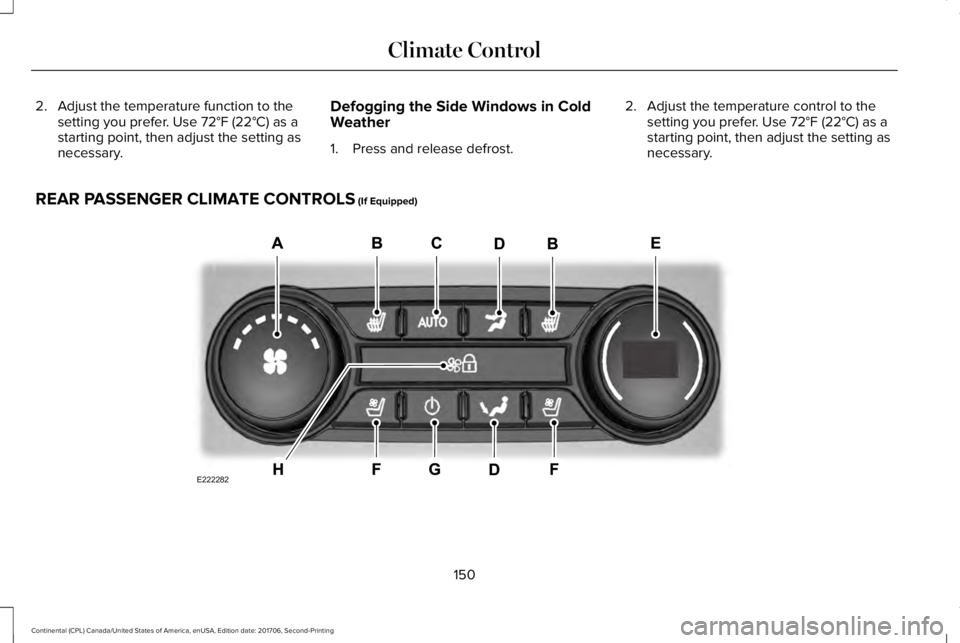
REAR PASSENGER CLIMATE CONTROLS (If Equipped)
150
Continental (CPL) Canada/United States of America, enUSA, Edition date: 201706, Second-Printing
Climate ControlE222282
Page 154 of 615

Rear fan speed control: Adjuststhe volume of air circulated to therear passenger compartment.
A
Rear heated seats: Press to switchthe rear heated seats on and off.B
Rear AUTO: Press to switch onautomatic operation. Adjust toselect the desired temperature.Fan speed and air distributionadjust to heat or cool the vehicleto maintain the temperature youdesire.
C
Rear air distribution control: Pressto switch the direction of air flow.D
Rear passenger temperaturecontrol: Adjusts the temperaturesetting for the rear passengercompartment.
E
Rear ventilated seats: Press toswitch the rear ventilated seats onand off. See Rear PassengerClimate Controls (page 150).
F
Rear passenger power: Press toswitch the rear system on and off.G
Note: The rear climate systemturns off whenever you switch onmax defrost, and turns back onwhen you switch max defrost off.You can switch on the rear systemwith max defrost on.
Rear control lock: Whenilluminated, you can only operatethe rear passenger settingsthrough the front controls.
H
Note: The indicator brieflyilluminates if you try to use the rearclimate system when the controlsare locked.
HEATED WINDOWS AND MIRRORS
Note:Make sure the engine is runningbefore operating the heated windows.
Note:Depending on your remote startsettings, the heated windows, mirrors andwipers may remain on after remote startingthe vehicle.
Heated Rear Window
Press the button to clear theheated rear window of thin ice andfog. The heated rear window turnsoff after a short period of time. Press thebutton again to switch it off. It illuminateswhen you switch the system on.
Note: Do not use razor blades or othersharp objects to clean or remove decals fromthe inside of the heated rear window. Thevehicle warranty does not cover damagecaused to the heated rear window grid lines.
Heated Exterior Mirrors (If Equipped)
When you switch the heated rear windowon, the heated exterior mirrors turn on.
Note:Do not remove ice from the mirrorswith a scraper or adjust the mirror glasswhen it is frozen in place.
Note:Do not clean the mirror housing orglass with harsh abrasives, fuel or otherpetroleum-based cleaning products.
151
Continental (CPL) Canada/United States of America, enUSA, Edition date: 201706, Second-Printing
Climate ControlE72507