Page 507 of 615
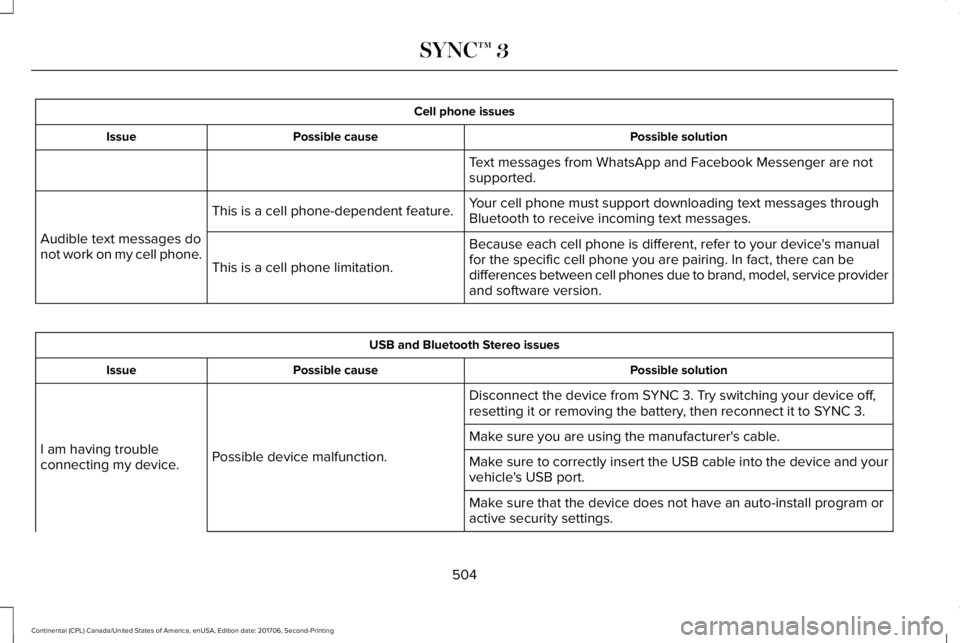
Cell phone issues
Possible solutionPossible causeIssue
Text messages from WhatsApp and Facebook Messenger are notsupported.
Your cell phone must support downloading text messages throughBluetooth to receive incoming text messages.This is a cell phone-dependent feature.
Audible text messages donot work on my cell phone.Because each cell phone is different, refer to your device's manualfor the specific cell phone you are pairing. In fact, there can bedifferences between cell phones due to brand, model, service providerand software version.
This is a cell phone limitation.
USB and Bluetooth Stereo issues
Possible solutionPossible causeIssue
Disconnect the device from SYNC 3. Try switching your device off,resetting it or removing the battery, then reconnect it to SYNC 3.
Possible device malfunction.I am having troubleconnecting my device.
Make sure you are using the manufacturer's cable.
Make sure to correctly insert the USB cable into the device and yourvehicle's USB port.
Make sure that the device does not have an auto-install program oractive security settings.
504
Continental (CPL) Canada/United States of America, enUSA, Edition date: 201706, Second-Printing
SYNC™ 3
Page 510 of 615
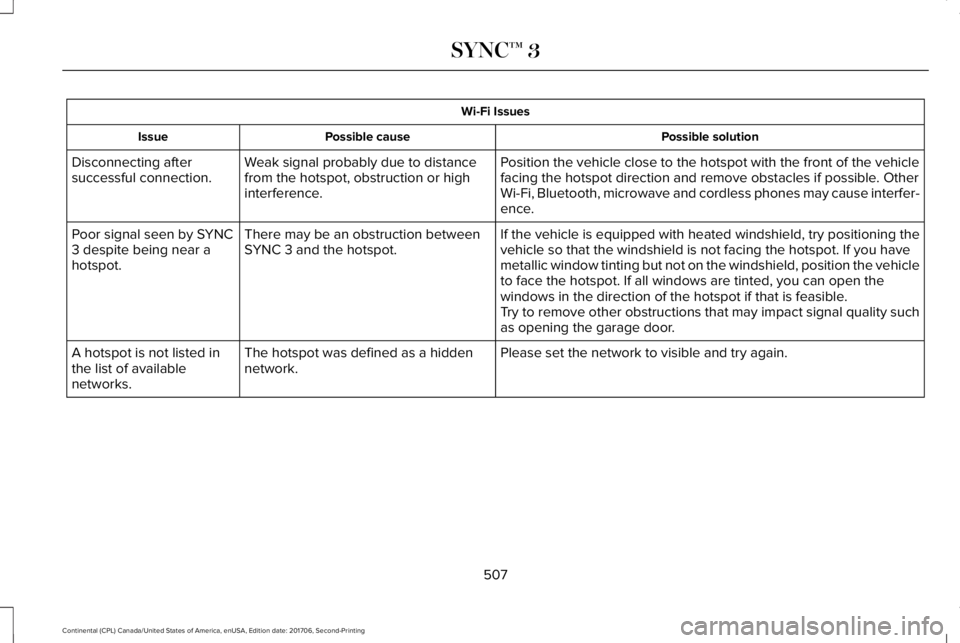
Wi-Fi Issues
Possible solutionPossible causeIssue
Position the vehicle close to the hotspot with the front of the vehiclefacing the hotspot direction and remove obstacles if possible. OtherWi-Fi, Bluetooth, microwave and cordless phones may cause interfer-ence.
Weak signal probably due to distancefrom the hotspot, obstruction or highinterference.
Disconnecting aftersuccessful connection.
If the vehicle is equipped with heated windshield, try positioning thevehicle so that the windshield is not facing the hotspot. If you havemetallic window tinting but not on the windshield, position the vehicleto face the hotspot. If all windows are tinted, you can open thewindows in the direction of the hotspot if that is feasible.
There may be an obstruction betweenSYNC 3 and the hotspot.Poor signal seen by SYNC3 despite being near ahotspot.
Try to remove other obstructions that may impact signal quality suchas opening the garage door.
Please set the network to visible and try again.The hotspot was defined as a hiddennetwork.A hotspot is not listed inthe list of availablenetworks.
507
Continental (CPL) Canada/United States of America, enUSA, Edition date: 201706, Second-Printing
SYNC™ 3
Page 511 of 615
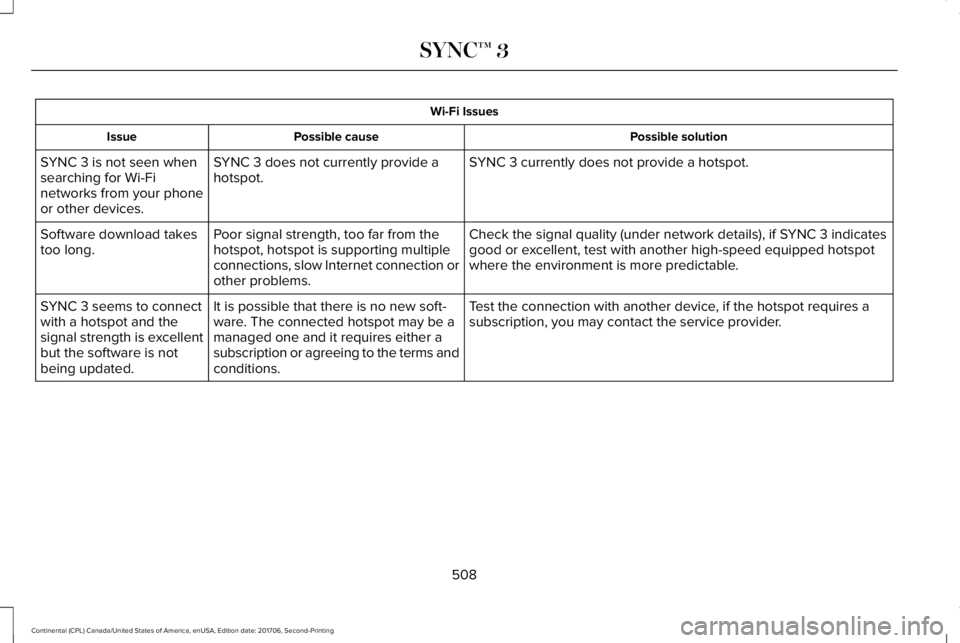
Wi-Fi Issues
Possible solutionPossible causeIssue
SYNC 3 currently does not provide a hotspot.SYNC 3 does not currently provide ahotspot.SYNC 3 is not seen whensearching for Wi-Finetworks from your phoneor other devices.
Check the signal quality (under network details), if SYNC 3 indicatesgood or excellent, test with another high-speed equipped hotspotwhere the environment is more predictable.
Poor signal strength, too far from thehotspot, hotspot is supporting multipleconnections, slow Internet connection orother problems.
Software download takestoo long.
Test the connection with another device, if the hotspot requires asubscription, you may contact the service provider.It is possible that there is no new soft-ware. The connected hotspot may be amanaged one and it requires either asubscription or agreeing to the terms andconditions.
SYNC 3 seems to connectwith a hotspot and thesignal strength is excellentbut the software is notbeing updated.
508
Continental (CPL) Canada/United States of America, enUSA, Edition date: 201706, Second-Printing
SYNC™ 3
Page 512 of 615
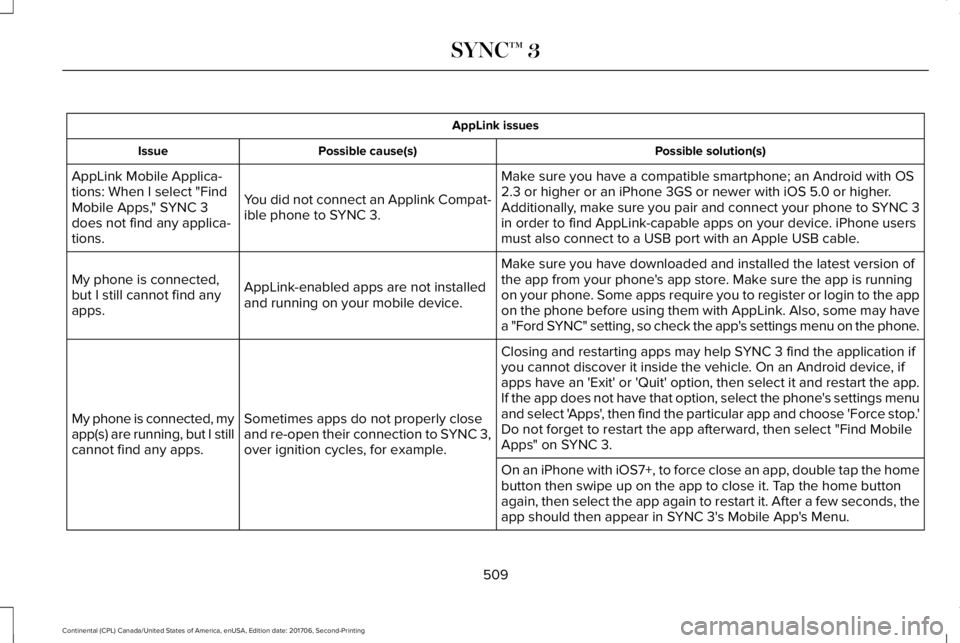
AppLink issues
Possible solution(s)Possible cause(s)Issue
Make sure you have a compatible smartphone; an Android with OS2.3 or higher or an iPhone 3GS or newer with iOS 5.0 or higher.Additionally, make sure you pair and connect your phone to SYNC 3in order to find AppLink-capable apps on your device. iPhone usersmust also connect to a USB port with an Apple USB cable.
You did not connect an Applink Compat-ible phone to SYNC 3.
AppLink Mobile Applica-tions: When I select "FindMobile Apps," SYNC 3does not find any applica-tions.
Make sure you have downloaded and installed the latest version ofthe app from your phone's app store. Make sure the app is runningon your phone. Some apps require you to register or login to the appon the phone before using them with AppLink. Also, some may havea "Ford SYNC" setting, so check the app's settings menu on the phone.
AppLink-enabled apps are not installedand running on your mobile device.
My phone is connected,but I still cannot find anyapps.
Closing and restarting apps may help SYNC 3 find the application ifyou cannot discover it inside the vehicle. On an Android device, ifapps have an 'Exit' or 'Quit' option, then select it and restart the app.If the app does not have that option, select the phone's settings menuand select 'Apps', then find the particular app and choose 'Force stop.'Do not forget to restart the app afterward, then select "Find MobileApps" on SYNC 3.
Sometimes apps do not properly closeand re-open their connection to SYNC 3,over ignition cycles, for example.
My phone is connected, myapp(s) are running, but I stillcannot find any apps.
On an iPhone with iOS7+, to force close an app, double tap the homebutton then swipe up on the app to close it. Tap the home buttonagain, then select the app again to restart it. After a few seconds, theapp should then appear in SYNC 3's Mobile App's Menu.
509
Continental (CPL) Canada/United States of America, enUSA, Edition date: 201706, Second-Printing
SYNC™ 3
Page 513 of 615
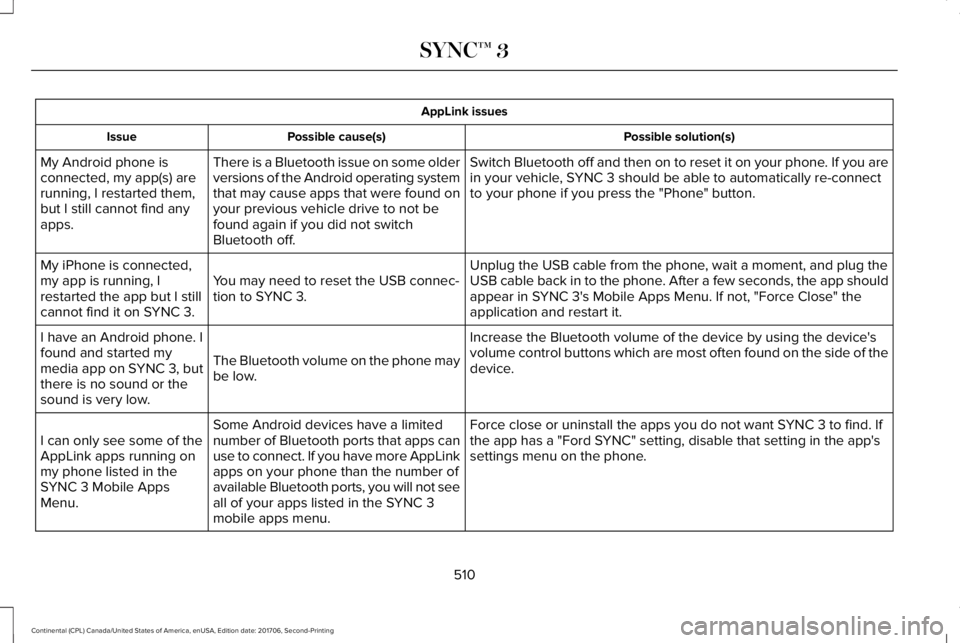
AppLink issues
Possible solution(s)Possible cause(s)Issue
Switch Bluetooth off and then on to reset it on your phone. If you arein your vehicle, SYNC 3 should be able to automatically re-connectto your phone if you press the "Phone" button.
There is a Bluetooth issue on some olderversions of the Android operating systemthat may cause apps that were found onyour previous vehicle drive to not befound again if you did not switchBluetooth off.
My Android phone isconnected, my app(s) arerunning, I restarted them,but I still cannot find anyapps.
Unplug the USB cable from the phone, wait a moment, and plug theUSB cable back in to the phone. After a few seconds, the app shouldappear in SYNC 3's Mobile Apps Menu. If not, "Force Close" theapplication and restart it.
You may need to reset the USB connec-tion to SYNC 3.
My iPhone is connected,my app is running, Irestarted the app but I stillcannot find it on SYNC 3.
Increase the Bluetooth volume of the device by using the device'svolume control buttons which are most often found on the side of thedevice.The Bluetooth volume on the phone maybe low.
I have an Android phone. Ifound and started mymedia app on SYNC 3, butthere is no sound or thesound is very low.
Force close or uninstall the apps you do not want SYNC 3 to find. Ifthe app has a "Ford SYNC" setting, disable that setting in the app'ssettings menu on the phone.
Some Android devices have a limitednumber of Bluetooth ports that apps canuse to connect. If you have more AppLinkapps on your phone than the number ofavailable Bluetooth ports, you will not seeall of your apps listed in the SYNC 3mobile apps menu.
I can only see some of theAppLink apps running onmy phone listed in theSYNC 3 Mobile AppsMenu.
510
Continental (CPL) Canada/United States of America, enUSA, Edition date: 201706, Second-Printing
SYNC™ 3
Page 514 of 615
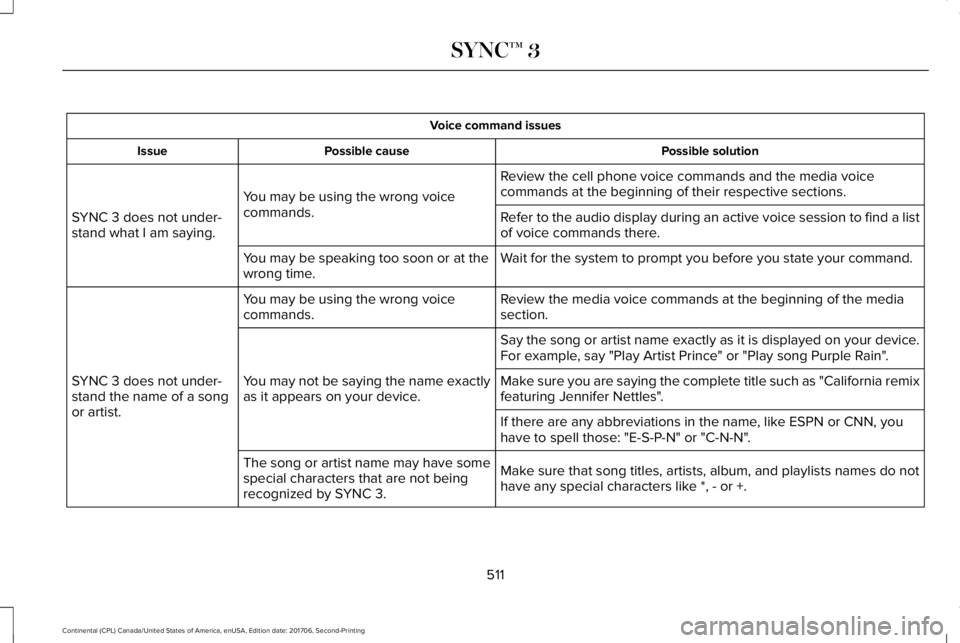
Voice command issues
Possible solutionPossible causeIssue
Review the cell phone voice commands and the media voicecommands at the beginning of their respective sections.You may be using the wrong voicecommands.SYNC 3 does not under-stand what I am saying.Refer to the audio display during an active voice session to find a listof voice commands there.
Wait for the system to prompt you before you state your command.You may be speaking too soon or at thewrong time.
Review the media voice commands at the beginning of the mediasection.You may be using the wrong voicecommands.
SYNC 3 does not under-stand the name of a songor artist.
Say the song or artist name exactly as it is displayed on your device.For example, say "Play Artist Prince" or "Play song Purple Rain".
You may not be saying the name exactlyas it appears on your device.Make sure you are saying the complete title such as "California remixfeaturing Jennifer Nettles".
If there are any abbreviations in the name, like ESPN or CNN, youhave to spell those: "E-S-P-N" or "C-N-N".
Make sure that song titles, artists, album, and playlists names do nothave any special characters like *, - or +.
The song or artist name may have somespecial characters that are not beingrecognized by SYNC 3.
511
Continental (CPL) Canada/United States of America, enUSA, Edition date: 201706, Second-Printing
SYNC™ 3
Page 515 of 615
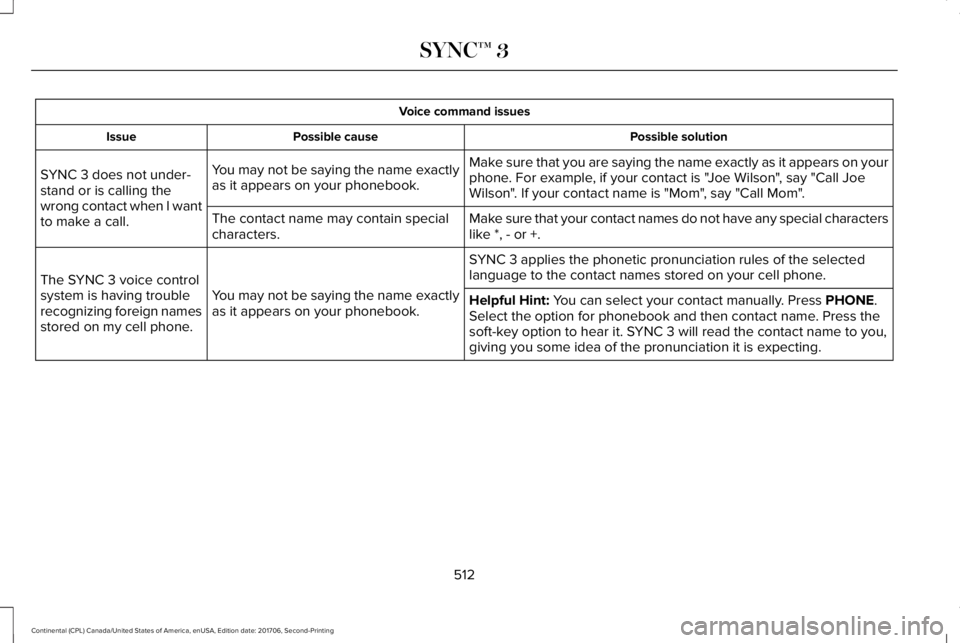
Voice command issues
Possible solutionPossible causeIssue
Make sure that you are saying the name exactly as it appears on yourphone. For example, if your contact is "Joe Wilson", say "Call JoeWilson". If your contact name is "Mom", say "Call Mom".
You may not be saying the name exactlyas it appears on your phonebook.SYNC 3 does not under-stand or is calling thewrong contact when I wantto make a call.Make sure that your contact names do not have any special characterslike *, - or +.The contact name may contain specialcharacters.
SYNC 3 applies the phonetic pronunciation rules of the selectedlanguage to the contact names stored on your cell phone.
You may not be saying the name exactlyas it appears on your phonebook.
The SYNC 3 voice controlsystem is having troublerecognizing foreign namesstored on my cell phone.
Helpful Hint: You can select your contact manually. Press PHONE.Select the option for phonebook and then contact name. Press thesoft-key option to hear it. SYNC 3 will read the contact name to you,giving you some idea of the pronunciation it is expecting.
512
Continental (CPL) Canada/United States of America, enUSA, Edition date: 201706, Second-Printing
SYNC™ 3
Page 516 of 615
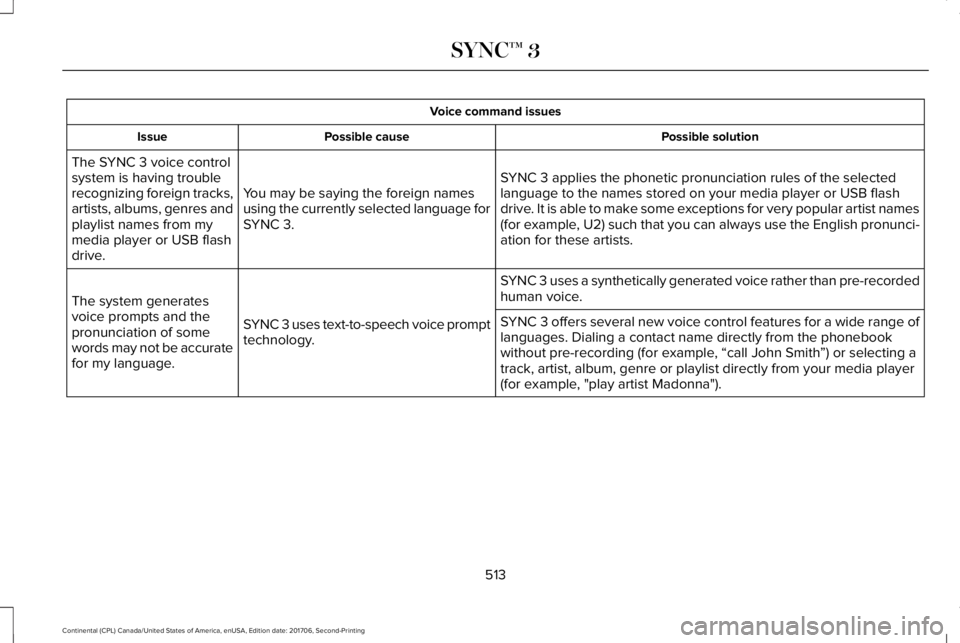
Voice command issues
Possible solutionPossible causeIssue
SYNC 3 applies the phonetic pronunciation rules of the selectedlanguage to the names stored on your media player or USB flashdrive. It is able to make some exceptions for very popular artist names(for example, U2) such that you can always use the English pronunci-ation for these artists.
You may be saying the foreign namesusing the currently selected language forSYNC 3.
The SYNC 3 voice controlsystem is having troublerecognizing foreign tracks,artists, albums, genres andplaylist names from mymedia player or USB flashdrive.
SYNC 3 uses a synthetically generated voice rather than pre-recordedhuman voice.
SYNC 3 uses text-to-speech voice prompttechnology.
The system generatesvoice prompts and thepronunciation of somewords may not be accuratefor my language.
SYNC 3 offers several new voice control features for a wide range oflanguages. Dialing a contact name directly from the phonebookwithout pre-recording (for example, “call John Smith”) or selecting atrack, artist, album, genre or playlist directly from your media player(for example, "play artist Madonna").
513
Continental (CPL) Canada/United States of America, enUSA, Edition date: 201706, Second-Printing
SYNC™ 3