2018 LINCOLN CONTINENTAL display
[x] Cancel search: displayPage 145 of 615

ActionMessage
Displays when the brake pedal needs to be depressed to enable the transmission to shift frompark.Depress Brake to Shift from Park
Displays when neutral hold is active. See Automatic Transmission (page 194).Stay in Neutral Mode Engaged
Displays when the neutral button N needs to be pressed again to enter neutral hold. See Auto-matic Transmission (page 194).To Stay in Neutral When Exiting VehicleSelect N Again
HEAD UP DISPLAY (If Equipped)
Head Up Display (HUD)
This is a visual system that shows informationin your field of view as you drive. Theinformation comes from various vehiclesystems and includes vehicle speed, speedlimit, navigation, and advanced driverassistance systems (ADAS), such as adaptivecruise control (ACC) and the lane keepingsystem. This system projects the informationoff the windshield, and focuses the image
near the end of the hood approximately 7 ft(2 m) in front of the driver. Viewing thisinformation does not require you tosignificantly move your head, allowing youto keep your eyes on the road while havingquick and easy access to information.
Head Up Display Information
Signaling and Traffic Indication.A
Left Information Group.B
ADAS Display Area.C
142
Continental (CPL) Canada/United States of America, enUSA, Edition date: 201706, Second-Printing
Information DisplaysE228521
Page 146 of 615

Navigation Display Area.D
Status Bar.E
Speedometer Display Area.F
Signaling and Traffic Indication
Displays direction indicators, blind spotinformation (if direction indicators are active)and cross traffic alert.
Left Information Group
Displays incoming call information.
ADAS Display Area
Displays ACC and lane keeping systemstatus and warnings.
Navigation Display Area
Displays navigation next turn instructions.
Status Bar
Displays distance to empty (DTE), time andoutside air temperature. Next to DTE, thefuel gauge fill color changes to yellow in lowfuel conditions. You can switch off the statusbar in the HUD settings menu.
Speedometer Display Area
Displays current vehicle speed, speed limit(if available in the map database) and yourtransmission gear selection.
Configuring The Head Up Display
You can control the system's options throughthe information display by using the HUD,OK and arrow buttons on the right-hand sideof your steering wheel. See GeneralInformation (page 115). You can adjust thedisplay according to your height to makeviewing the content easier. You can alsoadjust what content displays and thebrightness of the content. The system'soptions appear in the instrument clusterwhile the updates happen in the HUD.
Note:If HUD On is unchecked, other optionsof the system are hidden.
Note:The HUD menu automatically closesafter a certain period of inactivity.
Note:The HUD image brightnessautomatically adjusts to the brightness ofthe ambient environment. You have theability to adjust the brightness furtheraccording to your preference.
Note:In some instances, sunlight can causesome reflections in and around the HUDimage.
143
Continental (CPL) Canada/United States of America, enUSA, Edition date: 201706, Second-Printing
Information Displays
Page 147 of 615
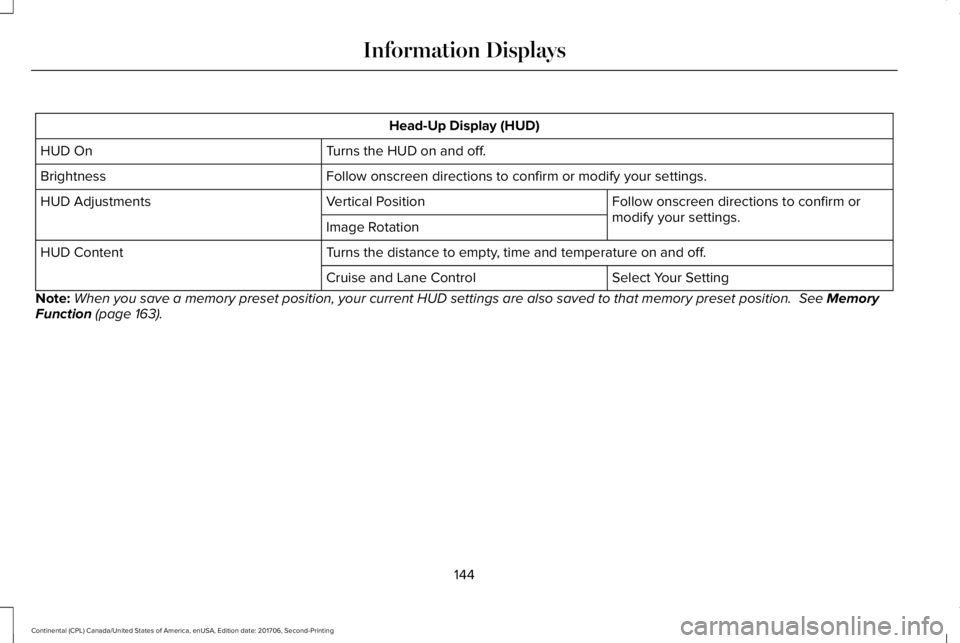
Head-Up Display (HUD)
Turns the HUD on and off.HUD On
Follow onscreen directions to confirm or modify your settings.Brightness
Follow onscreen directions to confirm ormodify your settings.Vertical PositionHUD Adjustments
Image Rotation
Turns the distance to empty, time and temperature on and off.HUD Content
Select Your SettingCruise and Lane Control
Note:When you save a memory preset position, your current HUD settings are also saved to that memory preset position. See MemoryFunction (page 163).
144
Continental (CPL) Canada/United States of America, enUSA, Edition date: 201706, Second-Printing
Information Displays
Page 148 of 615

Maintaining Your Head Up Display
•Do not place objects onto the transparentcover, as they may block you from seeingportions of the image. These objectscould also damage the cover and affectthe quality of the projected image.
•The system uses a special windshielddesigned to provide the optimum imagequality. You must replace the windshieldin a vehicle with this system with acertified original equipmentmanufactured (OEM) head up displaywindshield. Replacing this system'swindshield with a non-head up displaywindshield causes a double image ordistorted image. Have an authorizeddealer or authorized repair facility replacethe windshield.
•Light conditions such as oncomingheadlamps, sunrise, sunset or reflectionsoff of wet road surfaces can affect thedriver's ability to see the HUD image.
•Clean the windshield often for optimalHUD performance. See Cleaning theWindows and Wiper Blades (page 337).
145
Continental (CPL) Canada/United States of America, enUSA, Edition date: 201706, Second-Printing
Information Displays
Page 155 of 615

Windshield Wiper De-icer (If Equipped)
The windshield wiper de-icer turns on in lowtemperatures or when you manually switchthe heated rear window on.
CABIN AIR FILTER
Your vehicle is equipped with a cabin airfilter, which gives you and your passengersthe following benefits:
•It improves your driving comfort byreducing particle and odor concentration.
•It improves the interior compartmentcleanliness.
•It protects the climate controlcomponents from particle deposits.
You can locate the cabin air filter behind theglove box.
Note:Make sure you have a cabin air filterinstalled at all times. This prevents foreignobjects from entering the system. Runningthe system without a filter in place couldresult in degradation or damage to thesystem.
Replace the filter at regular intervals. SeeScheduled Maintenance (page 523).
For additional cabin air filter information, orto replace the filter, see a qualifiedtechnician.
REMOTE START
The system adjusts the interior temperaturedepending on your chosen settings duringremote start.
You cannot adjust the climate control settingduring remote start operation. When youswitch the ignition on, the climate controlsystem returns to the previous settings. Youcan now make adjustments.
Some features may remain on if they turn onduring remote start:
•Driver heated seat.
•Driver ventilated seat.
•Heated steering wheel.
•Heated mirrors.
•Heated rear window.
•Windshield wiper de-icer.
Note:If the passenger heated or ventilatedseats are on when you switch the vehicleoff, they default to the driver setting whenyou switch the vehicle on.
You can adjust the default remote startsettings using the information displaycontrols. See Information Displays (page115).
Automatic Settings
In hot weather, the system sets to 72°F(22°C). The ventilated seats set to high (ifavailable, and if you select AUTO in theinformation display).
In moderate weather, the system heats orcools (based on pre-selected settings). Therear defroster, heated mirrors and heated orventilated seats do not turn on.
In cold weather, the system sets to 72°F(22°C). The heated seats and heated steeringwheel set to high (if available, and if youselect AUTO in the information display). Therear defroster and heated mirrors turn on.
152
Continental (CPL) Canada/United States of America, enUSA, Edition date: 201706, Second-Printing
Climate Control
Page 166 of 615
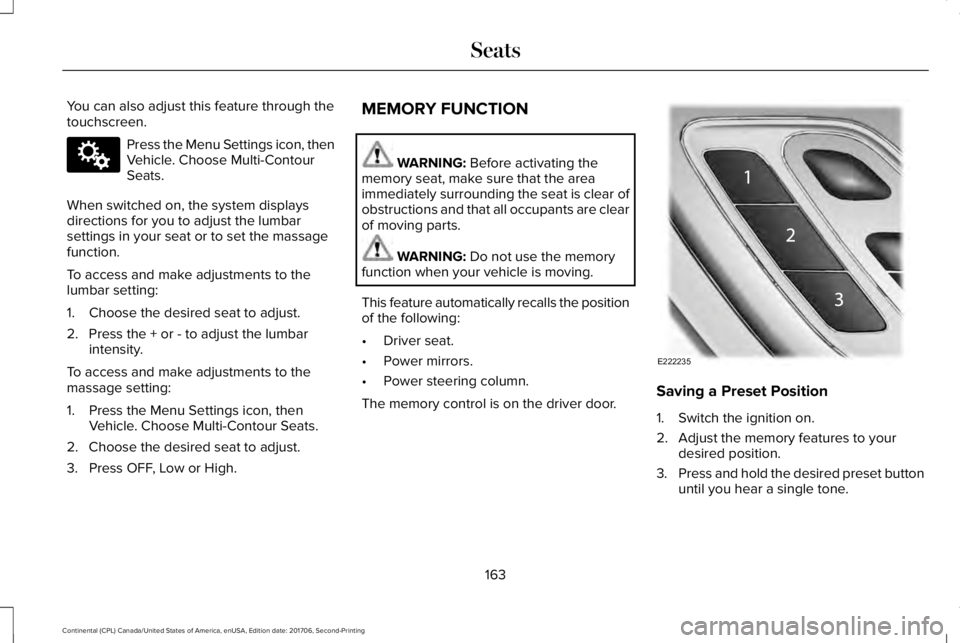
You can also adjust this feature through thetouchscreen.
Press the Menu Settings icon, thenVehicle. Choose Multi-ContourSeats.
When switched on, the system displaysdirections for you to adjust the lumbarsettings in your seat or to set the massagefunction.
To access and make adjustments to thelumbar setting:
1. Choose the desired seat to adjust.
2. Press the + or - to adjust the lumbarintensity.
To access and make adjustments to themassage setting:
1. Press the Menu Settings icon, thenVehicle. Choose Multi-Contour Seats.
2. Choose the desired seat to adjust.
3. Press OFF, Low or High.
MEMORY FUNCTION
WARNING: Before activating thememory seat, make sure that the areaimmediately surrounding the seat is clear ofobstructions and that all occupants are clearof moving parts.
WARNING: Do not use the memoryfunction when your vehicle is moving.
This feature automatically recalls the positionof the following:
•Driver seat.
•Power mirrors.
•Power steering column.
The memory control is on the driver door.Saving a Preset Position
1. Switch the ignition on.
2. Adjust the memory features to yourdesired position.
3.Press and hold the desired preset buttonuntil you hear a single tone.
163
Continental (CPL) Canada/United States of America, enUSA, Edition date: 201706, Second-Printing
SeatsE142607 E222235
Page 167 of 615
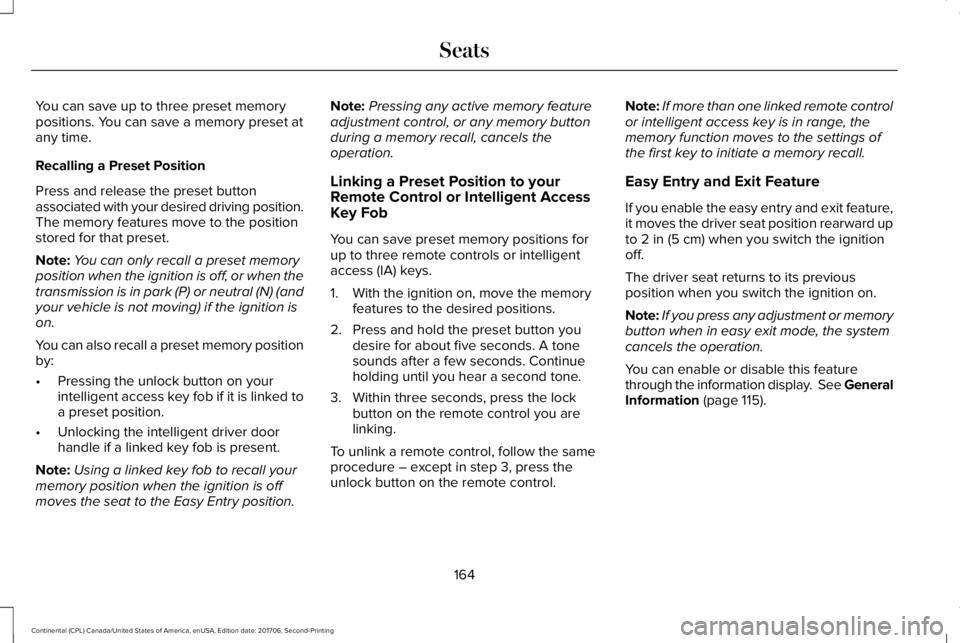
You can save up to three preset memorypositions. You can save a memory preset atany time.
Recalling a Preset Position
Press and release the preset buttonassociated with your desired driving position.The memory features move to the positionstored for that preset.
Note:You can only recall a preset memoryposition when the ignition is off, or when thetransmission is in park (P) or neutral (N) (andyour vehicle is not moving) if the ignition ison.
You can also recall a preset memory positionby:
•Pressing the unlock button on yourintelligent access key fob if it is linked toa preset position.
•Unlocking the intelligent driver doorhandle if a linked key fob is present.
Note:Using a linked key fob to recall yourmemory position when the ignition is offmoves the seat to the Easy Entry position.
Note:Pressing any active memory featureadjustment control, or any memory buttonduring a memory recall, cancels theoperation.
Linking a Preset Position to yourRemote Control or Intelligent AccessKey Fob
You can save preset memory positions forup to three remote controls or intelligentaccess (IA) keys.
1. With the ignition on, move the memoryfeatures to the desired positions.
2. Press and hold the preset button youdesire for about five seconds. A tonesounds after a few seconds. Continueholding until you hear a second tone.
3. Within three seconds, press the lockbutton on the remote control you arelinking.
To unlink a remote control, follow the sameprocedure – except in step 3, press theunlock button on the remote control.
Note:If more than one linked remote controlor intelligent access key is in range, thememory function moves to the settings ofthe first key to initiate a memory recall.
Easy Entry and Exit Feature
If you enable the easy entry and exit feature,it moves the driver seat position rearward upto 2 in (5 cm) when you switch the ignitionoff.
The driver seat returns to its previousposition when you switch the ignition on.
Note:If you press any adjustment or memorybutton when in easy exit mode, the systemcancels the operation.
You can enable or disable this featurethrough the information display. See GeneralInformation (page 115).
164
Continental (CPL) Canada/United States of America, enUSA, Edition date: 201706, Second-Printing
Seats
Page 171 of 615

Press the heated seat symbol to cyclethrough the various heat settings and off.More indicator lights indicate warmersettings.
The heated seat module resets at everyignition run cycle. While the ignition is on,press the high or low heated seat switch toenable heating mode. When activated, theywill turn off automatically when you turn theengine off.
CLIMATE CONTROLLED SEATS (If
Equipped)
Heated Seats
WARNING: People who are unable tofeel pain to their skin because of advancedage, chronic illness, diabetes, spinal cordinjury, medication, alcohol use, exhaustionor other physical conditions, must usecaution when using the heated seat. Theheated seat may cause burns even at lowtemperatures, especially if used for longperiods of time. Do not place anything on
the seat that may block the heat, such as ablanket or cushion. This can cause theheated seat to overheat. Do not puncturethe seat with pins, needles or other pointedobjects. This damages the heating elementand can cause the heated seat to overheat.An overheated seat may cause seriouspersonal injury.
Note:The heated seats switch on during aremote start if they are enabled through theinformation displays. See GeneralInformation (page 115).
Note:The heated seats may also switch onwhen you start your vehicle if they were onwhen you previously switched your vehicleoff.
Note:Do not do the following:
•Place heavy objects on the seat.
•Operate the seat heater if water or anyother liquid spills on the seat. Allow theseat to dry thoroughly.
Press this symbol to cycle through thevarious heat settings and off. More indicatorlights indicate warmer settings.
Ventilated Seats
Note:The ventilated seats switch on duringa remote start if they are enabled throughthe information displays. See GeneralInformation (page 115).
Note:The ventilated seats may also switchon when you start your vehicle if they wereon when you previously switched yourvehicle off.
Note:Do not do the following:
168
Continental (CPL) Canada/United States of America, enUSA, Edition date: 201706, Second-Printing
SeatsE146322