Page 159 of 615

The rear center head restraint consists of:
An energy absorbing headrestraint.A
Two steel stems.B
Guide sleeve adjust and unlockbutton.C
Guide sleeve unlock and removebutton.D
Raising the Head Restraint
Pull the head restraint up.
Lowering the Head Restraint
1. Press and hold button C.
2. Push the head restraint down.
Removing the Head Restraint
1.Pull the head restraint up until it reachesits highest position.
2. Press and hold buttons C and D.
3. Pull the head restraint up.
Installing the Head Restraint
Align the steel stems into the guide sleevesand push the head restraint down until itlocks.
Power Front Head Restraints (If equipped)
To raise the head restraint, lift the switch upuntil you reach a comfortable height.
To lower the head restraint, press the switchdown.
To move the head restraint forward, pushthe switch forward until you reach thedesired position.
To move the head restraint rearward, pushthe switch rearward.
Power Rear Head Restraints (If Equipped)
Press the button on the overhead consoleto fold the rear outboard head restraints.
Note:If your vehicle has power rear headrestraints, you cannot remove them.
156
Continental (CPL) Canada/United States of America, enUSA, Edition date: 201706, Second-Printing
SeatsE222280 E229803
Page 160 of 615
POWER SEATS
WARNING: Do not adjust the driverseat or seat backrest when your vehicle ismoving. This may result in sudden seatmovement, causing the loss of control of yourvehicle.
WARNING: Do not place cargo or anyobjects behind the seatback before returningit to the original position.
The power seat controls are on the door.
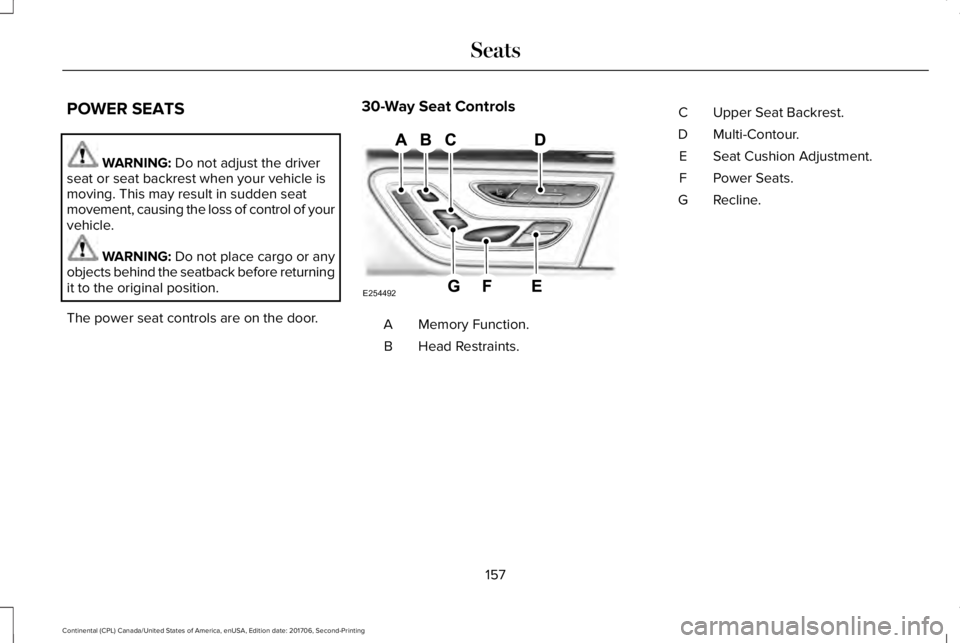
30-Way Seat Controls
Memory Function.A
Head Restraints.B
Upper Seat Backrest.C
Multi-Contour.D
Seat Cushion Adjustment.E
Power Seats.F
Recline.G
157
Continental (CPL) Canada/United States of America, enUSA, Edition date: 201706, Second-Printing
SeatsE254492
Page 161 of 615
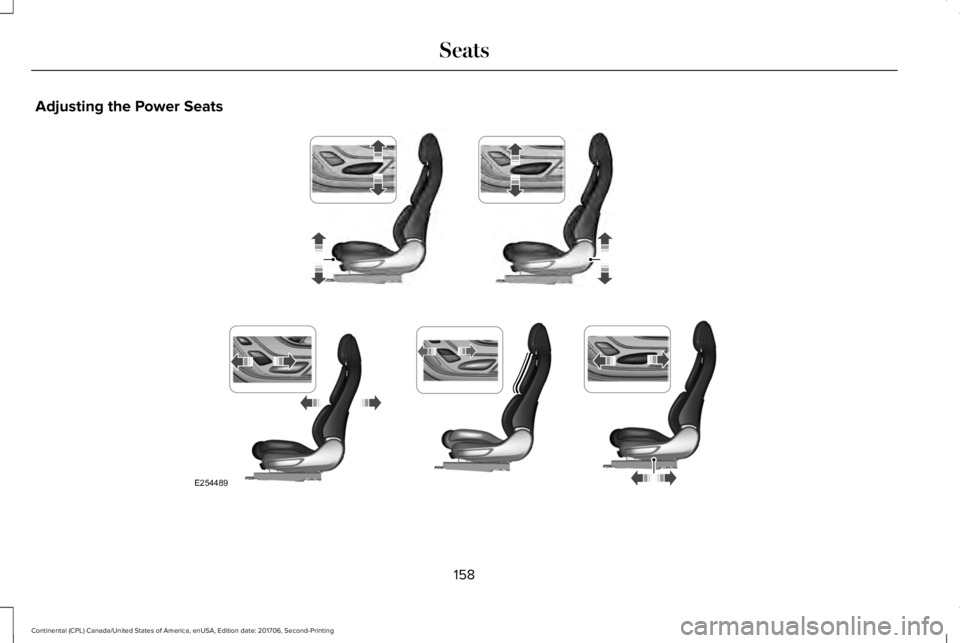
Adjusting the Power Seats
158
Continental (CPL) Canada/United States of America, enUSA, Edition date: 201706, Second-Printing
SeatsE254489
Page 162 of 615
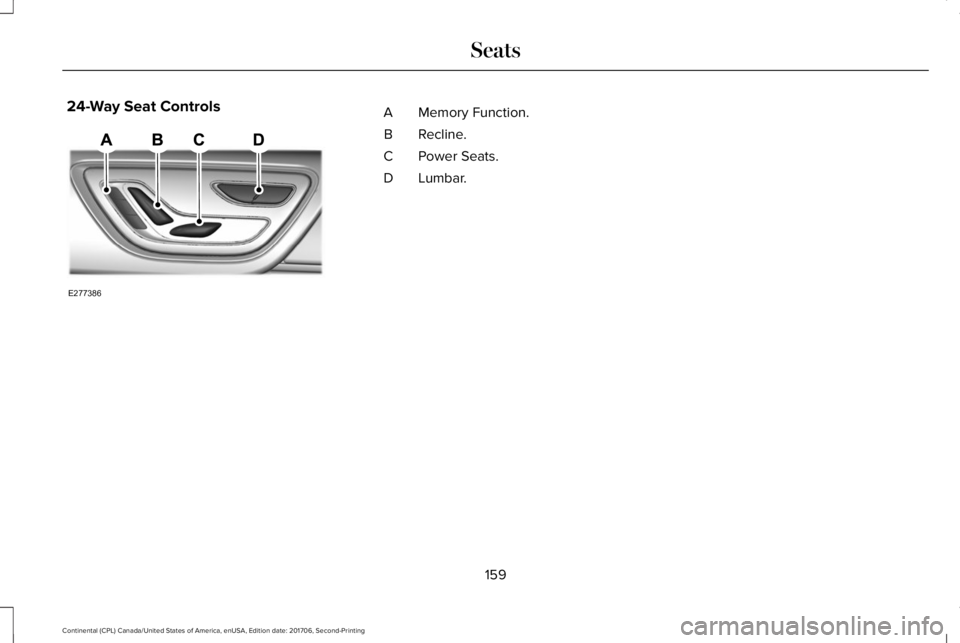
24-Way Seat ControlsMemory Function.A
Recline.B
Power Seats.C
Lumbar.D
159
Continental (CPL) Canada/United States of America, enUSA, Edition date: 201706, Second-Printing
SeatsE277386
Page 163 of 615
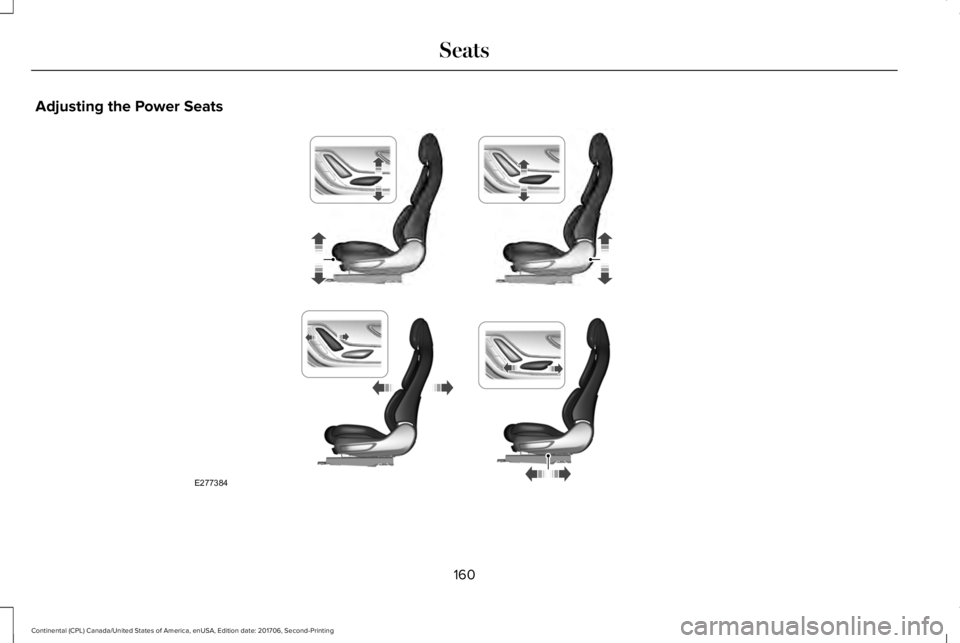
Adjusting the Power Seats
160
Continental (CPL) Canada/United States of America, enUSA, Edition date: 201706, Second-Printing
SeatsE277384
Page 164 of 615
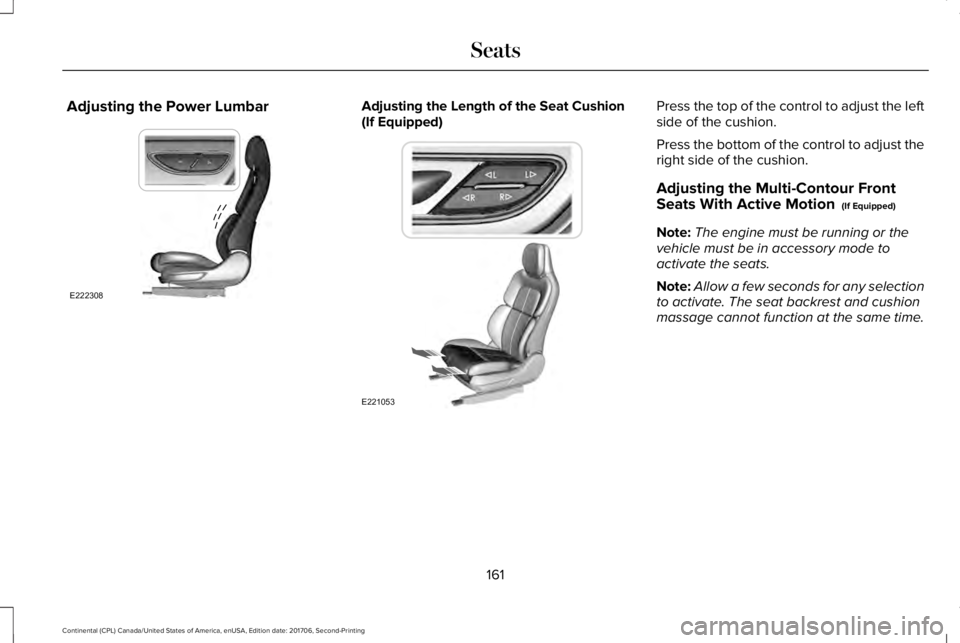
Adjusting the Power LumbarAdjusting the Length of the Seat Cushion(If Equipped)Press the top of the control to adjust the leftside of the cushion.
Press the bottom of the control to adjust theright side of the cushion.
Adjusting the Multi-Contour FrontSeats With Active Motion (If Equipped)
Note:The engine must be running or thevehicle must be in accessory mode toactivate the seats.
Note:Allow a few seconds for any selectionto activate. The seat backrest and cushionmassage cannot function at the same time.
161
Continental (CPL) Canada/United States of America, enUSA, Edition date: 201706, Second-Printing
SeatsE222308 E221053
Page 165 of 615
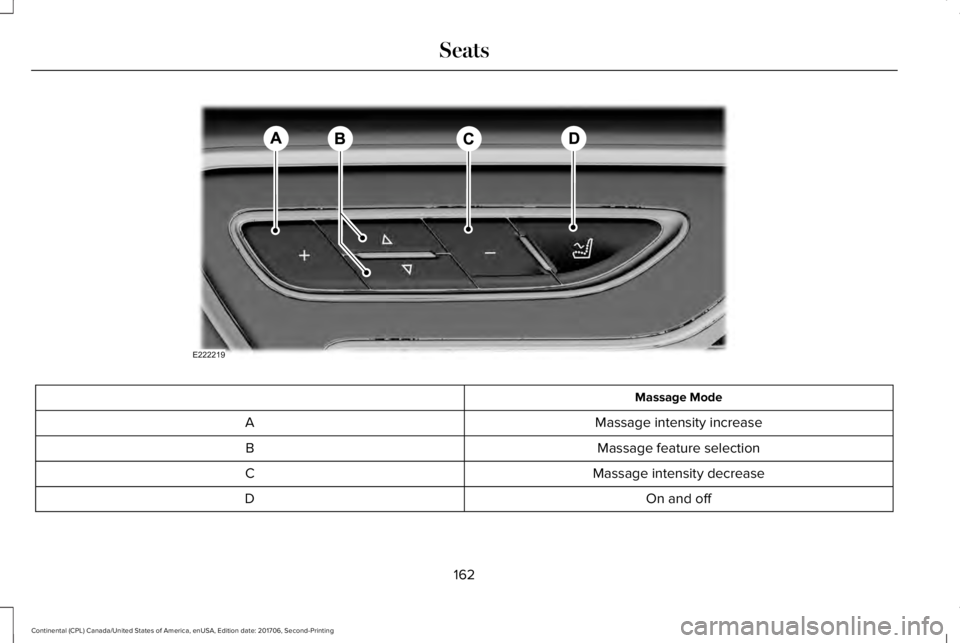
Massage Mode
Massage intensity increaseA
Massage feature selectionB
Massage intensity decreaseC
On and offD
162
Continental (CPL) Canada/United States of America, enUSA, Edition date: 201706, Second-Printing
SeatsE222219
Page 166 of 615
You can also adjust this feature through thetouchscreen.
Press the Menu Settings icon, thenVehicle. Choose Multi-ContourSeats.
When switched on, the system displaysdirections for you to adjust the lumbarsettings in your seat or to set the massagefunction.
To access and make adjustments to thelumbar setting:
1. Choose the desired seat to adjust.
2. Press the + or - to adjust the lumbarintensity.
To access and make adjustments to themassage setting:
1. Press the Menu Settings icon, thenVehicle. Choose Multi-Contour Seats.
2. Choose the desired seat to adjust.
3. Press OFF, Low or High.
MEMORY FUNCTION
WARNING: Before activating thememory seat, make sure that the areaimmediately surrounding the seat is clear ofobstructions and that all occupants are clearof moving parts.
WARNING: Do not use the memoryfunction when your vehicle is moving.
This feature automatically recalls the positionof the following:
•Driver seat.
•Power mirrors.
•Power steering column.
The memory control is on the driver door.Saving a Preset Position
1. Switch the ignition on.
2. Adjust the memory features to yourdesired position.
3.Press and hold the desired preset buttonuntil you hear a single tone.
163
Continental (CPL) Canada/United States of America, enUSA, Edition date: 201706, Second-Printing
SeatsE142607 E222235