2018 LINCOLN CONTINENTAL lights
[x] Cancel search: lightsPage 470 of 615

Mute: Press to mute the audionavigation guidance. Press thebutton again to un-mute theguidance.
Points of Interest (POI) groupingicon: You can choose up to threePOI icons to display on the map. Ifthe chosen POIs are located closetogether or are at the same location a box isused to display a single category icon
instead of repeating the same icon, in orderto reduce clutter. When you select the boxon the map, a pop-up appears indicating howmany POIs are in this location. Select the popup to see a list of the available POIs. You canscroll through and select POIs from this list.
If your vehicle is low on charge or fuel,station icons automatically display on themap.
If you have subscribed to SiriusXM Trafficand Travel Link (where available), traffic flowwill be indicated on the map by green (clear),yellow (slowing), and red (stopped) roadhighlights. Traffic flow is indicated where theinformation is available and varies across theUS.
You can choose to display traffic icons onthe map representing twelve different typesof incidents. See Settings (page 480).
You can set a destination by hovering abovea location and selecting:
Button
Start
Destination Mode
To set a destination, press:
DescriptionMenu Item
Destination
Enter a navigation destination in any of the following formats:
Street AddressSearch
467
Continental (CPL) Canada/United States of America, enUSA, Edition date: 201706, Second-Printing
SYNC™ 3E251780 E251779 E207754
Page 528 of 615
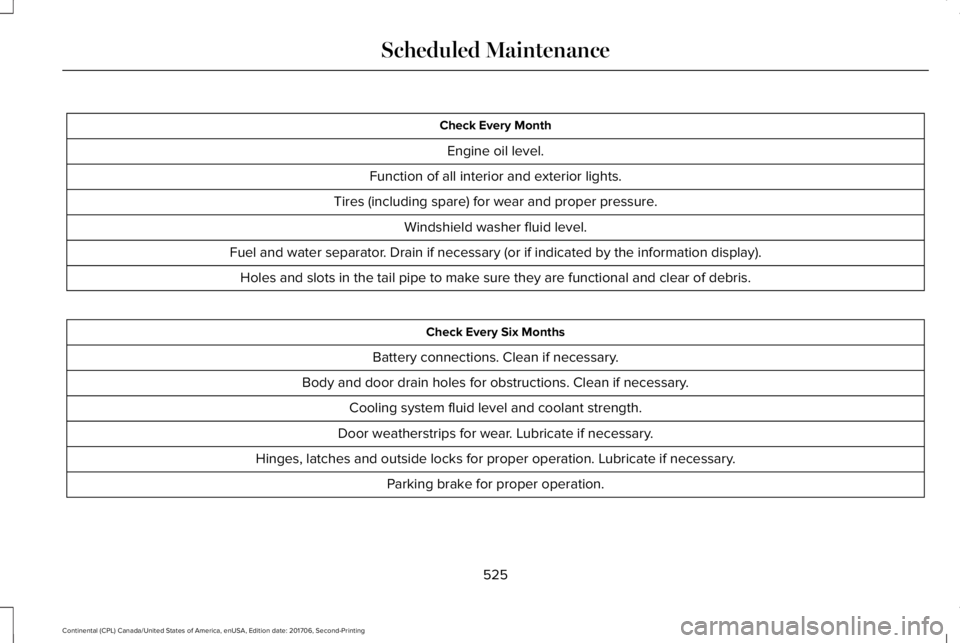
Check Every Month
Engine oil level.
Function of all interior and exterior lights.
Tires (including spare) for wear and proper pressure.
Windshield washer fluid level.
Fuel and water separator. Drain if necessary (or if indicated by the information display).
Holes and slots in the tail pipe to make sure they are functional and clear of debris.
Check Every Six Months
Battery connections. Clean if necessary.
Body and door drain holes for obstructions. Clean if necessary.
Cooling system fluid level and coolant strength.
Door weatherstrips for wear. Lubricate if necessary.
Hinges, latches and outside locks for proper operation. Lubricate if necessary.
Parking brake for proper operation.
525
Continental (CPL) Canada/United States of America, enUSA, Edition date: 201706, Second-Printing
Scheduled Maintenance
Page 606 of 615

Changing a Fuse..........................................309Fuses.....................................................................309
Changing a Road Wheel.............................364Dissimilar Spare Wheel and Tire AssemblyInformation......................................................365Stowing the flat tire ...........................................369Tire Change Procedure....................................366
Changing the 12V Battery..........................325Changing the Engine Air Filter - 2.7LEcoBoost™/3.0L EcoBoost™.....................332Changing the Engine Air Filter - 3.7L......332Changing the Wiper Blades.......................327Changing the Windshield Wiper Blades......328
Checking MyKey System Status.................64MyKey Distance.....................................................64Number of Admin Keys.......................................65Number of MyKeys...............................................64
Checking the Wiper Blades.......................327Child Restraint and SeatbeltMaintenance..................................................44Child Restraint Positioning...........................33Child Safety.......................................................19General Information..............................................19
Child Safety Locks..........................................34Child Seats........................................................21Cleaning Leather Seats...............................341Cleaning Products........................................334Materials................................................................334
Cleaning the Engine....................................337Cleaning the Exterior...................................335Cleaning the Headlamps..................................335Exterior Chrome Parts.......................................336Exterior Plastic Parts..........................................336Stripes or Graphics............................................336Underbody...........................................................336Under Hood.........................................................336
Cleaning the Instrument Panel andInstrument Cluster Lens...........................340Cleaning the Interior....................................338Cleaning Black Label or PresidentialInterior...............................................................338
Cleaning the Wheels....................................341Cleaning the Windows and WiperBlades...........................................................337Clearing All MyKeys.......................................64Climate............................................................454Climate Control..............................................146Climate Controlled Seats............................168Ventilated Seats...................................................168
Coolant CheckSee: Engine Coolant Check..............................319
Crash Sensors and Airbag Indicator..........55Creating a MyKey...........................................63Programming/Changing ConfigurableSettings...............................................................64
Cross Traffic Alert.........................................255Blocked Sensors................................................258Switching the System Off and On..................258System Errors......................................................258System Lights, Messages and AudibleAlerts.................................................................258System Limitations.............................................258Using the Cross Traffic Alert System............255
Cruise Control.................................................86Principle of Operation.......................................237Type One................................................................86Type Two.................................................................87
Cruise controlSee: Using Cruise Control................................237
Customer Assistance..................................286
D
Data Recording................................................10Event Data Recording...........................................10Service Data Recording.......................................10
Daytime Running Lamps...............................94Type One - Conventional(Non-Configurable)..........................................95Type Two - Configurable....................................95
Direction Indicators........................................97Indicating a Lane Change...................................97
Doors and Locks.............................................67
603
Continental (CPL) Canada/United States of America, enUSA, Edition date: 201706, Second-Printing
Index
Page 614 of 615

Tire Pressure Monitoring System.............359Changing Tires With a Tire PressureMonitoring System..........................................361Understanding Your Tire Pressure MonitoringSystem ..............................................................361
TiresSee: Wheels and Tires......................................344
Toll Reader......................................................105Installing the Toll Reader...................................105
Towing a Trailer..............................................271Load Placement...................................................271
Towing the Vehicle on Four Wheels........275Emergency Towing.............................................275Recreational Towing..........................................275
Towing..............................................................271Traction Control.............................................216Principle of Operation........................................216
Transmission Code Designation...............381Transmission...................................................194Transporting the Vehicle............................285Type Approvals.............................................590Radio Frequency Certification Logos for BlindSpot Information System.............................598Radio Frequency Certification Logos for MidRange Radar....................................................593Radio Frequency Certification Logos forPassive Anti-Theft System...........................594
Radio Frequency Certification Logos for RadioTransceiver Module......................................596Radio Frequency Certification Logos for SYNC3.........................................................................599Radio Frequency Certification Logos for TirePressure Monitoring Sensor(s)...................590Radio Frequency Certification Logos forWireless Charging.........................................599
U
Under Hood Overview - 2.7L EcoBoost™/3.7L.................................................................315Under Hood Overview - 3.0L.....................313Universal Garage Door Opener..................171HomeLink Wireless Control System................171
USB Port..........................................................412Using Adaptive Cruise Control.................238Automatic Cancellation.....................................242Blocked Sensor...................................................244Canceling the Set Speed.................................242Changing the Set Speed..................................242Detection Issues.................................................242Following a Vehicle...........................................240Following a Vehicle to a CompleteStop...................................................................240Hilly Condition Usage.......................................242Overriding the Set Speed.................................241
Park Brake Application.....................................242Resuming the Set Speed..................................242Setting the Adaptive Cruise Speed...............239Setting the Adaptive Cruise Speed When YourVehicle is Stationary......................................239Setting the Gap Distance.................................240Switching Adaptive Cruise Control Off.........242Switching Adaptive Cruise Control On.........239Switching to Normal Cruise Control..............245System Not Available........................................244
Using All-Wheel Drive.................................200Driving In Special Conditions With All-WheelDrive (AWD).....................................................202Operating AWD Vehicles With Spare orMismatched Tires..........................................202
Using Cruise Control...................................237Switching Cruise Control Off...........................238Switching Cruise Control On...........................237
Using MyKey With Remote StartSystems..........................................................65Using Snow Chains......................................358Using Stability Control.................................218Using Summer Tires....................................358Using Traction Control.................................216Switching the System Off..................................216System Indicator Lights and Messages.........216Using a Switch.....................................................216Using the Information Display Controls........216
611
Continental (CPL) Canada/United States of America, enUSA, Edition date: 201706, Second-Printing
Index