2018 LINCOLN CONTINENTAL ESP
[x] Cancel search: ESPPage 216 of 615

HILL START ASSIST
WARNING: The system does notreplace the parking brake. When you leaveyour vehicle, always apply the parking brakeand shift the transmission into park (P) forautomatic transmission or first gear formanual transmission.
WARNING: You must remain in yourvehicle when the system turns on. At alltimes, you are responsible for controllingyour vehicle, supervising the system andintervening, if required. Failure to take caremay result in the loss of control of yourvehicle, serious personal injury or death.
WARNING: The system turns off if thereis a malfunction or if you excessively rev theengine.
The system makes it easier to pull awaywhen your vehicle is on a slope without theneed to use the parking brake.
When the system activates, your vehicleremains stationary on a slope for a fewseconds after you release the brake pedal.This allows you time to move your foot fromthe brake to the accelerator pedal. Thebrakes release when the engine hasdeveloped sufficient torque to prevent yourvehicle from rolling down the slope. This isan advantage when pulling away on a slope,for example from a car park ramp, trafficlights or when reversing uphill into a parkingspace.
The system activates on any slope thatcauses your vehicle to roll.
Note:There is no warning lamp to indicatethe system is either on or off.
Using Hill Start Assist
1. Press the brake pedal to bring yourvehicle to a complete standstill. Keep thebrake pedal pressed and shift into firstgear when facing uphill or reverse (R)when facing downhill.
2. The system activates if the sensorsdetect that your vehicle is on a slope.
3. When you remove your foot from thebrake pedal, your vehicle remains on theslope without rolling away for a fewseconds. This hold time increases if youare in the process of driving off.
4. Pull away in the normal manner.
Switching the System On and Off
Vehicles with Manual Transmission
You can switch this feature on or off in theinformation display. The system remembersthe last setting when you start your vehicle.
Vehicles with Automatic Transmission
The system turns on when you switch theignition on and you cannot switch the systemoff.
AUTO HOLD
WARNING: The system does notreplace the parking brake. When you leaveyour vehicle, always apply the parking brake.
213
Continental (CPL) Canada/United States of America, enUSA, Edition date: 201706, Second-Printing
Brakes
Page 217 of 615
WARNING: You must remain in yourvehicle when the system turns on. At alltimes, you are responsible for controllingyour vehicle, supervising the system andintervening, if required. Failure to take caremay result in the loss of control of yourvehicle, serious personal injury or death.
WARNING: The system will turn off ifa malfunction is apparent or if you rev theengine excessively. Failure to take care mayresult in the loss of control of your vehicle,serious personal injury or death.
Auto Hold uses your vehicle's brake to holdyour vehicle at a stop once your vehicle hasreached a standstill condition. For example,Auto Hold can assist you while stopping attraffic lights or while in traffic jams by holdingthe brake pressure for you once you bringyour vehicle to a stop.
Switch Auto Hold off during vehicle or trailertowing.
Note:In case of a malfunction in the systemwhile Auto Hold actively holds the vehicle(for example, low power supply), a messageappears in the information display askingyou to press the brake pedal. If you see thismessage, press the brake pedalimmediately.
Note: Auto Hold only activates if the systemrecognizes it is applying enough brakepressure. On a steep hill or slope, make sureyou press the brake pedal sufficiently toactivate the Auto Hold system.
Note:In some cases, Auto Hold might handover to the parking brake. When the parkingbrake applies, the red brake lamp appears.This is normal. When you press theaccelerator pedal, the drive away releasefeature releases the parking brake.
Note:Auto Hold works on all road grades.
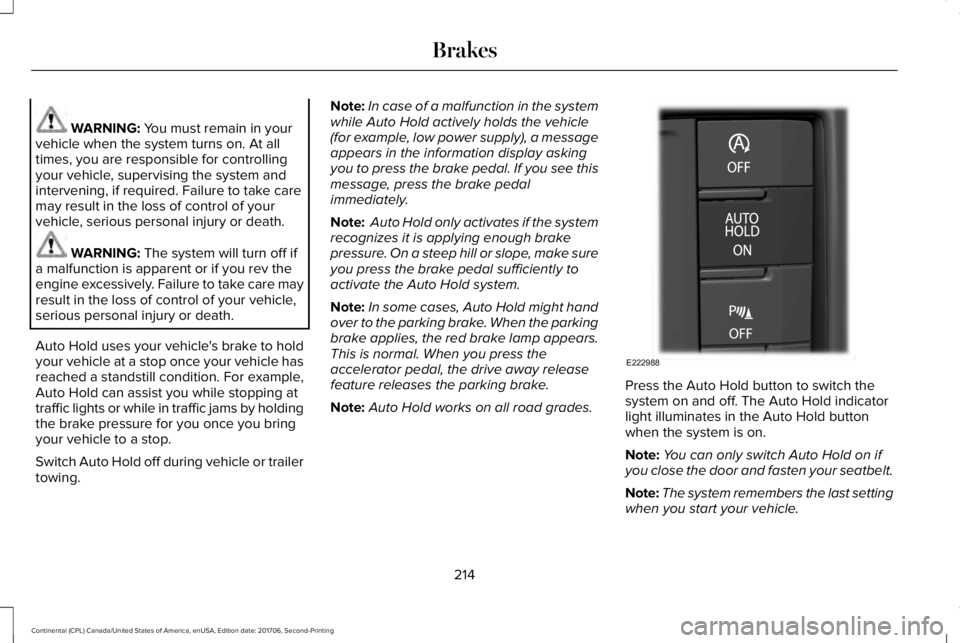
Press the Auto Hold button to switch thesystem on and off. The Auto Hold indicatorlight illuminates in the Auto Hold buttonwhen the system is on.
Note:You can only switch Auto Hold on ifyou close the door and fasten your seatbelt.
Note:The system remembers the last settingwhen you start your vehicle.
214
Continental (CPL) Canada/United States of America, enUSA, Edition date: 201706, Second-Printing
BrakesE222988
Page 226 of 615

If the transmission is in neutral (N), the sidesensing system provides visual distanceindication only when your vehicle is movingbelow a speed of 5 mph (8 km/h) and thereis a front or rear parking aid obstacledetected, and the side obstacle is within24 in (60 cm) from the side of your vehicle.When you stop your vehicle the visualdistance indication stops after four seconds.
If the side sensing system is not available,the side distance indicator blocks do notappear.
The side sensing system is not availableunder the following condition:
•If you switch the traction control systemoff.
The side sensing system may not beavailable until you have driven approximatelythe length of your vehicle in order for thesystem to reinitialize if:
•You switch the ignition on, off and backon.
•Your vehicle remains stationary for overtwo minutes.
•The anti-lock brake system is activated.
•The traction control system is activated.
•When the steering wheel angleinformation is not available, the sidesensing system is not available. Thevehicle must be driven at least 492 ft(150 m) above 19 mph (30 km/h) torecover the steering wheel angleinformation.
ACTIVE PARK ASSIST (If Equipped)
WARNING: You must remain in yourvehicle when the system turns on. At alltimes, you are responsible for controllingyour vehicle, supervising the system andintervening, if required. Failure to take caremay result in the loss of control of yourvehicle, serious personal injury or death.
WARNING: The sensors may not detectobjects in heavy rain or other conditions thatcause interference.
WARNING: Active park assist does notapply the brakes under any circumstances.
WARNING: You are responsible forcontrolling your vehicle at all times. Thesystem is designed to be an aid and doesnot relieve you of your responsibility to drivewith due care and attention. Failure to followthis instruction could result in the loss ofcontrol of your vehicle, personal injury ordeath.
Active park assist is a multi-step process andmay require you to shift the transmissionmultiple times. Follow the onscreeninstructions until the parking maneuver iscomplete.
If you are uncomfortable with the proximityto any vehicle or object, you may choose tooverride the system by grabbing the steeringwheel, or by taking full control of your vehicleafter pressing the active park assist button.
Keep your hands, hair, clothing and anyloose items clear of the steering wheel whenusing active park assist.
The sensors are on the front and rearbumpers.
223
Continental (CPL) Canada/United States of America, enUSA, Edition date: 201706, Second-Printing
Parking Aids
Page 228 of 615
To toggle through the modes, use thebuttons on the information display to selectthe following:
•Parallel parking.
•Perpendicular parking.
•Parallel park out assist.
•Switch the system off.
Note:There is no time limit for togglingthrough the modes.
Parallel Parking
The system detects available parallel parkingspaces and steers your vehicle into thespace. You control the accelerator, gearshiftand brakes. The system visually and audiblyguides you into a parallel parking space.
Press the button once to searchfor a parking space.
Note:You can also switch the system onafter you have already driven partially orcompletely past a parking space. Press theactive park assist button and the systeminforms you if you have recently passed asuitable parking space.
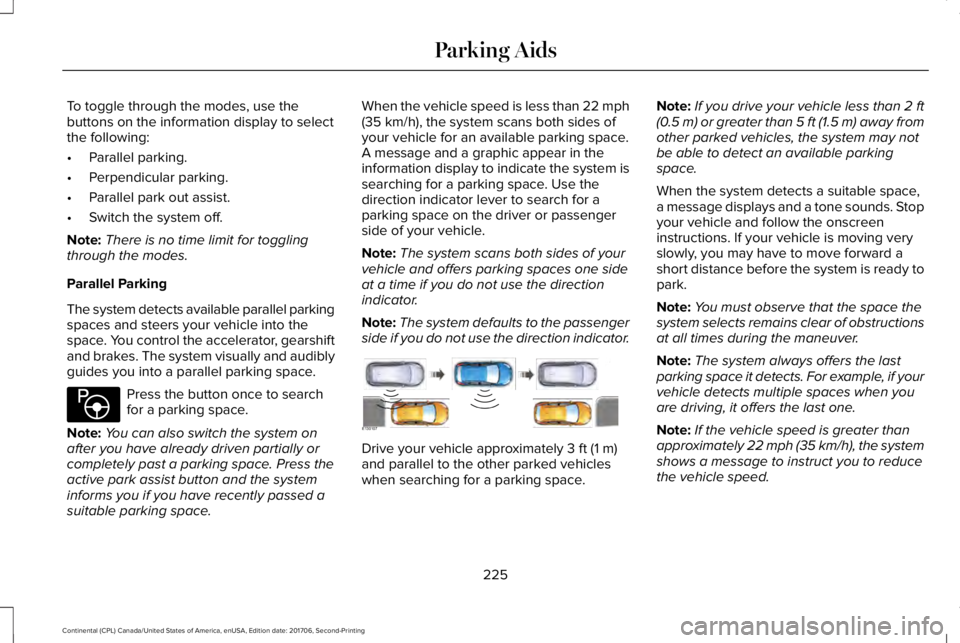
When the vehicle speed is less than 22 mph(35 km/h), the system scans both sides ofyour vehicle for an available parking space.A message and a graphic appear in theinformation display to indicate the system issearching for a parking space. Use thedirection indicator lever to search for aparking space on the driver or passengerside of your vehicle.
Note:The system scans both sides of yourvehicle and offers parking spaces one sideat a time if you do not use the directionindicator.
Note:The system defaults to the passengerside if you do not use the direction indicator.
Drive your vehicle approximately 3 ft (1 m)and parallel to the other parked vehicleswhen searching for a parking space.
Note:If you drive your vehicle less than 2 ft(0.5 m) or greater than 5 ft (1.5 m) away fromother parked vehicles, the system may notbe able to detect an available parkingspace.
When the system detects a suitable space,a message displays and a tone sounds. Stopyour vehicle and follow the onscreeninstructions. If your vehicle is moving veryslowly, you may have to move forward ashort distance before the system is ready topark.
Note:You must observe that the space thesystem selects remains clear of obstructionsat all times during the maneuver.
Note:The system always offers the lastparking space it detects. For example, if yourvehicle detects multiple spaces when youare driving, it offers the last one.
Note:If the vehicle speed is greater thanapproximately 22 mph (35 km/h), the systemshows a message to instruct you to reducethe vehicle speed.
225
Continental (CPL) Canada/United States of America, enUSA, Edition date: 201706, Second-Printing
Parking AidsE146186 E130107
Page 229 of 615
Automatically Steering into a ParallelParking Space
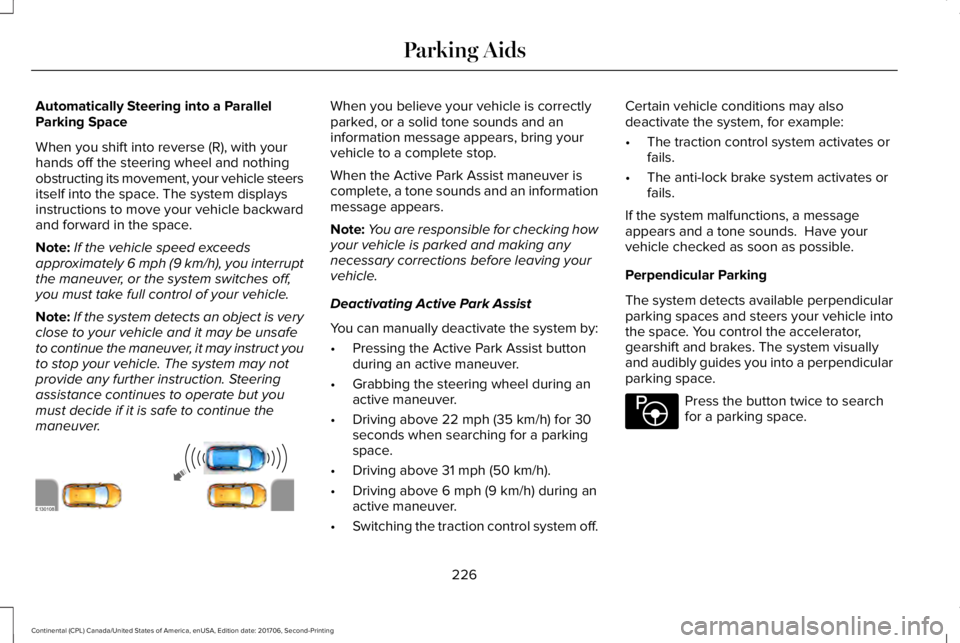
When you shift into reverse (R), with yourhands off the steering wheel and nothingobstructing its movement, your vehicle steersitself into the space. The system displaysinstructions to move your vehicle backwardand forward in the space.
Note:If the vehicle speed exceedsapproximately 6 mph (9 km/h), you interruptthe maneuver, or the system switches off,you must take full control of your vehicle.
Note:If the system detects an object is veryclose to your vehicle and it may be unsafeto continue the maneuver, it may instruct youto stop your vehicle. The system may notprovide any further instruction. Steeringassistance continues to operate but youmust decide if it is safe to continue themaneuver.
When you believe your vehicle is correctlyparked, or a solid tone sounds and aninformation message appears, bring yourvehicle to a complete stop.
When the Active Park Assist maneuver iscomplete, a tone sounds and an informationmessage appears.
Note:You are responsible for checking howyour vehicle is parked and making anynecessary corrections before leaving yourvehicle.
Deactivating Active Park Assist
You can manually deactivate the system by:
•Pressing the Active Park Assist buttonduring an active maneuver.
•Grabbing the steering wheel during anactive maneuver.
•Driving above 22 mph (35 km/h) for 30seconds when searching for a parkingspace.
•Driving above 31 mph (50 km/h).
•Driving above 6 mph (9 km/h) during anactive maneuver.
•Switching the traction control system off.
Certain vehicle conditions may alsodeactivate the system, for example:
•The traction control system activates orfails.
•The anti-lock brake system activates orfails.
If the system malfunctions, a messageappears and a tone sounds. Have yourvehicle checked as soon as possible.
Perpendicular Parking
The system detects available perpendicularparking spaces and steers your vehicle intothe space. You control the accelerator,gearshift and brakes. The system visuallyand audibly guides you into a perpendicularparking space.
Press the button twice to searchfor a parking space.
226
Continental (CPL) Canada/United States of America, enUSA, Edition date: 201706, Second-Printing
Parking AidsE130108 E146186
Page 231 of 615
When you believe your vehicle is correctlyparked, or a solid tone sounds and aninformation message appears, bring yourvehicle to a complete stop.
When the active park assist maneuver iscomplete, a tone sounds and a messageappears.
Note:You are responsible for checking howyour vehicle is parked and making anynecessary corrections before leaving yourvehicle.
Deactivating Active Park Assist
You can manually deactivate the system by:
•Pressing the Active Park Assist buttonduring an active maneuver.
•Grabbing the steering wheel during anactive maneuver.
•Driving above 19 mph (30 km/h) for 30seconds when searching for a parkingspace.
•Driving above 31 mph (50 km/h).
•Driving above 6 mph (9 km/h) during anactive maneuver.
•Switching the traction control system off.
Certain vehicle conditions may alsodeactivate the system, for example:
•The traction control system activates orfails.
•The anti-lock brake system activates orfails.
If the system malfunctions, a messageappears and a tone sounds. Have yourvehicle checked as soon as possible.
Parallel Park Out Assist
The system steers your vehicle out of aparallel parking space. You control theaccelerator, gearshift and brakes. The systemvisually and audibly guides you out of aparallel parking space.
Note:This system is not intended to assistwhen exiting a perpendicular parking space.
Press the button once when yourvehicle is stationary in a parallelparking space.
Note:If you did not use active park assist toparallel park your vehicle, pressing thebutton once selects parallel park. You mustuse the information display to select parkout assist.
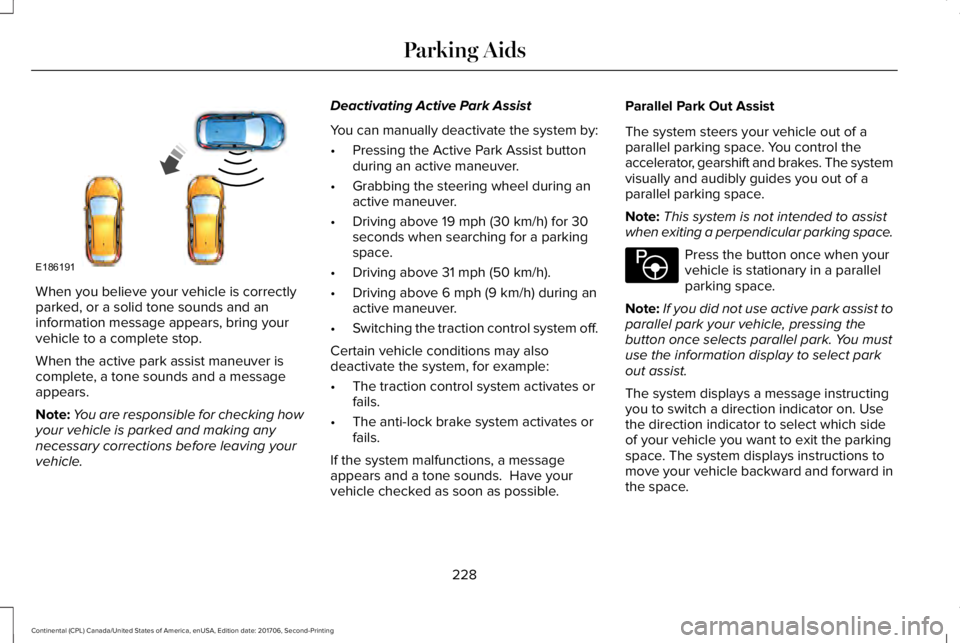
The system displays a message instructingyou to switch a direction indicator on. Usethe direction indicator to select which sideof your vehicle you want to exit the parkingspace. The system displays instructions tomove your vehicle backward and forward inthe space.
228
Continental (CPL) Canada/United States of America, enUSA, Edition date: 201706, Second-Printing
Parking AidsE186191 E146186
Page 232 of 615

Note:If the system detects an object is veryclose to your vehicle and it may be unsafeto continue the maneuver, it may instruct youto stop your vehicle. The system may notprovide any further instruction. Steeringassistance continues to operate but youmust decide if it is safe to continue themaneuver.
After the system directs your vehicle to aposition where you can exit the parkingspace in a forward movement, a messageappears instructing you to take full controlof your vehicle. Generally, hand-over is whenyour vehicle is still inside the parking space.
Note:Parallel Park Out Assist may not beavailable when the clearance to the front orthe rear of your vehicle is too small.
Note:If the vehicle speed exceedsapproximately 6 mph (9 km/h), you interruptthe maneuver, or the system switches off,you must take full control of your vehicle.
Note:You are responsible for controllingyour vehicle and making sure the path isclear prior to pulling into traffic.
Troubleshooting
Possible CauseSymptom
You may have switched the traction control off.The system does not search for a parking space.
The transmission is in reverse (R). Your vehicle must be moving forward to be able todetect a parking space.
The sensors may be blocked. For example, snow, ice or dirt buildup. Blocked sensorscan affect how the system functions.The system does not offer a parking space.
There is not enough room in the parking space for your vehicle to safely park.
There is not enough space for the parking maneuver on the opposite side of the parkingspace.
229
Continental (CPL) Canada/United States of America, enUSA, Edition date: 201706, Second-Printing
Parking AidsE188012
Page 237 of 615

The system uses red, yellow and greenhighlights that appear on top of the videoimage when any of the sensing systemsdetect an object.
Manual Zoom
WARNING: When manual zoom is on,the full area behind your vehicle may notshow. Be aware of your surroundings whenusing the manual zoom feature.
Note:Manual zoom is only available whenthe transmission is in reverse (R).
Note:When you enable manual zoom, onlythe centerline is shown.
Selectable settings for this feature are zoomin (+) and zoom out (-). Press the symbol inthe camera screen to change the view. Thedefault setting is zoom off.
This allows you to get a closer view of anobject behind your vehicle. The zoomedimage keeps the bumper in the image toprovide a reference. The zoom is only activewhile the transmission is in reverse (R).
Rear Camera Delay
Selectable settings for this feature are onand off.
The default setting for the rear camera delayis off.
When shifting the transmission out of reverse(R) and into any gear other than park (P), thecamera image remains in the display until:
•Your vehicle speed sufficiently increases.
•You shift your vehicle into park (P).
360 DEGREE CAMERA (If Equipped)
WARNING: The 360 degree camerasystem still requires the driver to use it inconjunction with looking out of the windows,and checking the interior and exterior mirrorsfor maximum coverage.
WARNING: You may not see objectsthat are close to either corner of the bumperor under the bumper due to the limitedcoverage of the camera system.
WARNING: Use caution when turningcamera features on or off when thetransmission is not in park (P). Make sureyour vehicle is not moving.
WARNING: At all times, you areresponsible for controlling your vehicle,supervising the system and intervening, ifrequired. Failure to take care may result inthe loss of control of your vehicle, seriouspersonal injury or death.
Note:Use caution using the 360 view whenany of the doors are ajar. If a door is ajar,the camera will be out of position and thevideo image may be incorrect.
The 360 degree camera system consists offront, side and rear cameras. The system:
•Allows you to see what is directly in frontor behind your vehicle.
•Provides cross traffic view in front andbehind your vehicle.
234
Continental (CPL) Canada/United States of America, enUSA, Edition date: 201706, Second-Printing
Parking Aids