2018 LINCOLN CONTINENTAL CD player
[x] Cancel search: CD playerPage 485 of 615
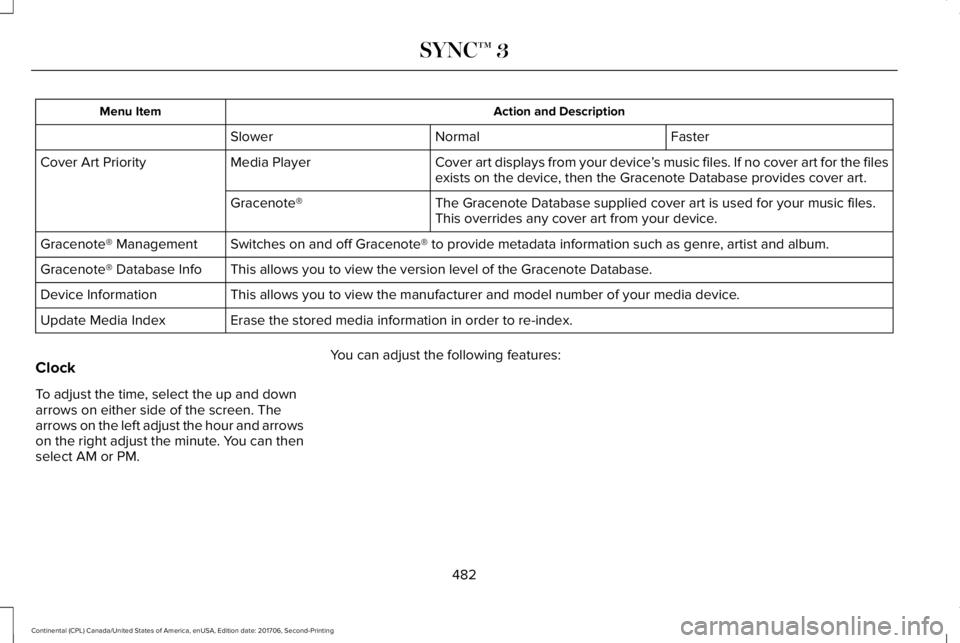
Action and DescriptionMenu Item
FasterNormalSlower
Cover art displays from your device’s music files. If no cover art for the filesexists on the device, then the Gracenote Database provides cover art.Media PlayerCover Art Priority
The Gracenote Database supplied cover art is used for your music files.This overrides any cover art from your device.Gracenote®
Switches on and off Gracenote® to provide metadata information such as genre, artist and album.Gracenote® Management
This allows you to view the version level of the Gracenote Database.Gracenote® Database Info
This allows you to view the manufacturer and model number of your media device.Device Information
Erase the stored media information in order to re-index.Update Media Index
Clock
To adjust the time, select the up and downarrows on either side of the screen. Thearrows on the left adjust the hour and arrowson the right adjust the minute. You can thenselect AM or PM.
You can adjust the following features:
482
Continental (CPL) Canada/United States of America, enUSA, Edition date: 201706, Second-Printing
SYNC™ 3
Page 508 of 615
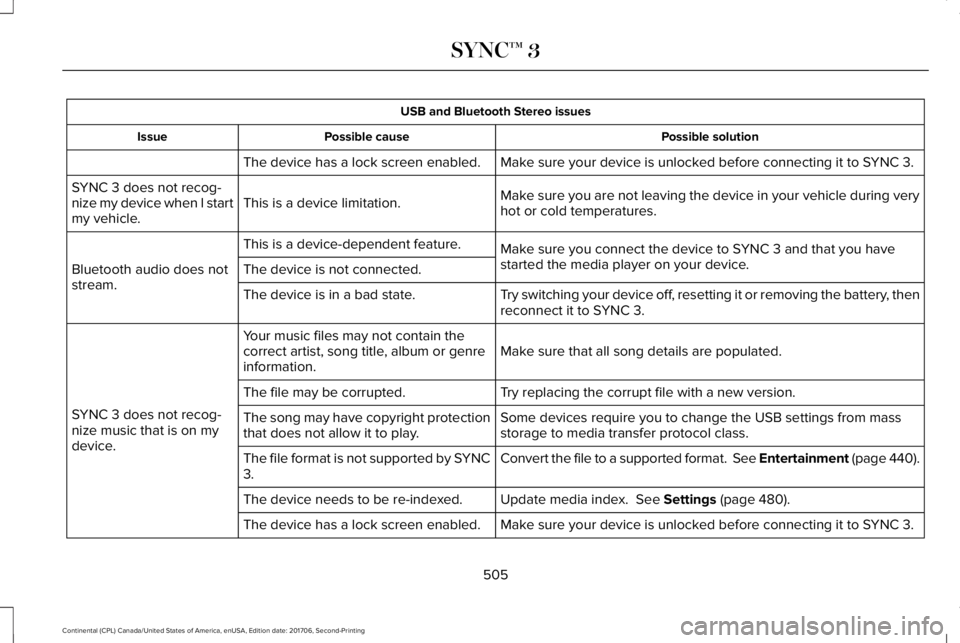
USB and Bluetooth Stereo issues
Possible solutionPossible causeIssue
Make sure your device is unlocked before connecting it to SYNC 3.The device has a lock screen enabled.
Make sure you are not leaving the device in your vehicle during veryhot or cold temperatures.This is a device limitation.SYNC 3 does not recog-nize my device when I startmy vehicle.
Make sure you connect the device to SYNC 3 and that you havestarted the media player on your device.
This is a device-dependent feature.
Bluetooth audio does notstream.The device is not connected.
Try switching your device off, resetting it or removing the battery, thenreconnect it to SYNC 3.The device is in a bad state.
Make sure that all song details are populated.Your music files may not contain thecorrect artist, song title, album or genreinformation.
SYNC 3 does not recog-nize music that is on mydevice.
Try replacing the corrupt file with a new version.The file may be corrupted.
Some devices require you to change the USB settings from massstorage to media transfer protocol class.The song may have copyright protectionthat does not allow it to play.
Convert the file to a supported format. See Entertainment (page 440).The file format is not supported by SYNC3.
Update media index. See Settings (page 480).The device needs to be re-indexed.
Make sure your device is unlocked before connecting it to SYNC 3.The device has a lock screen enabled.
505
Continental (CPL) Canada/United States of America, enUSA, Edition date: 201706, Second-Printing
SYNC™ 3
Page 509 of 615
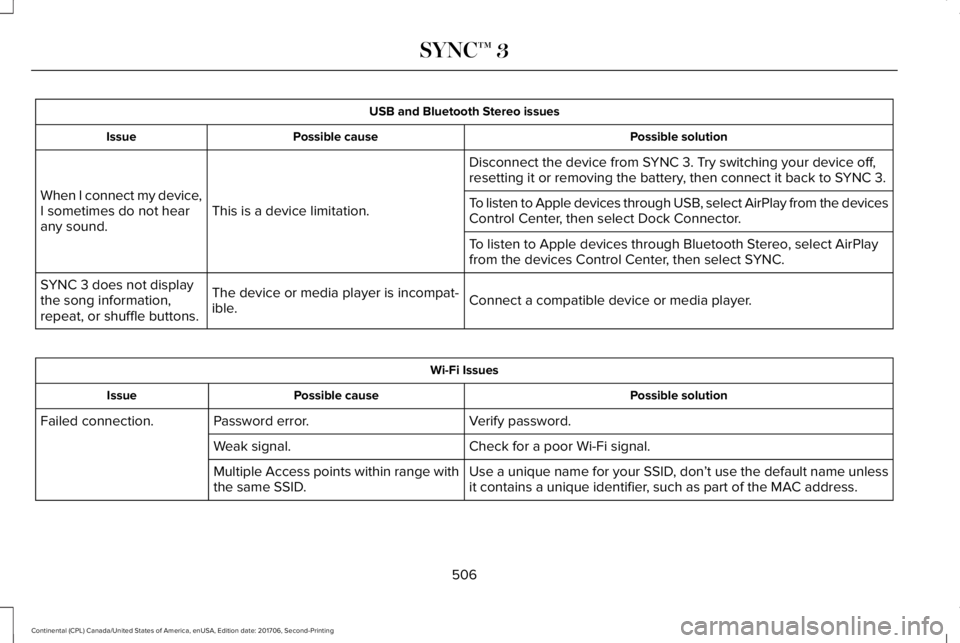
USB and Bluetooth Stereo issues
Possible solutionPossible causeIssue
Disconnect the device from SYNC 3. Try switching your device off,resetting it or removing the battery, then connect it back to SYNC 3.
This is a device limitation.When I connect my device,I sometimes do not hearany sound.
To listen to Apple devices through USB, select AirPlay from the devicesControl Center, then select Dock Connector.
To listen to Apple devices through Bluetooth Stereo, select AirPlayfrom the devices Control Center, then select SYNC.
Connect a compatible device or media player.The device or media player is incompat-ible.
SYNC 3 does not displaythe song information,repeat, or shuffle buttons.
Wi-Fi Issues
Possible solutionPossible causeIssue
Verify password.Password error.Failed connection.
Check for a poor Wi-Fi signal.Weak signal.
Use a unique name for your SSID, don’t use the default name unlessit contains a unique identifier, such as part of the MAC address.Multiple Access points within range withthe same SSID.
506
Continental (CPL) Canada/United States of America, enUSA, Edition date: 201706, Second-Printing
SYNC™ 3
Page 516 of 615
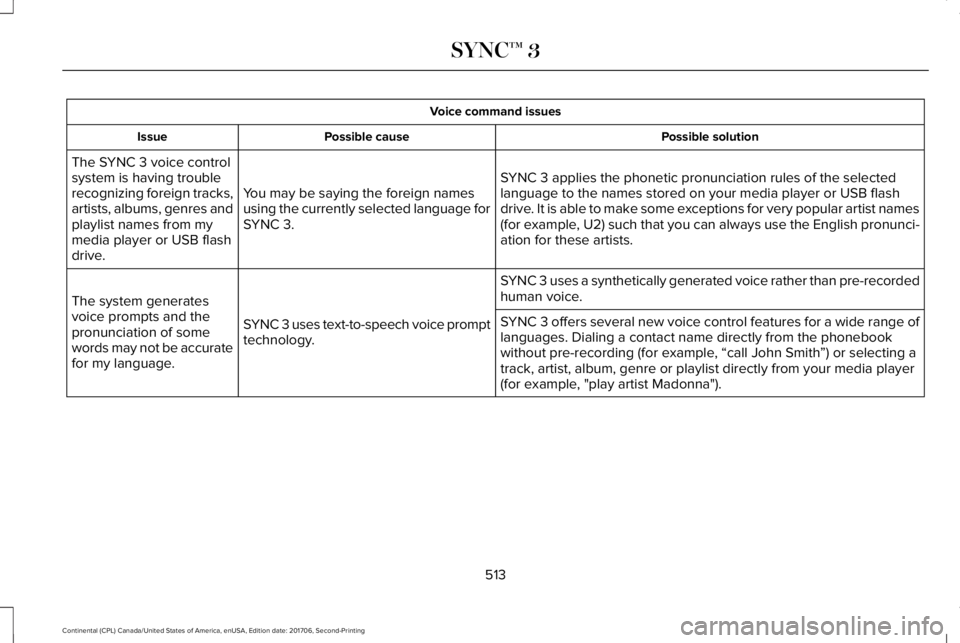
Voice command issues
Possible solutionPossible causeIssue
SYNC 3 applies the phonetic pronunciation rules of the selectedlanguage to the names stored on your media player or USB flashdrive. It is able to make some exceptions for very popular artist names(for example, U2) such that you can always use the English pronunci-ation for these artists.
You may be saying the foreign namesusing the currently selected language forSYNC 3.
The SYNC 3 voice controlsystem is having troublerecognizing foreign tracks,artists, albums, genres andplaylist names from mymedia player or USB flashdrive.
SYNC 3 uses a synthetically generated voice rather than pre-recordedhuman voice.
SYNC 3 uses text-to-speech voice prompttechnology.
The system generatesvoice prompts and thepronunciation of somewords may not be accuratefor my language.
SYNC 3 offers several new voice control features for a wide range oflanguages. Dialing a contact name directly from the phonebookwithout pre-recording (for example, “call John Smith”) or selecting atrack, artist, album, genre or playlist directly from your media player(for example, "play artist Madonna").
513
Continental (CPL) Canada/United States of America, enUSA, Edition date: 201706, Second-Printing
SYNC™ 3
Page 519 of 615
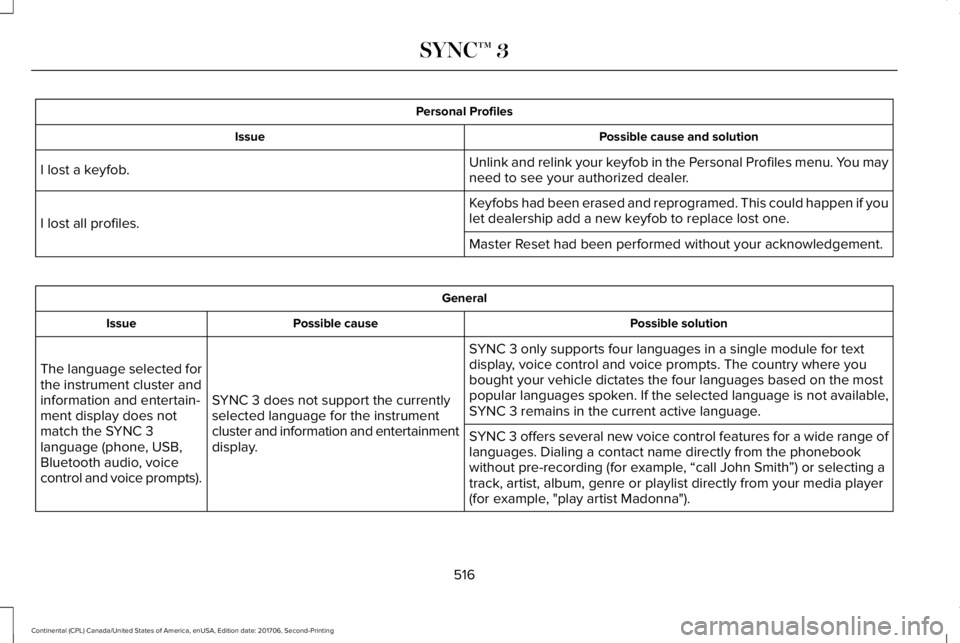
Personal Profiles
Possible cause and solutionIssue
Unlink and relink your keyfob in the Personal Profiles menu. You mayneed to see your authorized dealer.I lost a keyfob.
Keyfobs had been erased and reprogramed. This could happen if youlet dealership add a new keyfob to replace lost one.I lost all profiles.
Master Reset had been performed without your acknowledgement.
General
Possible solutionPossible causeIssue
SYNC 3 only supports four languages in a single module for textdisplay, voice control and voice prompts. The country where youbought your vehicle dictates the four languages based on the mostpopular languages spoken. If the selected language is not available,SYNC 3 remains in the current active language.SYNC 3 does not support the currentlyselected language for the instrumentcluster and information and entertainmentdisplay.
The language selected forthe instrument cluster andinformation and entertain-ment display does notmatch the SYNC 3language (phone, USB,Bluetooth audio, voicecontrol and voice prompts).
SYNC 3 offers several new voice control features for a wide range oflanguages. Dialing a contact name directly from the phonebookwithout pre-recording (for example, “call John Smith”) or selecting atrack, artist, album, genre or playlist directly from your media player(for example, "play artist Madonna").
516
Continental (CPL) Canada/United States of America, enUSA, Edition date: 201706, Second-Printing
SYNC™ 3
Page 607 of 615
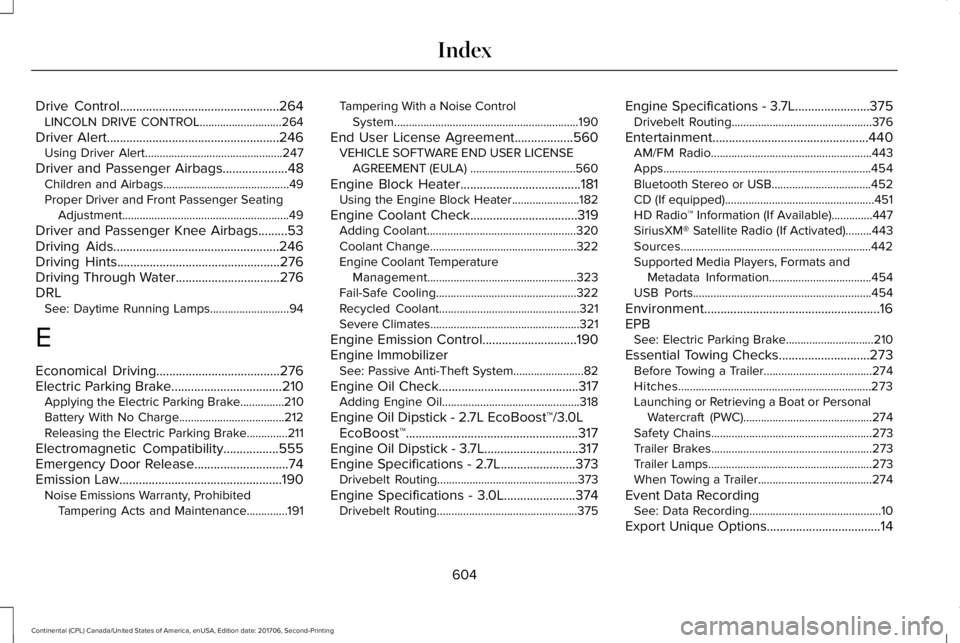
Drive Control.................................................264LINCOLN DRIVE CONTROL............................264
Driver Alert.....................................................246Using Driver Alert...............................................247
Driver and Passenger Airbags....................48Children and Airbags...........................................49Proper Driver and Front Passenger SeatingAdjustment.........................................................49
Driver and Passenger Knee Airbags.........53Driving Aids...................................................246Driving Hints..................................................276Driving Through Water................................276DRLSee: Daytime Running Lamps...........................94
E
Economical Driving......................................276Electric Parking Brake..................................210Applying the Electric Parking Brake...............210Battery With No Charge....................................212Releasing the Electric Parking Brake..............211
Electromagnetic Compatibility.................555Emergency Door Release.............................74Emission Law..................................................190Noise Emissions Warranty, ProhibitedTampering Acts and Maintenance..............191
Tampering With a Noise ControlSystem...............................................................190
End User License Agreement..................560VEHICLE SOFTWARE END USER LICENSEAGREEMENT (EULA) ....................................560
Engine Block Heater.....................................181Using the Engine Block Heater.......................182
Engine Coolant Check.................................319Adding Coolant...................................................320Coolant Change..................................................322Engine Coolant TemperatureManagement...................................................323Fail-Safe Cooling................................................322Recycled Coolant................................................321Severe Climates...................................................321
Engine Emission Control.............................190Engine ImmobilizerSee: Passive Anti-Theft System........................82
Engine Oil Check...........................................317Adding Engine Oil...............................................318
Engine Oil Dipstick - 2.7L EcoBoost™/3.0LEcoBoost™.....................................................317Engine Oil Dipstick - 3.7L.............................317Engine Specifications - 2.7L.......................373Drivebelt Routing................................................373
Engine Specifications - 3.0L......................374Drivebelt Routing................................................375
Engine Specifications - 3.7L.......................375Drivebelt Routing................................................376
Entertainment................................................440AM/FM Radio.......................................................443Apps.......................................................................454Bluetooth Stereo or USB..................................452CD (If equipped)...................................................451HD Radio™ Information (If Available)..............447SiriusXM® Satellite Radio (If Activated).........443Sources.................................................................442Supported Media Players, Formats andMetadata Information...................................454USB Ports.............................................................454
Environment......................................................16EPBSee: Electric Parking Brake..............................210
Essential Towing Checks............................273Before Towing a Trailer.....................................274Hitches..................................................................273Launching or Retrieving a Boat or PersonalWatercraft (PWC)............................................274Safety Chains.......................................................273Trailer Brakes.......................................................273Trailer Lamps........................................................273When Towing a Trailer.......................................274
Event Data RecordingSee: Data Recording.............................................10
Export Unique Options...................................14
604
Continental (CPL) Canada/United States of America, enUSA, Edition date: 201706, Second-Printing
Index
Page 613 of 615

Display...................................................................499General..................................................................494Media Player.........................................................481Mobile Apps.........................................................493Navigation............................................................490Phone....................................................................483Radio......................................................................489SiriusXM................................................................490Sound....................................................................480Valet Mode..........................................................500Vehicle...................................................................497Voice Control.......................................................499Wi-Fi & Hotspot...................................................495
Side Airbags.....................................................52Side Sensing System...................................221Obstacle Distance Indicator............................222
Sitting in the Correct Position....................153Snow ChainsSee: Using Snow Chains..................................358
Soft Closing Door............................................78Spare WheelSee: Changing a Road Wheel.........................364
Special Notices.................................................13New Vehicle Limited Warranty...........................13On Board Diagnostics Data LinkConnector............................................................14Special Instructions...............................................13
Special Operating Conditions ScheduledMaintenance................................................531Exceptions............................................................534
Speed ControlSee: Cruise Control............................................237
Stability Control..............................................217Principle of Operation........................................217
Starting a Gasoline Engine.........................179Automatic Engine Shutdown............................180Failure to Start......................................................179Guarding Against Exhaust Fumes....................181Important Ventilating Information....................181Starting Your Vehicle..........................................179Stopping the Engine When Your Vehicle isMoving................................................................181Stopping the Engine When Your Vehicle isStationary..........................................................180
Starting and Stopping the Engine.............178General Information............................................178
Steering..........................................................259Adaptive Steering..............................................260Electric Power Steering....................................259
Steering Wheel................................................85Storage Compartments................................177SunroofSee: Moonroof......................................................107
Sun Shades.....................................................106
Sun Visors.......................................................106Illuminated Vanity Mirror...................................106
Supplementary Restraints System..............47Principle of Operation..........................................47
Symbols Glossary..............................................7SYNC™ 3...........................................................413General Information............................................413
SYNC™ 3 Troubleshooting.........................500
T
Technical SpecificationsSee: Capacities and Specifications................373
The Better Business Bureau (BBB) AutoLine Program (U.S. Only)..........................288Tire Care.........................................................344Glossary of Tire Terminology..........................346Important Information About Low-ProfileTires...................................................................344Information About Uniform Tire QualityGrading.............................................................344Information Contained on the TireSidewall............................................................347Temperature A B C.............................................345Traction AA A B C...............................................345Treadwear............................................................345
610
Continental (CPL) Canada/United States of America, enUSA, Edition date: 201706, Second-Printing
Index