2018 LEXUS RX450h seats
[x] Cancel search: seatsPage 183 of 792
1833-3. Adjusting the seats
3
Operation of each component
RX450h_RX450hL _U_OM48F85U■
Recall procedure
Check that the shift lever is in P.
Turn the power switch to ON mode.
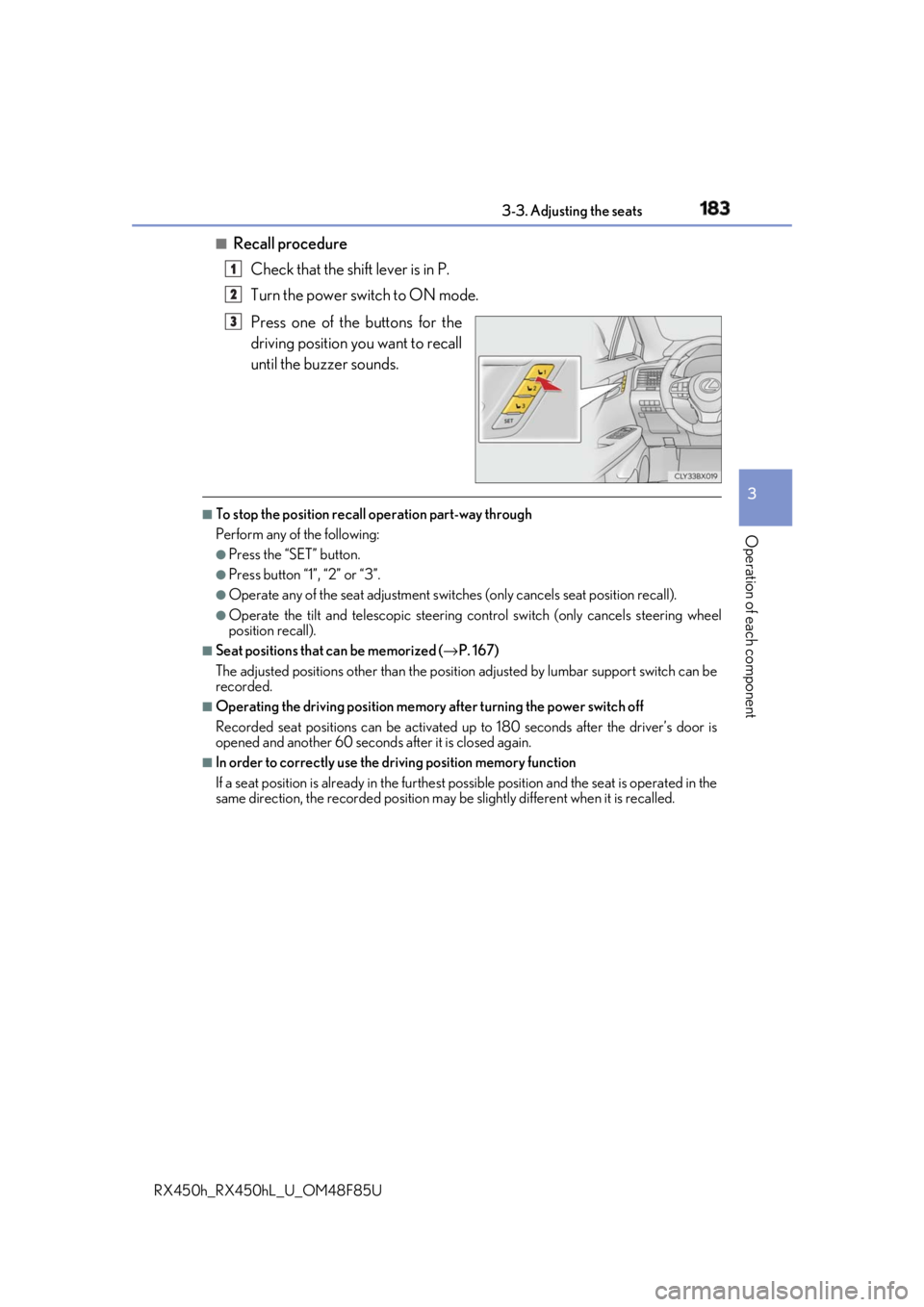
Press one of the buttons for the
driving position you want to recall
until the buzzer sounds. ■
To stop the position recall operation part-way through
Perform any of the following: ●
Press the “SET” button. ●
Press button “1”, “2” or “3”. ●
Operate any of the seat adjustment switches (only cancels seat position recall). ●
Operate the tilt and telescopic steering control switch (only cancels steering wheel
position recall). ■
Seat positions that can be memorized ( → P. 167)
The adjusted positions other than the position adjusted by lumbar support switch can be
recorded. ■
Operating the driving position memory after turning the power switch off
Recorded seat positions can be activated up to 180 seconds after the driver’s door is
opened and another 60 seconds after it is closed again. ■
In order to correctly use the dr iving position memory function
If a seat position is already in the furthest po ssible position and the seat is operated in the
same direction, the recorded position may be slightly di fferent when it is recalled.1
2
3
Page 184 of 792

184 3-3. Adjusting the seats
RX450h_RX450hL _U_OM48F85UEach electronic key can be registered to recall your preferred driving position.■
Registering procedure
Record your driving position to button “1”, “2” or “3” before performing the
following:
Carry only the key you want to regist er, and then close the driver’s door.
If 2 or more keys are in the vehicle, the driving position cannot be recorded
properly.
Check that the shift lever is in P.
Turn the power switch to ON mode.
Recall the driving position that you want to record.
While pressing the recalled but-
ton, press and hold the door lock
switch (either lock or unlock) until
the buzzer sounds. If the button could not be registered,
the buzzer sounds continuously for
approximately 3 seconds.
■
Recall procedure
Make sure that the doors are locked before recalling the driving position.
Carry the electronic key that has been registered to the driving position,
and then unlock and open the driver’s door using the smart access system
with push-button start or wireless remote control. The driving position will move to the recorded position (not including the steering
wheel and head-up display
* ). However, the seat will move to a position slightly
behind the recorded position in order to make entering the vehicle easier.
If the driving position is in a position th at has already been recorded, the seat and
outside rear view mirrors will not move.
* : If equipped
Turn the power switch to ACCESSORY mode or ON mode, or fasten a
seat belt. The seat, steering wheel and head-up display (if equipped) will move to the
recorded position.Memory recall function (driver’s side only) 1
2
3
4
1
2
Page 185 of 792

1853-3. Adjusting the seats
3
Operation of each component
RX450h_RX450hL _U_OM48F85U■
Cancelation procedure
Carry only the key you want to cance l and then close the driver’s door.
If 2 or more keys are in the vehicle, the driving position cannot be canceled
properly.
Turn the power switch to ON mode.
While pressing the “SET” button, pr ess and hold the door lock switch
(either lock or unlock) un til the buzzer sounds twice.If it button could not be canceled, the buzzer sounds continuously for approxi-
mately 3 seconds.■
Recalling the driving position using the memory recall function●
Different driving positions can be registered for each electronic key. Therefore, the
driving position that is recalled may be di fferent depending on the key being carried.●
If a door other than the driver’s door is unlocked with the smart access system with
push-button start, the driving position cannot be recalled. In this case, press the driving
position button which has been set. ■
Customization
Some functions can be customized. ( → P. 736)
WARNING ■
Seat adjustment caution
Take care during seat adjustment so that th e seat does not strike the rear passenger or
squeeze your body against the steering wheel. 1
2
Page 186 of 792
186 3-3. Adjusting the seats
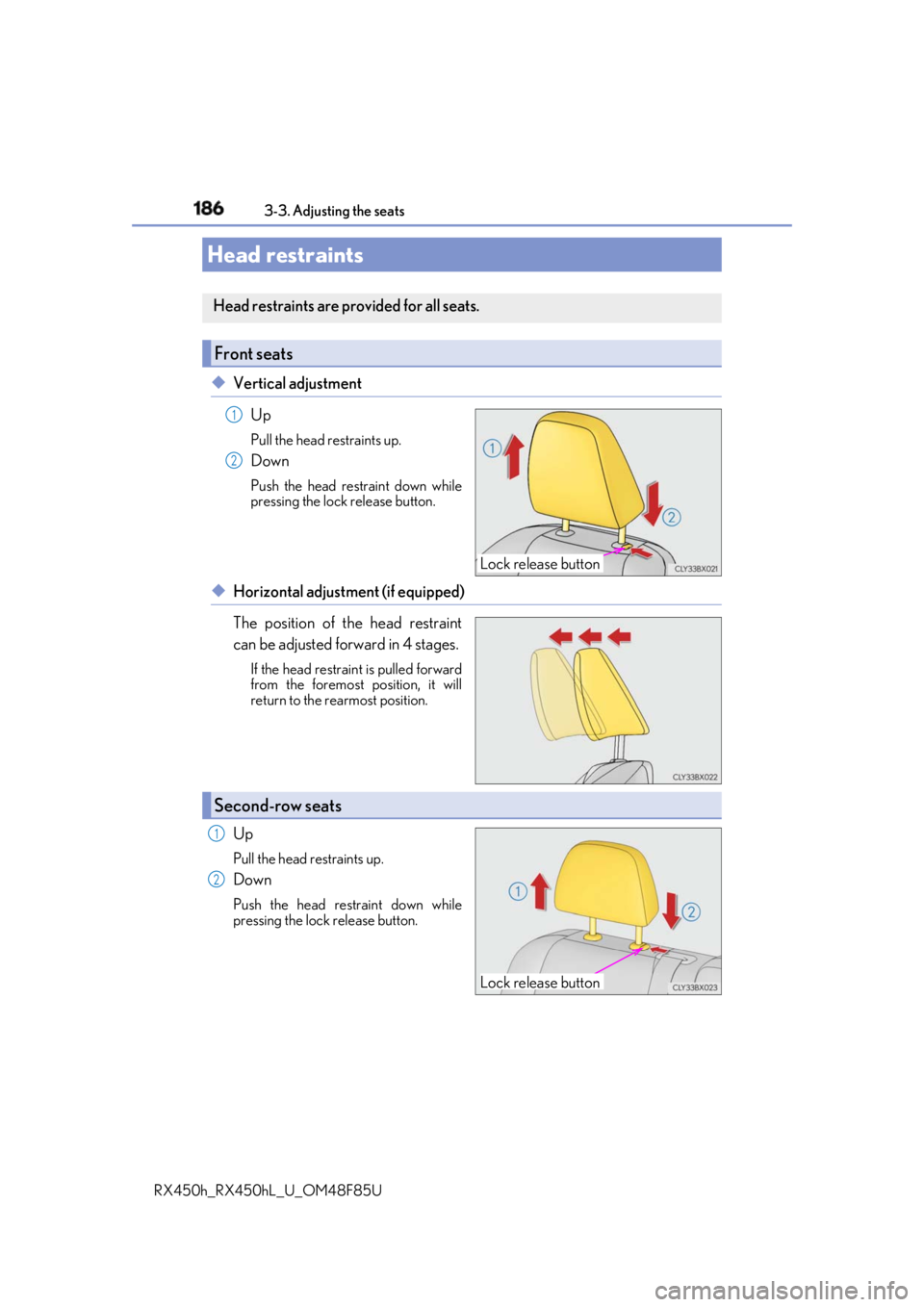
RX450h_RX450hL _U_OM48F85U◆ Vertical adjustment
Up Pull the head restraints up.
Down Push the head restraint down while
pressing the lock release button.
◆ Horizontal adjustment (if equipped)
The position of the head restraint
can be adjusted forward in 4 stages. If the head restrain t is pulled forward
from the foremost position, it will
return to the rearmost position.
Up Pull the head restraints up.
Down Push the head restraint down while
pressing the lock release button.Head restraints Head restraints are provided for all seats.
Front seats
Lock release button1
2
Second-row seats
Lock release button1
2
Page 187 of 792
1873-3. Adjusting the seats
3
Operation of each component
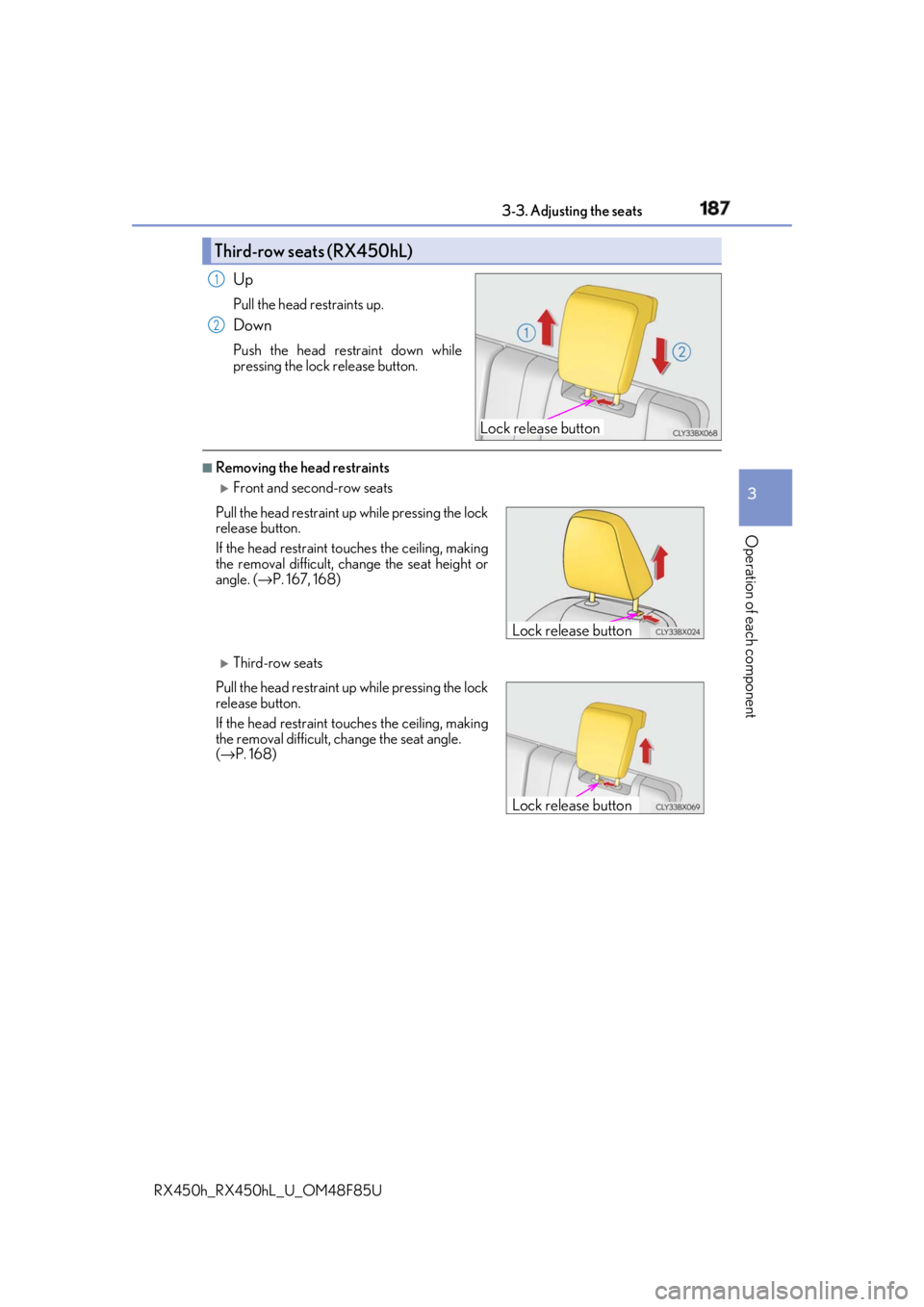
RX450h_RX450hL _U_OM48F85UUp Pull the head restraints up.
Down Push the head restraint down while
pressing the lock release button. ■
Removing the head restraints
Front and second-row seats
Third-row seatsThird-row seats (RX450hL)
Lock release button1
2
Pull the head restraint up while pressing the lock
release button.
If the head restraint to uches the ce iling, making
the removal difficult, change the seat height or
angle. ( → P. 167, 168)
Pull the head restraint up while pressing the lock
release button.
If the head restraint to uches the ce iling, making
the removal difficult, change the seat angle.
( → P. 168) Lock release button
Lock release button
Page 188 of 792

188 3-3. Adjusting the seats
RX450h_RX450hL _U_OM48F85U■
Installing the head restraints
Front and second-row seats
Third-row seats
■
Adjusting the height of the head restraints
■
Adjusting the second-row center an d third-row seat head restraints
Always raise the head restraint one leve l from the stowed position when using.Align the head restrain t with the installation
holes and push it down to the lock position.
Press and hold the lock release button when
lowering the head restraint.
Align the head restrain t with the installation
holes and push it down to the lock position.
Press and hold the lock release button when
lowering the head restraint.
Make sure that the head restraints are adjusted
so that the center of the head restraint is closest
to the top of your ears.
WARNING ■
Head restraint precautions
Observe the following precautions regarding the head restraints.
Failure to do so may result in death or serious injury.●
Use the head restraints design ed for each respective seat.●
Adjust the head restraints to th e correct position at all times.●
After adjusting the head restraints, push down on them and make sure they are
locked in position. ●
Do not drive with the head restraints removed. Lock release button
Lock release
button
Page 222 of 792

222 4-1. Before driving
RX450h_RX450hL _U_OM48F85UWARNING ■
Storage precautions
Observe the following precautions.
Failure to do so may prevent the pedals from being depressed properly, may block the
driver’s vision, or may result in items hittin g the driver or passeng ers, possibly causing
an accident. ●
Stow cargo and luggage in the luggage compartment whenever possible.●
Do not stack cargo and luggage in the luggage compartment higher than the seat-
backs. ●
When you fold down the rear seats, long items should not be placed directly behind
the front seats. ●
Never allow anyone to ride in the luggage compartment. It is not designed for pas-
sengers. They should ride in their seats with their se at belts properly fastened.●
Do not place cargo or luggage in or on the following locations.
• At the feet of the driver
• On the front passenger or re ar seats (when stacking items)
•On the luggage cover
• On the instrument panel
•On the dashboard ●
Secure all items in the occupant compartment. ■
Capacity and distribution ●
Do not exceed the maximum axle weight rating or the total vehicle weight rating. ●
Even if the total load of occupant’s weight and the cargo load is less than the total load
capacity, do not apply the load unevenly. Improper loading may cause deterioration
of steering or braking control whic h may cause death or serious injury.■
Roof luggage carrier precautions
Observe the following precautions: ●
Place the cargo so that its weight is distributed evenly between the front and rear
axles. ●
If loading long or wide cargo, never exceed the vehicle overall length or width.
( → P. 710) ●
Before driving, make sure the cargo is secu rely fastened on the roof luggage carrier.●
Loading cargo on the roof luggage carrier will make the center of gravity of the vehi-
cle higher. Avoid high speeds, sudden star ts, sharp turns, sudden braking or abrupt
maneuvers, otherwise it may re sult in loss of control or vehicle rollover due to failure
to operate this vehicle correctly and result in death or serious injury.●
If driving for a long distance, on rough road s, or at high speeds , stop the vehicle now
and then during the trip to make sure the cargo remains in its place.●
Do not exceed 165 lb. (75 kg) cargo weight on the roof luggage carrier.
NOTICE ■
When loading cargo (vehicles with a moon roof or panoramic moon roof)
Be careful not to scratch the surface of the moon roof or panoramic moon roof.
Page 396 of 792
396 4-6. Driving tips
RX450h_RX450hL _U_OM48F85U [
WARNING ■
Off-road driving precautions
Always observe the following precautions to minimize the risk of death, serious injury
or damage to your vehicle: ●
Drive carefully when off the road. Do not ta ke unnecessary risks by driving in danger-
ous places. ●
Do not grip the steering wheel spokes when driving off-road. A bad bump could jerk
the wheel and injure your hands. Keep both hands and especially your thumbs on the
outside of the rim. ●
Always check your brakes for effectiveness immediately after driving in sand, mud,
water or snow. ●
After driving through tall grass, mud, rock , sand, rivers, etc., check that there is no
grass, bush, paper, rags, stone, sand, etc. adhering or trapped on the underbody.
Clear off any such matter from the underbody. If the vehicle is used with these materi-
als trapped or adhering to the underbody, a breakdown or fire could occur. ●
When driving off-road or in rugged terrain , do not drive at excessive speeds, jump,
make sharp turns, strike obje cts, etc. This may cause loss of control or vehicle rollover
causing death or serious injury. You are also risking expensive damage to your vehi-
cle’s suspension and chassis.
NOTICE ■
To prevent water damage
Take all necessary safety measures to ensure that water damage to the hybrid battery
(traction battery), hybrid system or other components does not occur.●
Water entering the engine compartment may cause severe damage to the hybrid
system. Water entering the interior may cause the hybrid battery (traction battery)
stowed under the rear seats to short circuit.●
Water entering the hybrid transmission and rear electric motor (traction motor) will
cause deterioration in transmission qualit y. The malfunction indicator may come on,
and the vehicle may not be drivable. ●
Water can wash the grease from wheel be arings, causing rusting and premature fail-
ure, and may also enter the hybrid transmissi on case, reducing the gear oil’s lubricat-
ing qualities. ■
When you drive through water
If driving through water, such as when cro ssing shallow streams, first check the depth of
the water and the bottom of the riverbed for firmness. Drive slowly and avoid deep
water. ■
Inspection after off-road driving ●
Sand and mud that has accumulated around brake discs may affect braking efficiency
and may damage brake system components. ●
Always perform a maintenance inspection afte r each day of off-road driving that has
taken you through rough terrain, sand, mud, or water. For scheduled maintenance
information, refer to the “Warranty and Services Guide/Owner’s Manual Supple-
ment/Scheduled Maintenance”.