2018 LEXUS RX450h stop start
[x] Cancel search: stop startPage 160 of 792
160 3-2. Opening, closing and locking the doors
RX450h_RX450hL _U_OM48F85U■
Electronic Key battery-Saving Function
When battery-saving mode is set, battery depletion is minimized by stopping the elec-
tronic key from re ceiving radio waves.
■
Conditions affe cting operation
The smart access system with push-button st art, wireless remote control and immobilizer
system use weak radio waves. In the following situations, the communication between the
electronic key and the vehicle may be affect ed, preventing the smart access system with
push-button start, wireless remote control an d immobilizer system from operating prop-
erly. (Ways of coping: → P. 692)●
When the electronic key battery is depleted ●
Near a TV tower, electric power plant, gas st ation, radio station, la rge display, airport or
other facility that generates strong radio wave s or electrical noise●
When the electronic key is in contact wi th, or is covered by the following metallic
objects
• Cards to which aluminum foil is attached
• Cigarette boxes that have aluminum foil inside
• Metallic wallets or bags
•Coins
• Hand warmers made of metal
• Media such as CDs and DVDs ●
When other wireless keys (that emit radio waves) are being used nearby ●
When carrying the electronic key together with the following devices that emit radio
waves
• Portable radio, cellular phone, cordle ss phone or other wireless communication
devices
• Another vehicle’s electronic key, another electronic key of your vehicle, or a wireless
key that emits radio waves
• Personal computers or person al digital assistants (PDAs)
• Digital audio players
• Portable game systems ●
If window tint with a metallic content or me tallic objects are atta ched to the rear win-
dow ●
When the electronic key is placed near a battery charger or electronic devices ●
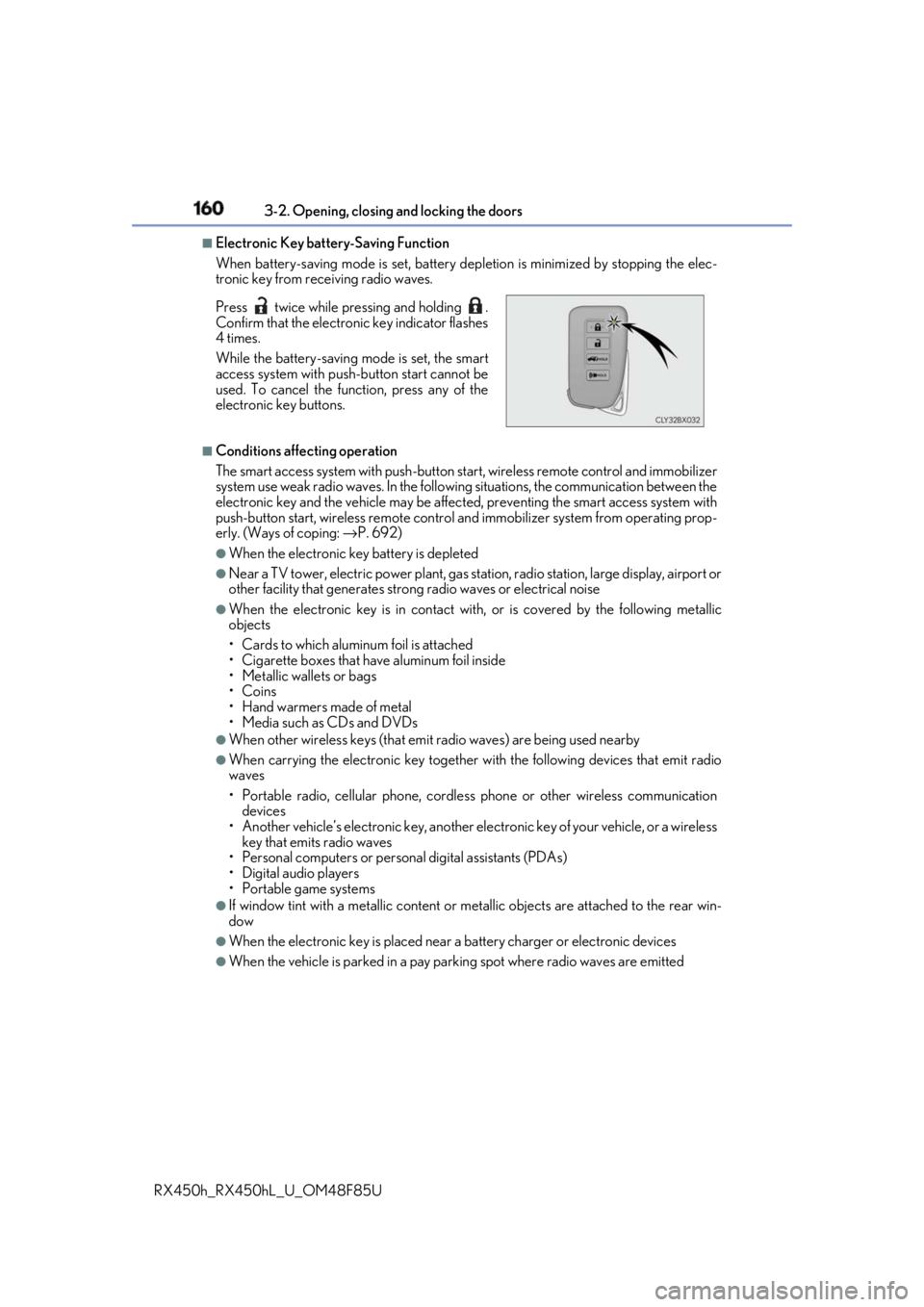
When the vehicle is parked in a pay parking spot where radio waves are emittedPress twice while pressing and holding .
Confirm that the electronic key indicator flashes
4 times.
While the battery-saving mode is set, the smart
access system with push -button start cannot be
used. To cancel the function, press any of the
electronic key buttons.
Page 162 of 792

162 3-2. Opening, closing and locking the doors
RX450h_RX450hL _U_OM48F85U●
Fingernails may scrape against the door duri ng operation of the do or handle. Be care-
ful not to injure fingernails or damage the surface of the door.
* : This setting can be customiz ed at your Lexus dealer.■
When the vehicle is not driven for extended periods ●
To prevent theft of the vehicle, do not leave the electronic key within 6 ft. (2 m) of the
vehicle. ●
The smart access system wi th push-button start can be deactivated in advance.
( → P. 736) ●
Setting the electronic key to battery-saving mode helps to reduce key battery deple-
tion. ( → P. 160)■
To operate the system properly
Make sure to carry the electronic key when operating the system. Do not get the elec-
tronic key too close to the vehicle when operating the system from the outside of the
vehicle.
Depending on the position and holding condition of the elec tronic key, the key may not
be detected correctly and the system may not operate properly. (The alarm may go off
accidentally, or the door lock prevention may not operate.) ■
If the smart access system with push-button start does not operate properly ●
Locking and unlocking the doors: Use the mechanical key. ( → P. 692)●
Starting the hybrid system: → P. 693■
Customization
Some functions can be customized. ( → P. 736)■
If the smart access system with push-button start has been deactivated in a customized
setting ●
Locking and unlocking the doors:
Use the wireless remote cont rol or mechanical key. ( → P. 136, 142, 692)●
Starting the hybrid system and changing power switch modes: → P. 693●
Stopping the hybrid system: → P. 240
Page 171 of 792
1713-3. Adjusting the seats
3
Operation of each component
RX450h_RX450hL _U_OM48F85U■
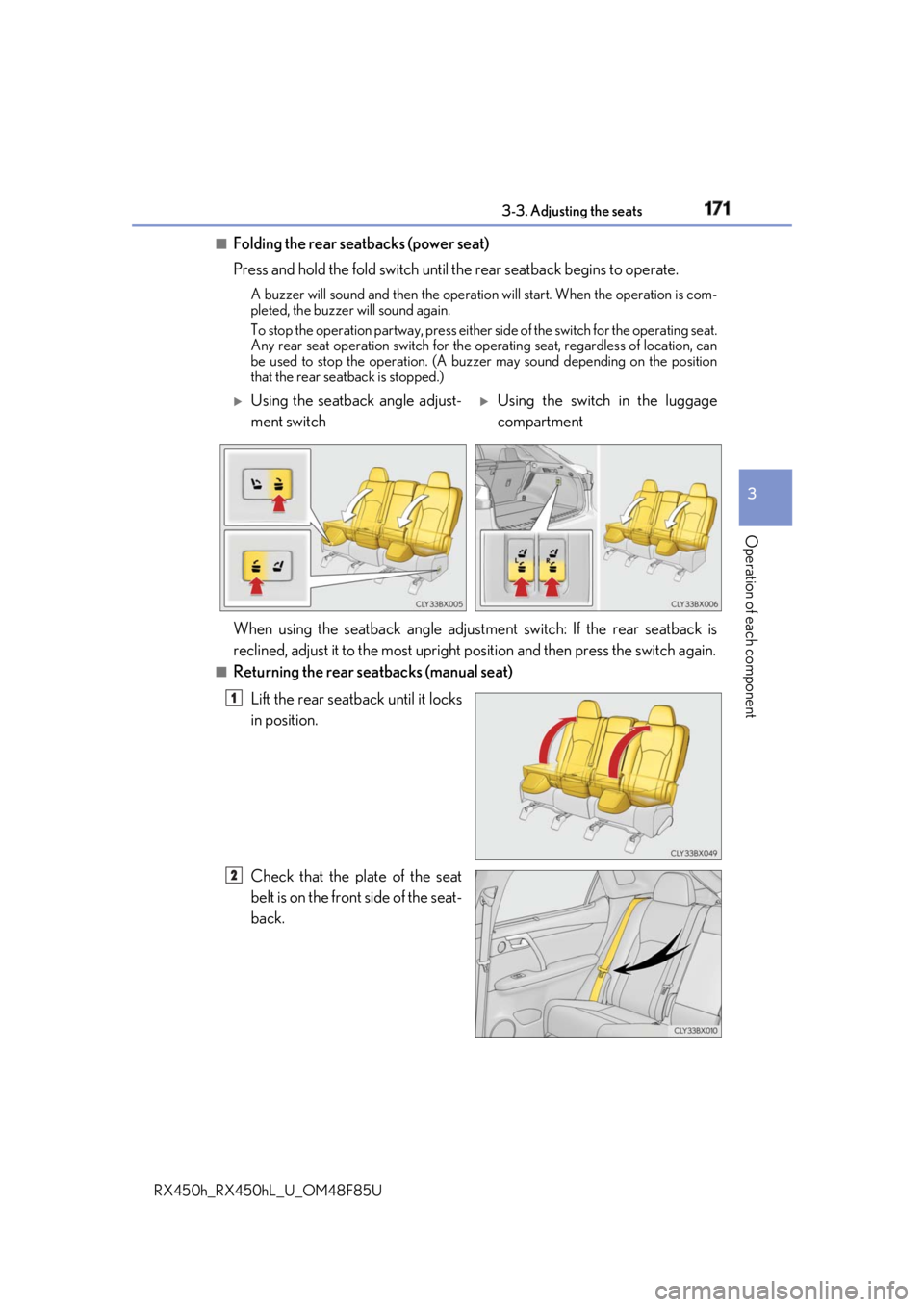
Folding the rear seatbacks (power seat)
Press and hold the fold switch until the rear seatback begins to operate.A buzzer will sound and then the operation will start. When the operation is com-
pleted, the buzzer will sound again.
To stop the operation partway, press either side of the switch for the operating seat.
Any rear seat operation switch for the op erating seat, regardless of location, can
be used to stop the operation. (A buzzer may sound depending on the position
that the rear seatback is stopped.)
■
Returning the rear seatbacks (manual seat)
Lift the rear seatback until it locks
in position.
Check that the plate of the seat
belt is on the front side of the seat-
back.
Using the seatback angle adjust-
ment switch
Using the switch in the luggage
compartment
When using the seatback angle adjustme nt switch: If the rear seatback is
reclined, adjust it to the most upright position and then press the switch again.1
2
Page 172 of 792
172 3-3. Adjusting the seats
RX450h_RX450hL _U_OM48F85U■
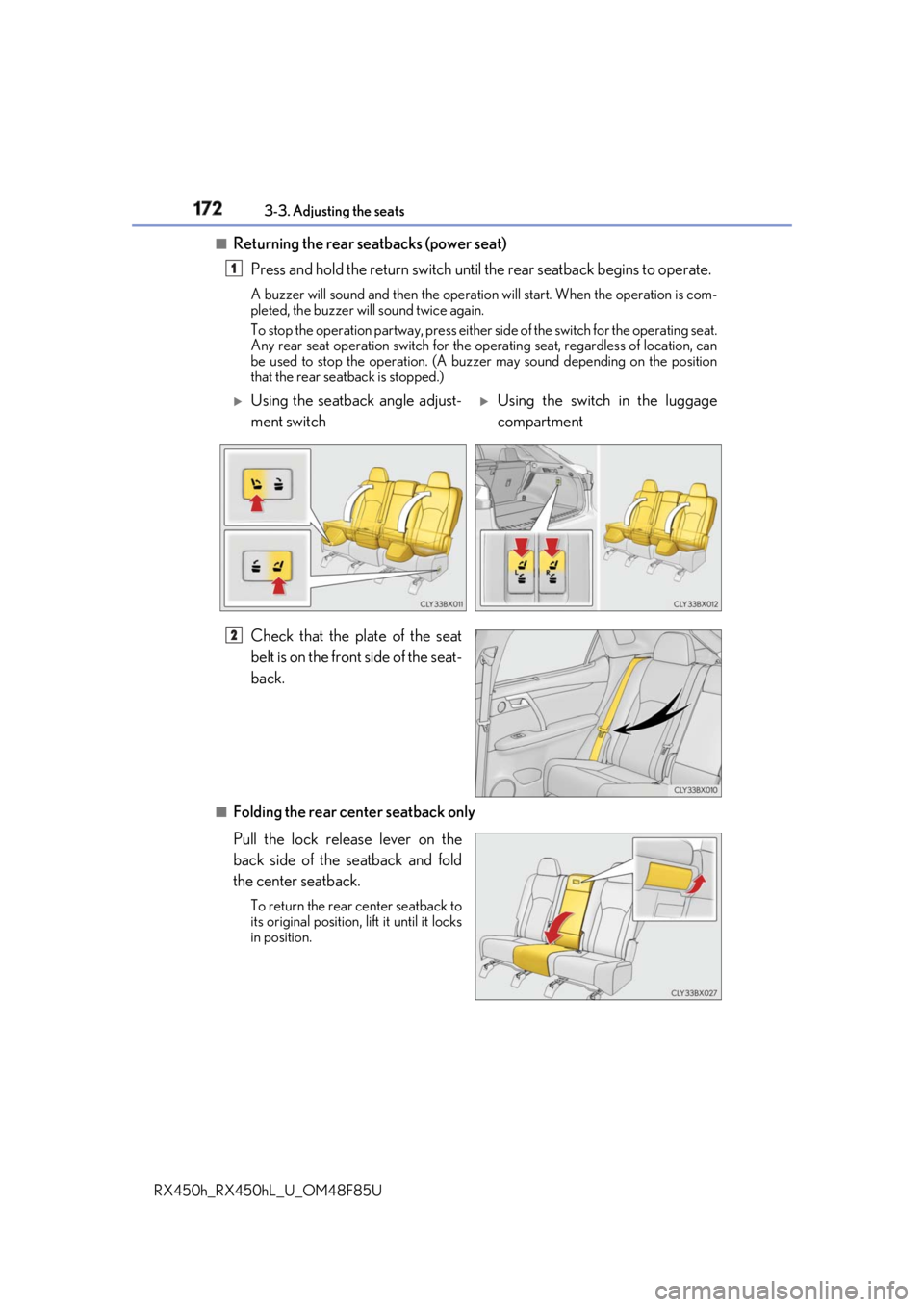
Returning the rear seatbacks (power seat)
Press and hold the return switch until the rear seatback begins to operate.A buzzer will sound and then the operation will start. When the operation is com-
pleted, the buzzer will sound twice again.
To stop the operation partway, press either side of the switch for the operating seat.
Any rear seat operation switch for the op erating seat, regardless of location, can
be used to stop the operation. (A buzzer may sound depending on the position
that the rear seatback is stopped.)
Check that the plate of the seat
belt is on the front side of the seat-
back.
■
Folding the rear center seatback only
Pull the lock release lever on the
back side of the seatback and fold
the center seatback. To return the rear center seatback to
its original position, li ft it until it locks
in position. 1
Using the seatback angle adjust-
ment switch
Using the switch in the luggage
compartment
2
Page 197 of 792

1973-5. Opening, closing the windows and moon roof
3
Operation of each component
RX450h_RX450hL _U_OM48F85U■
The power windows can be operated when
The power switch is in ON mode. ■
Operating the power windows after turning the hybrid system off
The power windows can be operated for ap proximately 45 seconds even after the
power switch is turned to ACCESSORY mode or turned off. They cannot, however, be
operated once either front door is opened. ■
Jam protection function
If an object becomes jammed between the window and the window frame while the win-
dow is closing, window movement is stop ped and the window is opened slightly.■
Catch protection function
If an object becomes caught between the door and window while the window is opening,
window movement is stopped. ■
When the window cannot be opened or closed
When the jam protection functi on or catch protection func tion operates unusually and
the door window cannot be opened or closed, perform the following operations with the
power window switch of that door. ●
Stop the vehicle. With the power switch in ON mode, within 4 seconds of the jam pro-
tection function or catch pr otection function activating, continuously operate the
power window switch in the one-touch clos ing direction or one-touch opening direc-
tion so that the door window can be opened and closed. ●
If the door window cannot be opened and closed even when performing the above
operations, perform the following procedure for function initialization.
Turn the power switch to ON mode.
Pull and hold the power window switch in the one-touch closing direction and com-
pletely close the door window.
Release the power window sw itch for a moment, resume pulling the switch in the
one-touch closing direction, and hold it there for approximately 6 seconds or more.
Press and hold the power window switch in the one-touch opening direction. After
the door window is completely opened, cont inue holding the switch for an additional
1 second or more.
Release the power window switch for a mo ment, resume pushing the switch in the
one-touch opening direction, and hold it there for approximately 4 seconds or
more.
Pull and hold the power window switch in the one-touch closing direction again.
After the door window is completely clos ed, continue holding the switch for a fur-
ther 1 second or more.
If you release the switch while the window is moving, start again from the beginning.
If the window reverses and cannot be fully cl osed or opened, have the vehicle inspected
by your Lexus dealer. 1
2
3
4
5
6
Page 206 of 792

206 3-5. Opening, closing the windows and moon roof
RX450h_RX450hL _U_OM48F85U■
Closing both the panoramic moon roof and electronic sunshade
Slide the
switch forward.
The electronic sunshade will close to the half-open position and pause. The panoramic
moon roof will then fully close. Then the electronic sunshade will fully close.■
When the panoramic moon roof or electronic sunshade does not close normally
Perform the following procedure:
Stop the vehicle.
Turn the power switch to ON mode.
Slide and hold the switch or swit ch forward. Continue pressing the
switch for approximately 10 seconds afte r the panoramic moon roof or electronic
sunshade closes and reopens. The panora mic moon roof and electronic sunshade
will start to close.
*Check that the panoramic moon roof and electronic sunshade are fully closed and
release the switch.
* : If the switch is released at the incorrect time, the pr ocedure will have to be per-
formed again from the beginning.
If the panoramic moon roof or electronic sunshade does not fully close even after per-
forming the above procedure correctly, have the vehicle inspected by your Lexus dealer. ■
Alarm
A alarm may be triggered if the alarm is set and the panoramic moon roof is closed using
the door lock linked panoramic m oon roof operation function. ( → P. 87) ■
Panoramic moon roof open warning buzzer
The buzzer sounds and a message is shown on the multi-information display in the instru-
ment cluster when the power switch is turned off and the driver’s door is opened with the
panoramic moon roof open. ■
Customization
Some functions can be customized. ( → P. 736)1
2
3
4
Page 212 of 792

212
RX450h_RX450hL _U_OM48F85U4-1. Before driving
→ P. 239
With the brake pedal depressed, shift the shift lever to D. ( → P. 246)
Release the parking brake. ( → P. 254)If the parking brake is in automatic mode, the parking brake is released automatically
when shifting the shift lever to any position other than P. ( → P. 253)
Gradually release the brake pedal and gently depress the accelerator pedal
to accelerate the vehicle.
With the shift lever in D, depress the brake pedal.
If necessary, set the parking brake. ( → P. 254)If the vehicle is to be stopped for an extended period of time, shift the shift lever to P.
( → P. 246)
With the shift lever in D, depress the brake pedal.
Set the parking brake ( → P. 254), and shift the shift lever to P ( → P. 246).
Press the power switch to stop the hybrid system.
Lock the door, making sure that you ha ve the electronic key on your person.If parking on a hill, bloc k the wheels as needed.Driving the vehicle The following procedures should be observed to ensure safe driving:
Starting the hybrid system
Driving
Stopping
Parking the vehicle 1
2
3
1
2
1
2
3
4
Page 214 of 792
214 4-1. Before driving
RX450h_RX450hL _U_OM48F85U■
Breaking in your new Lexus
To extend the life of the vehicle, observin g the following precautions is recommended:●
For the first 200 miles (300 km):
Avoid sudden stops. ●
For the first 500 miles (800 km):
Do not tow a trailer. ●
For the first 1000 miles (1600 km):
• Do not drive at extremely high speeds.
• Avoid sudden acceleration.
• Do not drive continuously in low gears.
• Do not drive at a constant speed for extended periods.■
Operating your vehicle in a foreign country
Comply with the relevant vehicle registration laws and confirm the availability of the cor-
rect fuel. ( → P. 712)■
Eco-friendly driving
→ P. 121
WARNING
Observe the following precautions.
Failure to do so may result in death or serious injury. ■
When starting the vehicle
Always keep your foot on the brake pedal while stopped with the “READY” indicator is
illuminated. This prevents the vehicle from creeping.■
When driving the vehicle ●
Do not drive if you are unfamiliar with the location of the brake and accelerator ped-
als to avoid depressing the wrong pedal.
• Accidentally depressing the accelerator pedal instead of the brake pedal will
result in sudden acceleration that may lead to an accident.
• When backing up, you may twist your body around, leading to difficulty in operat-
ing the pedals. Make sure to operate the pedals properly.
• Make sure to keep a correct driving po sture even when moving the vehicle only
slightly. This allows you to depress th e brake and accelerator pedals properly.
• Depress the brake pedal using your right foot. Depressing the brake pedal using
your left foot may delay re sponse in an emergency, resulting in an accident.●
The driver should pay extra attention to pedestrians when the vehicle is powered only
by the electric motor (traction motor). As there is no engine noise, the pedestrians
may misjudge the vehicle’s movement. ●
Do not drive the vehicle over or stop the vehicle near flammable materials.
The exhaust system and exhaust gases can be extremely hot. These hot parts may
cause a fire if there is any flammable material nearby.