2018 LEXUS RX450h fuel
[x] Cancel search: fuelPage 125 of 792
1252. Instrument cluster
2
Instrument cluster
RX450h_RX450hL _U_OM48F85U
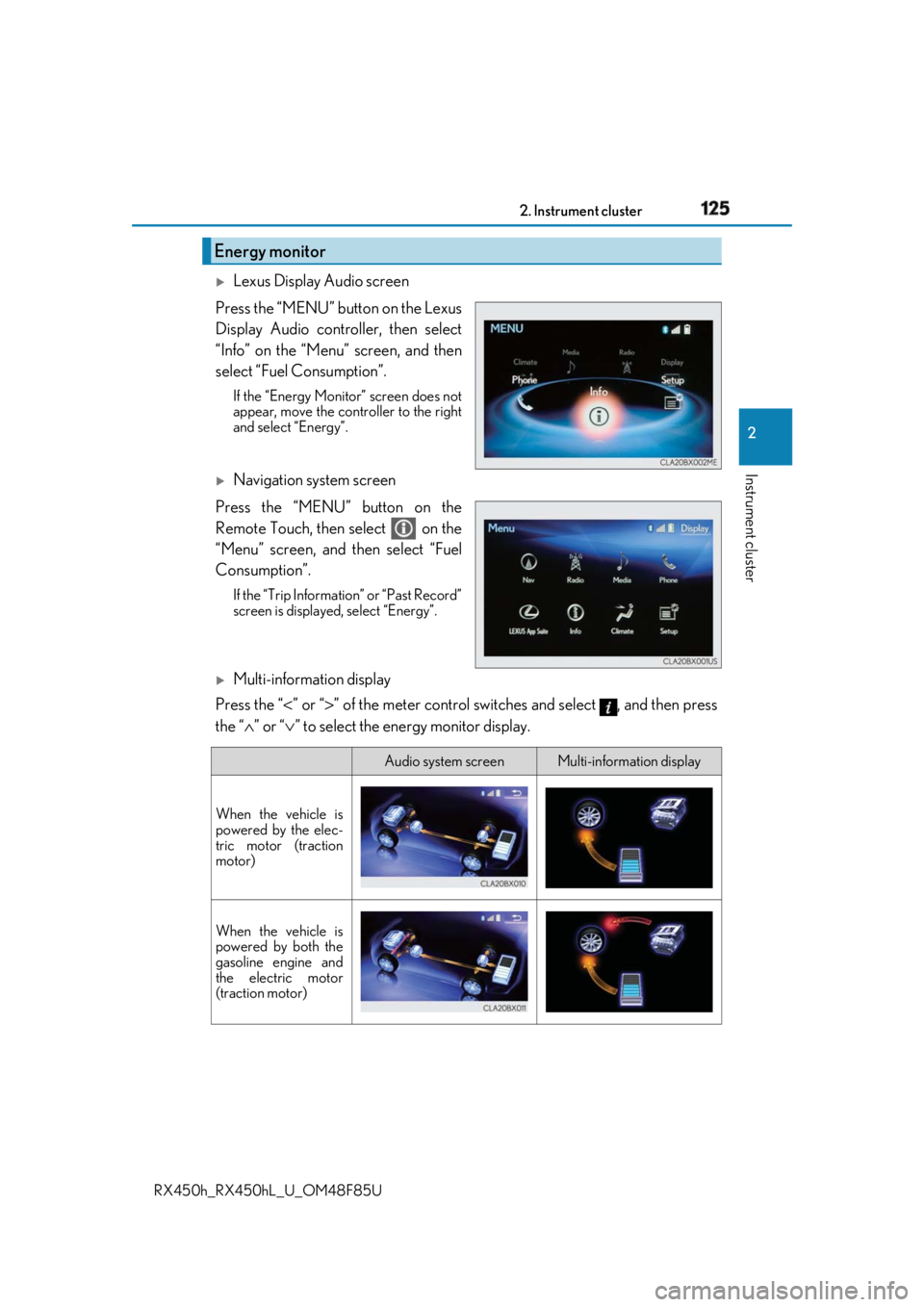
Lexus Display Audio screen
Press the “MENU” button on the Lexus
Display Audio controller, then select
“Info” on the “Menu” screen, and then
select “Fuel Consumption”. If the “Energy Monitor” screen does not
appear, move the controller to the right
and select “Energy”.
Navigation system screen
Press the “MENU” button on the
Remote Touch, then select on the
“Menu” screen, and then select “Fuel
Consumption”. If the “Trip Information” or “Past Record”
screen is displayed, select “Energy”.
Multi-information display
Press the “ < ” or “ > ” of the meter control switches and select , and then press
the “ ∧ ” or “ ∨ ” to select the energy monitor display.Energy monitor
Audio system screen Multi-information display
When the vehicle is
powered by the elec-
tric motor (traction
motor)
When the vehicle is
powered by both the
gasoline engine and
the electric motor
(traction motor)
Page 127 of 792

1272. Instrument cluster
2
Instrument cluster
RX450h_RX450hL _U_OM48F85U■
Trip information
Lexus Display Audio screen
Press the “MENU” button on the Lexus Display Audio controller, then select
“Info” on the “Menu” screen, and then select “Fuel Consumption”.If the “Trip Information” screen does no t appear, move the co ntroller to the right
and select “Trip Information”.
Fuel consumption in the past 15
minutes
Current fuel consumption
Regenerated energy in the past
15 minutes
One symbol indicates 50 Wh.
Up to 5 symbols are shown.
Average vehicle speed since the hybrid system was started.
Elapsed time since the hybrid system was started.
Cruising range ( → P. 129)
Navigation system screen
Press the “MENU” button on the Remo te Touch, then select on the
“Menu” screen, and then se lect “Fuel Consumption”.If the “Energy Monitor” or “Past Record” screen is displayed, select “Trip Informa-
tion”.
Resetting the consumption data
Fuel consumption in the past 15
minutes
Current fuel consumption
Regenerated energy in the past
15 minutes
One symbol indicates 50 Wh.
Up to 5 symbols are shown.
Average vehicle speed since the hybrid system was started.
Elapsed time since the hybrid system was started.
Cruising range ( → P. 129)Fuel consumption 1
2
3
4
5
6
1
2
3
4
5
6
7
Page 128 of 792

128 2. Instrument cluster
RX450h_RX450hL _U_OM48F85UAverage fuel consumption for the past 15 minutes is divided by color into past
averages and averages atta ined since the power switch was last turned to ON
mode. Use the displayed average fuel consumption as a reference.
The image is an example only. ■
Past record
Lexus Display Audio screen
Press the “MENU” button on the Lexus Display Audio controller, then select
“Info” on the “Menu” screen, and then select “Fuel Consumption”.If the “Past Record” screen does not appear, move the controller to the right and
select “Past Record”.
Previous fuel consumption record
Current fuel consumption
Best recorded fuel consumption
Navigation system screen
Press the “MENU” button on the Remo te Touch, then select on the
“Menu” screen, and then se lect “Fuel Consumption”.If the “Energy Monitor” or “Trip Informat ion” screen is disp layed, select “Past
Record”.
Resetting the past record data
Best recorded fuel consumption
Average fuel consumption
Previous fuel consumption record
Updating the average fuel con-
sumption data
The average fuel consumption history is divided by color into past averages
and the average fuel consumption since the last updated. Use the displayed
average fuel consumption as a reference.
The image is an example only. 1
2
3
1
2
3
4
5
Page 129 of 792

1292. Instrument cluster
2
Instrument cluster
RX450h_RX450hL _U_OM48F85U■
Updating the past record data
Vehicles with a Lexus Display Audio system
Update the average fuel cons umption by moving the contro ller to the left and select
“Update” to measure the current fuel consumption again.
Vehicles with a navigation system
Update the average fuel consumption by selecting “Upd ate” to measure the current
fuel consumption again. ■
Resetting the data
Vehicles with a Lexus Display Audio system
The fuel consumption data can be deleted by moving the controller to the left and
select “Clear”.
Vehicles with a navigation system
The fuel consumption data can be deleted by selecting “Clear”. ■
Cruising range
Displays the estimated maximum distance that can be driven with the quantity of fuel
remaining.
This distance is computed based on your average fuel consumption.
As a result, the actual distance that can be driven may differ from that displayed.
Vehicle information can be displayed on the side display ( → P. 505), then select
“<” or “>” to select the desired screen.
Fuel consumption
Displays the average fuel consumption
and regenerated energy for the past 10
minutes in 1 minute intervals, as well as
the cruising range.Using the side display (vehicles with 12.3-inch display)
Page 130 of 792
130 2. Instrument cluster
RX450h_RX450hL _U_OM48F85U
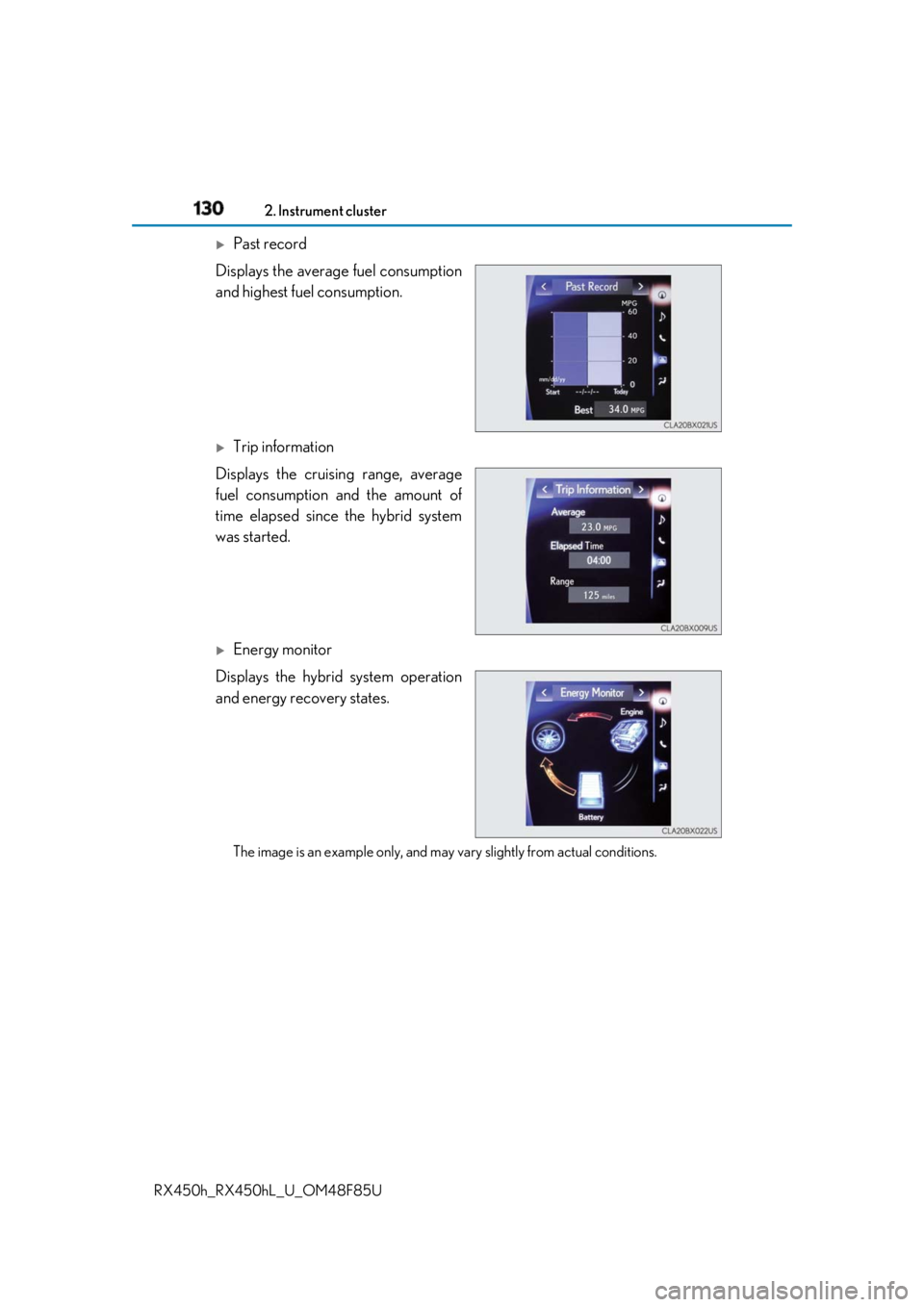
Past record
Displays the average fuel consumption
and highest fuel consumption.
Trip information
Displays the cruising range, average
fuel consumption and the amount of
time elapsed since the hybrid system
was started.
Energy monitor
Displays the hybrid system operation
and energy recovery states.
The image is an example only, and may va ry slightly from actual conditions.
Page 211 of 792

211
4 Driving
RX450h_RX450hL _U_OM48F85U4-3. Operating the lights and
wipers
Headlight switch ........................ 258
Automatic High Beam ............. 262
Fog light switch ...........................266
Windshield wipers and
washer.......................................... 267
Rear window wiper and
washer.......................................... 272
4-4. Refueling
Opening the fuel tank cap...... 274 4-5. Using the driving support
systems
Lexus Safety System+ .............. 279
PCS
(Pre-Collision System) ......... 286
LKA
(Lane-Keeping A ssist) .......... 297
Dynamic radar cruise
control with full-speed
range ............................................306
BSM (Blind Spot Monitor) ...... 319
• BSM function ......................... 323
• RCTA function...................... 327
Intuitive parking assist .............. 332
Intelligent Clearance Sonar
(ICS) ............................................. 342
Lexus parking assist
monitor ........................................ 363
Driving mode select
switch ........................................... 379
Driving assist systems ..............382
4-6. Driving tips
Hybrid vehicle driving
tips ................................................ 388
Winter driving tips .....................390
Utility vehicle
precautions................................ 394
Page 213 of 792

2134-1. Before driving
4
Driving
RX450h_RX450hL _U_OM48F85UWith the brake pedal depressed, shift the shift lever to D. ( → P. 246)
Pull the parking brake switch and parking brake is set manually. ( → P. 254)
Release the brake pedal and gently de press the accelerator pedal to acceler-
ate the vehicle.
Press the parking brake switch and pa rking brake is released manually.
( → P. 254) ■
When starting off on a uphill
The hill-start assist control will activate. ( → P. 382)■
For fuel-efficient driving
Keep in mind that hybrid vehicles are simila r to conventional vehicles, and it is necessary
to refrain from activities su ch as sudden acceleration. ( → P. 388)■
Driving in the rain ●
Drive carefully when it is ra ining, because visibility will be reduced, the windows may
become fogged-up, and the road will be slippery. ●
Drive carefully when it starts to rain, beca use the road surface will be especially slip-
pery. ●
Refrain from high speeds when driving on an expressway in the rain, because there may
be a layer of water between the tires and th e road surface, preventing the steering and
brakes from operating properly. ■
Restraining the hybrid system output (Brake Override System)●
When the accelerator and brake pedals are depressed at the same time, the hybrid sys-
tem output may be restrained. ●
A warning message is displayed on the mult i-information display while the system is
operating. If a warning messa ge is shown on the multi-in formation display, read the
message and follow the instructions. ■
Restraining sudden start (Drive-Start Control)●
When the following unusual operation is pe rformed, the hybrid system output may be
restrained.
• When the shift lever is shifted from R to D, D to R, N to R, P to D, or P to R (D
includes S) with the acce lerator pedal depressed, a warning message appears on
the multi-information display. If a warning message is shown on the multi-informa-
tion display, read the message and follo w the instructions.
• When the accelerator pedal is depressed t oo much while the vehicle is in reverse.●
While Drive-Start Control is being activated, your vehicle may have trouble escaping
from the mud or fresh snow. In such case, deactivate TRAC ( → P. 384) to cancel Drive-
Start Control so that the vehicle may beco me able to escape from the mud or fresh
snow.Starting off on a uphill 1
2
3
4
Page 214 of 792
214 4-1. Before driving
RX450h_RX450hL _U_OM48F85U■
Breaking in your new Lexus
To extend the life of the vehicle, observin g the following precautions is recommended:●
For the first 200 miles (300 km):
Avoid sudden stops. ●
For the first 500 miles (800 km):
Do not tow a trailer. ●
For the first 1000 miles (1600 km):
• Do not drive at extremely high speeds.
• Avoid sudden acceleration.
• Do not drive continuously in low gears.
• Do not drive at a constant speed for extended periods.■
Operating your vehicle in a foreign country
Comply with the relevant vehicle registration laws and confirm the availability of the cor-
rect fuel. ( → P. 712)■
Eco-friendly driving
→ P. 121
WARNING
Observe the following precautions.
Failure to do so may result in death or serious injury. ■
When starting the vehicle
Always keep your foot on the brake pedal while stopped with the “READY” indicator is
illuminated. This prevents the vehicle from creeping.■
When driving the vehicle ●
Do not drive if you are unfamiliar with the location of the brake and accelerator ped-
als to avoid depressing the wrong pedal.
• Accidentally depressing the accelerator pedal instead of the brake pedal will
result in sudden acceleration that may lead to an accident.
• When backing up, you may twist your body around, leading to difficulty in operat-
ing the pedals. Make sure to operate the pedals properly.
• Make sure to keep a correct driving po sture even when moving the vehicle only
slightly. This allows you to depress th e brake and accelerator pedals properly.
• Depress the brake pedal using your right foot. Depressing the brake pedal using
your left foot may delay re sponse in an emergency, resulting in an accident.●
The driver should pay extra attention to pedestrians when the vehicle is powered only
by the electric motor (traction motor). As there is no engine noise, the pedestrians
may misjudge the vehicle’s movement. ●
Do not drive the vehicle over or stop the vehicle near flammable materials.
The exhaust system and exhaust gases can be extremely hot. These hot parts may
cause a fire if there is any flammable material nearby.