Page 99 of 792
992. Instrument cluster
2
Instrument cluster
RX450h_RX450hL _U_OM48F85U■
The meters and display illuminate when
The power switch is in ON mode. ■
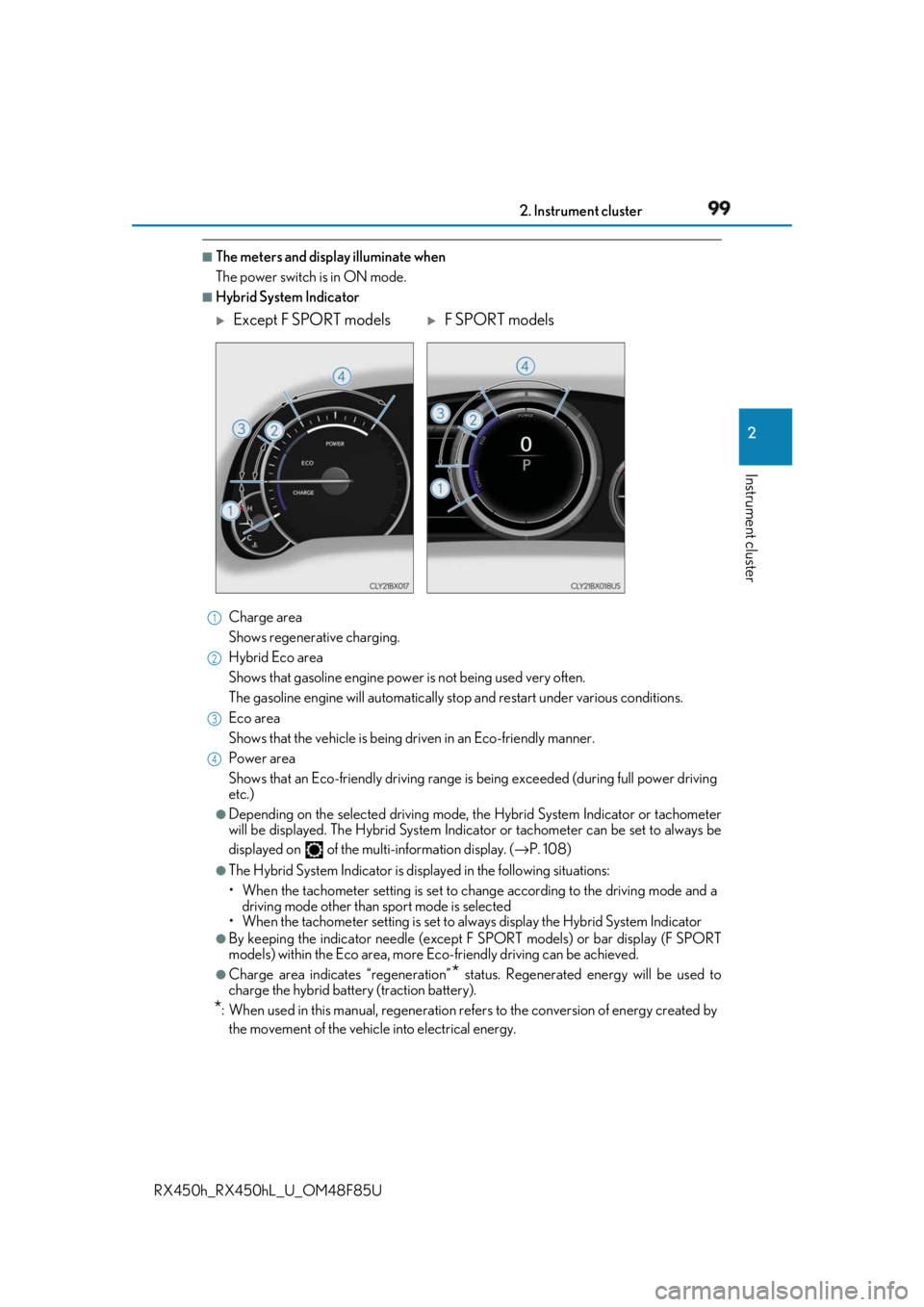
Hybrid System Indicator
Charge area
Shows regenerative charging.
Hybrid Eco area
Shows that gasoline en gine power is not being used very often.
The gasoline engine will automatically st op and restart under various conditions.
Eco area
Shows that the vehicle is being dr iven in an Eco-friendly manner.
Power area
Shows that an Eco-friendly driving range is being exceeded (dur ing full power driving
etc.) ●
Depending on the selected driving mode, th e Hybrid System Indicator or tachometer
will be displayed. The Hybrid System Indica tor or tachometer can be set to always be
displayed on of the mult i-information display. ( → P. 108)●
The Hybrid System Indicator is disp layed in the following situations:
• When the tachometer setting is set to ch ange according to the driving mode and a
driving mode other than sport mode is selected
• When the tachometer setting is set to al ways display the Hybrid System Indicator●
By keeping the indica tor needle (except F SPORT models) or bar display (F SPORT
models) within the Eco area, more Eco-friendly driving can be achieved.●
Charge area indicates “regeneration”
* status. Regene rated energy will be used to
charge the hybrid battery (traction battery).
* : When used in this manual, re generation refers to the conv ersion of energy created by
the movement of the vehicle into electrical energy.
Except F SPORT models
F SPORT models1
2
3
4
Page 100 of 792

100 2. Instrument cluster
RX450h_RX450hL _U_OM48F85U■
Tachometer
Hybrid System Indicator switches to the tachometer when driving mode is in sport mode.
The settings of the tachometer display can be changed on of the multi-information
display. ( → P. 108)■
Engine speed
On hybrid vehicles, engine speed is precisel y controlled in order to help improve fuel
efficiency and reduce exhaust emissions etc.
There are times when the engine speed that is displayed may differ even when vehicle
operation and driving conditions are the same. ■
Brightness of the meters (d ay mode and night mode)
The brightness of the meters is changed between day mode and night mode. ●
Day mode: When the tail lights are off or when the tail lights are on but the surrounding
area is bright ●
Night mode: When the tail lights are on and the surrounding area is dark ■
Outside temperature display ●
In the following situations, the correct outside temperature may not be displayed, or the
display may take longer than normal to change:
• When stopped, or driving at low speeds (less than 12 mph [20 km/h])
• When the outside temperature has changed suddenly (at the entrance/exit of a
garage, tunnel, etc.) ●
When “ − − ” or “E” is displayed, the sy stem may be malfunctioning.
Take your vehicle to your Lexus dealer. ■
Clock settings screen (vehicles with a navigation system only)
If the clock adjustment screen is displayed continuously wh en attempting to change the
clock settings, the system may be malfunctioning.
Have the vehicle inspected by your Lexus dealer. ■
Customization
Some functions can be customized. ( → P. 108)
NOTICE ■
To prevent damage to the engine and its components●
Do not let the indicator needle of the tachometer enter the red zone, which indicates
the maximum engine speed. ●
The engine may be overheating if the engine coolant temperature gauge is in the red
zone (H). In this case, immediately stop the vehicle in a safe place, and check the
engine after it has cooled completely. ( → P. 702)
Page 101 of 792

1012. Instrument cluster
2
Instrument cluster
RX450h_RX450hL _U_OM48F85UThe multi-information display presents the driver with a variety of driving-related
data, such as the current outside temperature. The multi-information display can
also be used to change the display settings and other settings.
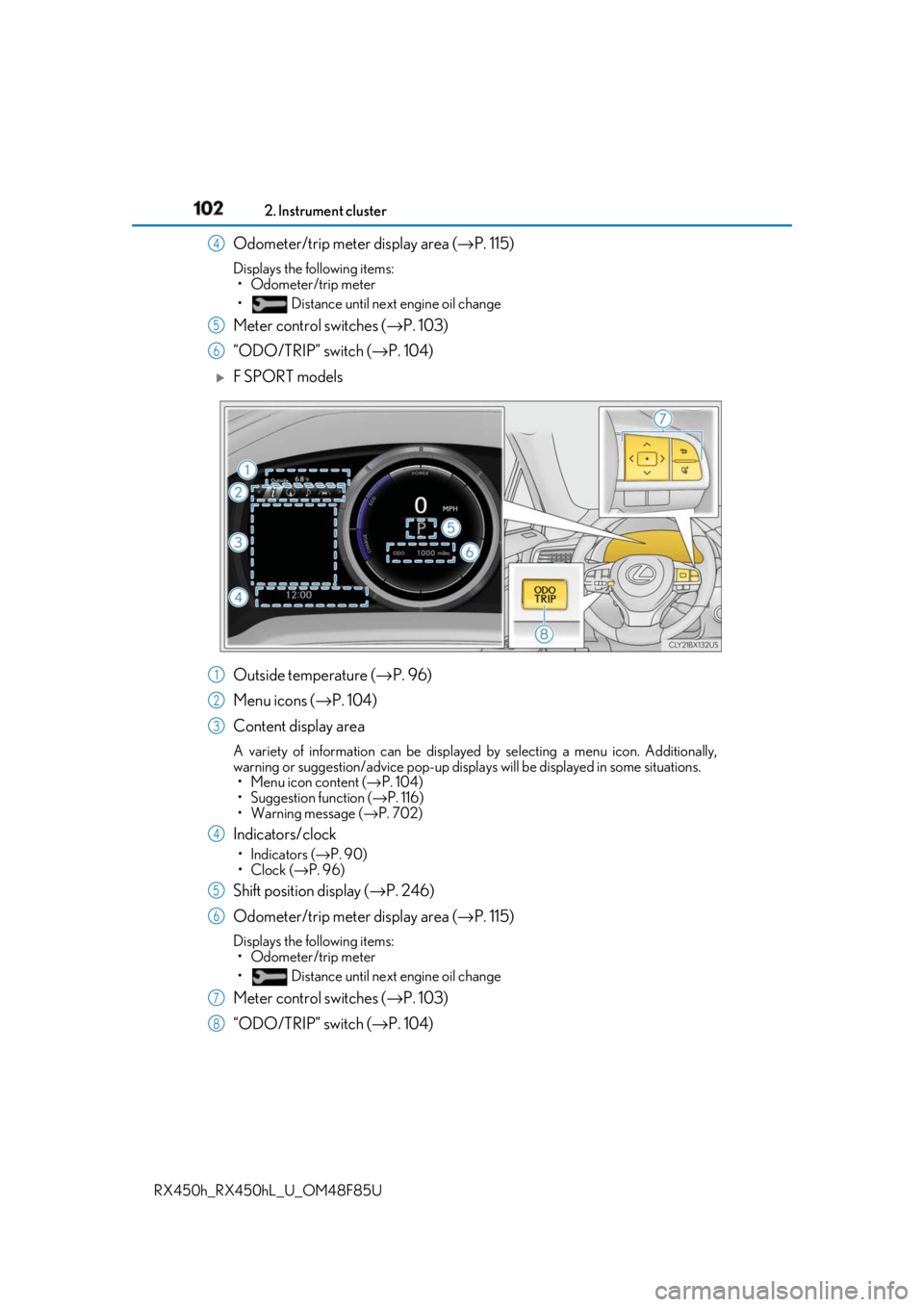
Except F SPORT models
Menu icon display area Displays the following items.
When a menu icon is not selected, the outside temperature and clock are displayed.
•Menu icons ( → P. 104)
• Outside temperature ( → P. 96)
•Clock ( → P. 96)
Content display area A variety of information can be displayed by selecting a menu icon. Additionally,
warning or suggestion/advice pop-up displa ys will be displayed in some situations.
• Menu icon content ( → P. 104)
• Suggestion function ( → P. 116)
• Warning message ( → P. 702)
Indicator/shift position display area Displays the following items:
•Indicators ( → P. 90)
• Shift position display ( → P. 246)Multi-information display Summary of functions
1
2
3
Page 102 of 792
102 2. Instrument cluster
RX450h_RX450hL _U_OM48F85UOdometer/trip meter display area ( → P. 115)Displays the following items:
• Odometer/trip meter
• Distance until next engine oil change
Meter control switches ( → P. 103)
“ODO/TRIP” switch ( → P. 104)
F SPORT models
Outside temperature ( → P. 96)
Menu icons ( → P. 104)
Content display area A variety of information can be displayed by selecting a menu icon. Additionally,
warning or suggestion/advice pop-up displa ys will be displayed in some situations.
• Menu icon content ( → P. 104)
• Suggestion function ( → P. 116)
• Warning message ( → P. 702)
Indicators/clock •Indicators ( → P. 90)
•Clock ( → P. 96)
Shift position display ( → P. 246)
Odometer/trip meter display area ( → P. 115)Displays the following items:
• Odometer/trip meter
• Distance until next engine oil change
Meter control switches ( → P. 103)
“ODO/TRIP” switch ( → P. 104)4
5
6
1
2
3
4
5
6
7
8
Page 103 of 792
1032. Instrument cluster
2
Instrument cluster
RX450h_RX450hL _U_OM48F85U◆ Using the content display area
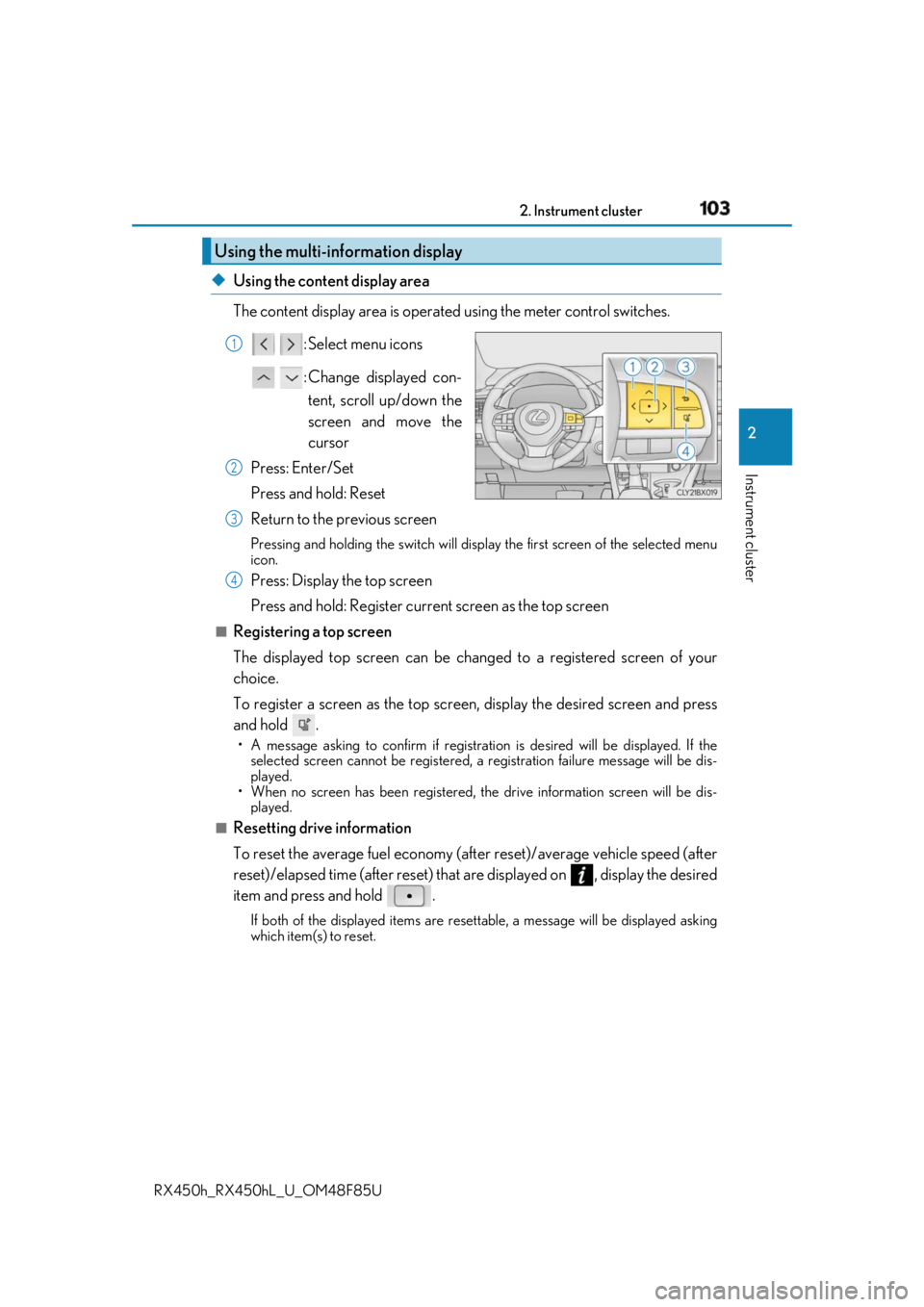
The content display area is operated using the meter control switches.
: Select menu icons
: Change displayed con-
tent, scroll up/down the
screen and move the
cursor
Press: Enter/Set
Press and hold: Reset
Return to the previous screen Pressing and holding the swit ch will display the first screen of the selected menu
icon.
Press: Display the top screen
Press and hold: Register current screen as the top screen■
Registering a top screen
The displayed top screen can be chan ged to a registered screen of your
choice.
To register a screen as the top screen, display the desired screen and press
and hold . • A message asking to confirm if registrati on is desired will be displayed. If the
selected screen canno t be registered, a registration failure message will be dis-
played.
• When no screen has been registered, the drive information screen will be dis-
played.■
Resetting drive information
To reset the average fuel economy (aft er reset)/average vehicle speed (after
reset)/elapsed time (after reset) that are displayed on , display the desired
item and press and hold . If both of the displayed items are resettable, a messa ge will be displayed asking
which item(s) to reset.Using the multi-information display 1
2
3
4
Page 104 of 792

104 2. Instrument cluster
RX450h_RX450hL _U_OM48F85U◆ Using the odometer/trip meter display area
Items in this area are operated using the “ODO/TRIP” switch.
Press: Change displayed item Each time the switch is pressed, the
displayed item will be changed.
Press and hold: Reset Display the desired trip meter and
press and hold the switch to reset the
trip meter.
Select a menu icon to display its content.
Drive information ( → P. 105)Select to display various drive data.
Navigation system-linked display (if equipped) Select to display the following na vigation system-linked information.
•Route guidance
• Compass display (heading-up display)
Audio system-linked display Select to enable selection of an audio source or track on the meter using the meter
control switches.
Driving assist system information Select to display the operational status of the following systems:
• Dynamic radar cruise control with full-speed range ( → P. 306)
• LKA (Lane-Keeping Assist) ( → P. 297)
Warning message display ( → P. 702)Select to display warning messages and me asures to be taken if a malfunction is
detected.
Settings display ( → P. 108)Select to change the meter display settings and other settings.Menu icons
Page 105 of 792
1052. Instrument cluster
2
Instrument cluster
RX450h_RX450hL _U_OM48F85U■
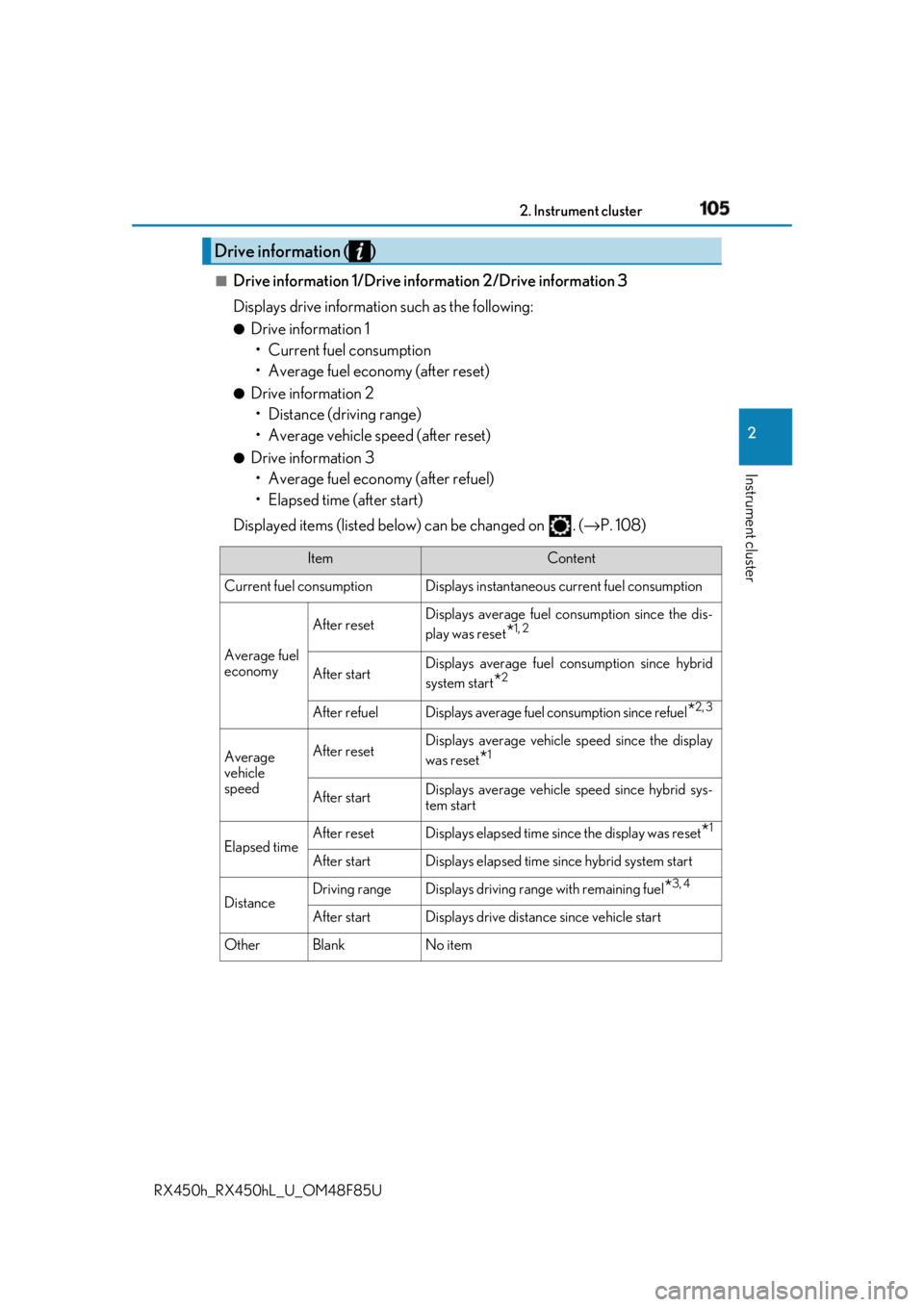
Drive information 1/Drive information 2/Drive information 3
Displays drive informatio n such as the following:●
Drive information 1
• Current fuel consumption
• Average fuel economy (after reset) ●
Drive information 2
• Distance (driving range)
• Average vehicle speed (after reset) ●
Drive information 3
• Average fuel economy (after refuel)
• Elapsed time (after start)
Displayed items (listed below) can be changed on . ( → P. 108)Drive information ( )
Item Content
Current fuel consumption Displays in stantaneous current fuel consumption
Average fuel
economy After reset Displays average fuel consumption since the dis-
play was reset
* 1, 2
After start Displays average fuel consumption since hybrid
system start
* 2
After refuel Displays average fuel consumption since refuel
* 2, 3
Average
vehicle
speed After reset Displays average vehicle speed since the display
was reset
* 1
After start Displays average vehicle speed since hybrid sys-
tem start
Elapsed time After reset Displays elapsed time since the display was reset
* 1
After start Displays elapsed time since hybrid system start
Distance Driving range Displays driving rang e with remaining fuel
* 3, 4
After start Displays drive distance since vehicle start
Other Blank No item
Page 106 of 792
106 2. Instrument cluster
RX450h_RX450hL _U_OM48F85U* 1
:Resetting: → P. 103
* 2
: Use the displayed fuel consumption as a reference.
* 3
: When only a small amount of fuel is added to the tank, the display may not be
updated.
When refueling, turn the power switch off. If the vehicle is refueled without turning the
power switch off, the display may not be updated.
* 4
: This distance is computed based on your average fuel consumption. As a result, the
actual distance that can be driven may differ from that displayed.■
Energy monitor
→ P. 124■
Sway warning
Detects the sway of the vehicle within a lane, which is often associated with a
decrease in the driver’s at tention level, and displays the decrease in attention
using a bar display.
The shorter the bar length, the more the driver may need to rest. This display is a part of the LKA (Lan e-Keeping Assist) system. The display is
enabled when the operating conditions of the vehicle sway warning are met.
( → P. 297)■
AWD Control
Displays the driving force applie d to each wheel using segments.
The greater the number of segments di splayed, the greater the driving force
applied.