2018 LEXUS RX450h air conditioning
[x] Cancel search: air conditioningPage 381 of 792
3814-5. Using the driving support systems
4
Driving
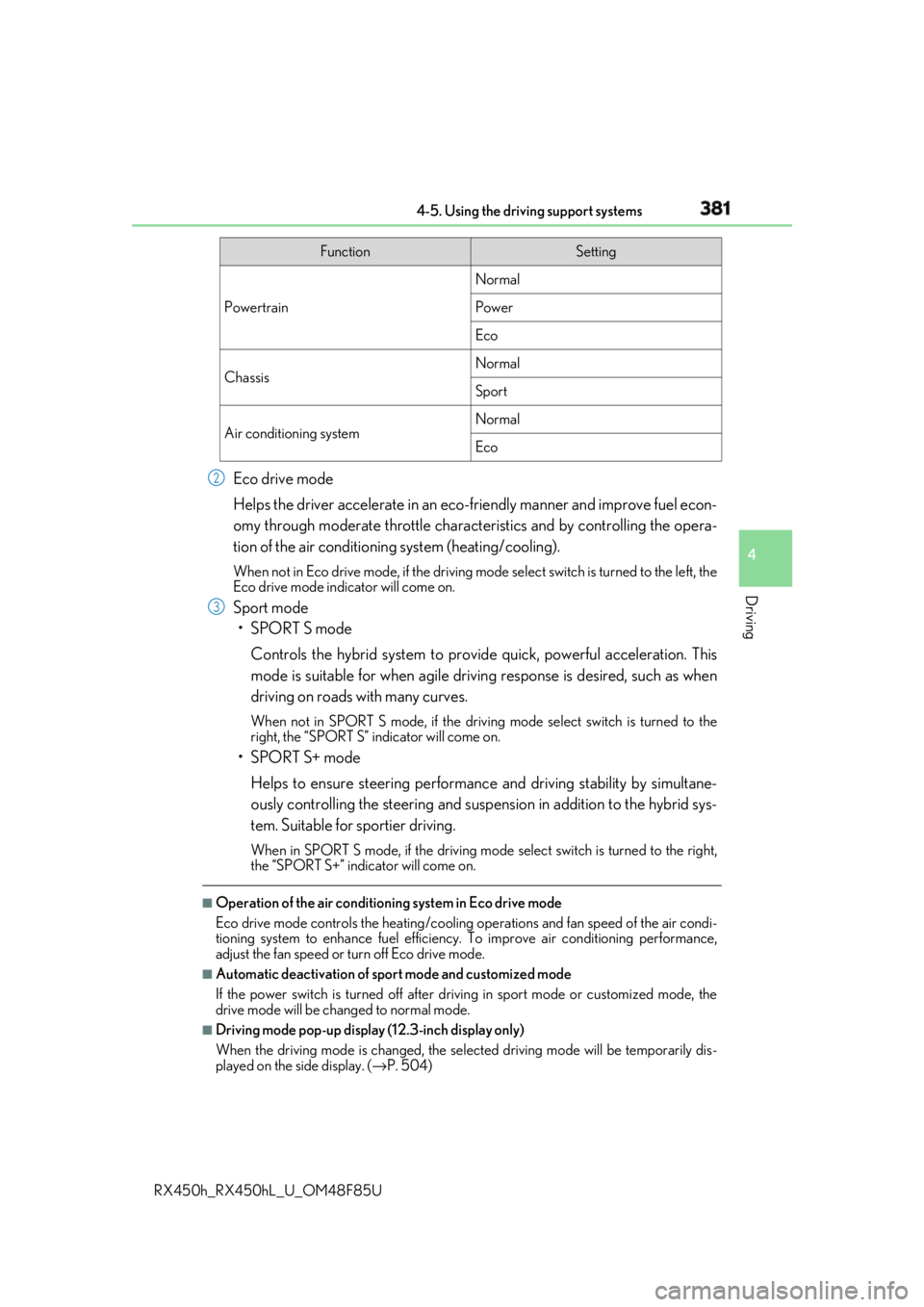
RX450h_RX450hL _U_OM48F85UEco drive mode
Helps the driver accelerate in an eco-fr iendly manner and improve fuel econ-
omy through moderate throttle charact eristics and by controlling the opera-
tion of the air conditioning system (heating/cooling). When not in Eco drive mode, if the driving mode select switch is tu rned to the left, the
Eco drive mode indicator will come on.
Sport mode
•SPORT S mode
Controls the hybrid system to prov ide quick, powerful acceleration. This
mode is suitable for when agile drivin g response is desired, such as when
driving on roads with many curves. When not in SPORT S mode, if the driving mode select switch is turned to the
right, the “SPORT S” indicator will come on.
•SPORT S+ mode
Helps to ensure steering performanc e and driving stability by simultane-
ously controlling the steering and suspension in addition to the hybrid sys-
tem. Suitable for sportier driving. When in SPORT S mode, if the driving mode select switch is turned to the right,
the “SPORT S+” indicator will come on.■
Operation of the air conditioning system in Eco drive mode
Eco drive mode controls the heating/cooling operations and fan speed of the air condi-
tioning system to enhance fuel efficiency. To improve air conditioning performance,
adjust the fan speed or turn off Eco drive mode. ■
Automatic deactivation of sport mode and customized mode
If the power switch is turned off after driv ing in sport mode or customized mode, the
drive mode will be changed to normal mode. ■
Driving mode pop-up display (12.3-inch display only)
When the driving mode is changed, the sele cted driving mode will be temporarily dis-
played on the side display. ( → P. 504)Function Setting
Powertrain Normal
Power
Eco
Chassis Normal
Sport
Air conditioning system Normal
Eco2
3
Page 388 of 792

388
RX450h_RX450hL _U_OM48F85U4-6. Driving tips
◆ Using Eco drive mode
When using Eco drive mode, the torque corresponding to the accelerator
pedal depression amount can be generate d more smoothly than it is in normal
conditions. In addition, the operation of the air conditioning system (heat-
ing/cooling) will be minimized, improving the fuel economy. ( → P. 379)
◆ Use of Hybrid System Indicator
The Eco-friendly driving is possible by keeping the indicator needle (except F
SPORT models) or bar display (F SPOR T models) of Hybrid System Indicator
within Eco area. ( → P. 99)
◆ Shift lever operation
Shift the shift lever to D when stopped at a traffic light, or driving in heavy traf-
fic, etc. Shift the shift lever to P when parking. When using the N, there is no
positive effect on fuel consumption. In the N, the gasoline engine operates but
electricity cannot be generated. Also, wh en using the air conditioning system,
etc., the hybrid battery (tractio n battery) power is consumed.
◆ Accelerator pedal/brake pedal operation ●
Drive your vehicle smoothly. Avoid ab rupt acceleration and deceleration.
Gradual acceleration and deceleration will make more effective use of the
electric motor (traction motor) without having to use gasoline engine
power. ●
Avoid repeated acceleration. Repeated acceleration consumes hybrid bat-
tery (traction battery) power, resulting in poor fuel consumption. Battery
power can be restored by driving with the accelerator pedal slightly
released.
◆ When braking
Make sure to operate the brakes gently and in a timely manner. A greater
amount of electrical energy can be regenerated when slowing down.Hybrid vehicle driving tips For economical and ecological driving, pay attention to the following points:
Page 389 of 792

3894-6. Driving tips
4
Driving
RX450h_RX450hL _U_OM48F85U◆ Delays
Repeated acceleration and deceleration, as well as long waits at traffic lights,
will lead to bad fuel economy. Check traffic reports before leaving and avoid
delays as much as possible. When drivin g in a traffic jam, gently release the
brake pedal to allow the vehicle to move forward slightly while avoiding over-
use of the accelerator pedal. Doing so can help control excessive gasoline
consumption.
◆ Highway driving
Control and maintain the vehicle at a co nstant speed. Before stopping at a toll
booth or similar, allow plenty of ti me to release the accelerator and gently
apply the brakes. A greater amount of electrical energy can be regenerated
when slowing down.
◆ Air conditioning
Use the air conditioning only when necessary. Doing so can help reduce
excessive gasoline consumption.
In summer: When the ambient temperature is high, use the recirculated air
mode. Doing so will help to reduce the burden on the air conditioning system
and reduce fuel consumption as well.
In winter: Because the gasoline engine will not automatically cut out until it
and the interior of the vehicle are warm , it will consume fuel. Also, fuel con-
sumption can be improved by av oiding overuse of the heater.
◆ Checking tire inflation pressure
Make sure to check the tire inflation pr essure frequently. Improper tire infla-
tion pressure can cause poor fuel economy.
Also, as snow tires can cause large amou nts of friction, their use on dry roads
can lead to poor fuel economy. Use ti res that are appropriate for the season.
◆ Luggage
Carrying heavy luggage will lead to poor fuel economy. Avoid carrying
unnecessary luggage. Installing a large roof rack will also cause poor fuel
economy.
◆ Warming up before driving
Since the gasoline engine starts up an d cuts out automatically when cold,
warming up the engine is unnecessary. Moreover, frequently driving short dis-
tances will cause the engine to repeated ly warm up, which can lead to excess
fuel consumption.
Page 401 of 792

4015-1. Basic Operations
5
Lexus Display Audio system
RX450h_RX450hL _U_OM48F85U■
“Menu” screen
To display the “Menu” screen, press th e “MENU” button on the Lexus Display
Audio controller.
* : Available in the 48 states, D.C. and Alaska Button Function
“Radio” Display the radio top screen ( → P. 426)
“Media” Display the media top screen ( → P. 433, 440, 444, 448, 453)
“Climate” Display the air conditioning control screen ( → P. 509, 511)
“Phone” Display the phone top screen ( → P. 461)
“Connected Navi”
* If a turn-by-turn navigation application has been downloaded
to a connected phone, the appl ication will be displayed and
can be used.
“Info” Display the “Information” screen ( → P. 488)
“Setup” Display the “Setup” screen ( → P. 412)
“Display” Display the display settings screen ( → P. 417)
Page 408 of 792

408 5-1. Basic Operations
RX450h_RX450hL _U_OM48F85U■
Adjusting the volume
The volume of the Mobile Assist ant can be adjusted using the
“ PWR·VOL
” knob or
steering wheel volume switch es. The Mobile Assistant an d phone call volumes are syn-
chronized. ■
Microphone
It is not necessary to speak directly into the microphone when using the Mobile Assis-
tant. ●
Wait for the listening beeps before using the Mobile Assistant.●
The Mobile Assistant may not recognize commands in the following situations:
• When spoken too quickly.
• When spoken at a low or high volume.
• When the roof or windows are open.
• When passengers are talking while th e Mobile Assistan t is being used.
• When the air conditioning syst em’s fan speed is set high.
• When the air conditioning vents ar e turned toward the microphone.■
Mobile Assistant precautions ●
The available features and functions may vary based on the iOS version installed on the
connected device. ●
Some Siri features are limited in Eyes Free mode. If you attempt to use an unavailable
function, Siri will inform you that the function is not available. ●
If Siri is not enabled on the ce llular phone connected via Bluetooth
, an error message
will be displayed on the screen. ●
While a phone call is active, the Mobile Assistant cannot be used. ●
If using the navigation featur e of the cellular phone, ensure the active audio source is
Bluetooth
audio or iPod in order to hear turn by turn direction prompts.
Page 482 of 792

482 5-11. Bluetooth ®
RX450h_RX450hL _U_OM48F85U■
When using the Bluetooth ®
audio system●
In the following situations, the system may not function.
• If the portable audio player is turned off
• If the portable audio player is not connected
• If the portable audio player’s battery is low ●
There may be a delay if a cellular phon e connection is made during Bluetooth ®
audio
play. ●
Depending on the type of portable audio play er that is connected to the system, opera-
tion may differ slight ly and certain functions may not be available.■
When using the hands-free system ●
The audio system is mu ted when making a call.●
If both parties speak at the same time, it may be difficult to hear.●
If the received call volume is over ly loud, an echo may be heard.
If the Bluetooth ®
phone is too close to the system, quality of the sound may deteriorate
and connection status may deteriorate. ●
In the following situations, it may be difficult to hear the other party:
• When driving on unpaved roads
• When driving at high speeds
• If a window is open
• If the air conditioning is blow ing directly on the microphone
• If there is interference from the network of the cellular phone●
Depending on the type phone, certain functions may not be available. ■
Conditions under which th e system will not operate●
If using a cellular phone that does not support Bluetooth ®
●
If the cellular phone is turned off ●
If you are outside of cellular phone service coverage ●
If the cellular phone is not connected ●
If the cellular phone’s battery is low ●
When outgoing calls are controlled, due to heavy traffic on phone lines, etc. ●
When the cellular phone itself cannot be used ●
When transferring phonebook da ta from the cellular phoneBluetooth ®
Page 494 of 792

494 5-12. Other function
RX450h_RX450hL _U_OM48F85U■
Microphone
→ P. 462 ■
When using the microphone ●
It is unnecessary to speak directly into the microphone when giving a command.●
Wait for the confirmation beep before speaking a command.●
Voice commands may not be recognized if:
• Spoken too quickly.
• Spoken at a low or high volume.
• The roof or windows are open.
• Passengers are talking while voice commands are spoken.
• The air conditioning speed is set high.
• The air conditioning vents are turned towards the microphone.●
In the following conditions, the system ma y not recognize the command properly and
using voice commands may not be possible:
• The command is incorrect or unclear. No te that certain words, accents or speech
patterns may be difficult for the system to recognize.
• There is excessive background noise, such as wind noise. ■
When searching for a track ●
A USB memory or iPod must be connected to enable track searching and playback.
( → P. 409) ●
When a USB memory or iPod is connected, recognition data is created so tracks can
be searched using voice commands. ●
Recognition data is updated un der the following conditions:
• When the USB memory or iPod data has changed.
• When the voice recognition language is changed. ( → P. 413)●
While the recognition data is being created or being updated, a track search cannot be
performed using a voice command. ■
The Gracenote ®
media database
Page 499 of 792

499
6Interior features
RX450h_RX450hL _U_OM48F85U6-1. Basic operation of the
Remote Touch screen
Remote Touch ............................ 500
12.3-inch display........................ 504
6-2. Using the air conditioning
system and defogger
Lexus Climate
Concierge ................................. 506
Front automatic air
conditioning system ...............507
Rear automatic air
conditioning system ...............522
Heated steering wheel/
seat heaters/
seat ventilators .........................525
6-3. Using the interior lights
Interior lights list......................... 528
• Interior lights ..........................529
• Personal lights ...................... 530
6-4. Using the storage features
List of storage features.............532
• Glove box ...............................534
• Console box ...........................534
• Cup holders........................... 535
• Door pockets .........................537 • Bottle holders ........................ 537
• Coin box ..................................538
• Auxiliary boxes .....................539
Luggage compartment
features .......................................540
6-5. Using the other interior
features
Other interior features ............ 547
• Sun visors ................................ 547
• Vanity mirrors ....................... 547
• Clock ........................................548
• Wireless charger .................548
• Power outlets.........................555
• Front passenger
footwell hooks ....................... 557
• Rear door sunshades ......... 557
• Armrest ................................... 558
• Assist grips..............................559
• Coat hooks .............................559
Garage door opener ...............560
Compass ....................................... 567
LEXUS Enform Safety
Connect ........................................571
LEXUS Enform Remote ......... 576
LEXUS Enform Service
Connect ...................................... 577