Page 364 of 792
364 4-5. Using the driving support systems
RX450h_RX450hL _U_OM48F85U■
Screen display
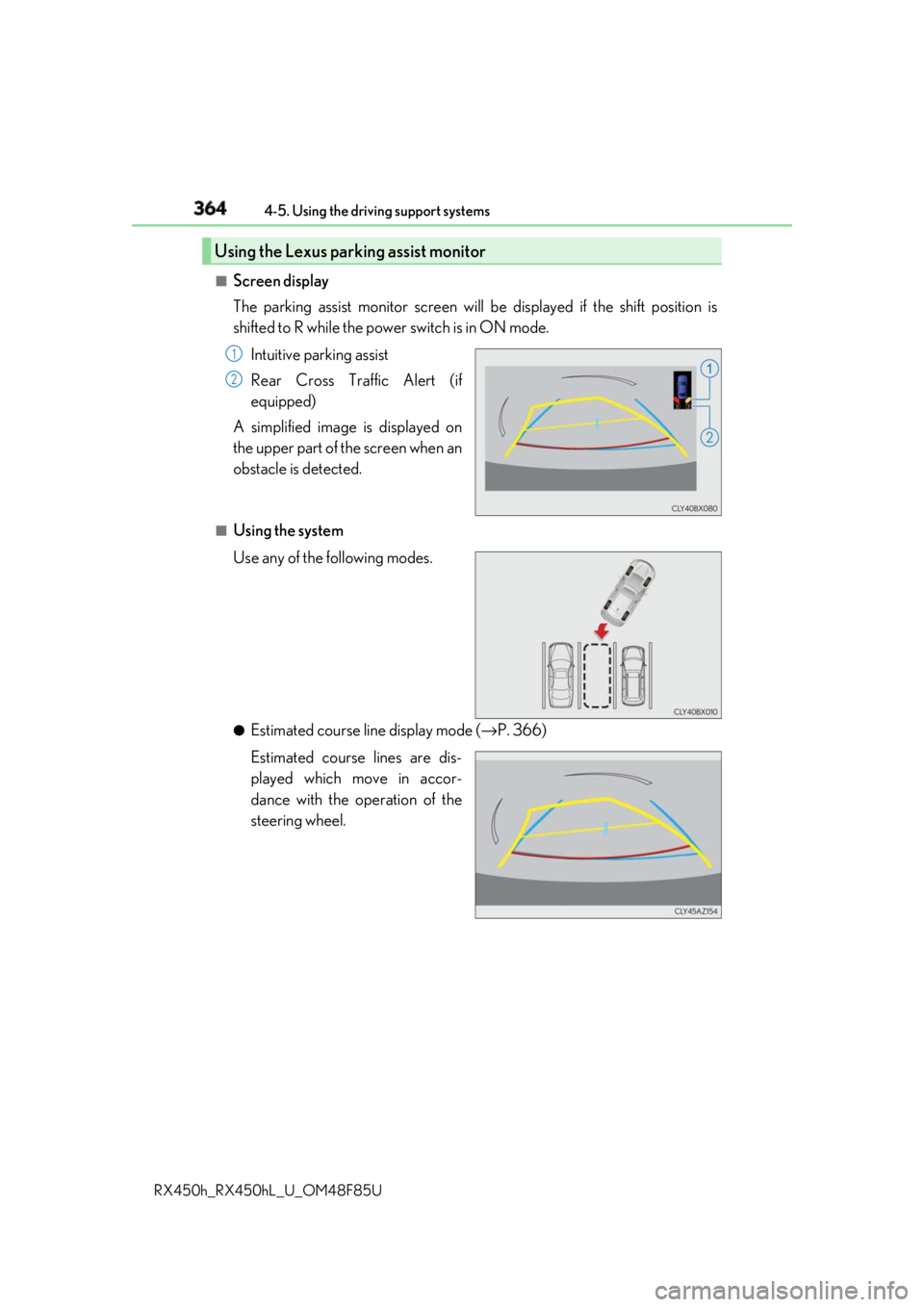
The parking assist monitor screen will be displayed if the shift position is
shifted to R while the power switch is in ON mode.
Intuitive parking assist
Rear Cross Traffic Alert (if
equipped)
A simplified image is displayed on
the upper part of the screen when an
obstacle is detected. ■
Using the system
Use any of the following modes.
●
Estimated course line display mode ( → P. 366)
Estimated course lines are dis-
played which move in accor-
dance with the operation of the
steering wheel.Using the Lexus parking assist monitor 1
2
Page 365 of 792
3654-5. Using the driving support systems
4
Driving
RX450h_RX450hL _U_OM48F85U●
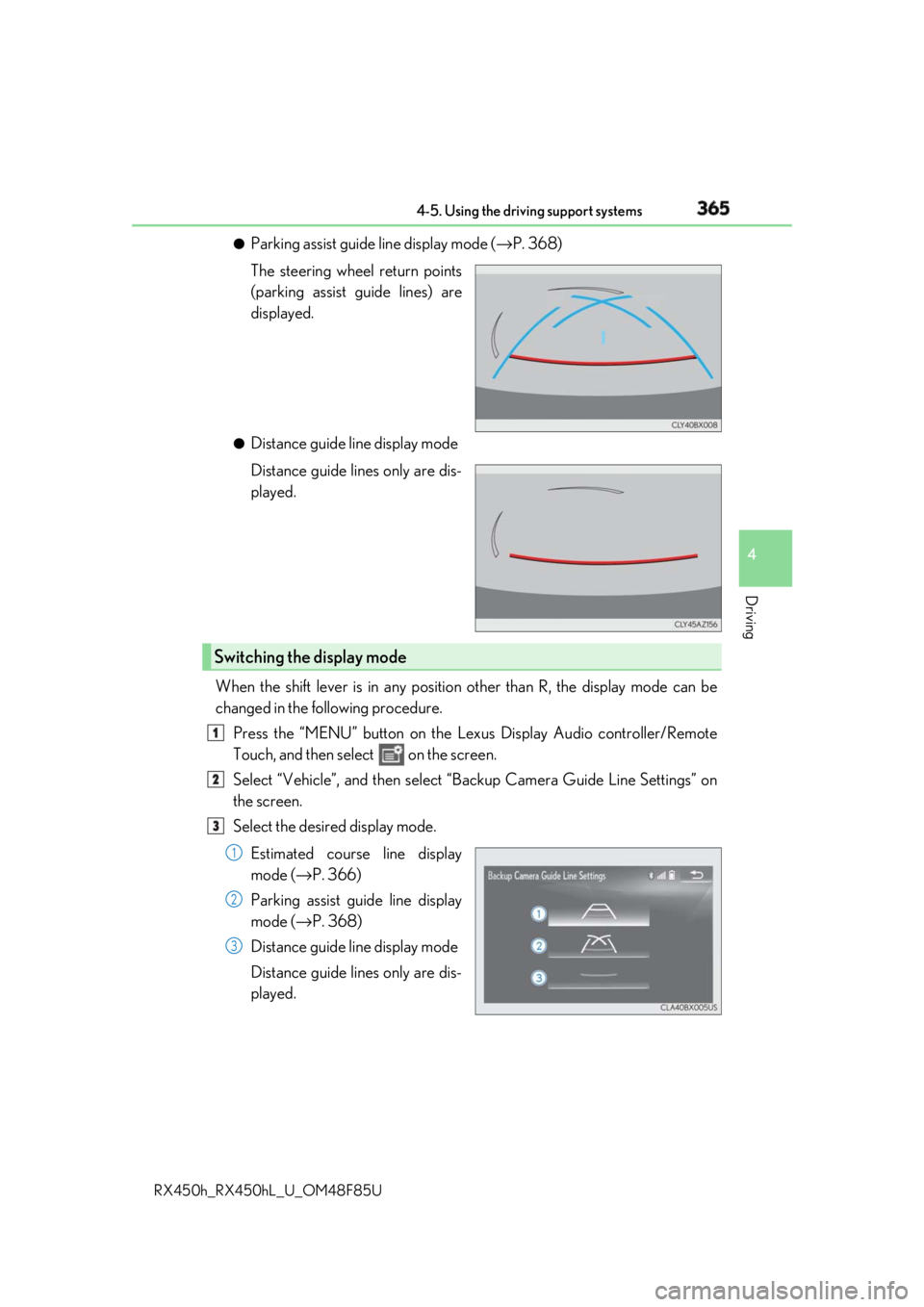
Parking assist guide line display mode ( → P. 368)
The steering wheel return points
(parking assist guide lines) are
displayed. ●
Distance guide line display mode
Distance guide lines only are dis-
played.
When the shift lever is in any position other than R, the display mode can be
changed in the following procedure.
Press the “MENU” button on the Le xus Display Audio controller/Remote
Touch, and then select on the screen.
Select “Vehicle”, and then select “Backup Camera Guide Line Settings” on
the screen.
Select the desired display mode.
Estimated course line display
mode ( → P. 366)
Parking assist guide line display
mode ( → P. 368)
Distance guide line display mode
Distance guide lines only are dis-
played.Switching the display mode 1
2
3
1
2
3
Page 366 of 792
366 4-5. Using the driving support systems
RX450h_RX450hL _U_OM48F85U■
Screen description
Vehicle center guide line The line indicates the estimated vehicle center on the ground.
Vehicle width guide line The line indicates a guide path when the vehicle is being backed straight up.
The displayed width is wider th an the actual vehicle width.
The line aligns with the estimated course lines when the steering wheel is straight.
Estimated course lines The lines show an estimated course when the steering wheel is turned.
Distance guide line The line moves, together with the estimated course lines, in sync with the steering
wheel. The line shows points approximately 1.5 ft. (0.5 m) (red) and approximately
3 ft. (1 m) (yellow) from the cent er of the edge of the bumper.
Distance guide line The line shows distance behind the vehicle, a point approximately 1.5 ft. (0.5 m)
(blue) from the edge of the bumper.Estimated course line display mode 1
2
3
4
5
Page 368 of 792
368 4-5. Using the driving support systems
RX450h_RX450hL _U_OM48F85UOnce the vehicle width guide lines and the parking space lines are parallel,
straighten the steering wheel and back up slowly until the vehicle has com-
pletely entered the parking space.
Stop the vehicle in an approp riate place, and finish parking.■
Screen description
Vehicle width guide lines
These lines indicate a guide path when the vehicle is being backed straight
up. The displayed width is wider than the actual vehicle width.
Parking assist guide lines
These lines indicate the path of the sm allest turn possible behind the vehi-
cle.
These lines also indicate the approx imate position of the steering wheel
when parking.
Distance guide line
This line (red) indicates points approxim ately 1.5 ft. (0.5 m) behind the rear
bumper of your vehicle.
Vehicle center guide line
The line indicates the estimated vehicle center on the ground.Parking assist guide line display mode 4
5
1
2
3
4
Page 370 of 792

370 4-5. Using the driving support systems
RX450h_RX450hL _U_OM48F85U■
Area displayed on screen
The parking assist monitor displays
an image of the view from the
bumper of the rear area of the vehi-
cle.
The image of the Lexus parking
assist monitor can be adjusted.
(Vehicles with a Lexus Display
Audio system: → P. 417) (Vehicles
with a navigation system: → “NAVI-
GATION SYSTEM OWNER’S
MANUAL”) • The area displayed on the screen
may vary according to vehicle orien-
tation conditions.
• Objects which are close to either
corner of the bumper or under the
bumper cannot be seen on the
screen.
• The camera uses a special lens. The dist ance of the image that appears on the
screen differs from the actual distance.
• Items which are located higher than the camera may not be displayed on the mon-
itor.
• If your vehicle is equipped with a backlit license plate, it may interfere with the dis-
play.■
Lexus parking assist monitor camera
The camera for the parking assist
monitor is located above the license
plate.
●
Using the camera
If dirt or foreign matter (such as wate r droplets, snow, mud etc.) is adhering
to the camera, it cannot transmit a clear image. In this case, flush it with a
large quantity of water and wipe the camera lens clean with a soft and wet
cloth.Lexus parking assist monitor precautions
Corners of bumper
Page 375 of 792

3754-5. Using the driving support systems
4
Driving
RX450h_RX450hL _U_OM48F85U■
If you notice any symptoms
If you notice any of the following symp toms, refer to the likely cause and the
solution, and re-check.
If the symptom is not resolved by the solution, have the vehicle inspected by
your Lexus dealer.Things you should know Likely cause Solution
The image is difficult to see
• The vehicle is in a dark area
• The temperature around the lens is
either high or low
• The outside temperature is low
• There are water droplets on the cam-
era
• It is raining or humid
• Foreign matter (mud, etc.) is adhering
to the camera
• There are scratches on the camera
• Sunlight or headlights are shining
directly into the camera
•The vehicle is unde r fluorescent lights,
sodium lights, mercury lights etc. If this happens due to these causes, it
does not indicate a malfunction.
Back up while visually checking the vehi-
cle’s surroundings. (Use the monitor
again once conditions have been
improved.)
The image on the Lexus parking assist
monitor system screen can be adjusted.
(Vehicles with a Lexus Display Audio sys-
tem: → P. 417) (Vehicles with a navigation
system: → “NAVIGATION SYSTEM
OWNER’S MANUAL”)
The image is blurry
Dirt or foreign matter (such as water
droplets, snow, mud, etc.) is adhering to
the camera. Flush the camera with a large quantity of
water and wipe the camera lens clean
with a soft and wet cloth.
The image is out of alignment
The camera or surrounding area has
received a strong impact. Have the vehicle inspected by your Lexus
dealer.
The guide lines are very far out of alignment
The camera position is out of alignment. Have the vehicle inspected by your Lexus
dealer.
• The vehicle is tilted (there is a heavy
load on the vehicle, tire pressure is low
due to a tire puncture, etc.)
• The vehicle is used on an incline. If this happens due to these causes, it
does not indicate a malfunction.
Back up while visually checking the vehi-
cle’s surroundings.
Page 376 of 792
376 4-5. Using the driving support systems
RX450h_RX450hL _U_OM48F85U The estimated course lines move even though the steering wheel is straight
There is a malfunction in the signals being
output by the steering sensor. Have the vehicle inspected by your Lexus
dealer.
Guide lines are not displayed
The back door is open. Close the back door.
If this does not resolve the symptom, have
the vehicle inspected by your Lexus
dealer.
The estimated course lines are not displayed
• The steering wheel has been moved
while the 12-volt battery was being
reinstalled.
• 12-volt battery power is low.
• The steering sensor has been rein-
stalled.
• There is a malfunction in the signals
being output by the steering sensor. Stop the vehicle, and turn the steering
wheel as far as it will go to the left and
right.
If this does not resolve the symptom, have
the vehicle inspected by your Lexus
dealer.Likely cause Solution
Page 377 of 792

3774-5. Using the driving support systems
4
Driving
RX450h_RX450hL _U_OM48F85UWARNING ■
When using the Lexus parking assist monitor system
The parking assist monitor is a supplemental device intended to assist the driver when
backing up. When backin g up, be sure to check visually behind and all around the vehi-
cle before proceeding.
Observe the following precautions to avoid an accident that could result in death or
serious injuries. ●
Never depend on the parking assist monitor entirely when backing up. The image
and the position of the guide lines displaye d on the screen may differ from the actual
state.
Use caution, just as you woul d when backing up any vehicle.●
Be sure to back up slowly, depressing the brake pedal to control vehicle speed. ●
If you seem likely to hit nearby vehicles, obstacles, people or mount the shoulder,
depress the brake pedal to stop the vehicle. ●
The instructions given are only guidelines.
When and how much to turn the steering wheel will vary according to traffic condi-
tions, road surface conditions, vehicle condit ion, etc. when parking. It is necessary to
be fully aware of this before using the parking assist system. ●
When parking, be sure to check that the parking space will accommodate your vehi-
cle before maneuvering into it. ●
Do not use the parking assist monitor in the following cases:
• On icy or slick road surfaces, or in snow
• When using tire chains or emergency tires
• When the back door is not closed completely
• On roads that are not flat or stra ight, such as curves or slopes.●
In low temperatures, the screen may darken or the image may become faint. The
image could distort when the vehicle is movi ng, or you may become unable to see the
image on the screen. Be sure to check dire ct visually and with the mirrors all around
the vehicle before proceeding. ●
If the tire sizes are changed, the position of the guide lines displayed on the screen
may change. ●
The camera uses a special lens. The distances between objects and pedestrians that
appear in the image displayed on the screen will differ from the actual distances.
( → P. 371) ●
Estimated course line display mode: If the st eering wheel is stra ight and the vehicle
width guide lines and the estimated course lines are not in alignment, have the vehicle
inspected by your Lexus dealer.